
dLLM: Simple Diffusion Language Modeling
dLLM
Simple Diffusion Language Modeling

Overview
dLLM is a library that unifies the training and evaluation of diffusion language models, bringing transparency and reproducibility to the entire development pipeline:- dLLM provides scalable training pipelines (based on
transformersTrainer), with support for LoRA, DeepSpeed, FSDP and beyond.
- dLLM provides unified evaluation pipelines (based on
lm-evaluation-harness) that abstracts away inference details and making customization simple.
- Built on these components, dLLM provides the minimal training / inference / evaluation recipes for open-weight models (e.g., LLaDA and Dream), and implementations of training algorithms (e.g., MDLM (masked diffusion), BD3LM (block diffusion), Edit Flows and so on).
News
[2026/04] 🎯 diffu-GRPO: We support diffu-GRPO training for masked diffusion language models, validated on LLaDA and Tiny-A2D across five reasoning tasks (GSM8K, MATH, Countdown, Sudoku, Code). See examples/rl for training instructions.
[2026/02] ⚡Fast-dLLM: We support accelerated inference and evaluation of LLaDA and Dream with Fast-dLLM (cache, confidence-threshold decoding). See examples/fastdllm for inference / evaluation instructions.
[2025/12] 🤗Tiny-A2D: We released a collection of SOTA small (0.5B/0.6B) diffusion models adapted from AR models, with fully open recipes for converting ANY AR model (e.g., Qwen, LLaMA, and GPT-2) into a diffusion model. See examples/a2d for training / inference / evaluation instructions.
[2025/11] 🤗BERT-Chat: We released a collection of BERTs finetuned to chat with diffusion, with open recipes for turning ANY BERT encoder (e.g., BERT, RoBERTa, ModernBERT) into a diffusion model. See examples/bert for training / inference / evaluation instructions.
Table of Contents
Features
examples/llada: Pretraining, finetuning and evaluating LLaDA / LLaDA-MoE.examples/llada2: Inference of LLaDA2.0.examples/llada21: Inference of LLaDA2.1.examples/dream: Pretraining, finetuning and evaluating Dream.examples/a2d: Finetuning any autoregressive model to generate text with masked diffusion / block diffusion.examples/bert: Finetuning any BERT to be lightweight Chatbots.
examples/editflow: Educational reference for training Edit Flows models, demonstrating how to extend existing DLLMs (e.g., LLaDA, Dream, BERT-Chat) with edit operations—insertion, deletion, and substitution—and how to pretrain or finetune Edit Flows models from scratch on public data.
examples/fastdllm: Inferencing and evaluating LLaDA and Dream with Fast-dLLM (cache, confidence-threshold decoding, and beyond).examples/rl: GRPO training for LLaDA and Tiny-A2D diffusion language models across reasoning tasks (GSM8K, MATH, Countdown, Sudoku, Code).- More upcoming.
Setup
Installation
# create and activate conda environment
conda create -n dllm python=3.10 -y
conda activate dllm
install pytorch with CUDA 12.4 (other pytorch/cuda versions should also work)
conda install cuda=12.4 -c nvidia
pip install torch==2.6.0 torchvision==0.21.0 torchaudio==2.6.0 \
    --index-url https://download.pytorch.org/whl/cu124
install dllm package
pip install -e .
(optional) Evaluation setup
# initialize lm-evaluation-harness submodule
git submodule update --init --recursive
install submodule in editable mode with IFEval & Math dependencies
pip install -e "lm-evaluation-harness[ifeval,math]"
(optional) Slurm setup
For Slurm users, updatescripts/train.slurm.sh for your cluster:
- #SBATCH --partition=mllm_safety # Note: adjust this for your cluster
- #SBATCH --quotatype=spot # Note: adjust this for your cluster
- #SBATCH --partition=YOUR_PARTITION
- #SBATCH --quotatype=YOUR_QUOTATYPE
mkdir .logsFiles
# modules for training / sampling
dllm
├── core                   # Core reusable modules shared across dllm/pipelines
│   ├── samplers
│   ├── schedulers
│   └── trainers
├── data
├── pipelines              # Application-specific training & inference pipelines
│   ├── a2d
│   ├── bert
│   ├── dream
│   ├── editflow
│   ├── fastdllm
│   ├── llada
│   │   ├── models         # Model architecture and configs
│   │   ├── sampler.py     # Inference module
│   │   ├── trainer.py     # Training module
│   │   └── eval.py        # Evaluation module
│   ├── llada2
│   ├── llada21
│   └── rl
├── tools
└── utils
entry points for training / sampling
examples
├── a2d
├── bert
├── dream
├── editflow
├── fastdllm
├── llada
│   ├── chat.py            # Interactive inference example
│   ├── sample.py          # Inference example
│   ├── pt.py              # Pretraining example
│   ├── README.md          # Documentation
│   ├── sft.py             # Supervised finetuning example
│   └── eval.sh            # Evaluation script
├── llada2
├── llada21
└── rl
Training
A typical training entry script (for example, examples/llada/sft.py) looks like this:
import transformers
import dllm
modelargs, dataargs, trainingargs = parser.parseargsintodataclasses() ----- Model ------------------------------------------------------------------ model = dllm.utils.getmodel(modelargs=model_args) ----- Tokenizer -------------------------------------------------------------- tokenizer = dllm.utils.gettokenizer(modelargs=model_args) ----- Dataset ---------------------------------------------------------------- dataset = "..."
----- Training --------------------------------------------------------------
trainer = dllm.core.trainers.MDLMTrainer(
    model=model,
    tokenizer=tokenizer,
    train_dataset=dataset["train"],
    eval_dataset=dataset["test"],
    args=training_args,
    data_collator=transformers.DataCollatorForSeq2Seq(
        tokenizer,
        return_tensors="pt",
        padding=True,
        labelpadtokenid=tokenizer.padtoken_id,
    ),
)
trainer.train()
You can launch training job locally with accelerate, or submit it to a Slurm cluster using sbatch.
# Run locally (ZeRO-2 on 8 GPUs with 4bit quantization and LoRA) accelerate launch \ --configfile scripts/accelerateconfigs/zero2.yaml \ examples/llada/sft.py \ --numtrainepochs 4 \ --loadin4bit True --lora True# Submit to a Slurm cluster (FSDP on 1 node, 8 GPUs) sbatch --gres=gpu:8 scripts/train.slurm.sh \ --accelerate_config "fsdp" \ --script_path "examples/llada/sft.py" \ --numtrainepochs 4
Submit to a Slurm cluster (FSDP on 2 nodes, 16 GPUs)
sbatch --nodes=2 --gres=gpu:8 scripts/train.slurm.sh \
--accelerate_config "fsdp" \
--script_path "examples/llada/sft.py" \
--numtrainepochs 4
Useful tips for training:
- Use a subset of data:
--dataset_args "allenai/tulu-3-sft-mixture[train:10000,test:1000]" - Concatenate datasets:
--dataset_args "allenai/tulu-3-sft-mixture+HuggingFaceTB/smoltalk" - Train with LoRA and 4bit quantization:
--loadin4bit True --lora True - Train with different distributed training methods:
--accelerate_config "ddp,zero-{1,2,3},fsdp" - Load pretraining dataset in streaming mode:
--streaming True - Preprocess SFT dataset before training (e.g., LLaDA):
# Preprocess SFT data
  + python dllm/tools/preprocesssftdataset.py \
  +     --modelnameor_path "GSAI-ML/LLaDA-8B-Base" \
  +     --sftmapfnpath "dllm.utils.defaultsftmapfn" \
  +     --dataset_args "allenai/tulu-3-sft-mixture" \
  +     --output_dir ".data/sft/llada/tulu-3-sft-mixture" \
  +     --num_proc 64

  # SFT with preprocessed data
  accelerate launch \
      --configfile scripts/accelerateconfigs/fsdp.yaml \
      examples/llada/sft.py \
      --modelnameor_path "GSAI-ML/LLaDA-8B-Base" \
  -   --dataset_args "allenai/tulu-3-sft-mixture" \
  +   --dataset_args ".data/sft/llada/tulu-3-sft-mixture" \
  +   --loadpreprocesseddata True \
      ...
Inference
We provide unified samplers that abstracts away inference details. A typical inference entry script (for example, examples/llada/sample.py) looks like this:
import dllm
model = dllm.utils.getmodel(modelargs=script_args).eval() tokenizer = dllm.utils.gettokenizer(modelargs=script_args) sampler = dllm.core.samplers.MDLMSampler(model=model, tokenizer=tokenizer)
messages = [     [{"role": "user", "content": "Lily runs 12 km/h for 4 hours. How far in 8 hours?"}],     [{"role": "user", "content": "Please write an educational python function."}], ]
inputs = tokenizer.applychattemplate(     messages,     addgenerationprompt=True,     tokenize=True, )
outputs = sampler.sample(inputs, return_dict=True) sequences = dllm.utils.sample_trim(tokenizer, outputs.sequences.tolist(), inputs)
You can also try interactive chat script (for example, examples/llada/chat.py) for visualized multi-turn dialogue:
python -u examples/llada/chat.py --modelnameor_path "GSAI-ML/LLaDA-8B-Instruct"You can accelerate inference of LLaDA and Dream with Fast-dLLM.
python examples/fastdllm/llada/sample.py --modelnameorpath "GSAI-ML/LLaDA-8B-Instruct" --usecache prefix --threshold 0.9 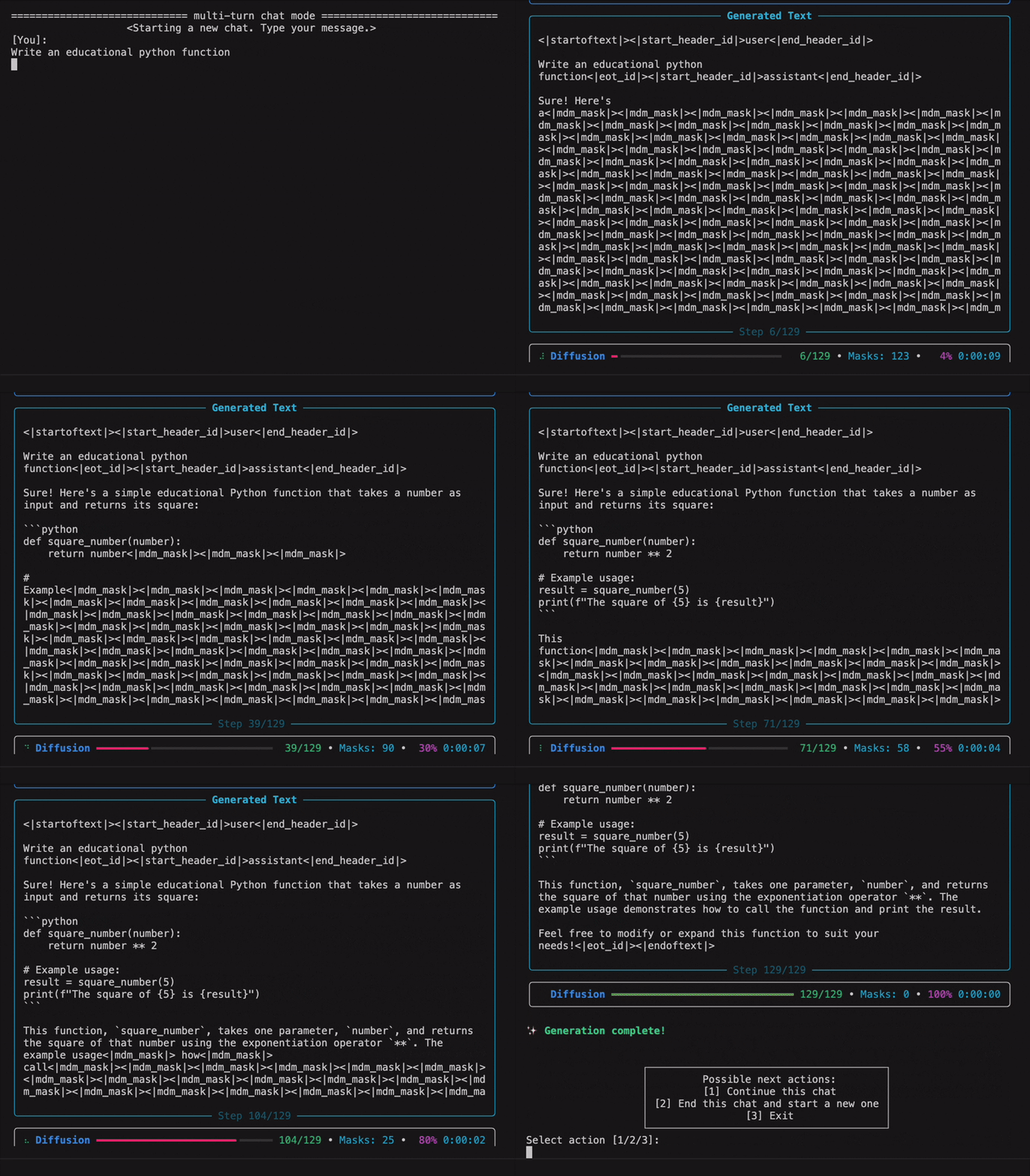
Evaluation
Read (optional) Evaluation setup before running evaluation.
For example, to evaluate LLaDA-8B-Instruct on MMLU_Pro using 4 GPUs, run:
accelerate launch --num_processes 4 \ dllm/pipelines/llada/eval.py \ --tasks "mmlu_pro" \ --model "llada" \ --applychattemplate \ --num_fewshot 0 \ --modelargs "pretrained=GSAI-ML/LLaDA-8B-Instruct,ischeckgreedy=False,mcnum=1,maxnewtokens=256,steps=256,blocksize=256,cfgscale=0.0"We also provide scripts to automatically evaluate LLaDA, Dream, and BERT-Chat on all benchmarks. For example, you can run examples/llada/eval.sh directly using the following commands:
bash examples/llada/eval.sh --modelnameor_path "GSAI-ML/LLaDA-8B-Instruct" --instruct True bash examples/llada/eval.sh --modelnameor_path "GSAI-ML/LLaDA-8B-Base" --instruct FalseWe provide scripts to evaluate LLaDA and Dream using Fast-dLLM:
bash examples/fastdllm/llada/eval.sh --modelnameorpath "GSAI-ML/LLaDA-8B-Instruct" --instruct True --numgpu 1 bash examples/fastdllm/dream/eval.sh --modelnameorpath "Dream-org/Dream-v0-Base-7B" --instruct False --numgpu 1Citation
@misc{zhou2026dllm,
      title={dLLM: Simple Diffusion Language Modeling},
      author={Zhanhui Zhou and Lingjie Chen and Hanghang Tong and Dawn Song},
      year={2026},
      eprint={2602.22661},
      archivePrefix={arXiv},
      primaryClass={cs.CL},
      url={https://arxiv.org/abs/2602.22661},
}


