
Official Repository for PosterGen - CVPR Findings 2026

PosterGen: Aesthetic-Aware Multi-Modal Paper-to-Poster Generation
via Multi-Agent LLMs
Zhilin Zhang1,2 ★ Xiang Zhang3 ★ Jiaqi Wei4 Yiwei Xu5 Chenyu You1
1 Stony Brook University 2 New York University 3 University of British Columbia
4 Zhejiang University 5 University of California, Los Angeles ★ Equal Contribution






Abstract
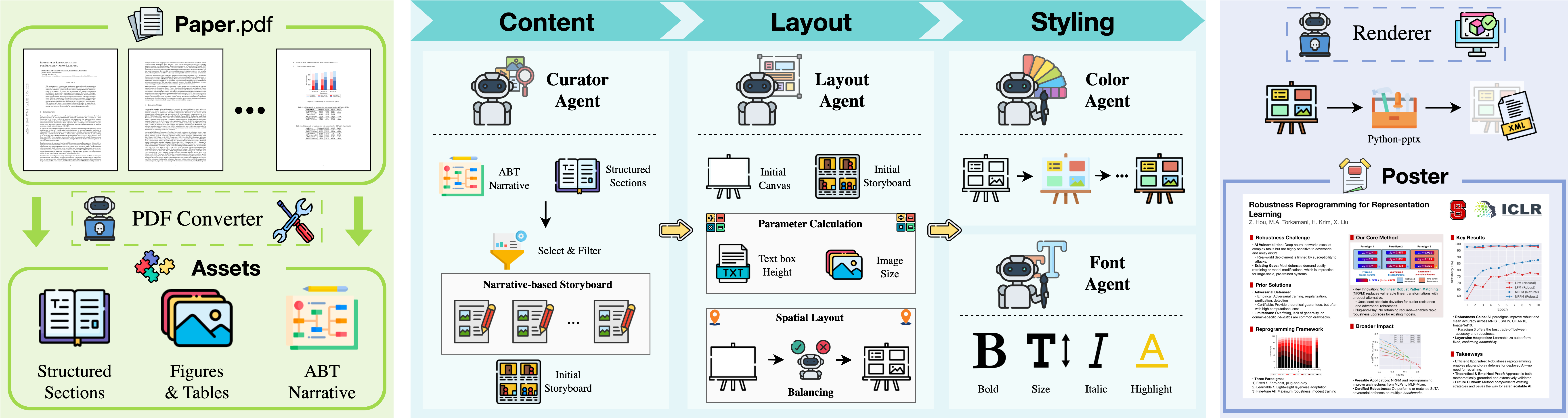
In this work, we propose a multi-agent LLMs framework that is guided by design principles.
Our multi-agent LLMs adopt a workflow of specialist agents that mirrors a professional design process:>
- Parser Agent – extracts and structures all content from the source paper.
- Curator Agent – designs a narrative-based storyboard.
- Layout Agent – transforms the storyboard into a spatially balanced, three-column layout.
- Styling Agents – apply a harmonious color palette and a hierarchical typographic system to ensure aesthetic coherence.>
This methodology is designed to generate a well-designed poster that minimizes the need for manual fine-tuning.
📢 News
- 2025.08.26 Our paper is now available on arXiv! 📄
- 2025.08.23 Code Released. PosterGen now available! 🎉🎉
🚀 Quick Start
System Requirements
- Operating System: Windows, Linux, or macOS
- Python Version: 3.11
1. Environment Setup
Option 1: UV (Recommended)
git clone -b main https://github.com/Y-Research-SBU/PosterGen.git
cd PosterGen
uv sync
Option 2: Conda
# Create and activate conda environment
conda create -n poster python=3.11 -y
conda activate poster
git clone -b main https://github.com/Y-Research-SBU/PosterGen.git cd PosterGen
pip install -r requirements.txt
2. Install LibreOffice
Windows:
- Download and install LibreOffice from official website
- Add LibreOffice to your system PATH:
C:\Program Files\LibreOffice\program to PATH - Or custom installation: Add <yourinstallpath>\LibreOffice\program to PATH
macOS:
brew install --cask libreofficeUbuntu/Linux:
sudo apt install libreoffice Or using snap:
sudo snap install libreoffice3. API Keys Configuration
Create a .env file in the project root with your API keys:
OPENAIAPIKEY="youropenaikey"
ANTHROPICAPIKEY="youranthropickey"
ZHIPUAPIKEY="yourzhipukey"
To use a compatible API service or a custom deployment, set the base URL in your .env file:
OPENAIBASEURL="https://your-api-endpoint.com/v1"
ANTHROPICBASEURL="https://your-anthropic-endpoint.com"
GOOGLEBASEURL="https://your-google-endpoint.com"
ZHIPUBASEURL="https://your-zhipu-endpoint.com"
Data Structure Setup
Before running the multi-agent pipeline, organize your files in the data/ folder:
data/
└── <yourpapername>/
    ├── paper.pdf          # Your research paper (required)
    ├── aff.png           # Affiliation logo for color extraction (required)
    └── logo.png          # Conference logo for poster (required)
Examples (check `data/ folder): <pre><code class="lang-">data/ └── NeuralEncodingandDecodingat_Scale/ ├── paper.pdf ├── aff.png └── logo.png └── ...</code></pre>
🎯 Usage
Command-line Interface
Generate your poster with a single command:
For UV setup: <pre><code class="lang-bash">uv run python -m src.workflow.pipeline \ --posterwidth 54 --posterheight 36 \ --paperpath ./data/YourPaper_Name/paper.pdf \ --text_model gpt-4.1-2025-04-14 \ --vision_model gpt-4.1-2025-04-14 \ --logo ./data/YourPaperName/logo.png \ --afflogo ./data/YourPaper_Name/aff.png</code></pre>
For Conda setup: <pre><code class="lang-bash">python -m src.workflow.pipeline \ --posterwidth 54 --posterheight 36 \ --paperpath ./data/YourPaper_Name/paper.pdf \ --text_model gpt-4.1-2025-04-14 \ --vision_model gpt-4.1-2025-04-14 \ --logo ./data/YourPaperName/logo.png \ --afflogo ./data/YourPaper_Name/aff.png</code></pre>
Parameters:
- --poster_width/height
: Poster dimensions in inches, with aspect ratio (w/h): lower bound 1.4 (ISO A paper size), upper bound 2 (human vision limit) - --paper_path
: Path to your PDF paper - --text_model
: LLM for text processing (options: "gpt-4.1-2025-04-14" (default), "gpt-4o-2024-08-06", "gpt-4.1-mini-2025-04-14", "claude-sonnet-4-20250514") - --visionmodel
: Vision model for analysis (same options as textmodel) - --logo
: Conference logo - --aff_logo
: Affiliation logo (used for color scheme extraction)
Web Interface
> Developed by: React + TypeScript + Vite
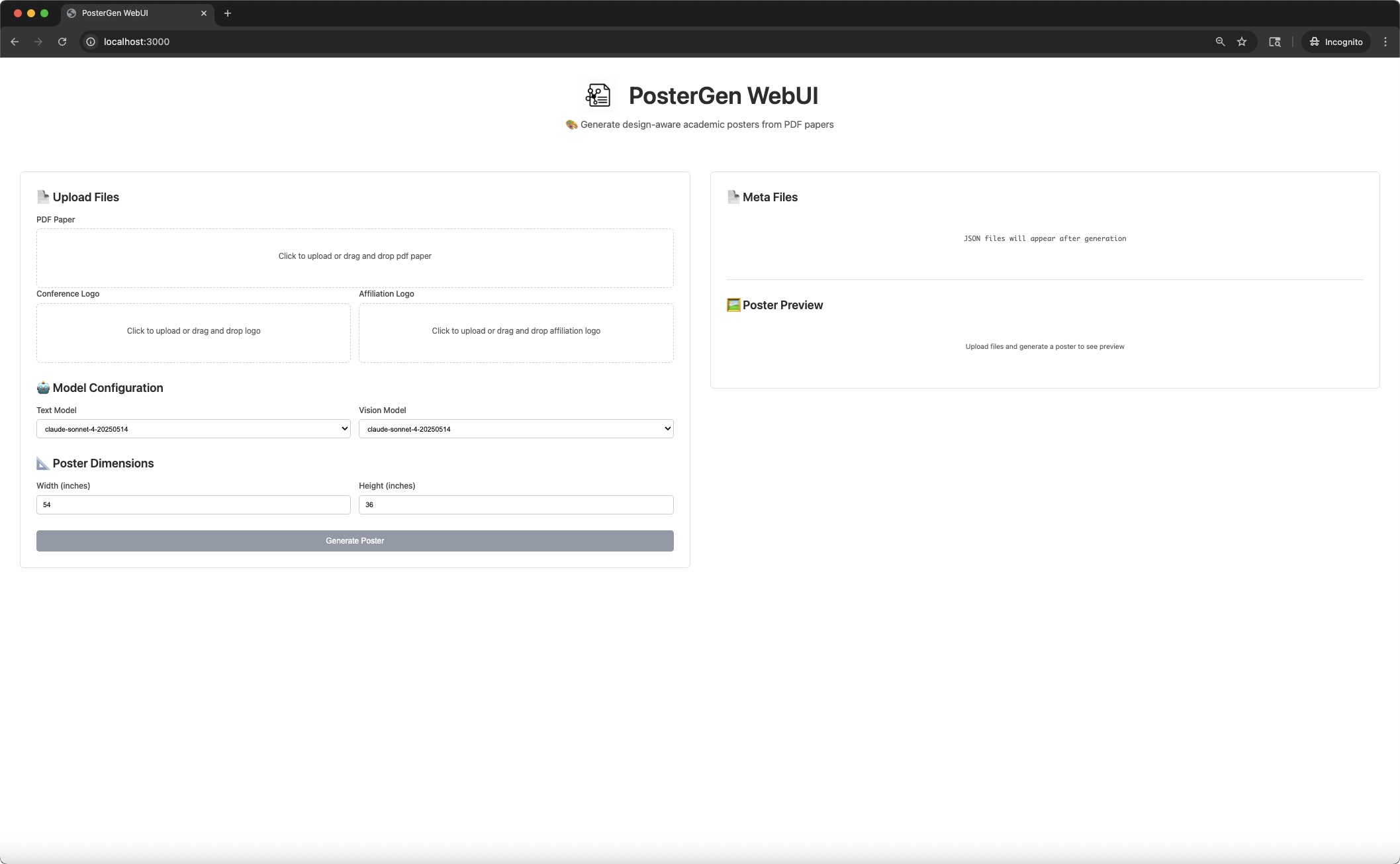
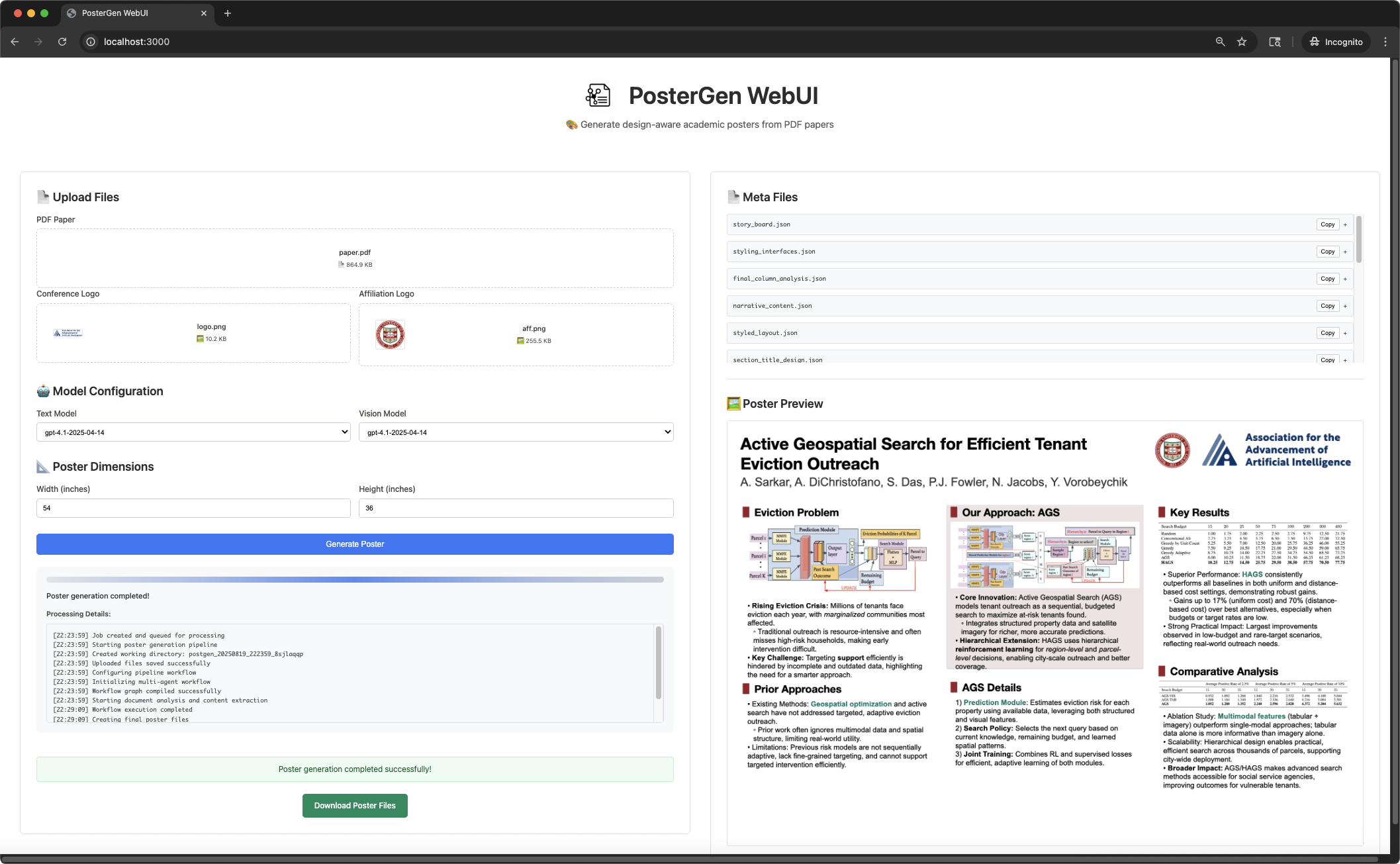
Upload your PDF paper and logos through drag-and-drop, configure models and dimensions, then generate and download your poster files.
Prerequisites:
- Node.js installed
- Main PosterGen dependencies installed (from project root)
- API keys configured in .env
file
Start backend
cd webui && python start_backend.pyStart frontend (in new terminal, from project root)
cd webui && sh ./start_frontend.shOpen http://localhost:3000 in your browser</code></pre>
Output Structure
After successful generation, you'll find your results in the output/ folder:
<pre><code class="lang-">output/ └── <paper_name>/ ├── <paper_name>.png # final poster image ├── <paper_name>.pptx # editable PowerPoint file ├── timingcostlog.json # runtime & api cost log ├── assets/ # extracted content from paper via Marker │ ├── figures.json # figure metadata with aspect ratios │ ├── tables.json # table metadata with aspect ratios │ ├── figure-*.png # individual figures from paper │ ├── table-*.png # individual tables from paper │ └── figtabcaption_mapping.json # caption mappings └── content/ # multi-agent artifacts ├── raw.md # raw text extraction ├── structured_sections.json # organized sections ├── classified_visuals.json # categorized visuals ├── narrative_content.json # paper summary ├── story_board.json # content organization ├── initiallayoutdata.json # initial layout ├── column_analysis.json # column usage stats ├── optimizedstoryboard.json # balanced content ├── balancer_decisions.json # optimization details ├── finalcolumnanalysis.json # final usage metrics ├── optimized_layout.json # balanced layout ├── finaldesignlayout.json # element coordinates ├── color_scheme.json # color palette ├── sectiontitledesign.json # title styling ├── keywords.json # highlighted terms ├── styled_layout.json # formatted text └── styling_interfaces.json # typography settings</code></pre>
🤖 Multi-Agent Pipeline
Our system uses 6 specialized AI agents working together:
- Parser Agent: Extracts and structures content from paper PDF
- Curator Agent: Plans content organization and visual placement
- Layout Agent: Calculates precise positioning and spacing
- Color Agent: Generates cohesive color schemes from your affiliation logo
- Font Agent: Applies typography and keyword highlighting
- Renderer: Generates final PowerPoint and image files
Key Features
- Professional Layout: CSS-like precision positioning with proper spacing
- Intelligent Balancing: Automatic column optimization prevents overflow
- Color Harmony: Automatic color scheme generation from your institution branding
- Typography Excellence: Professional font choices and keyword highlighting
- Flexible Output: Both PNG images and editable PowerPoint files
- Academic Standards: Follows poster design best practices for conferences
Other Configurations
The system supports customization through config/poster_config.yaml. You can adjust:
- Layout parameters (margins, padding, spacing)
- Typography settings (fonts, sizes, line spacing)
- Color generation algorithms
- Visual asset sizing constraints
- Content optimization thresholds
, modify the getfontfilepath() mapping in src/layout/textheightmeasurement.py, and adjust the 'typography' in config/posterconfig.yaml`.
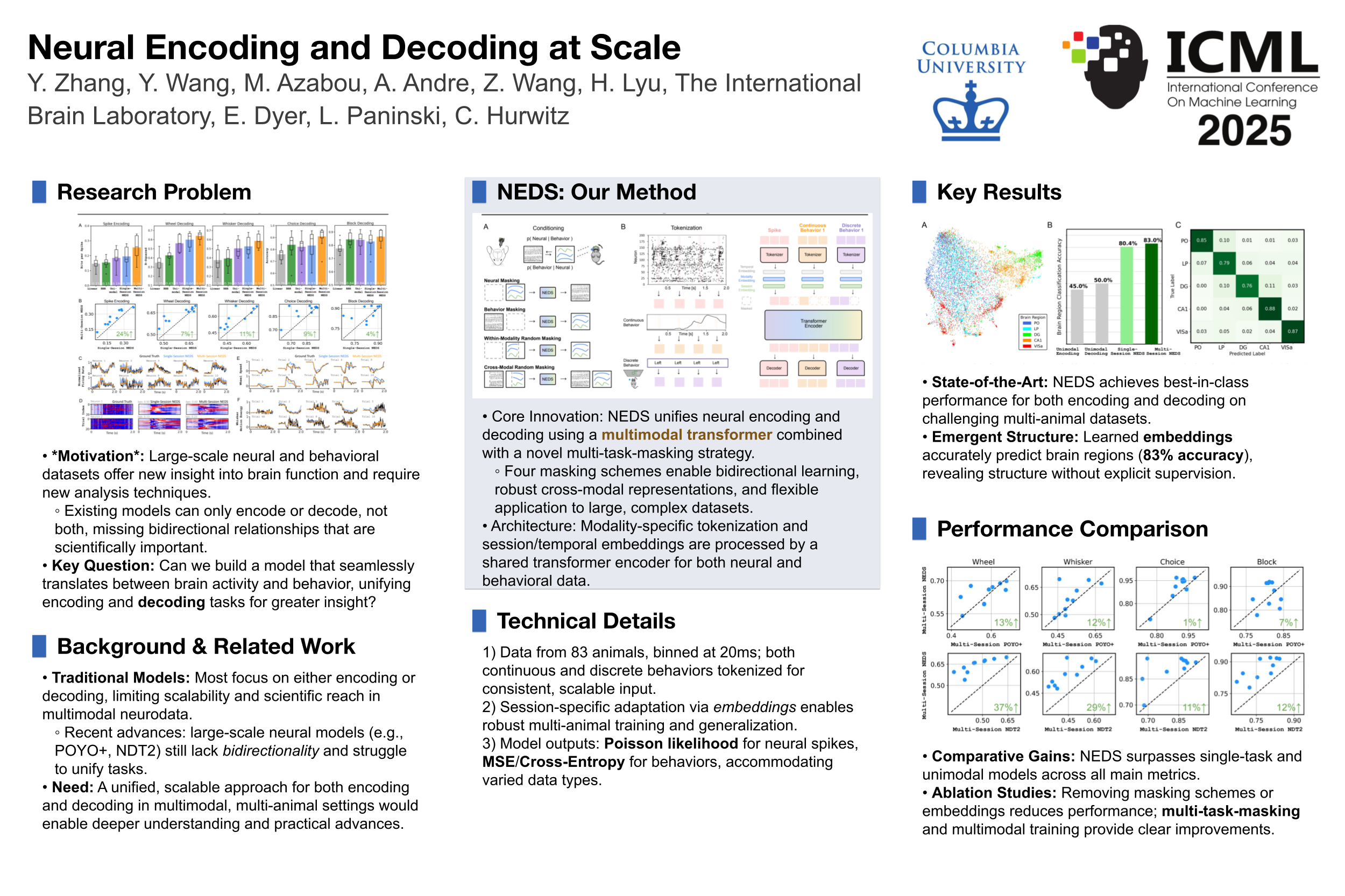
📊 Example Results
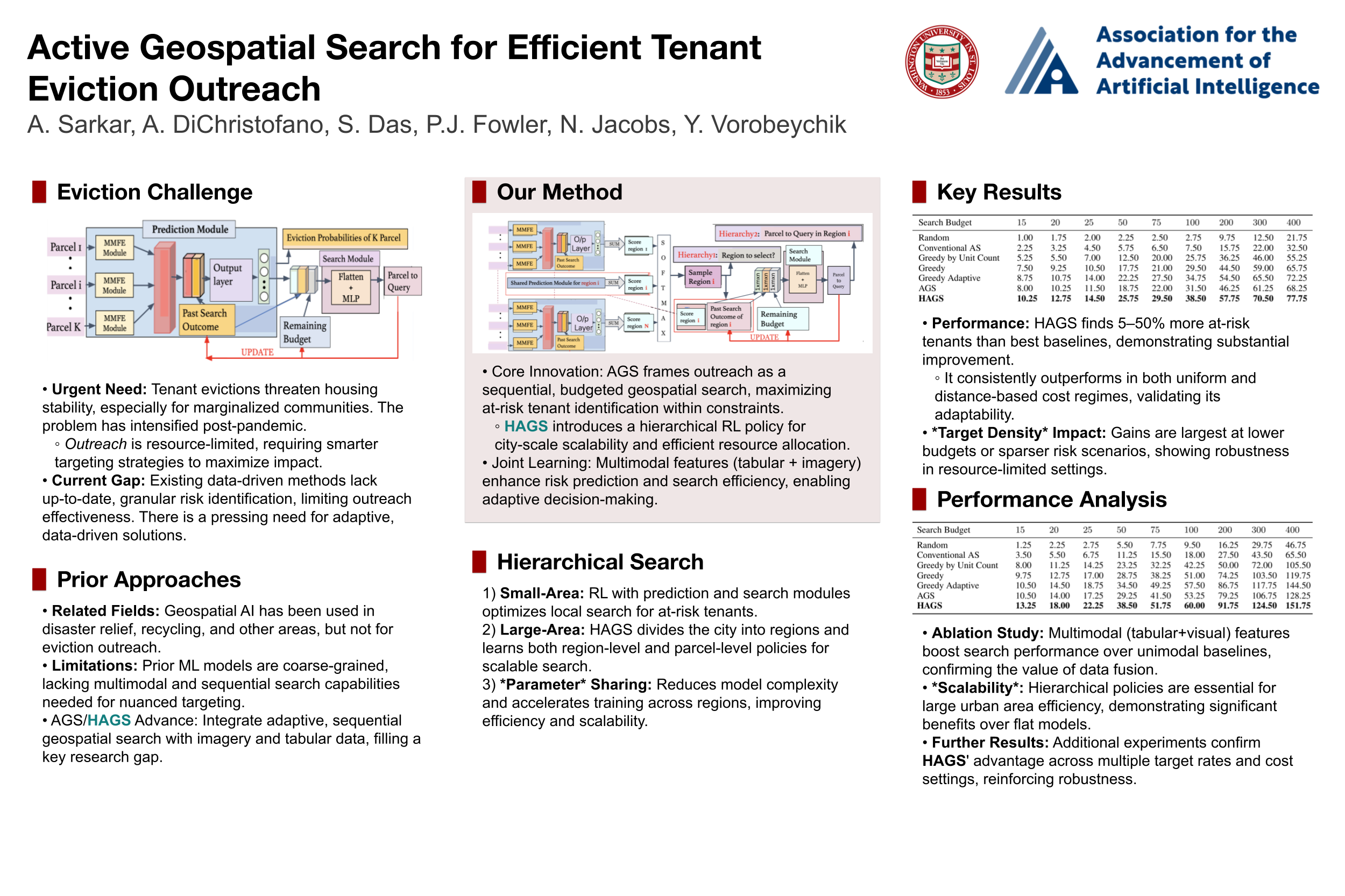
Our system generates professional academic posters with high visual quality. Here are some examples of generated posters:
Citation
@inproceedings{zhang2026postergen,
  title={PosterGen: Aesthetic-Aware Multi-Modal Paper-to-Poster Generation Via Multi-Agent LLMs},
  author={Zhang, Zhilin and Zhang, Xiang and Wei, Jiaqi and Xu, Yiwei and You, Chenyu},
  booktitle={Proceedings of the IEEE/CVF Conference on Computer Vision and Pattern Recognition},
  pages={9813--9823},
  year={2026}
}
Acknowledgments
This codebase is built upon following open-source projects. We express our sincere gratitude to:
- LangGraph: Multi-agent workflow framework;
- Marker: High-quality PDF parsing library that enables accurate content extraction from research papers.
- python-pptx: Python library for creating PowerPoint (.PPTX) poster files.


