
Paaster is a secure and user-friendly pastebin application that prioritizes privacy and simplicity. With end-to-end encryption and paste history, Paaster ensures that your pasted code remains confidential and accessible.

Paaster.io
Paaster is a secure and user-friendly pastebin application that prioritizes privacy and simplicity. With end-to-end encryption and paste history, Paaster ensures that your pasted code remains confidential and accessible.
Terms of service · Privacy policy



Preview
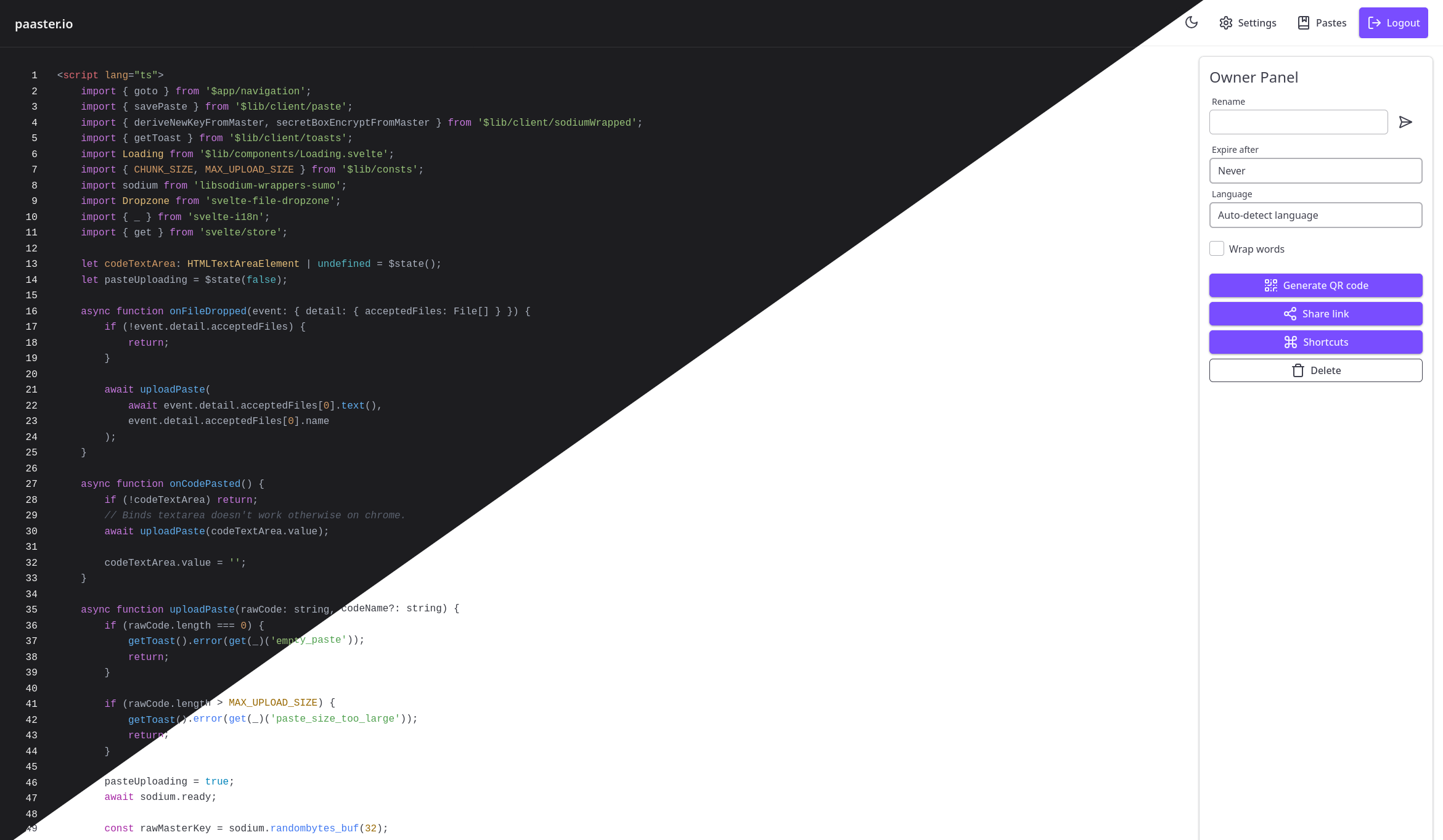
Table of Contents
- Docker Compose - Reverse Proxy - Minio Setup - What is E2EE? - FAQFeatures
- End-to-end encryption
- Memory efficient
- File drag & drop
- Keyboard shortcuts
- Paste history
- Themes
- Delete after view or X amount of time
- Share via QR code
- CLI Tool
- i18n support (Contribute)
- Automatic or manual language detection
- No dynamically loaded 3rd party dependencies — malicious code must be present at build time
- Use of
package-lock.json& Socket.dev to fight supply chain attacks
Deployment
Paaster requires S3-compatible object storage. You can use a hosted solution or self-host using MinIO.
Docker Compose
services:
  paaster:
    container_name: paaster
    image: wardpearce/paaster:latest
    restart: unless-stopped
    ports:
      - 3015:3000
    environment:
      COOKIE_SECRET: "" # A secure random value
S3_ENDPOINT: ""       S3_REGION: ""       S3ACCESSKEY_ID: ""       S3SECRETACCESS_KEY: ""       S3_BUCKET: ""       s3FORCEPATH_STYLE: true # Required for minio
MONGO_DB: "paasterv3"       MONGOURL: "mongodb://paastermongodb:27017"
paaster_mongodb:     image: mongo     containername: paastermongodb     restart: unless-stopped     environment:       MONGODBDATADIR: /data/db       MONDODBLOGDIR: /dev/null
paaster_minio:     containername: paasterminio     image: quay.io/minio/minio     restart: unless-stopped     ports:       - "9000:9000"       - "9001:9001"     environment:       MINIOROOTUSER: ""       MINIOROOTPASSWORD: "" # A secure random value     volumes:       - ~/minio/data:/data     command: server /data --console-address ":9001"
Reverse Proxy
Caddy
paaster.io {
    reverse_proxy localhost:3016
}
Only required for MinIO
s3.paaster.io {
    header Access-Control-Allow-Origin "https://paaster.io" {
        defer
    }
    header Access-Control-Allow-Methods "GET,POST,OPTIONS,HEAD,PATCH,PUT,DELETE"
    header Access-Control-Allow-Headers "User-Agent,Authorization,Content-Type"
    reverse_proxy localhost:9000
}
NGINX
server {
    listen 80;
    server_name paaster.io;
location / {         proxy_pass http://localhost:3016;         proxysetheader Host $host;         proxysetheader X-Real-IP $remote_addr;     } }
Only required for MinIO
server {
    listen 80;
    server_name s3.paaster.io;
location / {         add_header 'Access-Control-Allow-Origin' 'https://paaster.io' always;         add_header 'Access-Control-Allow-Methods' 'GET,POST,OPTIONS,HEAD,PATCH,PUT,DELETE' always;         add_header 'Access-Control-Allow-Headers' 'User-Agent,Authorization,Content-Type' always;
proxy_pass http://localhost:9000;         proxysetheader Host $host;         proxysetheader X-Real-IP $remote_addr;     } }
MinIO
Install mc CLI
Add instance
mc alias set minioinstance https://s3.paaster.io myminiousername myminio_passwordCreate bucket
mc mb minio_instance/paaster
mc anonymous set none minio_instance/paaster
Get credentials
mc admin accesskey create minioinstance/myminio_usernameObject storage providers
- iDrive e2 (no free tier anymore)
- Wasabi Hot Cloud Storage
- Storj (25 GB free tier)
- Contabo object storage
- Cloudflare R2
- Amazon S3
- Google Cloud Storage
Security
What is E2EE?
End-to-end encryption (E2EE) is a zero-trust encryption methodology. When you paste code into Paaster, it is encrypted locally in your browser using a secret that is never shared with the server. Only people you share the link with can view the paste.
FAQ
Can I trust an instance of Paaster not hosted by me?
No. Anyone could modify the functionality of Paaster to expose your secret key to the server. We recommend using an instance you host or trust.
How are client secrets stored?
Client secrets are stored in IndexedDB when the paste is created, allowing for paste history. This method of storage makes Paaster vulnerable to malicious JavaScript, but it would require malicious code to be present when the application is built.
How are client secrets transported?
Paaster uses URI fragments to transport secrets. According to the Mozilla Foundation, URI fragments aren't meant to be sent to the server. Bitwarden also has an article covering this usage here.
How are server secrets stored?
Server secrets are stored in IndexedDB when the paste is created, allowing for modification or deletion of pastes later on.
Cipher
Paaster uses the following libsodium functions:
cryptosecretstreamxchacha20poly1305_*crypto_pwhashcryptosecretboxeasy
Requesting Features
- Open a new issue to request a feature (one issue per feature).
What we won't add
- Paste editing — Paaster isn't a text editor, it's a pastebin.
- Paste button — Paaster isn't a text editor. When code is inputted, it will always be automatically uploaded.
- Optional encryption — Paaster will never have opt-in/opt-out encryption. Encryption will always be present.
Support
Have any questions? Join our Matrix space.


