
F# computational expressions to reduce boilerplate in Pulumi code
Pulumi.FSharp.Extensions
F# computational expressions to reduce boilerplate in Pulumi code
Readability difference
Pulumi.Tls vs Pulumi.FSharp.Tls for a self signed certificate
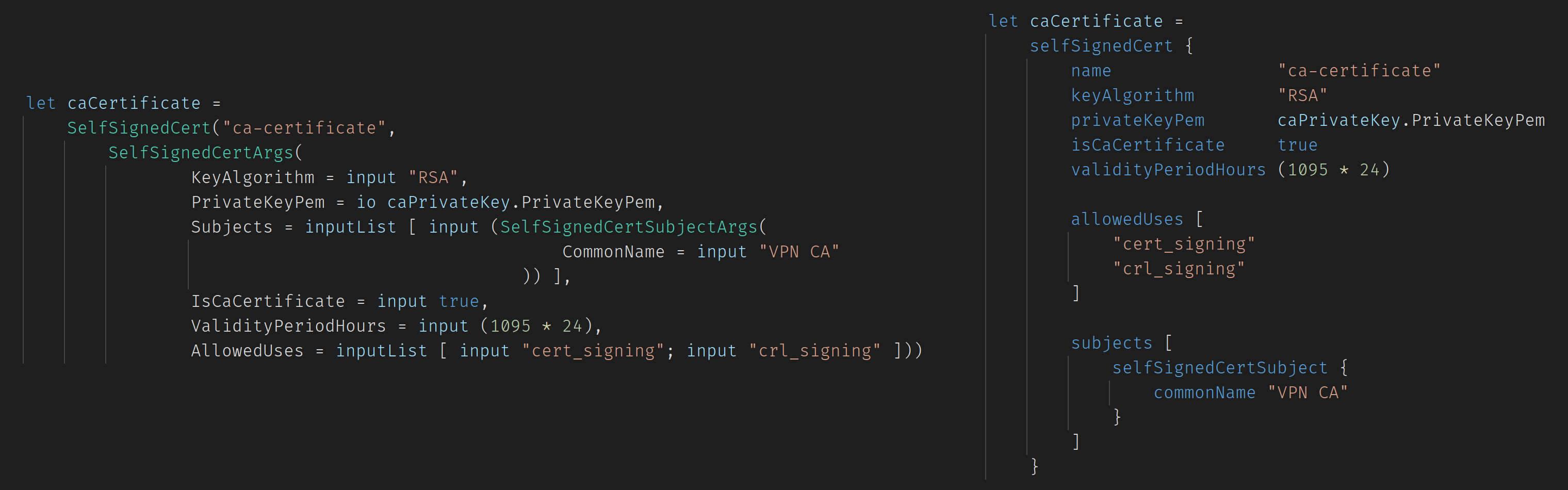
The computational expression syntax removes redundant parenthesis, input/io/inputList helpers, equal signs, lists for single input, subitems boilerplate.
Packages examples
Pulumi.FSharp.Aws
#
bucket {
    name "bucket-example"
    acl  "private"
bucketWebsite {          indexDocument "index.html"     } }
Pulumi.FSharp.Azure
#
let rg =
    resourceGroup {
        name                   "ResourceGroupName"
    }
let sa =     storageAccount {         name                   "StorageAccountName"         resourceGroup          rg.Name         accountReplicationType "LRS"         accountTier            "Standard"         enableHttpsTrafficOnly true     }      let container =     storageContainer {         name                   "StorageContainer"         account                sa.Name     }      let contentBlob =     blob {         name                   "StorageBlob"         storageAccountName     storage         storageContainerName   buildContainer         source                 { Text = "Blob content" }.ToPulumiType     }      let sasToken =     sasToken {         storage                sa         blob                   contentBlob     }      let appServicePlan =     plan {         name                   "FunctionAppServiceName"         resourceGroup          rg.Name         kind                   "FunctionApp"                  planSku {             size "Y1"             tier "Dynamic"         }     }
Pulumi.FSharp.AzureAD
#
application {
    name                    "AzureADApplicationName"
    displayName             "AzureAD application name"
    oauth2AllowImplicitFlow true

    replyUrls               [
        config.["WebEndpoint"]
        "https://jwt.ms"
        "http://localhost:8080"
    ]

    applicationOptionalClaims {
        idTokens [
            applicationOptionalClaimsIdToken {
                name                 "upn"
                additionalProperties "includeexternallyauthenticated_upn"
                essential            true
            }
        ]
    }
}
Pulumi.FSharp.AzureNative
#
let storage =
    storageAccount {
        resourceGroup rg.Name
        location      rg.Location
        name          "StorageAccount"
        sku           { name "LRS" }
        kind          Kind.StorageV2
    }
blobContainer {      accountName       storage.Name     resourceGroup     rg.Name     name              "StorageContainer"          PublicAccess.None }
Pulumi.FSharp.Core
#
// Output computational expressions
let deploymentCountBars =
    output {
        let! previousOutputs =
            StackReference(Deployment.Instance.StackName).Outputs

        return previousOutputs.["CountBars"] + "I"
    }

// Output as secret
let someSecret =
    secretOutput {
        let! key1 = sa.PrimaryConnectionString
        let! key2 = sa.SecondaryConnectionString

        return $"Secret connection strings: {key1} {key2}"
    }

// Mixing Output<> and Task<>
let sas =
    output {
        let! connectionString = sa.PrimaryConnectionString
        let! containerName = container.Name
        let! url = blob.Url
let start =             DateTime.Now.ToString("u").Replace(' ', 'T')                  let expiry =             DateTime.Now.AddHours(1.).ToString("u").Replace(' ', 'T')                  // Task to Output         let! tokenResult =             GetAccountBlobContainerSASArgs(                 ConnectionString = connectionString,                 ContainerName = containerName,                 Start = start,                 Expiry = expiry,                 Permissions = (GetAccountBlobContainerSASPermissionsArgs(Read = true))             ) |>             // This returns Task<>             GetAccountBlobContainerSAS.InvokeAsync
return url + tokenResult.Sas     }
Pulumi.FSharp.Kubernetes
#
deployment {
    name "application"
deploymentSpec {         replicas 1
labelSelector {              matchLabels [ "app", input "nginx" ]         }
podTemplateSpec {             objectMeta {                 labels [ "app", input "nginx" ]             }
podSpec {                 containers [                     container {                         name  "nginx"                         image "nginx"                         ports [ containerPort { containerPortValue 80 } ]                     }                 ]             }         }     } }
Full stack file example
- Create a Pulumi F# project using
pulumi new fsharp - Upgrade the project to .NET 5
- Add the NuGet package
Pulumi.FSharp.Azure - Edit the
Program.fsand paste the example below - Run
pulumi upand create the infrastructure using a readable strongly-typed DSL - Log in your new Visual Studio VM using the IP from the outputs and credentials in code
Pulumi.FSharp.Azure.Compute.windowsVirtualMachine computational expression to find all available properties and on each property to discover their description)
#
module Program
open Pulumi.FSharp.Azure.Compute.Inputs open Pulumi.FSharp.Azure.Network.Inputs open Pulumi.FSharp.Azure.Compute open Pulumi.FSharp.Azure.Network open Pulumi.FSharp.Azure.Core open Pulumi.FSharp
let infra () =     let rg =         resourceGroup {             name     "rg-example"             location "West Europe"         }
let pip =         publicIp {             name             "pip-example"             resourceGroup    rg.Name             location         rg.Location             allocationMethod "Dynamic"         }          let vnet =         virtualNetwork {             name          "vnet-example"             addressSpaces "10.0.0.0/16"             location      rg.Location             resourceGroup rg.Name         }
let subnet =         subnet {             name               "snet-example"             resourceGroup      rg.Name             virtualNetworkName vnet.Name             addressPrefixes    "10.0.2.0/24"         }
let nic =         networkInterface {             name          "nic-example"             location      rg.Location             resourceGroup rg.Name
ipConfigurations [                  networkInterfaceIpConfiguration {                     name                       "internal"                     subnetId                   subnet.Id                     privateIpAddressAllocation "Dynamic"                     publicIpAddressId          pip.Id                 }             ]         }          let vm =         windowsVirtualMachine {             name                "vm-example"             resourceName        "vm-example"             resourceGroup       rg.Name             size                "StandardA1v2"             networkInterfaceIds nic.Id                          windowsVirtualMachineOsDisk {                 caching            "ReadWrite"                 storageAccountType "Standard_LRS"             }                          adminUsername "unosdpulumi"             adminPassword "ReplaceThisWithAProperPassword%%55"                          windowsVirtualMachineSourceImageReference {                 offer     "visualstudio2019latest"                 publisher "microsoftvisualstudio"                 sku       "vs-2019-comm-latest-win10-n"                 version   "latest"             }         }              dict [ "PublicIP", vm.PublicIpAddress :> obj ]             [<EntryPoint>] let main _ =   Deployment.run infra
Examples library
https://github.com/UnoSD/Pulumi.FSharp.Extensions.Examples
Example project using the library
https://github.com/UnoSD/UnoCash
One language to rule them all (F# eXchange 2020)
I had the pleasure of being invited to speak at the F# eXchange 2020 on the 21st of October and, as promised, I have created a repo to share the slides of the talk: https://github.com/UnoSD/FSharp-eXChange2020
The talk goes through infrastructure as code in F# with Pulumi in general and explains the rationale and some of the technical details behind this repository.
Link to the video: https://skillsmatter.com/skillscasts/14888-lightning-talk-one-language-to-rule-them-all-iac-in-f-sharp
Development notes
Given that changes to the Pulumi.FSharp.Myriad project do not trigger re-generation unless the Myriad.fs file is modified, a PreBuildEvent in each fsproj file uses sed to change a dummy variable to a random integer on each build (this only works on GNU/Linux machines with sed). To avoid git finding changes in the Myriad.fs file every time, use the following:
git update-index --skip-worktree Pulumi.FSharp.Aws/Myriad.fs
git update-index --skip-worktree Pulumi.FSharp.Gcp/Myriad.fs
git update-index --skip-worktree Pulumi.FSharp.Tls/Myriad.fs
git update-index --skip-worktree Pulumi.FSharp.Azure/Myriad.fs
git update-index --skip-worktree Pulumi.FSharp.AzureAD/Myriad.fs
git update-index --skip-worktree Pulumi.FSharp.Kubernetes/Myriad.fs
git update-index --skip-worktree Pulumi.FSharp.AzureNative/Myriad.fs


