
A full IDE experience anywhere you have a terminal. SSH into a server, run lazyide, and pair with your agentic coding tool.
lazyide



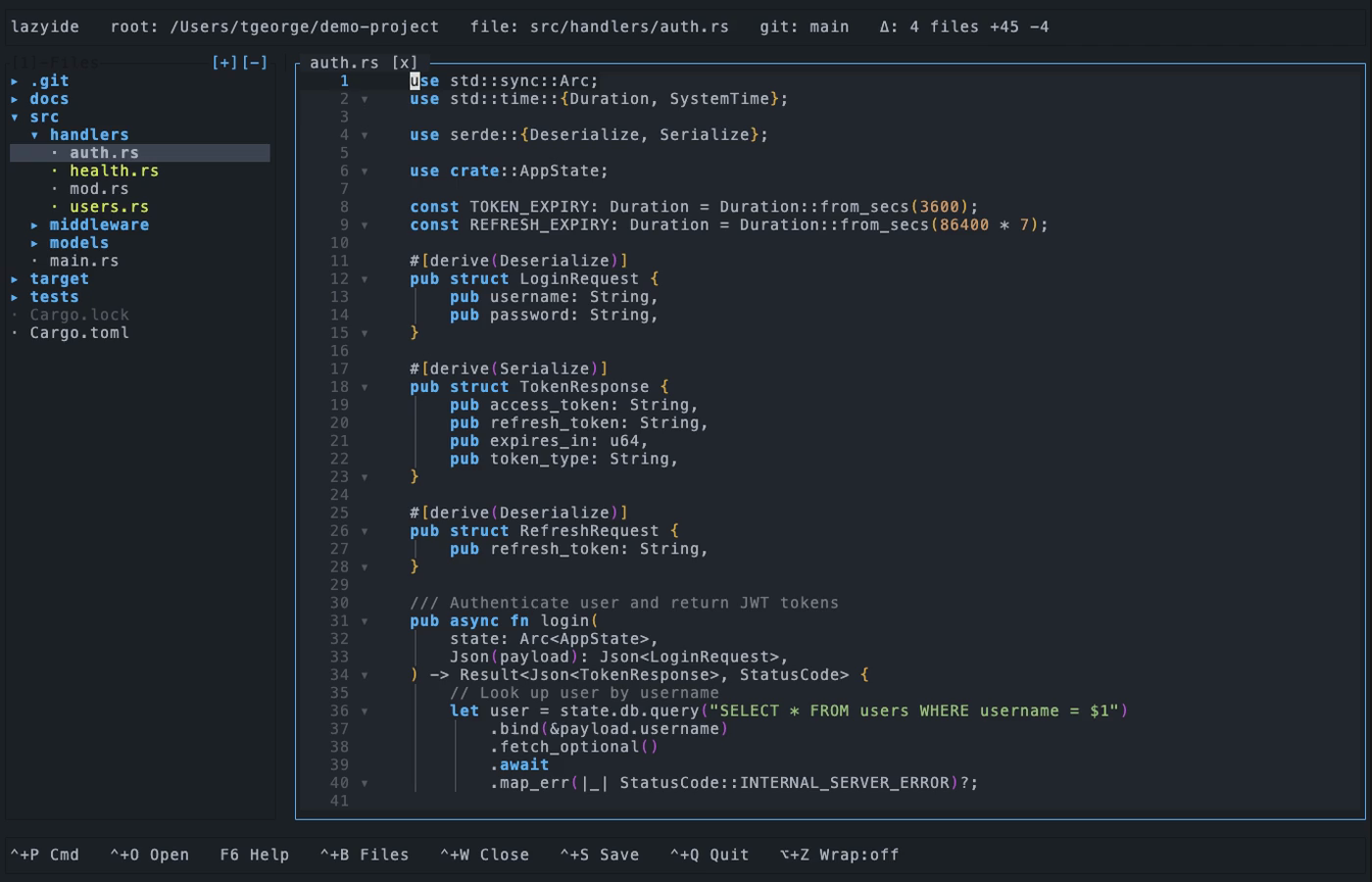
A lightweight terminal IDE built with Rust and ratatui. File tree, tabbed editing, LSP, syntax highlighting, code folding, git integration, project search, 32 themes, and customizable keybindings — all in a single binary.
A full IDE experience anywhere you have a terminal. SSH into a server, run lazyide, and pair with your agentic coding tool.
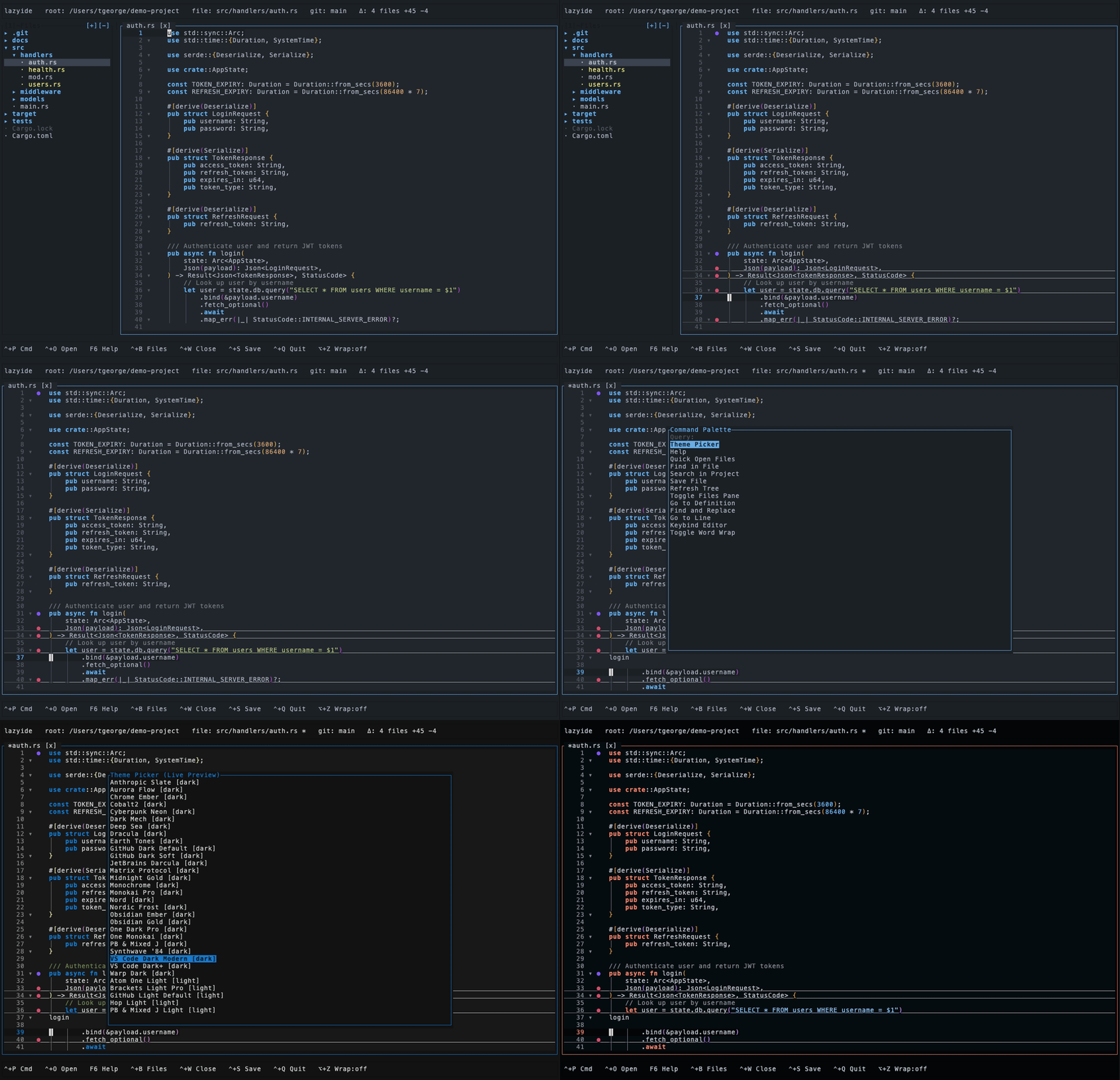
Static screenshot
Install
Linux / macOS / WSL2:
curl -fsSL https://tysonlabs.dev/lazyide/install.sh | shWindows (PowerShell):
irm https://tysonlabs.dev/lazyide/install.ps1 | iexMore install options
Homebrew (macOS):
brew tap TysonLabs/tap && brew install lazyideScoop (Windows):
scoop bucket add lazyide https://github.com/TysonLabs/scoop-bucket scoop install lazyideFrom source:
cargo install --git https://github.com/TysonLabs/lazyidePrebuilt binaries: GitHub Releases
Installer flags:
sh install.sh --with-deps # also install ripgrep + rust-analyzer sh install.sh --prefix /usr/local/bin sh install.sh --version v0.3.0After installing, run lazyide --setup to detect and install optional tools (rust-analyzer, ripgrep).
Features
Editor
- LSP integration — rust-analyzer completions with inline ghost text, diagnostics, go-to-definition
- Syntax highlighting — Rust, Python, JS/TS, Go, PHP, CSS/SCSS, HTML/XML, Shell, JSON/TOML/YAML, Markdown
- Code folding — brace-based (Rust, JS, Go), indentation-based (Python), tag-based (HTML/XML)
- Bracket pair colorization —
{}()[]colored by nesting depth - Find & replace — regex search in file, ripgrep-powered project search
- Word wrap — toggle with
Alt+Z, with full cursor/selection/mouse support - Horizontal scrolling —
Shift+scrollwhen word wrap is off
Git
- Gutter markers — added
+, modified~, deleted-per line viagit diff - File status — tree colors files by status (modified, added, untracked) with directory propagation
- Branch display — branch name and change summary in the top bar
Interface
- 32 themes — dark and light, with live preview browser
- Customizable keybindings — remap ~40 actions via config file or in-app editor
- Tabbed editing — preview tabs, sticky tabs, dirty indicators
- File tree — folders-first sorting, expand/collapse, context menus, resizable divider
- Command palette —
Ctrl+Pfor quick access to all actions - Autosave & recovery — buffers saved every 2s, crash recovery on reopen
Keyboard
Global
| Key | Action | |-----|--------| | Ctrl+P | Command palette | | Ctrl+O | Quick open (fuzzy search) | | Ctrl+S | Save | | Ctrl+W | Close tab | | Ctrl+Q | Quit (press twice if unsaved) | | Ctrl+B | Toggle file tree | | Ctrl+F | Find in file | | Ctrl+H | Find and replace | | Ctrl+Shift+F | Search project (ripgrep) | | Ctrl+N | New file | | Ctrl+R | Refresh tree | | Alt+Z | Toggle word wrap | | F1 / F2 | Previous / next tab | | F4 | Help | | Tab / Shift+Tab | Focus tree / editor |
Editor
| Key | Action | |-----|--------| | Ctrl+Space | LSP completion | | Ctrl+D | Go to definition | | Ctrl+G | Go to line | | Ctrl+J | Toggle fold | | Ctrl+U | Toggle fold all | | Ctrl+Z / Ctrl+Y | Undo / redo | | Ctrl+/ | Toggle comment | | Ctrl+C / Ctrl+X / Ctrl+V | Copy / cut / paste | | Ctrl+A | Select all | | Shift+Alt+Down / Up | Duplicate line | | F3 / Shift+F3 | Find next / previous | | PageUp / PageDown | Scroll page | | Ctrl+Home / Ctrl+End | Start / end of file |
Tree
| Key | Action | |-----|--------| | Up / Down / K / J | Navigate | | Right / L / Enter | Open / expand | | Left / H | Collapse / parent | | Delete | Delete (with confirmation) |
Mouse
- Click file/folder in tree to open
- Drag divider to resize panes
- Right-click tree for context menu (New File, Rename, Delete)
- Click + drag in editor to select text
- Right-click editor for edit menu
- Click gutter fold icons to toggle folds
- Shift+scroll to pan horizontally
Custom keybindings
Override any shortcut in ~/.config/lazyide/keybinds.json:
{
  "save": "ctrl+s",
  "redo": ["ctrl+shift+z", "ctrl+y"],
  "fold_toggle": "ctrl+j"
}
Or use the in-app keybind editor: Ctrl+P > "Keybind Editor"
Build from source
cargo build --release
cargo run -- /path/to/project
cargo test
Requires Rust 2024 edition.
Optional tools
| Tool | Purpose | Install | |------|---------|---------| | rust-analyzer | LSP completions, diagnostics, go-to-definition | lazyide --setup | | ripgrep | Project-wide search | lazyide --setup | | git | Branch display, gutter markers | System package manager |
Documentation
- Architecture — module structure, data flow, rendering pipeline
- Contributing — themes, bug reports, code contributions
Acknowledgements
- lazygit and lazyssh — inspiration for the terminal-native approach
- ratatui — TUI framework
- rust-analyzer — LSP server
- ripgrep — project search engine


