
Open-source PDF-to-Markdown post-processor with footnotes, LaTeX normalization, figure links, and YAML metadata. Supports Marker, MinerU, PyMuPDF, and Docling. Includes a self-hosted web UI.


PaperFlow
**Turn academic PDFs into structured, knowledge-ready Markdown - with working footnotes, LaTeX equations, figure links, and metadata.**
PaperFlow is an open-source post-processing engine for PDF->Markdown pipelines. It takes raw Markdown from any PDF parser (Marker, PaddleOCR-VL, PyMuPDF, Docling, LlamaParse) and upgrades it into structured output that works in Obsidian, Notion, Logseq, or any RAG pipeline.
What it fixes
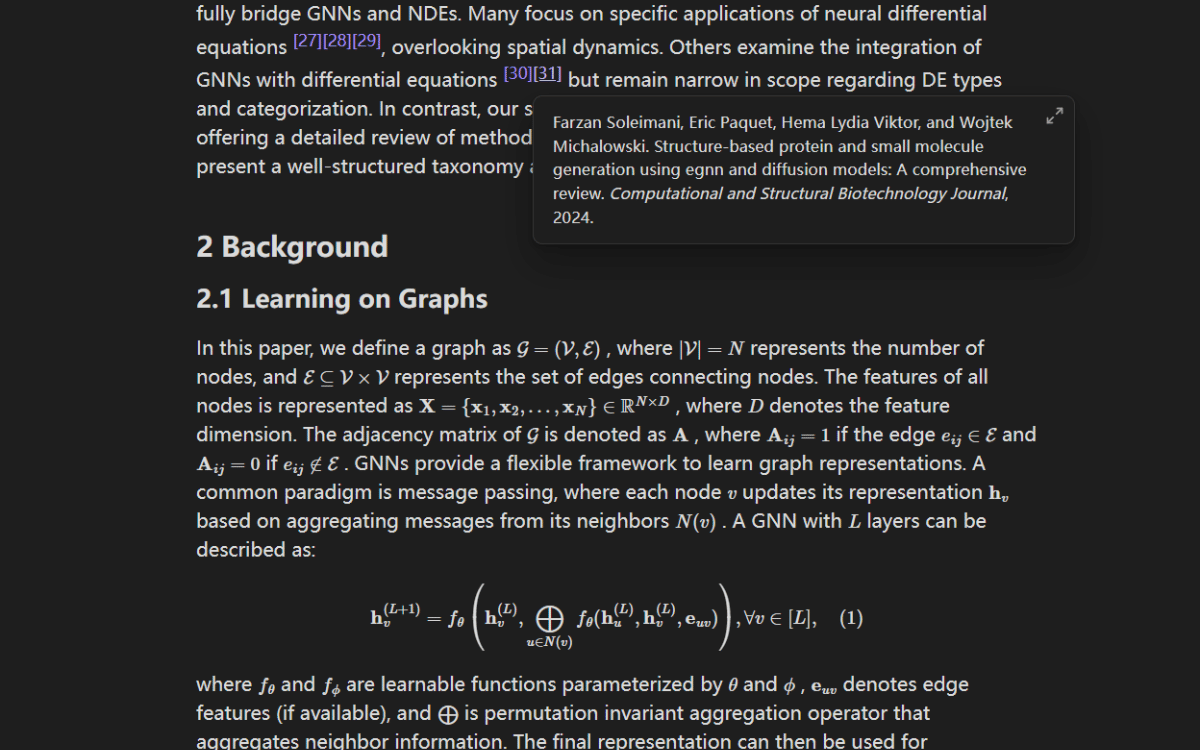
| Problem in raw parser output | After PaperFlow | |-----|-----| | [1] dead text - can't click | [^1] standard footnote - hover to preview | | \[ E=mc^2 \] wrong delimiters | $$ E=mc^2 $$ renders everywhere | | [Fig. 3] plain string | [[#^fig-3\|Fig. 3]] clickable internal link | | No metadata | YAML frontmatter: title, authors, date, tags | | Repeated headers/footers | Cleaned automatically |
Visual comparison
| Source PDF | Generic converter | PaperFlow output | |---|---|---| |  |
|  |
|  |
|
77K views on Reddit - 810 upvotes - 98% upvote ratio -
10,000+ pages processed - Used by researchers in 40+ countries
PyPI package: https://pypi.org/project/paperflow-postprocess/ GitHub: https://github.com/TylerMorrison21/paperflow Project page: https://www.paperflowing.com
New: NAS / Unraid Deployment
PaperFlow now has a straightforward NAS deployment path:
- prebuilt image:
ghcr.io/tylermorrison21/paperflow:latest - single-container local Web UI + API
- Unraid template in
unraid/paperflow.xml - Unraid notes in
docs/unraid.md
Install
pip install paperflow-postprocessQuick Start
Option A: Local Web UI (recommended for most users)
git clone https://github.com/TylerMorrison21/paperflow
cd paperflow
cp .env.example .env
pip install -r requirements.txt
uvicorn api.main:app --port 8000
Then open the local UI:
http://localhost:8000/The local UI shows a quick decision guide, checks which parsers are actually ready on your machine, and displays exact setup commands for each parser option.
Option A2: Docker / Unraid
PaperFlow can also run as a single container because the FastAPI backend serves the local Web UI.
What is available now:
- published image:
ghcr.io/tylermorrison21/paperflow:latest - included Unraid template:
unraid/paperflow.xml - persistent job storage via
/data
docker run --name paperflow \
  -p 8000:8000 \
  -e DATA_DIR=/data/jobs \
  -v $(pwd)/data:/data \
  --restart unless-stopped \
  ghcr.io/tylermorrison21/paperflow:latest
Or build locally from this repo:
docker build -t paperflow .
docker run --name paperflow \
  -p 8000:8000 \
  -e DATA_DIR=/data/jobs \
  -v $(pwd)/data:/data \
  --restart unless-stopped \
  paperflow
Then open:
http://localhost:8000/For Unraid, map /data to your appdata share, for example /mnt/user/appdata/paperflow. The repo also includes an Unraid app template at unraid/paperflow.xml. This means PaperFlow can already be deployed manually on Unraid today.
The stock container is best for:
PyMuPDF Localas the default free local parserMarker API (Datalab.to)if you provide your own API key
PaddleOCR-VL-0.9BEnterprise Marker Self-Hosted
See docs/unraid.md for the Unraid-specific setup, Compose example, and recommended Unraid values.
Option B: Python package only
Use the pip package when you already have raw markdown from another parser and only want PaperFlow's post-processing layer.
from paperflow_postprocess import enhance
raw_markdown = """ Text with citation [1].
References
[1] Example Author. Example Paper. """
markdown = enhance(     rawmarkdown=rawmarkdown,     images={},     metadata={         "title": "Example Paper",         "authors": ["Example Author"],         "source": "https://example.com/paper",         "date": "2026-03-11",     }, )
print(markdown)
Option C: API calls
Submit a PDF by API:
curl -X POST http://localhost:8000/api/submit \
  -F "file=@paper.pdf"
Use Marker API instead of the default PyMuPDF parser:
curl -X POST http://localhost:8000/api/submit \
  -F "file=@paper.pdf" \
  -F "parser=marker_api" \
  -F "markerapikey=yourdatalabapi_key"
Use PaddleOCR-VL for scanned PDFs or more complex layouts:
curl -X POST http://localhost:8000/api/submit \
  -F "file=@paper.pdf" \
  -F "parser=paddleocr_vl"
Poll for completion:
curl http://localhost:8000/api/jobs/<job_id>/statusDownload the processed markdown:
curl http://localhost:8000/api/jobs/<job_id>/result -o paper.mdDownload the markdown plus images package:
curl http://localhost:8000/api/jobs/<job_id>/package -o paperflow.zipChoosing a Parser
If you want the simplest path from PDF to usable markdown, run the local UI and pick the parser that matches your needs.
PyMuPDF Localis the default. It is free, local, and fastest for standard digital PDFs.PaddleOCR-VL-0.9Bis the best free local choice for scanned PDFs, formulas, and complex layouts.Marker API (Datalab.to)is the easiest premium-quality path. The UI requires the user's ownmarkerapikey.Enterprise Marker Self-Hostedworks if you have the officialmarker_singleCLI installed locally.
- Start with
PyMuPDF Localfor standard digital PDFs and the fastest free local conversion. - Switch to
PaddleOCR-VL-0.9Bfor scans, tables, formulas, and harder layouts. - Use
Marker API (Datalab.to)when you want the easiest premium-quality setup. - Use
Enterprise Marker Self-Hostedwhen privacy, compliance, and private infrastructure matter most.
Local Parser Setup
PyMuPDF
Nothing extra is required beyond the Python dependencies in requirements.txt.
Marker API (Datalab.to)
For the local UI, paste your own API key into the Marker API key field.
For direct API calls, send:
-F "parser=markerapi" -F "markerapikey=yourdatalabapikey"If you want a server-side default for custom integrations, you can still set:
DATALABAPIKEY=yourdatalabapikeyhereEnterprise Marker Self-Hosted
Install Marker locally so marker_single is available on your PATH. If you use a custom command path or want extra flags, set:
MARKERSINGLECMD=marker_single
MARKERSINGLEARGS=
PaperFlow runs the local CLI in this shape:
markersingle input.pdf --outputdir output --output_format markdownPaddleOCR-VL-0.9B
Install PaddleOCR locally so paddleocr is available on your PATH. If you use a custom command path or want extra flags, set:
PADDLEOCRVLCMD=paddleocr
PADDLEOCRVLARGS=
PaperFlow runs the local CLI in this shape:
paddleocr docparser -i input.pdf --device cpu --savepath outputParser Compatibility
| Parser | Status | Notes | |--------|--------|-------| | PyMuPDF Local | Default local path | Free, fastest, easiest setup for text-layer PDFs | | PaddleOCR-VL-0.9B | Local AI path | Best free local option for scans, formulas, and harder layouts | | Marker API (Datalab.to) | Premium cloud path | Easiest premium-quality setup, requires markerapikey | | Enterprise Marker Self-Hosted | Private deployment path | Uses the official marker_single CLI locally | | Docling | Partial | Basic cleanup works, links untested | | LlamaParse | Partial | Output format differs, YMMV | | Others | Unknown | PRs welcome to add parser adapters |
For the fastest local path, start with PyMuPDF. For the best free local quality, use PaddleOCR-VL. For the easiest premium-quality path, use Marker API. For private enterprise infrastructure, use self-hosted Marker.
PaperFlow is still built and tested most deeply against Marker's output format. Other parsers may work well for basic features (LaTeX normalization, header cleanup), but footnote conversion and figure linking are strongest on Marker-style formatting.
What enhance() Does
enhance() upgrades parser output into structured markdown with:
- standard footnotes
[^N]from inline citations like[1],[1, 2], or[1-3] - normalized LaTeX delimiters using
$...$and$$...$$ - figure links like
[[#^fig-3|Fig. 3]] - table links like
[[#^tab-2|Table 2]] - YAML frontmatter with title, authors, source, date, and extraction hash
- cleaned repeated headers, footers, and page number lines
Debugging
If you use another parser and the output looks wrong, debug in this order:
- Check whether citations look like
[1],[2],[1-3] - Check whether figure captions look like
Fig. 3:orFigure 3: - Check whether table captions look like
Table 2: - Run the individual helpers one by one instead of
enhance()
from paperflow_postprocess import (
    cleanheadersfooters,
    converttofootnotes,
    fixlatexdelimiters,
    linkify_figures,
    linkify_tables,
)
md = open("raw.md", encoding="utf-8").read() md = fixlatexdelimiters(md) md = cleanheadersfooters(md) md = converttofootnotes(md) md = linkify_figures(md) md = linkify_tables(md)
For local parser debugging, check these first:
markersingle --helporpaddleocr docparser -hworks in your terminal- The parser shows as
Configuredin the local UI - The parser can produce a
.mdfile when run directly on one sample PDF - If needed, set
MARKERSINGLECMD,MARKERSINGLEARGS,PADDLEOCRVLCMD, orPADDLEOCRVLARGSin.env
Enterprise & Commercial Use
PaperFlow is MIT licensed - free for personal and commercial use.
For organizations that need:
- Private deployment on your infrastructure (Docker, air-gapped)
- Commercial API with SLA and support
- Custom integrations (iManage, SharePoint, NetDocuments, Notion)
- Custom post-processing rules for your document types
API Reference
enhance(raw_markdown, images=None, metadata=None)postprocess(raw_markdown, images=None, metadata=None)for backward compatibilityfixlatexdelimiters(md)cleanheadersfooters(md)converttofootnotes(md)linkify_figures(md)linkify_tables(md)inject_frontmatter(md, metadata)


