
A fast, comprehensive tool for mapping and inventorying AWS resources across 150+ services and all regions.







awsmap
A fast, comprehensive tool for mapping and inventorying AWS resources across 150+ services and all regions.
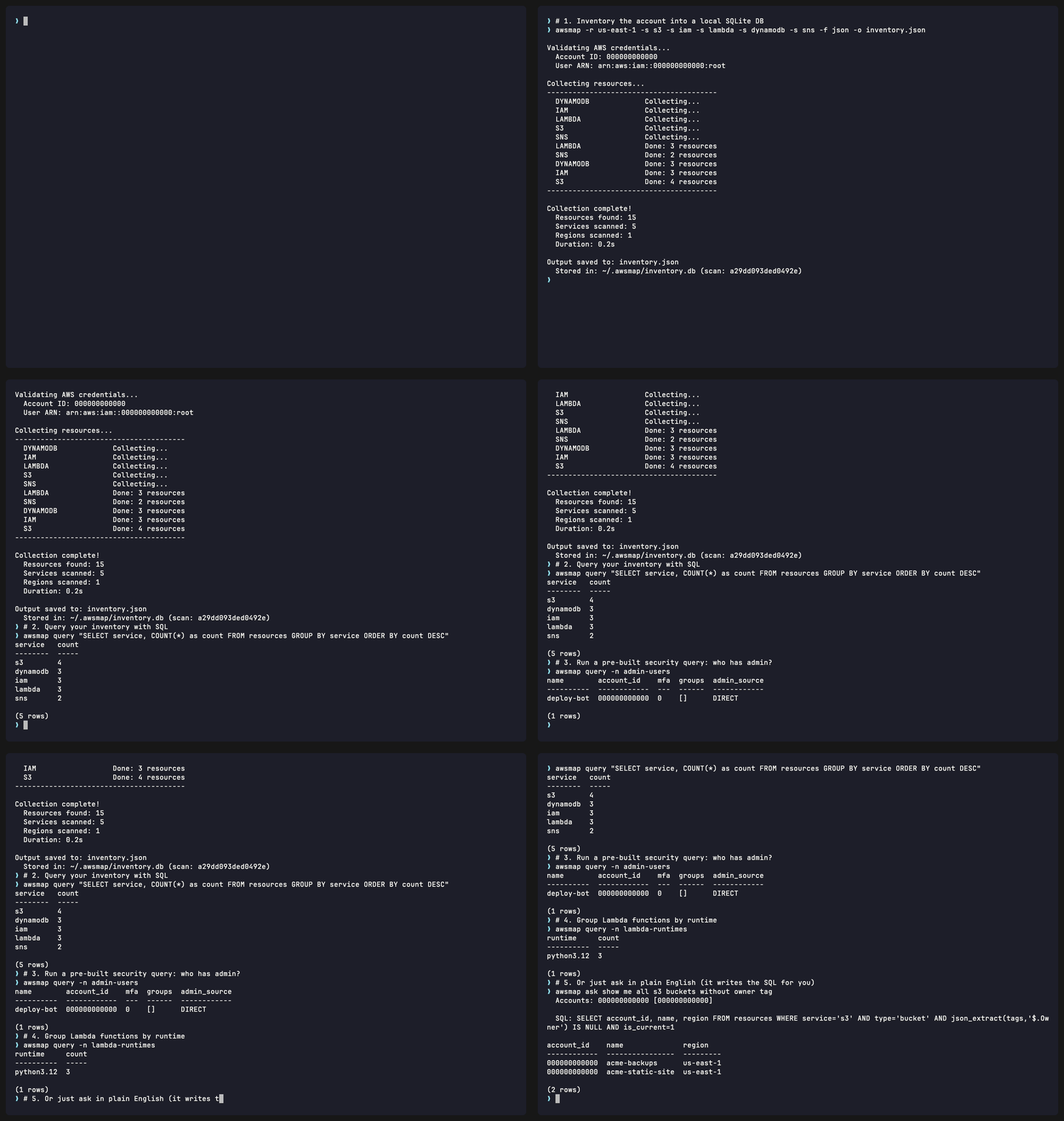
Features
- 150+ AWS Services: Covers compute, storage, database, networking, security, and more
- Multi-Region: Parallel scanning across all enabled regions
- Local Database: Every scan auto-stored in SQLite - query your inventory offline
- SQL Query Engine: Run SQL against your inventory history (
awsmap query "SELECT ...") - Pre-Built Query Library: 30 ready-to-use security and compliance queries (
awsmap query -n admin-users) - Natural Language Queries: Ask questions in plain English - zero dependencies, works out of the box (
awsmap ask show me all EC2 without Owner tag) - Examples Library: 1381 ready-to-run questions organized by service (
awsmap examples lambda) - Multi-Account: Scan multiple accounts, query across all of them
- Tag Filtering: Filter by tags - multiple values for same tag match ANY (Owner=John OR Jane), different tags match ALL (Owner=John AND Environment=Production)
- Beautiful HTML Reports: Interactive reports with search, filters, dark mode, and export
- Multiple Outputs: JSON, CSV, and HTML formats
- Fast: Parallel execution with 40 workers (~2 minutes for typical accounts)
- Drift Detection: Compare snapshots over time - detect added, removed, and modified resources (
awsmap diff) - Waste Detection: Find idle or wasteful resources from collected data, no extra API calls (
awsmap waste) - Tag Compliance: Audit tagging coverage and score against required tags (
awsmap tags) - Scan-Scoped Queries: Query any point in your scan history, not just the current state (
awsmap query --scan,awsmap ask --scan) - Console Login Support: Works with
aws logincredential provider
Installation
PyPI
pip install awsmapRequirements: Python 3.9+, AWS credentials configured
Docker
docker pull tarekcheikh/awsmapOr build locally:
git clone https://github.com/TocConsulting/awsmap.git
cd awsmap
docker build -t awsmap .
Development Installation
git clone https://github.com/TocConsulting/awsmap.git
cd awsmap
pip install -e .
Docker Usage
# Using AWS credentials file
docker run --rm \
  -v ~/.aws:/root/.aws:ro \
  -v $(pwd)/output:/app/output \
  -v ~/.awsmap:/root/.awsmap \
  awsmap -p myprofile -o /app/output/inventory.html
Using environment variables
docker run --rm \
  -e AWSACCESSKEY_ID \
  -e AWSSECRETACCESS_KEY \
  -e AWSDEFAULTREGION=us-east-1 \
  -v $(pwd)/output:/app/output \
  -v ~/.awsmap:/root/.awsmap \
  awsmap -o /app/output/inventory.html
Query stored inventory
docker run --rm \
  -v ~/.awsmap:/root/.awsmap \
  awsmap query "SELECT service, COUNT(*) as count FROM resources GROUP BY service ORDER BY count DESC"
List available services
docker run --rm awsmap --list-services
Usage
# Full account inventory (all services, all regions, HTML output)
awsmap -p myprofile
Specific services (comma-separated or multiple -s flags)
awsmap -p myprofile -s ec2,s3,rds,lambda,iam
Specific regions
awsmap -p myprofile -r us-east-1,eu-west-1
Filter by tags (OR logic for same key)
awsmap -p myprofile -t Owner=John -t Owner=Jane -t Environment=Production
JSON output
awsmap -p myprofile -f json -o inventory.json
List available collectors
awsmap --list-services
Show timing per service (useful for debugging)
awsmap -p myprofile --timings
Exclude default AWS resources (default VPCs, security groups, etc.)
awsmap -p myprofile --exclude-defaults
Skip local database storage
awsmap -p myprofile --no-db
Multi-Account
Scan multiple AWS accounts. Each scan is stored in the same local database - query across all of them.
# Scan different accounts (different profiles)
awsmap -p production
awsmap -p staging
awsmap -p dev-account
Query across all accounts
awsmap query -n resources-by-account
awsmap ask how many resources per account
Scope to one account
awsmap query -n admin-users -a production
awsmap ask -a staging show me all Lambda functions
Query Your Inventory
Every scan is automatically stored in a local SQLite database (~/.awsmap/inventory.db). Query it offline with raw SQL or natural language.
SQL Queries
# Count resources per service
awsmap query "SELECT service, COUNT(*) as count FROM resources GROUP BY service ORDER BY count DESC"
Find all EC2 instances in a specific region
awsmap query "SELECT id, name, region FROM resources WHERE service='ec2' AND type='instance'"
View scan history
awsmap query "SELECT * FROM scans ORDER BY timestamp DESC"
JSON or CSV output
awsmap query "SELECT * FROM resources WHERE service='s3'" -f json
awsmap query "SELECT service, id, name FROM resources" -f csv
Query tags (filter to resources that have the tag)
awsmap query "SELECT id, name, jsonextract(tags, '$.Owner') as owner FROM resources WHERE service='ec2' AND jsonextract(tags, '$.Owner') IS NOT NULL"
More SQL examples: See examples/queries/*.sql for ready-to-use query templates you can customize.
Pre-Built Query Library
awsmap ships with 30 pre-built queries for common security, compliance, and operational tasks. No SQL knowledge required.
# List all available queries
awsmap query --list
Run a named query
awsmap query -n admin-users
awsmap query -n users-without-mfa
awsmap query -n open-security-groups
awsmap query -n untagged-resources
Pass parameters (find resources with Owner tag)
awsmap query -n resources-by-tag -P tag=Owner
Multiple parameters (find EC2 missing Environment tag)
awsmap query -n missing-tag -P tag=Environment -P service=ec2
Scope to a specific account
awsmap query -n admin-users -a production
Show query SQL without running it
awsmap query --show admin-users
Run SQL from a file
awsmap query -F my-query.sql
Parameter format: Use -P parameter=value where parameter is the query parameter name (e.g., tag, service) and value is what you're searching for. Example: -P tag=Owner means "filter by the Owner tag" (NOT -P Owner=SomeValue).
Available queries:
| Query | Description | Example | |-------|-------------|---------| | IAM / Security | | | | admin-users | IAM users with admin permissions (direct + via group) | awsmap query -n admin-users | | admin-roles | IAM roles with admin permissions | awsmap query -n admin-roles | | users-without-mfa | IAM users without MFA enabled | awsmap query -n users-without-mfa | | iam-inactive-users | IAM users with no login and no access keys | awsmap query -n iam-inactive-users | | old-access-keys | IAM users with access keys | awsmap query -n old-access-keys | | cross-account-roles | IAM roles with trust policies allowing external accounts | awsmap query -n cross-account-roles | | open-security-groups | Security groups with 0.0.0.0/0 ingress rules | awsmap query -n open-security-groups | | secrets-no-rotation | Secrets Manager secrets without auto-rotation | awsmap query -n secrets-no-rotation | | S3 | | | | public-s3-buckets | S3 buckets with public access enabled | awsmap query -n public-s3-buckets | | encryption-status | S3 buckets and their encryption configuration | awsmap query -n encryption-status | | s3-no-versioning | S3 buckets without versioning | awsmap query -n s3-no-versioning | | s3-no-logging | S3 buckets without access logging | awsmap query -n s3-no-logging | | EC2 / EBS | | | | stopped-instances | EC2 instances in stopped state | awsmap query -n stopped-instances | | unused-volumes | EBS volumes not attached to any instance | awsmap query -n unused-volumes | | ebs-unencrypted | EBS volumes without encryption | awsmap query -n ebs-unencrypted | | unused-eips | Elastic IPs not associated with any instance | awsmap query -n unused-eips | | default-vpcs | Default VPCs across all regions | awsmap query -n default-vpcs | | RDS | | | | rds-public | RDS instances with public access enabled | awsmap query -n rds-public | | rds-unencrypted | RDS instances without encryption | awsmap query -n rds-unencrypted | | rds-no-multi-az | RDS instances without Multi-AZ | awsmap query -n rds-no-multi-az | | rds-engines | RDS instances grouped by engine | awsmap query -n rds-engines | | Lambda | | | | lambda-runtimes | Lambda functions grouped by runtime | awsmap query -n lambda-runtimes | | lambda-high-memory | Lambda functions with memory > 512 MB | awsmap query -n lambda-high-memory | | Tags | | | | untagged-resources | Resources with no tags | awsmap query -n untagged-resources | | missing-tag | Resources missing a specific tag | awsmap query -n missing-tag -P tag=Owner | | resources-by-tag | Resources that have a specific tag | awsmap query -n resources-by-tag -P tag=Owner | | Inventory | | | | resources-by-service | Resource count per service | awsmap query -n resources-by-service | | resources-by-region | Resource count per region | awsmap query -n resources-by-region | | resources-by-account | Resource count per account | awsmap query -n resources-by-account | | resources-per-account-service | Resource count per account per service | awsmap query -n resources-per-account-service |
You can also add your own queries by placing .sql files in ~/.awsmap/queries/. Use the same header format as the built-in queries (-- name:, -- description:, -- params:).
Natural Language Queries
Ask questions about your inventory in plain English using awsmap ask. No setup required - works out of the box with a built-in zero-dependency parser.
awsmap ask how many resources per region
awsmap ask show me all EC2 instances without Owner tag
awsmap ask which S3 buckets are in eu-west-1
awsmap ask what services have the most resources
awsmap translates your question to SQL using a built-in parser (zero dependencies), shows you the generated query, and displays the results.
Examples Library
Browse and run 1381 pre-built questions organized by AWS service using awsmap examples.
# List all services with question counts
awsmap examples
Browse questions for a service
awsmap examples lambda
Run a specific question by number
awsmap examples lambda 5
Search across all questions
awsmap examples --search "public"
awsmap examples --search "encryption"
Multi-Account Queries
When multiple accounts have been scanned, awsmap ask queries all of them by default. Use -a to scope to a single account:
# Query across all accounts
awsmap ask show me all IAM users
Scope to one account
awsmap ask -a production show me Lambda functions
Drift Detection
Compare snapshots of your AWS inventory over time to detect what changed - resources added, removed, or modified.
# What did the most recent scan change? (no arguments: previous scan vs current)
awsmap diff
What changed in the last 7 days?
awsmap diff --from 7d
Compare two specific dates
awsmap diff --from 2026-01-15 --to 2026-02-09
Scope to specific services
awsmap diff --from 30d -s ec2,s3
Scope to a specific account (by profile name, alias, or account ID)
awsmap diff --from 7d -a production -r us-east-1
Show only added or removed resources
awsmap diff --from 7d --type added
awsmap diff --from 7d --type removed
Summary only (no resource details)
awsmap diff --from 7d --summary
Ignore tag-only changes
awsmap diff --from 30d --ignore-tags
JSON output
awsmap diff --from 7d -f json -o drift-report.json
HTML report (interactive, with filters and dark mode)
awsmap diff --from 7d -f html -o drift-report.html
How it works: awsmap reconstructs point-in-time snapshots from your scan history. For each (account, service), it finds the latest scan at or before the given date, then compares the two snapshots field by field. This correctly handles partial scans - if you scanned EC2 on Monday and S3 on Tuesday, each service uses its own latest scan.
With no --from, awsmap diff compares the state before the most recent scan against the current state, so you can see exactly what your latest scan changed. --to without --from defaults --from to the scan immediately before --to.
Relative dates: 7d, 30d, 90d, yesterday, today, or exact dates like 2026-01-15.
Change types:
- Added - resource exists in the newer snapshot but not the older one
- Removed - resource exists in the older snapshot but not the newer one
- Modified - resource exists in both but details, tags, or name changed (with field-level diffs)
Waste Detection
Find idle or potentially wasteful resources from the data awsmap already collected. No new AWS API calls - the rules run over your latest stored snapshot.
# Run all rules against the current snapshot
awsmap waste
Counts per rule only
awsmap waste --summary
Scope to one account (by profile name, alias, or account ID)
awsmap waste -a production
Run only specific rules
awsmap waste -t unattached-ebs -t available-eni
Change the age threshold for snapshots and AMIs (default 90 days)
awsmap waste --min-age-days 180
Include default AWS resources (excluded by default)
awsmap waste --include-defaults
HTML report (interactive, with filters and dark mode)
awsmap waste -f html -o waste.html
Rules:
| Rule key | What it flags | |----------|---------------| | unattached-ebs | EBS volumes in the available state | | unassociated-eip | Elastic IPs not attached to an instance or network interface | | available-eni | Network interfaces in the available (detached) state | | idle-target-group | Target groups with no registered targets | | empty-classic-elb | Classic load balancers with no instances | | old-snapshot | EBS snapshots older than --min-age-days (default 90) | | old-ami | AMIs older than --min-age-days (default 90) | | stopped-instance | EC2 instances in the stopped state |
awsmap reports counts and the resources to act on. It does not estimate dollar costs. Output is table (default), json, or html; is_default resources are excluded unless you pass --include-defaults.
Tag Compliance
Audit tagging coverage across your inventory and score it against a set of required tags. Operates on already-collected data.
# Coverage of "has at least one tag"
awsmap tags
Compliance against required tags
awsmap tags -R Owner,Environment,CostCenter
Scope to an account and service, list only non-compliant resources
awsmap tags -a production -s ec2 --noncompliant-only
List only resources with zero tags
awsmap tags --untagged-only
Score only, no resource listing
awsmap tags -R Owner --summary
HTML report
awsmap tags -R Owner,Environment -f html -o tag-compliance.html
The report shows an overall compliance score, per-required-tag coverage (so you can see which tag is the gap), a per-service breakdown, and the list of non-compliant resources with their missing tags.
- Required tags come from
-R/--required(comma-separated or repeatable) or therequired_tagsconfig key. With neither set, compliance falls back to "has at least one tag". - A blank tag value (for example
Owner=) counts as missing. is_defaultresources are excluded by default; pass--include-defaultsto keep them.- Set a default required set once:
awsmap config set required_tags Owner,Environment,CostCenter. - Output is
table(default),json, orhtml.
Querying a Specific Scan
By default query and ask run against the current snapshot (is_current). Use --scan to target any scan in your history.
# List stored scans
awsmap query --list-scans
Run a named query against the previous scan
awsmap query --scan previous -n admin-users
Raw SQL against the latest scan (use the {scan_filter} placeholder)
awsmap query --scan latest "SELECT service, COUNT(*) FROM resources WHERE {scan_filter} GROUP BY service"
Natural language against the first (oldest) scan
awsmap ask --scan first show me ec2 instances
Selectors: latest, previous, first, or an explicit <scanid> (see --list-scans). Named queries, files, and ask apply the scope automatically. For raw inline SQL, include the {scanfilter} placeholder where the scope should go; using --scan on raw SQL without the placeholder reports an error instead of running an unscoped query.
Demo Database
Generate a realistic synthetic database to try awsmap without needing an AWS account. Covers all 150+ services, multiple accounts, and multiple scans with drift.
# Generate with defaults (3 accounts, 3 scans, ~12,000 resources)
awsmap demo
Custom options
awsmap demo --accounts 2 --scans 5 --db ./demo.db
Overwrite existing
awsmap demo --force
After generating, use --db to point any command at the demo database:
awsmap query --db ~/.awsmap/demo.db -n admin-users
awsmap ask --db ~/.awsmap/demo.db show me all EC2 instances
awsmap diff --db ~/.awsmap/demo.db --from 30d
awsmap examples lambda 5 --db ~/.awsmap/demo.db
Or set it as the default database:
awsmap config set db ~/.awsmap/demo.dbDemo Options (awsmap demo)
| Option | Description | |--------|-------------| | --db | Database path (default: ~/.awsmap/demo.db) | | --accounts | Number of accounts to generate (1-5, default: 3) | | --scans | Number of scans per account for drift (1-5, default: 3) | | --seed | Random seed for reproducibility (default: 42) | | --force | Overwrite existing demo database |
CLI Options
Scan Options
| Option | Description | |--------|-------------| | -p, --profile | AWS profile name | | -r, --region | Region(s) to scan (comma-separated or multiple flags) | | -s, --services | Service(s) to scan (comma-separated or multiple flags) | | -t, --tag | Filter by tag Key=Value (multiple allowed) | | -f, --format | Output format: html (default), json, csv | | -o, --output | Output file path | | -w, --workers | Parallel workers (default: 40) | | -q, --quiet | Suppress progress output | | --timings | Show timing summary per service | | --include-global | Include global services when filtering by non-global regions | | --exclude-defaults | Exclude default AWS resources (default VPCs, security groups, etc.) | | --no-db | Skip local database storage | | --list-services | List available service collectors |
Query Options (awsmap query)
| Option | Description | |--------|-------------| | -n, --name | Run a pre-built named query | | -F, --file | Run SQL from a file | | -l, --list | List available pre-built queries | | -S, --show | Show SQL of a named query without running it | | -P, --param | Parameter for named query (key=value, multiple allowed) | | -a, --account | Scope to an account (account ID, account alias, or AWS profile) | | --scan | Scope to a scan: latest, previous, first, or a <scanid> (raw SQL needs the {scanfilter} placeholder) | | --list-scans | List stored scans and exit | | --db | Database path (default: ~/.awsmap/inventory.db) | | -f, --format | Output format: table (default), json, csv |
Ask Options (awsmap ask)
| Option | Description | |--------|-------------| | -a, --account | Scope to an account (account ID, account alias, or AWS profile) | | --scan | Scope to a scan: latest, previous, first, or a <scan_id> | | --db | Database path (default: ~/.awsmap/inventory.db) |
Diff Options (awsmap diff)
| Option | Description | |--------|-------------| | --from | Start date for comparison. Supports: YYYY-MM-DD, 7d, 30d, yesterday, today. If omitted, compares the previous scan against the current state | | --to | End date (default: current state). Same date formats as --from | | -a, --account | Scope to an account (account ID, alias, or profile) | | -s, --service | Service(s) to compare (comma-separated or multiple flags) | | -r, --region | Region(s) to compare (comma-separated or multiple flags) | | --type | Show only one change type: all (default), added, removed, or modified | | --summary | Show summary counts only, no resource details | | --ignore-tags | Ignore tag-only changes | | -f, --format | Output format: table (default), json, html | | -o, --output | Output file path | | --db | Database path (default: ~/.awsmap/inventory.db) |
Waste Options (awsmap waste)
| Option | Description | |--------|-------------| | -a, --account | Scope to an account (account ID, alias, or profile) | | -t, --type | Run only specific rule key(s) (comma-separated or multiple flags) | | --min-age-days | Age threshold for old-snapshot and old-ami (default: 90) | | --include-defaults | Include default AWS resources (excluded by default) | | --summary | Show counts per rule only, no resource listing | | -f, --format | Output format: table (default), json, html | | -o, --output | Output file path | | --db | Database path (default: ~/.awsmap/inventory.db) |
Tags Options (awsmap tags)
| Option | Description | |--------|-------------| | -R, --required | Required tag key(s) (comma-separated or repeatable). Falls back to the required_tags config key | | -a, --account | Scope to an account (account ID, alias, or profile) | | -s, --service | Scope to service(s) (comma-separated or multiple flags) | | --untagged-only | List only resources with zero tags | | --noncompliant-only | List only resources missing a required tag | | --include-defaults | Include default AWS resources (excluded by default) | | --summary | Show scores only, no resource listing | | -f, --format | Output format: table (default), json, html | | -o, --output | Output file path | | --db | Database path (default: ~/.awsmap/inventory.db) |
Examples Options (awsmap examples)
| Argument / Option | Description | |-------------------|-------------| | <service> | Show questions for a specific service | | <service> <number> | Run question #N against the database | | -s, --search | Search all questions by keyword | | --db | Database path (default: ~/.awsmap/inventory.db) |
Config Commands (awsmap config)
Set persistent defaults so you don't have to repeat CLI flags. CLI flags always override config values.
Only the keys listed below are accepted - unknown keys and invalid values are rejected. If the config file is manually edited and contains invalid entries, awsmap config list detects them, warns you, and auto-cleans the file.
| Command | Description | |---------|-------------| | awsmap config set key value | Set a configuration value (validated) | | awsmap config get key | Get a configuration value | | awsmap config list | List all values (detects and cleans invalid entries) | | awsmap config delete key | Delete a configuration value |
Available config keys (only these are accepted):
| Key | Applies to | Description | Example | |-----|-----------|-------------|---------| | profile | awsmap (scan) | Default AWS profile | awsmap config set profile production | | regions | awsmap (scan) | Default regions (comma-separated) | awsmap config set regions us-east-1,eu-west-1 | | services | awsmap (scan) | Default services (comma-separated) | awsmap config set services ec2,s3,lambda | | format | awsmap (scan) | Default output format (html, json, csv) | awsmap config set format json | | workers | awsmap (scan) | Default parallel workers | awsmap config set workers 20 | | excludedefaults | awsmap (scan) | Exclude default AWS resources (true/false) | awsmap config set excludedefaults true | | db | query, ask | Default database path | awsmap config set db /path/to/inventory.db | | queryformat | query | Default query output format (table, json, csv) | awsmap config set queryformat csv | | requiredtags | tags | Default required tag keys (comma-separated) | awsmap config set requiredtags Owner,Environment,CostCenter |
# Set your usual profile and regions
awsmap config set profile production
awsmap config set regions us-east-1,eu-west-1
Now just run:
awsmap
Equivalent to: awsmap -p production -r us-east-1,eu-west-1
CLI flags still override config:
awsmap -p staging    # Uses staging profile, but regions from config
Shell Completion
awsmap supports tab completion for bash, zsh, and fish. Complete subcommands, service names, regions, AWS profiles, query names, account names, and config keys.
# Bash
eval "$(awsmap completion bash)"     # add to ~/.bashrc
Zsh
eval "$(awsmap completion zsh)"      # add to ~/.zshrc
Fish
awsmap completion fish > ~/.config/fish/completions/awsmap.fish
What gets completed:
| Context | Completions | |---------|-------------| | awsmap <TAB> | Subcommands: ask, config, completion, demo, diff, examples, query | | awsmap -s <TAB> | Service names (ec2, s3, lambda, ...) | | awsmap -r <TAB> | AWS region names | | awsmap -p <TAB> | AWS profile names from ~/.aws/credentials and ~/.aws/config | | awsmap query -n <TAB> | Pre-built query names | | awsmap query -a <TAB> | Account aliases, profiles, and IDs from the database | | awsmap config set <TAB> | Valid configuration keys | | awsmap examples <TAB> | Service names from the examples library |
Important: Bash version requirement. Shell completion requires Bash 4.4 or newer. macOS ships with Bash 3.2 (from 2007, frozen due to GPLv3 licensing) which is not supported. To fix this on macOS:>
> brew install bash > > # Add it to allowed shells > sudo sh -c 'echo /opt/homebrew/bin/bash >> /etc/shells' > > # Set it as your default shell > chsh -s /opt/homebrew/bin/bash > >> # Install modern Bash via Homebrew
Alternatively, macOS users can use zsh (the default shell since macOS Catalina) which works out of the box.
Supported Services
| Category | Services | |----------|----------| | Compute | ec2, lambda, ecs, eks, ecr, ecr-public, lightsail, autoscaling, application-autoscaling, elasticbeanstalk, batch, apprunner, imagebuilder | | Storage | s3, efs, fsx, backup, datasync, dlm, storagegateway | | Database | rds, dynamodb, elasticache, memorydb, docdb, neptune, redshift, redshift-serverless, keyspaces, opensearch, opensearch-serverless, dax, dsql, timestream-influxdb | | Networking | vpc, elbv2, elb, route53, route53resolver, route53domains, cloudfront, globalaccelerator, apigateway, apigatewayv2, appsync, directconnect, network-firewall, servicediscovery, vpc-lattice, networkmanager | | Security | iam, sso, kms, secretsmanager, acm, acm-pca, wafv2, guardduty, inspector2, securityhub, ds, cognito, accessanalyzer, macie2, detective, shield, fms, cloudhsmv2, auditmanager, securitylake | | Management & Monitoring | cloudwatch, logs, cloudtrail, ssm, config, sns, sqs, events, xray, grafana, amp, ce, budgets, compute-optimizer, service-quotas, resource-groups, health, synthetics, appconfig, organizations, servicecatalog, resiliencehub | | Serverless | stepfunctions, kinesis, firehose, kafka, serverlessrepo, eventbridge-scheduler, eventbridge-pipes, schemas | | Developer Tools | cloudformation, codeartifact, codebuild, codepipeline, codedeploy, devicefarm | | Analytics | athena, glue, mwaa, lakeformation, emr, emr-serverless, cleanrooms, quicksight, datazone | | AI/ML | sagemaker, bedrock, lexv2, rekognition, textract, transcribe, translate, comprehend, polly, personalize, kendra, frauddetector | | Media | mediaconvert, mediaconnect, mediapackage, medialive, mediastore, mediatailor, ivs | | Migration & Transfer | transfer, dms | | End User Computing | workspaces, amplify, connect | | IoT | iot, iotsitewise | | Other | ram, resource-explorer-2, mq, sesv2, appflow, gamelift, outposts, fis, location |
For detailed resource types per service, see SERVICES.md.
Output Formats
HTML (Default)
Interactive report with:- Dashboard with resource counts and charts
- Global search across all resources
- Filter by service and region
- Collapsible service sections
- Click to copy ARN/ID
- Clickable tag badges (shows all tags)
- Dark/light mode toggle
- Export filtered view to CSV
- Print-friendly
JSON
{
  "metadata": {
    "account_id": "123456789012",
    "timestamp": "2024-12-24 15:30:00 UTC",
    "resource_count": 1590
  },
  "resources": [
    {
      "service": "ec2",
      "type": "instance",
      "id": "i-1234567890abcdef0",
      "arn": "arn:aws:ec2:us-east-1:123456789012:instance/i-1234567890abcdef0",
      "name": "my-instance",
      "region": "us-east-1",
      "is_default": false,
      "details": {...},
      "tags": {"Owner": "John", "Environment": "Production"}
    }
  ]
}
CSV
Flat format with columns: service, type, id, name, region, arn, is_default, tagsTag Filtering
# Single tag
awsmap -t Environment=Production
Multiple values for same key (OR logic)
awsmap -t Owner=John -t Owner=Jane
Returns resources where Owner is "John" OR "Jane"
Multiple keys (AND logic)
awsmap -t Owner=John -t Environment=Production
Returns resources where Owner is "John" AND Environment is "Production"
Combined
awsmap -t Owner=John -t Owner=Jane -t Environment=Production
Returns resources where (Owner is "John" OR "Jane") AND Environment is "Production"
Global vs Regional Services
AWS has two types of services:
- Regional services (EC2, RDS, Lambda, etc.) - Resources exist in specific regions
- Global services (IAM, Route53, CloudFront, etc.) - Resources are account-wide, not region-specific
How awsmap handles global services
When you filter by region, awsmap intelligently includes global services based on their control plane location:
| Command | Behavior | |---------|----------| | awsmap (no region) | All services (regional + global) | | awsmap -r us-east-1 | Regional in us-east-1 + global services with us-east-1 control plane | | awsmap -r us-west-2 | Regional in us-west-2 + global services with us-west-2 control plane | | awsmap -r eu-west-1 | Regional in eu-west-1 only (no global services) | | awsmap -r eu-west-1 --include-global | Regional in eu-west-1 + all global services |
Global services by control plane
Based on AWS Global Services documentation:
| Control Plane | Global Services | |---------------|-----------------| | us-east-1 | IAM, Organizations, Route53, Route53 Domains, CloudFront, Shield, Budgets, Cost Explorer, Health | | us-west-2 | Network Manager, Global Accelerator |
S3 buckets
S3 bucket names are globally unique, but each bucket has a specific region. awsmap treats S3 as a regional service:
# Only S3 buckets in eu-west-1
awsmap -r eu-west-1 -s s3
All S3 buckets
awsmap -s s3
Performance
Scans 150+ services across all regions in parallel.
| Account Size | Resources | Estimated Time | |--------------|-----------|----------------| | Small | <500 | ~1.5 minutes | | Medium | 500-5,000 | ~2 minutes | | Large | 5,000-20,000 | ~3-5 minutes | | Enterprise | 20,000+ | ~5-10 minutes |
Tuning Options:
# Increase parallelism for faster scans awsmap -p myprofile -w 50
Reduce parallelism for rate-limited accounts
awsmap -p myprofile -w 20
Scan specific services only (much faster)
awsmap -p myprofile -s ec2,s3,lambda,iam
Scan specific regions only
awsmap -p myprofile -r us-east-1,eu-west-1
Why is the scan fast?
- Parallel execution with configurable workers (default: 40)
- Region-aware collectors skip unsupported regions automatically
- Global services (IAM, Route53, etc.) collected once, not per-region
- Smart region filtering excludes global services when not relevant
- Optimized API calls (batch operations where available)
IAM Permissions
Only scanning (awsmap) calls AWS, and it needs read-only access to the services you want to inventory. The analysis commands (query, ask, diff, waste, tags) run entirely against your local database and require no AWS permissions.
Beyond the per-service read actions, a scan calls sts:GetCallerIdentity, account:ListRegions (to discover enabled regions; falls back to a built-in region list if denied), and iam:ListAccountAliases (for the account alias).
Recommended: ReadOnlyAccess plus a small supplement
Attach the AWS managed ReadOnlyAccess policy. It is maintained by AWS and covers the large majority of awsmap's read calls.
ReadOnlyAccess does not cover everything, though: it lags on some newer services (Amazon Location, MediaTailor, Timestream for InfluxDB, Textract adapters) and deliberately omits a few read actions (for example glue:GetConnections). awsmap calls 26 read actions that ReadOnlyAccess does not grant. They were computed by diffing awsmap's exact API calls against the live ReadOnlyAccess document, so the list is the precise difference, not a guess.
Attach this supplemental policy alongside ReadOnlyAccess:
{
  "Version": "2012-10-17",
  "Statement": [
    {
      "Sid": "awsmapSupplementalReadOnly",
      "Effect": "Allow",
      "Action": [
        "airflow:GetEnvironment",
        "bedrock:ListTagsForResource",
        "codeartifact:ListPackageGroups",
        "fms:GetResourceSet",
        "fms:ListResourceSets",
        "geo:ListGeofenceCollections",
        "geo:ListMaps",
        "geo:ListPlaceIndexes",
        "geo:ListRouteCalculators",
        "geo:ListTrackers",
        "glue:GetConnections",
        "mediatailor:ListChannels",
        "mediatailor:ListPlaybackConfigurations",
        "mediatailor:ListSourceLocations",
        "quicksight:ListAnalyses",
        "quicksight:ListDashboards",
        "quicksight:ListDataSets",
        "quicksight:ListDataSources",
        "quicksight:ListTagsForResource",
        "rekognition:DescribeCollection",
        "textract:GetAdapter",
        "textract:ListAdapters",
        "timestream-influxdb:GetDbInstance",
        "timestream-influxdb:ListDbInstances",
        "timestream-influxdb:ListDbParameterGroups",
        "timestream-influxdb:ListTagsForResource"
      ],
      "Resource": "*"
    }
  ]
}
Attach both to a role (or use attach-user-policy for a user):
# 1. Attach the AWS managed ReadOnlyAccess policy
aws iam attach-role-policy \
  --role-name YourRoleName \
  --policy-arn arn:aws:iam::aws:policy/ReadOnlyAccess
2. Create the supplemental policy from the JSON above and attach it
aws iam create-policy \
  --policy-name awsmap-supplemental-readonly \
  --policy-document file://awsmap-supplemental-readonly.json
aws iam attach-role-policy \   --role-name YourRoleName \   --policy-arn arn:aws:iam::<account-id>:policy/awsmap-supplemental-readonly
Every collector call is wrapped so a denied permission never stops a scan: the affected resources are simply skipped. The supplement only removes those blind spots so the inventory is complete. All 26 actions are read-only.
Alternative: no managed policy
If you cannot use ReadOnlyAccess, grant read actions (Describe, List, Get, plus BatchGet/Search* where applicable) for the services awsmap scans, together with the supplemental actions above. The full standalone list covers about 150 service prefixes; see the IAM Service Authorization Reference for per-service read actions.
What's NOT Collected
This tool only collects user-owned resources, excluding:
- AWS-managed policies (only customer-managed)
- AWS-managed KMS keys (only customer-managed)
- Default parameter groups and option groups
- AWS service-linked roles
- Reserved instance offerings (pricing catalog)
- Foundation models (Bedrock catalog)
- Automated backups (only manual snapshots)
- AWS system keyspaces (Keyspaces:
system_*) - AWS default queues/groups (MediaConvert, X-Ray)
- AWS managed domain lists (Route53 Resolver:
AWSManagedDomains*) - Default data lake settings (Lake Formation)
--exclude-defaults to filter them out.
See SERVICES.md for the complete list of filtered resources.
Why a Built-In NLQ Parser Instead of AI/LLM?
We evaluated three approaches for natural language queries:
| Approach | Accuracy | Cost | Latency | Offline | |----------|----------|------|---------|---------| | Ollama (local LLMs) | ~80% | Free | Slow (seconds) | Yes | | OpenAI / Anthropic APIs | ~95% | Pay per query | Network dependent | No | | Built-in parser (awsmap) | 100% | Free | Instant | Yes |
- Ollama models are free and run locally, but when tested against real AWS inventory queries, accuracy was around 80% - one in five queries would generate wrong SQL or fail silently. Not acceptable for a CLI tool where users trust the output.
- OpenAI / Anthropic APIs produce better results, but require API keys, cost money per query, and depend on network connectivity. Not ideal for an infrastructure tool that should just work.
- Built-in parser is a zero-dependency, deterministic NL-to-SQL engine. It's tested against 1500 realistic test questions with a 100% pass rate (separate from the 1381 examples library). It covers listing, counting, aggregation, region filters, negation, tags, multi-service queries, synonyms, typo tolerance, relative time, numeric fields, keyword-value patterns, and 150+ AWS services. No API keys, no network, no cost, instant results.
Found a bug or an inaccurate query? Please open an issue and report it! Every report helps improve the parser for everyone. If you have ideas for a better approach than the built-in NLQ, we're always open to suggestions.
Support
- Documentation: Check this README and SERVICES.md
- Issues: Report bugs via GitHub Issues
- Discussions: Join conversations in GitHub Discussions
License
This project is licensed under the MIT License - see the LICENSE file for details.


