
Proxmox VM/CT Management Tool – A robust Bash TUI for managing Proxmox virtual machines and containers. Features include listing, status, start/stop/restart, snapshot management, console access, SPICE integration, and permission checks.
╔══════════════════════════════════════════════════════════╗
║  ██████╗ ███╗   ███╗  █████╗  ███╗   ██╗               ║
║  ██╔══██╗████╗ ███║ ██╔══██╗ ████╗  ██║               ║
║  ██████╔╝██╔████╔██║ ███████║ ██╔██╗ ██║               ║
║  ██╔═══╝ ██║╚██╔╝██║ ██╔══██║ ██║╚██╗██║               ║
║  ██║     ██║ ╚═╝ ██║ ██║  ██║ ██║ ╚████║               ║
║  ╚═╝     ╚═╝     ╚═╝ ╚═╝  ╚═╝ ╚═╝  ╚═══╝  v2.11.1     ║
║                                                          ║
║  Proxmox VM/CT Manager · Single Bash · No Dependencies  ║
╚══════════════════════════════════════════════════════════╝
Single-file Bash tool for managing Proxmox VMs and containers. No daemons. No agents. No dependencies beyond what ships with Proxmox VE.





📖 Community & Tutorials
Check out how others are using proxmox-manager:
🇵🇱 Proxmox Manager – Co to jest, jak działa, instalacja i obsługa A detailed walkthrough and review by askomputer.pl featuring usage examples and screenshots (in Polish).*
📸 Screenshots
| Main Menu — VM/CT Table | Action Menu | |:---:|:---:| | 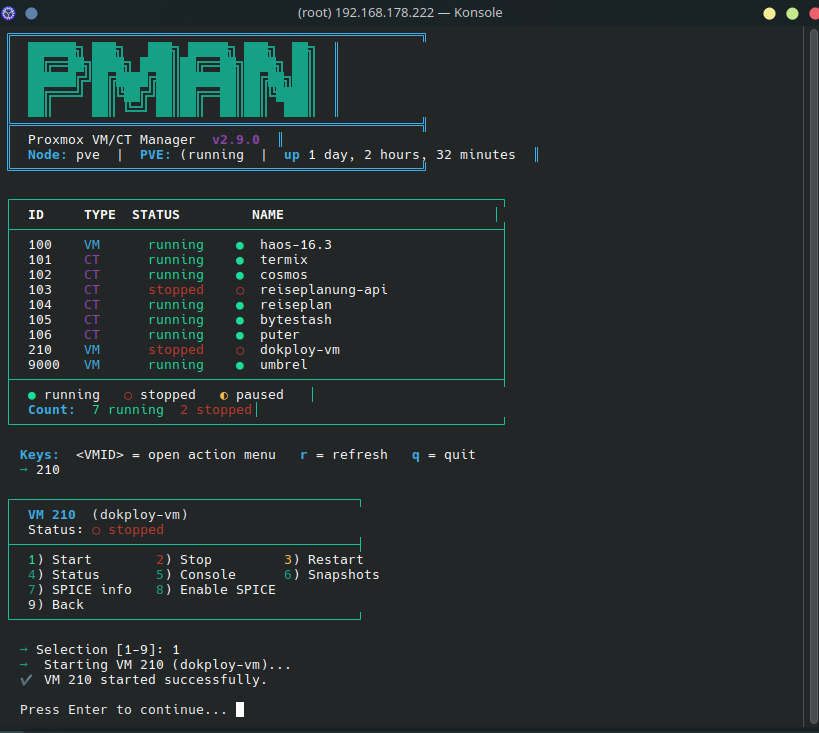 |
| 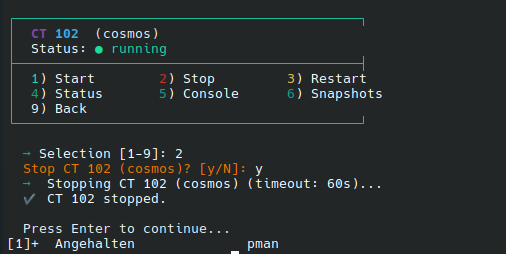 | | Live status for all VMs & containers | Per-instance controls: start, stop, console, snapshots |
🎯 Features
| | Feature | Details | |---|---|---| | 📋 | List & Status | All VMs and containers with live status — [+] running · [-] stopped · [~] paused · [?] unknown | | ⚡ | Start / Stop / Restart | Confirmation prompt for destructive actions. Proxmox error details on failure. Configurable timeout with force-stop fallback | | 🖥️ | Console Access | LXC shell via pct enter or QEMU terminal via qm terminal. Verifies running state before entering | | 🌐 | IP Address Lookup | Shows current IPv4 addresses for running VMs and CTs — VM via QEMU Guest Agent, CT via pct exec | | 📦 | Snapshot Management | List, create, rollback, delete — with name validation and snapshot preview before destructive actions | | 🖱️ | SPICE Integration | Enable SPICE for VMs and retrieve .vv connection files. Auto-launches virt-viewer when installed | | 🤖 | Automation-Ready | --json output, --filter by status, --name ERE filter, --force mode, structured logging via LOG_FILE | | ⚙️ | Config File | Persistent defaults via /etc/pmanrc or ~/.pmanrc — CLI flags always win |
🏗️ How It Works
A single proxmox-manager.sh script — no build step, no service, no config files. Runs on-demand as root directly on the Proxmox VE node.
User / Automation
       │
       ▼
  ┌─────────────────────────────────┐
  │  pman  (proxmox-manager.sh)     │
  │                                 │
  │  ┌──────────┐  ┌─────────────┐  │
  │  │ --list   │  │ interactive │  │
  │  │ --json   │  │    TUI      │  │
  │  │ --filter │  │             │  │
  │  └────┬─────┘  └──────┬──────┘  │
  └───────┼───────────────┼─────────┘
          │               │
          ▼               ▼
  ┌───────────────────────────────┐
  │  qm (VMs)  ·  pct (CTs)      │  ← Proxmox CLI (bundled with PVE)
  └───────────────────────────────┘
          │
          ▼
  ┌───────────────────────────────┐
  │  Proxmox VE Host  (local)     │
  │  QEMU Virtual Machines        │
  │  LXC Containers               │
  └───────────────────────────────┘
✅ No network calls · ✅ No background process · ✅ Bash ≥ 4.0 · ✅ PVE 7.x / 8.x / 9.x
🚀 Installation
Requirements: Proxmox VE host · Bash ≥ 4.0 · Root privileges · qm / pct (bundled with PVE)
Step 1 — Clone
git clone https://github.com/TimInTech/proxmox-manager.git
cd proxmox-manager
Step 2 — Run directly
chmod +x proxmox-manager.sh
./proxmox-manager.sh
Step 3 — Or register as pman system-wide (optional, requires root)
./install_dependencies.shInstalls a symlink to /usr/local/bin/pman so you can call pman from anywhere on the host.
🛠️ Usage
| Command | Description | |---|---| | pman | Interactive TUI — VM/CT table with full action menus | | pman --list | Plain-text table output — useful for logging or quick checks | | pman --json | Machine-readable JSON array for automation & jq | | pman --filter running | Filter output by status: running \| stopped \| paused | | pman --name web | Filter by VM/CT name (ERE substring-match; combinable with --filter) | | pman --force | Skip all confirmation prompts (for unattended scripts) | | pman --timeout 30 | Custom stop timeout in seconds (default: 60) | | pman --no-clear | Don't clear screen in interactive mode | | pman --once | Run a single interactive refresh cycle (useful for TTY recording) | | pman --version | Print version and exit | | pman -h, --help | Show usage information and exit |
Interactive mode
pmanDisplays a table of all VMs/containers. Enter a VMID to open the action menu.
[+] running [-] stopped [~] paused [?] unknownPress r to refresh · q to quit
JSON output
pman --json | jq '.[] | select(.status == "running")'[
{"id": 100, "type": "VM", "status": "running", "symbol": "[+]", "name": "web-server"},
{"id": 101, "type": "CT", "status": "stopped", "symbol": "[-]", "name": "db-container"}
]SPICE remote desktop
The SPICE integration generates a .vv connection file for any VM. If virt-viewer is installed, it is launched automatically:
# Install virt-viewer (Debian / Proxmox host)
apt install virt-viewer
When virt-viewer is not installed, the path to the generated .vv file is printed together with the install hint. The SPICE bind address defaults to 127.0.0.1 and can be overridden via PROXMOXMANAGERSPICE_ADDR (env var or ~/.pmanrc).
Configuration
proxmox-manager checks the following files at startup (in this order):
| File | Scope | |---|---| | /etc/pmanrc | System-wide (all users) | | ~/.pmanrc | Per-user (overrides system-wide) |
CLI flags are applied last and always win over config file values.
# ~/.pmanrc — example
STOP_TIMEOUT=120                          # stop timeout in seconds (default: 60)
LOG_FILE="/var/log/proxmox-manager.log"   # structured log file (empty = disabled)
PROXMOXMANAGERSPICE_ADDR="192.168.1.10" # SPICE bind address (default: 127.0.0.1)
Shell Completions
# Bash (system-wide)
sudo cp completions/pman.bash /etc/bash_completion.d/pman
Zsh
mkdir -p ~/.zsh/completions
cp completions/pman.zsh ~/.zsh/completions/_pman
🔐 Security
- Root required:
qmandpctneed elevated privileges — there's no workaround. - No credentials stored: Relies entirely on Proxmox host authentication.
- No outbound traffic: All operations are local to the node.
- CI hardening: ShellCheck on every push · Gitleaks scan for accidental secrets.
📋 Changelog
🆕 v2.11.1 — 2026-05-04
| Issue | Change | |---|---| | #21 | Full Proxmox stderr written to LOGFILE; only first line shown on stdout | | #22 | Config file support: /etc/pmanrc and ~/.pmanrc loaded before CLI flags | | #23 | Numbered snapshot selection for rollback and delete (free-text fallback) | | #24 | validatemenu_choice() helper — unified error format for all menu inputs | | #25 | --name PATTERN flag — ERE substring filter on VM/CT name, combinable with --filter | | #26 | virt-viewer auto-launched from SPICE info; fallback hint when not installed | | #28 | New IP info menu item to show current IPv4 addresses for running VMs and CTs |
v2.9.0 — 2026-04-09
--filter STATUS·--timeout SECSwith force-stop fallback ·--forcemode · 29 unit tests · Bash & Zsh shell completions
🧪 Testing
# Lint
shellcheck proxmox-manager.sh
Unit tests (no real Proxmox needed — uses mock stubs)
tests/run.sh
31 tests covering validatevmid, validatesnapshotname, ipinfo, --filter, and CLI flags.
🤝 Contributing
Contributions welcome — keep it simple, keep it Bash.
- Fork & create a feature branch:
git checkout -b feat/your-change - Keep external dependencies at zero. Run
shellchecklocally. - Commit with conventional format:
feat(vm): add suspend action - Open a Pull Request.
📜 License
MIT License — see LICENSE for full text.


