
An institutional-grade trading journal built for serious traders.
Journedge






An institutional-grade trading journal built for serious traders.
Features · Screenshots · Getting Started · Importing Trades · Analytics · Roadmap · Contributing
Why Journedge
Most trading journals are either too simple to be useful or locked behind expensive subscriptions. Journedge is built differently.
Your data stays yours. Everything runs locally on your machine using SQLite. No cloud sync, no user accounts, no telemetry, no third-party data transfers. Your trade history, journal entries, and performance data never leave your machine.
Built for serious traders. Multi-account support, real equity curve tracking from actual starting balance, institutional-grade risk analytics, execution quality analysis, behavioral pattern detection, and a full rich text journal — not just a P&L spreadsheet.
Open source and auditable. The entire codebase is available, readable, and open to contribution. You can verify exactly what the application does with your data.
Journedge was previously released as Tradello (v1.0.0 through v2.3.0). The project has been renamed to better reflect its core purpose — turning your journal into your edge. Full history is preserved in CHANGELOG.md.
Screenshots
Dashboard
Real-time stat cards, full trade history table with multi-filter support, and account-scoped P&L tracking.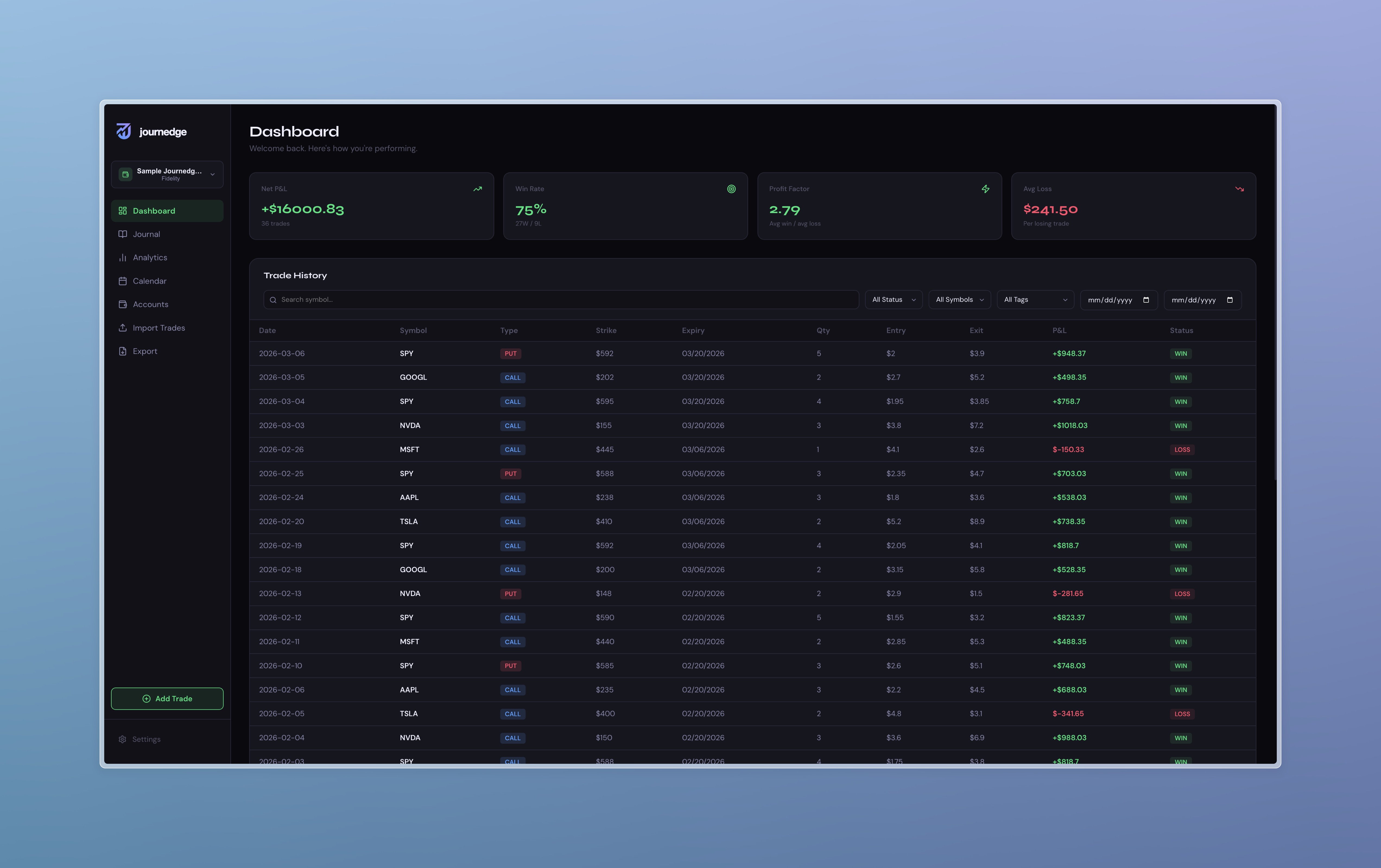
Journal Editor
Full-page rich text editor with formatting toolbar, trade stats header, tag management, and template support.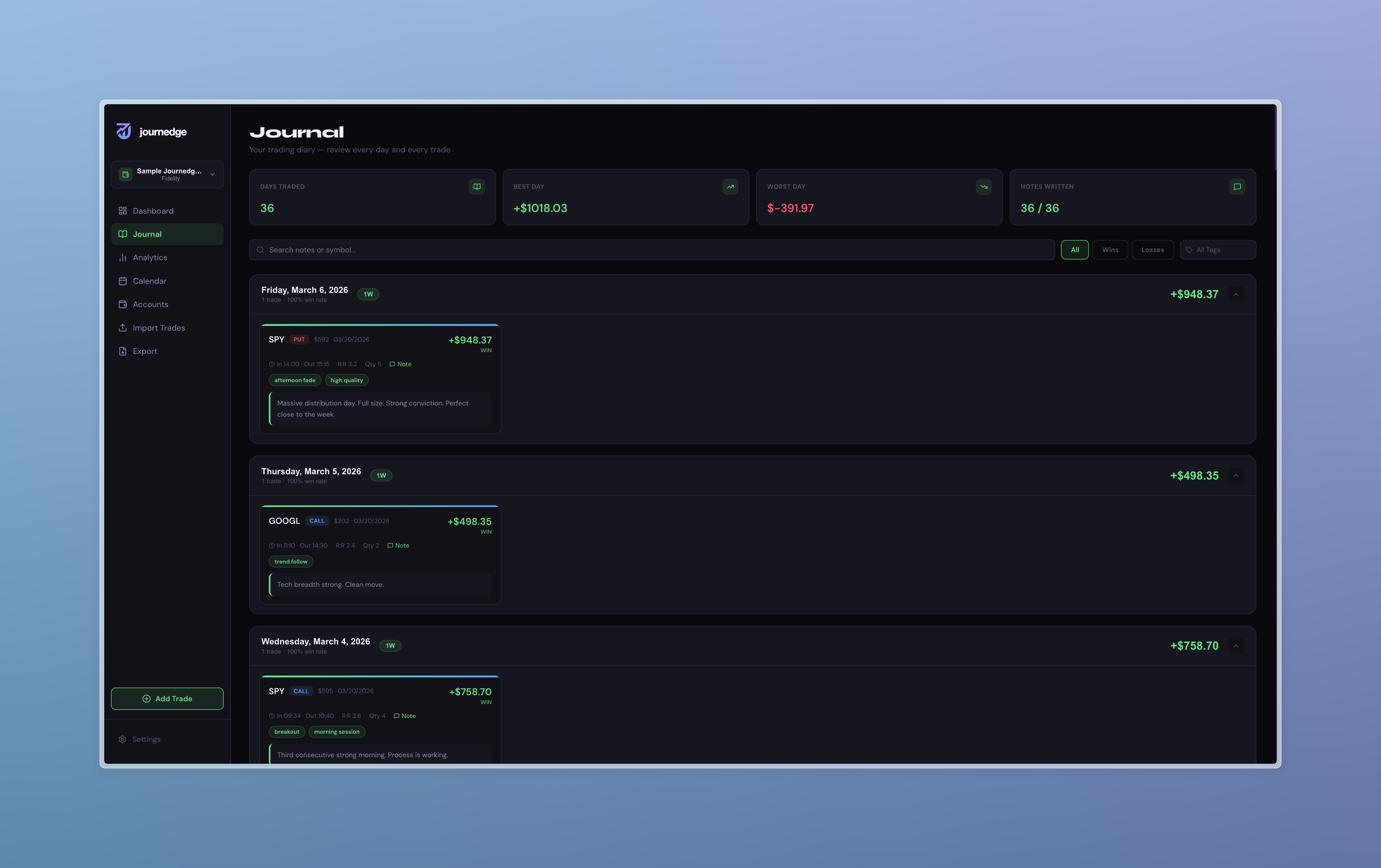
Analytics — Overview
Equity curve from actual account balance, P&L by symbol, P&L by tag, win/loss breakdown, and streak analysis.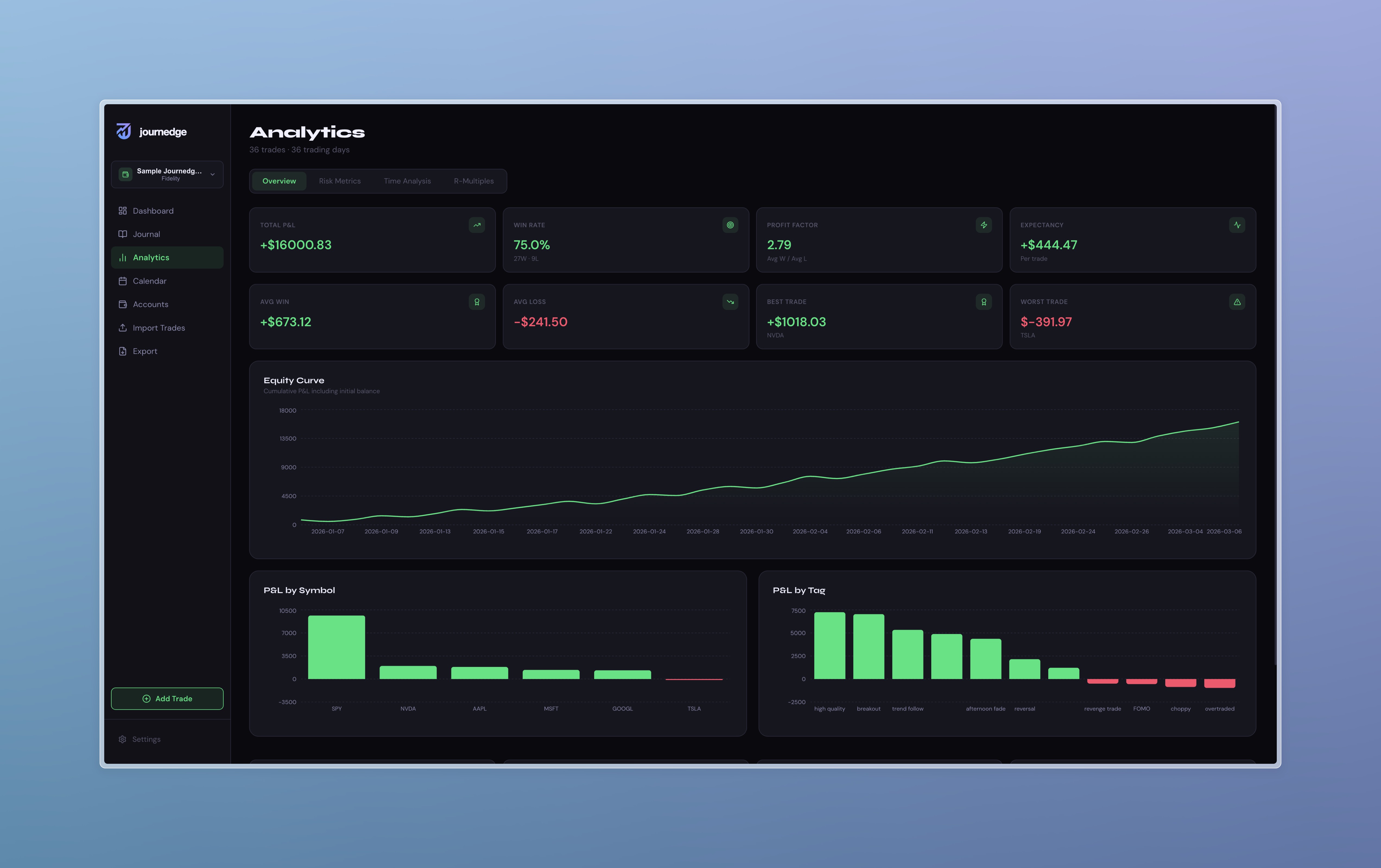
Analytics — Risk Metrics
Sharpe, Sortino, and Calmar ratios. Drawdown curve over time. Rolling 20-trade win rate.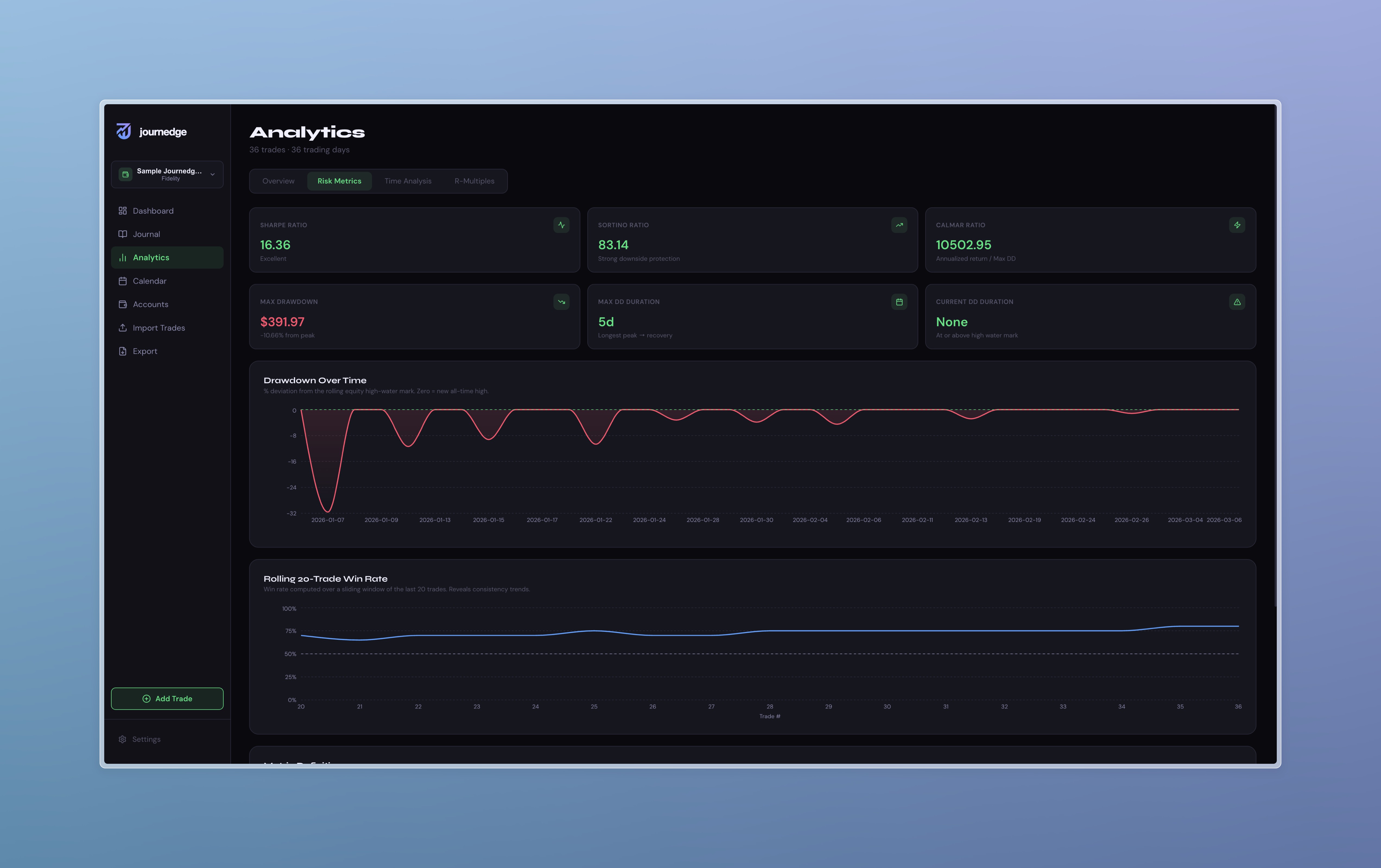
Analytics — Time Analysis
P&L and win rate by day of week, daily distribution bars, and win rate by tag.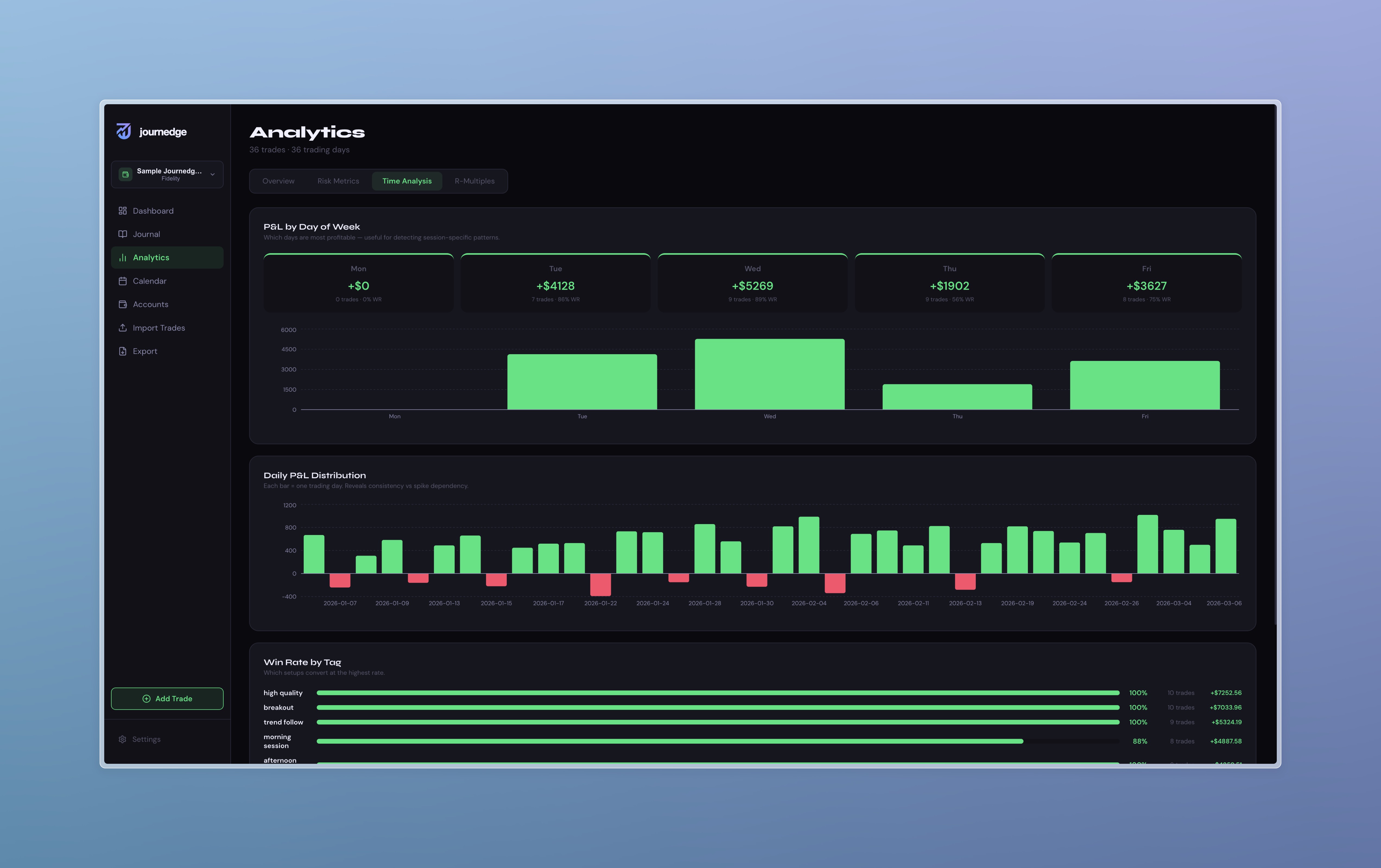
Export
Report builder with date range, ticker, tag, and status filters. Live PDF preview.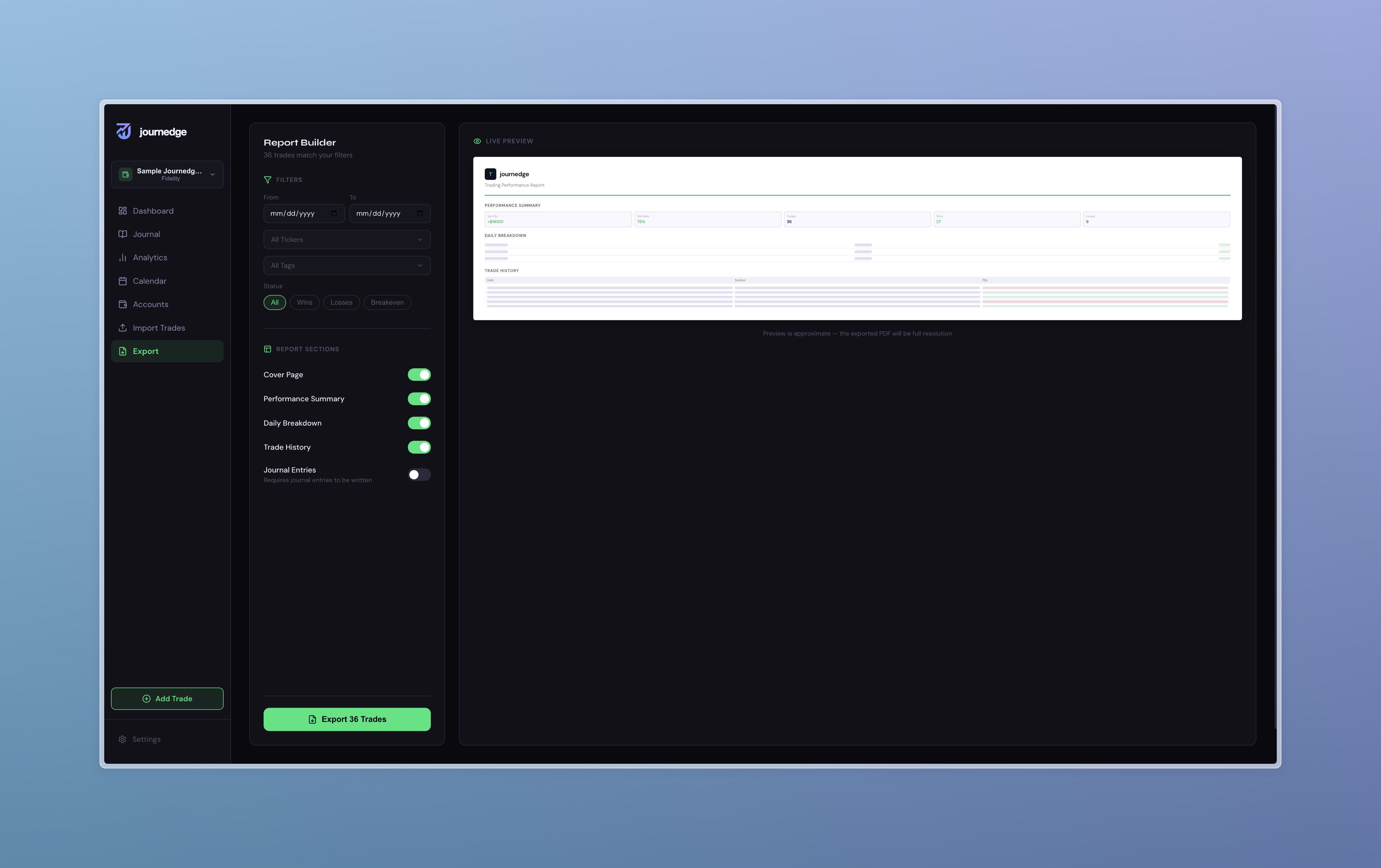
Features
Trade Management
- Import trades from five brokers — format auto-detected on file drop, no configuration required
- Manual trade entry with live P&L preview, auto symbol detection, and OCC option symbol parsing
- Multi-account support — create separate accounts per broker, switch from the sidebar, all data is account-scoped
- Full trade journal with rich text, tags, screenshots, entry/exit times, R:R ratio, chart links, MAE, and MFE
- Idempotent imports — re-importing the same file does not create duplicates
Journal Editor
The journal editor is a full word processor built on TipTap and ProseMirror.
Toolbar features:
- Undo / Redo
- Font family — 15 fonts including DM Sans, Montserrat, Inter, Poppins, Playfair Display, Georgia, Times New Roman, and more. Google Fonts load dynamically on selection
- Font weight — Light through ExtraBold
- Headings H1, H2, H3
- Bold, italic, underline, strikethrough
- Text color — 40-swatch palette, pinnable colors, custom hex input
- Highlight — 20-swatch palette, pinnable colors, custom hex input
- Text alignment — left, center, right, justify
- Bullet and numbered lists
- Horizontal divider
- Link and image insertion
Templates — define a document structure once and save it as a template. Set it to auto-apply for specific trade types (options, stocks, futures, or all). When you open a new empty journal for a matching trade type, the template is applied automatically.
Tag System
Tags are stored in a dedicated database table and shared globally across the app. Every entry point — the journal editor, the quick view panel, and the add trade modal — uses the same tag selector. Creating a new tag anywhere persists it immediately and makes it available everywhere.
Dashboard
- Stat cards for net P&L, win rate, profit factor, and average loss — reactive to active filters
- Filter by symbol, status, tag, date range, and free-text search simultaneously
- Full trade history table with click-to-open detail panel
- WIN/LOSS status indicators always display in fixed red/green regardless of accent color theme
Analytics Engine
Performance metrics
- Net P&L and equity curve from initial account balance
- Win rate, profit factor, expectancy in dollars per trade
- Average win, average loss, best trade, worst trade
- Maximum win streak, maximum loss streak, current streak
- Sharpe ratio — annualised to 252 trading days
- Sortino ratio — penalises downside deviation only
- Calmar ratio — annualised return divided by max drawdown
- Maximum drawdown in dollars and percentage from equity peak
- Longest and current drawdown duration
- Rolling 20-trade win rate
- Daily P&L distribution
- P&L by day of week with win rate per session
- R-multiple histogram using average loss as 1R proxy
- Average R per trade and expectancy in R units
- MAE / MFE per-trade logging and analysis
- Entry efficiency — how close to the optimal entry price you got
- Exit efficiency — how much of the maximum available move you captured
- Paired MAE/MFE bar chart per trade
- Overtrading detection — flags sessions where trade count significantly exceeds your personal baseline
- Revenge trade sequence detection
- Discipline score
- Risk of ruin calculator with interactive position sizing slider
- Kelly Criterion and half-Kelly recommendation
Calendar
- Monthly calendar with per-day P&L colouring — always red/green, not affected by accent theme
- Calendar automatically opens to the month of your most recent trade
- Click any day to open a detail panel — click any trade to open the full journal editor
Export
- Report builder with date range, ticker, tag, and status filters
- Toggle individual sections — cover page, performance summary, daily breakdown, trade history, journal entries
- Live preview before generating
- PDF rendered entirely client-side — data never transmitted
Settings
- Accent colour themes — green, blue, purple, orange, pink — applied consistently across the entire interface
- Trading preferences — default multiplier, commission, fees
- CSV export for backup or migration
- In-app auto-update — environment-aware, shadow install, semver comparison, backup verification
- Automatic database backup before every update — last five retained
Tech Stack
| Layer | Technology | |-------|-----------| | Framework | Next.js 16.1.6 (App Router, Turbopack) | | Language | TypeScript 5 | | Database | SQLite via Prisma 5 | | Editor | TipTap 2 (ProseMirror) | | Charts | Recharts 3 | | PDF | @react-pdf/renderer 4 | | Icons | Lucide React | | Styling | Inline styles with CSS custom properties |
Getting Started
Prerequisites
- Node.js 20 or higher
- npm or yarn
Installation
git clone https://github.com/TheQuantum-Dev/journedge.git
cd journedge
npm install
cp .env.example .env
npx prisma migrate dev
npm run dev
Open http://localhost:3000 in your browser.
First Steps
- Go to Accounts and create your first account — name it, select your broker, and enter your starting balance.
- Go to Import Trades and drop your broker CSV. Format is detected automatically.
- Your trades populate immediately across Dashboard, Journal, Analytics, Calendar, and Export.
- Open the Journal, click Open Journal on any trade, and start writing.
Importing Trades
| Broker | Status | Notes | |--------|--------|-------| | Fidelity | ✅ Supported | Export from Activity and Orders | | TD Ameritrade | ✅ Supported | Works with post-Schwab merger exports | | Tastytrade | ✅ Supported | Options, stocks, and futures supported | | Interactive Brokers | ✅ Supported | Export from Flex Query or Activity Statement | | Journedge Export | ✅ Supported | Re-import your own exports — all journal data preserved |
How to export from Fidelity
- Go to Accounts and Trade → Activity and Orders
- Select your date range
- Click Download and choose CSV
How to export from Tastytrade
- Go to History
- Set your date range
- Click Export in the top right
How to export from TD Ameritrade
- Go to My Account → History and Statements
- Select Transactions and your date range
- Export as CSV
How to export from Interactive Brokers
- Go to Reports → Flex Queries or open an Activity Statement
- Set format to CSV
- Ensure the Trades section is included
Architecture Notes
Database. SQLite via Prisma. All data is local. The database file lives at prisma/journedge.db and is gitignored.
CSV parsers. Each broker has an isolated parser in app/lib/. The import page runs format detection in priority order — Journedge export first, then Tastytrade, TD Ameritrade, IBKR, with Fidelity as the fallback.
Journal editor. Built on TipTap with ProseMirror as the underlying engine. Documents are stored as TipTap JSON in the journalEntry TEXT column. Legacy plain-text entries render as plain paragraphs. Autosave debounces 1.5 seconds and patches the in-memory trade immediately so navigation never shows stale content.
Tag system. Tags are stored in a dedicated Tag table. On first load, AppContext seeds the table from all existing trade tag arrays. Every subsequent tag creation writes to the database and updates global state in memory — no full reload required.
Template system. Templates are stored in a JournalTemplate table as TipTap JSON with a scope string (all, option, stock, future, or comma-separated combinations). Auto-apply runs when the editor opens an empty journal — it queries matching templates and applies silently if exactly one matches.
PDF generation. @react-pdf/renderer runs entirely in the browser via a dynamic import with ssr: false.
MAE/MFE. Two nullable float columns on the Trade table. Entry efficiency (MFE / (MFE + MAE)) and exit efficiency (PnL / MFE on wins) are computed at read time in the analytics engine — no denormalized values stored.
Behavioral analytics. Overtrading detection uses a statistical threshold of mean + 1.5 standard deviations of daily trade count. Risk of ruin uses a normalized edge formula derived from win rate and payoff ratio. Kelly Criterion is computed from the same inputs and displayed alongside a half-Kelly recommendation.
Theme system. All UI colors use CSS custom properties. Financial indicators (win/loss P&L, calendar cells) use hardcoded green/red constants so they are never affected by the user's accent color selection. UI chrome (buttons, borders, active states) uses var(--accent-green) and updates with the theme.
Auto-update. The update endpoint streams progress via Server-Sent Events. Detects Vercel, Docker, and write-permission issues at preflight. Uses a shadow install directory so the running server's node_modules is never touched until the swap completes. Deletes .next at the end of the pipeline after packages are fully rebuilt. Supports both git and zip-based installations.
State management. A single React Context holds all trades, accounts, tags, and navigation state. updateTradeInMemory patches a single trade in the array without a full API reload — used by autosave and tag saves in the editor.
Project Structure
journedge/
├── app/
│   ├── api/
│   │   ├── accounts/            # Account CRUD
│   │   ├── trades/              # Trade read, write, patch, clear
│   │   ├── tags/
│   │   ├── templates/
│   │   ├── upload/              # Screenshot file uploads
│   │   └── update/              # Auto-update SSE stream + restart endpoint
│   ├── components/
│   │   ├── Sidebar.tsx          # Navigation and account switcher
│   │   ├── TradePanel.tsx       # Slide-out journal and edit panel
│   │   ├── AddTradeModal.tsx    # Manual trade entry
│   │   ├── TagSelector.tsx
│   │   ├── JournalToolbar.tsx
│   │   ├── TradingReportPDF.tsx # PDF document definition
│   │   └── ExportPDFInner.tsx   # Client-only PDF download wrapper
│   ├── context/
│   │   └── AppContext.tsx       # Global state — trades, accounts, navigation
│   ├── hooks/
│   │   └── useSettings.ts       # Settings persistence via localStorage
│   ├── lib/
│   │   ├── types.ts             # Shared Trade and Account interfaces
│   │   ├── db.ts                # Prisma client singleton
│   │   ├── svgToPng.ts          # SVG rasteriser for PDF logo
│   │   ├── parseFidelityCSV.ts
│   │   ├── parseTDAmeritradeCSV.ts
│   │   ├── parseTastytradeCSV.ts
│   │   ├── parseIBKRCSV.ts
│   │   └── parseJournedgeCSV.ts  # Journedge export format parser
│   └── pages/
│       ├── Dashboard.tsx
│       ├── JournalPage.tsx
│       └── JournalEditorPage.tsx  # Journal Editor Page
│       ├── AnalyticsPage.tsx
│       ├── CalendarPage.tsx
│       ├── ImportPage.tsx
│       ├── AccountsPage.tsx
│       ├── ExportPage.tsx
│       └── SettingsPage.tsx
├── prisma/
│   ├── schema.prisma            # Database schema
│   └── migrations/              # Full migration history
├── public/
│   ├── journedge-logo-dark.svg
│   ├── journedge-logo-light.svg
│   └── journedge-icon.svg
├── scripts/
│   └── changelog.js             # Automated changelog entry generator
└── backups/                     # Auto-update database backups (gitignored)
Roadmap
v3.2.0 — Current
- MAE/MFE tracking per trade with execution quality analytics
- Overtrading detection and behavioral analysis
- Risk of ruin calculator with Kelly Criterion
- Discipline score
- Theme consistency fixes — financial indicators always red/green
- Calendar auto-snaps to most recent trade month
- Robust auto-update pipeline with shadow install and environment detection
- Import page full-width layout
- Pre-trade planning
- Strategy playbook
- Hour-of-day performance heatmap
- Daily risk controls
- Position sizing calculator
- Light mode
Contributing
Contributions are welcome. Please read CONTRIBUTING.md before opening a pull request.
Changelog
See CHANGELOG.md for full release history back to v1.0.0.
Security
See SECURITY.md for the vulnerability disclosure policy.
License
Journedge is open source under the MIT License.
Built by TheQuantum-Dev
Built for traders who take their craft seriously.


