
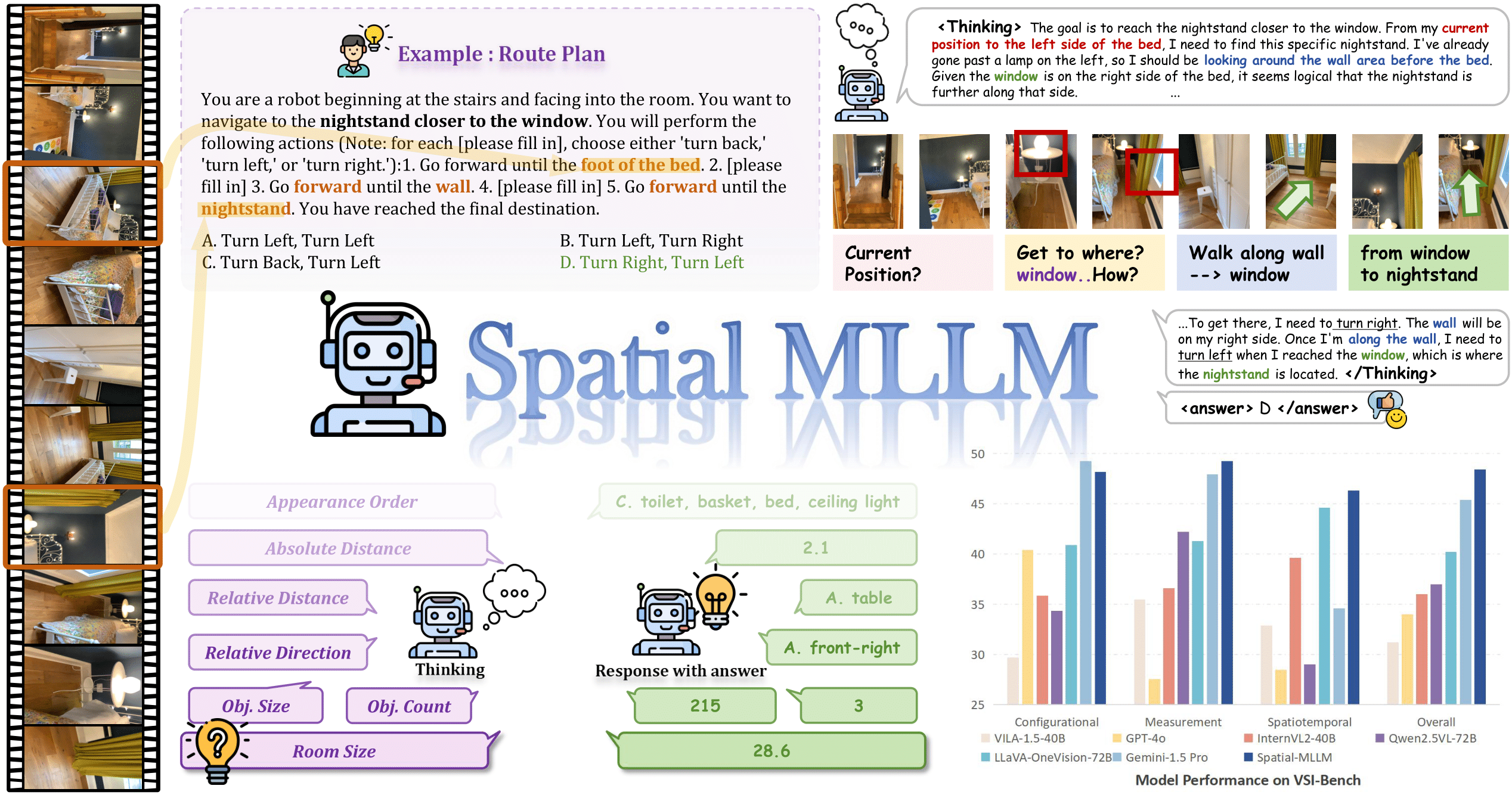
[NeurIPS 2025 Spotlight] Official implementation of Spatial-MLLM: Boosting MLLM Capabilities in Visual-based Spatial Intelligence
✨Spatial-MLLM: Boosting MLLM Capabilities in Visual-based Spatial Intelligence✨
Diankun Wu1*, Fangfu Liu1*, Yi-Hsin Hung1, Yueqi Duan1,
*Equal Contribution.
1Tsinghua University
NeurIPS 2025 (Spotlight)



📢 News
- 🎉[01/05/2026] We release two new SFT models: Spatial-MLLM-v1.1-Instruct-135K and Spatial-MLLM-v1.1-Instruct-820K.
- 🎉[01/05/2026] We refactor our repo and release the refined SFT training code for Spatial-MLLM-v1.1-Instruct. We also release code for space-aware frame sampling.
- 🎉[05/30/2025] We release Spatial-MLLM-subset-sft, which is trained on a subset of our proposed Spatial-MLLM-120k dataset. We also release the evaluation code on VSI-Bench. Please switch to the
v1.0branch for instructions and code related to this version. - 🔥[05/30/2025] We release "Spatial-MLLM: Boosting MLLM Capabilities in Visual-based Spatial Intelligence". Check our project page and arXiv paper.
🌟 Overview
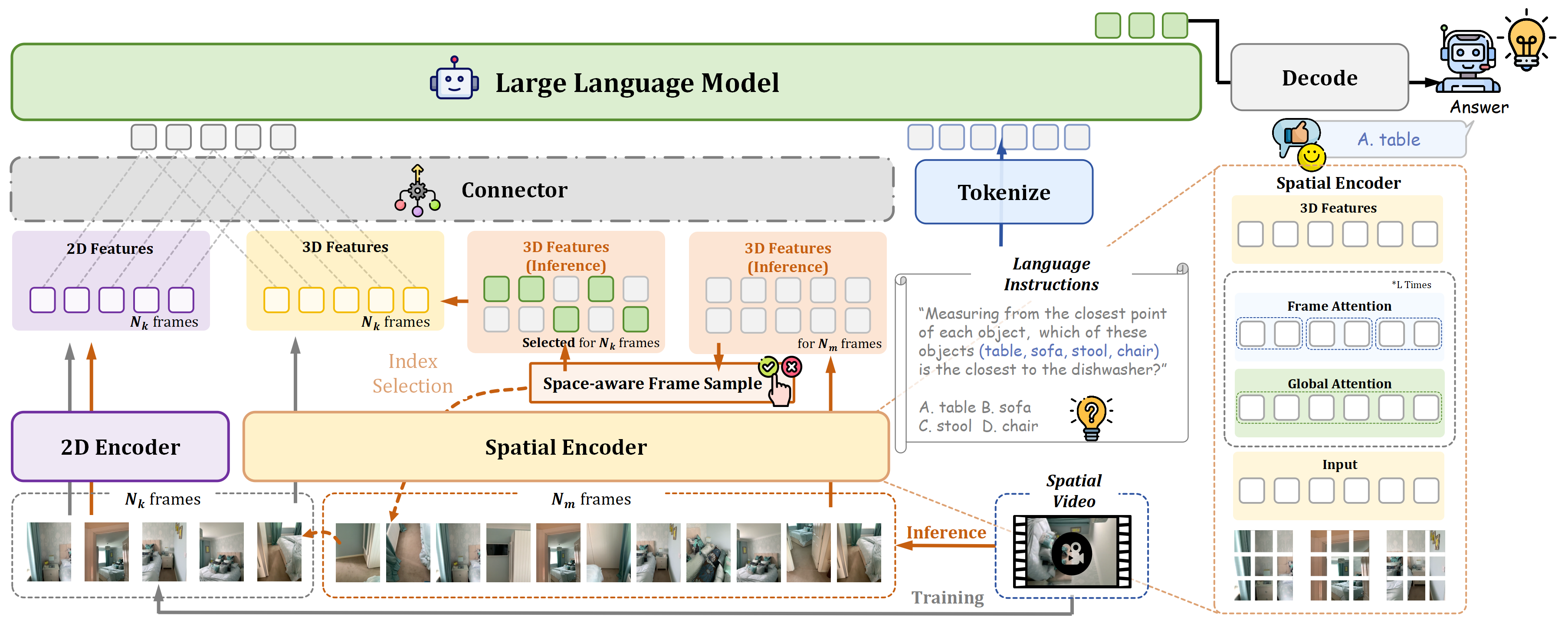
Overview of Spatial-MLLM. Our model is composed of a 2D visual encoder, a spatial encoder which is initialized from a feed-forward visual geometry foundation model, a connector, and a large language model backbone. At inference time, we incorporate a space-aware frame sampling strategy to select spatially informative frames when the number of input frames is limited due to GPU memory constraints.
⚙️ Setup
1. Clone Repository
git clone https://github.com/diankun-wu/Spatial-MLLM
cd Spatial-MLLM
2. Environment Setup
We use conda to manage the environment. First, create conda environment:
conda create -n spatial-mllm python=3.10 -y
conda activate spatial-mllm
Install PyTorch 2.6.0 with CUDA 12.4 support:
pip install torch==2.6.0 torchvision==0.21.0 torchaudio==2.6.0 --index-url https://download.pytorch.org/whl/cu124Install other required packages:
pip install transformers==4.51.3
pip install accelerate datasets decord deepspeed einops matplotlib pandas pythonLevenshtein qwenvl_utils ray safetensors tqdm tyro wandb
Finally, download and install the pre-built wheel for Flash Attention 2:
wget https://github.com/Dao-AILab/flash-attention/releases/download/v2.7.4.post1/flashattn-2.7.4.post1+cu12torch2.6cxx11abiFALSE-cp310-cp310-linuxx86_64.whl
pip install flashattn-2.7.4.post1+cu12torch2.6cxx11abiFALSE-cp310-cp310-linuxx86_64.whl
💻 Inference
To run inference, you can use the script src/inference.py. For example:
python src/inference.py \ --model_path Diankun/Spatial-MLLM-v1.1-Instruct-135K \ --model_type spatial-mllm \ --text "How many chair(s) are in this room?\nPlease answer the question using a single word or phrase."📊 Evaluation
Evaluation on VSI-Bench
To evaluate the model on VSI-Bench, you should first download the VSI-Bench dataset and place it in the datasets/evaluation/vsibench directory. You can use the following command:
# download the VSI-Bench dataset from Hugging Face hf download nyu-visionx/VSI-Bench \     --local-dir datasets/evaluation/vsibench \     --repo-type dataset
extract the downloaded dataset
for f in datasets/evaluation/vsibench/*.zip; do
    unzip "$f" -d datasets/evaluation/vsibench
done
Download the Spatial-MLLM-v1.1-Instruct models to the checkpoints directory (recommended when using multiple GPUs):
mkdir -p checkpoints
download Spatial-MLLM-v1.1-Instruct-135K
hf download Diankun/Spatial-MLLM-v1.1-Instruct-135K \
    --local-dir checkpoints/Spatial-MLLM-v1.1-Instruct-135K
download Spatial-MLLM-v1.1-Instruct-820K
hf download Diankun/Spatial-MLLM-v1.1-Instruct-820K \
    --local-dir checkpoints/Spatial-MLLM-v1.1-Instruct-820K
Then you can use the provided bash script to evaluate the model.
bash scripts/evaluation/evaluatevsibenchspatial_mllm.shCUDAVISIBLEDEVICES environment variable before running the script.
Using Space-aware Frame Sampling
To use the space-aware frame sampling strategy during evaluation, we recommend using our pre-sampled frames. You can download them using the following command:# Download the zip file
hf download Diankun/Spatial-MLLM-Data evaluation/vsibench/sasampling16f.zip \
--repo-type dataset \
--local-dir .
Unzip the file
unzip evaluation/vsibench/sasampling16f.zip -d datasets/evaluation/vsibench/arkitscenessampling16fYou can also sample frames using our provided script:
bash scripts/evaluation/sa_sampling.shThis script will use space-aware frame sampling to sample frames for all videos in datasets/evaluation/vsibench and save the sampled frames to datasets/evaluation/vsibench/sasampling16f.
Then, you can use the provided bash script to evaluate the model with the sampled frames.
bash scripts/evaluation/evaluatevsibenchspatialmllmwsasampling.shHere are our evaluation results for Spatial-MLLM-v1.1-Instruct and baseline models on VSI-Bench (16 frames input):
| Model | VSIBench Micro | VSIBench Macro | ||||
|---|---|---|---|---|---|---|
| Acc | MRA | All | Acc | MRA | All | |
| Qwen2.5-VL-3B-Instruct | 35.42 | 20.72 | 27.86 | 32.84 | 21.65 | 27.25 |
| Qwen2.5-VL-3B-Instruct-135K | 46.91 | 52.60 | 49.84 | 46.47 | 52.81 | 49.64 |
| Spatial-MLLM-v1.1-Instruct-135K | 49.28 | 52.88 | 51.13 | 47.07 | 53.88 | 50.48 |
| Spatial-MLLM-v1.1-Instruct-135K (SA Sampling) | 52.13 | 53.33 | 52.75 | 49.15 | 54.46 | 51.81 |
| Spatial-MLLM-v1.1-Instruct-820K | 49.56 | 57.27 | 53.53 | 48.60 | 57.39 | 53.00 |
| Spatial-MLLM-v1.1-Instruct-820K (SA Sampling) | 50.60 | 57.68 | 54.24 | 48.78 | 58.09 | 53.43 |
Evaluation on ScanQA
We also provide evaluation scripts for ScanQA:bash scripts/evaluation/evaluatescanqaspatial_mllm.shdatasets/visuals/scannet/videos before evaluation.
After evaluation, you will get the results saved in results/scanqa/Spatial-MLLM-v1.1-Instruct-135K-16f.json. Then use the following command to calculate the metrics:
python src/evaluation/scanqa/score_scanqa.py \ --input-file "results/scanqa/Spatial-MLLM-v1.1-Instruct-135K-16f.json"🚂 Training
You can refer to our TRAINING.md for detailed training instructions.
📚 Citation
If you find it useful for your research and applications, please cite our paper using this BibTeX:
@article{wu2025spatialmllmboostingmllmcapabilities, title={Spatial-MLLM: Boosting MLLM Capabilities in Visual-based Spatial Intelligence}, author={Wu, Diankun and Liu, Fangfu and Hung, Yi-Hsin and Duan, Yueqi}, journal={arXiv preprint arXiv:2505.23747}, year={2025} }Acknowledgements
Thanks to these great repositories: thinking-in-space, VGGT, Qwen2.5-VL, open-r1, R1-V, Video-3D-LLM, VLM-R1, VLM-3R, MindCube, Cambrian-S and many other inspiring works in the community.


