
No description available.
nautilus-open-any-terminal

is an extension for nautilus, which adds an context-entry for opening other terminal emulators than gnome-terminal.
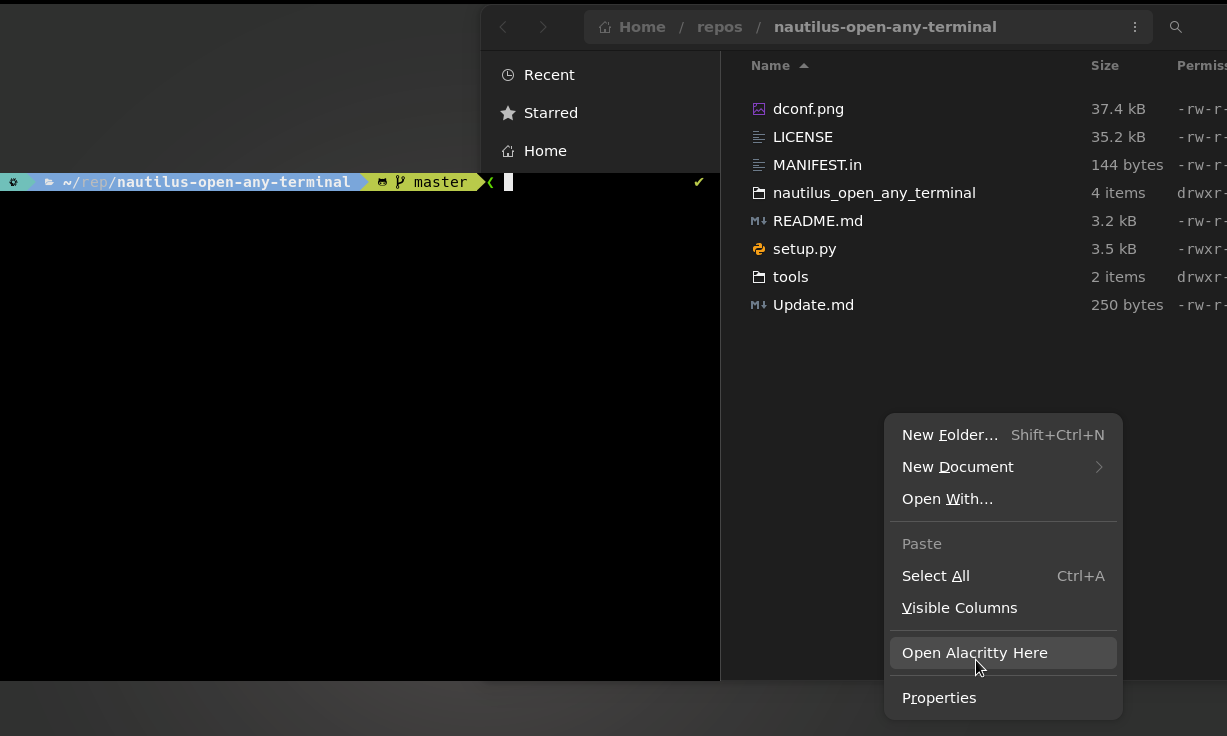
Supported file managers
- Nautilus
- Caja
Supported Terminal Emulators
The following terminal emulators are fully supported. PRs for other terminals are welcome!
alacrittyapp2unit-termblackbox( useblackbox-terminalfor Debian)bobcatcool-retro-termcontourcosmic-termdeepin-terminalddtermfoot/footclientghostty(requiresgtk-single-instance = falsein the Ghostty config, otherwise the working directory flag is ignored by a running instance)gnome-terminalguakekermitkgx(GNOME Console)kittykonsolemate-terminalmltermptyxisqterminalriosakurasttabbyterminatorterminologyterminustermitetilixurxvturxvtcuwsm-terminalwarpweztermxfce4-terminalxterm/uxterm
custom, which allows you to set custom commands for opening a local or remote terminal via dconf.
Installing
From the AUR (Arch Linux) 
yay -S nautilus-open-any-terminalNixpkgs (NixOS) 
For configuration.nix (works without needing to enable Gnome DE)
programs.nautilus-open-any-terminal = {
  enable = true;
  terminal = "kitty";
};
environment.systemPackages = with pkgs; [   nautilus ];
From PYPI 
Dependencies to install before:
nautilus-python(python-nautilus/python3-nautilus(newer) package on Debian / Ubuntu)gir1.2-gtk-4.0(Debian / Ubuntu)typelib-10-Gtk-40(openSUSE)
pip install --user nautilus-open-any-terminalSystem-wide install:
pip install nautilus-open-any-terminalFor Debian/Ubuntu based Distros
Download the '.deb' package from the GitHub releases page. Debian packages are automatically built and attached to each release via CI.
After downloading, install it with the apt command:
apt install <package_name>.debOr depending on your Linux Distro, you can just double-click the '.deb' file and install it that way.
For Fedora Copr
dnf copr enable monkeygold/nautilus-open-any-terminal
dnf install nautilus-open-any-terminal
From source
Requires gettext.
git clone https://github.com/Stunkymonkey/nautilus-open-any-terminal.git
cd nautilus-open-any-terminal
make
make install schema      # User install sudo make install schema # System install
install installs this extension to extension directories of all supported file managers. To avoid this, use install-nautilus or install-caja instead.
make install-nautilus schema # Install nautilus only
make install-caja schema     # Install caja only
restart nautilus
Then kill Nautilus to allow it to load the new extension:
nautilus -qSettings
To configure the plugin's behaviour make sure to run (system-wide):
glib-compile-schemas /usr/share/glib-2.0/schemasor for (user-wide) installation:
glib-compile-schemas ~/.local/share/glib-2.0/schemas/via dconf-editor
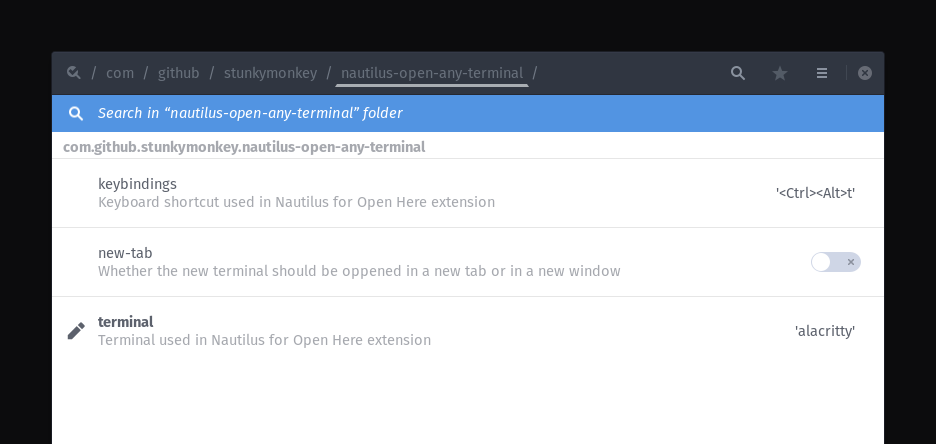
via command-line
gsettings set com.github.stunkymonkey.nautilus-open-any-terminal terminal alacritty
gsettings set com.github.stunkymonkey.nautilus-open-any-terminal keybindings '<Ctrl><Alt>t'
gsettings set com.github.stunkymonkey.nautilus-open-any-terminal new-tab true
gsettings set com.github.stunkymonkey.nautilus-open-any-terminal flatpak system
Uninstall
Since setup.py does not provide a natively uninstall method the Makefile has an uninstall option.
make uninstall schema      # user uninstall
sudo make uninstall schema # system uninstall


