
Minimalistic & highly extensible project manager for NeoVim.
Whaler

Lost in the ocean of your unordered and unorganized file-explorer looking for that project? Whaler has you covered.
What is Whaler?
Whaler is a minimalist project / directory navigator. It provides a clean interface to work with projects.
It is based on the concept of tmux-windowizer from ThePrimeagen which uses a set of directories and fzf to move to another directory in a new tmux session.
Whaler offers a fast experience to move between projects without having much hassle, while giving users the ability to customize their experience as much as possible.
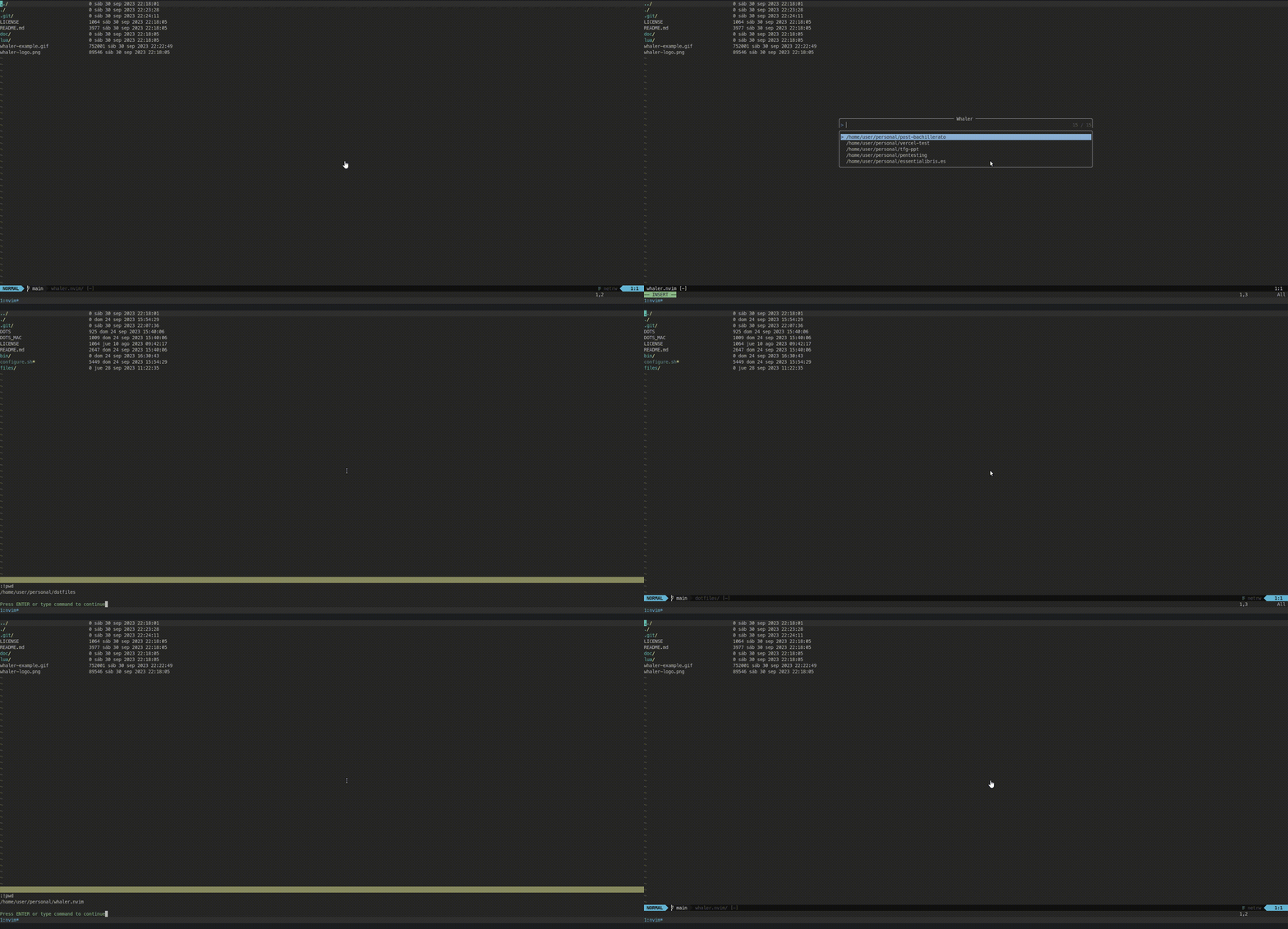
The gist of whaler.nvim is simple:
- Set the parent directories where projects live. All the subdirectories will be considered projects for Whaler (
directories). - If there are single directories you need as projects you can also define them (
oneoff_directories) - Execute
Whalerto move between projects! - You can customize Whaler to make it your own project navigator. See Options and API for advanced usage.
Whaler: Table of Contents
- Getting started
- Installation
- Usage
- Options
- User Events
- API
- Supported Pickers
- Supported File Explorers
- Related Projects
Getting Started
Whaler is a neovim project / directory navigator.
Dependencies
Optional pickers:Minimal installation setup
Using lazy.nvim:
return {
    "SalOrak/whaler",
    opts = {
        -- Directories to be used as parent directories. Their subdirectories
        -- are considered projects for Whaler.
        directories = {
            "path/to/parent/project",
            { path = "path/to/another/parent/project", alias = "An alias!"}
        },
        -- Directories to be directly used as projects. No subdirectory lookup.
        oneoff_directories = {
            { path = "~/.local/share/nvim/lazy", alias = "Neovim Installation"},
            { path = "~/.config/", alias = "Config directory"}
        },
-- Picker to use. By default uses telescope for compatibility reasons.         -- Options are 'telescope', 'fzf_lua', 'snacks' and 'vanilla' (uses vim.ui.input).         picker = "telescope"     }, }
Or you can also set up whaler.nvim as a Telescope extension.
return { 	{         "nvim-telescope/telescope.nvim", 		dependencies = {             "salorak/whaler.nvim", -- Make sure to add whaler as a dependency.         },          config = function()             local t = require("telescope")
t.setup({                 --- ... your telescope configuration .. ---                 extensions = {                     whaler = {                         -- Directories to be used as parent directories. Their subdirectories                          -- are considered projects for Whaler.                         directories = {                             "path/to/parent/project",                              { path = "path/to/another/parent/project", alias = "An alias!"}                         },                         -- Directories to be directly used as projects. No subdirectory lookup.                         oneoff_directories = {                             { path = "~/.local/share/nvim/lazy", alias = "Neovim Installation"}                             { path = "~/.config/", alias = "Config directory"}                         },
-- Picker to use. By default uses telescope for compatibility reasons.                         -- Options are 'telescope', 'fzf_lua', 'snacks'  and 'vanilla' (uses vim.ui.input).                         picker = "telescope"
},                 }             })
-- Don't forget to load Whaler as an extension!             t.load_extension("whaler")         end
Usage example
Whaler does not have any mappings by default. It is up to you to create any mappings.
You can also call the Whaler and WhalerSwitch user commands.
In the configuration file:
-- Telescope setup() local telescope = require('telescope')
telescope.setup({     -- Your telescope setup here...     extensions = {         whaler = {             -- Whaler configuration             directories = { "path/to/dir", "path/to/another/dir", { path = "path/to/yet/another/dir", alias = "yet" } },             -- You may also add directories that will not be searched for subdirectories             oneoff_directories = { "path/to/project/folder",  { path = "path/to/another/project", alias = "Project Z" } },         }     } }) -- More config here telescope.load_extension("whaler") --
-- Open whaler using <leader>fw vim.keymap.set("n", "<leader>fw", function()     local w = telescope.extensions.whaler.whaler     w({         -- Settings can also be called here.         -- These would use but not change the setup configuration.     })  end,)
-- Or directly vim.keymap.set("n", "<leader>fw", telescope.extensions.whaler.whaler)
In addition to passing strings into the directories and oneoff_directories parameters above one may also choose to use tables such as {path="/path/to/dir", alias="Personal Projects"}, this will modify the text presented in the selection UI to show [Personal Projects] theproject instead of the full path to each of the project folders.
Now, pressing <leader>fw will open a Telescope picker with the subdirectories of the specified directories for you to select.
Options
Whaler.nvim shines the most when your personal touch is added. Below is the default and complete list of configuration options. Here is the list of a default configuration:
whaler = {     -- Path directories to search. By default the list is empty.     directories = { "/home/user/projects", { path = "/home/user/work", alias = "work" } },
-- Path directories to append directly to list of projects. By default is empty.      oneoff_directories = { "/home/user/.config/nvim" },
-- Whether to automatically open file explorer. By default is true     autofileexplorer = true,
-- Whether to automatically change current working directory. By default is true     auto_cwd = true,
-- Minimum verbosity level to notify when something happens. By default is WARN.     -- See vim.log.levels      verbosity = vim.log.levels.WARN,
-- Automagically creates a configuration for the file explorer of your choice.      -- Options are "fzfluaexplorer", "netrw"(default), "nvimtree", "neotree", "oil", "telescopefilebrowser", "rnvimr"     file_explorer = "netrw",
-- Show hidden directories or not (default false)     hidden = false,
-- (OPTIONAL) If you want to fully customize the file explorer configuration,      -- below are all the possible options and its default values.     fileexplorerconfig = {
-- Plugin. Should be installed.         plugin_name = "netrw",
-- The plugin command to open.         -- Command must accept a path as parameter         -- Prefix string to be appended after the command and before the directory path.          command = "Explorer",                                         -- Example: In the telescopefilebrowser the value is  path=.         --          The final command is Telescope file_browser path=/path/to/dir.         -- By default is " " (space)         prefix_dir = " ",          },
-- Which picker to use. One of 'telescope', 'fzf_lua', 'snacks'  or 'vanilla'. Default to 'telescope'     picker = "telescope",
-- Picker options     -- Options to pass to Telescope. Below is the default.     telescope_opts = {         results_title = false,         layout_strategy = "center",         previewer = false,         layout_config = {             --preview_cutoff = 1000,             height = 0.3,             width = 0.4,         },         sorting_strategy = "ascending",         border = true,     },     -- For compatiblity you can also use theme directly to modify Telescope.      theme = {},       -- Options to pass to FzfLua directly. See     -- https://github.com/ibhagwan/fzf-lua?tab=readme-ov-file#customization for     -- options. Below is the defaults.     fzflua_opts= {         prompt = "Whaler >> ",         --- You can modify the actions! Go ahead!         actions = {             ["default"] = function(selected)                     local Whaler = require'whaler'                     local dirsmap = State:get().dirsmap
local display = selected[1]                      local path = dirs_map[selected[1]]
-- For changing projects and                     Whaler.select(path, display)                 end
},         fnformatentry = function(entry)             if entry.alias then                 return (                         "["                         .. entry.alias                         .. "] "                         .. vim.fn.fnamemodify(entry.path, ":t")                        )             end             return entry.path             end,     },
snacks_opts = {         title = "Whaler",         prompt = "Whaler >> ",         preview = "file",         format_entry = function(entry)             if entry.alias then                 return {                     alias = "[" .. entry.alias .. "]",                      pathname = vim.fn.fnamemodify(entry.path, ":t"),                 }             else                 return {                     alias = nil,                     pathname = entry.path                 }         end             end,             keys = {                 ["CR"] = "confirm",                 ["<C-y>"] = { "confirm", mode = {"i", "n"}},                 ["<C-n>"] = { "list_down", mode = {"i", "n"}},                 ["<C-p>"] = { "list_up", mode = {"i", "n"}},                 ["<C-d>"] = { "listscrolldown", mode = {"i", "n"}},                 ["<C-u>"] = { "listscrollup", mode = {"i", "n"}},                 ["gg"] = { "listscrolltop", mode = {"n"}},                 ["G"] = { "listscrollbottom", mode = {"n"}},                 ["<M-p>"] = { "toggle_preview", mode = {"i", "n"}},             },     },
}
Whaler.nvim changes the current working directory (cwd) to the selected directory AND opens the file explorer (netrw by default).
Changing auto_cwd to false will make Whaler to only open the file explorer in the selected directory while maintaining the previous current working directory.
Changing autofileexplorer to false while keeping auto_cwd enabled will make Whaler to change the current working directory to the selected one but without losing the current file.
The file_explorer is a shortcut that automatically creates a fileexplorerconfig with some basics commands. You can, for example, use the default netrw but instead of using Explore you can use VExplore. Below the configuration changes to use VExplore instead of Explore.
whaler = { -- Some config here fileexplorerconfig = { plugin_name = "netrw", -- Plugin name. command = "Vexplore", -- Vertical file explorer command prefix_dir = " ", -- (Optional) By default is space. }, }User Events
whaler.nvim automatically fires user events on certain moments. These are the following:
WhalerPre: Before executing the picker. It contains the dictionary of
whaler.
WhalerPost: After executing the picker. Contains the current state (path and display).
select. Beware of it if you customize the actions.
WhalerPreSwitch: Before actually switching projects. Contains the previous
switch function.
WhalerPostSwitch: After switching to another project. Fired when calling the
switch function.
See API to know more about using the Whaler.nvim API.
API
The exposed API interface is quite small. There are only 4 functions to use.
whaler(run_opts)
---@param run_opts table General options for runtime mods.
function whaler(run_opts) endnetrw or oil. The run_opts are
runtime options. These options are the same ones used during the setup section
and they overwrite them. Allows for fine grain control of whaler. You can
create multiple whaler functions that act on different projects lists, execute
different commands or have different themes. Fires WhalerPre after generating
the projects list. The data object contains a key called projects with the
projects.
switch(path, display)
---@param path string Path to project to switch to.
---@param display string? Name of the project to switch to.
function switch(path, display) end
Switches to another path, changing the current whaler project state. It fires the WhalerPreSwitch before switching and WhalerPostSwitch after switching. Use it whenever you want to change to another project directly.
select(path, display)
---@param path string Path to project to switch to.
---@param display string? Name of the project to switch to.
function select(path, display) end- Calling
switchifauto_cwdis set to true. - Executing the file explorer command whenever
autofileexploreris set to
- Finally, firing the
WhalerPostuser event.
current()
---@return {path: string?, display?} table Current state
function current() end
Returns the current state of Whaler. That is, the project (path) selected as well as the display name. They both can be nil. Useful when you want to act on the current project.
Supported Pickers
Currently there are only 3 supported pickers:
vanilla: Does not require any external plugin. It usesvim.ui.input.telescope: UsesTelescope.fzf_lua: UsesFzfLua.snacks: UsesSnacks Picker.
Supported File Explorers
Currently the following file explorers are supported out of the box:
- fzf-lua-explorer. Does not require any configuration.
- [netrw](): Default and fallback option.
- Neo-Tree. Does not require any configuration.
- Oil. Does not require any configuration.
- Nvim-Tree. To work as intended add
syncrootwithcwd = truein thenvim-treesetup function. - Telescope-file-browser. Does not require any configuration.
- rnvimr. To work as intended add the following code to the
rnvimrsettings file and add thefileexplorer = "rnvimr"in thewhalerconfiguration block. If the ranger window seems "buggy" get into insert modeiand it should work as usual.
-- Setup rnvimr vim.api.nvimcreateuser_command("RnvimrOpen", function(args)     if #args.fargs == 1 then        local arg = vim.fn.expand(args.fargs[1])        vim.api.nvimcallfunction("rnvimr#open", { arg })     else        vim.api.nvim_command("RnvimrToggle")     end end, { nargs = "?" })
vim.api.nvimsetkeymap( "n", "<leader>e", ":RnvimrOpen<CR>", { noremap = true, desc = "Ranger File Explorer" })
Related projects
There are MANY file explorers in the neovim communniity, check them out!
But there are many extensions and projects that do relatively the same thing.
Check them out:
You can find more telescope extensions in the Telescope Extensions Wiki.If you use or prefer any other let me know and I'll add them here.
Credits
Shoutouts to all the great contributrs actively working onWhaler.nvim that helped shape the plugin.
- GCBallesteros - for constantly suggesting and developing Whaler.


