
Terminal Fret Board: A CLI tool that display guitar chords and scales in the terminal
Terminal Fret Board
A CLI tool that display guitar chords and scales in the terminal. It is built to supports any kind of instrument that has strings with frets.
It's one more reason to stay in your terminal.
TFB command
By default the tfb command is interactive, allowing you to search for a given mode and root note.
- use
upanddownto browse the list. - use
leftandrightto change the root note. - use
/to fuzzy search a mode name. - use
escto reset the UI. - use
g,u,bto switch instrument (Guitar, Ukulele, Bass)
hjkl are supported too.
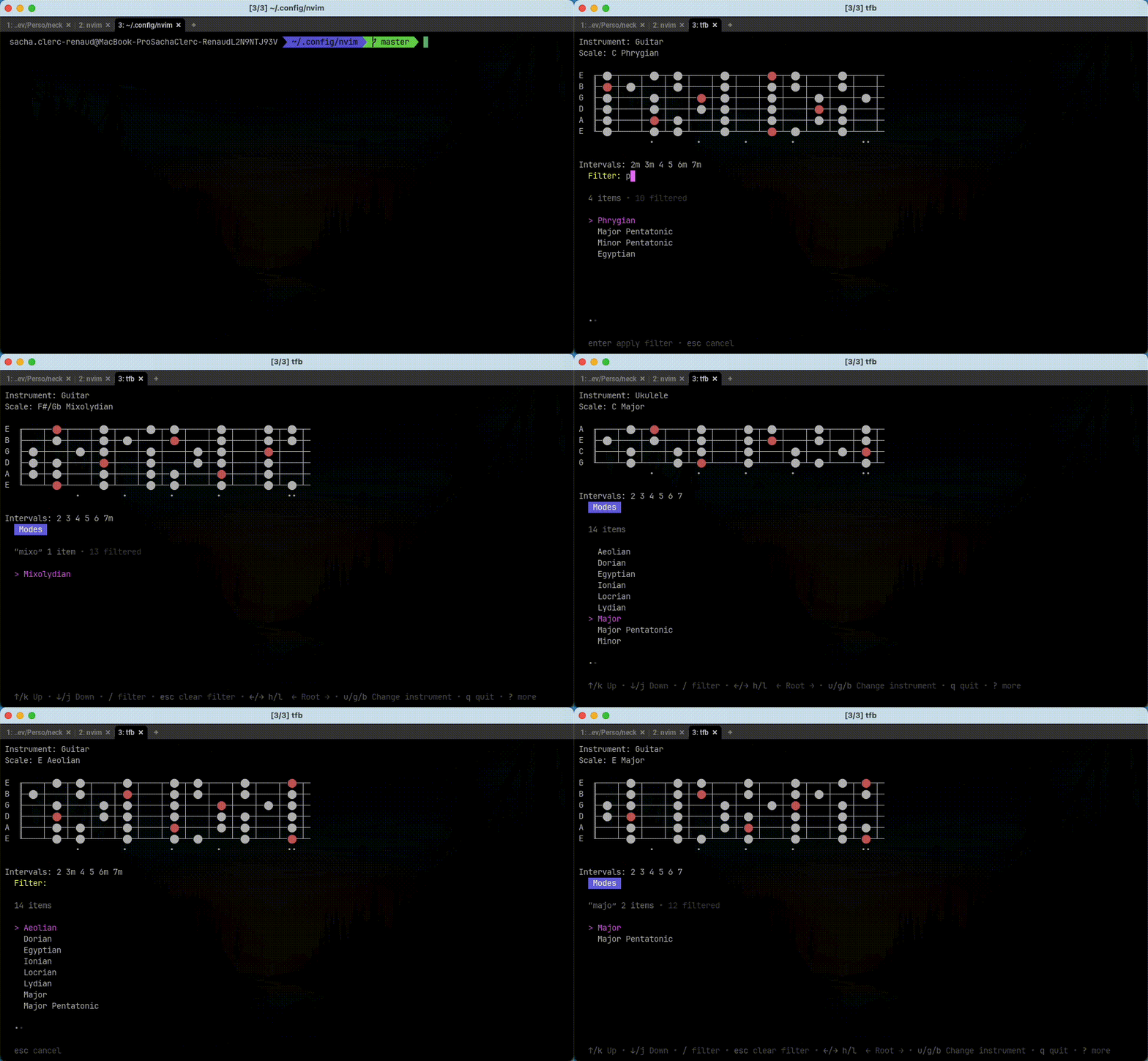
But you can also pass argument like this
tfb ionian -r D : This will directly render the diagram to the standard output.
Custom Tuning
You can represent any tuning and neck by using the --tuning, -t flag:
tfb --tuning D-A-D-G-B-E: This would render a neck in Drop D.
tfb -t B-E-A-D-G-B-E: 7 strings guitar tuning
Chords
$ tfb chord 0-2-2-0-0-0E 0╓────┬────┬────┬─
B 0╟────┼────┼────┼─
G 0╟────┼────┼────┼─
D ╟────┼─⬤─┼────┼─
A ╟────┼─⬤─┼────┼─
E 0╙────┴────┴────┴─Print chords that you pass in argument. Example: 0-2-2-0-0-0
Use x to mute strings. Example x-x-0-2-3-2
E  ╓────┬─⬤─┬────┬─
B  ╟────┼────┼─🔴─┼─
G  ╟────┼─⬤─┼────┼─
D 0╟────┼────┼────┼─
A x╟────┼────┼────┼─
E x╙────┴────┴────┴─
Usage: tfb chord [flags]
Flags:
-h, --help help for chord
-n, --name string Give a chord name like Major7 or m7b5
-r, --root string Set the root of your chord. Example: C, D#, Bb...
Scales
$ ./tfb scale C-D-E-F-G-A-BWill display:
E ╓─⬤─┬────┬─⬤─┬────┬─⬤─┬────┬─⬤─┬─🔴─┬────┬─⬤─┬────┬─⬤─┬─ B ╟─🔴─┼────┼─⬤─┼────┼─⬤─┼─⬤─┼────┼─⬤─┼────┼─⬤─┼────┼─⬤─┼─ G ╟────┼─⬤─┼────┼─⬤─┼─🔴─┼────┼─⬤─┼────┼─⬤─┼─⬤─┼────┼─⬤─┼─ D ╟────┼─⬤─┼─⬤─┼────┼─⬤─┼────┼─⬤─┼────┼─⬤─┼─🔴─┼────┼─⬤─┼─ A ╟────┼─⬤─┼─🔴─┼────┼─⬤─┼────┼─⬤─┼─⬤─┼────┼─⬤─┼────┼─⬤─┼─ E ╙─⬤─┴────┴─⬤─┴────┴─⬤─┴────┴─⬤─┴─🔴─┴────┴─⬤─┴────┴─⬤─┴─ • • • • ••Print scale that you pass in argument. Example: C-D-E-F-G-A-B
Takes the first note of the scale as root note.
Usage: tfb scale [flags]
Flags:
-h,--helphelp for scale
-n,--namestring Set the scale name. Example: Major
-f,--fromint Render from that fret number (default 1)
--toint Last fret number to render (default 12)
-m,--modestring Select the display mode eithercircleornote. Default to circle
-i,--inststring Set the instrument type,Gfor guitar,Bfor Bass,Ufor Ukulele (defaultG)
-t,--tuningstring Set a custom instrument tuning ex:B-E-A-D-G-B-Efor a 7 string guitar. Default toE-A-D-G-B-E
TODO
- [x] Customize list item styling to take less space
- [x] Bug: conflict on key
handlthat changes the root and the pagination in interactive mode - [x] Rename fretString into neckString and move it under the neck package
- [ ] Add a pkg directory at the root of the repository. Verify what is internal or not.
- [ ]
s,--styleoptions to choose the renderng style: utf8, ascii, etc... - [x] An options to display note names instead of circles. Maybe
--mode,m - [x] Verify everything works with
#andbnote with - [ ] Add a
quizsubcommand that randomly display a fret on the screen and wait for you to type the note's name. - [x] Make the base command
tfbdisplaying the fretboard with all the notes. - [x]
-i,--instrumentoption to choose between Guitar, Bass, Ukulele - [x]
-t,--tuningoption to choose the tuning - [ ] Add tests
- [x] Make tfb root command interactive. Allow to select a mode and a root and then render the neck
- [ ] Refactor root command to separate concerns


