
The Swagger/OpenAPI toolchain for .NET, ASP.NET Core and TypeScript.
NSwag: The Swagger/OpenAPI toolchain for .NET, ASP.NET Core and TypeScript
NSwag | NJsonSchema | Apimundo | Namotion.Reflection







:pointright: Announcing Apimundo: An API documentation system based on NSwag and NJsonSchema :point_left:
NSwag is a Swagger/OpenAPI 2.0 and 3.0 toolchain for .NET, .NET Core, Web API, ASP.NET Core, TypeScript (jQuery, AngularJS, Angular 2+, Aurelia, KnockoutJS and more) and other platforms, written in C#. The OpenAPI/Swagger specification uses JSON and JSON Schema to describe a RESTful web API. The NSwag project provides tools to generate OpenAPI specifications from existing ASP.NET Web API controllers and client code from these OpenAPI specifications.
The project combines the functionality of Swashbuckle (OpenAPI/Swagger generation) and AutoRest (client generation) in one toolchain (these two libs are not needed). This way a lot of incompatibilites can be avoided and features which are not well described by the OpenAPI specification or JSON Schema are better supported (e.g. inheritance, enum and reference handling). The NSwag project heavily uses NJsonSchema for .NET for JSON Schema handling and C#/TypeScript class/interface generation.
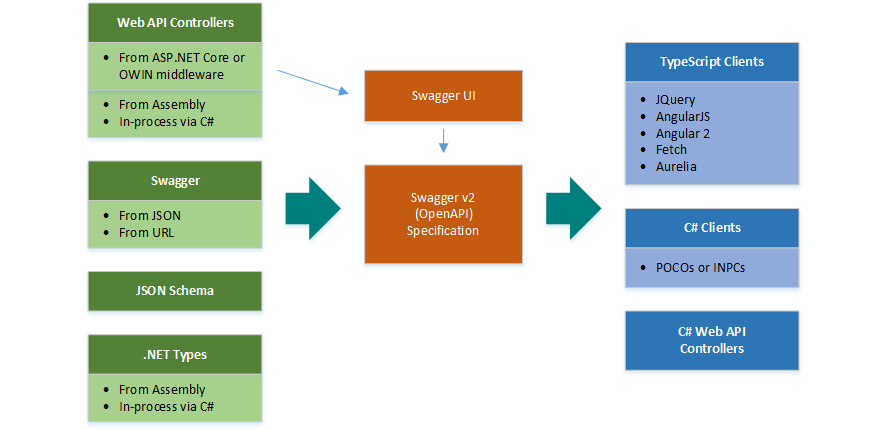
The project is developed and maintained by Rico Suter and other contributors.
Features
- Generate Swagger 2.0 and OpenAPI 3.0 specifications from C# ASP.NET (Core) controllers
- Serve the specs via ASP.NET (Core) middleware, optionally with Swagger UI or ReDoc
- Generate C# or TypeScript clients/proxies from these specs
- Everything can be automated via CLI (distributed via NuGet tool or build target; or NPM)
- CLI configured via JSON file or NSwagStudio Windows UI
Ways to use the toolchain
- Simple to use Windows GUI, NSwagStudio
- By using the OpenAPI or OpenAPI UI OWIN and ASP.NET Core Middlewares (also serves the Swagger UI) (recommended)
- Via command line (Windows, Mac and Linux support through Mono or .NET Core console binary, also via NPM package)
- In your C# code, via NuGet
- In your MSBuild targets
- With ServiceProjectReference tags in your .csproj (preview)
- In your Azure V2 Functions (external project, might not use latest NSwag version)
Tutorials
- Add NSwag to your ASP.NET Core app
- Integrate the NSwag toolchain into your ASP.NET Web API project
- Generate an Angular TypeScript client from an existing ASP.NET Web API web assembly
- Video Tutorial: How to integrate NSwag into your ASP.NET Core Web API project (5 mins)
OpenAPI/Swagger Generators
- ASP.NET Web API assembly to OpenAPI (supports .NET Core)
Code Generators
- CSharp Client
- CSharp Controllers (contract first/schema first development)
- TypeScript Client
JQueryCallbacks
- JQuery with promises JQueryPromises
- AngularJS using $http, AngularJS
- Angular (v2+) using the http service, Angular
- window.fetch API and ES6 promises, Fetch (use this template in your React/Redux app)
- Aurelia using the HttpClient from aurelia-fetch-client, Aurelia (based on the Fetch template)
- Axios (preview)
Downloads
- Download latest NSwagStudio MSI installer (NSwagStudio.msi) (Windows Desktop application)
- Download latest NSwag command line tools and NSwagStudio (NSwag.zip)
NPM Packages
- NSwag: Command line tools (.NET and .NET Core) distributed as NPM package
NuGet Packages
Specification
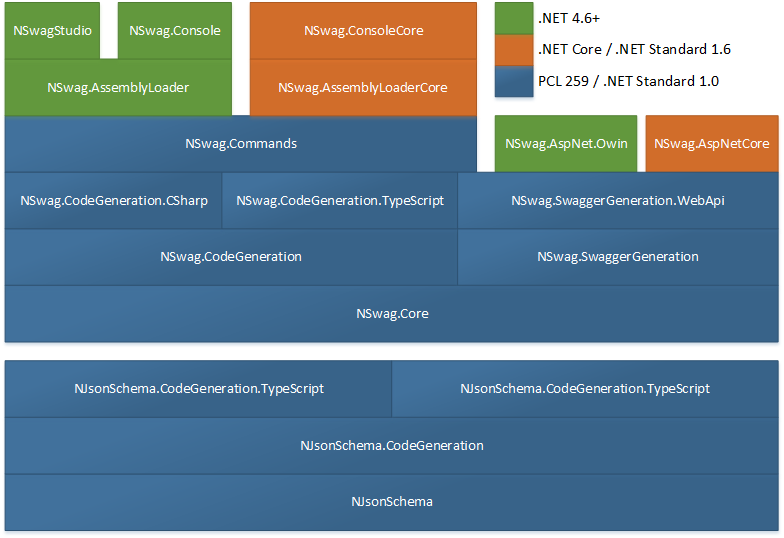
- The OpenAPI/Swagger reader and writer classes, see OpenApiDocument (.NET Standard 1.0 / 2.0 and .NET 4.5)- NSwag.Core.Yaml (.NET Standard 1.3 / 2.0 and .NET 4.5)
- NSwag.Annotations (.NET Standard 1.0 / 2.0 and .NET 4.5)
OpenAPI generation
- NSwag.Generation (.NET Standard 1.0 / 2.0 and .NET 4.5)
- NSwag.Generation.WebApi (.NET Standard 1.0 / 2.0 and .NET 4.5)
- NSwag.Generation.AspNetCore (.NET Standard 1.6 / 2.0 and .NET 4.5.1)
Code generation
- NSwag.CodeGeneration (.NET Standard 1.3 / 2.0 / .NET 4.5.1)
- NSwag.CodeGeneration.CSharp (.NET Standard 1.3 and .NET 4.5.1)
- NSwag.CodeGeneration.TypeScript (.NET Standard 1.3 and .NET 4.5.1)
ASP.NET and ASP.NET Core
- NSwag.AspNetCore (.NET Standard 1.6 / 2.0 and .NET 4.5.1+)
- NSwag.AspNet.Owin (.NET 4.5+)
- NSwag.AspNet.WebApi (.NET 4.5+)
Frontends
- NSwag.AssemblyLoader (.NET Standard 1.6 / 2.0 and .NET 4.5.1):
- NSwag.Commands (.NET Standard 1.6 / 2.0 and .NET 4.5.1+):
- NSwag.MSBuild (MSBuild .targets):
- NSwag.ConsoleCore (.NET Core 1.0, 1.1, 2.0, 2.1 and 2.2):
dotnet nswag)
- <DotNetCliToolReference Include="NSwag.ConsoleCore" Version="..." />
- NSwagStudio (Chocolatey, Windows):
CI NuGet Feed
https://www.myget.org/F/nswag/api/v3/index.json
The NuGet packages may require the Microsoft.NETCore.Portable.Compatibility package on .NET Core/UWP targets (if mscorlib is missing).
Usage in C#
To register the middlewares to generate an OpenAPI spec and render the UI, register NSwag in Startup.cs:
public class Startup
{
    ...
public void ConfigureServices(IServiceCollection services)     {         services.AddOpenApiDocument(); // add OpenAPI v3 document //      services.AddSwaggerDocument(); // add Swagger v2 document     }
public void Configure(IApplicationBuilder app, IHostingEnvironment env, ILoggerFactory loggerFactory)     {         ...
app.UseOpenApi(); // serve OpenAPI/Swagger documents         app.UseSwaggerUi(); // serve Swagger UI         app.UseReDoc(); // serve ReDoc UI     } }
The following code shows how to read an OpenAPI/Swagger specification and generate C# client classes to call the described web services:
var document = await OpenApiDocument.FromFileAsync("openapi.json"); var clientSettings = new CSharpClientGeneratorSettings  {     ClassName = "MyClass",     CSharpGeneratorSettings =      {         Namespace = "MyNamespace"     } };
var clientGenerator = new CSharpClientGenerator(document, clientSettings); var code = clientGenerator.GenerateFile();
Check out the project Wiki for more information.
NSwagStudio
The generators can be used in a comfortable and simple Windows GUI called NSwagStudio:

Sponsors, support and consulting
Companies or individuals which paid a substantial amount for implementing, fixing issues, support or sponsoring are listed below. Thank you for supporting this project! You can also become a financial contributor:
Please contact Rico Suter for paid consulting and support.Contributors
This project exists thanks to all the people who contribute. [Contribute]. 
Sponsors
Support this project by becoming a sponsor. Your logo will show up here with a link to your website.
Top sponsors:

Sponsors:






Backers
Thank you to all our backers!



