
wow very terminal doge
doge
[




[doge_pypi]: https://pypi.org/project/doge/ "doge (PyPI)" [ruff]: https://github.com/astral-sh/ruff "ruff - An extremely fast Python linter and code formatter, written in Rust (GitHub)"
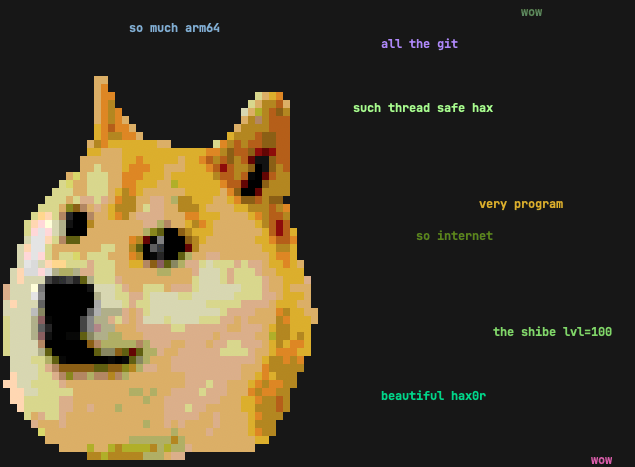
doge is a simple motd script based on the slightly stupid but very funny [doge meme][]. It prints random grammatically incorrect statements that are sometimes based on things from your computer.
[doge meme]: http://knowyourmeme.com/memes/doge "Doge (Know Your Meme)"
If you have [uv][] or [pipx][] (you should!), you can try out doge without installing it permanently.\ Just type uvx doge or pipx run doge in your terminal to see if you enjoy it. 🐶\ If you do, uv tool install doge or pipx install doge to keep it around! 👍
[pipx]: https://pipx.pypa.io "pipx — Install and Run Python Applications in Isolated Environments" [uv]: https://docs.astral.sh/uv/ "uv — An extremely fast Python package and project manager, written in Rust."
Features
- Randomly placed and colored random strings, complete with broken english.
- Awesome Shibe 😎 in the terminal.
- Fetching of system data, such as hostname, running processes, current user
$EDITOR.
- If you have 🌈 [lolcat][], you can do this gem:\
while true; do doge | lolcat -a -d 100 -s 100 -p 1; done
(thx [hom3chuk][])
- stdin support:
ls /usr/bin | dogewill doge-print some of the executables
doge -h, wow.
* To use all dictionary words that start or end with "dog", try:\
egrep '(^dog|dog$)' /usr/share/dict/words | fgrep -v "'s" | doge
[lolcat]: https://github.com/busyloop/lolcat "lolcat - Rainbows and unicorns! (GitHub)" [hom3chuk]: https://github.com/hom3chuk "hom3chuk (GitHub)"
Notes
You need a terminal that supports 256 colors running on a system that supports unicode.
The terminal Shibe was created with hax0r Gimp skills and [img2xterm][].
[img2xterm]: https://github.com/rossy2401/img2xterm "img2xterm: display images on the terminal (GitHub)"
Installation
There are several options for installing and running a Python CLI application such as doge.
Python-Based Install (Recommended)
The best way is to install doge directly from [PyPI][doge_pypi] with either [uv][] or [pipx][]:
uv tool install doge-- this is the recommended method, but you need [uv][]
uv tool upgrade doge or uv tool upgrade --all.
- The other option is to use [pipx][]:
pipx install doge
- Make a self-contained Python [zipapp][] with [pex][] or [shiv][], and put it
$PATH, for example:
* shiv doge -c doge -o ~/bin/doge
* pex doge -c doge -o ~/bin/doge
Install with pip*, see Brett Cannon's
[quick-and-dirty guide on how to install packages for Python][install_guide]
for more information. TLDR; basically use your preferred Python and run:\
python3 -m pip install doge
[zipapp]: https://docs.python.org/3/library/zipapp.html "zipapp — Manage executable Python zip archives" [pex]: https://github.com/pantsbuild/pex "pex - Python EXecutable (GitHub)" [shiv]: https://github.com/linkedin/shiv "shiv - fully self-contained Python zipapps (GitHub)" [install_guide]: https://snarky.ca/a-quick-and-dirty-guide-on-how-to-install-packages-for-python/ "A quick-and-dirty guide on how to install packages for Python"
Then, just add a call to doge at the bottom of your shell rc file.
If you don't want to install doge with the options above for whatever reason, there is a proper pyproject.toml included, so inside a virtual environment, python -m pip install -e . should work just fine.
Package Managers And Linux Distributions
Your package manager or Linux distribution might carry a downstream doge package.
If you choose this option, and experience any installation problems, then please report them to your downstream package maintainer.
[ ][dogerepology1]
[ ][dogerepology2]
[doge_repology1]: https://repology.org/project/doge-motd/versions "Versions for doge (Repology)" [doge_repology2]: https://repology.org/project/doge-unclassified/versions "Versions for doge (Repology)"
Please note that it might take some time for downstream packages to catch up with [PyPI][doge_pypi]. The recommended installation with [uv][] or [pipx][] will always give you the latest version.


