
Slang shader line previews for nvim
shaderdebug
A Neovim plugin for live Slang shader debugging — preview what any line of your fragment shader outputs, right in the editor.
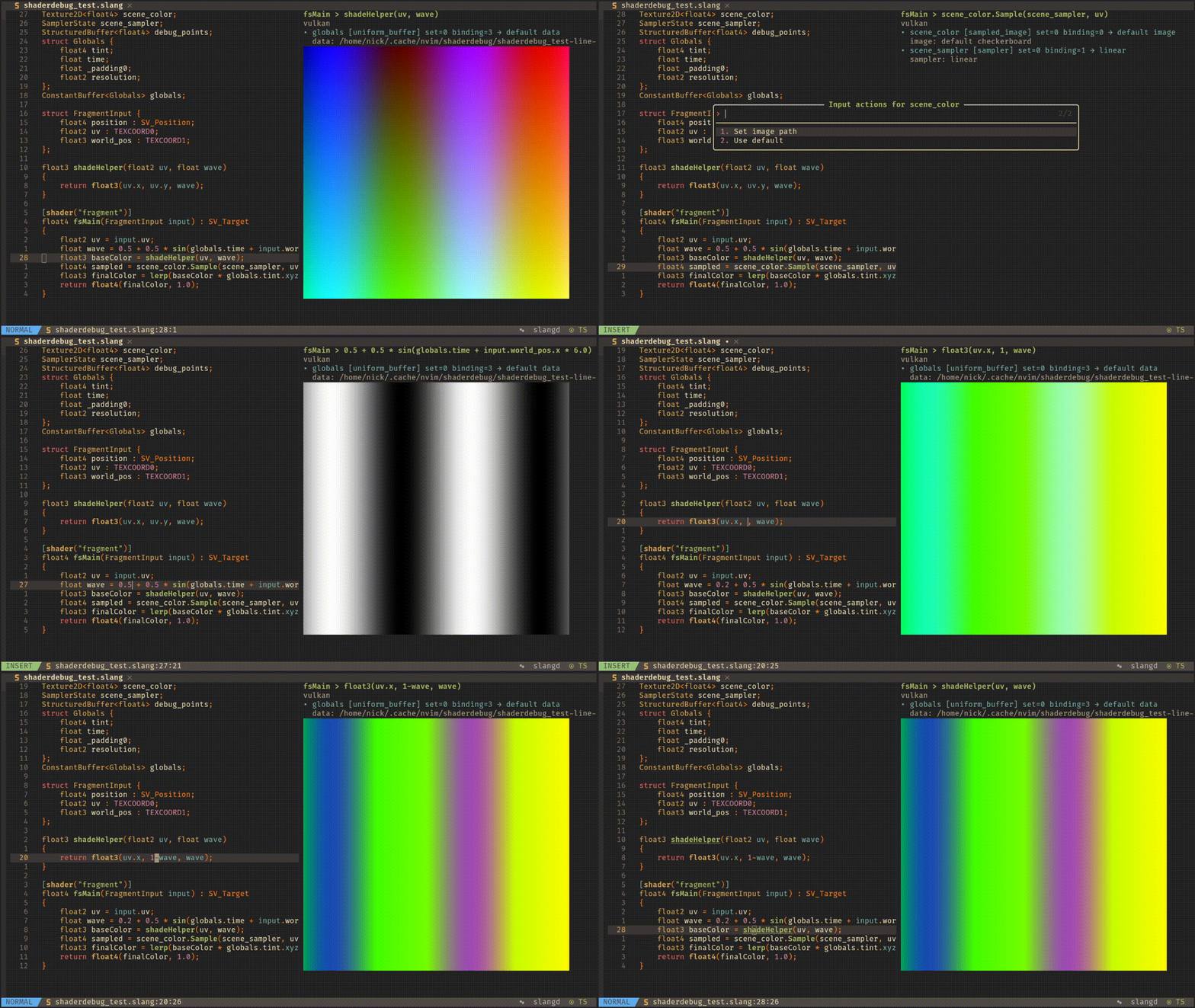
What it does
- Live shader previews — move your cursor to any Slang line and see what it outputs rendered on a quad
- Reflection-driven — automatically detects textures, buffers, samplers, and uniform bindings from your shader
- Interactive inputs — click or press Enter on any input to bind custom images, textures, or JSON data
- Dual render API — render previews through Vulkan or headless OpenGL/EGL
- Selectable preview display backend — show images through Neovim's native
vim.ui.imgAPI orimage.nvim - Non-blocking — everything runs in the background, so your editor never stutters
Installation
Using lazy.nvim
With image.nvim:
{
  "NickTsaizer/shaderdebug.nvim",
  ft = { "slang" },
  dependencies = { "3rd/image.nvim" },
}
With Neovim's native image support only:
{
  "NickTsaizer/shaderdebug.nvim",
  ft = { "slang" },
}
Requirements
- Neovim 0.10+
- Preview display backend — either:
vim.ui.img)
- image.nvim for plugin-based inline image rendering
- slangc — available on your
PATH, or configured viasetup({ slangc = "/path/to/slangc" }) - glslangValidator — available on your
PATH, or configured viasetup({ glslang_validator = "/path/to/glslangValidator" }) - Vulkan — required when
api = "vulkan"orapi = "auto" - EGL + OpenGL — required when
api = "opengl"(headless/offscreen path) - libepoxy — OpenGL function loading for the headless EGL path
- ffmpeg — for non-PNG image conversion
- libpng — PNG reading/writing
Quick Start
" Open a Slang shader file
:e myshader.slang
" Preview the current line :ShaderDebugPreview
" Enable auto-preview on cursor move :ShaderDebugToggleAuto
Configure the render API and preview display backend in setup():
require("shaderdebug").setup({
  api = "auto", -- "vulkan", "opengl", or "auto"
  preview = {
    backend = "native", -- "native", "auto", or "image.nvim"
  },
})
Usage
Commands
| Command | Description | |---------|-------------| | :ShaderDebugPreview | Render preview for the current line | | :ShaderDebugToggleAuto | Toggle live preview on cursor move | | :ShaderDebugInputs | Show reflected inputs in the message area | | :ShaderDebugSetImage <name> <path> | Bind a single image to an input | | :ShaderDebugSetImages <name> <paths> | Bind multiple images (comma-separated) | | :ShaderDebugSetData <name> <json> | Bind JSON data to a buffer input | | :ShaderDebugClearInput <name> | Clear an input override | | :ShaderDebugClear | Close the preview and disable auto-preview |
Interactive Preview
The preview split shows:
- Header —
<entry> > <expression> - Render API — the active renderer (e.g.
vulkan) - Inputs — each reflected resource with current binding
- Enter — edit that input (prompt for image path, JSON data, etc.)
- x — clear the input override
- r — refresh the preview
Configuration
Pass options to setup():
require("shaderdebug").setup({
  api = "vulkan",            -- "vulkan", "opengl", or "auto"
  auto_preview = false,      -- start with auto-preview disabled
  debounce_ms = 180,         -- delay before rendering
  image_size = 512,          -- preview image resolution
  slangc = "slangc",         -- compiler command or absolute path
  glslang_validator = "glslangValidator", -- validator command or absolute path
  preview = {
    backend = "native",      -- "native", "auto", or "image.nvim"
    cellaspectratio = nil,  -- override terminal cell height/width ratio if needed
  },
})
Render API notes
api = "vulkan"compiles Slang to SPIR-V and uses the Vulkan offscreen rendererapi = "opengl"compiles Slang to GLSL and uses a headless EGL/OpenGL rendererapi = "auto"currently resolves to Vulkan
Preview display backend notes
preview.backend = "native"is the default and requires a Neovim build withvim.ui.imgsupportpreview.backend = "auto"prefers Neovim's native image API when supported, then falls back toimage.nvimpreview.backend = "image.nvim"forces plugin-based preview renderingpreview.cellaspectratiolets you manually tune image sizing when your terminal reports unusual cell proportions
require("shaderdebug").setup({
  preview = {
    backend = "native",
  },
})
Example image.nvim setup with manual sizing override:
require("shaderdebug").setup({
  preview = {
    backend = "image.nvim",
    cellaspectratio = 2,
  },
})
OpenGL texture example
Texture2D<float4> albedo;
SamplerState albedoSampler;
struct FragmentInput {     float2 uv: TEXCOORD0; };
[[shader("fragment")]] float4 fragment(FragmentInput input) : SV_Target0 {     return albedo.Sample(albedoSampler, input.uv); }
Bind the texture from Neovim:
:ShaderDebugSetImage albedo /path/to/image.png
:ShaderDebugPreview
Known Limitations
- Only fragment shaders are supported
- Works best with simple expressions (assignments, returns, direct function calls)
- OpenGL currently treats sampled textures as combined
sampler2Duniforms internally
Credits
Built with Slang, Vulkan, and EGL/OpenGL.


