
A desktop application for automating Unreal Engine plugin and project builds across multiple engine versions and platforms.
Last updated Jun 5, 2026
62
Stars
8
Forks
0
Issues
0
Stars/day
Attention Score
41
Language breakdown
TypeScript 81.1%
CSS 17.2%
JavaScript 1.3%
HTML 0.4%
▸ Files
click to expand
README
Unreal Builder
A desktop application for automating Unreal Engine plugin and project builds across multiple engine versions and platforms.>
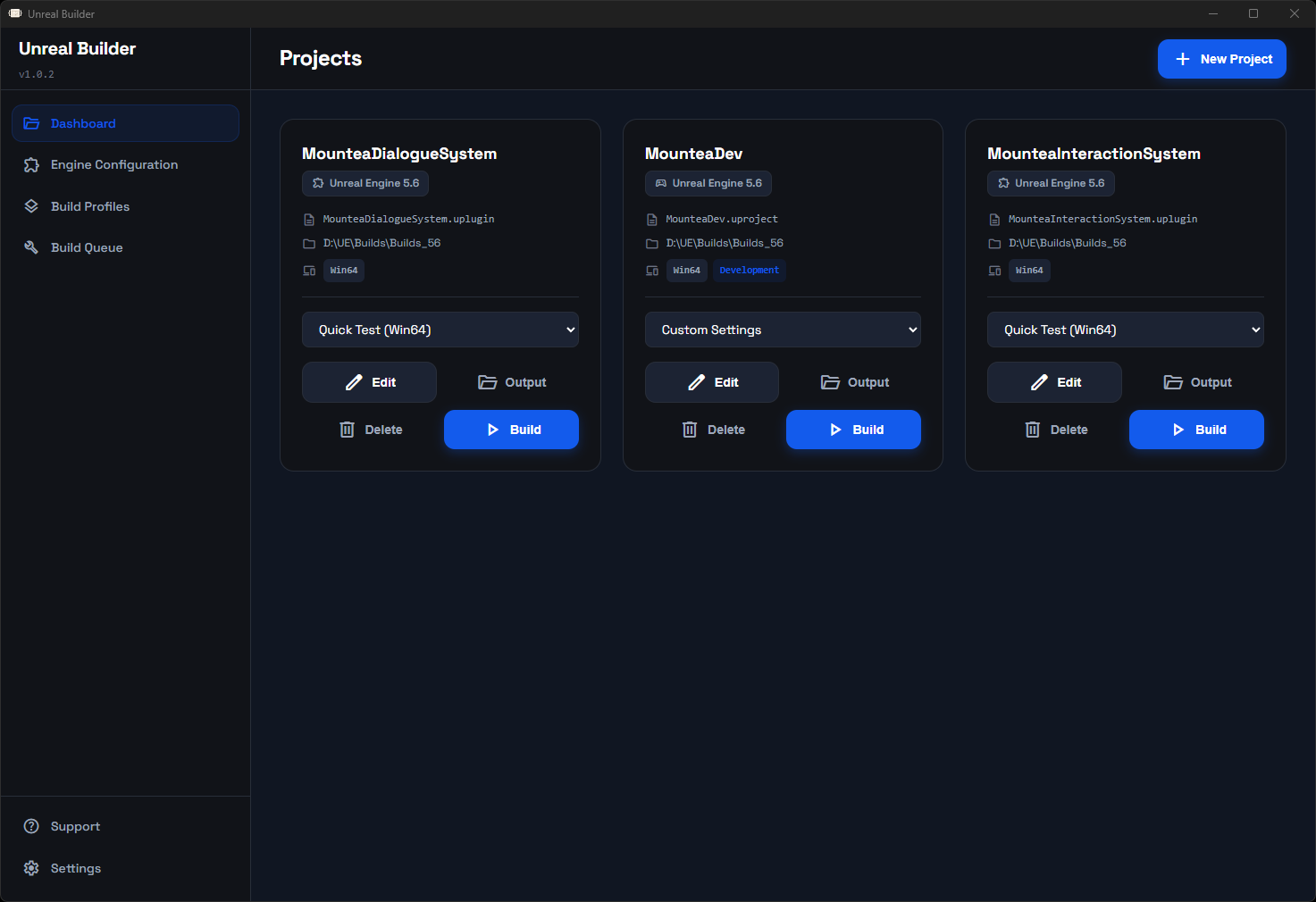
Overview
Unreal Builder streamlines the process of building Unreal Engine plugins and projects by providing a centralized interface for managing multiple engine versions, build configurations, and target platforms. The application handles the complex UAT (Unreal Automation > > Tool) commands and provides real-time feedback on build progress.
Key Features
Multi-Engine Support
Manage multiple Unreal Engine installations from a single interface. Automatically detects engine versions installed on your system and allows you to build the same plugin or project for different engine versions.
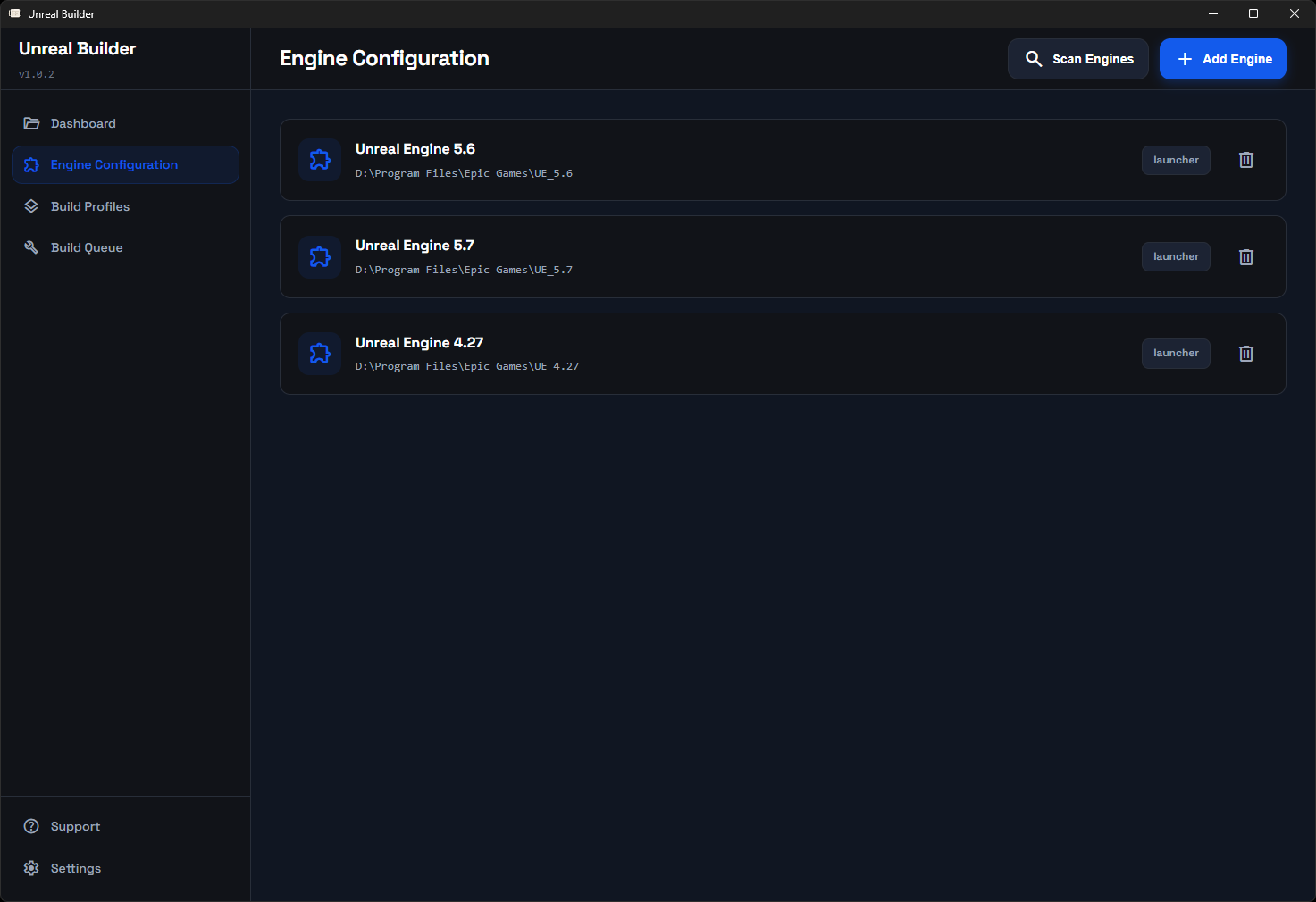
Plugin and Project Support
Build both Unreal Engine plugins and standalone projects. The application automatically adjusts build parameters and UI based on the file type selected.
Plugins:
- Build for multiple platforms simultaneously
- Generates Editor, Development, and Shipping configurations
- Outputs ready-to-distribute plugin packages
Projects:
- Build complete game projects
- Cook content and package for distribution
- Select Development or Shipping configurations
- Single platform per build with queueing support
Build Queue System
Queue multiple builds and let them process sequentially. Useful when building for multiple platforms or testing across different engine versions.
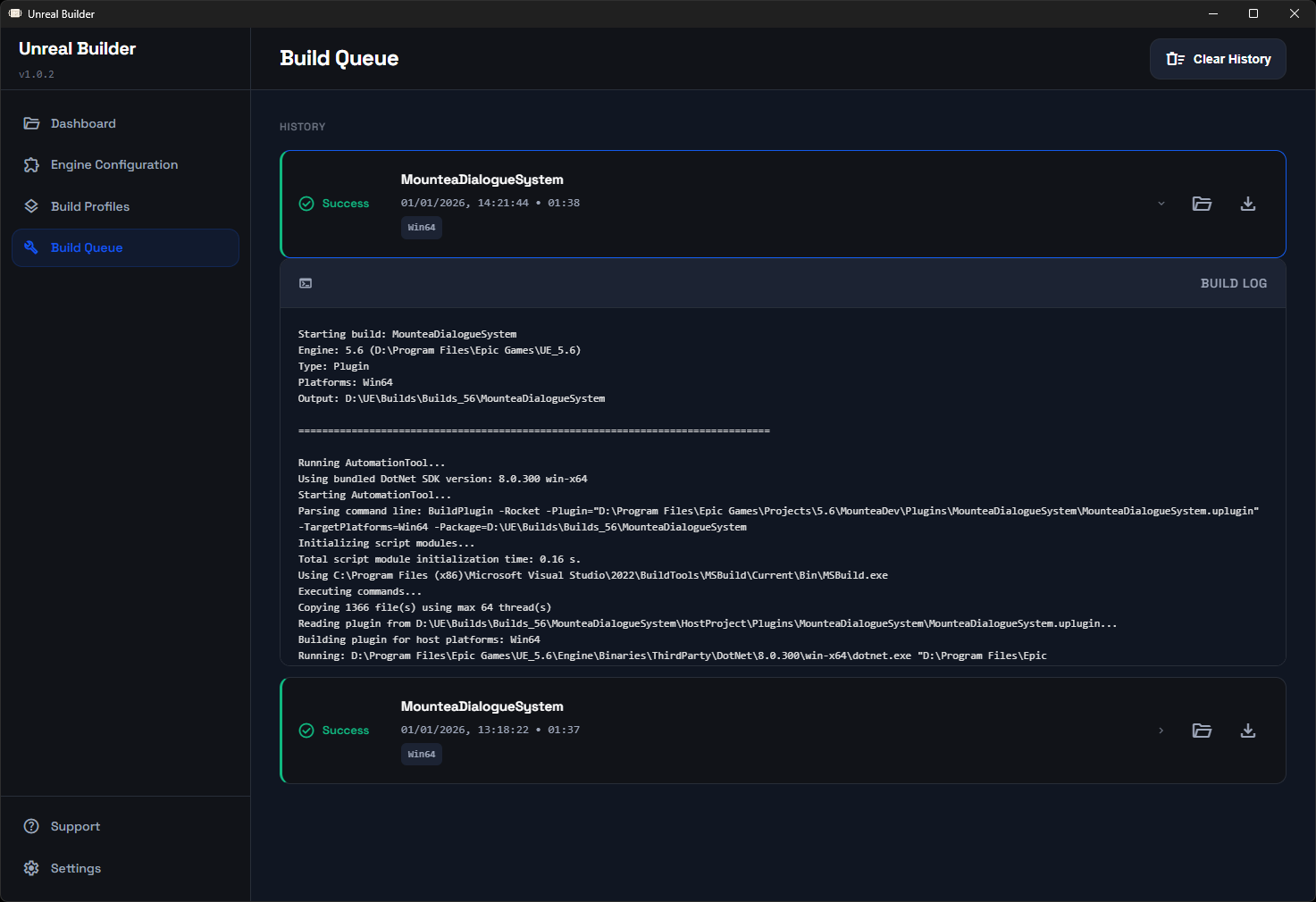
Features:
- Real-time build progress with stage visualization
- Live log output with auto-scroll
- Cancel builds in progress
- Export build logs for debugging
- Build history with success/failure tracking
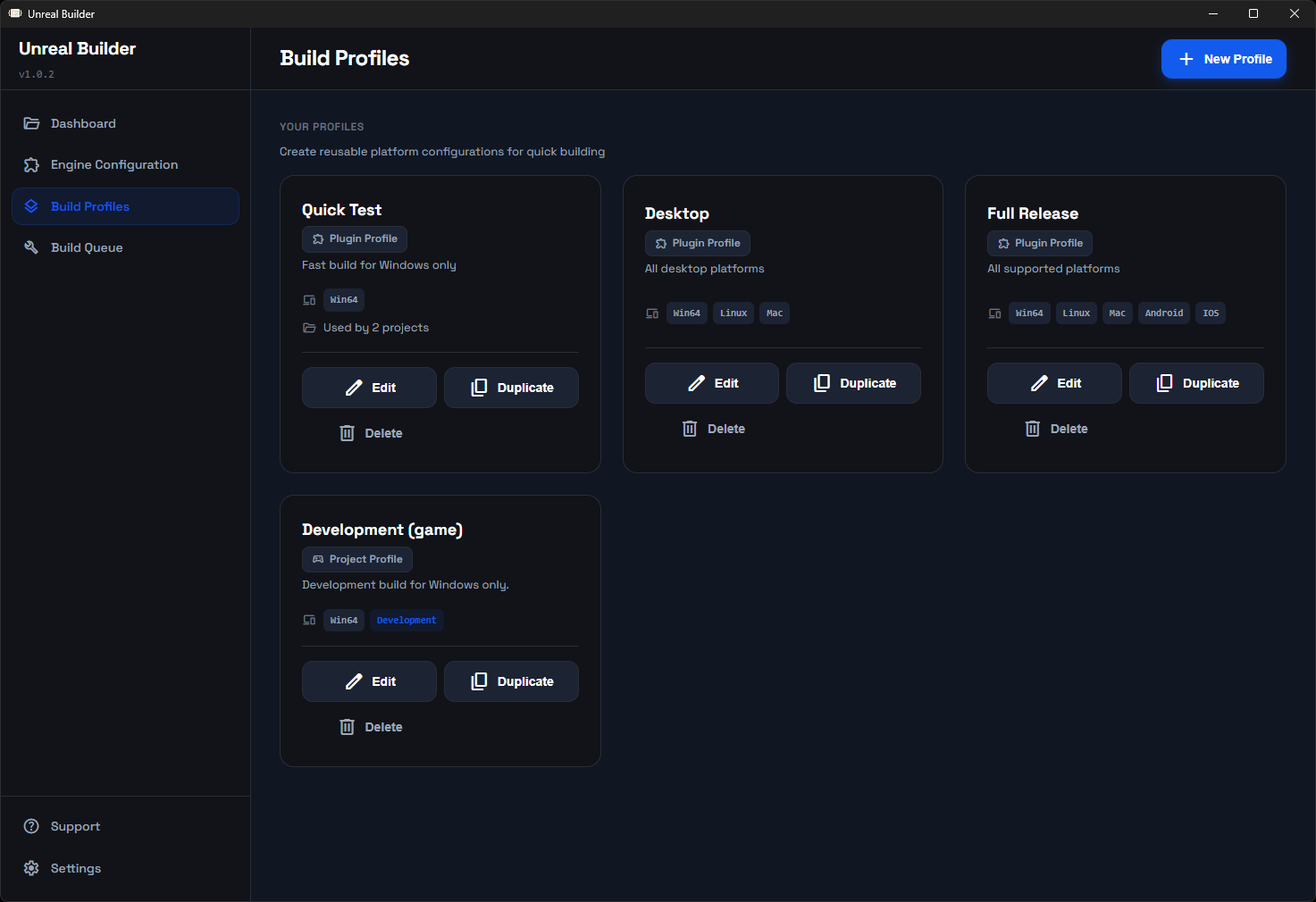
Build Profiles
Create reusable build profiles with preset platform configurations. Quickly switch between common build scenarios without reconfiguring platforms each time.
Build Analytics
Track build statistics over time:
- Total builds executed
- Success and failure rates
- Average build times
- Per-platform statistics
System Tray Integration
Minimize the application to the system tray and continue builds in the background. Useful for long-running builds that don't require constant monitoring.
Build Pipeline Visualization
Real-time visualization of build stages with progress indicators:
Plugin Builds:
1. Setup - Initialize build environment
2. Editor - Build editor binaries
3. Development - Build development runtime
4. Shipping - Build shipping runtime
Project Builds:
1. Setup - Initialize build environment
2. Cook - Cook game content
3. Build - Compile game binaries
4. Stage - Stage cooked content
5. Package - Create distribution package
Installation
Requirements
- Windows 10/11, macOS 10.14+, or Linux
- Unreal Engine 4.x or 5.x installed
- 4GB RAM minimum
- A bunch of free disk space for builds
Download
Download the latest release for your platform:
- Windows:Unreal Builder Setup.exeorUnreal Builder.exe(portable)
- macOS: Unreal Builder.dmg
- Linux:Unreal Builder.AppImageor.debpackage
Windows Installation
1. Run the installer
2. Follow installation wizard
3. Launch from Start Menu or Desktop shortcut
macOS Installation
1. Mount the DMG file
2. Drag Unreal Builder to Applications folder
3. Launch from Applications
Linux Installation
AppImage:
> ./Unreal-Builder.AppImage >> chmod +x Unreal-Builder.AppImage
Debian Package:
>> sudo dpkg -i unreal-builder1.0.0amd64.deb
Getting Started
1. Configure Engine Versions
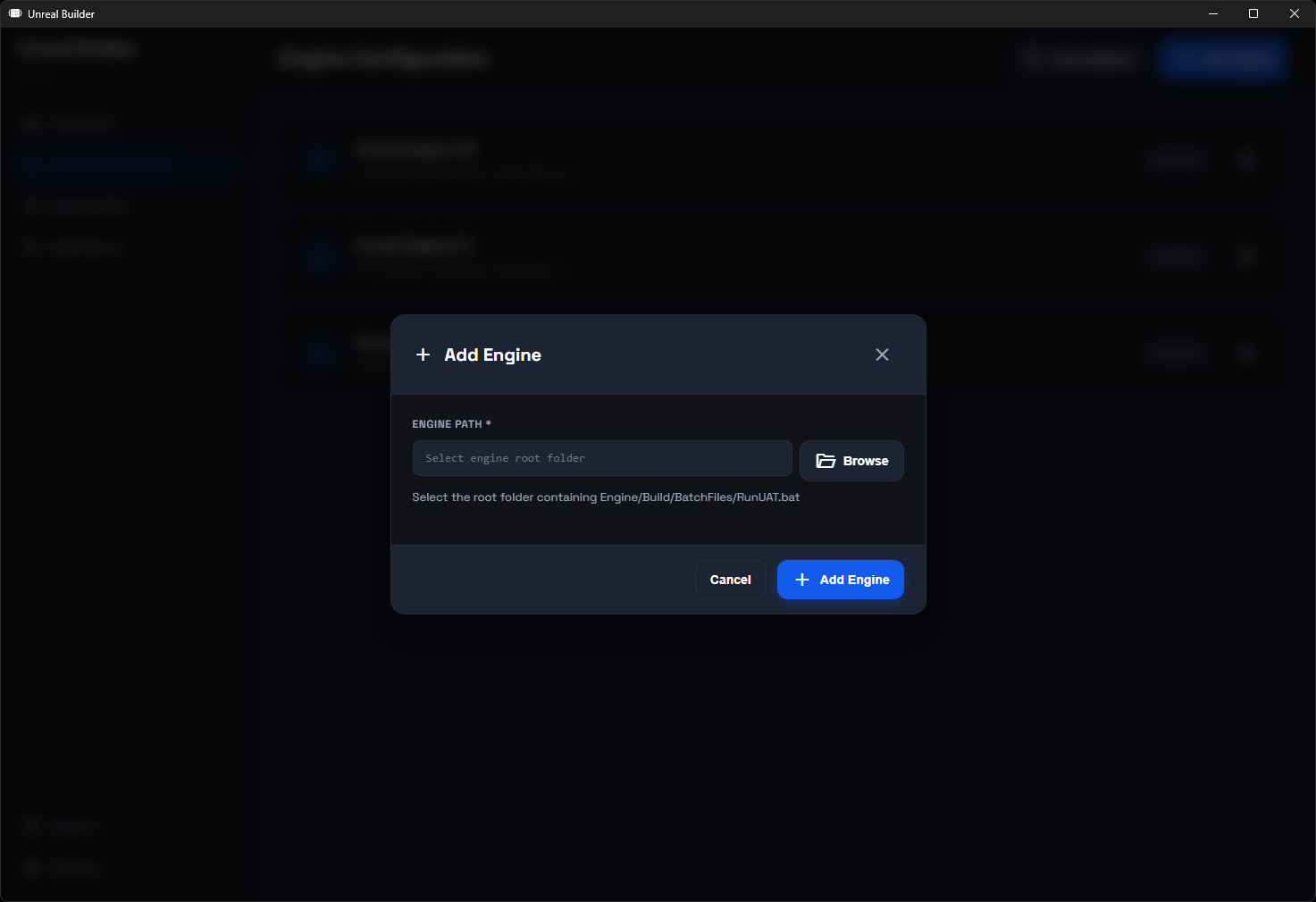
Navigate to Engine Configuration and add your installed Unreal Engine versions:
1. Click "Add Engine"
2. Browse to engine installation folder
3. Application automatically detects version
4. Save configuration
Example engine paths:
- Windows: C:\Program Files\Epic Games\UE_5.6
- macOS: /Users/Shared/Epic Games/UE_5.6
- Linux: /home/user/UnrealEngine/Engine
2. Add a Plugin
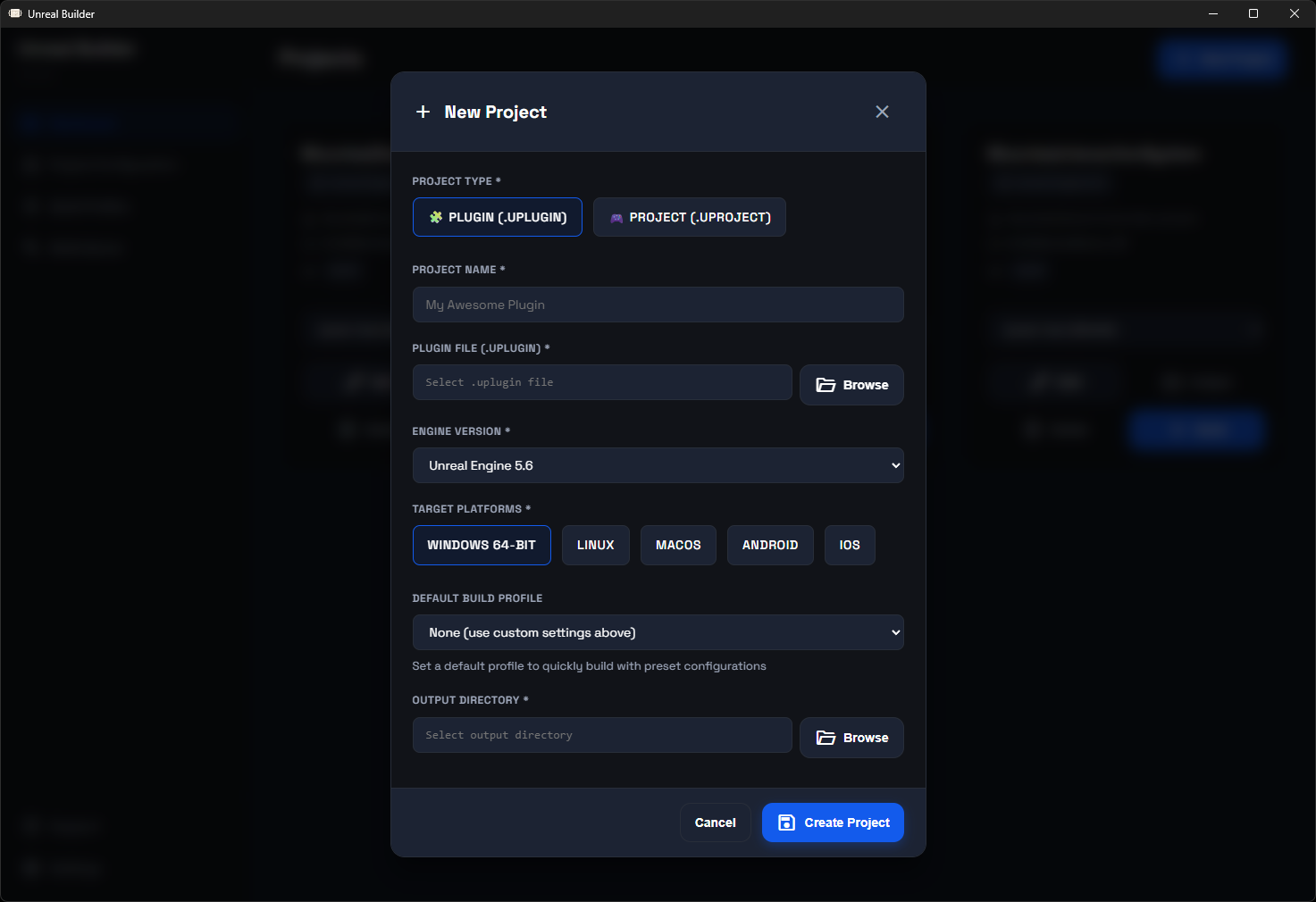
From the Dashboard:
1. Click "New Project"
2. Select "Plugin" as project type
3. Click "Browse" and select your .uplugin file
4. Project name is auto-filled from filename
5. Select engine version
6. Choose target platforms:
- Windows 64-bit
- Linux
- macOS
- Android
- iOS
7. Select output directory for built plugin
8. Click "Create Project"
3. Add a Project
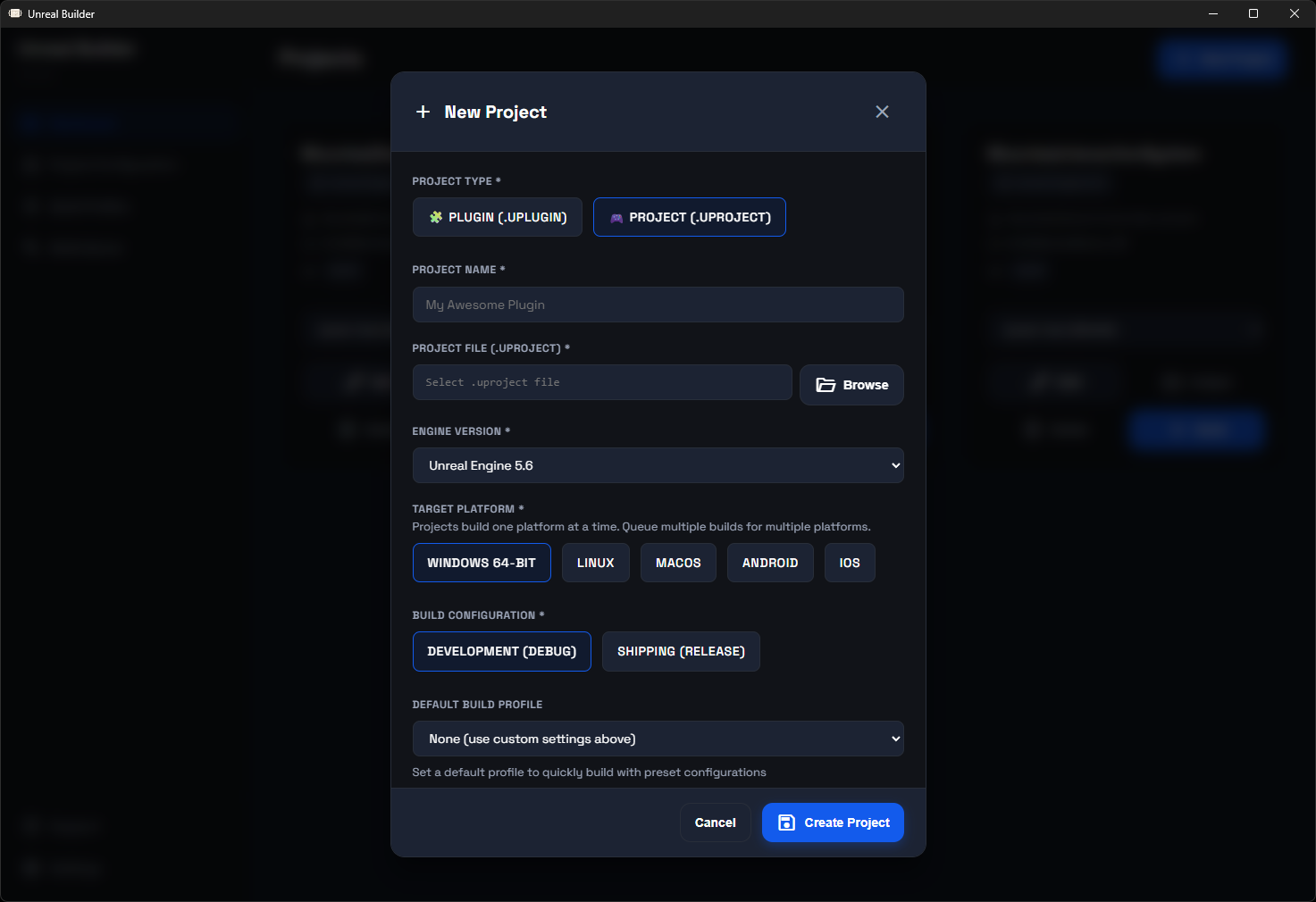
From the Dashboard:
1. Click "New Project"
2. Select "Project" as project type
3. Click "Browse" and select your .uproject file
4. Project name is auto-filled from filename
5. Select engine version
6. Choose target platform (one at a time)
7. Select build configuration:
- Development (with debug symbols)
- Shipping (optimized, no debug)
8. Select output directory
9. Click "Create Project"
4. Start a Build
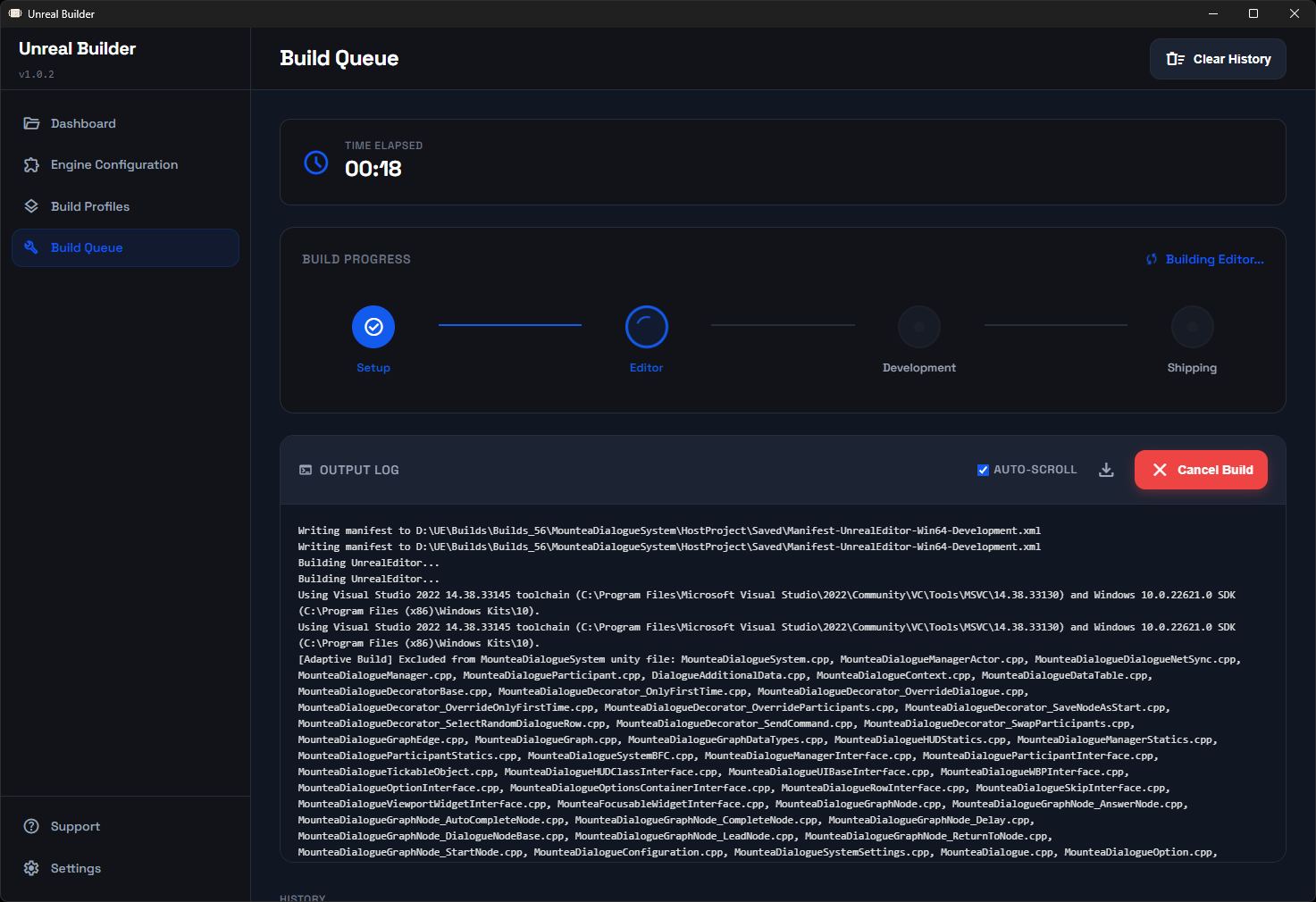
From the Dashboard:
1. Find your plugin or project
2. Click "Build" button
3. Application switches to Build Queue page
4. Monitor real-time progress:
- Current build stage
- Elapsed time
- Live log output
5. Wait for completion or cancel if needed
5. Using Build Profiles (Optional)
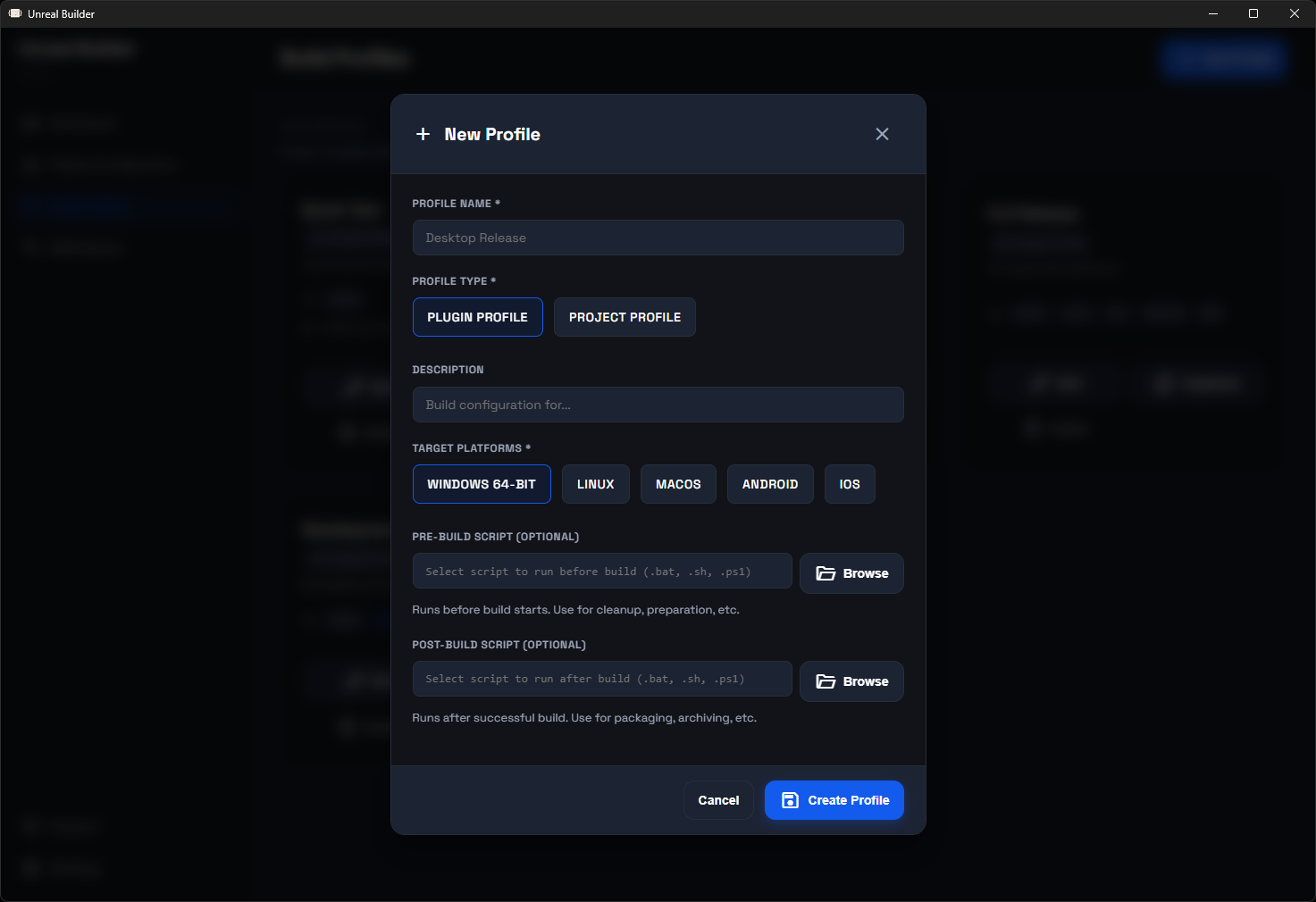
Build profiles allow quick switching between platform configurations:
1. Navigate to Build Profiles page
2. Click "New Profile"
3. Name your profile (e.g., "Desktop Platforms")
4. Select platforms for this profile
5. Save profile
To use a profile:
1. On Dashboard, find your project
2. Select profile from dropdown
3. Click "Build"
4. Project builds with profile's platform settings
About
Support
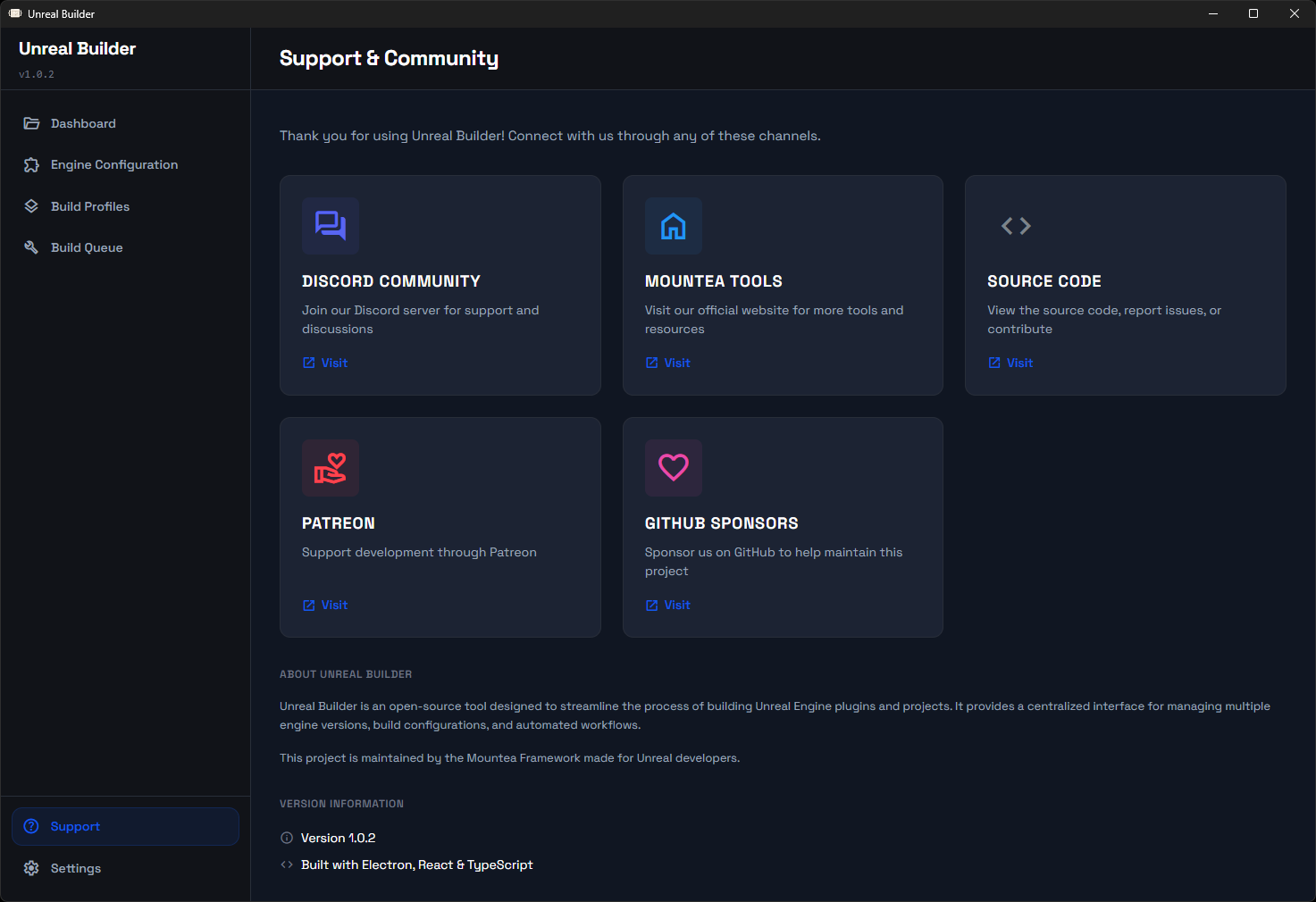
Support page contains useful links which might help you if you are stuck or
if you want to financially support Mountea Framework.
Discord Community:
- Official Discord server to raise support tickets or discuss anything gamedev related
Mountea Tools:
- Mountea website where you can see list of our tools, some you might find useful
Source Code:
- Public GitHub repository containing the full source, we have nothing to hide!
Patreon:
- If you are feeling generous we would happily appreciate any financial support!
GitHub Sponsors:
- If you are feeling generous we would happily appreciate any financial support!
Configuration
Settings
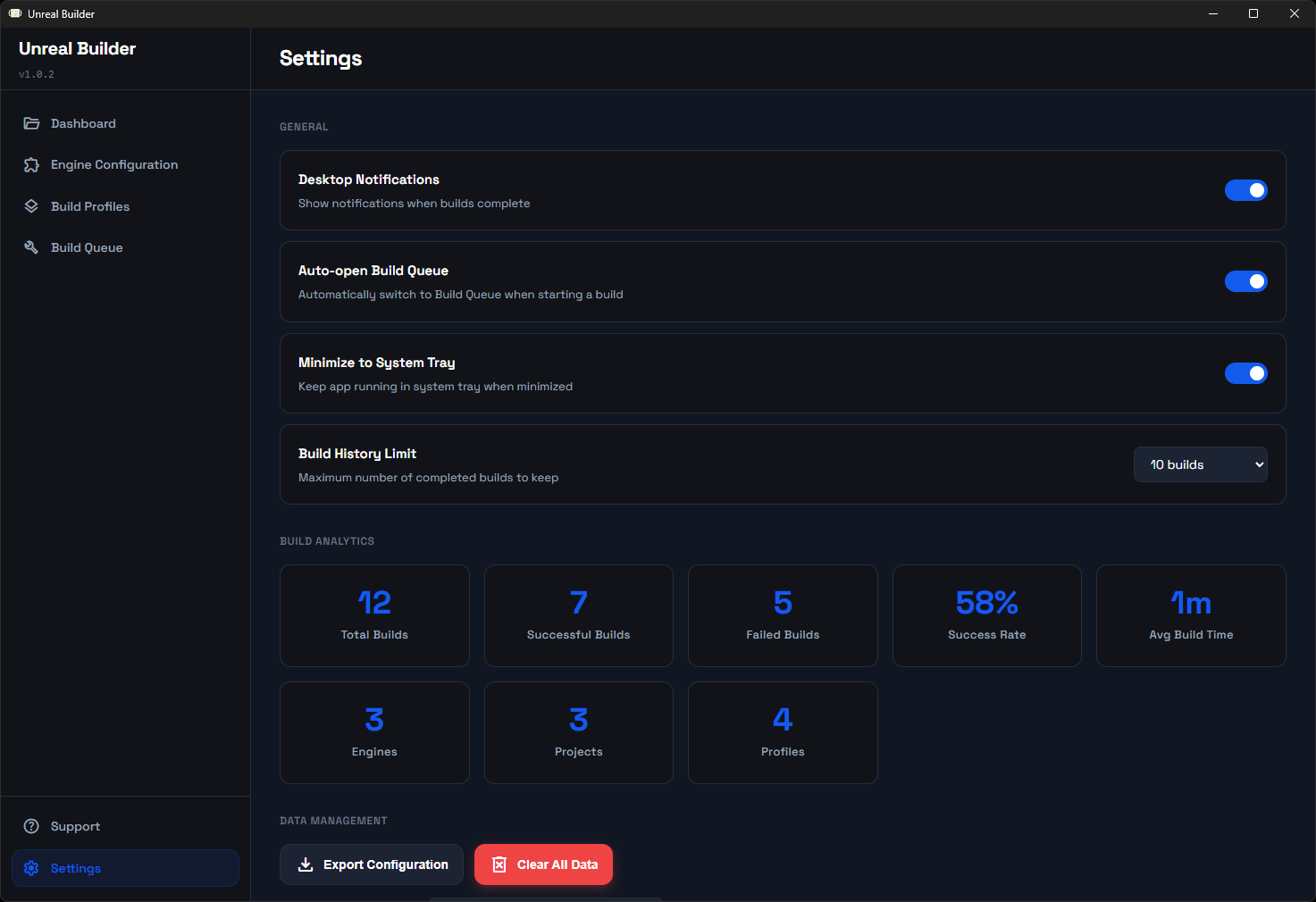
Access settings from the sidebar:
Notifications:
- Enable/disable build completion notifications
- Desktop notifications when builds finish
Build Queue:
- Auto-open Build Queue when build starts
- Automatically switches to queue page
Build History:
- Maximum builds to keep in history
- Older builds are automatically cleaned up
System Tray:
- Minimize to system tray
- Continue builds in background
- Click tray icon to restore window
Output Folder Structure
After a successful build:
Plugin Output:
> └── PluginName/ > ├── Binaries/ > ├── Content/ > ├── Resources/ > └── PluginName.uplugin >> OutputFolder/
Project Output:
> └── ProjectName/ > └── WindowsNoEditor/ (or LinuxNoEditor, etc.) > ├── ProjectName.exe > └── ProjectName/ > ├── Content/ > └── Binaries/ >> OutputFolder/
Build Queue Management
Queue Controls
- Cancel Build: Stops the current build immediately
- Clear History: Removes all completed builds from history
- Export Logs: Save build logs to text file for debugging
Build Status
Each build shows:
- Current status (Queued, Building, Success, Failed)
- Build duration
- Platform(s) being built
- Completion timestamp
Log Viewer
The integrated log viewer provides:
- Real-time output from Unreal Automation Tool
- Auto-scroll to latest output
- Manual scroll for reviewing earlier output
- Color-coded error messages
- Export capability for bug reports
Advanced Features
Multiple Platform Builds
Plugins:
Select multiple platforms and build all at once. The build system compiles binaries for each platform in sequence.
Projects:
Queue separate builds for each platform. For example, to build for Windows and Linux:
1. Create build for Windows Development
2. While first build runs or is queued, create another for Linux Development
3. Builds process sequentially
Engine Version Testing
Test plugin compatibility across multiple engine versions:
1. Add plugin multiple times, each with different engine version
2. Queue builds for all versions
3. Compare results to identify compatibility issues
Build Analytics
Track build performance over time:
- Success Rate: Percentage of successful builds
- Average Build Time: Mean duration across all builds
- Platform Statistics: Success rates and times per platform
- Recent Activity: Quick view of latest build results
Keyboard Shortcuts
- Ctrl+1: Navigate to Dashboard
- Ctrl+2: Navigate to Engine Configuration
- Ctrl+3: Navigate to Build Queue
- Ctrl+4: Navigate to Build Profiles
- Ctrl+,: Open Settings
- Ctrl+B: Start build (when project selected)
- Ctrl+Shift+X: Cancel current build
Troubleshooting
Engine Not Detected
Problem: Engine not showing in dropdown when adding project
Solution:
1. Navigate to Engine Configuration
2. Manually add engine installation
3. Verify path points to engine root folder
4. Ensure Engine/Build/BatchFiles/RunUAT.bat exists
Build Fails Immediately
Problem: Build fails in Setup stage
Common Causes:
- Incorrect engine path
- Missing UAT dependencies
- File permissions
Solutions:
1. Verify engine installation is complete
2. Run Unreal Builder as administrator (Windows)
3. Check build logs for specific error messages
4. Ensure output directory is writable
Build Hangs
Problem: Build appears stuck at certain stage
Solution:
1. Check log output for errors
2. Verify sufficient disk space
3. Ensure engine version matches project requirements
4. Try canceling and restarting build
Missing Platforms
Problem: Cannot build for certain platforms
Causes:
- Platform SDK not installed
- Engine not built with platform support
Solutions:
1. Install required platform SDKs
2. Rebuild engine with platform support enabled
3. Verify platform files exist in engine installation
Plugin Won't Load After Build
Problem: Built plugin doesn't load in engine
Common Issues:
1. Plugin built for wrong engine version
2. Module names don't match
3. Dependencies missing
Solutions:
1. Verify engine version matches
2. Check .uplugin file for correct module names
3. Review build logs for compilation errors
4. Ensure all dependencies are included
Building from Source
Prerequisites
- Node.js 18 or higher
- Git
Clone Repository
> cd unreal-builder >> git clone https://github.com/Mountea-Framework/MounteaUnrealBuilder.git
Install Dependencies
>> npm install
Development Mode
>> npm start
Build for Production
>> npm run build
Create Distribution
> npm run dist:mac # macOS > npm run dist:linux # Linux >> npm run dist:win # Windows
Project Structure
> ├── src/ > │ ├── main/ # Main process (Electron) > │ │ ├── main.ts # Application entry point > │ │ └── builder.ts # Build execution logic > │ ├── preload/ # Preload scripts > │ │ └── preload.ts # IPC bridge > │ ├── renderer/ # Renderer process (React) > │ │ ├── pages/ # Application pages > │ │ ├── styles.css # Global styles > │ │ └── App.tsx # Main React component > │ └── shared/ > │ └── types.ts # Shared TypeScript types > ├── assets/ > │ ├── icon.ico # Windows icon > │ ├── icon.icns # macOS icon > │ └── icon.png # Linux icon > └── package.json # Dependencies and scripts >> unreal-builder/
Technology Stack
- Electron: Cross-platform desktop framework
- React: User interface library
- TypeScript: Type-safe JavaScript
- Webpack: Module bundler
- Unreal Automation Tool: Build backend
Contributing
Contributions are welcome. Please follow these guidelines:
1. Fork the repository
2. Create a feature branch
3. Commit changes with clear messages
4. Push to your fork
5. Submit a pull request
Support
For issues, questions, or feature requests:
- GitHub Issues: [Link to issues page]
- Documentation: [Link to docs]
License
This project is licensed under the GPL-2.0 license. See LICENCE file for details.
Acknowledgments
Built with Unreal Engine developer workflows in mind. Special thanks to the Unreal Engine community for feedback and testing and Epic Games for not creating anything better so I had to do it myself.
Version History
1.0.4 (Current)
- Win paths fix
- Pre-operation/Post-operation script variables in Profiles
- Fixed a few visual issues with clipping texts
1.0.3
- Mac paths fix
1.0.2
- Mac paths fix
- Added support page
1.0.1
- Pre-operation script selector
- Post-operation script selector
1.0.0
- Initial release
- Plugin build support
- Project build support
- Multi-engine support
- Build queue system
- Build profiles
- Build analytics
- System tray integration
- Real-time build logs
- Cross-platform support (Windows, macOS, Linux)
Star history


