
Intelligent proxy pool for Humans™ to extract content from the internet and build your own Large Language Models in this new AI era





Scylla
An intelligent proxy pool for humanities, to extract content from the internet and build your own Large Language Models in this new AI era.
Key features:
- Automatic proxy ip crawling and validation
- Easy-to-use JSON API
- Simple but beautiful web-based user interface (eg. geographical
- Get started with only 1 command minimally
- Simple HTTP Forward proxy server
- [Scrapy] and [requests] integration with only 1 line of code
- Headless browser crawling
Get started ===========
Installation
Install with Docker (highly recommended)
docker run -d -p 8899:8899 -p 8081:8081 -v /var/www/scylla:/var/www/scylla --name scylla wildcat/scylla:latestInstall directly via pip
pip install scylla
scylla --help
scylla # Run the crawler and web server for JSON API
Install from source
git clone https://github.com/imWildCat/scylla.git
cd scylla
pip install -r requirements.txt
cd frontend npm install cd ..
make assets-build
python -m scylla
Usage
This is an example of running a service locally (localhost), using port 8899.
Note: You might have to wait for 1 to 2 minutes in order to get some proxy ips populated in the database for the first time you use Scylla.
JSON API
Proxy IP List
http://localhost:8899/api/v1/proxiesOptional URL parameters:
| Parameters | Default value | Description | | ----------- | ------------- | ------------------------------------------------------------ | | page | 1 | The page number | | limit | 20 | The number of proxies shown on each page | | anonymous | any | Show anonymous proxies or not. Possible values:true, only anonymous proxies; false, only transparent proxies | | https | any | Show HTTPS proxies or not. Possible values:true, only HTTPS proxies; false, only HTTP proxies | | countries | None | Filter proxies for specific countries. Format example: `US, or multi-countries: US,GB |
Sample result:
<pre><code class="lang-json">{ "proxies": [{ "id": 599, "ip": "91.229.222.163", "port": 53281, "is_valid": true, "created_at": 1527590947, "updated_at": 1527593751, "latency": 23.0, "stability": 0.1, "is_anonymous": true, "is_https": true, "attempts": 1, "https_attempts": 0, "location": "54.0451,-0.8053", "organization": "AS57099 Boundless Networks Limited", "region": "England", "country": "GB", "city": "Malton" }, { "id": 75, "ip": "75.151.213.85", "port": 8080, "is_valid": true, "created_at": 1527590676, "updated_at": 1527593702, "latency": 268.0, "stability": 0.3, "is_anonymous": true, "is_https": true, "attempts": 1, "https_attempts": 0, "location": "32.3706,-90.1755", "organization": "AS7922 Comcast Cable Communications, LLC", "region": "Mississippi", "country": "US", "city": "Jackson" }, ... ], "count": 1025, "per_page": 20, "page": 1, "total_page": 52 }</code></pre>
System Statistics
<pre><code class="lang-bash">http://localhost:8899/api/v1/stats</code></pre>
Sample result:
<pre><code class="lang-json">{ "median": 181.2566407083, "valid_count": 1780, "total_count": 9528, "mean": 174.3290085201 }</code></pre>
HTTP Forward Proxy Server
By default, Scylla will start a HTTP Forward Proxy Server on port 8081. This server will select one proxy updated recently from the database and it will be used for forward proxy. Whenever an HTTP request comes, the proxy server will select a proxy randomly.
Note: HTTPS requests are not supported at present.
The example for curl using this proxy server is shown below:
<pre><code class="lang-bash">curl http://api.ipify.org -x http://127.0.0.1:8081</code></pre>
You could also use this feature with [requests][]:
<pre><code class="lang-python">requests.get('http://api.ipify.org', proxies={'http': 'http://127.0.0.1:8081'})</code></pre>
Web UI
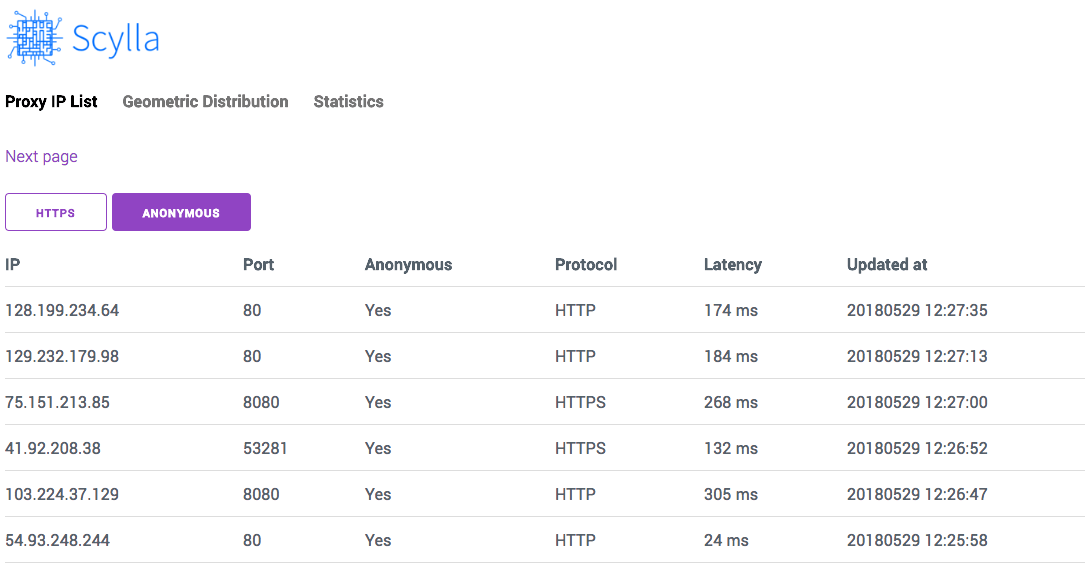
Open http://localhost:8899` in your browser to see the Web UI of this project.
Proxy IP List
http://localhost:8899/Screenshot:
Globally Geographical Distribution Map
http://localhost:8899/#/geoScreenshot:

API Documentation =================
Please read Module Index.
Roadmap =======
Please see Projects.
Development and Contribution ============================
git clone https://github.com/imWildCat/scylla.git
cd scylla
pip install -r requirements.txt
npm install make assets-build
Testing =======
If you wish to run tests locally, the commands are shown below:
pip install -r tests/requirements-test.txt
pytest tests/
You are welcomed to add more test cases to this project, increasing the robustness of this project.
Naming of This Project ======================
Scylla is derived from the name of a group of memory chips in the American TV series, Prison Break. This project was named after this American TV series to pay tribute to it.
Help ====================== How to install Python Scylla on CentOS7
Donation ========
If you find this project useful, could you please donate some money to it?
No matter how much the money is, Your donation will inspire the author to develop new features continuously! 🎉 Thank you!
The ways for donation are shown below:
GitHub Sponsor
I super appreciate if you can join my sponsors here.
PayPal

License =======
Apache License 2.0. For more details, please read the LICENSE file.
[Alipay and WeChat Donation]: https://user-images.githubusercontent.com/2396817/40589594-cfb0e49e-61e7-11e8-8f7d-c55a29676c40.png
[Scrapy]: https://scrapy.org [requests]: http://docs.python-requests.org/


