
A strategy tester for MetaTrader5 in Python language
What is StrategyTester5?
Full documentation -> https://strategytester5.com
StrategyTester5 (ST5) is a Python framework for building, testing, and optimizing algorithmic trading strategies using the MetaTrader 5 platform.
It extends the native MetaTrader 5 Python API by adding high-performance backtesting, simulation, and data handling capabilities that are not available out of the box.

What's New!
Why StrategyTester5?
The official MetaTrader5 Python API provides access to market data and trading operations — but it lacks a built-in way to efficiently backtest and simulate trading strategies.
StrategyTester5 fills this gap by providing backtesting and optimization capabilities.
!!! Note "Note" Built for developers who want full control over their trading logic without leaving the MetaTrader 5 ecosystem.
How it Works
It simulates the MetaTrader5 API on the actual historical data from the MetaTrader5 terminal. See a quick start guide.
Installation
With pip (recommended)
This package is available at Python package index pypi.org.pip install strategytester5Or, you can install while checking for the updates.
pip install -U strategytester5With git
Of course, you can pull strategytester5 directly from the GitHub repository.
Git clone:
git clone git@github.com:MegaJoctan/StrategyTester5.git strategytester5Install the cloned repository as a package:
pip install -e strategytester5Quick Start | Build & Test your First Trading Robot
All you need is to add three (3) Lines of code to your existing Python project.
01: Import the VirtualMetaTrader5 class
from strategytester5.MetaTrader5.api import VirtualMetaTrader502: Assign the parent (MetaTrader5) initialized instance to the VirtulMetaTrader5 object
if not mt5.initialize():
    raise RuntimeError(f"Failed to initialize mt5. Error = {mt5.last_error()}")
virtualmt5 = VirtualMetaTrader5(parentmt5=mt5)
Optional : Choosing the right MT5 instance
Since the VirtualMetaTrader5 object has similar methods and constants to MetaTrader5 API.To keep all the code in a single file, introduce if statements to check for passed arguments from the script.
!!! Note "Rule of Thumb" For instance, if a user has passed --backtesting when calling the main script the script should use a simulated MetaTrader5 rather than the actual one.
script_argument = sys.argv[1:]
    if "--backtesting" in script_argument:
        mt5 = VirtualMetaTrader5(parentmt5=parentmt5) # Assign parent MetaTrader5 to the virtual MetaTrader5 class object
    else:
        mt5 = parent_mt5
> Always use the virtual MetaTrader5 object for backtesting and visualization purposes and stick to the original one for live trading. That's all
03: Backtesting your Python Trading Strategies
To Backtest your trading systems call the function run_backtesting.
if "--backtesting" in script_argument:
stats = run_backtesting(         main_function=main,         testerconfig=testerconfig,         virtual_mt5=mt5,         logging_level=logging.DEBUG     )
else:     # run the script on the market (realtime)     while True:         main()
Tester Configurations
The so-called tester_config is supposed to be a dictionary with a set of key, and value pairs that resemble MetaTrader5's strategy tester section.
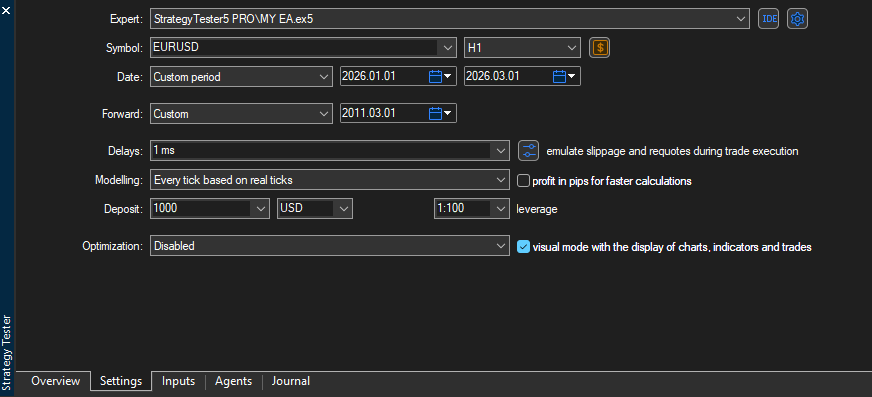
title="example tester config(s)"
tester_config = {
        "bot_name": "RSI Strategy Bot",
        "symbols": ["EURUSD"],
        "timeframe": "H1",
        "start_date": "01.01.2026",
        "end_date": "01.06.2026",
        "modelling" : "open price only",
        "deposit": 1000,
        "leverage": "1:100"
}!!! Note "Rule of Thumb"
Storing tester configuration in a JSON file is the best way forward. It helps adjust the values without changing the original code :)
A complete Trading robot Example.
title="simple trading bot\bot.py"
import logging
from strategytester5.MetaTrader5.api import VirtualMetaTrader5
from strategytester5.tester import run_backtesting
from strategytester5.trade_classes.Trade import CTrade
import MetaTrader5 as parent_mt5
import sys
if not parent_mt5.initialize():     raise RuntimeError(f"Failed to initialize mt5. Error = {parentmt5.lasterror()}")
script_argument = sys.argv[1:] if "--backtesting" in script_argument:     mt5 = VirtualMetaTrader5(parentmt5=parentmt5) # Assign parent MetaTrader5 to the virtual MetaTrader5 class object else:     mt5 = parent_mt5
---------------------- inputs/global variables ----------------------------
symbol = "EURUSD" timeframe = mt5.TIMEFRAME_H1 # This should be an integer so you should convert timeframe in string into integer MAGIC_NUMBER = 1001
---------------------------------------------------------
mtrade = CTrade(terminal=mt5, symbol=symbol, magicnumber=MAGICNUMBER, deviationpoints=100)
def posexists(magic: int, postype: int) -> bool:     """Checks if position exists"""
positionsfound = mt5.positionsget()     if positions_found:         for position in positions_found:             if position.type == pos_type and position.magic == magic:                 return True
return False
def main(stop_loss: float=500,          take_profit: float=700          ):
symbolinfo = mt5.symbolinfo(symbol) # Symbols information     if symbol_info is None:         return
pts = symbol_info.point
lotsize = symbolinfo.volume_min # use the minimum volume (lot size)
ticks = mt5.symbolinfotick(symbol)
if ticks is None:         return
ask = ticks.ask     bid = ticks.bid
# print(f"ask: {ask}, bid: {bid}, pts: {pts}")
if not posexists(magic=MAGICNUMBER, postype=mt5.POSITIONTYPE_BUY): # if a buy position doesn't exist         mtrade.buy(volume=lotsize,                     price=ask,                     sl=ask-stop_loss * pts,                     tp=ask+take_profit * pts,                     comment="Simple bot Buy Trade"                     ) # open a new buy position (trade)
if not posexists(magic=MAGICNUMBER, postype=mt5.POSITIONTYPE_SELL): # if a sell position doesn't exist         mtrade.sell(volume=lotsize,                      price=bid,                      sl=bid + stop_loss * pts,                      tp=bid - take_profit * pts,                      comment="Simple bot Sell Trade"                      ) # open a new sell position (trade)
tester_config = {         "bot_name": "RSI Strategy Bot",         "symbols": ["EURUSD"],         "timeframe": timeframe,         "start_date": "01.01.2026",         "end_date": "01.06.2026",         "modelling" : "1 minute ohlc",         "deposit": 1000,         "leverage": "1:100" }
if "--backtesting" in script_argument:
stats = run_backtesting(         main_function=main,         testerconfig=testerconfig,         virtual_mt5=mt5,         logging_level=logging.DEBUG     )
else:     # run the script on the market (realtime)     while True:         main()
And that’s it: Calling a script with — backtesting will start backtesting (simulation) in the web browser.
python bot.py --backtesting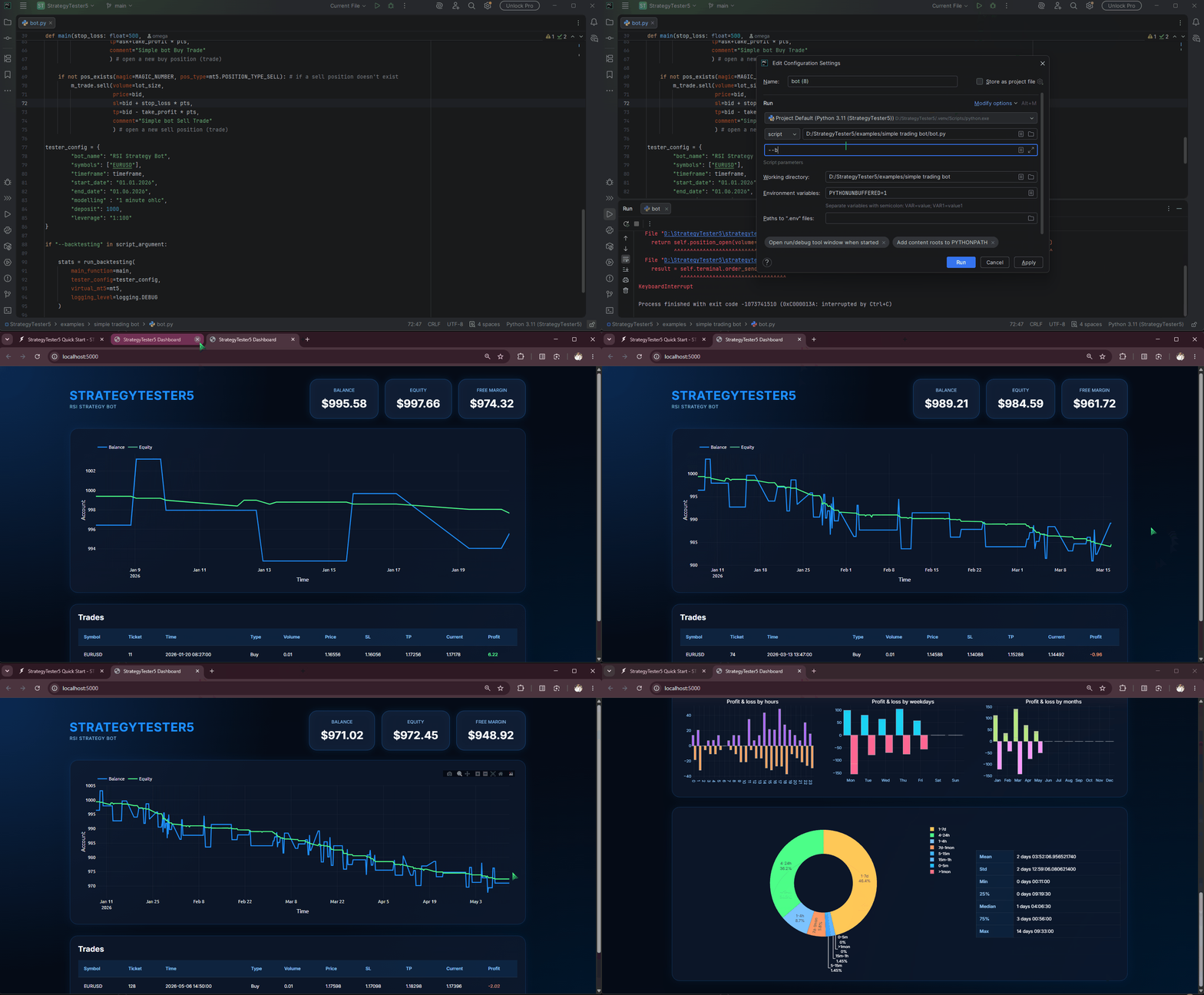
To backtest your strategies in MetaTrader5’s StrategyTester App, add visual_mode to tester configurations.
tester_config = {
        "bot_name": "RSI Strategy Bot",
        "symbols": ["EURUSD"],
        "timeframe": timeframe,
        "start_date": "01.01.2026",
        "end_date": "01.06.2026",
        "modelling" : "1 minute ohlc",
        "deposit": 1000,
        "leverage": "1:100",
        "visual_mode": True
}
This time, when you run the script using the same command, backtesting will take place inside the MetaTrader5 App (terminal)🤯
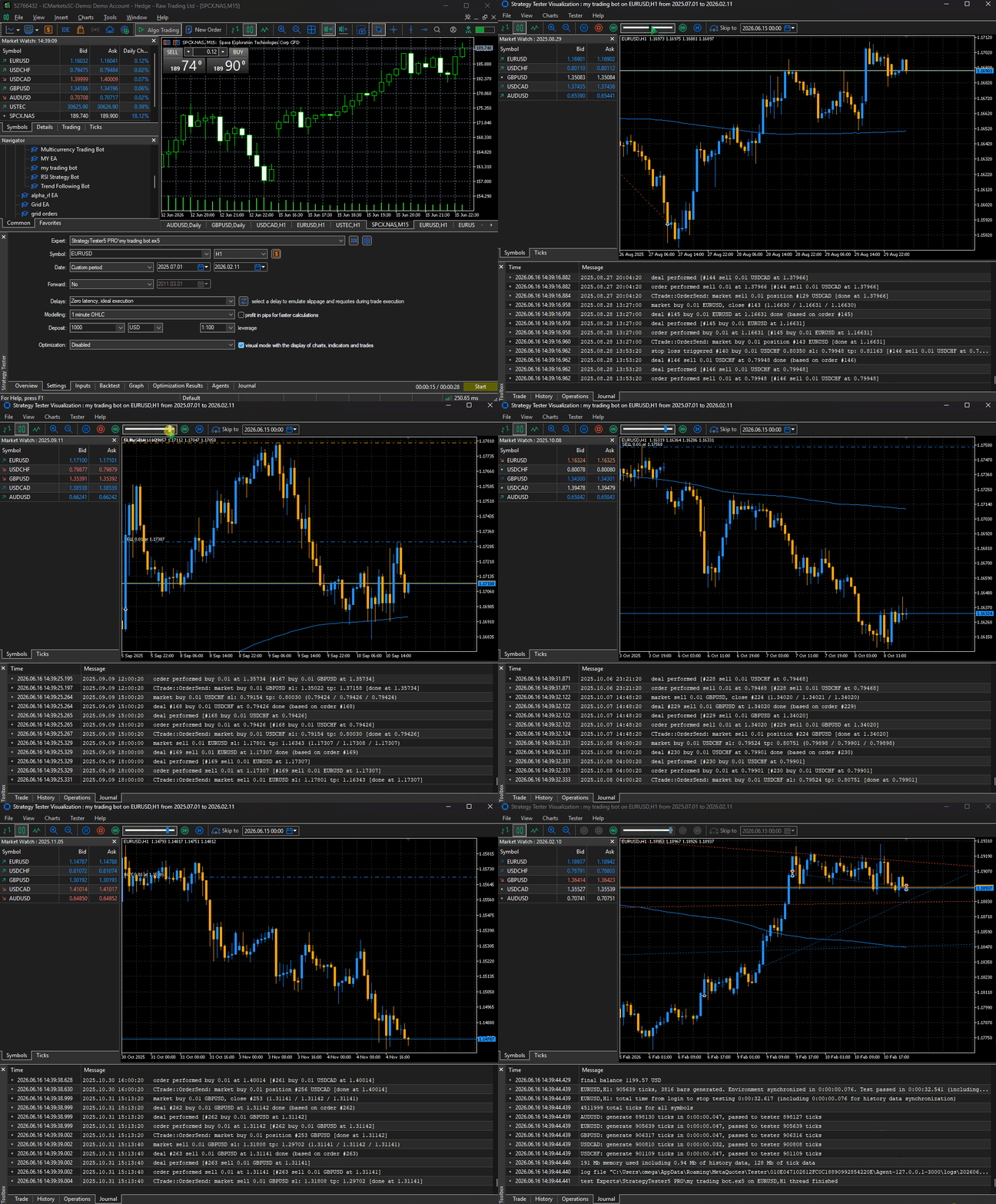
More examples and Python files used in this article are found here..
Free vs Profession Edition
For accurate backtests in the MetaTrader 5 platform using Python, upgrade to the . StrategyTester5 Professional Edition ↗
| Feature | Free | Professional | |--------------------------------------|------|--------------| | Accurate MT5 Backtesting | ✅ | ✅ | | Optimization Mode | ✅ | ✅ | | Backtest Speed | Fast | Electric ⚡ | | Interactive equity & balance curves | ✅ | ✅ | | Visual Trade Replay in MT5↗ | ❌ | ✅ | | Real-Time Trade Annotations on Chart | ❌ | ✅ | | Detailed Trade History Analysis | ❌ | ✅ | | Advanced Performance Metrics | ❌ | ✅ | | Tick-Level Backtesting | ❌ | ✅ | | Priority Support & Updates | ❌ | ✅ |


