
Serverless jobs processor on AWS
Last updated Sep 17, 2025
84
Stars
10
Forks
0
Issues
0
Stars/day
Attention Score
19
Topics
Language breakdown
HCL 85.2%
JavaScript 10.5%
Shell 4.3%
▸ Files
click to expand
README
AWS SQS Jobs Processor
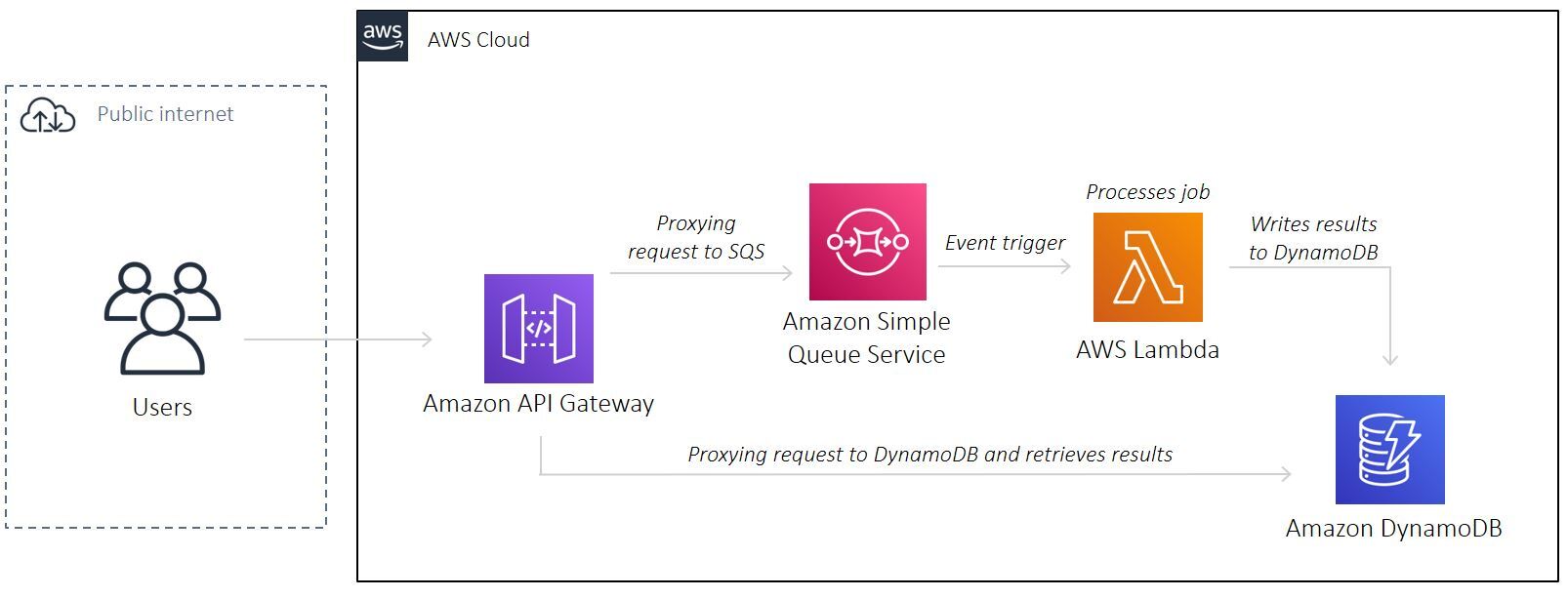
A reference project to deploy a serverless jobs processor on AWS with Terraform
A service which returns Fibonacci sequence
App URL here: https://8nalvgvzrl.execute-api.us-east-1.amazonaws.com/production/api/v1/jobs
Pre-requisite
- Make sure you have installed Terraform, AWS CLI, and configured a
defaultAWS CLI profile (see doc here)
terraform -help # prints Terraform options
which aws # prints /usr/local/bin/aws
aws --version # prints aws-cli/2.0.36 Python/3.7.4 Darwin/18.7.0 botocore/2.0.0
aws configure # configure your AWS CLI profile
Configuration
- Create an S3 bucket to store Terraform state. Populate bucket name in
01-main.tf
- Create another S3 bucket to store Lambda functions build artifacts:
aws s3api create-bucket --bucket=<YOURUNIQUEBUCKETNAME> --region=<DEFAULTREGION>- Populate
terraform.tfvars:
defaultregion      = "<YOURAWSDEFAULTREGION>"
appname            = "<GIVEYOURAPPA_NAME!>"
environment         = "<ENVIRONMENT_NAME>"
Deploy Lambda package
- Navigate to
/deploy/lambdas/<FUNCTION_NAME> - Create a
.zipfile:
zip -r <FUNCTION_NAME>.zip .- Uploads Lambda artifact to S3 bucket:
aws s3 cp <FUNCTIONNAME>.zip s3://<BUCKETNAME>/v1.0.0/<FUNCTION_NAME>.zipDeploy Lambda layer
cd deploy/lambdas/layer # change to lambda layer directory
sh updateLayer.sh # uploads lambda layer to S3 bucket
Deploy AWS stack
cd deploy # change to deploy directory
terraform init # initialises Terraform
terraform apply # deploys AWS stack. See output for API url
terraform destroy # destroys AWS stack
Usages
- Make a
POSTrequest to<API_ENDPOINT>/api/v1/jobsto trigger a job which returns Fibonacci sequence with N numbers
{
  "data": 10
}- Make a
GETrequest to<API_ENDPOINT>/api/v1/jobsto retrieve all jobs - Make a
GETrequest to<APIENDPOINT>/api/v1/jobs/<JOBID>to retrieve a specific job
Update Lambda package
- Update the
deploy/lambdas/processQueue/updateFunction.shshell script with correct values i.e. Amazon S3 bucket name, and key. See documentation on AWS CLIupdate-function-codehere
- Run the script:
cd deploy/lambdas/processQueue # change to lambda directory
chmod +x updateFunction.sh # set permission to run script
./updateFunction.sh # run the script
Contributing
Pull requests are welcome. For major changes, please open an issue first to discuss what you would like to change.
Please make sure to update tests as appropriate.
If you find this project helpful, please give a :star: or even better buy me a coffee :coffee: :pointdown: because I'm a caffeine addict :sweatsmile:


