
Serverless function to automatically update balance of investment accounts in YNAB
Last updated May 25, 2026
17
Stars
0
Forks
0
Issues
0
Stars/day
Attention Score
3
Language breakdown
No language data available.
▸ Files
click to expand
README
sls-ynab-stock-updates

Serverless function to automatically update investment account balances in YNAB. If the assets are in multiple currencies - tries it's best to convert to the accounts base currency.
Requirements
- Node
- NPM
Installation
npm installSetup
There are a few preliminary steps that must be taken to start using this serverless function.
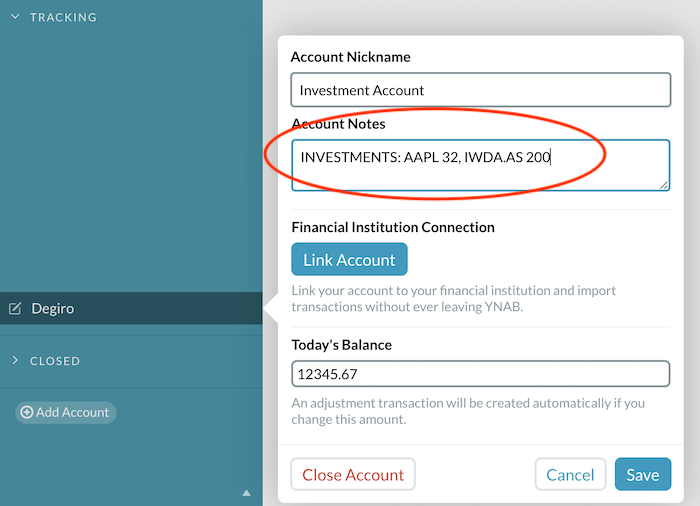
- Add information about your portfolio to the YNAB accounts you would like to be tracked.
INVESTMENTS: {Stock Symbol} {Amount}, {Stock Symbol} {Amount}...
Example: INVESTMENTS: AAPL 191, MSFT 120
Crypto example: INVESTMENTS: BTC-EUR 0.09231, XMR-USD 120.3341
- Create a
serverless.env.ymlenvironment variable file and copy the existing variables from the example file.
cp serverless.env.example.yml serverless.env.yml- Set the environment variables
YNABAPITOKEN: personal API token generated in the YNAB homepage.AUTOMATIC_APPROVAL: should the automatic balance adjustment transactions be auto-approved? Useful to set this totrueif you are running this function hourly/daily/weekly/etc and don't want to go through streams of transactions.AUTOMATICCURRENCYCONVERSION: should automatic currency conversion be turned on? Converts to budgets base currency. Useful if, you have assets in multiple currencies and they are all in one account.ALARM_EMAIL: what email should be notified if the function starts malfunctioning and throwing errors?
- Deploy the function
npm run deployDevelopment
- Define necessary env variables in
serverless.env.yml(example available inserverless.env.example.yml)
- Run (to run locally)
npm startDeployment
If you wish to run this serverless function on a schedule (configured in serverless.yml file), then it must be deployed. This can be done by running the following command.
npm run deploy


