
A customizable Neovim plugin to run code inside the editor
runner.nvim
A customizable Neovim plugin to run code inside the editor
Demo
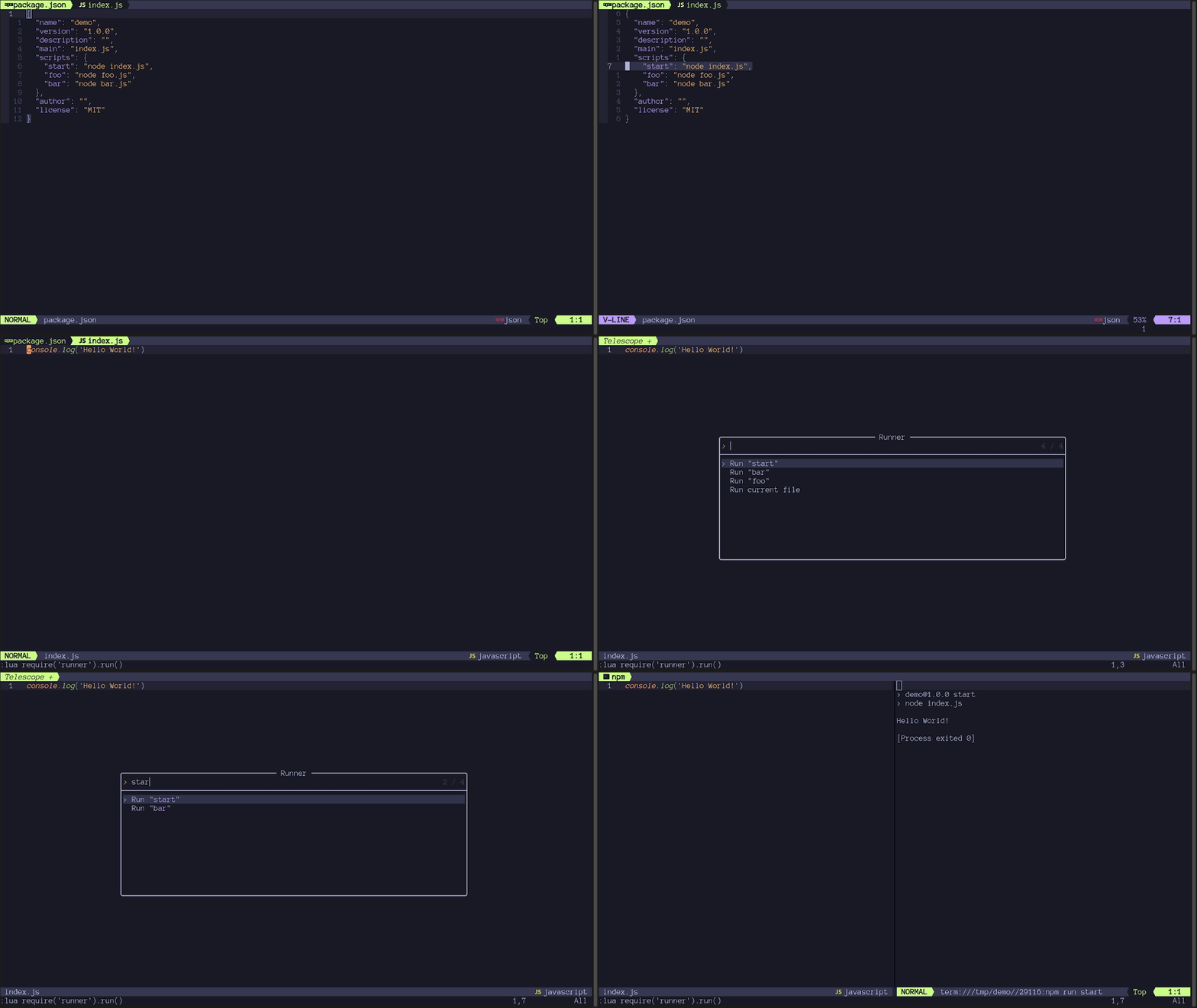
Table of Contents
Installation
Using packer.nvim:
return require('packer').startup(function(use)
    use {
      'MarcHamamji/runner.nvim',
      requires = {
        'nvim-telescope/telescope.nvim',
        requires = { 'nvim-lua/plenary.nvim' }
      },
      config = function()
        require('runner').setup()
      end
    }
  end)
Using lazy.nvim:
require('lazy').setup({
    {
      'MarcHamamji/runner.nvim',
      dependencies = {
        'nvim-telescope/telescope.nvim',
        dependencies = { 'nvim-lua/plenary.nvim' }
      },
      config = function()
        require('runner').setup()
      end
    }
  })
Usage
Commands
| Command | lua | Description | |-------------------|------------------------------------|------------------------------------------| | :Runner | require('runner').run() | Runs code in buffer | | :AutoRunner | require('runner').autorun() | Runs code in buffer on every file save | | :AutoRunnerStop | require('runner').autorun_stop() | Stops AutoRunner and closes the window |
Lua
require('runner').run()
  require('runner').autorun()
  require('runner').autorun_stop()
-- Can also be called with the buffer number where the code is:   -- require('runner').run( <buffer_number> )   -- require('runner').autorun( <buffer_number> )
-- To set a mapping   vim.keymap.set('n', '<leader><space>', require('runner').run)
Configuration
setup(options)
Runner comes with the following defaults:
require('runner').setup({
    position = 'right', -- position of the terminal window when using the shell_handler
                        -- can be: top, left, right, bottom
                        -- will be overwritten when using the telescope mapping to open horizontally or vertically
width = 80,         -- width of window when position is left or right     height = 10,        -- height of window when position is top or bottom
handlers = {} -- discussed in the next section   })
Handlers
Runner has the concept of handlers. Handlers are language specific and are little functions that run code. For example, a handler could run the project, run the tests, build the project, or even run custom project scripts.
A handler is a function that accepts a buffer number as an argument, and doesn't return anything. This buffer number is the buffer where the code to run is located. It defaults to the buffer where the run() function was called, or, if specified, is the buffer number that was passed to the run() function. Runner runs the appropriate handler based on this buffer's filetype.
Default handlers can be found here.
When setting a handler, you should pass the following arguments | Argument | Description | Type | |---------------- | --------------- | --------------- | | filetype | The filetype on which to run the given handler | string | | handler | The handler to run when the current file matches the filetype | function(bufnr) |
There are 2 ways to set handlers. Both of them overwrite the handlers already set for the specified filetype.
- ####
setup(options)
setup() function. The handlers table has the following format:
{
    ["filetype"] = handler
  }
Example:
require('runner').setup({     -- Other options
handlers = {       lua = function(bufnr)         vim.print('Running lua file in buffer ' .. bufnr)         -- Run the file here       end     }   })
- ####
set_handler(filetype, handler)
require('runner').set_handler('lua', function(bufnr)
    vim.print('Running lua file in buffer ' .. bufnr)
    -- Run the file here
  end)
NOTE: For using multiple handlers on the same filetype, see the choice helper.
Helpers
This plugin exposes some helpers to make creating handlers easier. They're all available by importing them as follows:local helpername = require('runner.handlers.helpers').helpernameHere is a description of each one:
- ####
shell_handler(command, editable)
The split window's position will be determined by the position value from the config. It will be overwritten when using the telescope mapping to open horizontally or vertically. - select_horizontal (defaults to <C-X>): Opens the window at the bottom of the screen. - select_vertical (defaults to <C-V>): Opens the window at the right of the screen.
| Argument name | Description | Type | |---------------- | --------------- | --------------- | | command | The shell command to run when the handler is called | string | | editable| Whether the user should be prompted to edit the command using vim.input() before running it. Useful when giving command line arguments to a script | boolean (optional, defaults to false) |
Example:
local shellhandler = require('runner.handlers.helpers').shellhandler
require('runner').sethandler('rust', shellhandler('cargo run', true))- ####
command_handler(command)
| Argument name | Description | Type | |---------------- | --------------- | --------------- | | command | The Vim command to run when the handler is called | string |
Example:
local commandhandler = require('runner.handlers.helpers').commandhandler
require('runner').sethandler('lua', commandhandler('luafile %'))- ####
choice(handlers)
Telescope finder to allow the user to choose which handler to run.
| Argument name | Description | Type | |---------------- | --------------- | --------------- | | handlers | The list of handlers to choose from | table where the keys are the name of the handlers in the telescope finder, and where the values are the actual handlers |
Example:
local choice = require('runner.handlers.helpers').choice
    require('runner').set_handler('rust', choice({
      ['Run'] = helpers.shell_handler('cargo run'),
      ['Test'] = helpers.shell_handler('cargo test'),
      ['Custom'] = helpers.shell_handler('cargo ', true),
    }))
Advanced handlers configurations
For creating dynamic handlers like one for eachnpm or cargo script, you can write your own handler function that generates the other handlers, gives them to the choice handler, and runs it itself.
See Node.js example.
Contribution
This project uses StyLua for enforcing code style, and has a pre-commit hook setup for running it automatically. It also has a Github Action that runs the linter on every pull request. If a check doesn't pass on a specific pull request, please lint the code and commit it again.
For running these tools locally, you have to have them installed on your system:
Some useful commands
- Install the pre-commit hook
pre-commit install- Check for StyLua errors
stylua --check lua/- Fix StyLua errors
stylua lua/


