
Security gate for AI-generated code - blocks the build until vulnerabilities are fixed

ai-rsk - Security gate for AI-generated code



Install • Quick Start • What it Detects • Architecture • Contributing
ai-rsk blocks your build until security issues are fixed. One Rust binary. 67 built-in rules. 5 compliance profiles (security, GDPR, AI Act, SEO, accessibility). Tree-sitter AST filter for context-aware detection. Auto-installs and manages external security tools (Semgrep, Gitleaks, osv-scanner, knip). Your AI can't deploy insecure code because the build won't pass.
The Problem
LLMs generate functional code, but with recurring security flaws:
// LLM writes this - it works, it's insecure
localStorage.setItem('access_token', response.data.token);
fetch('/api/data', { headers: { Authorization: Bearer ${token} } });
app.use(cors());
app.use(express.json());
// No helmet, no CSP, no rate limiting, no input validation
Non-developers who build with AI ship these patterns to production. Real users' emails, passwords, and payment data become accessible to anyone who knows where to look.
ai-rsk makes this impossible. The build doesn't pass. The LLM is forced to fix the code.
What Happens When You Run It
$ ai-rsk scan --all
ai-rsk vX.X.X - Security Gate + Project Analysis ===================================================   Profiles: security, gdpr, ai-act, seo, a11y   Ecosystems: JavaScript/TypeScript   ✓ semgrep 1.156.0   ✓ gitleaks 8.30.0   ✓ osv-scanner 2.3.3   ✓ knip 5.88.1 ===================================================
[1/3] Running external tools...   [2/3] Scanning 67 rules...   [3/3] Analyzing project structure...
[BLOCK] Token stored in localStorage - accessible to any XSS attack.   File: src/auth.js:42   Rule: TOKENINLOCALSTORAGE   Ref:  CWE-922 (https://cwe.mitre.org/data/definitions/922.html)   Code: localStorage.setItem('access_token', response.data.token)   Fix:  Move token to HttpOnly cookie server-side.
[WARN] CORS allows any origin - any website can call your API.   File: src/app.js:12   Rule: CORS_WILDCARD   Ref:  CWE-942 (https://cwe.mitre.org/data/definitions/942.html)   Code: app.use(cors());   Fix:  Restrict CORS to specific trusted origins.
[ADVISE] No privacy policy page found. [ADVISE] No robots.txt file found.
=================================================== Security Score: 55/100 Result: BLOCKED (2B 2W 3A) Exit code: 1 ===================================================
Next: Fix the 2 BLOCK findings first - the build is blocked until they are resolved.   Then address the 2 WARNs (they become BLOCK with --strict).   After fixing, run ai-rsk scan to verify.
The LLM reads this output, fixes every issue, and re-runs the build. It can't skip anything - exit code 1 means the build fails.
Installation
Pre-built binaries (recommended)
Download from Releases:
| Platform | File | |----------|------| | macOS (Apple Silicon) | ai-rsk-aarch64-apple-darwin.tar.gz | | macOS (Intel) | ai-rsk-x86_64-apple-darwin.tar.gz | | Linux (x64) | ai-rsk-x86_64-unknown-linux-musl.tar.gz | | Linux (ARM64) | ai-rsk-aarch64-unknown-linux-gnu.tar.gz | | Windows (x64) | ai-rsk-x86_64-pc-windows-msvc.zip |
# Linux/macOS example:
tar -xzf ai-rsk-x86_64-unknown-linux-musl.tar.gz
sudo mv ai-rsk /usr/local/bin/
Windows: extract the zip, add ai-rsk.exe to your PATH
From crates.io
cargo install ai-rskFrom source (requires Rust 1.85+)
cargo install --git https://github.com/Krigsexe/ai-rskVerify
ai-rsk --version
ai-rsk --help  # Quick start guide with examples
Quick Start
1. Initialize your project
cd /your/project
ai-rsk init 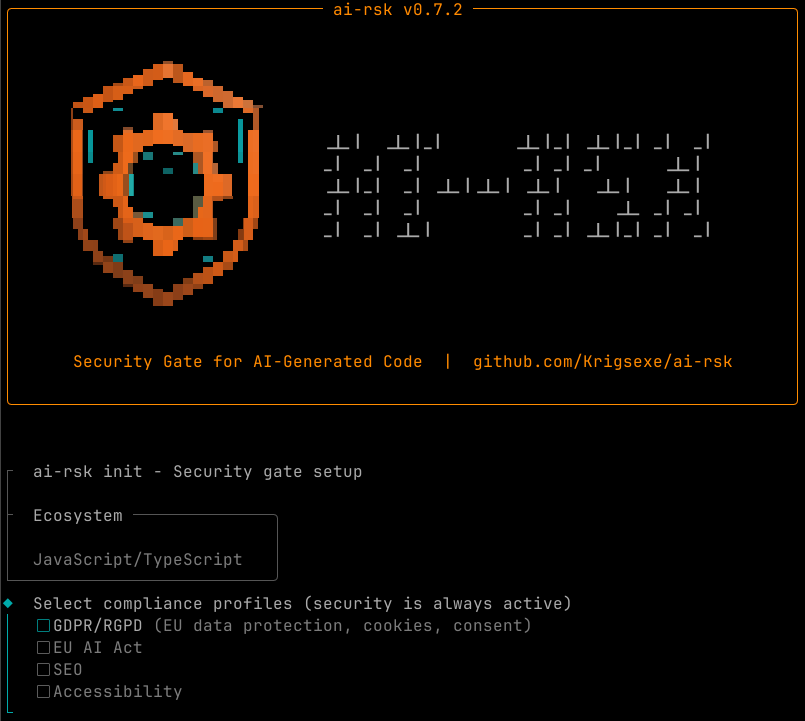
This presents an interactive setup where you choose:
- Compliance profiles: GDPR/RGPD, EU AI Act, SEO, Accessibility (security is always active)
- Environment mode: Development, Production, or Auto
- Region: EU region auto-activates GDPR
ai-rsk.config.yamlwith your selectionsSECURITY_RULES.md- contract between ai-rsk and the LLM (adapts to selected profiles)- LLM discipline files for 16 AI coding tools (Claude Code, Cursor, Copilot, Windsurf, Cline, Gemini CLI, Codex CLI, Aider, Roo, Kiro, Continue, JetBrains AI, Amazon Q, Tabnine, Augment, Zed)
- Git hooks (pre-commit blocks insecure commits, pre-push blocks force-push to protected branches)
- Prebuild hook in
package.json(JS/TS projects) .gitignoreentry for.ai-rsk/report directory
2. Scan
ai-rsk                # Scan current directory (no subcommand needed)
ai-rsk scan --strict  # Block on warnings too
ai-rsk scan --full    # Block on everything (recommended for AI-built projects)
ai-rsk scan --gdpr    # Add GDPR/RGPD compliance checks
ai-rsk scan --ai-act  # Add EU AI Act compliance checks
ai-rsk scan --seo     # Add SEO checks (robots.txt, sitemap, meta viewport)
ai-rsk scan --a11y    # Add accessibility checks (WCAG 2.2)
ai-rsk scan --all     # Enable ALL profiles
ai-rsk scan --json    # JSON output for CI/CD integration
3. Fix and re-scan
The output tells the LLM exactly what to fix, with code examples. Fix, re-run, repeat until exit code 0.
What it Detects
Layer 1 - 67 Built-in Rules (offline, deterministic, AST-filtered)
Patterns that LLMs generate repeatedly and existing tools miss. Tree-sitter AST filter eliminates false positives in comments and docstrings.
| Profile | Category | Rules | Examples | |---------|----------|-------|---------| | security | Token/Secret exposure | 5 | Token in localStorage, Bearer in client code, hardcoded secrets | | security | Missing security headers | 8 | No helmet, no CSP, no HSTS, no X-Frame, no Referrer-Policy, no Permissions-Policy | | security | Authentication flaws | 4 | Client-side auth only, missing rate limiting, WebSocket without auth, unprotected API routes | | security | Cookie misconfiguration | 3 | Missing HttpOnly, Secure, SameSite flags | | security | Input/Output | 5 | eval(), CORS wildcard, SSRF, XSS via dangerouslySetInnerHTML, path traversal | | security | Business logic | 3 | Negative price, SELECT * in response, prompt injection | | security | Django | 4 | DEBUG=True, SECRETKEY hardcoded, ALLOWEDHOSTS wildcard, missing CSRF middleware | | security | Flask | 1 | app.run(debug=True) enables RCE via Werkzeug debugger | | security | Python general | 7 | requests no timeout, os.system, marshal.load, shelve.open, SQL f-string, JWT no verify, eval(input) | | security | Python (existing) | 3 | pickle.load (RCE), yaml.unsafe_load (RCE), subprocess shell=True (command injection) | | security | Go | 2 | text/template for HTML (XSS), http.ListenAndServe without timeout (slowloris) | | security | Infrastructure | 4 | Source maps in prod, body parser no limit, unvalidated redirects, weak hash | | security | Third-party | 2 | CDN scripts without SRI, Stripe webhooks without signature | | gdpr | Privacy | 2 | Tracking without consent (gtag/fbq), PII in localStorage | | ai-act | AI compliance | 4 | AI output not labeled, system prompt in client, LLM call without audit log, no token limit | | a11y | Accessibility | 3 | img without alt, html without lang, form input without label |
Every rule has a CWE reference verified on cwe.mitre.org. Rules are activated by profiles — --gdpr, --ai-act, --a11y enable their respective rules. Security rules are always active.
Layer 2 - External Tools (auto-installed)
| Tool | What it does | Why it matters | |------|-------------|----------------| | Semgrep | Static analysis, 1000+ rules, 30+ languages | Catches SQL injection, XSS, SSRF, insecure crypto | | Gitleaks | Secret detection in code and git history | API keys, passwords, tokens accidentally committed | | osv-scanner | Known CVE in dependencies | Vulnerable packages that need updating |
These are automatically installed if missing. ai-rsk manages their versions and updates.
Layer 3 - Project Analysis (18 checks)
| Profile | Check | Type | What it detects | |---------|-------|------|-----------------| | always | Missing tests | ADVISE | No test framework, no test files | | always | Missing CI/CD | ADVISE | No pipeline = security gates can be bypassed | | always | Dead dependencies | ADVISE | Installed but never imported | | always | Deprecated packages | ADVISE | request, moment, etc. | | always | No console.log stripping | WARN | Console statements leak to production | | always | Duplicate HTTP clients | ADVISE | axios + node-fetch + got in same project | | always | Tamper detection | BLOCK | ai-rsk scan \|\| true, --no-verify in CI | | always | No lockfile | WARN | No package-lock.json, Cargo.lock, go.sum | | always | .env not gitignored | BLOCK | Secrets will be committed to git | | always | Dockerfile root user | WARN | Container runs as root — no USER directive | | gdpr | No cookie banner | WARN | Tracking scripts without CMP | | gdpr | No privacy page | ADVISE | No /privacy or /politique-de-confidentialite | | seo | No robots.txt | ADVISE | Search engines can't find crawl rules | | seo | robots.txt exposes sensitive paths | WARN | /admin, /api in Disallow reveals existence | | seo | No sitemap | ADVISE | Search engines miss pages | | seo | No meta viewport | ADVISE | Mobile rendering broken | | seo | No canonical URLs | ADVISE | Duplicate content in search results |
Severity Levels
| Flag | BLOCK | WARN | ADVISE | Best for | |------|-------|------|--------|----------| | ai-rsk scan | exit 1 | exit 0 | exit 0 | Senior devs who want security only | | ai-rsk scan --strict | exit 1 | exit 1 | exit 0 | Teams with defense-in-depth | | ai-rsk scan --full | exit 1 | exit 1 | exit 1 | AI-built projects - LLM can't ignore anything |
Integration
npm / pnpm / yarn / bun
{
  "scripts": {
    "prebuild": "ai-rsk scan --strict",
    "build": "vite build"
  }
}
prebuild runs automatically before build. Exit code 1 = build stops.
CI/CD (GitHub Actions)
jobs:
  security:
    runs-on: ubuntu-latest
    steps:
      - uses: actions/checkout@v4
      - name: Install ai-rsk
        run: |
          wget -qO- https://github.com/Krigsexe/ai-rsk/releases/latest/download/ai-rsk-x86_64-unknown-linux-musl.tar.gz | tar xz -C /usr/local/bin/
      - name: Security gate
        run: ai-rsk scan --strict
Or with Cargo (if Rust is already in your CI):
- name: Install ai-rsk (from source)
        run: cargo install --git https://github.com/Krigsexe/ai-rsk
Docker (multi-stage)
# Build stage - ai-rsk scans here
FROM node:20-alpine AS builder
Download pre-built binary (no Rust needed)
RUN wget -qO- https://github.com/Krigsexe/ai-rsk/releases/latest/download/ai-rsk-x86_64-unknown-linux-musl.tar.gz | tar xz -C /usr/local/bin/
WORKDIR /app
COPY . .
RUN ai-rsk scan --strict
RUN npm ci && npm run build
Production stage - ai-rsk is NOT here (dev tool only)
FROM node:20-alpine
COPY --from=builder /app/dist /app/dist
CMD ["node", "dist/server.js"]
False Positive Handling
// ai-rsk-ignore TOKENINLOCALSTORAGE -- stores UI theme preference, not an auth token
localStorage.setItem('auththemetoken', 'dark');
Rules:
- Comment must be on the line before the flagged code
- Justification after
--is mandatory (ignore without reason = still flagged) - Total ignore count is displayed in the report
Supported Ecosystems
| Ecosystem | Detection | Layer 1 Rules | Layer 2 Tools | Layer 3 Analysis | |-----------|-----------|---------------|---------------|------------------| | JavaScript/TypeScript | package.json | 39 rules | Semgrep + Gitleaks + osv-scanner + knip | Full (dead deps, console strip, HTTP clients, prebuild) | | Python | requirements.txt, pyproject.toml, setup.cfg, Pipfile, requirements/ | 16 rules (Django, Flask, requests, os.system, marshal, shelve, SQL f-string, JWT, eval, pickle, yaml, subprocess, exec) | Semgrep + Gitleaks + osv-scanner | Tests + CI | | Go | go.mod | 2 rules (text/template XSS, http timeout) | Semgrep + Gitleaks + osv-scanner | Tests + CI | | Rust | Cargo.toml | Ecosystem-specific discipline | Semgrep + Gitleaks + osv-scanner + cargo-audit | Tests + CI | | HTML | *.html files | 5 rules (img alt, html lang, form label, CDN SRI, window.opener) | Semgrep | SEO checks (robots, sitemap, viewport, canonical) |
Compliance Profiles
ai-rsk goes beyond security with compliance profiles that you select during ai-rsk init:
| Profile | Flag | What it enforces | |---------|------|------------------| | security | always active | OWASP Top 10, CWE Top 25, security headers, auth, crypto, input validation | | gdpr | --gdpr | RGPD/GDPR: cookie consent, tracking scripts, PII in storage, privacy page | | ai-act | --ai-act | EU AI Act Art. 50 + Cyber Resilience Act: AI output labeling, system prompt protection, audit logs, token limits | | seo | --seo | robots.txt, sitemap.xml, meta viewport, canonical URLs | | a11y | --a11y | WCAG 2.2 Level A: img alt, html lang, form labels |
Profiles can be set in ai-rsk.config.yaml:
profiles:
  - "security"
  - "gdpr"
  - "ai-act"
region: "eu"  # Automatically activates gdpr
mode: "production"  # Filters mode-specific rules
Or via CLI flags: ai-rsk scan --gdpr --ai-act
Or all at once: ai-rsk scan --all
Configuration
ai-rsk.config.yaml at your project root:
# Compliance profiles (security is always active)
profiles:
  - "security"
  - "gdpr"
Environment mode (development/production)
mode: "production"
Region hint (eu = GDPR automatically active)
region: "eu"
Timeout for external tools (seconds)
tooltimeoutseconds: 120
Disable rules with mandatory justification
disabled_rules:
  - id: MISSING_CSP
    reason: "CSP is handled by Cloudflare, not in app code"
Additional paths to exclude from scanning
exclude:
  - "generated/"
  - "migrations/"
Unknown fields are rejected — typos in config are caught immediately.
Why Not Just Use Semgrep?
Semgrep is excellent. ai-rsk uses it. But Semgrep alone doesn't:
- Force installation - LLMs skip optional tools
- Detect absence - "no helmet" is not a pattern Semgrep finds
- Block the build - Semgrep findings don't stop
npm run build - Generate LLM discipline files - Semgrep doesn't tell your AI coding tool how to behave
- Analyze project structure - missing tests, dead deps, no CI
Philosophy
There's no such thing as "discipline" with AI. It's about imposition.>
An LLM will always try to work around the problem to deliver what the user asked for as fast as possible. Security is a brake on that objective - so the LLM will ignore it, work around it, or minimize it.>
Every security rule must be imposed by a technical mechanism (exit code 1, blocked build, CI that refuses to merge). Advice in stdout is necessary but insufficient - only the exit code forces action.
License
MIT - Julien GELEE
Support
If ai-rsk helps you ship secure code, consider supporting the project:
- Star this repo
- Report false positives and false negatives
- Contribute rules
- Fueling my open source work with coffee


