
Real-time token, cost, and AI limits widget with multi-device sync for Claude Code, Codex, OpenCode, Hermes, OpenClaw, Cursor, Antigravity and more. | 为 AI Tools 打造的即时Token、成本与限额监控桌面组件,支持多设备同步
Token Monitor
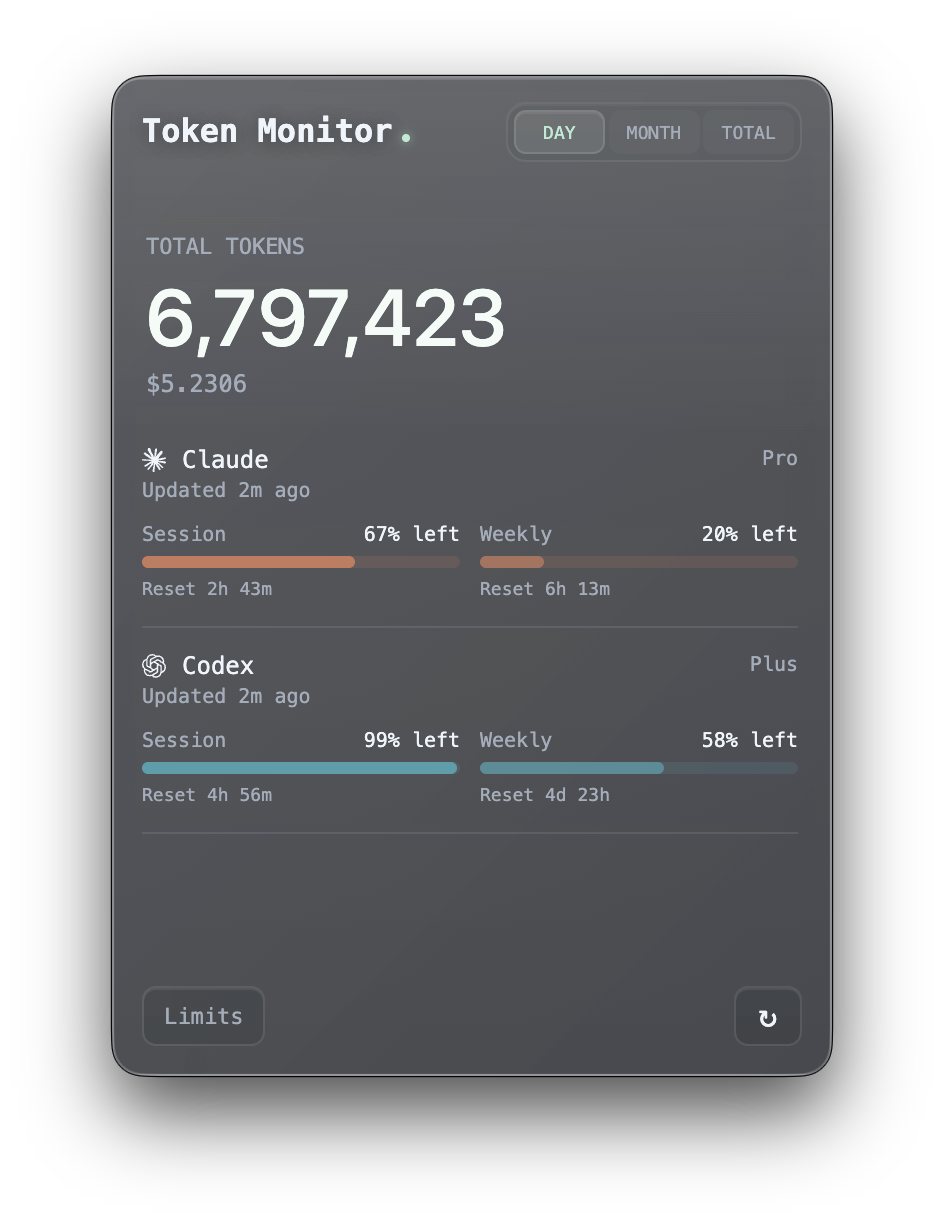
One live dashboard for every AI coding tool, synced across every machine.






What is Token Monitor?
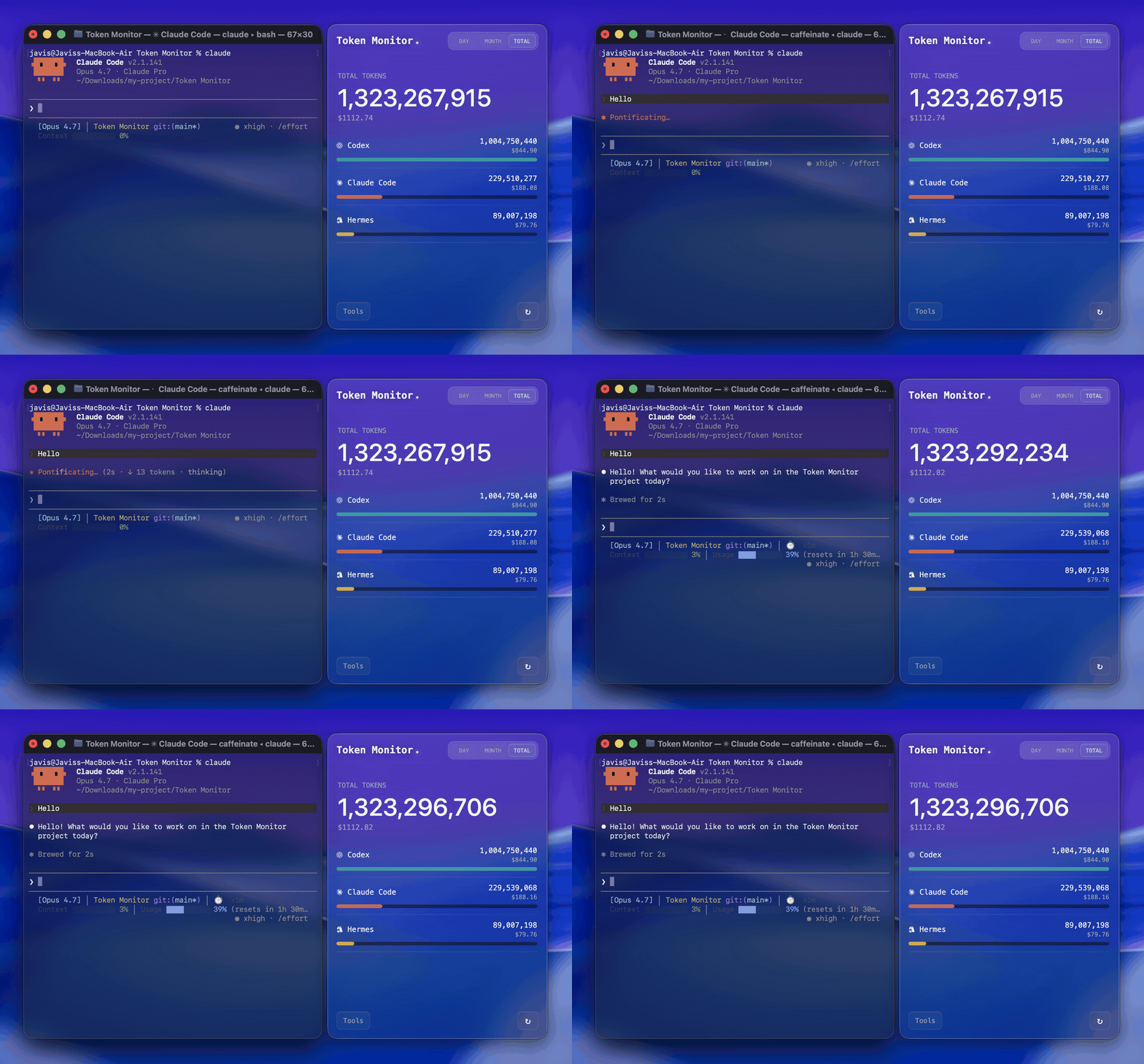
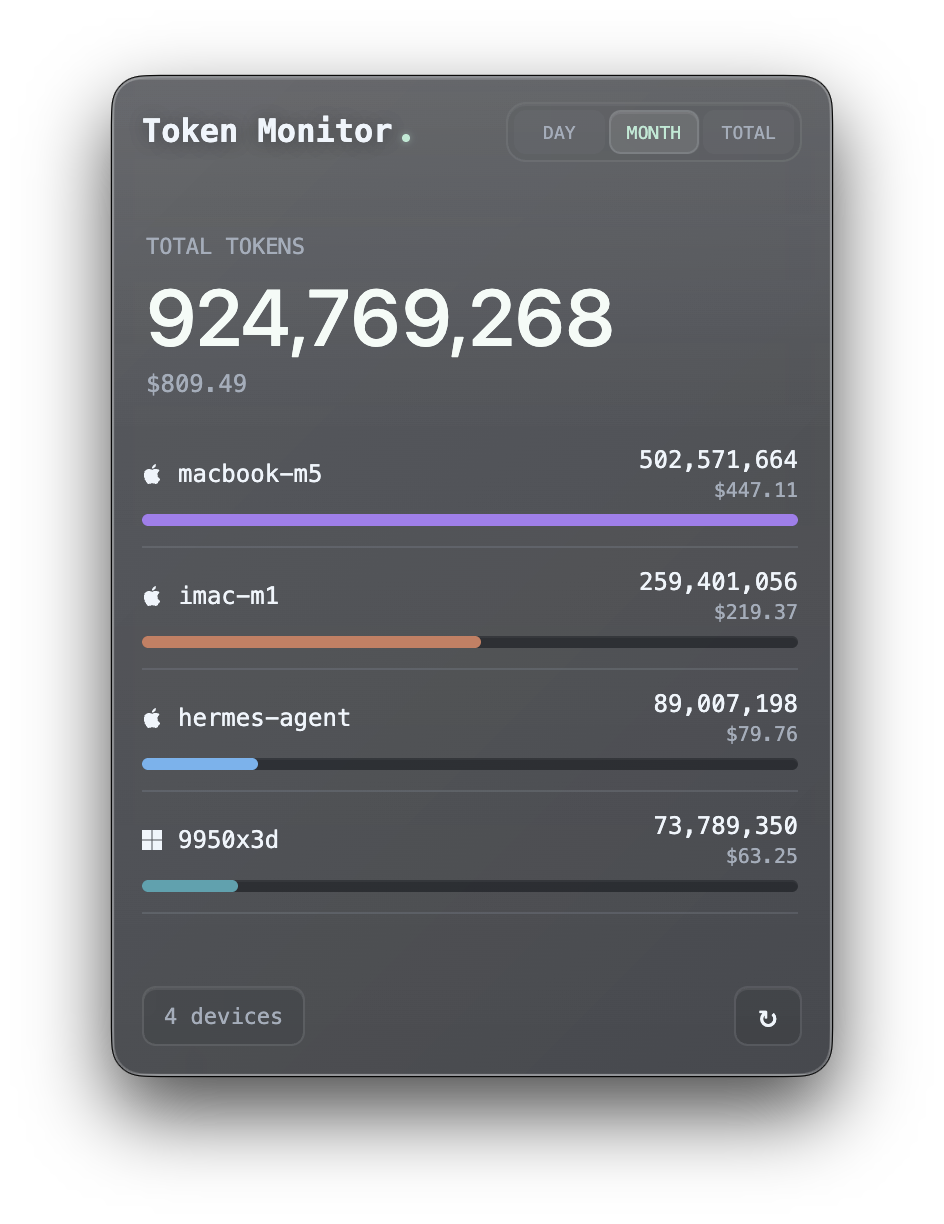
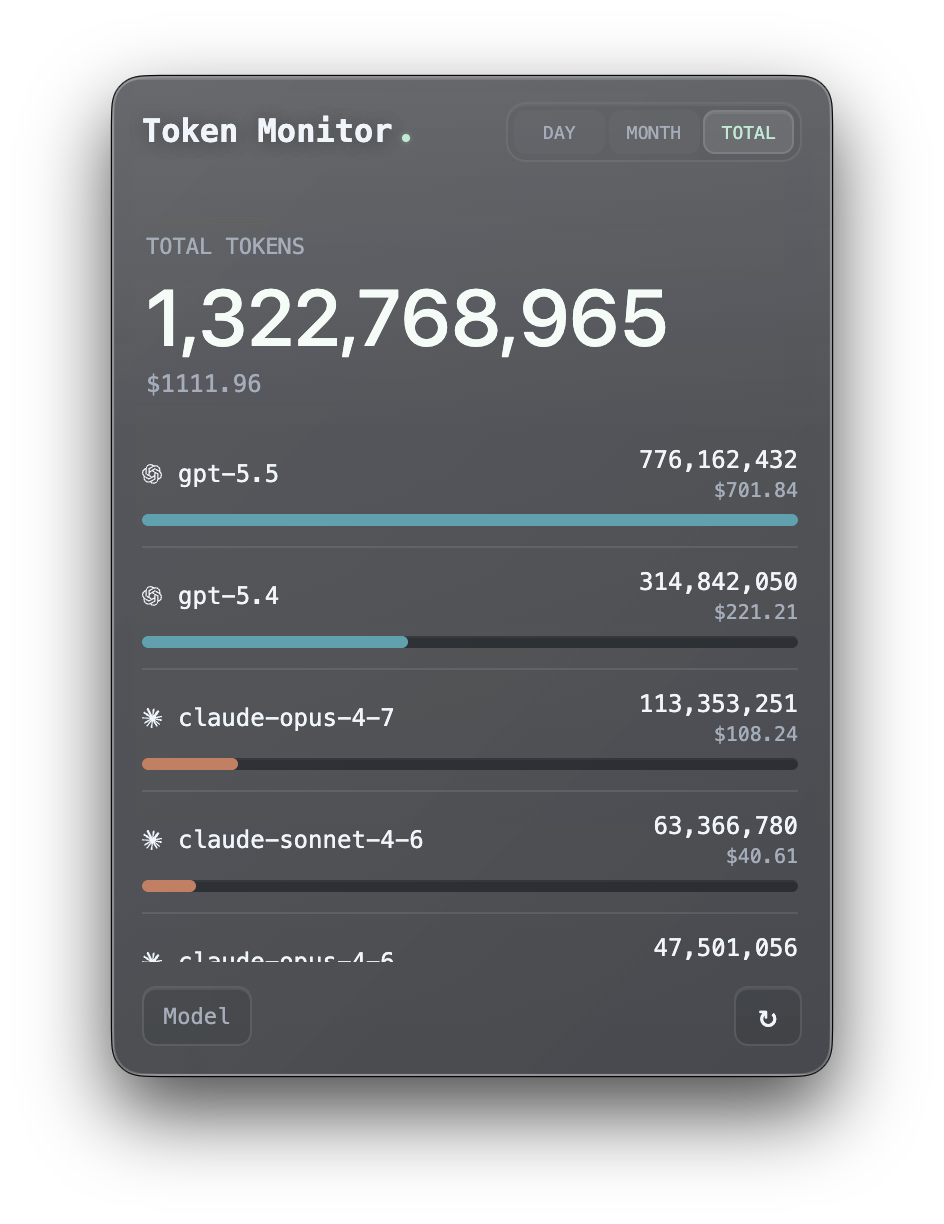
A desktop widget that shows live token usage and AI Tool Limits across various AI coding tools (Claude Code, Codex, Hermes Agent, OpenCode, OpenClaw, Cursor, Antigravity, Cline, and more) with real-time multi-device sync, historical usage trends, and breakdowns by tool, device, model, or session.
Supported Tools
Token Monitor supports token usage, account-limit checks, and session details separately:
| Logo | Tool | Data path | Token Usage | AI Tool Limits | Session Details | |:---:|------|-----------|:---:|:---:|:---:| |  | Claude Code |
 ~/.claude/projects/, ~/.claude/transcripts/ | ✅ | ✅ | ✅ | |  | Codex |
 ~/.codex/sessions/ | ✅ | ✅ | ✅ | |  | OpenCode |
 ~/.local/share/opencode/ | ✅ | ✅ | ✅ | |  | Hermes Agent |
 $HERMES_HOME/state.db or ~/.hermes/state.db | ✅ | — | — | |  | OpenClaw |
 ~/.openclaw/agents/ | ✅ | — | — | |  | Cursor |
 ~/.config/tokscale/cursor-cache/ (kept fresh by Cursor sync) | ✅ | ✅ | — | |  | Antigravity |
 ~/.config/tokscale/antigravity-cache/ (kept fresh by Antigravity sync) | ✅ | ✅ | — | |  | Cline | VS Code globalStorage tasks (
.../saoudrizwan.claude-dev/tasks/) | ✅ | — | — | |  | Kimi CLI / Kimi Code |
 ~/.kimi/sessions/, ~/.kimi-code/sessions/ (KIMICODEHOME) | ✅ | — | — | |  | Qwen CLI |
 ~/.qwen/projects/ | ✅ | — | — | |  | Grok Build |
 $GROK_HOME/sessions/ or ~/.grok/sessions/ | ✅ | ✅ | — | |  | GitHub Copilot |
 ~/.copilot/otel/ (Set up) | ✅ | ✅ | — | |  | Pi |
 ~/.pi/agent/sessions/, ~/.omp/agent/sessions/ (Oh My Pi) | ✅ | — | — | |  | Zed |
 ~/.local/share/zed/threads/threads.db | ✅ | — | — | |  | Kilo Code | VS Code globalStorage tasks (
.../kilocode.kilo-code/tasks/) — Linux & remote/WSL only | ✅ | — | — | |  | MiMo Code |
 ~/.local/share/mimocode/mimocode.db | ✅ | — | — | |  | ZCode / GLM |
 ~/.zcode/projects/; Z.ai API key (GLM personal/team Coding Plan quota via Z.ai API) | ✅ | ✅ | — | |  | Kiro |
 ~/.kiro/sessions/cli/, Kiro IDE globalStorage & kiro-cli DB | ✅ | ✅ | — | |  | CodeBuddy |
 ~/.codebuddy/projects/ + IDE / VS Code extension logs | ✅ | — | — | |  | WorkBuddy |
 ~/.workbuddy/projects/, ~/.workbuddy/workbuddy.db | ✅ | — | — | |  | DeepSeek | DeepSeek API key (balance via DeepSeek API) | — | ✅ | — | |
  | Minimax | Minimax API key (Token Plan quota via Minimax API) | — | ✅ | — | |
  | Volcengine | Ark API key or Volcengine AK/SK (Ark Coding Plan quota via Volcengine API) | — | ✅ | — | |
  | Qoder | Qoder dashboard cookie (big-model credits via Qoder usage API) | — | ✅ | — |
Why Token Monitor?
Most usage monitors are useful on the machine they run on. Token Monitor is built for multi-device work: each device watches its own local logs, sends summary updates to your hub, and every connected widget sees token changes almost immediately.
Features
- Live token tracking for Claude Code, Codex, Hermes Agent, OpenCode, OpenClaw, Cursor, Antigravity, Cline, Kimi, Qwen, Grok Build, GitHub Copilot, Pi, Zed, Kilo Code, MiMo Code, ZCode, Kiro, CodeBuddy, and WorkBuddy (UI updates within seconds of each turn)
- WSL usage (Windows) — usage from AI tools running inside a running WSL distro is detected automatically and merged into your totals (refreshed on the periodic scan, about every 5 minutes)
- Real-time multi-device sync over Server-Sent Events
- Breakdown views grouped by tool, device, model, session, or account limits
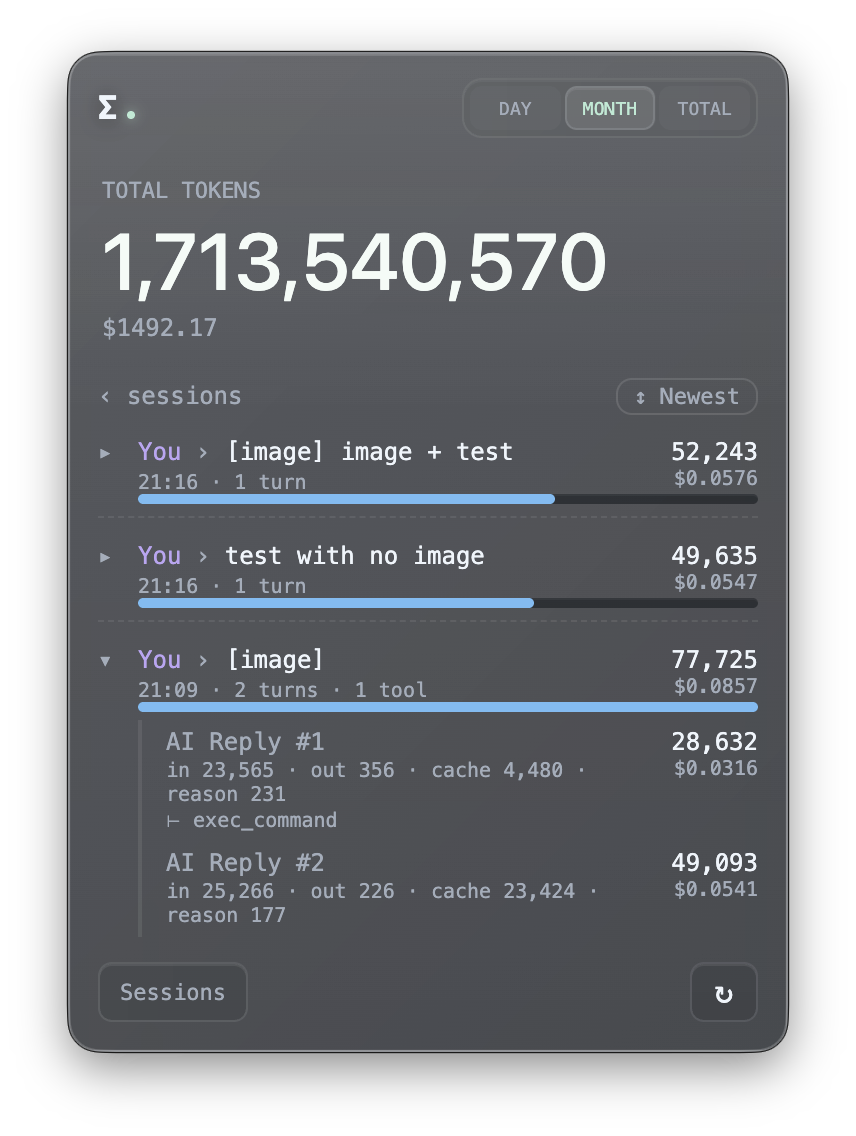
- Per-session detail — open a Claude Code, Codex, or OpenCode session to see tokens per prompt, expandable to each reply's exact token split and tools used (read on-demand from local transcripts or databases, never synced)
- Cache hit statistics — click on any tool or model to expand a detailed breakdown of input tokens (cache hit vs miss), output tokens, and hit rate percentages
- Cost breakdown alongside token counts
- Cost in your currency — show costs in USD, TWD, HKD, or CNY; exchange rates auto-update daily and can be manually overridden in Settings
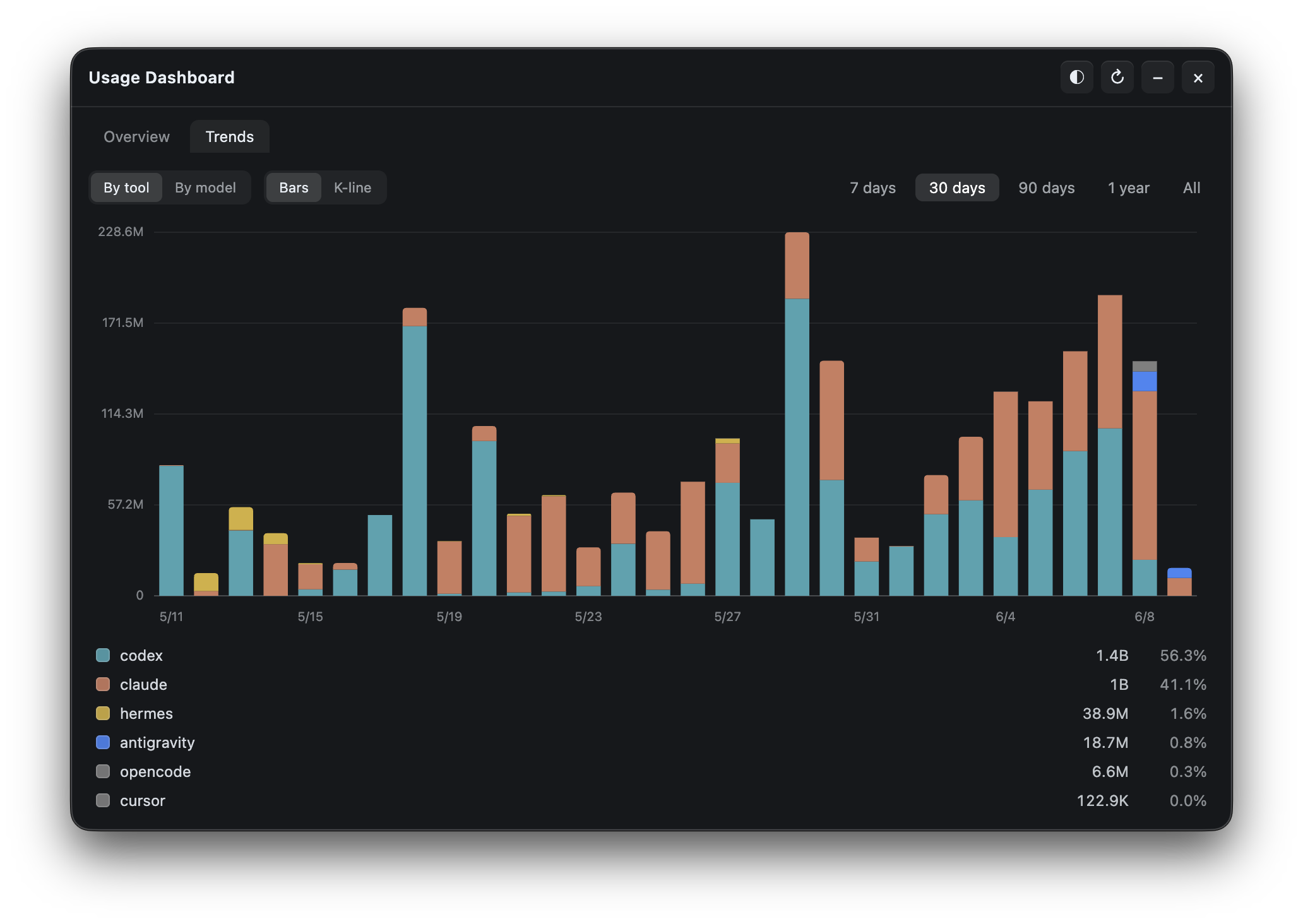
- Usage Trends & Dashboard — a home-screen activity heatmap and trend chart, plus a dedicated dashboard window with streaks and stacked per-tool/per-model usage history (bar and K-line views) across all your devices
- Data export — export your usage as tool-agnostic CSV + JSON, manually or auto-written to a folder, for spreadsheets, Obsidian, Grafana, or scripts; see docs/export.md
- AI Tool Limits detection for Claude Code, Codex, Cursor, Antigravity, OpenCode, Grok, Minimax, GitHub Copilot, Kiro, GLM, Volcengine, and Qoder with session, weekly, billing, and credits windows, plus DeepSeek prepaid balance and today/month spend. Tracked Codex accounts can be made the local Codex account in one click, without re-authenticating.
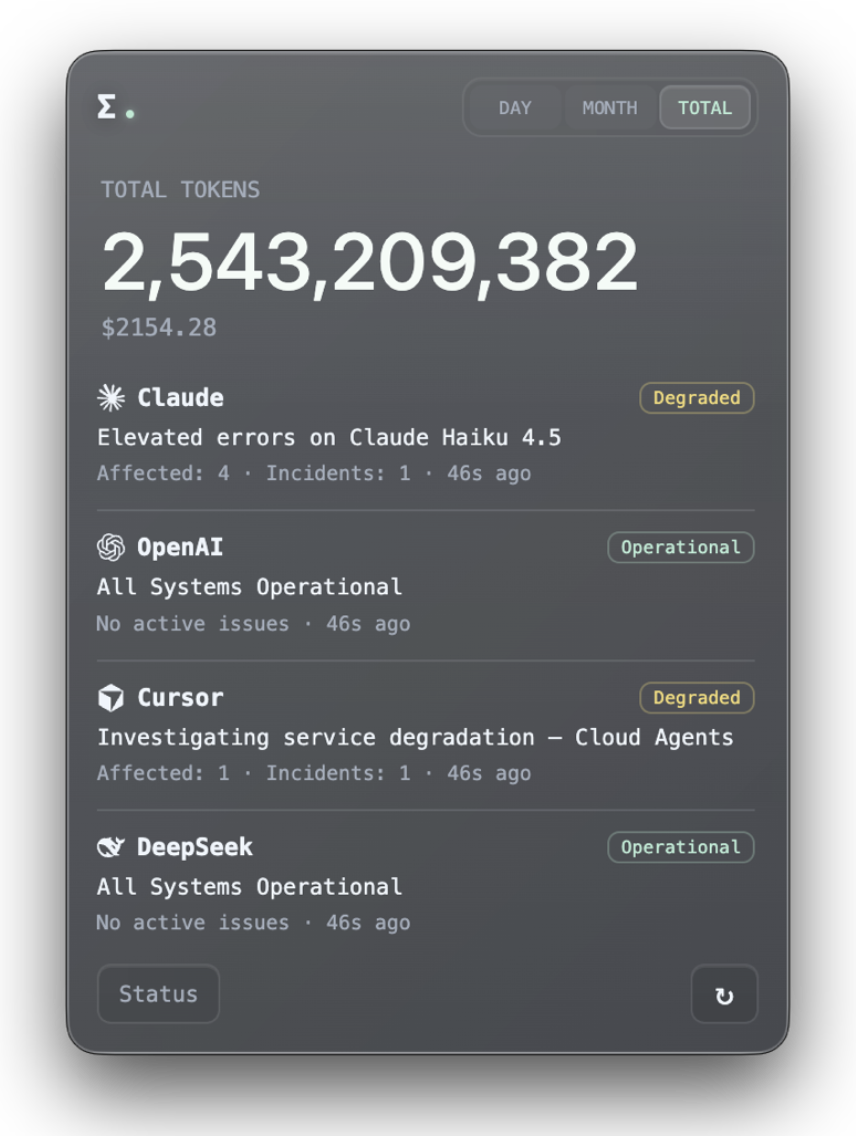
- Optional Status view for Claude, OpenAI, Cursor, and DeepSeek status pages, with manual or interval re-checks
- Customizable tool list to hide, pin, and reorder tools in the main dashboard without changing what gets tracked
- Appearance controls — interface theme switching (incl. a light mode), per-tool vendor colours, glass opacity, blur, and transparent window mode
- Menu bar (macOS) and system tray (Windows) popover with live cost, tokens, or closest Claude/Codex/Cursor/Antigravity/OpenCode/Grok/Minimax/GitHub Copilot/Kiro/GLM/Volcengine/Qoder limit % next to the icon
- Floating Bubble mode that collapses the widget into a draggable mini-window with click or hover preview and tray-style content
- Recordable global shortcut to show or hide the window from anywhere
- Local-first: no servers needed for single-device use
- Self-hosted sync backend (in-widget hub, Node CLI hub, or Cloudflare Worker)
- iOS widget support via Widgy and Scriptable through the Worker hub
- Discord Rich Presence to broadcast today's tokens, cost, and top client (opt-in)
- Privacy-first: only summary numbers ever leave your machine
 |
|  |
|  |
|
| Session View | Session Details | Service Status | |:---:|:---:|:---:| | 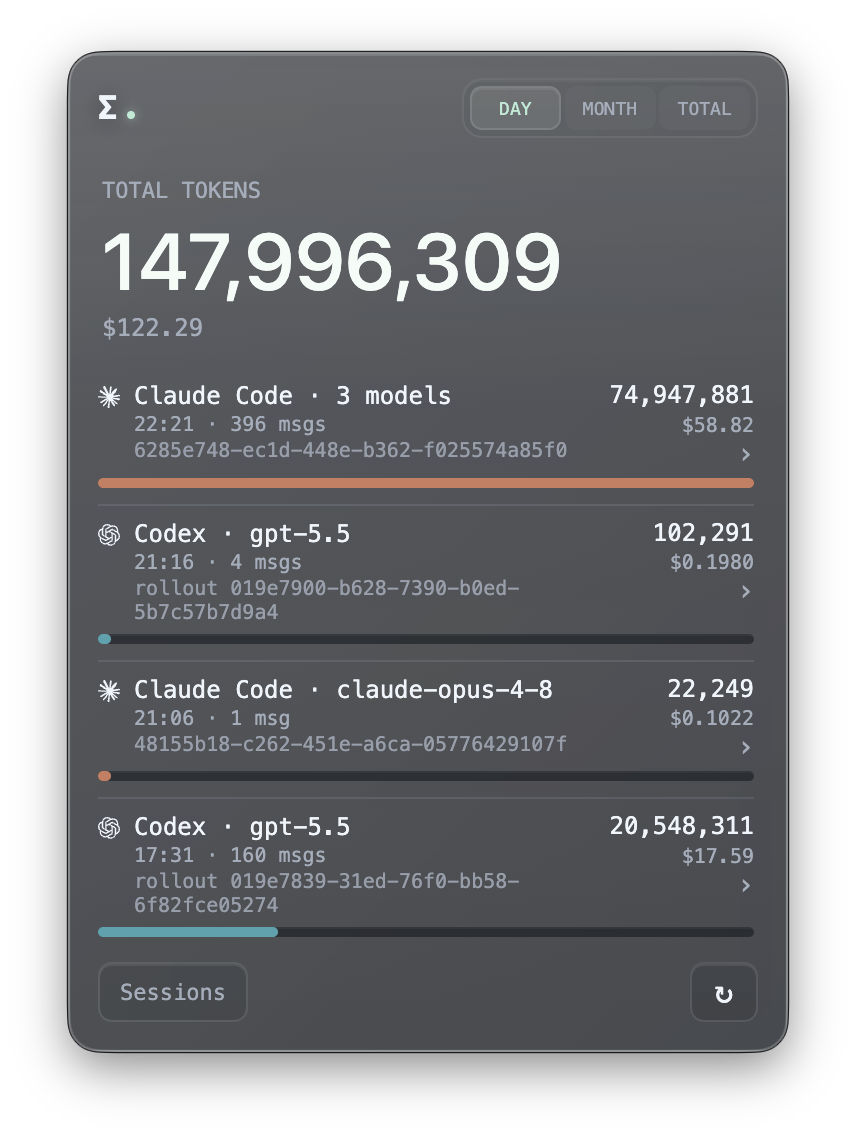 |
|  |
|  |
|
| Usage Dashboard — Overview | Usage Dashboard — Trends | |:---:|:---:| | 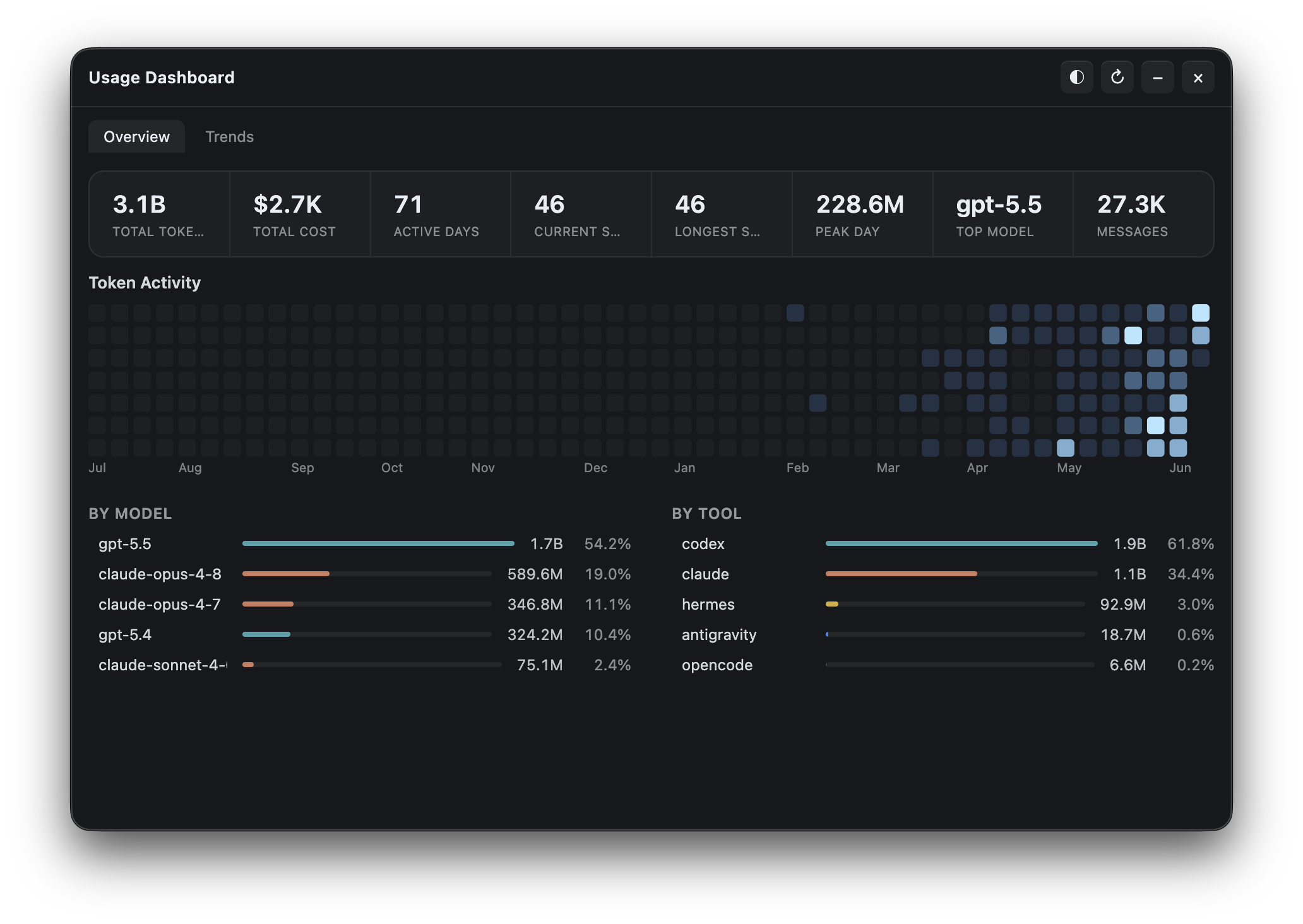 |
|  |
|
Installation
Download from GitHub Releases.
- macOS (Apple Silicon) —
.dmg, signed and notarized - Windows 10/11 — setup
.exe; signing is being prepared, so SmartScreen may appear - Linux x64 —
.AppImage
First run
Local mode is the default: launch the app and it starts tracking this device. No hub, agent, or config required.
Multi-device sync
Pick ONE hub backend that all your devices (and any headless agents) connect to. On each device, open the widget and pick a mode under Settings → Multi-device Sync. The widget contributes this device's usage automatically; run npm run agent only on machines without a widget.
Option A — Host the hub from the widget (easiest, no CLI)
In the widget on one always-on machine, open Settings → Multi-device Sync and pick Host hub on this device. The widget generates a random secret and lists the LAN URLs other devices can connect to (Tailscale or ZeroTier addresses appear here too). On every other device, pick Connect to a hub and paste the URL + secret.
The hub runs while Token Monitor is running — quitting (not just closing the window) stops it for all connected devices.
Option B — Self-hosted Node hub (always-on headless machine)
# on the always-on machine
cp .env.example .env
set TOKENMONITORSECRET to something private, then:
npm run hub
Option C — Cloudflare Worker hub (across networks, including iPhone)
One-click deploy — Cloudflare will prompt for the TOKENMONITORSECRET during setup. Or deploy manually:
cd worker
npm install
npx wrangler login
npx wrangler secret put TOKENMONITORSECRET
npx wrangler deploy
Paste the deployed URL into each device's widget at Settings → Multi-device Sync. See worker/README.md for the iOS widget recipe and endpoint reference, or docs/API.md for the hub HTTP API.
App data
App state lives in the OS user-data dir — delete it along with the app to fully uninstall.
| Platform | Path | |----------|------| | macOS | ~/Library/Application Support/Token Monitor/ | | Windows | %APPDATA%/Token Monitor/ | | Linux | ~/.config/Token Monitor/ |
Build from source
To build your own installer, use Node.js 22.13+ on the target OS (electron-builder can't cross-build a macOS .dmg on Windows, or vice-versa).
npm install
npm run dist:mac   # macOS arm64 .dmg          → dist/
npm run dist:win   # Windows x64 installer .exe → dist/
npm run dist:linux # Linux x64 AppImage        → dist/
npm run pack       # unpacked app dir (no installer), for quick local testing
Output lands in dist/. Windows and Linux use the matching dist:* script above on the target OS. Packaging the macOS release build requires a local Developer ID Application signing identity; use npm start for local development or unsupported platforms.
How it works
Mode A — Local (default, no setup)
    widget (Electron) ──▶ tokscale ──▶ ~/.claude, ~/.codex, $HERMES_HOME
Mode B — Sync (opt-in, multi-device)     device A agent ──▶     device B agent ──▶  hub  ──▶  widget on any device     device C agent ──▶
The widget chooses local vs sync mode based on Settings → Multi-device Sync. The hub itself can run as a separate npm run hub process, a Cloudflare Worker, or directly inside one of the widgets (Host mode). In sync mode the hub pushes aggregated stats to every connected widget over Server-Sent Events, so updates on one device appear on the others within a few seconds.
Settings
Widget (GUI)
Click the ⚙ button in the widget header to open the Settings panel.
- Multi-device Sync — three modes: Local only (this device, no hub), Connect to a hub (paste another machine's Hub URL + secret), or Host hub on this device (open a hub here so other devices can connect; LAN/Tailscale/ZeroTier addresses are listed for you).
- Tracked Tools — choose which AI tools are collected, and independently hide, pin, or reorder tools in the main list.
- AI Tool Limits — choose Claude Code, Codex, Cursor, Antigravity, OpenCode, DeepSeek, Grok, Minimax, GitHub Copilot, Kiro, GLM, Volcengine, and Qoder limit detection and refresh frequency.
- Trends — choose the scan interval for daily usage history, or turn it off; open the Usage Dashboard for the activity heatmap, streaks, and stacked per-tool/per-model bar and K-line charts.
- Window behavior — choose floating above apps, a normal window, or desktop pinned mode.
- Tray Mode — switch to a menu bar (macOS) or system tray (Windows) popover and choose what shows next to the icon: cost, today's tokens, total tokens, cost + tokens, the closest Claude/Codex/Cursor/Antigravity/OpenCode/Grok/Minimax/GitHub Copilot/Kiro/GLM/Volcengine/Qoder limit % left, or icon-only.
- Floating Bubble — collapse the widget into a draggable mini-window, reopen it by click or hover preview, and choose bubble content from icon, tokens, cost, or AI Tool Limit bars.
- Shortcut — record a global shortcut to show or hide the window.
- Appearance — switch the interface theme between presets (Default, Obsidian, and a Porcelain light mode) or your own custom colours (accent, background, text, muted), set per-tool vendor colours, system glass, live dot, tool icons, Discord Rich Presence, glass opacity, and glass blur.
- Advanced — opens the underlying
settings.jsonfor less-common options likeallTimeSince.
Headless agent and hub (.env)
The agent and hub have no UI. Configure them with a .env file at the project root (copy from .env.example):
TOKENMONITORHUB_URL=               # required for sync mode — Worker URL or http://<lan-ip>:17321
TOKENMONITORSECRET=                # shared secret, must match the hub
TOKENMONITORDEVICE_ID=             # optional — defaults to hostname
TOKENMONITORCLIENTS=               # optional — defaults to all supported tools; set empty to disable tracking
TOKENMONITORHISTORY_ENABLED=       # optional — defaults to enabled; set to 0 to skip collecting Trends history
TOKENMONITORLIMITS_ENABLED=        # optional — defaults to enabled; set to 0 to skip CLI probing
TOKENMONITORLIMIT_PROVIDERS=       # optional — defaults to all supported (claude, codex, cursor, antigravity, opencode, deepseek, minimax, grok, copilot, kiro, zai, zaiteam, volcengine, qoder)
The widget reads the same env vars as first-run defaults, then takes over with its own GUI-managed settings.
Every value can also be passed as a CLI flag (--hub=, --secret=, --device=, --clients=, --history=, --limits=, --limitProviders=) — flags win over env. Less-common knobs (TOKENMONITORINTERVALMS, TOKENMONITORPORT, TOKENMONITORSTALEAFTERMS, TOKENMONITORHISTORYINTERVALMS, TOKENMONITORLIMITSREFRESH_MS, …) are also accepted via env / flag but kept out of .env.example to reduce noise.
Example one-off run:
npm run agent -- --clients=claude,codex,opencode --oncePrivacy
The hub and agent only transmit summary fields:
- device id, hostname, platform
- total tokens per period (today / month / all-time)
- cost totals (when
tokscalereturns cost data) - per-client and per-model breakdowns
- normalized Claude Code/Codex/Cursor/Antigravity/OpenCode/Grok/Minimax/GitHub Copilot/Kiro/GLM/Volcengine/Qoder limit status when AI Tool Limits is enabled
.env, data/, and node_modules/
are gitignored.
Requirements
- macOS, Windows, or Linux x64
- Node.js 22.13+
- For sync mode only: network reachability from each agent/widget to the hub
Star History
Contributing
Issues and PRs are welcome. Project conventions, architecture notes, and the command reference live in AGENTS.md — written for coding agents, but it doubles as the contributor guide.


