
Open Source Alternative to Lovable, v0, Bolt, Replit, Emergent. 🌟 Star if you like it!
Micracode
Open-Source AI Web App Builder
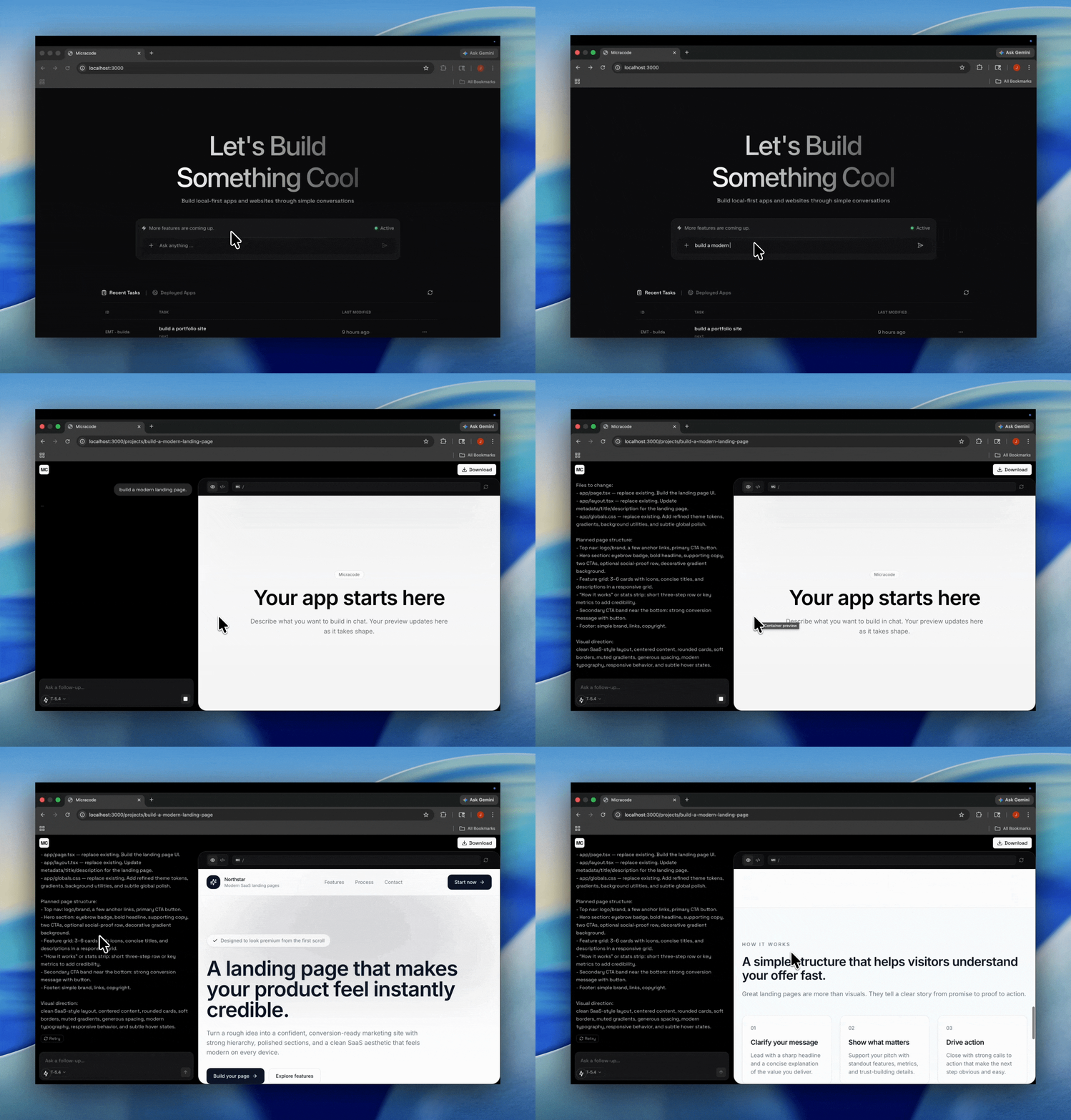
Describe an app in natural language and Micracode streams code into an in-browser workspace.
Iterate by chat or edit the code directly in a Monaco editor — everything runs on your laptop.


Quick Install
pip install micracodeRequires Python 3.12+. No Node.js, no Docker, no separate frontend setup.
1. Set your API key
Google Gemini (default, free tier available):
export GOOGLEAPIKEY=your-keyOpenAI:
export LLM_PROVIDER=openai export OPENAIAPIKEY=your-key export OPENAI_MODEL=gpt-4oOllama (local, no API key needed):
export LLM_PROVIDER=ollama export OLLAMA_MODEL=llama3.2 # any model you have pulledOr put any of the above in a .env file in your working directory.
2. Start
micracode webOpen http://localhost:8000 — the full UI and API run from the same process.
micracode web --port 9000       # change port
micracode web --host 0.0.0.0   # expose on your local network
3. Build something
- Type a description on the home screen → Micracode generates a working project
- Chat to iterate, edit code in the Monaco editor, and preview your app live
- Projects are saved as plain folders at
~/opener-apps/
Getting started & staying tuned with us.
Star us, and you will receive all release notifications from GitHub without any delay!
Features
- Natural-Language Codegen — Describe an app in plain English; Micracode streams a working project into the workspace file by file.
- Iterative Chat — Refine your project through conversation. Ask for changes, fixes, or new features and watch them stream in.
- In-Browser Monaco Editor — Edit generated code directly in a full Monaco editor; changes persist to disk.
- Pluggable LLM Providers — Ships with Google Gemini by default; switch to OpenAI or local Ollama with one env var. Ollama models are discovered dynamically — no API key required.
- Local-First Storage — Projects live as plain folders on your filesystem. No database, no auth, no cloud service required.
- Streaming Backend — Server-sent events deliver generated code in real time using a typed stream-event contract shared between web and API.
- Snapshots & Prompt History — Every project keeps its prompt history and snapshots so you can review or roll back.
Tech Stack
Backend
- FastAPI — High-performance Python web framework
- LangChain + Google Gemini / OpenAI / Ollama — Pluggable LLM orchestration (gemini-2.5-flash by default)
- SSE-Starlette — Server-sent events for streaming code generation
- UV — Modern Python package manager
- Pytest — Storage and HTTP test suite
Frontend
- Next.js 15 — React framework with App Router
- React 19 — Latest React with concurrent features
- Tailwind CSS — Utility-first CSS framework
- Radix UI + shadcn/ui — Accessible component primitives
- Monaco Editor — VS Code's editor in the browser
- WebContainer API — Run Node.js apps directly in the browser
- Zustand — Lightweight state management
- ai-sdk — Vercel AI SDK for chat streaming
Tooling
- Bun — JS workspace manager and runtime
- TypeScript — End-to-end type safety, with shared types in
packages/shared
Development Setup
For contributors and people building from source. If you just want to use Micracode, see Quick Install above.
Prerequisites
- Node.js v22.18.0 (pinned via
.nvmrc) - Bun ≥ 1.1.0
- Python ≥ 3.12 (managed automatically by
uv) - uv ≥ 0.4
- A Google Gemini or OpenAI API key, or a locally running Ollama instance (no API key needed)
Environment Setup
Copy the example env file into the API app and add your key:
cp .env.example apps/api/.env $EDITOR apps/api/.envMinimum config (Gemini, the default provider):
LLM_PROVIDER=gemini GOOGLEAPIKEY=yourgeminiapi_keyOr use OpenAI:
LLM_PROVIDER=openai OPENAIAPIKEY=youropenaiapi_key OPENAI_MODEL=gpt-4oOr use a local Ollama model (no API key required):
LLM_PROVIDER=ollama OLLAMABASEURL=http://localhost:11434 OLLAMA_MODEL=llama3.2Ollama models are discovered dynamically from your local daemon — any model you have pulled (ollama pull <model>) will appear in the UI picker automatically.
See docs/configuration.md for the full reference and supported model IDs.
Installation
nvm use                # picks up .nvmrc -> Node 22.18.0
bun install            # JS workspaces (web + shared)
bun run api:install    # Python deps for the API (creates a uv-managed venv)
Running the Application
Start both apps in parallel:
bun run dev- Web:
- API:
bun run dev:web        # Next.js only
bun run dev:api        # FastAPI only (uvicorn --reload)
Open
Project Structure
micracode/
├── apps/
│   ├── web/                    # Next.js 15 frontend
│   │   ├── src/
│   │   │   ├── app/            # App Router pages
│   │   │   ├── components/     # React components (incl. shadcn/ui)
│   │   │   ├── lib/            # Utilities and clients
│   │   │   └── store/          # Zustand stores
│   │   └── package.json
│   │
│   └── api/                    # FastAPI backend
│       ├── src/micracode_api/
│       │   ├── agents/         # LLM orchestrator, prompts, model catalog
│       │   ├── routers/        # health, models, projects, generate
│       │   ├── schemas/        # Pydantic request/response models
│       │   ├── starter/        # Starter project templates
│       │   ├── config.py       # Settings (env vars)
│       │   ├── storage.py      # Local filesystem project storage
│       │   └── main.py         # FastAPI app entry point
│       ├── tests/
│       └── pyproject.toml
│
├── packages/
│   └── shared/                 # Shared TypeScript types (stream event contract)
│
├── docs/                       # End-user documentation
└── README.md
API Endpoints
All endpoints are mounted under /v1.
| Method | Endpoint | Description | |--------|----------|-------------| | GET | /v1/health | Service health check | | GET | /v1/models | List available LLM models | | POST | /v1/generate | Stream code generation events (SSE) | | GET | /v1/projects | List all projects | | POST | /v1/projects | Create a new project | | GET | /v1/projects/{id} | Get a project by id | | DELETE | /v1/projects/{id} | Delete a project | | GET | /v1/projects/{id}/files | List/read project files | | PUT | /v1/projects/{id}/files | Write project files | | GET | /v1/projects/{id}/download | Download project as archive | | GET | /v1/projects/{id}/prompts | Get prompt history | | POST | /v1/projects/{id}/prompts/pop-assistant | Pop last assistant message | | GET | /v1/projects/{id}/snapshots | List project snapshots |
Documentation
End-user docs live in docs/:
- Getting Started — install prerequisites, configure an API key, and run the app.
- Configuration — environment variables, switching between OpenAI and Gemini, and supported model IDs.
- Using the Workspace — the home page, chat, editor, and preview panels.
- Projects on Disk — where your generated apps live and how to work with them outside the app.
- Troubleshooting — common errors and how to fix them.
- FAQ — short answers to common questions.
Useful Scripts
bun run dev           # web + api in parallel
bun run dev:web       # Next.js only
bun run dev:api       # FastAPI only (uvicorn --reload, 127.0.0.1:8000)
bun run typecheck     # TS across all workspaces
bun run lint          # eslint across workspaces
bun run format        # prettier
bun run test:api      # pytest (storage + HTTP tests)
bun run api:lint      # ruff check
bun run api:format    # ruff format
License
This project is licensed under the MIT License.
Contributing
Contributions are welcome! Feel free to open issues and pull requests.
Join our community Discord


