
Native macOS Wayland Compositor written in Rust using Smithay. Experience seamless Linux app streaming on macOS without XQuartz.
Cocoa-Way




Native macOS Wayland compositor for running Linux apps seamlessly
Demo Video
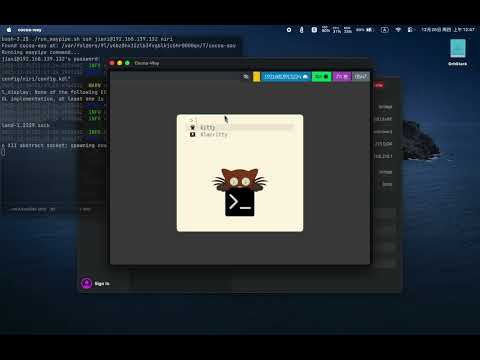
True protocol portability: Cocoa-Way rendering Linux apps from SSH hosts, Docker, OrbStack, and Apple Container.
Features
| Feature | Description | | ------------------------------------- | --------------------------------------------------------- | | Native macOS | Metal rendering | | Compositor Zero VM Overhead | Direct Wayland protocol via socket, no virtualization | | HiDPI Ready | Optimized for Retina displays with proper scaling | | Polished UI | Server-side decorations with shadows and focus indicators | | Hardware Accelerated | Efficient Metal rendering pipeline |
Installation
Homebrew (Recommended)
brew tap J-x-Z/tap
brew install cocoa-way waypipe-darwin
Download Binary
Download the latest .dmg or .zip from Releases.
Build from Source
# Install dependencies
brew install libxkbcommon pixman pkg-config
Clone and build
git clone https://github.com/J-x-Z/cocoa-way.git
cd cocoa-way
cargo build --release
Quick Start
⚠️ Required: You must install waypipe-darwin to connect Linux apps.>
>> brew tap J-x-Z/tap && brew install waypipe-darwin
- Start the compositor:
cocoa-way- Connect Linux apps via SSH:
./run_waypipe.sh ssh user@linux-host firefox- Or add persistent container sessions in
~/.config/cocoa-way/container-sessions.toml:
[[session]]
   name = "Ubuntu (Apple Container)"
   runtime = "container"
   image = "docker.io/library/ubuntu:24.04"
   profile = "single-app"
   app = "weston-terminal"
   container_socket = "/tmp/cocoa-way/waypipe.sock"
   runtime_args = ["--rosetta"]
Then use the Container menu inside Cocoa-Way to launch the session.
Container Runtimes
Cocoa-Way has two control modes: Classic connections for SSH / local sockets, and Container Mode for local Linux GUI sessions managed by Cocoa-Way.
runtime = "container"uses Apple's officialcontainerCLI. Apple documents it as requiring Apple silicon and macOS 26+, and you must start its background service first withcontainer system start.runtime = "docker"works with Docker Desktop and compatible CLIs.runtime = "orb"orruntime = "orbstack"works with OrbStack.
container run --publish-socket ... so the waypipe socket is exported back to macOS without requiring a shared bind mount. For Docker and OrbStack, Cocoa-Way bind-mounts the host socket directory into the container and connects over that local socket.
Architecture
graph LR
    subgraph macOS
        CW[Cocoa-Way<br/>Compositor]
        WP1[waypipe<br/>client]
    end

    subgraph Linux VM/Container
        WP2[waypipe<br/>server]
        APP[Linux App<br/>Firefox, etc]
    end

    APP -->|Wayland Protocol| WP2
    WP2 <-->|SSH/Socket| WP1
    WP1 -->|Wayland Protocol| CW
    CW -->|Metal| Display[macOS Display]
Comparison
| Solution | Latency | HiDPI | Native Integration | Setup Complexity | | ------------------- | ------- | ------------ | ------------------ | ---------------- | | Cocoa-Way | ⚡ Low | ✅ | ✅ Native windows | 🟢 Easy | | XQuartz | 🐢 High | ⚠️ Partial | ⚠️ X11 quirks | 🟡 Medium | | VNC | 🐢 High | ❌ | ❌ Full screen | 🟡 Medium | | VM GUI | 🐢 High | ⚠️ Partial | ❌ Separate window | 🔴 Complex |
Roadmap
- [X] macOS backend (METAL)
- [X] Waypipe integration
- [X] HiDPI scaling
- [ ] winit and objc update
- [ ] Multi-monitor support
- [X] Clipboard sync
next step
new guiTroubleshooting
SSH: "remote port forwarding failed"
A stale socket file exists on the remote host. Our run_waypipe.sh script handles this automatically with -o StreamLocalBindUnlink=yes.
If running manually:
waypipe ssh -o StreamLocalBindUnlink=yes user@host ...Apple Container support checklist
container system start
container run --rm -it ubuntu:24.04 /bin/bash
If Cocoa-Way cannot launch a configured Apple Container connection:
- Verify the
containerCLI is installed and available in/usr/local/bin/containeror yourPATH. - Make sure the image contains
waypipeand the app you configured inapp = "...". - On first run, try a shell as the app command to confirm the image itself starts cleanly.
Can Cocoa-Way run local X11 apps directly?
Not yet. Cocoa-Way is focused on Wayland clients transported over waypipe. Running same-machine X11 apps as a full XQuartz replacement is still an open gap.
Contributing
Contributions welcome! Please open an issue first to discuss major changes.
License
GPL-3.0 - Copyright (c) 2024-2025 J-x-Z


