
PyBreeze features built-in modules tailored for every level of modern automation, allowing developers to tackle complex scenarios without leaving the IDE.
PyBreeze: The Automation-First IDE


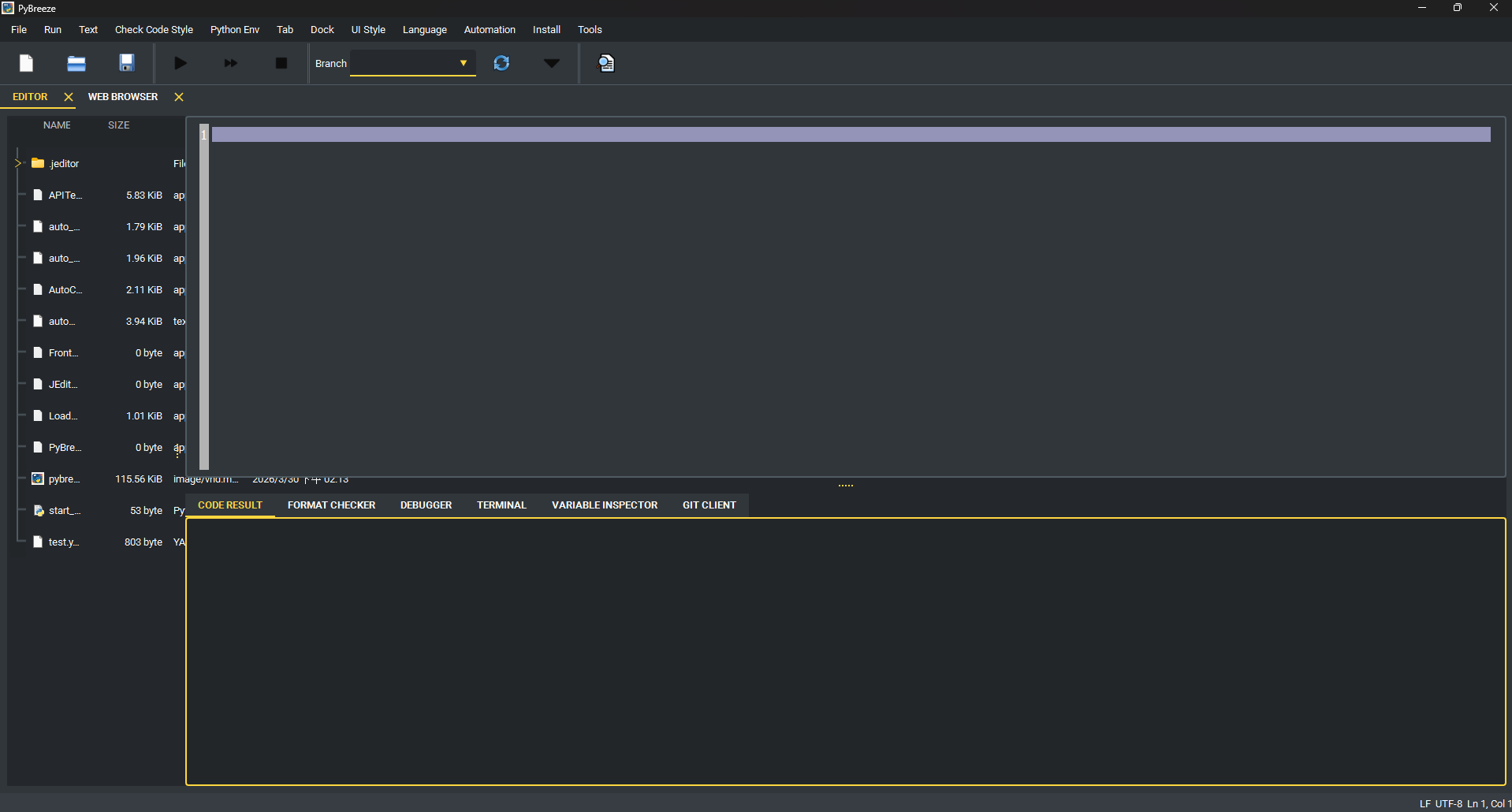
PyBreeze is a Python IDE purpose-built for automation engineers. It integrates Web, API, GUI, and load testing automation into a single unified environment — no plugin hunting, no complex environment setup, just open and start automating.
Table of Contents
- Four-Dimensional Automation - IDE Core Capabilities - Built-in Tools - AI-Assisted Development - Plugin System - Multi-Language UI- Architecture
- Installation
- Quick Start
- Integrated Automation Modules
- Project Structure
- Dependencies
- Target Audience
- License
Features
Four-Dimensional Automation
PyBreeze covers the full spectrum of automation testing needs out of the box:
| Dimension | Module | Description | |---|---|---| | Web Automation | WebRunner | Browser-based interaction simulation and testing with deep integration of browser drivers and element locators | | API Automation | APITestka | RESTful API development and testing with built-in request builders, response analyzers, mock servers, and assertion verification | | GUI Automation | AutoControl | Desktop application automation via image recognition, coordinate-based positioning, keyboard/mouse control, and action recording | | Load & Stress Testing | LoadDensity | High-concurrency performance testing engine for monitoring system stability under extreme pressure |
Additionally:
- File Automation — Automated file and directory operations via the automation-file module
- Mail Automation — Automated email sending (e.g., test report delivery) via MailThunder
- Test Framework — Structured YAML-driven test execution via TestPioneer
IDE Core Capabilities
PyBreeze is not just a code editor — it is a command center for the automation lifecycle:
- Syntax Highlighting — Built-in Python syntax highlighting with deep keyword awareness for automation libraries (APITestka, AutoControl, WebRunner, LoadDensity, etc.). Custom syntax rules can be added via plugins.
- Code Editor — Built on JEditor, a full-featured editor with tab management, file tree navigation, and project workspace support.
- Script Execution — Run automation scripts directly from the IDE with real-time output. Supports single-script and multi-script batch execution.
- Report Generation — Automation modules can generate HTML, JSON, and XML reports after test execution, with optional email delivery.
- Integrated JupyterLab — Launch JupyterLab directly as a tab within PyBreeze for interactive notebook-based development. Auto-installs JupyterLab if not present.
- Virtual Environment Awareness — Automatically detects and uses the project's virtual environment (
.venvorvenv).
Built-in Tools
- SSH Client — Full SSH terminal client with:
~/.pybreeze/sshknownhosts
- Diagram Editor — Built-in WYSIWYG architecture-diagram editor:
flowchart / graph import
- Save/Open as .diagram.json, export to PNG or SVG
- Undo/redo, align, distribute, grid, snap, and zoom controls
- File Tree Context Menu — Right-click any file or folder in the project tree to create files/folders, rename, delete, copy absolute or relative paths, or reveal the item in your platform file manager. Renaming or deleting a file that is currently open in an editor tab keeps the tab in sync.
- Package Manager — Install automation modules and build tools directly from the IDE menu without leaving the editor.
- Integrated Documentation — Quick access to documentation and GitHub pages for each automation module directly from the menu bar.
AI-Assisted Development
- AI Code Review — Send code to an LLM API endpoint for automated code review. Accept or reject suggestions directly in the IDE.
- CoT (Chain-of-Thought) Prompt Editor — Create and manage multi-step CoT prompts for structured code analysis, including:
- Skill Prompt Editor — Define and manage reusable skill-based prompts (code explanation, code review templates) that can be sent to LLM APIs.
- Skill Send GUI — Pick a skill prompt template, optionally edit the prompt text, send it to an LLM API endpoint, and view the response — all in a dedicated tab or dock.
Plugin System
PyBreeze supports an extensible plugin architecture for:
- Syntax Highlighting — Add syntax highlighting for any programming language via plugins
- UI Translation — Add new interface languages via translation plugins
- Run Configurations — Add "Run with..." support for compiled and interpreted languages (C, C++, Go, Java, Rust, etc.)
- Plugin Browser — Browse and install plugins from remote repositories directly within the IDE
jeditorplugins/ directory. See PLUGINGUIDE.md for full documentation.
Bundled plugins: C, C++, Go, Java, Rust syntax highlighting and run support; French translation.
Multi-Language UI
The IDE interface supports multiple languages:
- English (default)
- Traditional Chinese (繁體中文)
- Additional languages can be added via plugins
Architecture
flowchart TB
    UI["PyBreeze UI · PySide6"]
subgraph Editor["JEditor (Base Editor)"]         direction LR         E1["Code Editor + Tabs"]         E2["File Tree"]         E3["Syntax Highlighting"]         E4["Plugin System"]     end
subgraph Automation["Automation Menu"]         direction LR         A1["APITestka"]         A2["AutoControl"]         A3["WebRunner"]         A4["LoadDensity"]         A5["FileAutomation"]         A6["MailThunder"]         A7["TestPioneer"]     end
subgraph Executors["Subprocess Executors · TaskProcessManager"]         direction LR         X1["jeapitestka"]         X2["jeautocontrol"]         X3["jewebrunner"]         X4["jeloaddensity"]         X5["automation-file"]         X6["je-mail-thunder"]         X7["test_pioneer"]     end
subgraph Tools["Tools"]         direction LR         T1["SSH · paramiko"]         T2["AI Code Review"]         T3["CoT Prompt Editor"]         T4["Skill Prompt Editor"]         T5["Skill Send GUI"]         T6["Diagram Editor"]         T7["JupyterLab"]     end
subgraph Install["Install Menu"]         direction LR         I1["Module Installers"]         I2["Build Tools"]     end
UI --> Editor     UI --> Automation     UI --> Tools     UI --> Install
A1 --> X1     A2 --> X2     A3 --> X3     A4 --> X4     A5 --> X5     A6 --> X6     A7 --> X7
PyBreeze follows a modular architecture:
PyBreeze UI (PySide6)
├── JEditor (Base Editor Engine)
│   ├── Code Editor with Tabs
│   ├── File Tree Navigation
│   ├── Syntax Highlighting Engine
│   └── Plugin System
├── Automation Menu
│   ├── APITestka ──→ APITestka Executor ──→ jeapitestka
│   ├── AutoControl ──→ AutoControl Executor ──→ jeautocontrol
│   ├── WebRunner ──→ WebRunner Executor ──→ jewebrunner
│   ├── LoadDensity ──→ LoadDensity Executor ──→ jeloaddensity
│   ├── FileAutomation ──→ FileAutomation Executor ──→ automation-file
│   ├── MailThunder ──→ MailThunder Executor ──→ je-mail-thunder
│   └── TestPioneer ──→ TestPioneer Executor ──→ test_pioneer
├── Tools
│   ├── SSH Client (paramiko)
│   ├── AI Code Review Client
│   ├── CoT Prompt Editor
│   ├── Skill Prompt Editor
│   ├── Skill Send GUI
│   ├── Diagram Editor (WYSIWYG, Mermaid import, PNG/SVG export)
│   └── JupyterLab Integration
└── Install Menu
    ├── Automation Module Installers
    └── Build Tools Installer
Each automation module runs in its own subprocess via PythonTaskProcessManager, providing process isolation and preventing crashes from affecting the IDE.
Installation
From PyPI
pip install pybreezeFrom Source
git clone https://github.com/Intergration-Automation-Testing/AutomationEditor.git
cd AutomationEditor
pip install -r requirements.txt
System Requirements
- Python: 3.10 or higher
- OS: Windows, macOS, Linux
- GUI Framework: PySide6 6.11.0 (installed automatically)
Quick Start
Run via command line
python -m pybreezeRun via Python script
from pybreeze import start_editor
start_editor()
Run from the exe directory
python exe/start_pybreeze.pyOnce launched, you can:
- Write automation scripts in the editor with syntax-aware auto-completion
- Execute scripts via
Automationmenu — choose the target module (APITestka, WebRunner, etc.) - View results in the integrated output panel
- Generate reports in HTML/JSON/XML formats
- Send reports via email using MailThunder integration
Integrated Automation Modules
APITestka — API Testing
- HTTP method testing (GET, POST, PUT, DELETE, etc.)
- Async HTTP support via httpx
- Mock server creation with Flask
- Report generation (HTML, JSON, XML)
- Scheduler-based event triggering
- Socket server support
AutoControl — GUI Automation
- Mouse control (click, drag, scroll, position tracking)
- Keyboard simulation (type, hotkey, key press/release)
- Image recognition and locate-and-click
- Screenshot capture
- Action recording and playback
- Shell command execution
- Process management
WebRunner — Web Automation
- Browser driver integration
- Element location and interaction
- Web-based test scripting
- Report generation
LoadDensity — Load Testing
- Concurrent request simulation
- Performance metrics collection
- Stress test scenario management
- Report generation
MailThunder — Email Automation
- SMTP email sending
- HTML report delivery
- Attachment support
- Environment variable-based configuration
TestPioneer — Test Framework
- YAML-based test definition
- Template generation
- Structured test execution
File Automation
- Automated file and directory operations
- Batch file processing
Project Structure
PyBreeze/
├── pybreeze/
│   ├── init.py                 # Public API (start_editor, plugin re-exports)
│   ├── main.py                 # Entry point (python -m pybreeze)
│   ├── extend/
│   │   ├── mailthunderextend/    # Email report sending after tests
│   │   ├── process_executor/       # Subprocess managers for each automation module
│   │   │   ├── api_testka/
│   │   │   ├── auto_control/
│   │   │   ├── file_automation/
│   │   │   ├── load_density/
│   │   │   ├── mail_thunder/
│   │   │   ├── test_pioneer/
│   │   │   └── web_runner/
│   │   └── processexecutor/pythontaskprocessmanager.py
│   ├── extendmultilanguage/      # Built-in translations (English, Traditional Chinese)
│   ├── pybreeze_ui/
│   │   ├── editor_main/            # Main window (extends JEditor) + file tree context menu
│   │   ├── connect_gui/ssh/        # SSH client widgets (TOFU host-key verification)
│   │   ├── diagram_editor/         # WYSIWYG architecture-diagram editor
│   │   ├── extendaigui/          # AI code review & prompt editors
│   │   ├── jupyterlabgui/        # JupyterLab integration
│   │   ├── menu/                   # Menu bar construction
│   │   ├── syntax/                 # Automation keyword definitions
│   │   └── showcodewindow/       # Code display widgets
│   └── utils/                      # Logging, exceptions, file processing, package management
├── exe/                            # Standalone launcher & build configs
├── docs/                           # Sphinx documentation source
├── test/                           # Unit tests
├── images/                         # Screenshots
├── architecture_diagram/           # Architecture diagrams
├── PLUGIN_GUIDE.md                 # Plugin development documentation
├── pyproject.toml                  # Package configuration
├── requirements.txt                # Runtime dependencies
└── dev_requirements.txt            # Development dependencies
Dependencies
Runtime
| Package | Purpose | |---|---| | PySide6 (6.11.0) | GUI framework (Qt for Python) | | je-editor | Base code editor engine | | jeapitestka | API testing automation | | jeautocontrol | GUI/desktop automation | | jewebrunner | Web browser automation | | jeloaddensity | Load and stress testing | | je-mail-thunder | Email automation | | automation-file | File operation automation | | test_pioneer | YAML-based test framework | | paramiko | SSH client support | | jupyterlab | Integrated notebook environment |
Development
build, twine, sphinx, sphinx-rtd-theme, auto-py-to-exe
Target Audience
- Python Developers — A lightweight, dedicated environment for building automation scripts without the overhead of heavy general-purpose IDEs
- SDET (Software Development Engineers in Test) — Professionals maintaining Web, API, and Performance tests simultaneously in one tool
- Automation Beginners — A friendly IDE that lowers the barrier to entry for Python automation with zero-config environment setup
- DevOps Teams — A platform for rapidly building and debugging integration test suites within CI/CD pipelines
License
This project is licensed under the MIT License — see the LICENSE file for details.
Copyright (c) 2022 JE-Chen


