
A Kubernetes operator designed to intelligently manage resource overcommit on pod resource requests.
🚀 k8s-overcommit Operator
Intelligent resource overcommit management for Kubernetes clusters











🚀 Quick Start • 📖 Documentation • 🤝 Contributing • 📝 License

🎯 Overview
The k8s-overcommit Operator is a Kubernetes operator designed to intelligently manage resource overcommit on pod resource requests. It automatically adjusts CPU and memory requests based on configurable overcommit classes, enabling better cluster resource utilization while maintaining workload performance.
✨ Key Features
- 🎛️ Flexible Overcommit Classes: Define different overcommit policies for different workload types
- 🏷️ Label-Based Configuration: Apply overcommit using pod or namespace labels
- 🛡️ Namespace Exclusions: Protect critical namespaces from overcommit policies
- 📊 Default Policies: Fallback overcommit values when no specific class is defined
- 🔒 Admission Webhooks: Seamless integration with Kubernetes admission controllers
- 📈 Resource Optimization: Improve cluster resource utilization efficiency
🚀 Quick Start
🎯 Method 1: Helm Installation (Recommended)
1️⃣ Clone the Repository
Clone the repository to your local machine:
git clone https://github.com/InditexTech/k8s-overcommit-operator.git
cd k8s-overcommit-operator
2️⃣ Configure Values
Edit the values.yaml file to customize your deployment. Below is an example configuration:
# Example configuration
deployment:
  image:
    registry: ghcr.io
    image: inditextech/k8s-overcommit-operator
    tag: 1.3.1
3️⃣ Install with Helm
Install the operator using Helm:
helm install k8s-overcommit-operator chart🔧 Method 2: OLM Installation
1️⃣ Install the CatalogSource
For OpenShift or clusters with OLM installed, apply the catalog source:
kubectl apply -f https://raw.githubusercontent.com/InditexTech/k8s-overcommit-operator/refs/heads/main/deploy/catalog_source.yaml2️⃣ Apply the OperatorGroup
Apply the operator group configuration:
kubectl apply -f https://raw.githubusercontent.com/InditexTech/k8s-overcommit-operator/refs/heads/main/deploy/operator_group.yaml3️⃣ Create the Subscription (Alternative)
You can create your own subscription or use the default subscription.yaml. Below is an example:
apiVersion: operators.coreos.com/v1alpha1
kind: Subscription
metadata:
  name: k8s-overcommit-operator
  namespace: operators
spec:
  channel: alpha
  name: k8s-overcommit-operator
  source: community-operators
  sourceNamespace: olm
Apply the subscription:
kubectl apply -f https://raw.githubusercontent.com/InditexTech/k8s-overcommit-operator/refs/heads/main/deploy/subscription.yaml4️⃣ Validation
After installation, validate that the operator is running:
kubectl get pods -n k8s-overcommit📝 Configuration
🎯 Overcommit Resource
[!IMPORTANT]
It's a singleton CRD: only can exist one, and it has to be called cluster
First, deploy the main Overcommit resource named "cluster":
apiVersion: overcommit.inditex.dev/v1alphav1
kind: Overcommit
metadata:
  name: cluster
spec:
  overcommitLabel: inditex.com/overcommit-class
  labels:
    environment: production
  annotations:
    description: "Main overcommit configuration"
🏷️ OvercommitClass Resource
Define overcommit classes for different workload types:
apiVersion: overcommit.inditex.dev/v1alphav1
kind: OvercommitClass
metadata:
  name: high
spec:
  cpuOvercommit: 0.2        # 20% of limits as requests
  memoryOvercommit: 0.8     # 80% of limits as requests
  excludedNamespaces: ".(^(openshift|k8s-overcommit|kube).).*"
  isDefault: true
  labels:
    workload-type: batch
  annotations:
    description: "High-density workloads with aggressive overcommit"
💡 How It Works
🔍 Label Resolution Priority
- Pod Level: Check if pod has the overcommit class label
- Namespace Level: If not found, check namespace labels
- Default Class: Apply default overcommit class if configured
📊 Calculation Example
Original Pod Specification:
apiVersion: v1 kind: Pod metadata: name: test labels: inditex.com/overcommit-class: high spec: resources: limits: cpu: "2" memory: "2Gi"With OvercommitClass (cpuOvercommit: 0.2, memoryOvercommit: 0.8):
apiVersion: v1 kind: Pod metadata: name: test labels: inditex.com/overcommit-class: high spec: resources: limits: cpu: "2" # Unchanged memory: "2Gi" # Unchanged requests: cpu: "400m" # 2 * 0.2 = 0.4 cores memory: "1638Mi" # 2Gi * 0.8 = 1.6GiB🛡️ Namespace Exclusions
Protect critical namespaces using regex patterns:
excludedNamespaces: ".(^(openshift|k8s-overcommit|kube).).*"This excludes:
openshift-*k8s-overcommit-*kube-*
📚 Documentation
| Topic | Description | Link | |-------|-------------|------| | 🏗️ Architecture | Detailed architecture overview | Architecture Guide | | 🧪 E2E Testing | End-to-end testing guide | E2E Testing | | 🎯 Helm Configuration | Helm chart configuration options | Helm Values | | 🤝 Contributing | How to contribute to the project | Contributing Guide | | 📋 Code of Conduct | Community guidelines | Code of Conduct |
🤝 Contributing
We welcome contributions! Please see our Contributing Guide for details on how to:
- 🐛 Report bugs
- 💡 Request features
- 🔧 Submit pull requests
- 📝 Improve documentation
🚀 Development Quick Start
# Generate the manifests
make generate manifests
Install the CRDs
make install
Run locally
make run
Run tests
make test
Build image
make docker-build
🚀 Develop with Tilt
Tilt is a tool that streamlines Kubernetes development by automating build, deploy, and live-update workflows.
./hack/tilt/run_tilt.sh📄 License
This project is licensed under the Apache License 2.0 - see the LICENSE file for details.
🙏 Acknowledgments
- Built with ❤️ by the Inditex Tech team
- Powered by Operator SDK
- Inspired by Kubernetes community best practices
⭐ Star this project if you find it useful!
Made with ❤️ for the Kubernetes community
🏗️ Architecture
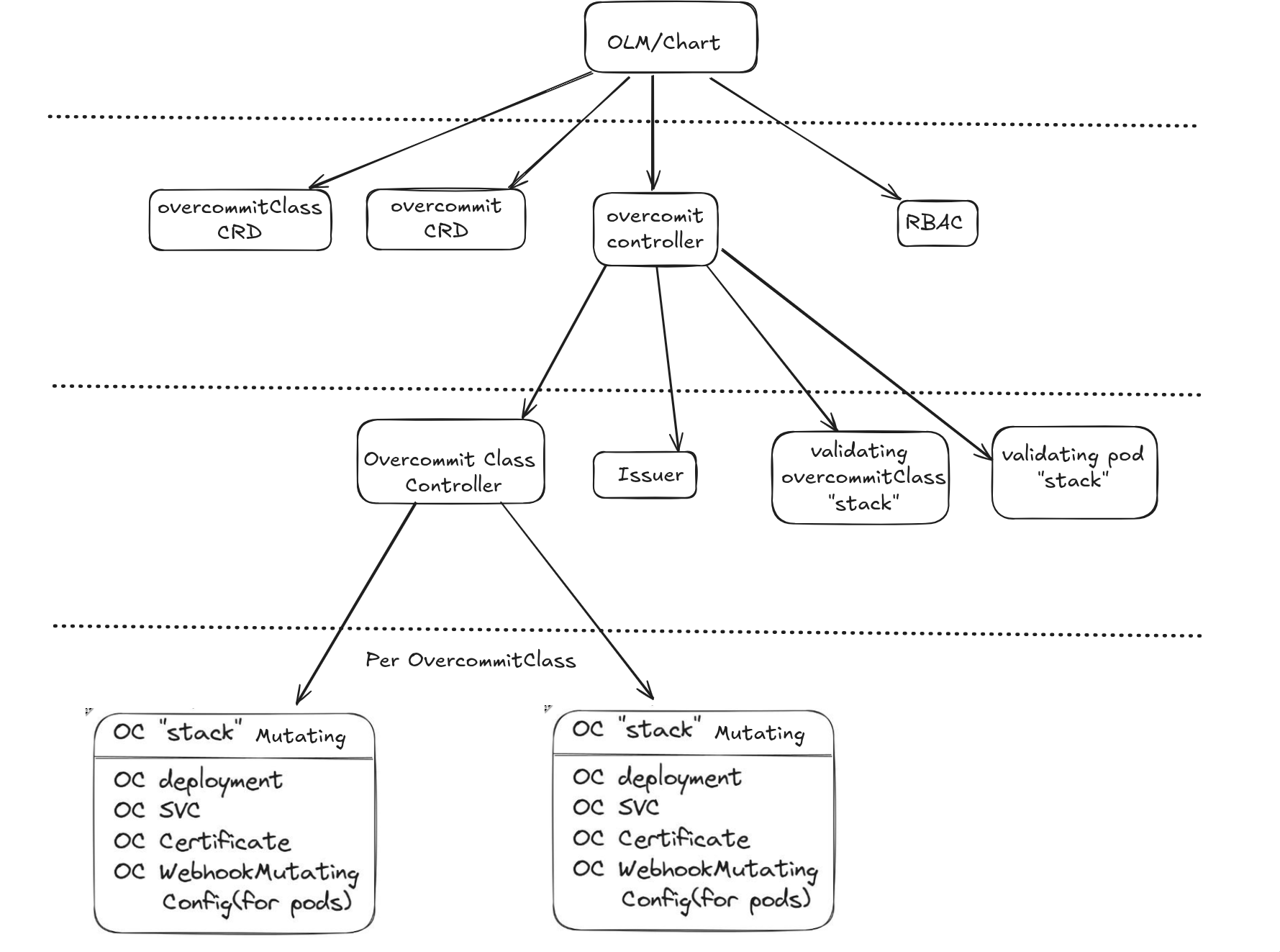
🔄 Kubernetes API Flow
flowchart LR
    subgraph "Main Flow"
    A[📝 API Request] --> B[🔧 API HTTP Handler]
    B --> C[🔐 Authentication & Authorization]
    C --> D[🔄 Mutating Admission]
    D --> E[✅ Object Schema Validation]
    E --> F[🛡️ Validating Admission]
    F --> G[💾 Persisted to etcd]
    end
subgraph "Mutating Webhooks"     direction LR     D --> MW1[🔄 Overcommit Webhook]     D --> MW2[🔄 Other Webhooks]     end
subgraph "Validating Webhooks"     direction LR     F --> VW1[✅ Validation Webhook 1]     F --> VW2[✅ Validation Webhook 2]     F --> VW3[✅ Validation Webhook 3]     end


