
WARNING: This repository is no longer maintained :warning: This repository will not be updated. The repository will be kept available in read-only mode.
WARNING: This repository is no longer maintained :warning:
This repository will not be updated. The repository will be kept available in read-only mode.

Portfolio Analytics Computation
Upload a portfolio and compute analytics on it
This journey leverages two services:
- The Investment Portfolio service is used to manage and store portfolios and financial security information such as the set of eligible investments, benchmarks, and user portfolios.
- The Instruments Analytics service is used to compute analytics on securities. This service is pre-integrated with market data and leverages a wide set of financial models. These financial models are cashflow generation models, meaning they project all cash flow a given security is going to make over its lifespan in order to calculate properties of financial securities such as current value (using present value of the cash flows) or sensitivities (to see how much cashflows change when incremental changes are made to various model inputs).
- Load and retrieve data from the Investment Portfolio service
- Construct a payload to generate analytics on a portfolio
- Construct a user interface to display results, or download to a CSV file.
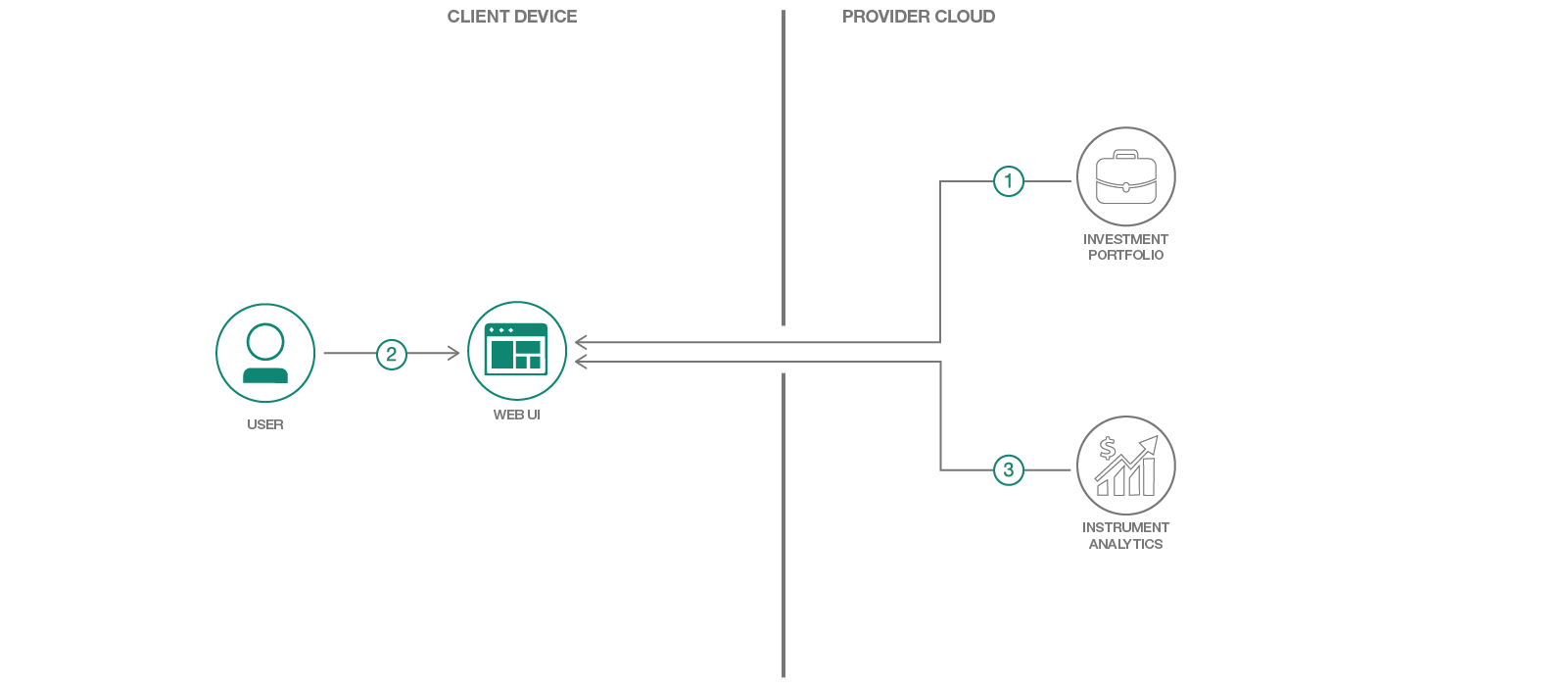
Flow
- User uploads a portfolio for analysis.
- User selects a portfolio and which analytic to compute on the portfolio.
- The portfolio and analytic choices are sent to the Instrument Analytics service. Computational results are returned to the browser or downloaded in CSV format.
Included Components
Note: these services are free for those who have a Lite accountSteps
Use the `Deploy to IBM Cloud button OR create the services and run Run Locally.
Deploy to IBM Cloud
Create an IBM Cloud account and directly deploy the application using the button below.

Running the Application Locally
Follow these steps to setup and run this developer journey. The steps are described in detail below.Prerequisites
Steps to run locally
- Clone the repo
- Create IBM Cloud services
- Configure Manifest file
- Configure .env file
- Run Application
- Uploading Holdings
- Compute Analytics
1. Clone the repo
Clone the Portfolio Analytics Computation code locally. In a terminal, run:
$ git clone https://github.com/IBM/Portfolio-compute.git
2. Create IBM Cloud services
Create the following services in IBM Cloud. These services are part of either Free or Experimental plan.
3. Configure Manifest file
Edit the manifest.yml file in the folder that contains your code and replace with a unique name for your application. The name that you specify determines the application's URL, such as your-application-name.mybluemix.net. Additionally - update the service names so they match what you have in the IBM Cloud. The relevant portion of the manifest.yml file looks like the following:
<pre><code class="lang-none">declared-services: Investment-Portfolio: label: fss-portfolio-service plan: fss-portfolio-service-free-plan Instrument-Analytics: label: fss-instrument-analytics-service plan: fss-instrument-analytics-service-free-plan applications: - path: . memory: 128M instances: 1 name: Portfolio-Compute disk_quota: 1024M domain: mybluemix.net services: - Investment-Portfolio - Instrument-Analytics buildpack: python_buildpack</code></pre>
4. Configure .env file
Create a .env file in the root directory of your clone of the project repository by copying the sample .env.example file using the following command in terminal:
<pre><code class="lang-none">cp .env.example .env</code></pre>
NOTE Most files systems regard files with a "." at the front as hidden files. If you are on a Windows system, you should be able to use either GitBash or Xcopy
You will need to update the credentials with the IBM Cloud credentials for each of the services you created in Step 2.
The .env file will look something like the following:
<pre><code class="lang-none"># Investment Portfolio CREDPORTFOLIOUSERID_W= CREDPORTFOLIOPWD_W= CREDPORTFOLIOUSERID_R= CREDPORTFOLIOPWD_R=
Instrument Analytics
IA_uri=https://fss-analytics.mybluemix.net/ IAaccesstoken=</code></pre>5. Run Application
In your terminal, cd into this project's root directory
- Run pip install -r requirements.txt
to install the app's dependencies - Run python run.py
- Access the running app in a browser at <http://0.0.0.0:8080/>
 file.  From your root directory login into IBM Cloud using CLI: <pre><code class="lang-">bx login</code></pre> And push the app to IBM Cloud: <pre><code class="lang-">bx push</code></pre>
6. Upload Holdings
Once the application is running, the first step is to upload a file that will be used to create a portfolio or a series of portfolios in the Investment Portfolio service. We use the file format of the Algorithmics Risk Service (ARS) import file as many production clients are already used to that format. You can find an example file in this repo labelled "Blue Chip Portfolio". Alternatively, the file
ICFSSAMPLEPOSITIONS.csv` contains the superset of instruments that the Instrument Analytics service supports.
- The column labeled "UNIQUE ID" must refer to the unique identifier of the asset in our system.
- The "NAME" column will hold the display name of the asset.
- "POSITION UNITS" column holds the quantity.
- "PORTFOLIO" indicates which portfolio the asset belongs to.
Some notes:
- The portfolio will be loaded as 500-asset chunks as there are currently limitations on POST request sizing. This means you shouldn't use the 'latest=True' parameter when requesting calculations from the Instrument Analytics service!
- The portfolio will be tagged as type = 'unit test portfolio' to distinguish between any other portfolios that may exist in the system.
7. Compute Analytics
Once the portfolio have been loaded, a second API call can be made. This was parsed out as two separate calls as uploading the portfolio may not need to occur frequently, whereas the computations may.
The next step is to use the application to call the /api/unit_test endpoint. This will perform the following:
- Gather all portfolios in the Investment Portfolio service that are labelled as type = 'unit test portfolio'
- Parse each portfolio into 500-asset chunks to be sent to the Instrument Analytics service (currently a limitation we enforce)
- Compute a series of analytics, which is currently hard-coded to 'THEO/Price' and 'THEO/Value'. This can be changed in the code.
- Return a csv file of results, along with printing out statistics on timing to the console.
- This script currently processes securities in series (synchronously). As the Instrument Analytics service runs on Kubernetes, this script can be enhanced to submit calculation requests asynchronously to improve timing.
- Instruments not found will be ignored.
Troubleshooting
- To troubleshoot your IBM Cloud application, use the logs. To see the logs, run:
bx logs <application-name> --recent- If you are running locally - inspect your environment variables closely to confirm they match. Try running each service as standalone:
python InvestmentPortfolio.py
python InstrumentAnalytics.py
License
This code pattern is licensed under the Apache Software License, Version 2. Separate third party code objects invoked within this code pattern are licensed by their respective providers pursuant to their own separate licenses. Contributions are subject to the Developer Certificate of Origin, Version 1.1 (DCO) and the Apache Software License, Version 2.


