
Learn how to build a socially responsible portfolio
WARNING: This repository is no longer maintained :warning:
This repository will not be updated. The repository will be kept available in read-only mode.
Skill Level: Beginner
N.B: All services used in this repo are Lite plans.

Socially Responsible Investment Portfolio Construction
In this developer journey, we will demonstrate how to collect information from a user to build a socially responsible portfolio that maintains the same risk and return profile of a standardized portfolio.
This journey leverages two services:
- The Investment Portfolio service is used to manage and store portfolios and financial security information such as the set of eligible investments, benchmarks, and user portfolios.
- The Portfolio Optimization service is used to determine an optimal set of holdings based on a user's constraints and preferences. This could be a Markowitz minimum variance, maximum return efficient portfolio or minimization of tracking error with respect to a benchmark. This journey explores the latter use case.
- Load and retrieve data from the Investment Portfolio service
- Construct a payload to generate an optimization request from the Portfolio Optimization service.
- Construct a user interface to gather requirements and constraints from the user and return the details of the optimized portfolio.
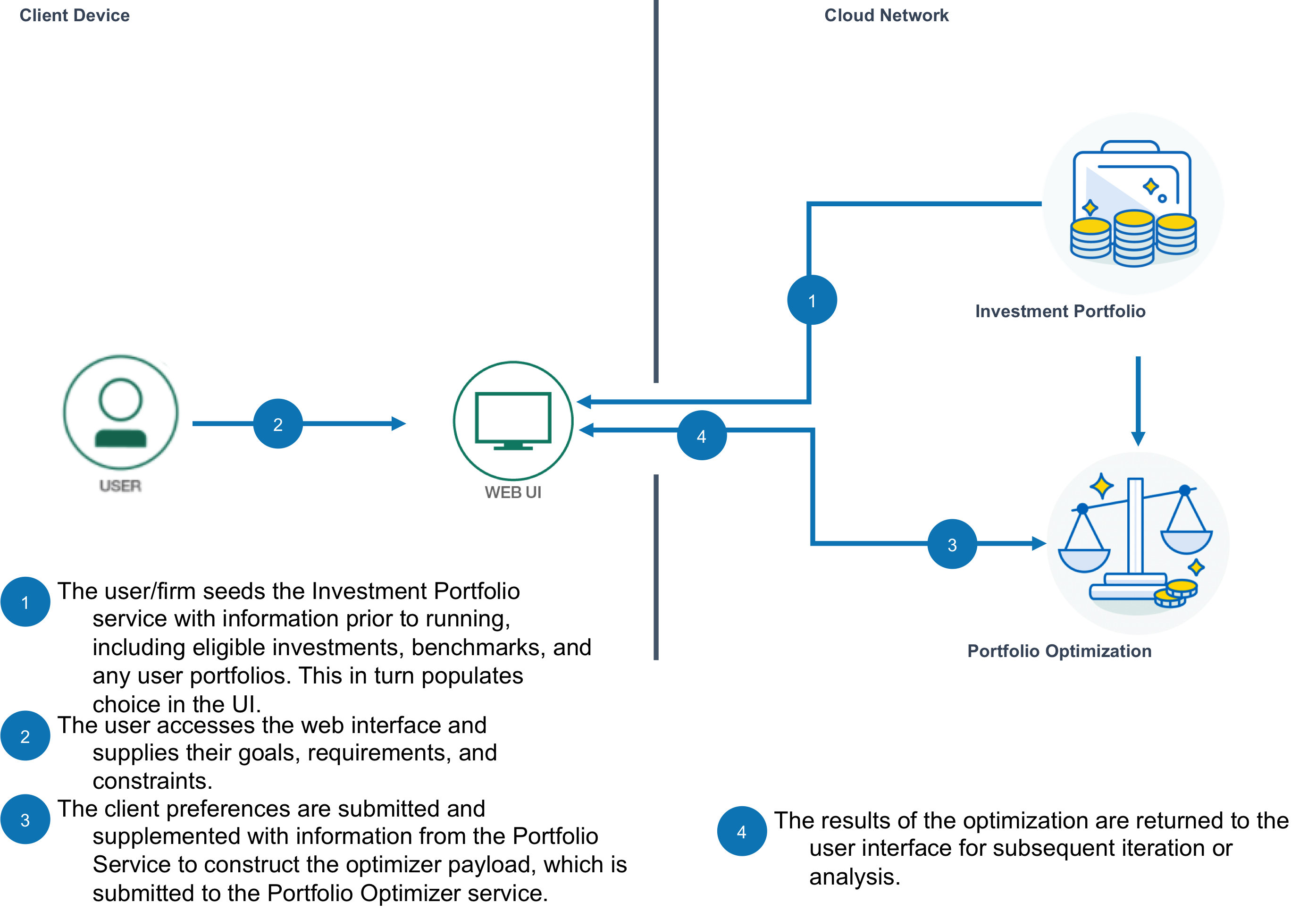
Included Components
- IBM Cloud Investment Portfolio
- IBM Cloud Portfolio Optimization
Steps
Use the `Deploy to IBM Cloud button OR create the services and run Run Locally.
Deploy to IBM Cloud

Note: The code automatically prepopulates the Investment Portfolio service before running the front end. This is done without use the typical raw curl command. See Step 6: Initialize Investment Portfolio for more details.
Running the Application Locally
Follow these steps to setup and run this developer journey. The steps are described in detail below.Prerequisites
Steps to run locally
- Clone the repo
- Create IBM Cloud services
- Configure Manifest file
- Configure .env file
- Run Application
- Initialize Investment Portfolio
1. Clone the repo
Clone the Portfolio-Optimize code locally. In a terminal, run:
$ git clone https://github.com/IBM/Portfolio-Optimize
2. Create IBM Cloud services
Create the following services: You need to click on each link listed below, give it a name and create the service.
3. Configure Manifest file
Edit the manifest.yml file in the folder that contains your code and replace with a unique name for your application. The name that you specify determines the application's URL, such as your-application-name.mybluemix.net. Additionally - update the service names so they match what you have in the IBM Cloud. The relevant portion of the manifest.yml file looks like the following:
<pre><code class="lang-none">declared-services: Investment-Portfolio: label: fss-portfolio-service plan: fss-portfolio-service-free-plan Portfolio-Optimization: label: fss-financial-optimization-service plan: fss-financial-optimization-service-free-plan applications: - path: . memory: 128M instances: 1 name: Socially-Responsible-Investment-Portfolio-Construction disk_quota: 1024M domain: mybluemix.net services: - Investment-Portfolio - Portfolio-Optimization buildpack: python_buildpack</code></pre>
4. Configure .env file
Create a .env file in the root directory of your clone of the project repository by copying the sample .env.example file using the following command:
<pre><code class="lang-none">cp .env.example .env</code></pre>
NOTE Most files systems regard files with a "." at the front as hidden files. If you are on a Windows system, you should be able to use either GitBash or Xcopy
You will need to update the credentials with the IBM Cloud credentials for each of the services you created in Step 2.
The .env file will look something like the following:
<pre><code class="lang-none"># Investment Portfolio CREDPORTFOLIOUSERID_W= CREDPORTFOLIOPWD_W= CREDPORTFOLIOUSERID_R= CREDPORTFOLIOPWD_R=
Portfolio Optimizer
CREDOPTIMIZERuri=https://fss-analytics.mybluemix.net/ CREDOPTIMIZERaccessToken=</code></pre>5. Run Application
cd into this project's root directory
- Run pip install -r requirements.txt
to install the app's dependencies - Run python run.py
- Access the running app in a browser at <http://0.0.0.0:8080/>
6. Initalize the Investment Portfolio Service
The application relies on a few elements pre-populated in the Investment Portfolio service. The user interface will read from this service in order to retrieve the properties and selections that a user can interact with.
Once the application is running, we can initialize the service by populating the Investment Portfolio service with the information it needs.
Some points to note:
- make sure the .env
file has been updated with your user credentials for the Investment Portfolio service. - You can observe the financial security choices and meta-data in the Instrument Universe.csv
file. - Benchmark options and weights are defined in the benchmarks.csv
file. You can specify weights instead of position units (e.g. .25 for 25% allocation) - An example user portfolio is defined in the portfolio.csv
file. Here, position units are expected as the total value of the optimized portfolio will match the current value of this (unless a cash infusion is specified in the request).
Find more information on Investment Portfolio api calls here.
Note that accessing the /api/reset endpoint will delete all of the portfolios in the service that the /api/init endpoint created. You can always start over this way, but be careful to not access this if you've done considerable work.
#7. Learn More Big Data and Analytics Hub Data & Analytics Architecture
Troubleshooting
- To troubleshoot your IBM Cloud application, use the logs. To see the logs, run:
- If you are running locally - inspect your environment variables closely to confirm they match. Try running each service as standalone:
Privacy Notice
This web application includes code to track deployments to IBM Cloud runtimes and services. The following information is sent to a Metrics Tracker service on each deployment:
- Application Name (application_name
) - Application GUID (application_id
) - Application instance index (instance_index
) - Space ID (space_id
) - Application Version (application_version
) - Application URIs (application_uris
) - Labels of bound services
- Number of instances for each bound service
and VCAPSERVICES` environment variables in IBM Cloud. This data is used by IBM to track metrics around deployments of sample applications to IBM Cloud to measure the usefulness of our examples, so that we can continuously improve the content we offer to you. Only deployments of sample applications that include code to ping the Deployment Tracker service will be tracked.
Learn more
- Artificial Intelligence Code Patterns: Enjoyed this Code Pattern? Check out our other AI Code Patterns.
- Data Analytics Code Patterns: Enjoyed this Code Pattern? Check out our other Data Analytics Code Patterns
- AI and Data Code Pattern Playlist: Bookmark our playlist with all of our Code Pattern videos
- With Watson: Want to take your Watson app to the next level? Looking to utilize Watson Brand assets? Join the With Watson program to leverage exclusive brand, marketing, and tech resources to amplify and accelerate your Watson embedded commercial solution.
- Watson Studios: Master the art of data science with IBM's Watson Studios
- PowerAI: Get started or get scaling, faster, with a software distribution for machine learning running on the Enterprise Platform for AI: IBM Power Systems
- Spark on IBM Cloud: Need a Spark cluster? Create up to 30 Spark executors on IBM Cloud with our Spark service
- Kubernetes on IBM Cloud: Deliver your apps with the combined the power of Kubernetes and Docker on IBM Cloud
License
This code pattern is licensed under the Apache Software License, Version 2. Separate third party code objects invoked within this code pattern are licensed by their respective providers pursuant to their own separate licenses. Contributions are subject to the Developer Certificate of Origin, Version 1.1 (DCO) and the Apache Software License, Version 2.


