
🚀 100% local RAG system with one-command setup. Your data never leaves your server. AGPL-3.0
RAG Enterprise - Local RAG System
100% local Retrieval-Augmented Generation (RAG) system for businesses that need complete data privacy and control.





One command. Full RAG system. Your data stays yours.
Why RAG Enterprise?
- ✅ 100% Local: No data leaves your infrastructure
- 🚀 One-Command Setup: Automated installation script (~1 hour / ~15 min with fast connection)
- 🤖 Modern LLMs: Qwen3, Mistral 7B (Q4 quantized)
- 🔐 Multi-user Auth: JWT-based with role-based access control
- 💾 Backup & Restore: Full system backup with 70+ cloud providers via rclone
- 📊 Production-Ready: Designed for 10,000+ documents
- 🌍 Multilingual: Supports 29 languages
- 🎨 Clean UI: Modern React interface
- 📁 Multiple Formats: PDF, DOCX, TXT, MD, PPTX, XLSX, and more
Quick Start
Prerequisites
- OS: Ubuntu 20.04+ (22.04 recommended)
- GPU: NVIDIA (CUDA), AMD (ROCm), or CPU-only
- RAM: 16GB minimum, 32GB recommended
- Storage: 50GB+ available
- Connection: 80+ Mbit/s recommended
Automated Installation
# 1. Clone repository
git clone https://github.com/I3K-IT/RAG-Enterprise.git
cd RAG-Enterprise/rag-enterprise-structure
2. Run setup script (installs everything)
./setup.sh standard
3. Follow prompts - you'll need to logout/login once during setup
Setup time: ~1 hour (80 Mbit/s) / ~10-15 min (400+ Mbit/s)
4. Access the application
Frontend: http://localhost:3000
Get admin password: docker compose logs backend | grep "Password:"
What Gets Installed
The setup script automatically installs and configures:
- Docker Engine + Docker Compose
- GPU toolkit (NVIDIA Container Toolkit or AMD ROCm, based on your selection)
- All required Docker images (CUDA or ROCm variant)
- Ollama with LLM model (Mistral 7B or Qwen3:14b)
- Qdrant vector database
- Backend + Frontend services
docker compose logs backend -fOnce you see "Application startup complete", open http://localhost:3000 and login.
Architecture
┌─────────────────────────────────────────┐
│  React + Vite Frontend (Port 3000)     │
│  - JWT Authentication                   │
│  - Document Management                  │
│  - Conversation History                 │
└─────────────────┬───────────────────────┘
                  │ REST API
                  ↓
┌─────────────────────────────────────────┐
│  FastAPI Backend (Port 8000)           │
│  - RAG Pipeline (LangChain)            │
│  - Role-Based Access Control           │
│  - Backup & Restore (rclone)           │
│  - OCR (Apache Tika + Tesseract)       │
│  - Embeddings (BAAI/bge-m3)            │
└─────────────────┬───────────────────────┘
                  │
    ┌─────────────┴─────────────┐
    ↓                           ↓
┌─────────────────┐   ┌─────────────────┐
│  Qdrant (6333) │   │  Ollama (11434) │
│  Vector DB     │   │  LLM Server     │
└─────────────────┘   └─────────────────┘
User Roles
- User: Query documents (read-only)
- Super User: Upload and delete documents
- Admin: Full access including user management
Usage
First Login
- Open http://localhost:3000
- Get your admin password from the logs:
docker compose logs backend | grep "Password:"- Login with username
adminand the password from logs - Create additional users in Admin panel
Note: The admin password is randomly generated at first startup for security.
It is not a fixed default like admin123. If you don't see it in the logs, see Password Recovery below.
Upload Documents
- Login as Super User or Admin
- Click "Upload Document"
- Select files (PDF, DOCX, TXT, MD, etc.)
- Wait for processing (1-2 min per document)
- Start querying your documents
Supported Formats
- ✅ PDF (with OCR)
- ✅ DOCX/DOC
- ✅ PPTX/PPT
- ✅ XLSX/XLS
- ✅ TXT, MD
- ✅ ODT, RTF, HTML, XML
Backup & Restore
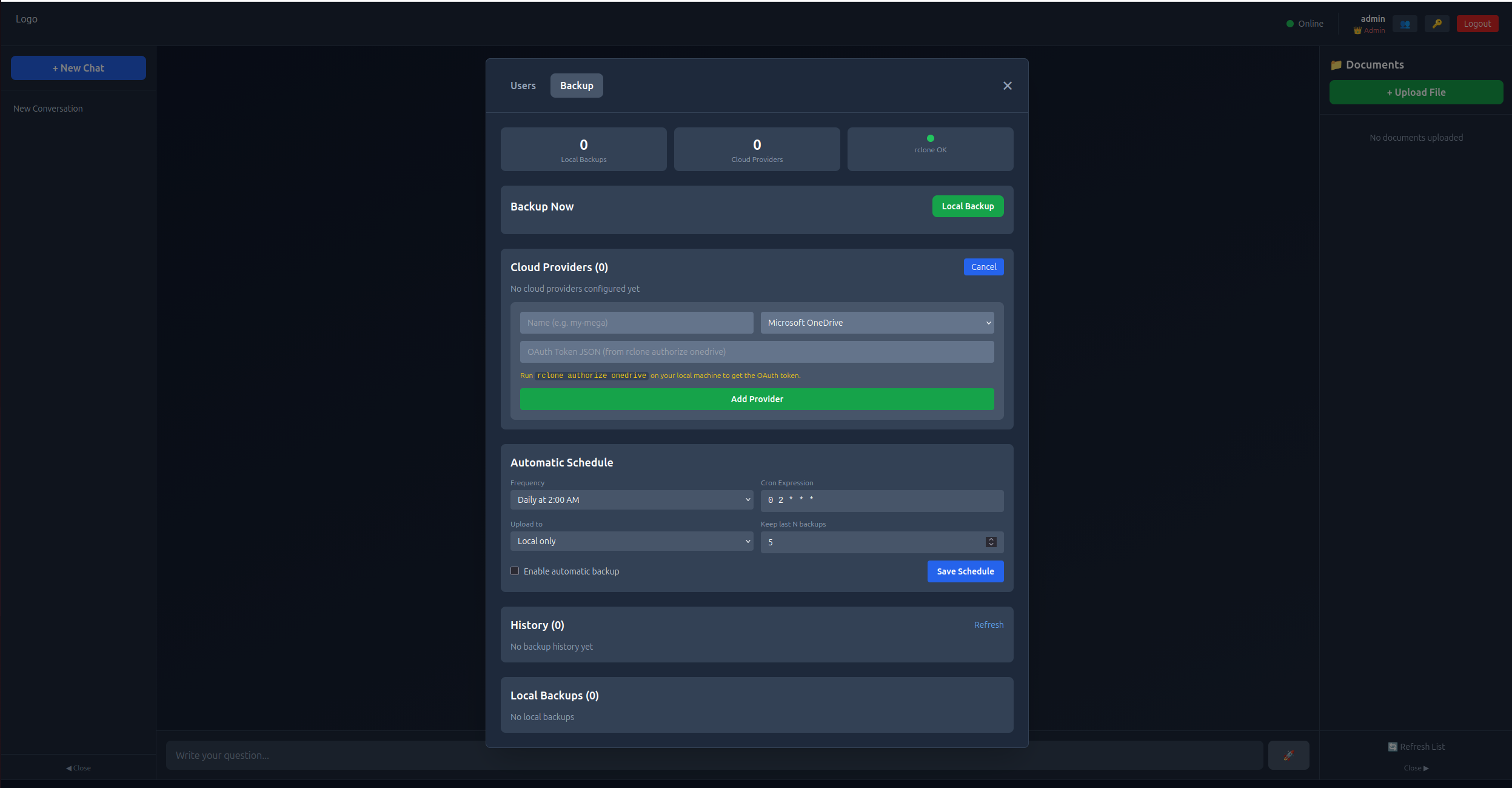
RAG Enterprise includes a complete backup system that protects your entire deployment — database, documents, and vector store — with support for 70+ cloud providers via rclone.
Key Features
- One-click backup: Create full system backups from the admin panel
- 10 provider types: Mega, S3/MinIO, Google Drive, OneDrive, Dropbox, WebDAV (Nextcloud), FTP, SFTP, Backblaze B2, pCloud
- Automatic scheduling: Cron-based with configurable retention policies
- Selective restore: Choose which components to restore (database, documents, vectors)
- Zero-downtime backup: SQLite safe backup API, no service interruption
Quick Example
# Add a Mega cloud provider
curl -X POST http://localhost:8000/api/admin/backup/providers \
  -H "Authorization: Bearer TOKEN" \
  -d '{"name": "my-mega", "type": "mega", "config": {"user": "email@example.com", "pass": "password"}}'
Run backup + upload to cloud
curl -X POST http://localhost:8000/api/admin/backup/run \
  -H "Authorization: Bearer TOKEN" \
  -d '{"provider": "my-mega"}'
Schedule daily backups at 2 AM
curl -X POST http://localhost:8000/api/admin/backup/schedule \
  -H "Authorization: Bearer TOKEN" \
  -d '{"cron": "0 2   *", "provider": "my-mega", "retention": 5, "enabled": true}'
Full documentation: See docs/BACKUP.md for complete setup guide, all provider configurations, API reference, and troubleshooting.
Configuration
All configuration is done via the .env file. Copy the example and edit:
cp .env.example .env
nano .env
After any change, restart the stack:
docker compose down && docker compose up -dChange LLM Model
The default model is Qwen3:14b (~10-12 GB VRAM). If it's too heavy for your hardware, switch to a lighter model in .env:
| Model | VRAM | Best for | |-------|------|----------| | qwen3:14b-q4KM | ~10-12 GB | Best quality (default) | | qwen3:8b-q4KM | ~5 GB | Good balance quality/speed | | qwen3:4b-q4KM | ~3 GB | Fast, works on most GPUs | | qwen3:1.7b-q4KM | ~1.5 GB | Ultra-light, works on CPU | | mistral:7b | ~5 GB | Proven alternative, English-focused |
# .env
LLMMODEL=qwen3:8b-q4K_M
The new model is pulled automatically on next startup.
LLM Timeout
The LLM_TIMEOUT variable controls how long the backend waits for the model to generate a response. Default is 120 seconds (2 minutes), suitable for GPU inference.
On CPU-only setups, larger models can take 5-10+ minutes per query. Increase the timeout accordingly:
| Setup | Recommended timeout | |-------|-------------------| | GPU (NVIDIA/AMD) | 120 (default) | | CPU + light model (4B/1.7B) | 300 | | CPU + large model (8B/14B) | 600 |
# .env — example for CPU-only with 14B model
LLM_TIMEOUT=600
Customize Branding
See LOGO_SETUP.md for logo and company name customization.
Useful Commands
System Management
# View all logs
docker compose logs -f
View backend logs only
docker compose logs -f backend
Check service status
docker compose ps
Restart services
docker compose restart
Stop everything
docker compose down
Start everything
docker compose up -d
Health checks
curl http://localhost:8000/health
curl http://localhost:3000
Cleanup & Reinstall
If you need to start fresh:
# Complete cleanup (removes everything)
./cleanup.sh
Logout and login again
Run setup from scratch
./setup.sh standard
Troubleshooting
Backend shows "unhealthy"
Wait 3-5 minutes on first startup - it's downloading the embedding model:
docker compose logs backend -fLook for "Application startup complete" message.
Admin password lost / not in logs
The admin password is randomly generated on first startup. If the logs have been cleared and you can't find it:
Option A: Set a custom password and recreate the admin user:
# 1. Add to your .env file echo "ADMINDEFAULTPASSWORD=your-secure-password" >> .env
2. Delete the user database to force recreation
docker compose exec backend rm /app/data/rag_users.db
3. Restart the backend
docker compose restart backend
Option B: Set ADMINDEFAULTPASSWORD in .env before first startup to avoid random passwords entirely:
# In .env - the admin account will use this password ADMINDEFAULTPASSWORD=your-secure-passwordTip: If you prefer a known password, setADMINDEFAULTPASSWORDin.envbefore first startup. Otherwise, the system generates a secure random password shown only once in the logs.
Can't login / Frontend not loading
Check all services are running:
docker compose ps
All should show "Up" status
If backend is "unhealthy", wait a few more minutes
GPU not detected
NVIDIA:
nvidia-smi docker run --rm --gpus all nvidia/cuda:12.9.0-runtime-ubuntu22.04 nvidia-smiAMD (ROCm):
ls /dev/kfd /dev/dri Verify ROCm: https://rocm.docs.amd.com
CPU-only: No GPU needed — set GPU_TYPE=cpu in .env (or select option 3 during setup).
No results from queries
Lower the similarity threshold in docker-compose.yml:
RELEVANCE_THRESHOLD: "0.3" # Lower = more resultsThen docker compose restart backend.
Performance
Expected Speed (RTX 4070, 12GB VRAM)
- Setup time: ~1 hour (80 Mbit/s) / ~10-15 min (400+ Mbit/s)
- First startup: +9 min (80 Mbit/s) / +2 min (400+ Mbit/s) for embedding model
- Total ready: ~1h 10min (80 Mbit/s) / ~15-20 min (fast connection)
- Query response: 2-4 seconds
- Generation speed: 80-100 tokens/s
- Document capacity: 1,000-10,000 documents
- Upload speed: 1-2 documents/minute
Community Benchmarks
Real-world performance results from the community. Run python benchmark/rag_benchmark.py to test your hardware and contribute your results!
Hardware Configurations Tested
| Hardware | CPU | RAM | GPU | VRAM | |----------|-----|-----|-----|------| | Config #1 | AMD Ryzen 9 5950X (32 cores) | 64 GB | RTX 5070 Ti | 16 GB |
Upload Performance (seconds)
| Hardware | Mean | Median | Min | Max | |----------|------|--------|-----|-----| | Config #1 | 10.96s | 9.31s | 0.59s | 24.62s |
Query Performance (seconds)
| Hardware | Mean | Median | Min | Max | P95 | |----------|------|--------|-----|-----|-----| | Config #1 | 4.31s | 3.63s | 2.09s | 8.78s | 8.78s |
Test Documents
| Document | Type | Size | Upload Time (Config #1) | |----------|------|------|-------------------------| | Mueller Report (2019) | Legal | 11 MB | 17.72s | | 9/11 Commission Report | Legal | 7.4 MB | 24.62s | | Bitcoin Whitepaper | Technical | 180 KB | 0.59s | | Attention Is All You Need | Technical | 2.2 MB | 0.91s |
Query Accuracy (Similarity Scores)
| Query Type | Config #1 | |------------|-----------| | Factual lookups | 65-69% | | Conceptual questions | 50-62% | | Complex analysis | 45-55% |
Want to contribute? Run the benchmark on your hardware and open an issue with your results!
See benchmark/README.md for instructions.
Privacy & Security
- ✅ Zero external calls: Everything runs locally
- ✅ No telemetry: No tracking or analytics
- ✅ Local models: LLM and embeddings on-premise
- ✅ AGPL-3.0 License: If you modify and deploy as a service, you must share source code
How to cite
If you use RAG Enterprise in academic research, EU grant proposals, or technical publications, please cite it as:
APA:
Marchetti, F. (2026). RAG Enterprise — Self-hosted document intelligence platform (Version 1.2.1) [Software]. Zenodo. https://doi.org/10.5281/zenodo.20413005
BibTeX:
@software{marchetti2026ragenterprise,
  author       = {Marchetti, Francesco},
  title        = {RAG Enterprise: Self-hosted document intelligence platform},
  year         = {2026},
  publisher    = {Zenodo},
  version      = {v1.2.1},
  doi          = {10.5281/zenodo.20413005},
  url          = {https://doi.org/10.5281/zenodo.20413005},
  license      = {AGPL-3.0},
  note         = {Sovereign GDPR-compliant Retrieval-Augmented Generation system for regulated industries; Community (AGPL-3.0) and Pro (commercial) editions}
}
Plain text:
Francesco Marchetti. (2026). RAG Enterprise — Self-hosted document intelligence platform (v1.2.1) [Software]. https://doi.org/10.5281/zenodo.20413005
License
This project is licensed under AGPL-3.0 - see LICENSE file.
What this means:
- ✅ Free to use and modify
- ✅ Must share modifications if you offer it as a service
- ✅ Protects against proprietary SaaS parasites
- ✅ Still fully open-source
Contributing
We welcome contributions! Please read our guidelines:
- Contributing Guide - How to contribute
- Code of Conduct - Community guidelines
- Security Policy - Report vulnerabilities
- Roadmap - Planned features
- Fork the repository
- Create feature branch (
git checkout -b feature/YourFeature) - Make your changes
- Open Pull Request
Support
- Issues: GitHub Issues
- Discussions: GitHub Discussions
- Docs: See LOGOSETUP.md for branding, docs/BACKUP.md for backup guide
Star History
If you find this project useful, please consider giving it a star! It helps others discover the project.
Credits
Built with:
- Ollama - Local LLM runtime
- Qdrant - Vector database
- LangChain - RAG orchestration
- FastAPI - Backend framework
- React + Vite - Frontend
- Apache Tika - Document processing
- rclone - Cloud storage integration for backups
Author
Francesco Marchetti - Creator & Lead Developer
- LinkedIn: francesco-marchetti
- Company: I3K Technologies
- Email: info@i3k.eu
- Phone: +39 02 99914444 | +39 338 7913579
Made with ❤️ by I3K Technologies for privacy-conscious enterprises


