
Source code of the article Trading Cup and Handles With MarketSmith Pattern Recognition
The Cup With Handle pattern, developed by William O’Neil, is a technical indicator for identifying the continuation of a trend after a period of consolidation. [1] It consists of an initial uptrend that’s ideally not too mature, a U-shaped move (cup), followed by another sharp and minor shake out (handle). The price, after a rally, starts to consolidate with a smooth slope but then bounces back to the previous highs as it faces support at lower price levels.
When previous highs are touched, investors who bought shares before consolidation and other less committed investors sell their shares, pushing the price down for one last time. Eventually, the price reverses from a second support level (above the previous one) and breaks out of the resistance. Traders use different rules to identify Cup With Handle patterns and gauge their strength, but the base usually lasts 6–65 weeks with depths ranging from 8% to 50%. When trading Cup With Handles, the profit target is usually 20–25% above the initial resistance (pivot point), and the stop-loss range is 5–8% below that line. [2] 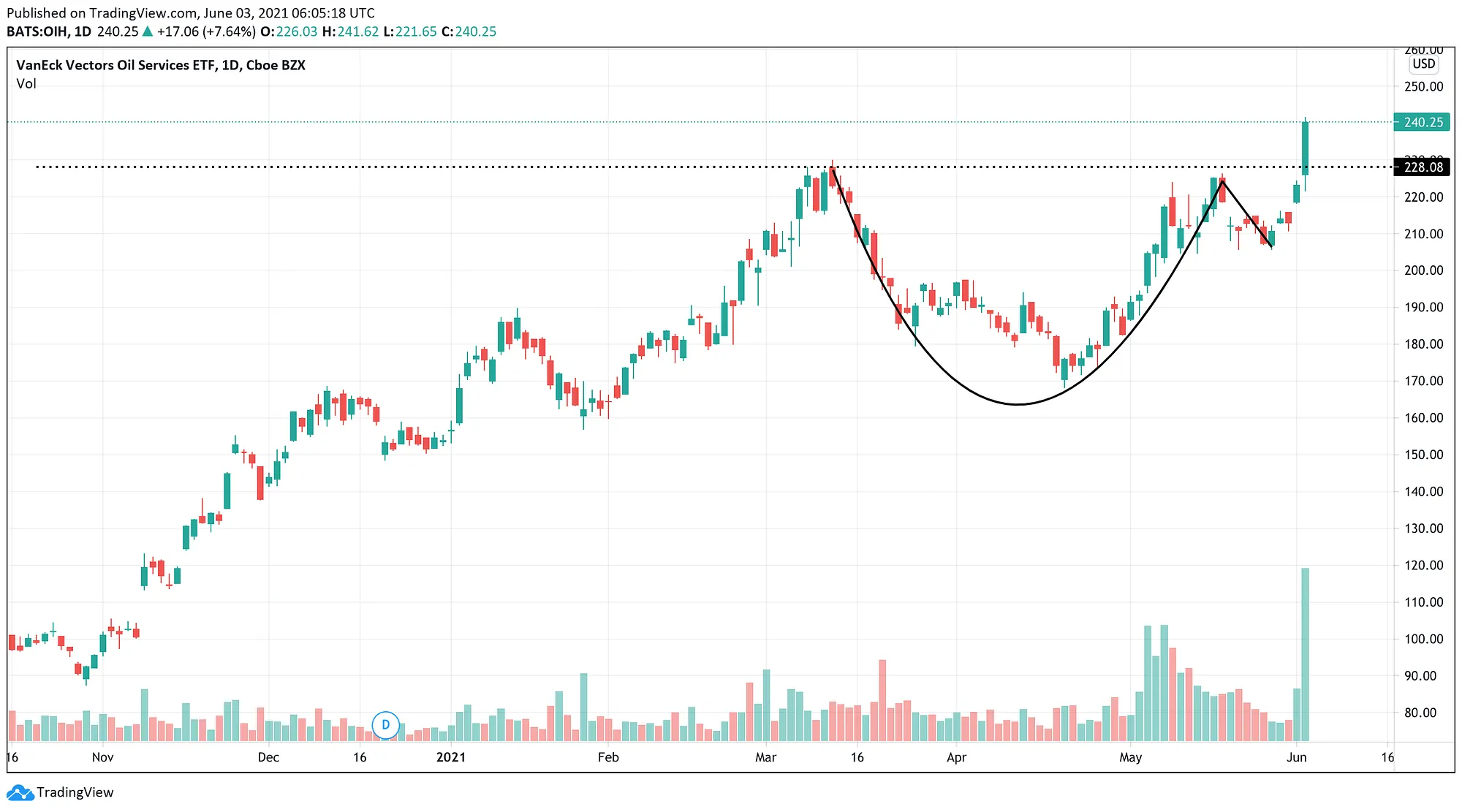
Pattern Recognition, part of the IBD MarketSmith’s premium trading toolkit, identifies seven different chart patterns in daily and weekly time periods: Cup and Cup With Handle, Saucer and Saucer With Handle, Double Bottom, Flat Base, Ascending Base, Consolidation, and IPO Base. This article will focus on using Pattern Recognition API to identify and trade Cup With Handle patterns. To find more information about other properties of Pattern Recognition, check its user manual. 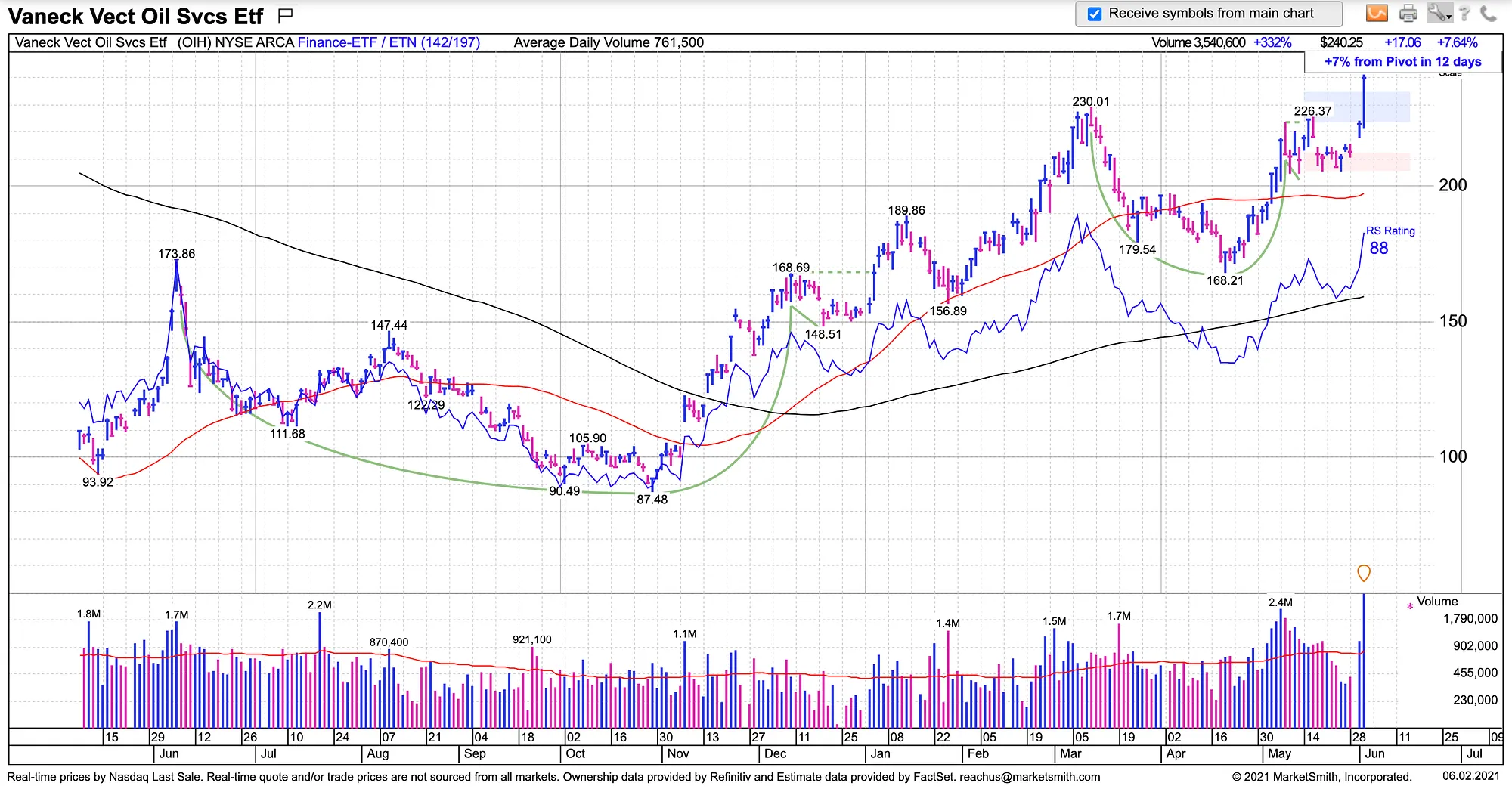
Prerequisites
A basic understanding of Python is needed to get the most out of the article. We’ll use pydantic to validate and serialize data, zipline-reloaded and pyfolio to backtest the strategy, pandas to load and access data, python-dotenv to read environment variables, yfinance to fetch benchmark price data, and requests to make API calls. A premium MarketSmith account is required to access Pattern Recognition. Symbols data and a list of Dow Jones Industrial Average (DJIA) constituents will be fetched from Financial Modeling Prep (FMP) v3 API. To retrieve the historical price data of the constituents, you need to ingest a zipline data bundle.Please make sure to use the following versions:
- python 3.6.12
- pyfolio 0.8.0
- pandas 0.22.0
- matplotlib 3.0.3
- numpy 1.19.5
Load and Store Data
DJIA Constituents
With a free FMP account, we can access the list of DJIA names from this endpoint. First of all, create src/price/endpoints.py to store the FMP endpoints.# src/price/endpoints.py
DJIACONSTITUENTS = "https://financialmodelingprep.com/api/v3/dowjonesconstituent"
NASDAQ100CONSTITUENTS = "https://financialmodelingprep.com/api/v3/nasdaqconstituent"# src/models/constituent.py
from typing import Union from pydantic import BaseModel
class Constituent(BaseModel): """Represents a ticker received from FMP API when retrieving constituents of an index; see price.load_tickers method.""" symbol: str name: str sector: str subSector: str headQuarter: Union[str, None] dateFirstAdded: str cik: Union[str, None] founded: Union[str, None]
# src/price/ticker.py
import os import csv from typing import List
import requests from dotenv import load_dotenv from pydantic import parseobjas
from src.price.endpoints import NASDAQ100CONSTITUENTS, DJIACONSTITUENTS from src.models import Constituent
load_dotenv()
def loadtickers(endpoint: str, apikey: str = os.environ["FMPAPIKEY"]) -> None:     """Fetches and loads list of tickers to data/ticker.csv file. Uses FMP API to get the latest data and requires FMPAPIKEY env variable to be set. Fetches the data from the passed endpoint."""     params = {"apikey": api_key}     res = requests.get(endpoint, params=params)     res = res.json()
# parse and validate data     tickers = parseobjas(List[Constituent], res)
# write data to file     tickers = [constituent.dict() for constituent in tickers]     keys = tickers[0].keys()     with open("data/tickers.csv", 'w', newline='') as output_file:         dictwriter = csv.DictWriter(outputfile, keys)         dict_writer.writeheader()         dict_writer.writerows(tickers)
if name == "main":     loadtickers(DJIACONSTITUENTS)
Make sure to store theFMPAPIKEY key in the .env file and set it to the key you received from the FMP dashboard. Now we can dispatch load_tickers from the command line. If it runs properly, we’ll have a CSV file similar to the image below. 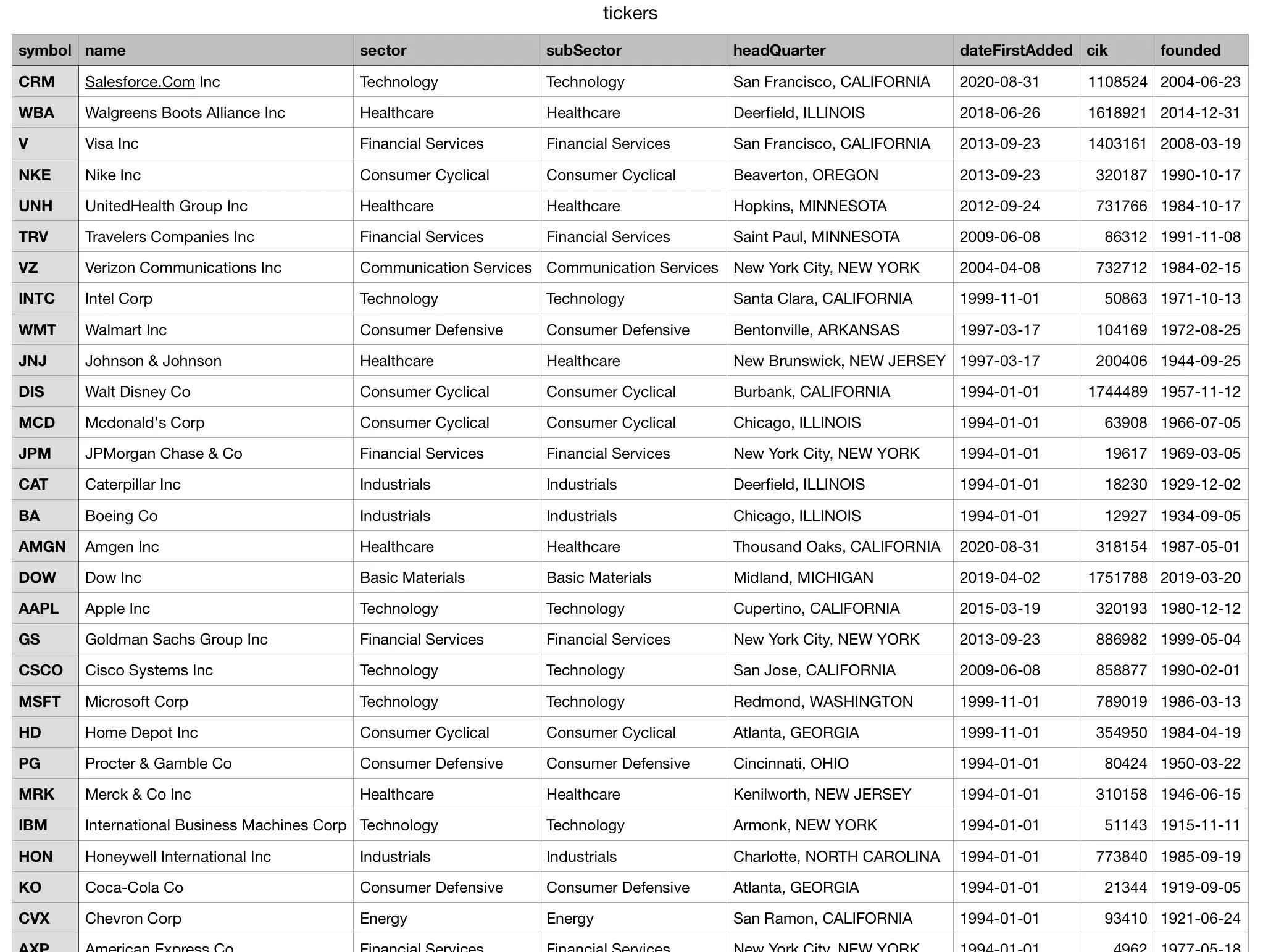
Cup With Handle Data
We should now load the history of Cup With Handle patterns for all symbols in data/tickers.csv . Let’s first define the MarketSmith endpoints we’re going to call.# src/ms/endpoints.py
GET_LOGIN = "https://login.investors.com/accounts.login"
HANDLE_LOGIN = "https://myibd.investors.com/register/raas/loginhandler.aspx"
SEARCH_INSTRUMENTS = "https://marketsmith.investors.com/mstool/api/chart/search-instruments"
GET_PATTERNS = "https://marketsmith.investors.com/WONServices/MSPatternRec/MSPatternRec.svc/json/getPatterns"
GETUSERINFO = "https://marketsmith.investors.com/mstool/api/tool/user-info"
# src/ms/auth.py
import os import json
from requests import Session from dotenv import load_dotenv
from src.ms.endpoints import HANDLELOGIN, GETLOGIN
load_dotenv()
class AuthSession:     def init(self,                  username: str = os.environ["USERNAME"],                  password: str = os.environ["PASSWORD"],                  apikey: str = os.environ["APIKEY"],                  include: str = "profile,data,"                  ):         """Generates a session authenticated into MarketSmith"""         session = Session()
payload = {             "loginID": username,             "password": password,             "ApiKey": api_key,             "include": include,             "includeUserInfo": "true"         }
# make auth payload accessible to class consumers         self.payload = payload
# make a request to GET_LOGIN endpoint to get login info         login = session.post(GET_LOGIN, data=payload).json()         login["action"] = "login"
# pass the login info to HANDLE_LOGIN endpoint to get .ASPXAUTH cookies         res = session.post(HANDLE_LOGIN, json=login)
self.session = session
Before fetching patterns, we need to load Instrument and User objects. Let’s start with the latter. Define the User model to serialize the object we’ll receive from the MarketSmith backend.
# src/models/user.py
from pydantic import BaseModel
class User(BaseModel):     """Represents a MarketSmith User object"""     CSUserID: int     DisplayName: str     EmailAddress: str     IsSpecialAccount: bool     RemainingTrialDays: int     SessionID: str     UserDataInitializationFailed: bool     UserEntitlements: str     UserID: int     UserType: int
# src/ms/user.py
from pydantic import validate_arguments
from src.ms.auth import AuthSession from src.ms.endpoints import GETUSERINFO from src.models import User
@validatearguments(config=dict(arbitrarytypes_allowed=True)) def get_user(session: AuthSession) -> User:     """Gets information of the authenticated user in a session"""     response = session.session.get(GETUSERINFO)     user = User(**response.json())     return user
It’s time to load instrument data from MS API.
# src/ms/utils.py
def convertmsdatetodate(msdate: str) -> date:     """Converts date string passed by MarketSmith API to date object     Parameters     ----------     ms_date : str         e.g., "/Date(1536303600000-0700)/"     Returns     -------     date     Raises     -------     ValueError         Invalid input type     """     try:         strbtwnparanthesis = msdate[msdate.find("(")+1:ms_date.find(")")]
if(strbtwnparanthesis[0] == "-"):             millis = int(strbtwnparanthesis.split("-")[1]) * -1         else:             millis = int(strbtwnparanthesis.split("-")[0])
date_obj = date.fromtimestamp(millis/1000)         return date_obj
except TypeError:         raise ValueError(             "Invalid date received from MS. Must be like /Date(1536303600000-0700)/")
# src/models/instrument.py
from datetime import date
from pydantic import BaseModel, validator
class Instrument(BaseModel):     """Represents a financial Instrument object passed by MarketSmith API"""     mSID: int     type: int     instrumentID: int     symbol: str     name: str     earliestTradingDate: date     latestTradingDate: date     hasComponents: bool     hasOptions: bool     isActive: bool
@validator("earliestTradingDate", "latestTradingDate", pre=True, always=True)     def validate_date(cls, v):         from src.ms.utils import convertmsdateto_date         return convertmsdateto_date(v)
# src/ms/instrument.py
import logging
from pydantic import validate_arguments
from src.ms import AuthSession from src.ms.endpoints import SEARCH_INSTRUMENTS from src.models import Instrument
@validatearguments(config=dict(arbitrarytypes_allowed=True)) def get_instrument(session: AuthSession, symbol: str) -> Instrument:     """Given a symbol (ticker), gets the corresponding Instrument from MarketSmith API     Parameters     ----------     session : AuthSession         authenticated session     symbol : str         ticker of Instrument     Raises     ----------     AssertionError         if the length of search results for the ticker is more than one     Returns     -------     Instrument     """     # search in instruments     search_results = session.session.post(         SEARCH_INSTRUMENTS, json=symbol)     searchresults = searchresults.json()["content"]
# in search results, find the exact match     instrument = list(filter(         lambda result: result['symbol'] == symbol, search_results))
# there shouldn't be less or more than 1 exact match     try:         assert len(instrument) == 1     except AssertionError:         logging.error(             f"Only 1 exact match should be found. Found {len(instrument)}")         raise
instrument = Instrument(**instrument[0])     return instrument
We’re getting to the meat of the matter. Let’s load, parse, and store Cup With Handle patterns. First, define a model to serialize the data.
# src/models/pattern.py
from typing import Literal, List, Optional from datetime import date
from pydantic import BaseModel, validator
class CupWithHandle(BaseModel):     """Represents a cup with handle pattern object passed by MarketSmith API"""     baseID: int     baseStartDate: date     baseEndDate: date     baseNumber: int     baseStage: str     baseStatus: int     pivotPriceDate: date     baseLength: int     periodicity: int     versionID: str     leftSideHighDate: date     patternType: int     firstBottomDate: date     handleLowDate: date     handleStartDate: date     cupEndDate: date     UpBars: int     BlueBars: int     StallBars: int     UpVolumeTotal: int     DownBars: int     RedBars: int     SupportBars: int     DownVolumeTotal: int     BaseDepth: float     AvgVolumeRatePctOnPivot: float     VolumePctChangeOnPivot: float     PricePctChangeOnPivot: float     HandleDepth: float     HandleLength: int     CupLength: int
@validator("baseStartDate", "baseEndDate", "pivotPriceDate", "leftSideHighDate", "firstBottomDate", "handleLowDate", "handleStartDate", "cupEndDate", pre=True, always=True)     def validate_date(cls, v):         from src.ms.utils import convertmsdateto_date         return convertmsdateto_date(v)
# src/ms/pattern.py
import json from typing import Literal, List import csv
from pydantic import validate_arguments, BaseModel
from src.ms import AuthSession, getinstrument, getuser from src.models import Instrument, User, CupWithHandle from src.ms.endpoints import GET_PATTERNS
@validatearguments(config=dict(arbitrarytypes_allowed=True)) def get_patterns(instrument: Instrument, user: User, session: AuthSession, start: int, end: int) -> dict:     """Gets all patterns for an instrument in a given period     Parameters     ----------     instrument : Instrument         Instrument object of the target name     user : User         Authenticated user     session : AuthSession         Authenticated session     start : int         Start in millis     end : int         End in millis     Returns     -------     dict     """     start_date = f"/Date({start})/"     end_date = f"/Date({end})/"     payload = {         "userID": user.UserID,         "symbol": instrument.symbol,         "instrumentID": instrument.instrumentID,         "instrumentType": instrument.type,         "dateInfo": {             "startDate": start_date,             "endDate": end_date,             "frequency": 1,             "tickCount": 0         }     }     res = session.session.post(GET_PATTERNS, json=payload)     res = res.json()     return res
def flatternpatternproperties(patterns: List[dict]) -> List[dict]:     """Each received Pattern instance from MS includes a properties field, which is a list of dictionaries w/ the Key and Value fields and containts extra properties of the pattern. This method flattens Pattern instance by adding removing properties field and adding its keys as separate fields of instance.     Parameters     ----------     patterns : List[dict]         list of patterns fetched from MS     Returns     -------     List[dict]         flattened patterns     """     # add properties field as separate keys     pattern_properties = [pattern.pop("properties", None)                           for pattern in patterns]     for index, props in enumerate(pattern_properties):         for prop in props:             patterns[index][prop["Key"]] = prop["Value"]
return patterns
def filtercupwith_handles(patterns) -> List[CupWithHandle]:     """Given the response object of GET_PATTERNS endpoint, filters cup with handle patterns from it     Parameters     ----------     patterns : object         response of GET_PATTERNS endpoint     Returns     -------     List[CupWithHandle]         list of cup with handles patterns     """     # cups w/ or w/o a handle     cups: List[CupWithHandle] = patterns.get("cupWithHandles", None)     if(cups == None):         return
# cups w/ handle     cupwithhandles = [cup                         for cup in cups                         if cup["patternType"] == 1]     cupwithhandles = flatternpatternproperties(cupwithhandles)     cupwithhandles = [CupWithHandle(**cup) for cup in cupwithhandles]
return cupwithhandles
def store_patterns(patterns: List[BaseModel], ticker: str) -> None:     """Stores a given list of patterns to data/patterns.csv     Parameters     ----------     patterns : List[BaseModel]         list of pydantic models (records) of the patterns to be stored     ticker : str         ticker that the data belongs to     """     filepath = "data/patterns.csv"
# convert to dict     patterns = [{**pattern.dict(), "symbol": ticker}for pattern in patterns]     keys = patterns[0].keys()
# check if is empty     with open(filepath, "r") as patterns_file:         csvdict = [row for row in csv.DictReader(patternsfile)]         isempty = len(csvdict) == 0
with open(filepath, 'a') as patterns_file:         dictwriter = csv.DictWriter(patternsfile, keys)         isempty and dictwriter.writeheader()         dict_writer.writerows(patterns)
MarketSmith passes a properties attribute with the instrument object that includes the instrument’s custom properties as a list. Since we only care about Cup With Handle patterns, and they share the same properties, we use flatternpatternproperties to flatten the object by removing properties key and adding the elements of its list value to our initial instrument object.
filtercupwith_handles receives a list of pattern objects and returns Cup With Handle patterns amongst them. One “gotcha” with this method is that MS passes Cup Without Handles and Cup With Handles under cupWithHandles key, but only those with a patternType of 1 are Cup With Handles (see lines 100–102 in the snippet above).
Finally, store_patterns receives a list of pattern instances and appends them to a local CSV file.
To wrap things up, write some controller functions to orchestrate all the previously defined methods.
# src/ms/utils.py
...
def convertcsvto_records(filepath: str, klass: BaseModel) -> List[BaseModel]:     """Converts a CSV file to a list of models     Parameters     ----------     filepath : str         filepath of CSV file     klass : BaseModel         pydantic model to use for serializing the CSV records     Returns     -------     List[BaseModel]         serialized CSV records     """     with open(filepath) as f:         records = [             klass(**{k: v for k, v in row.items()})             for row in csv.DictReader(f, skipinitialspace=True)]         return records
# src/ms/controller.py
from datetime import datetime import logging from typing import List
import src.ms as ms from src.ms.utils import convertcsvto_records from src.models import Constituent from src.ms.pattern import filtercupwith_handles
logging.basicConfig(level=logging.INFO)
def extractpatterns(ticker: str, filtermethod: callable, start: int, end: int, session=ms.AuthSession()) -> list:     """Extracts a set of patterns, given a filter method, from MarketSmith API     Parameters     ----------     ticker : str         symbol of Instrument to get the data for     filter_method : callable         method that filters target patterns from GET_PATTERNS endpoint response     start : int         start date in millis     end : int         end date in millis     session : AuthSession, optional         authenticated session, by default ms.AuthSession()     Returns     -------     list         List of filtered patterns     """     user = ms.get_user(session)     instrument = ms.get_instrument(session, ticker)     patterns = ms.get_patterns(instrument, user, session, start, end)     filteredpatterns = filtermethod(patterns)     return filtered_patterns
def extractnstorecupwith_handles(start: int, end: int, tickers: List[Constituent]) -> None:     """Loads tickers from data/tickers.csv, calls extract_patterns for each ticker to load Cup With Handle patterns, and then stores them in data/patterns.csv     Parameters     ----------     start : int         start date in millis     end : int`         end date in millis     """     for ix, ticker in enumerate(tickers):         logging.info(f"Fetching data for {ticker.symbol}")         logging.info(f"{ix}/{len(tickers)}")         patterns = extract_patterns(             ticker=ticker.symbol, filtermethod=filtercupwithhandles, start=start, end=end)         ms.store_patterns(patterns=patterns, ticker=ticker.symbol)
logging.info("––––––––––––––")
extract_patterns receives a ticker, a filter method for a pattern type, start and end dates, and an authenticated session. It then orchestrates other methods to fetch and serialize filtered patterns.
extractnstorecupwith_handles accepts the start and end dates in milliseconds since the epoch with a list of Constituent objects, retrieves their cup with handle patterns, and stores those patterns in data/patterns.csv file. Now, call the method with the required arguments.
# src/ms/controller.py
tickers: List[Constituent] = convertcsvto_records(         "data/tickers.csv", Constituent)
dttomilli = lambda dt: datetime.timestamp(dt) * 1000 start = dttomilli(datetime(2018, 1, 1)) end = dttomilli(datetime(2020, 1, 1))
extractnstorecupwith_handles(start, end, tickers)
Strategy
Create a Jupyter Notebook to develop, backtest, and analyze the strategy. First, import the requirements.from datetime import datetime
import pandas as pd import zipline as zp import yfinance as yf import pyfolio as pf
- The current date has passed the handleLowDate property of the object, but not by more than 30 days;
- The current price has broken out of the pivot price level (the second high of the cup) by more than 1%;
- The 50-day simple moving average (SMA) is above the 200-day SMA.
- The trade generated 15% profit or more;
- The trade led to a loss of 5% or more;
- Twenty-one days or more have been passed since the opening of the position.
WATCHLISTWINDOWDAYS = 30
ABOVEPIVOTPCT = 1.01
TAKEPROFITPCT = 1.15
STOPLOSSPCT = .95
PATIENCEWINDOWDAYS = 21
START = datetime(2016, 1, 1)
END = datetime(2018, 1, 1)
BENCHMARK = "SPY"
SHORTMALEN = 50
LONGMALEN = 200
CAPITAL_BASE = 10000000def convertdatecols(df: pd.DataFrame) -> pd.DataFrame:
"""Given a dataframe, adds UTC timezone to all columns that have date in their names."""
for col in df.columns:
if("date" in col.lower()):
df[col] = pd.todatetime(df[col]).dt.tzlocalize("UTC")
return dfdef initialize(context):
# avoid out of bounds error by dropping firstBottomDate col
patterns = pd.read_csv("data/patterns.csv").drop(["firstBottomDate"], axis=1)
patterns = convertdatecols(patterns)
context.patterns = patterns
tickers = pd.read_csv("data/tickers.csv") tickers = convertdatecols(tickers) context.stocks = [zp.api.symbol(ticker) for ticker in tickers.symbol]
context.position_dates = {}
def handle_data(context, data):     currentdt = zp.api.getdatetime()
prices = data.history(context.stocks, "price", bar_count=200, frequency="1d")          # look for new trades     for ix, pattern in context.patterns.iterrows():         # skip if asset is already in portfolio         open_positions = set(context.portfolio.positions.keys())         symbol = zp.api.symbol(pattern["symbol"])         isopen = symbol in openpositions         if(is_open): continue
# check date window from handleLowDate to N days after         isinwindow = (pattern["handleLowDate"] <= currentdt) and (pattern["handleLowDate"] >= (currentdt - pd.DateOffset(WATCHLISTWINDOWDAYS)))         if (not isinwindow): continue                  # get symbol and price history         price_history = prices[symbol]
# check price above pivot         pivotpricedate = pattern["pivotPriceDate"]         try:             pivotprice = pricehistory[pivotpricedate]         except KeyError:             pivot_price = None                  current_price = data.current(symbol, "price")         if(currentprice / pivotprice < ABOVEPIVOTPCT): continue
# check short MA above long MA         shortma = pricehistory.tail(SHORTMALEN).mean()         longma = pricehistory.tail(LONGMALEN).mean()         if(longma > shortma): continue
# add new position and update previous ones         open_positions.add(symbol)         targetpct = 1 / len(openpositions)         for position in open_positions:             zp.api.ordertargetpercent(position, target_pct)         context.positiondates[symbol] = currentdt          # look for closing positions     open_positions = context.portfolio.positions     for position in open_positions.values():         currentprice = position.lastsale_price         buyprice = position.costbasis         shouldtakeprofit = (currentprice / buyprice) > TAKEPROFITPCT         shouldstoploss = (currentprice / buyprice) < STOPLOSSPCT         doesexceedpatience = (currentdt - pd.DateOffset(PATIENCEWINDOWDAYS)) >= context.positiondates[position.asset]         shouldcloseposition = shouldtakeprofit or doesexceedpatience or shouldstoploss         if(shouldcloseposition): zp.api.ordertargetpercent(position.asset, 0)
Almost done. Define a method to fetch benchmark price data from yfinance and process it to the acceptable pyfolio format (a pandas Series with date index).
def getbenchmarkreturns() -> pd.Series: bench = yf.Ticker(BENCHMARK) benchhist = benchhist.history(start=START, end=END, autoadjust=True).tzlocalize("UTC") returns = pd.Series(benchhist["Close"].pctchange().values, index=bench_hist.index).dropna() returns.index.names = ["date"] return returnsdef analyze(perf: pd.DataFrame, bench: pd.Series) -> None: returns, positions, transactions = pf.utils.extractretspostxnfrom_zipline(perf) pf.createfulltearsheet(returns=returns, benchmarkrets=bench)# format start end tolocalizedts = lambda dt: pd.Timestamp(dt).tz_localize("UTC") start, end = tolocalizedts(START), tolocalizedts(END)
get returns
benchmark = getbenchmarkreturns()
run strat
results = zp.run_algorithm(
start=start,
end=end,
initialize=initialize,
handledata=handledata,
benchmark_returns=benchmark,
capitalbase=CAPITALBASE,
bundle='quandl',
data_frequency='daily')
analyze results
analyze(results, benchmark)
store results to CSV
results.to_csv("results.csv")Results
It’s time to receive our just deserts. After running the analyze method, pyfolio generates a tear sheet that includes several tables and charts to present a detailed analysis of the results.Start date 2016-01-04
End date 2017-12-29
Total months 23
Backtest
Annual return 9.7% Cumulative returns 20.2% Annual volatility 7.5% Sharpe ratio 1.27 Calmar ratio 1.96 Stability 0.91 Max drawdown -4.9% Omega ratio 1.62 Sortino ratio 2.4 Skew 3.63 Kurtosis 45.14 Tail ratio 1.6 Daily value at risk -0.9% Alpha 0.08 Beta 0.1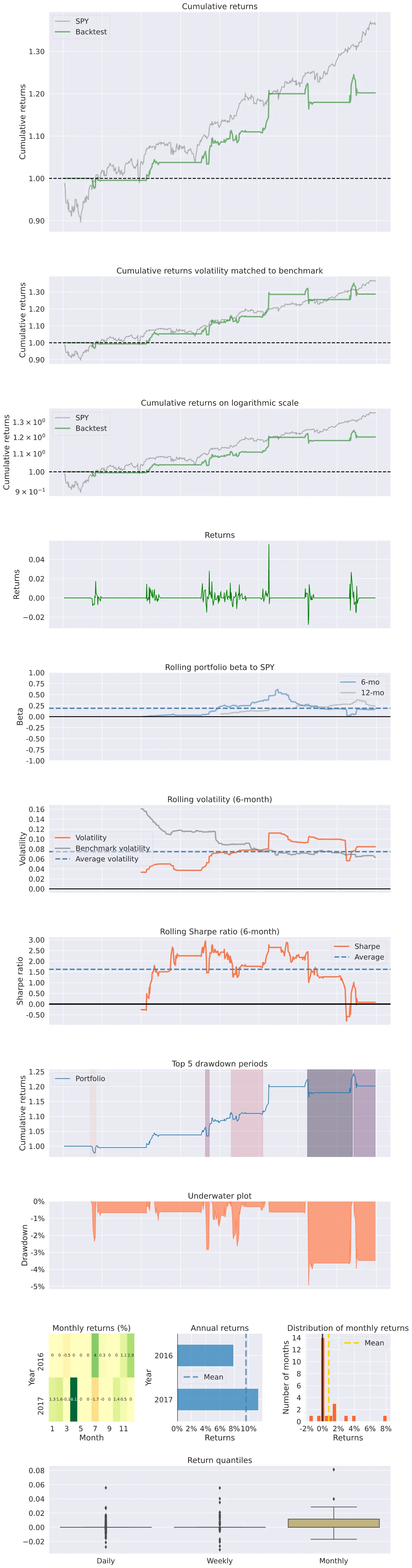
Improvements
The strategy could be enhanced in many ways; let’s discuss some of them.- % of up bars: by taking the ratio of green bars to red bars during the pattern formation, particularly in the latter half of the cup, we can gauge the strength of the bullish pattern and the potential breakout.
- % of up volume: similarly, showing above-average volume during up days (skyscrapers of accumulation) may confirm that institutions are interested in the asset. [3]
- Volume on breakout: another solution could be to buy the name when the volume is above average on the breakout day.
- The volatility of the cup: the cup shouldn’t be V-shaped; using the Average True Range or standard deviation of the price action, we can gauge the smoothness of the price movement while forming the cup pattern. [4]
- Prior uptrend strength: by making sure that the pattern follows a strong and established uptrend, using the height and length of the rally, we can ensure that a strong move backs the base.
[1] D. Saito-Chung, When To Buy The Best Growth Stocks: How To Analyze A Stock’s Cup With Handle (2020), Investor’s Business Daily
[2] Cup With Handle, StockCharts ChartSchool
[3] S. Lehtonen, Roku, One Of The Top Stocks Of 2019, Built ‘Skyscrapers’ Of Accumulation Before A Breakout (2019), Investor’s Business Daily
[4] W. J. O’Neill, How to Make Money in Stocks: A Winning System in Good Times and Bad (2009)


