
A native Mac App for LLM fine-tuning on Apple Silicon — fully on-device, fully open source.

A native Mac App for LLM fine-tuning on Apple Silicon — fully on-device, fully open source.
There is a quiet kind of power in running a model on the machine that sits in front of you.
MLX LoRA Studio puts fine-tuning on your Mac — local, native, and visible end to end.
Pick a model, choose an algorithm, watch the loss fall. The cloud is optional, the code is optional, the mystery is not.

Because this first open-source release is distributed outside the Mac App Store and is not yet notarized, macOS may show a scary "damaged", "cannot be opened", or unidentified developer warning. This does not mean the app is malware. It is Apple's quarantine flag on a freshly downloaded app bundle.
After dragging MLX LoRA Studio.app into /Applications, and before opening it for the first time, open Terminal and run:
sudo xattr -dr com.apple.quarantine "/Applications/MLX LoRA Studio.app"Table of contents
- Release v2.0.0
- Why MLX LoRA Studio?
- What it is
- What it isn't
- Features at a glance
- Screenshots
- Installation
- Quick start (60 seconds)
- A guided tour of the app
- The training pipeline under the hood
- Supported training methods
- Configuration reference
- Memory & hardware expectations
- Building from source
- Project layout
- Contributing
- Star History
- License
- Acknowledgments
Release v2.0.0
MLX LoRA Studio v2.0.0 updates the app for mlx-lm-lora 3.0.0.
This release adds FTPO, Dynamic Fine-Tuning, and memory-bounded Chunked NLL while aligning the native training runner and documentation with the mlx-lm-lora 3.0.0 API. Synthetic dataset creation has been removed from the active app workflow, while historical synthetic run folders remain readable in the Runs archive.
If you need detialed and longer explanations for the algorythms used, then visit the wiki page.
What's included
- Native macOS app for Apple Silicon built with SwiftUI and AppKit.
- Fully local fine-tuning workflow for MLX-compatible language models.
- 10 training algorithms: SFT, DPO, FTPO, CPO, ORPO, GRPO, Online DPO, XPO, RLHF Reinforce,
- Dynamic SFT objectives: NLL, memory-bounded Chunked NLL, and Dynamic Fine-Tuning.
- Multiple training modes: LoRA, DoRA, QLoRA at 4/6/8-bit, full fine-tuning, and
- Live training observability with loss, learning rate, gradient norm, throughput,
- Memory-aware run planning with live wired/active memory monitoring and ResourceGuard
- Runs archive for configs, logs, adapters, run status, resume flows, Finder reveal,
- Hugging Face upload flow with repository settings, model-card metadata, token handling,
- Algorithm Guide explaining when to use each method, which hyperparameters matter, and
- Python environment discovery and provisioning so users can start from the app instead
- Self-contained app bundle that includes the Swift app, Python helpers, and bundled
- MIT-licensed source code so the community can inspect, modify, improve, and build on
Why MLX LoRA Studio?
Fine-tuning a large language model used to mean renting a GPU, installing a Python environment the size of a refrigerator, and babysitting a Jupyter notebook for two days. **MLX LoRA Studio exists to make that loop feel like using a normal Mac app:**
- One click to fine-tune. Pick a model, point it at a dataset, hit Run. The app handles
- Local, on-device, private. Your prompts, your model, your weights, your disk. No data
- Real algorithms, not toy versions. SFT, DPO, FTPO, CPO, ORPO, GRPO, Online DPO, XPO,
- Built for everyone. A beginner can ship a LoRA-tuned Llama model on their M-series Mac
- The trainer is mine, and yours. MLX LoRA Studio wraps
mlx-lm-lora — the same project,
vendored at vendor/mlx-lm-lora/, so what runs in the GUI is exactly what you can run
from the CLI, and vice versa.
What it is
- A native macOS app written in SwiftUI + AppKit, distributed as a single
.appand
.dmg.
- A graphical front-end to the
mlx-lm-lora
- A complete workflow — train, watch live metrics, push the
What it isn't
- Not a general LLM chat app, IDE, or inference server. (Bring your own for inference;
mlx-lm or ollama.)
- Not a cross-platform app. macOS 14+ on Apple Silicon only — it depends on the
- Not a fork of someone else's training code. The trainer is the author's own work, and the
Features at a glance
🧠 Training
- 10 training algorithms out of the box: SFT, DPO, FTPO, CPO, ORPO, GRPO, Online DPO, XPO,
- Selectable SFT losses: NLL, Chunked NLL for lower peak memory, and DFT for emphasizing difficult tokens.
- LoRA, DoRA, QLoRA (4/6/8-bit), full fine-tuning, and QAT (Quantization-Aware Training
mlx-lm-lora CLI.
- Adapter resume — point a new run at an existing adapter checkpoint and Studio picks
- Judge / reward model selection for RL-style algorithms (GRPO, XPO, Online DPO, PPO,
- YAML-driven configuration — the GUI's form is a view over a YAML config; the
📊 Live observability
- Live metrics panel with loss, learning rate, gradient norm, throughput, and a
- Live memory monitor in the sidebar: current wired + active memory, plus a static
- Run progress bar in the sidebar while a job is in flight.
- Pause / resume / stop from the toolbar without losing the run.
🚀 Publish
- One-click Hugging Face upload of adapters (LoRA / DoRA / QLoRA / QAT) with
- Runs archive — every run's config, logs, and final adapter weights are kept in
~/Library/Application Support/MLXLoRAStudio/runs/ and surfaced in the Runs tab
for re-run, resume, or upload.
🛠 Engineering
- Python environment discovery & provisioning — Studio finds an existing venv/conda
- ResourceGuard — watches the OS memory pressure signals and refuses to start a
- Self-contained app bundle — the bundled Python +
mlx-lm-loracheckout is
Installation
Option 1 — Download a release (recommended for users)
- Go to the Releases page.
- Download the latest
MLX-LoRA-Studio-X.Y.Z.dmg. - Open the DMG, drag MLX LoRA Studio to /Applications.
- Before opening it for the first time, run this in Terminal:
sudo xattr -dr com.apple.quarantine "/Applications/MLX LoRA Studio.app"This clears Apple's quarantine flag from the downloaded app bundle. It is needed for this first open-source release because the app is distributed outside the Mac App Store and is not yet notarized; it does not mean the app is malware.
- Launch it from
/Applications(orSpotlight). - On first launch, allow the bundled Python helper to be opened in **System Settings →
The first time you start a run, Studio will discover or provision a Python environment with the right dependencies — no terminal needed.
Option 2 — Build it yourself
See Building from source below.
System requirements
| Component | Requirement | |-----------|----------------------------------------------------------------------| | OS | macOS 14 (Sonoma) or later | | Chip | Apple Silicon (M1 / M2 / M3 / M4 family). Intel is not supported. | | RAM | 16 GB minimum; 24 GB+ recommended for ≥13B models | | Disk | ~5 GB for the app + a per-model HF cache (varies by model) | | Python | Bundled Python is used; a system Python is not required |
Quick start (60 seconds)
- Launch MLX LoRA Studio.
- On the Train tab:
mlx-community/Meta-Llama-3-8B-Instruct-4bit).
- Pick a dataset (e.g. mlx-community/JOSIE-v2-Instruct-5K).
- Leave the algorithm at SFT for a first run.
- Hit Run in the toolbar.
- The sidebar memory card updates in real time; the Live Metrics tab shows
- When the run finishes, head to the Runs tab → open the run → Upload to HF
Tip: the Algorithm Guide tab in the sidebar explains why you'd pick DPO
over SFT, when GRPO makes sense, and how QAT differs from QLoRA — it pairs with the
Train tab rather than replacing it.
A guided tour of the app
The app is organised around a left-hand sidebar with seven sections. Each one maps to a single screen in the detail pane.
Train

The heart of the app. The form is grouped into:
- Model & data — base model, dataset, chat template, max sequence length, packing.
- Adapter shape — LoRA rank, alpha, dropout, target modules; or switch to DoRA /
- Optimization — learning rate, schedule, warmup, weight decay, grad accumulation,
- Algorithm-specific — only the fields the selected algorithm actually uses.
- Resume / output — where to write the adapter, whether to resume from an existing
A memory estimate at the bottom of the form shows what the current configuration should cost, so you can change a knob and immediately see the projected effect.
Live Metrics

A second-by-second view of what the runner is doing:
- Loss / reward / KL over the last N steps, with a refreshable line plot.
- Throughput (tokens/sec) and elapsed time.
- A scrolling console of the last lines of stdout/stderr from the Python job, for when
Upload to HF
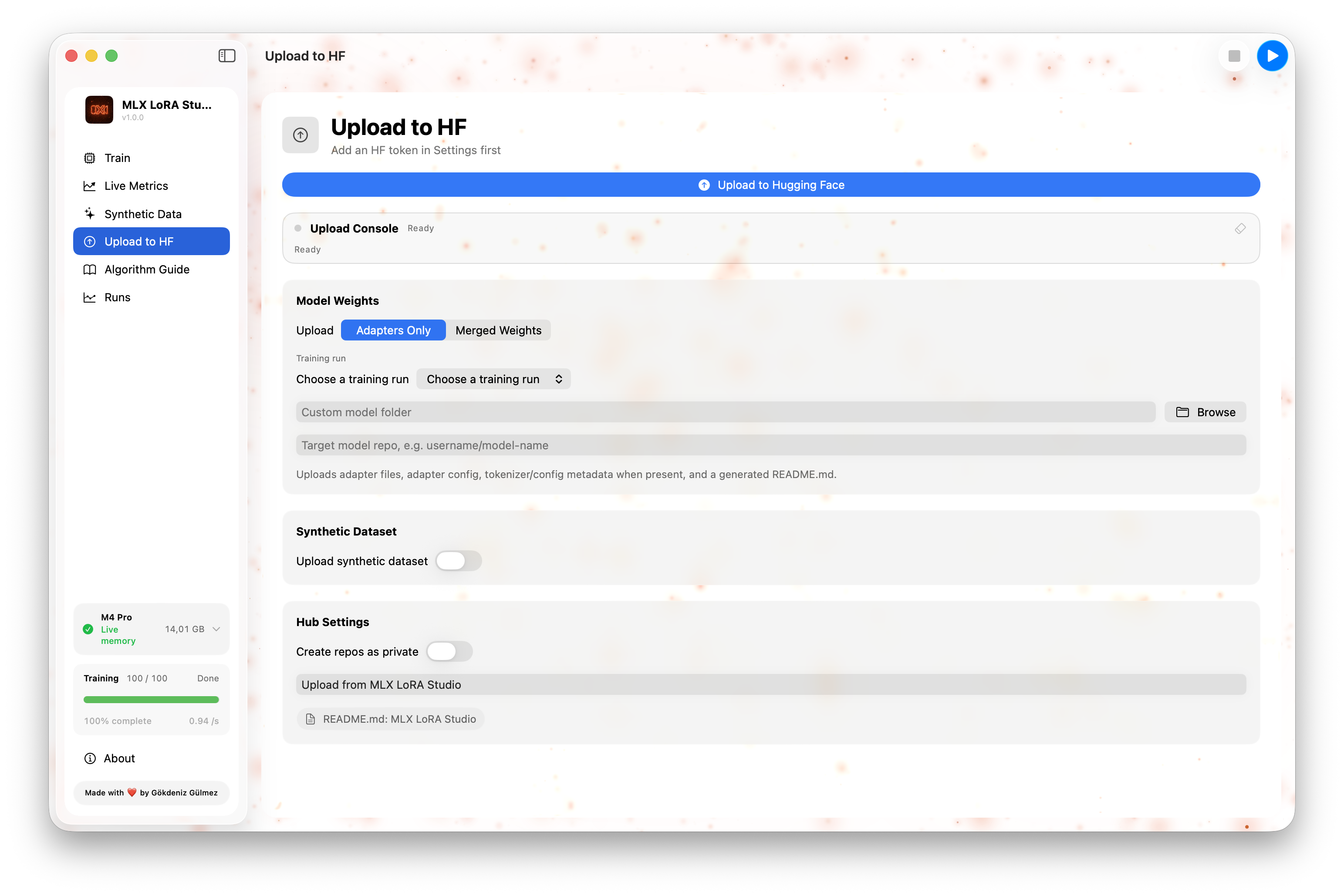
A guided form for pushing a finished adapter to the Hugging Face Hub:
- Repository name, visibility (public / private), license.
- Model card fields: base model, language, tags, dataset card, intended use.
- Token source: env var, keychain entry, or paste.
- One Push button. The app shows a step-by-step progress feed and a final URL.
Algorithm Guide

A built-in reference for the 9 supported algorithms. Each entry covers:
- What it is in one paragraph, with the math in plain words.
- When to use it — the practical "SFT first, then DPO" ladder.
- Key hyperparameters and how to think about them.
- Failure modes — what goes wrong if beta is too high, group size is too small, etc.
Runs
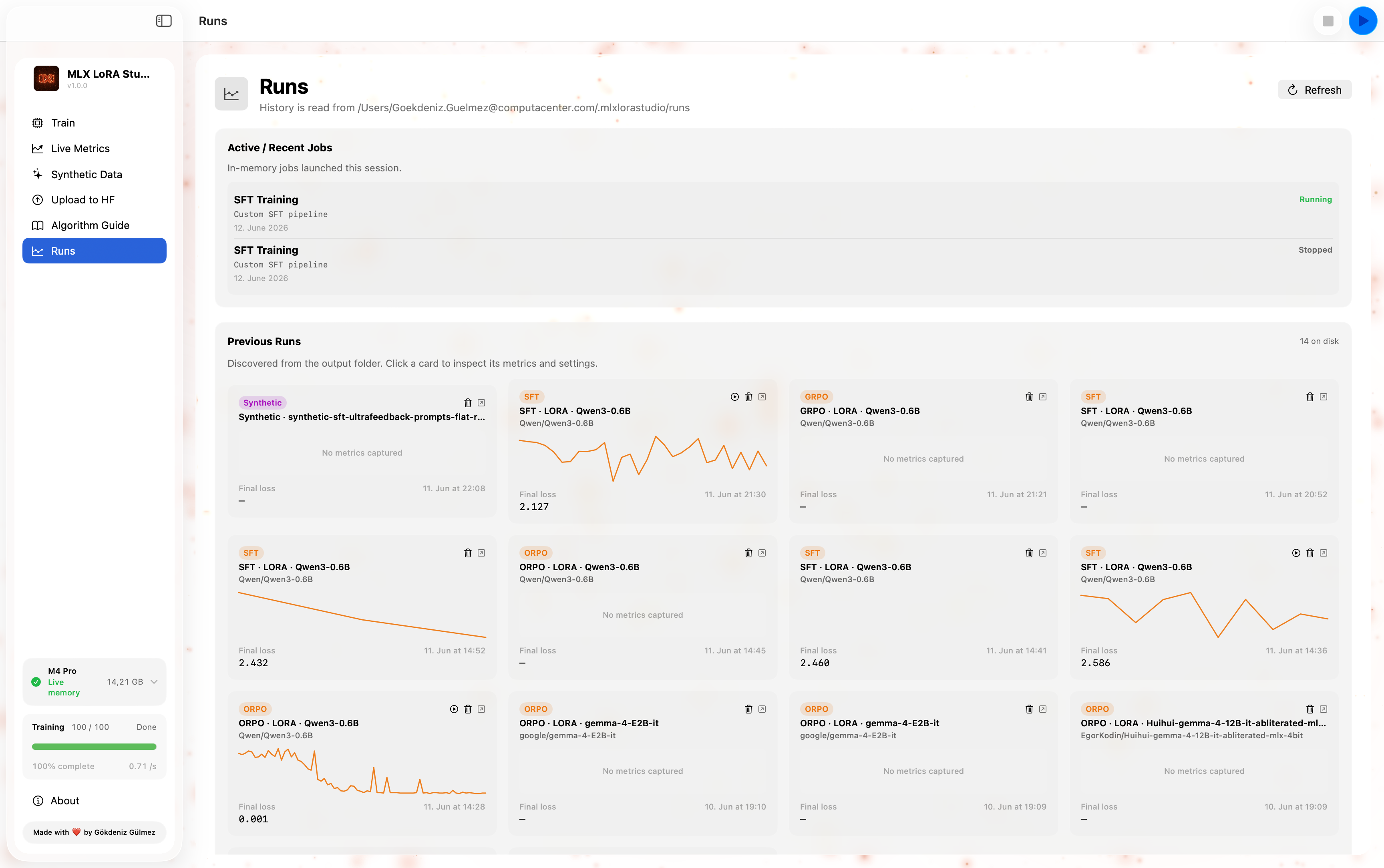
A table of every run Studio has ever done, sorted by recency:
- Status (running / paused / done / failed / cancelled).
- Algorithm, base model, dataset, last loss, duration.
- The run's full YAML config and final adapter path.
- Actions: Open (loads it back into the form), Resume (start a new run from
Settings & Onboarding
- Settings controls the Python environment Studio should use (auto-discovered,
- Onboarding is a 5-step tour shown on first launch: it walks through picking
The training pipeline under the hood
┌─────────────────────────────────────────────────────────────────────┐
│  SwiftUI app  (Sources/MLXLoRAStudio)                               │
│  ┌──────────────┐   ┌─────────────────┐   ┌──────────────────────┐ │
│  │ AppStore     │──▶│ PythonJobRunner │──▶│ LiveMemoryMonitor    │ │
│  │ (state)      │   │ (subprocess +   │   │ + ResourceGuard      │ │
│  └──────────────┘   │  line streaming)│   └──────────────────────┘ │
│                     └────────┬────────┘                             │
│                              │ stdin/stdout                         │
└──────────────────────────────┼──────────────────────────────────────┘
                               │
                               ▼
┌─────────────────────────────────────────────────────────────────────┐
│  Python helper  (Backend/training_runner.py)                        │
│  • Translates the YAML config into mlx-lm-lora CLI flags            │
│  • Streams metrics on stdout as JSON lines                          │
│  • Saves adapter checkpoints under the run dir                      │
└──────────────────────────────┬──────────────────────────────────────┘
                               │
                               ▼
┌─────────────────────────────────────────────────────────────────────┐
│  mlx-lm-lora  (vendor/mlx-lm-lora — same code the CLI uses)         │
│  • SFT / DPO / CPO / ORPO / GRPO / Online DPO / XPO /               │
│    RLHF Reinforce / PPO                                             │
│  • LoRA / DoRA / QLoRA / full / QAT                                 │
│  • MLX-native training, fused-metal on Apple Silicon                │
└─────────────────────────────────────────────────────────────────────┘
The app and the trainer communicate over a simple line-delimited JSON protocol: the runner emits one JSON object per training step (loss, lr, grad_norm, tokens/sec, etc.), plus structured event lines for phase changes (starting, epoch, checkpoint, done, error). This keeps the Swift side reactive without polling.
Supported training methods
Mirrored from the underlying mlx-lm-lora trainer:
| Family | Algorithms | |----------|---------------------------------------------------------------------------------------------| | Supervised fine-tuning | SFT | | Preference | DPO, CPO, ORPO | | RL / online | GRPO, Online DPO, XPO, RLHF Reinforce, PPO |
| Adapter type | Notes | |-------------------------------|----------------------------------------------------------------| | LoRA | Low-rank adapters, configurable rank / alpha / target modules | | DoRA | Weight-decomposed LoRA | | QLoRA (4/6/8-bit) | Quantized base model + LoRA adapters | | Full fine-tuning | Train all parameters | | QAT (Quantization-Aware) | SFT / DPO / ORPO; project quantization during training |
All combinations are exposed in the Train tab's adapter section.
Configuration reference
The GUI's form maps 1:1 to a YAML file (also the format the underlying mlx-lm-lora CLI takes). You can find every run's config in ~/Library/Application Support/MLXLoRAStudio/runs/.
A minimal SFT example:
# This file was generated by MLX LoRA Studio and is safe to edit by hand.
The same file can be passed to mlxlmlora on the CLI.
train_mode: sft model: mlx-community/Meta-Llama-3-8B-Instruct-4bit dataset:   - mlx-community/JOSIE-v2-Instruct-5K adapter:   type: lora   rank: 16   alpha: 32   dropout: 0.05   targetmodules: [qproj, kproj, vproj, o_proj] optim:   learning_rate: 2.0e-4   schedule: cosine   warmup_steps: 20   weight_decay: 0.0   gradaccumulationsteps: 8 train:   max_steps: 1000   batch_size: 2   maxseqlen: 2048   save_every: 200 output:   adapter_path: ~/Library/Application Support/MLXLoRAStudio/runs/<id>/adapter
Run a YAML directly from the terminal (no GUI):>
>> python -m mlxlmlora -c my_run.yaml
Memory & hardware expectations
Approximate, single-GPU Apple Silicon, batch_size 2, 2048-token sequences:
| Base model size | LoRA r=16 | QLoRA 4-bit | Full FT | |-----------------|-----------|-------------|---------| | 1B–3B | 8 GB | 5 GB | 12 GB | | 7B–8B | 14 GB | 7 GB | 32 GB | | 13B | 22 GB | 10 GB | 56 GB | | 70B | 110 GB | 38 GB | — |
The live memory card in the sidebar shows the OS's reported wired + active memory; the memory estimate below the form shows what the current configuration should cost, given the base model size, the sequence length, the adapter shape, and the quantization mode. ResourceGuard refuses to start a run whose estimated cost would push the system into swap.
Building from source
Requires the Xcode command-line tools (Swift 5.9+, macOS 14+ SDK):
git clone https://github.com/Goekdeniz-Guelmez/MLX-LoRA-Studio.git
cd mlx-lm-lora-app
Build + run the app:
./script/buildandrun.sh
Build a release .dmg:
./script/buildandrun.sh --package
Open the .app in lldb:
./script/buildandrun.sh --debug
Tail the unified log while the app runs:
./script/buildandrun.sh --logs
The build script:
- Compiles all Swift files in
Sources/MLXLoRAStudio/withswiftcagainst
SwiftUI and AppKit.
- Bundles the app icon, the Python helper (
Backend/), and the vendored
mlx-lm-lora checkout (vendor/) into Contents/Resources/.
- Stamps the version from the
versionfile at the repo root into
Info.plist.
The output .app is fully self-contained — you can copy it to another Mac and it will still run, as long as that Mac has Python access (or you let Studio provision one).
Project layout
.
├── Sources/
│   ├── Media/                       # logo.png, logo_ultra-wide.png
│   └── MLXLoRAStudio/
│       ├── App/                     # App entry point (SwiftUI @main)
│       ├── Models/                  # TrainingModels, PythonEnvironment
│       ├── Services/                # PythonJobRunner, HFCacheScanner, …
│       ├── Stores/                  # AppStore (Observable state root)
│       ├── Support/                 # LiveMemoryMonitor, MemoryEstimator
│       └── Views/                   # All SwiftUI screens
├── Backend/                         # Python helpers invoked by the Swift side
│   ├── training_runner.py
│   └── hf_upload.py
├── vendor/
│   └── mlx-lm-lora/                 # The training library the GUI wraps
├── script/
│   └── buildandrun.sh             # Builds .app + .dmg
├── Tests/
├── .github/workflows/release.yml    # Tag-driven release pipeline
├── Package.swift                    # SwiftPM manifest
├── version                          # Single source of truth for the app version
└── README.md
Contributing
Bug reports, feature requests, and PRs are very welcome.
- Bugs / UX issues → open an issue with the macOS version, chip, and a small log
Console.app filtered on the MLXLoRAStudio subsystem.
- Algorithm / trainer changes → open the issue in
mlx-lm-lora first; the trainer
is the source of truth, and the GUI follows it.
- GUI-only changes → fork, branch, run
./script/buildandrun.sh --verifyto
For larger changes, please open an issue first to align on direction.
Star History
License
MIT — see LICENSE for the full text. The vendored mlx-lm-lora and the Python helpers in Backend/ are MIT under the same project.
Acknowledgments
- Apple MLX — the array framework that makes
- mlx-lm — the model + tokenizer plumbing
mlx-lm-lora builds on.
- Hugging Face — model + dataset hub; the entire


