
Terminal UI OS (Terminal Multiplexer)
TUIOS - Terminal UI Operating System




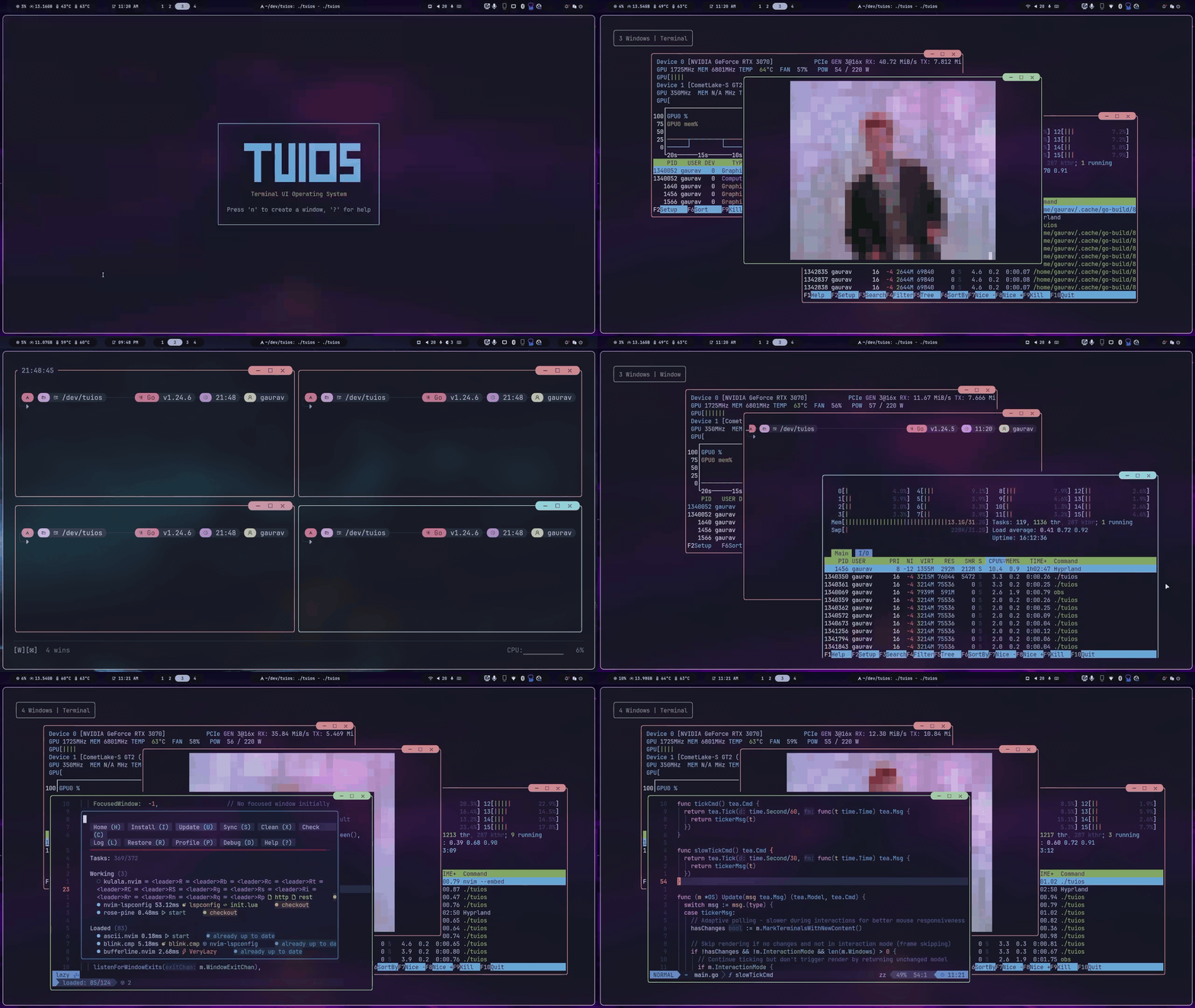
TUIOS is a modern terminal multiplexer and window manager built with Go. It provides a vim-like modal interface with multiple terminal panes, workspaces, BSP tiling, kitty graphics protocol support, and a command palette - all running inside your existing terminal.
Built on the Charm stack (Bubble Tea v2, Lipgloss v2), TUIOS features event-driven rendering for near-zero idle CPU usage, flicker-free kitty image passthrough, and comprehensive keyboard/mouse interaction.
Documentation
Full documentation is available at tuios-docs (hosted) or in the docs/ folder.
Quick Links
- Getting Started - Keybindings and quick reference
- BSP Tiling - Tiling with preselection and split control
- Configuration - Customize keybindings, themes, and behavior
- CLI Reference - All command-line options
- Tape Scripting - Automate workflows
- Sessions - Daemon mode and session persistence
- Architecture - Technical design
Table of Contents
Installation
Package Managers
Homebrew (macOS/Linux):
brew install tuiosArch Linux (AUR):
yay -S tuios-binNix:
nix run github:Gaurav-Gosain/tuios#tuiosOther Methods
# Quick install script (Linux/macOS)
curl -fsSL https://raw.githubusercontent.com/Gaurav-Gosain/tuios/main/install.sh | bash
Go install
go install github.com/Gaurav-Gosain/tuios/cmd/tuios@latest
Docker
docker run -it --rm ghcr.io/gaurav-gosain/tuios:latest
GitHub Releases - Pre-built binaries for all platforms.
Requirements: A terminal with true color support. Kitty graphics and sixel support recommended (Ghostty, Kitty, WezTerm).
Features
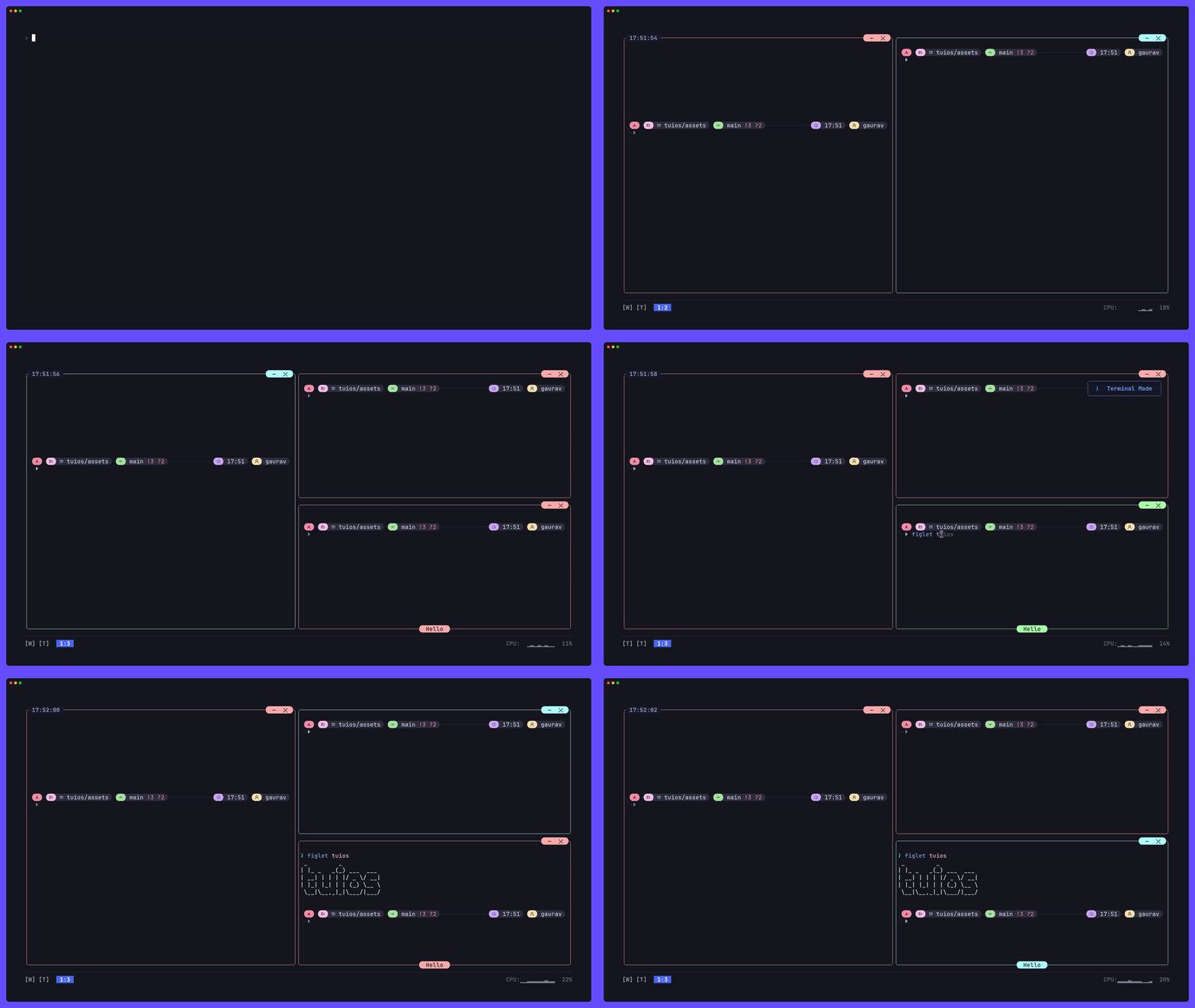
Core
- Multiple Terminal Panes - Create, resize, drag, and organize terminal sessions
- 9 Workspaces - Independent workspace isolation with instant switching
- Modal Interface - Vim-inspired Window Management and Terminal modes
- Command Palette - Fuzzy-searchable action launcher (Ctrl+P)
- Pane Zoom - Fullscreen any pane with z (WM mode) or Prefix+z. Shared borders hidden when zoomed, dockbar shows Z indicator.
Tiling
- BSP Tiling - Binary Space Partitioning with spiral layout
- Smart Auto-Split - Aspect-ratio-aware splitting (opt-in)
- Shared Borders - tmux-style separator lines between panes (
--shared-borders) - Preselection - Control where the next pane spawns
- Equalize Splits - Reset all splits to balanced ratios
Scrollback & Copy Mode
- Vim-Style Copy Mode - Navigate 10,000-line scrollback with hjkl, search with
/, yank withy - Mouse Wheel Scrollback - Scroll wheel enters copy mode directly (no alt-screen)
- Interactive Scrollbar - Click or drag the right border to jump to scroll position
- Selection Auto-Scroll - Drag selection above/below pane to scroll
- Scrollback Browser - OSC 133-aware command/output block navigation
- Scroll Position Indicator - Shows offset/total on the bottom border
Graphics & Protocols
- Kitty Graphics Protocol - Full image rendering with flicker-free video playback.
mpv --vo=kittyworks (both shm and base64), and youterm works. - Sixel Graphics - Sixel image passthrough (experimental, no pixel-level clipping yet)
- Kitty Keyboard Protocol - Progressive enhancement (CSI u) with push/pop/query support. Fish 4.x compatible; Shift+printable bypasses the protocol and sends text directly.
- Synchronized Output - Mode 2026 prevents screen tearing
- Shared Memory Support -
t=spassthrough for mpv--vo-kitty-use-shm - Terminal Queries - OSC 4 palette, OSC 10-12 colors, CSI 14/16/18t sizing, DA1/DA2
- Experimental - Kitty text sizing protocol (OSC 66) - basic passthrough works but has known issues with scrollback and window repositioning
- Not Yet Supported - Kitty animation protocol (a=f, a=a, a=c)
Session Management
- Daemon Mode - Persistent sessions with detach/reattach (like tmux)
- Session Switcher - In-app session list (Prefix+S)
- Layout Templates - Save/load window arrangements with working directories and startup commands
- Layout CLI -
tuios layout list,tuios layout delete,tuios layout export
Automation
- Tape Scripting - DSL for recording and replaying terminal workflows
- Tape Recording - Record live sessions (Prefix+T r)
- Headless Execution - Run scripts in CI/CD with
tuios tape run - Layout Export - Convert layouts to tape scripts for sharing
More
- Showkeys Overlay - Display pressed keys for presentations
- Customizable Keybindings - TOML configuration with Kitty protocol support
- Mouse Support - Click, drag, resize, scrollbar interaction
- SSH Server Mode - Remote terminal multiplexing
- Web Terminal Mode - Browser-based access (separate
tuios-webbinary) - Themes - Bundled themes with custom theme support
Quick Start
tuios                    # Launch TUIOS
tuios --show-keys        # Launch with key overlay for learning
Essential Keys
| Key | Action | |-----|--------| | Ctrl+P | Command palette - search and run any action | | n | New pane (Window Management mode) | | i / Enter | Enter Terminal mode | | Esc / Prefix+d | Back to Window Management mode | | z (WM) or Prefix+z | Toggle pane zoom (fullscreen) | | Prefix+Space | Toggle BSP tiling | | Prefix+ | Enter copy mode (vim scrollback) | | Prefix+S | Session switcher | | Prefix+L then l/s | Load/Save layout template | | Prefix+? | Help overlay | | Prefix+q | Quit |
The prefix key is Ctrl+B by default (configurable).
Daemon Mode
tuios new mysession          # Create persistent session
tuios attach mysession       # Reattach
tuios ls                     # List sessions
tuios kill-session mysession # Kill session
Layout Templates
# In-app: Ctrl+B, L, l to load / Ctrl+B, L, s to save
Or via command palette: Ctrl+P → "Save Layout" / "Load Layout"
CLI:
tuios layout list            # List saved layouts
tuios layout delete mysetup  # Delete a layout
tuios layout export mysetup  # Export as tape script
Configuration
tuios config edit            # Edit config in $EDITOR
tuios keybinds list          # View all keybindings
See [Configuration Guide for all options including showclock, showcpu, showram, sharedborders, custom themes, and keybinding customization.
What's New in v0.7.0
Architecture Overhaul
- Event-driven rendering - PTY output signals trigger renders instead of fixed-rate ticking. Near-zero CPU at idle.
- Graphics batched with render cycle - Kitty commands flush after text content, preventing tearing.
Performance
- Kitty graphics flicker elimination - Reuses image IDs so frames replace in-place without delete+re-place.
- Raw passthrough - File-based kitty transmissions forward the path directly (no read+encode+chunk).
- Fast render path - Unfocused panes use the emulator's built-in
Render()bypassing cell-by-cell iteration. - Hot path cleanup - Removed
defer/recoverfrom style comparison (~20k calls/frame), fixed string builder leak. - Visibility gating - Minimized/off-workspace panes skip rendering entirely.
- Synchronized output - Mode 2026 wrapping for all graphics output.
New Features
- Command palette (Ctrl+P) - Fuzzy search across 30+ actions with ranked results.
- Pane zoom (z in WM mode or Prefix+z) - Fullscreen toggle for the focused pane. Shared borders hidden when zoomed, dockbar shows Z indicator.
- Session switcher (Prefix+S) - Browse and switch daemon sessions in-app.
- Layout templates - Save/load window arrangements with CWD, startup commands, BSP tree, proportional scaling.
- Shared borders (
--shared-borders) - tmux-style thin separator lines between tiled panes. - Smart auto-split - Aspect-ratio-aware BSP splitting (opt-in via command palette).
- Interactive scrollbar - Click/drag the right border to scroll, theme-aware colors.
- Mouse wheel scrollback - Scroll wheel enters copy mode directly with full vim/selection support.
- Selection auto-scroll - Drag selection above/below pane to scroll during visual mode.
- Dock stats opt-in - Clock, CPU, RAM hidden by default (
--show-clock,--show-cpu,--show-ram).
Terminal Protocol Support
- Kitty keyboard protocol - Full CSI u support: push (
CSI > u), pop (CSI < u), query (CSI ? u), set (CSI = u). Keys encoded in CSI u format when the protocol is active. - Mode 2026 (synchronized output) and mode 2027 (unicode core) tracked in the VT emulator.
- OSC 4 palette color query/set, OSC 52 clipboard operations.
- DA1 now advertises sixel capability (attribute 4).
- Sixel passthrough re-enabled with raw data passthrough and active area clearing on hide (experimental).
Bug Fixes
- Images follow windows during drag and reposition on resize.
ctrl+dwindow close no longer requires double-press (race condition fix).- Visual line mode (
Shift+V) highlights immediately. - Off-screen windows don't corrupt ANSI rendering.
- Background windows stay fresh (no stale content on focus switch).
- Tiling toggle immediately shows/hides borders.
- Sixel images hidden during overlays and copy mode scrollback.
Dependencies
- Bubble Tea v2.0.2, Lipgloss v2.0.2, Wish v2.0.0, Log v2.0.0 (all stable releases).
Architecture
TUIOS follows the Model-View-Update pattern on Bubble Tea v2. For details, see Architecture Guide.
Key design decisions:
- Event-driven rendering - PTY reader goroutines signal bubbletea via a buffered channel. No fixed-rate ticking for terminal content.
- Kitty graphics passthrough - Image IDs are reused across frames for flicker-free video. Output is batched with the render cycle and wrapped in mode 2026 sync.
- BSP tiling - Binary space partitioning tree with configurable schemes (spiral, smart split). Shared borders mode overlaps window rects and draws separator lines as a separate layer.
- Copy mode - Full vim navigation over scrollback with mouse wheel entry, scrollbar interaction, and selection auto-scroll (timer-based continuous drag scrolling).
- Window Manager (
internal/app/os.go) - Central state, workspaces, overlays - Terminal Emulation (
internal/vt/) - ANSI parser with scrollback, kitty/sixel graphics, kitty keyboard protocol, OSC 133 - Rendering (
internal/app/render.go) - Layer composition, viewport culling, graphics batching - Input (
internal/input/) - Modal routing, 100+ configurable keybindings, mouse handling - Kitty Passthrough (
internal/app/kitty_passthrough.go) - Flicker-free image forwarding with ID reuse and sync output
Performance
- Event-driven rendering - Zero CPU at idle. Renders only when PTY data arrives or interaction occurs.
- Kitty graphics - Flicker-free via image ID reuse. Tearing-free via mode 2026 sync + render cycle batching.
- Fast unfocused render - Unfocused panes use emulator's built-in
Render()instead of cell-by-cell. - Style caching - LRU cache with sequence-based change detection (40-60% allocation reduction).
- Viewport culling - Off-screen and minimized panes skip rendering.
- Memory pooling - Pooled strings, buffers, and styles.
Development
git clone https://github.com/gaurav-gosain/tuios.git
cd tuios
go build -o tuios ./cmd/tuios
./tuios
go test ./... # Run tests
go vet ./... # Lint
staticcheck ./... # Static analysisSupport: 
Star History










License
MIT License - see LICENSE for details.


