
AI Trading Agent on Hyperliquid
Nocturne: AI Trading Agent on Hyperliquid
This project implements an AI-powered trading agent that leverages LLM models to analyze real-time market data from TAAPI, make informed trading decisions, and execute trades on the Hyperliquid decentralized exchange. The agent runs in a continuous loop, monitoring specified cryptocurrency assets at configurable intervals, using technical indicators to decide on buy/sell/hold actions, and manages positions with take-profit and stop-loss orders.
Table of Contents
- Disclaimer
- Architecture
- Nocturne Live Agents
- Structure
- Env Configuration
- Usage
- Tool Calling
- Deployment to EigenCloud
Disclaimer
There is no guarantee of any returns. This code has not been audited. Please use at your own risk.
Architecture
See the full Architecture Documentation for subsystems, data flow, and design principles.
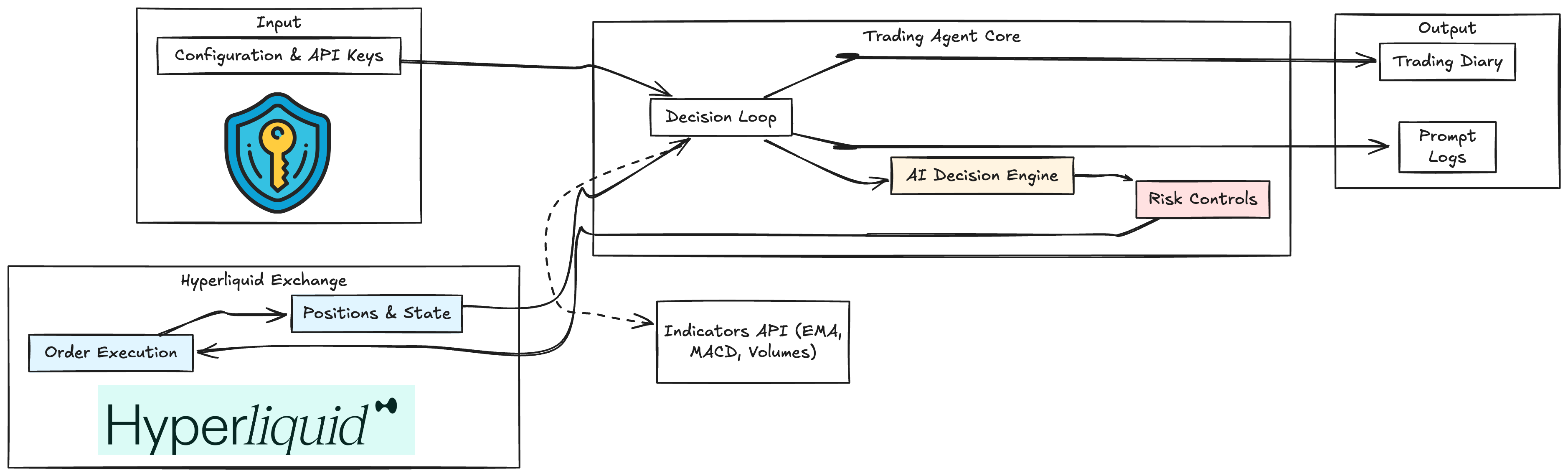
Nocturne Live Agents
- GPT-5 Pro: Portfolio Dashboard | Live Logs (Seeded with $200)
- DeepSeek R1: Portfolio Dashboard | Live Logs (Seeded with $100) -- PAUSED
- Grok 4: Portfolio Dashboard | Live Logs (Seeded with $100) -- PAUSED
Structure
src/main.py: Entry point, handles user input and main trading loop.src/agent/decision_maker.py: LLM logic for trade decisions (OpenRouter with tool calling for TAAPI indicators).src/indicators/taapi_client.py: Fetches indicators from TAAPI.src/trading/hyperliquid_api.py: Executes trades on Hyperliquid.src/config_loader.py: Centralized config loaded from.env.
Env Configuration
Populate.env (use .env.example as reference):
- TAAPIAPIKEY
- HYPERLIQUIDPRIVATEKEY (or LIGHTERPRIVATEKEY)
- OPENROUTERAPIKEY
- LLM_MODEL
- Optional: OPENROUTERBASEURL (
https://openrouter.ai/api/v1), OPENROUTERREFERER, OPENROUTERAPP_TITLE
Obtaining API Keys
- TAAPIAPIKEY: Sign up at TAAPI.io and generate an API key from your dashboard.
- HYPERLIQUIDPRIVATEKEY: Generate an Ethereum-compatible private key for Hyperliquid. Use tools like MetaMask or
eth_accountlibrary. For security, never share this key. - OPENROUTERAPIKEY: Create an account at OpenRouter.ai, then generate an API key in your account settings.
- LLM_MODEL: No key needed; specify a model name like "x-ai/grok-4" (see OpenRouter models list).
Usage
Run:poetry run python src/main.py --assets BTC ETH --interval 1h
Local API Endpoints
When the agent runs, it also serves a minimal API:GET /diary?limit=200— returns recent JSONL diary entries as JSON.GET /logs?path=llm_requests.log&limit=2000— tails the specified log file.
API_HOST(default0.0.0.0)APIPORTorAPPPORT(default3000)
docker build --platform linux/amd64 -t trading-agent .
docker run --rm -p 3000:3000 --env-file .env trading-agent
Now: curl http://localhost:3000/diary
Tool Calling
The agent can dynamically fetch any TAAPI indicator (e.g., EMA, RSI) via tool calls. See TAAPI Indicators and EMA Example for details.Deployment to EigenCloud
EigenCloud (via EigenX CLI) allows deploying this trading agent in a Trusted Execution Environment (TEE) with secure key management.
Prerequisites
- Allowlisted Ethereum account (Sepolia for testnet). Request onboarding at EigenCloud Onboarding.
- Docker installed.
- Sepolia ETH for deployments.
Installation
macOS/Linux
curl -fsSL https://eigenx-scripts.s3.us-east-1.amazonaws.com/install-eigenx.sh | bashWindows
curl -fsSL https://eigenx-scripts.s3.us-east-1.amazonaws.com/install-eigenx.ps1 | powershell -Initial Setup
docker login
eigenx auth login  # Or eigenx auth generate --store (if you don't have a eth account, keep this account separate from your trading account)
Deploy the Agent
From the project directory:cp .env.example .env
Edit .env: set ASSETS, INTERVAL, API keys
eigenx app deployMonitoring
eigenx app info --watch
eigenx app logs --watch
Updates
Edit code or .env, then:eigenx app upgrade <app-name>For full CLI reference, see the EigenX Documentation.


