
A multi-agent AI trading system using LLMs to optimize strategies and adapt to market conditions in real-time.
🤖 LLM-TradeBot


Intelligent Multi-Agent Quantitative Trading Bot based on the Adversarial Decision Framework (ADF). Achieves high win rates and low drawdown in automated futures trading through market regime detection, price position awareness, dynamic score calibration, and multi-layer physical auditing.




🌐 Web App (Recommended)
Experience the bot immediately through our web interface: 👉 Live Dashboard
Dashboard Highlights
- LLM toggle stays off by default; turning it on prompts for an API key.
- Agent Chatroom shows per-cycle agent outputs and the final Decision Core action.
- Real-time Balance Curve uses a fixed initial balance and PnL-driven current balance.
- Agent Config lets you edit per-agent parameters and (if applicable) system prompts.
✨ Key Features
- 🕵️ Perception First: Unlike strict indicator-based systems, this framework prioritizes judging "IF we should trade" before deciding "HOW to trade".
- 🤖 Multi-Agent Collaboration: Core + optional agents with LLM and Local variants for flexible deployment.
- 🎛️ Agent Configuration: Enable/disable optional agents via Dashboard, environment variables, or config file for customized strategy.
- 💬 Agent Chatroom: Chat-style multi-agent outputs per cycle, with Decision Core final decisioning.
- 🧩 Agent Config Tabs: Configure per-agent parameters and optional system prompts directly in the Dashboard.
- 🎰 AUTO1 Symbol Selection: Intelligent single-symbol selection based on momentum, volume, and technical indicators.
- 🧠 Multi-LLM Support: Seamlessly switch between DeepSeek, OpenAI, Claude, Qwen, and Gemini via Dashboard settings.
- 📊 Multi-Account Trading: Manage multiple exchange accounts with unified API abstraction (currently Binance, extensible).
- ⚡ Async Concurrency: Currently fetches multi-timeframe data (5m/15m/1h) concurrently, ensuring data alignment at the snapshot moment.
- 🖥️ CLI Headless Mode: Run without Web UI for headless servers - rich terminal output with 93% less log verbosity.
- 🧪💰 Test/Live Mode Toggle: Quick switch between paper trading and live trading with visual confirmation.
- 🛡️ Safety First: Stop-loss direction correction, capital pre-rehearsal, and veto mechanisms to safeguard live trading.
- 📊 Full-Link Auditing: Every decision's adversarial process and confidence penalty details are recorded, achieving true "White-Box" decision-making.
🏗️ System Architecture Overview
Multi-Agent Architecture (Current)
flowchart TD
A["🎯 Symbol Selector"] --> B["🕵️ DataSync (5m/15m/1h)"]
B --> C["👨🔬 Quant Analyst"]
C --> D["🧭 Multi-Period Parser"]
C --> E["🔮 Trend / 📊 Setup / ⚡ Trigger (LLM or Local)"]
C --> F["🪞 Reflection (optional)"]
D --> G["⚖️ Decision Core"]
E --> G
F --> G
G --> H["🛡️ Risk Audit"]
H --> I["🚀 Execution Engine"]Design highlights
- Symbol Selection chooses the active symbol(s) before analysis.
- DataSync aligns multi-timeframe data at the same snapshot moment.
- Quant Analyst produces numeric signals (trend/osc/sentiment/traps).
- Semantic Agents (Trend/Setup/Trigger) provide human-readable reasoning (LLM or local).
- Multi-Period Parser compresses 1h/15m/5m alignment into a Decision Core input.
- Decision Core fuses all enabled agent outputs into final action/confidence.
- Risk Audit can veto or adjust before execution.
- Reflection summarizes performance and feeds back into decisions.
📖 Detailed Docs: See Data Flow Analysis for complete mechanisms.
🤝 Supported Ecosystem
Supported Exchanges
CEX (Centralized Exchanges)
| Exchange | Status | Register (Fee Discount) | |----------|--------|-------------------------| | Binance | ✅ Supported | Register | | Bybit | 🗓️ Coming Soon | Register | | OKX | 🗓️ Coming Soon | Register | | Bitget | 🗓️ Coming Soon | Register |
Perp-DEX (Decentralized Perpetual Exchanges)
| Exchange | Status | Register (Fee Discount) | |----------|--------|-------------------------| | Hyperliquid | 🗓️ Coming Soon | Register | | Aster DEX | 🗓️ Coming Soon | Register | | Lighter | 🗓️ Coming Soon | Register |
Supported AI Models
| AI Model | Status | Get API Key | |----------|--------|-------------| | DeepSeek | ✅ Supported | Get API Key | | Qwen | ✅ Supported | Get API Key | | OpenAI (GPT) | ✅ Supported | Get API Key | | Claude | ✅ Supported | Get API Key | | Gemini | ✅ Supported | Get API Key | | Grok | 🗓️ Coming Soon | Get API Key | | Kimi | 🗓️ Coming Soon | Get API Key |
📚 What You Need to Know
For Complete Beginners:
- This is an automated trading bot that trades cryptocurrency futures on Binance
- It uses AI (LLM) and machine learning to make trading decisions
- Test mode lets you practice with virtual money before risking real funds
- The bot runs 24/7 and makes decisions based on market analysis
🚀 Quick Start (One-Click Installation)
🎯 Recommended: One-Click Installation
No need to manually configure Python environment! Use our automated installation scripts:
Method 1: Local Installation (Development)
# 1. Clone the project
git clone <your-repo-url>
cd LLM-TradeBot
2. One-click install
chmod +x install.sh
./install.sh
3. Configure API keys
vim .env  # Edit and add your API keys
4. One-click start
./start.sh
Visit Dashboard:
Method 2: Docker Deployment (Production)
# 1. Clone the project
git clone <your-repo-url>
cd LLM-TradeBot
2. Configure environment
cp .env.example .env
vim .env  # Edit and add your API keys
3. One-click start
cd docker && docker-compose up -d
📖 Detailed Guide: See QUICKSTART.md
⚙️ Prerequisites
Before you start, make sure you have:
For One-Click Installation (Recommended)
- ✅ Git installed (Download here)
- ✅ Python 3.11+ OR Docker (installation script will check)
For Test Mode (Beginners)
- ✅ Nothing else needed! Test mode uses virtual balance
For Live Trading (Advanced)
- ✅ Binance Account (Sign up here)
- ✅ Binance Futures API Keys with trading permissions
- ✅ USDT in Futures Wallet (minimum $100 recommended)
- ⚠️ Risk Warning: Only trade with money you can afford to lose
🧠 LLM Configuration (Multi-Provider Support)
The bot supports 8 LLM providers. Configure via environment variables or Dashboard Settings:
Supported Providers
| Provider | Model | Cost | Speed | Get API Key | |----------|-------|------|-------|-------------| | DeepSeek (Recommended) | deepseek-chat | 💰 Low | ⚡ Fast | platform.deepseek.com | | OpenAI | gpt-4o, gpt-4o-mini | 💰💰💰 High | ⚡ Fast | platform.openai.com | | Claude | claude-3-5-sonnet | 💰💰 Medium | ⚡ Fast | console.anthropic.com | | Qwen | qwen-turbo, qwen-plus | 💰 Low | ⚡ Fast | dashscope.console.aliyun.com | | Gemini | gemini-1.5-pro | 💰 Low | ⚡ Fast | aistudio.google.com | | Kimi | moonshot-v1-8k | 💰 Low | ⚡ Fast | platform.moonshot.ai | | MiniMax | MiniMax-M2.1 | 💰 Low | ⚡ Fast | platform.minimax.io | | GLM | glm-4-flash | 💰 Low | ⚡ Fast | open.bigmodel.cn |
Configuration Methods
Method 1: Environment Variables (Recommended)
Edit your .env file:
# Select LLM Provider (required)
LLM_PROVIDER=deepseek  # Options: deepseek, openai, claude, qwen, gemini, kimi, minimax, glm
Configure API Key for your selected provider
DEEPSEEKAPIKEY=sk-xxx     # if using DeepSeek
OPENAIAPIKEY=sk-xxx       # if using OpenAI
CLAUDEAPIKEY=sk-xxx       # if using Claude
QWENAPIKEY=sk-xxx         # if using Qwen
GEMINIAPIKEY=xxx          # if using Gemini
KIMIAPIKEY=sk-xxx         # if using Kimi
MINIMAXAPIKEY=sk-xxx      # if using MiniMax
GLMAPIKEY=sk-xxx          # if using GLM
Method 2: Dashboard Settings
- Open Dashboard at
http://localhost:8000 - Click ⚙️ Settings → API Keys tab
- Select your preferred LLM provider and enter API key
- Click Save - changes apply on next trading cycle
config.yaml)
llm:
  provider: "deepseek"  # or: openai, claude, qwen, gemini, kimi, minimax, glm
  model: "deepseek-chat"  # provider-specific model
  temperature: 0.3
  max_tokens: 2000
  api_keys:
    deepseek: "sk-xxx"
    openai: "sk-xxx"
    # ... other providers
📖 Manual Installation (Advanced)
If you prefer manual setup:
1. Install Dependencies
pip install -r requirements.txt2. Configure Environment
# Copy environment variable template
cp .env.example .env
Set API Keys
./setapikeys.sh
3. Configure Trading Parameters
# Copy config template
cp config.example.yaml config.yaml
Edit config.yaml to set parameters:
- Trading pair (symbol)
- Max position size (maxpositionsize)
- Leverage (leverage)
- Stop loss/Take profit % (stoplosspct, takeprofitpct)
⚙️ Dashboard Settings
You can also configure all settings from the Dashboard:
Settings Modal with 4 tabs: API Keys (LLM Provider), Accounts (Multi-Account), Trading, Strategy (Prompt)
4. Start the Bot
Built-in modern real-time monitoring dashboard.
🧪 Test Mode (Recommended for beginners)
Simulates trading with virtual balance ($1000). No real trades executed.
# Start with test mode
python main.py --test --mode continuous
🖥️ CLI Headless Mode (For Servers)
Run the bot without Web Dashboard, perfect for headless servers or terminal-only environments.
# Basic CLI mode (manual start required)
python main.py --test --headless
Custom interval (1 minute cycles)
python main.py --test --headless --interval 1Features:
- ✅ No Web UI - runs entirely in terminal
- ✅ Rich formatted output with colors and tables
- ✅ Real-time price updates and trading decisions
- ✅ Account summary panel after each cycle
- ✅ Graceful shutdown with session statistics (Ctrl+C)
- ✅ Optimized log output (93% less verbose than Web mode)
╔═══════════════════════════════════════════════════════╗
║ 🤖 LLM-TradeBot CLI - TEST MODE                      ║
╚═══════════════════════════════════════════════════════╝
─────────── Cycle #1 | LINKUSDT, NEARUSDT ────────────   🔍 Analyzing LINKUSDT...   ✅ Data ready: $13.29      ⏸️  HOLD | Confidence: 45.0%      Reason: No clear 1h trend
╭─────────────── Account Summary ───────────────────╮ │ 💰 Equity:    $1,000.00                           │ │ 📊 Available:   $900.00                           │ │ 📈 PnL:          $0.00 (0.00%)                    │ ╰───────────────────────────────────────────────────╯
⏳ Next cycle in 1.0 minutes...
🚀 Simplified CLI Mode (Live Trading)
For production live trading, use the simplified CLI script that skips non-essential components:
# Activate virtual environment first
source venv/bin/activate
Test mode - single run
python simple_cli.py --mode once
Test mode - continuous (3-minute intervals)
python simple_cli.py --mode continuous --interval 3
LIVE mode - continuous trading (⚠️ REAL MONEY)
python simple_cli.py --mode continuous --interval 3 --live
Custom symbols (overrides .env)
python simple_cli.py --mode continuous --symbols BTCUSDT,ETHUSDT --live
AUTO3 mode - automatic symbol selection
python simple_cli.py --mode continuous --symbols AUTO3 --liveFeatures:
- ✅ Minimal footprint - only core trading components loaded
- ✅ Production-ready - designed for stable 24/7 operation
- ✅ AUTO3 support - automatic best symbol selection via backtest
- ✅ LLM integration - full multi-agent decision system
- ✅ Risk management - built-in risk audit and position limits
- ✅ Graceful shutdown - Ctrl+C for clean exit
The script reads trading symbols from .env file by default:
# In your .env file
TRADING_SYMBOLS=BTCUSDT,ETHUSDT
Or use AUTO3 for automatic selection
TRADING_SYMBOLS=AUTO3
⚠️ Live Trading Prerequisites:
- Valid Binance Futures API keys in
.env - Sufficient USDT balance in Futures wallet
- API permissions: Read + Futures Trading enabled
- DeepSeek/OpenAI API key for LLM decisions
🔴 Live Trading Mode (Web Dashboard)
⚠️ WARNING: Executes real trades on Binance Futures!
# Start live trading
python main.py --mode continuous
Prerequisites for Live Trading:>
- Valid Binance Futures API keys configured in .env
- Sufficient USDT balance in Futures wallet
- API permissions: Read + Futures Trading enabled
After startup, visit:
Dashboard Features:

- 🧪💰 Test/Live Mode Toggle: Quick switch between paper trading and real trading with visual confirmation
- 📈 Real-time Balance Curve: Fixed initial balance with PnL-driven current balance
- 💬 Agent Chatroom: Per-cycle multi-agent outputs with Decision Core final action
- 🧭 Multi-Period Summary: Alignment snapshot from 1h/15m/5m signals
- 🧩 Agent Config Tabs: Per-agent parameters + optional system prompts
- 📜 Trade History: Complete record of all trades with Open/Close cycles and PnL statistics
- 📋 Live Log Output: Real-time scrolling logs with agent documentation sidebar, simplified/detailed mode toggle
📋 Recent Decisions Indicator Guide
All indicators use semantic icons and two-line display format for quick visual scanning:
📊 System Columns
- Time: Decision timestamp
- Cycle: Trading cycle number
- Symbol: Trading pair (e.g., BTCUSDT)
- Result: Final action (LONG/SHORT/WAIT)
- Conf: Decision confidence (0-100%)
- Reason: Decision rationale (hover for full text)
- 1h/15m/5m: Multi-timeframe signals
T:UP (Trend) / O:DN (Oscillator)
- Colors: Green (UP), Red (DN), Gray (NEU)
- Sent: Sentiment score with icon (📈/📉/➖)
- Format:
🔮↗+65% - Direction: ↗UP (>55%), ➖NEU (45-55%), ↘DN (<45%)
- Bull:
↗Bull/🔥Bull+ confidence % - Bear:
↘Bear/🔥Bear+ confidence % - Stance: 🔥Strong, ↗Slight, ➖Neutral, ❓Unclear
- Regime:
📈UP/📉DN/〰️CHOP - Position:
🔝HIGH/➖MID/🔻LOW+ percentage
- Risk:
✅SAFE/⚠️WARN/🚨DANGER - Guard:
✅PASS/⛔BLOCK(with reason on hover) - Aligned: ✅ Multi-period aligned / ➖ Not aligned
5. Common Operations
# Stop the bot
pkill -f "python main.py"
Restart the bot (Test Mode)
pkill -f "python main.py"; sleep 2; python main.py --test --mode continuous
View running processes
ps aux | grep "python main.py"
View logs in terminal (if running in background)
tail -f logs/trading_$(date +%Y%m%d).log
📁 Project Structure
Directory Description
LLM-TradeBot/
├── src/                    # Core Source Code
│   ├── agents/            # Multi-Agent Definitions (DataSync, Quant, Decision, Risk)
│   ├── api/               # Binance API Client
│   ├── data/              # Data Processing (processor, validator)
│   ├── exchanges/         # 🆕 Multi-Account Exchange Abstraction
│   │   ├── base.py       # BaseTrader ABC + Data Models
│   │   ├── binance_trader.py  # Binance Futures Implementation
│   │   ├── factory.py    # Exchange Factory
│   │   └── account_manager.py # Multi-Account Manager
│   ├── execution/         # Order Execution Engine
│   ├── features/          # Feature Engineering
│   ├── llm/               # 🆕 Multi-LLM Interface
│   │   ├── base.py       # BaseLLMClient ABC
│   │   ├── openai_client.py  # OpenAI Implementation
│   │   ├── deepseek_client.py # DeepSeek Implementation
│   │   ├── claude_client.py  # Anthropic Claude
│   │   ├── qwen_client.py    # Alibaba Qwen
│   │   ├── gemini_client.py  # Google Gemini
│   │   └── factory.py    # LLM Factory
│   ├── monitoring/        # Monitoring & Logging
│   ├── risk/              # Risk Management
│   ├── strategy/          # LLM Decision Engine
│   └── utils/             # Utilities (DataSaver, TradeLogger, etc.)
│
├── docs/                  # Documentation
│   ├── dataflowanalysis.md          # Data Flow Analysis
│   ├── ScreenShot2026-01-21003126_160.png # Dashboard
│   └── Backtesting.png                # Backtesting UI
│
├── data/                  # Structured Data Storage (Archived by Date)
│   ├── market_data/       # Raw K-Line Data
│   ├── indicators/        # Technical Indicators
│   ├── features/          # Feature Snapshots
│   ├── decisions/         # Final Decision Results
│   └── execution/         # Execution Records
│
├── config/                # Configuration Files
│   └── accounts.example.json  # 🆕 Multi-Account Config Template
│
├── logs/                  # System Runtime Logs
├── tests/                 # Unit Tests
│
├── main.py                # Main Entry Point (Multi-Agent Loop)
├── config.yaml            # Trading Parameters
├── .env                   # API Key Configuration
└── requirements.txt       # Python Dependencies
🎯 Core Architecture
Multi-Agent Collaborative Framework + Four-Layer Strategy
The system uses a Four-Layer Strategy Filter with a multi-agent pipeline. Core agents are always enabled, while optional agents can be configured via Dashboard or config.yaml.
Key Feature: Agents have LLM and Local variants - LLM versions use AI for semantic analysis, while Local versions use fast rule-based heuristics.
Core Agents (Always Enabled)
| Agent | Role | Responsibility | |-------|------|----------------| | 🕵️ DataSyncAgent | The Oracle | Async concurrent fetch of 5m/15m/1h K-lines, ensuring snapshot consistency | | 👨🔬 QuantAnalystAgent | The Strategist | Generates trend scores, oscillators, sentiment, and OI Fuel (Volume Proxy) | | 🛡️ RiskAuditAgent | The Guardian | Risk audit with absolute veto power on all trades | | 🧭 MultiPeriodParserAgent | The Summarizer | Multi-period alignment summary for Decision Core |
Symbol Selection Layer (Optional)
| Agent | Role | Responsibility | |-------|------|----------------| | 🎰 SymbolSelectorAgent | AUTO1/3 Selector | Two-stage backtest selection: AI500 Top10 + Majors → Top 5 (1h) → Top 2 (15m) |
Prediction & Analysis Layer (Optional)
| Agent | Role | Responsibility | |-------|------|----------------| | 🎯 PredictAgent | The Prophet | Predicts price probability using LightGBM ML model (auto-retrain every 2h) | | 🤖 AIPredictionFilterAgent | AI Validator | AI-Trend alignment verification with veto power | | 🔮 RegimeDetectorAgent | Regime Analyzer | Detects market state (Trending/Choppy/Ranging) and ADX strength | | 📍 PositionAnalyzerAgent | Position Tracker | Price position analysis (High/Mid/Low zone) and S/R level detection | | ⚡ TriggerDetectorAgent | Entry Scanner | 5m pattern detection and trigger signal scoring |
Semantic Analysis Layer (LLM or Local)
| Agent | LLM Version | Local Version | Responsibility | |-------|-------------|---------------|----------------| | 📈 TrendAgent | TrendAgentLLM | TrendAgent | 1h trend semantic analysis (UPTREND/DOWNTREND) | | 📊 SetupAgent | SetupAgentLLM | SetupAgent | 15m setup zone analysis (KDJ, Bollinger Bands, entry zones) | | 🔥 TriggerAgent | TriggerAgentLLM | TriggerAgent | 5m trigger signal analysis (CONFIRMED/WAITING) |
Decision & Execution Layer
| Agent | Role | Responsibility | |-------|------|----------------| | ⚖️ DecisionCoreAgent | The Critic | Aggregates multi-agent outputs into a final action | | 🚀 ExecutionEngine | The Executor | Precision order execution and state management | | 🪞 ReflectionAgent | The Philosopher | Trade reflection every 10 trades (LLM or Local variant) |
Agent Configuration
Agents can be configured in multiple ways (priority order):
- Dashboard Settings → Agents tab with checkboxes for each optional agent
- Environment Variables →
AGENT<NAME>=true/false(e.g.,AGENTPREDICT_AGENT=false) - config.yaml →
agents:section
# config.yaml example
agents:
  # Prediction & Analysis
  predict_agent: true              # ML probability prediction
  aipredictionfilter_agent: true # AI veto mechanism
  regimedetectoragent: true      # Market state detection
  positionanalyzeragent: false   # Price position analysis
  triggerdetectoragent: true     # 5m pattern detection

  # Semantic Analysis - LLM variants (expensive, disabled by default)
  trendagentllm: false           # 1h trend LLM analysis
  setupagentllm: false           # 15m setup LLM analysis
  triggeragentllm: false         # 5m trigger LLM analysis

  # Semantic Analysis - Local variants (fast, enabled by default)
  trendagentlocal: true          # 1h trend rule-based analysis
  setupagentlocal: true          # 15m setup rule-based analysis
  triggeragentlocal: true        # 5m trigger rule-based analysis

  # Reflection
  reflectionagentllm: false      # Trade reflection via LLM
  reflectionagentlocal: true     # Trade reflection via rules

  # Symbol Selection
  symbolselectoragent: true      # AUTO symbol selection
Four-Layer Strategy Filter
Layer 1: Trend + Fuel (1h EMA + Volume Proxy)
    ↓ PASS/FAIL
Layer 2: AI Filter (PredictAgent direction alignment)
    ↓ PASS/VETO
Layer 3: Setup (15m KDJ + Bollinger Bands entry zone)
    ↓ READY/WAIT
Layer 4: Trigger (5m Pattern + RVOL volume confirmation)
    ↓ CONFIRMED/WAITING
    ↓
🧠 LLM Decision (DeepSeek Bull/Bear Debate)
    ↓
🛡️ Risk Audit (Veto Power)
    ↓
🚀 Execution
Data Flow Diagrams
📖 See System Architecture Overview section above for visual diagrams.
📐 Mermaid Diagram (Interactive)
graph TB
subgraph "1️⃣ Data Collection Layer"
A["🕵️ DataSyncAgent<br/>(The Oracle)"] --> MS["MarketSnapshot<br/>5m/15m/1h K-lines"]
end
subgraph "2️⃣ Quant Analysis Layer"
MS --> QA["👨🔬 QuantAnalystAgent<br/>(The Strategist)"]
QA --> TS["📈 TrendSubAgent"]
QA --> OS["📊 OscillatorSubAgent"]
QA --> SS["💹 SentimentSubAgent"]
TS & OS & SS --> QR["Quant Signals"]
end
subgraph "3️⃣ Prediction Layer" MS --> PA["🔮 PredictAgent<br/>(The Prophet)"] PA --> ML["LightGBM Model<br/>Auto-Train 2h"] ML --> PR["P_Up Prediction"] end
subgraph "4️⃣ Bull/Bear Adversarial Layer" MS --> BULL["🐂 Bull Agent<br/>(The Optimist)"] MS --> BEAR["🐻 Bear Agent<br/>(The Pessimist)"] BULL --> BP["Bull Perspective"] BEAR --> BRP["Bear Perspective"] end subgraph "5️⃣ Reflection Layer" TH["📜 Trade History<br/>Last 10 Trades"] --> REF["🧠 ReflectionAgent<br/>(The Philosopher)"] REF --> RI["Reflection Insights<br/>Patterns & Recommendations"] end subgraph "6️⃣ Decision Layer" QR & PR & BP & BRP & RI --> DC["⚖️ DecisionCoreAgent<br/>(The Critic)"] DC --> RD["RegimeDetector"] DC --> POS["PositionAnalyzer"] RD & POS --> VR["VoteResult<br/>Action + Confidence"] end subgraph "7️⃣ Risk Audit Layer" VR --> RA["🛡️ RiskAuditAgent<br/>(The Guardian)"] RA --> AR["AuditResult<br/>Risk Level + Guard"] end subgraph "8️⃣ Execution Layer" AR --> EE["🚀 ExecutionEngine<br/>(The Executor)"] EE -.->|"Trade Complete"| TH end %% Styling for Agent Nodes style A fill:#4A90E2,color:#fff,stroke:#2563EB,stroke-width:2px style QA fill:#7ED321,color:#fff,stroke:#059669,stroke-width:2px style PA fill:#BD10E0,color:#fff,stroke:#9333EA,stroke-width:2px style BULL fill:#F8E71C,color:#333,stroke:#CA8A04,stroke-width:2px style BEAR fill:#F8E71C,color:#333,stroke:#CA8A04,stroke-width:2px style REF fill:#00CED1,color:#fff,stroke:#0891B2,stroke-width:2px style DC fill:#F5A623,color:#fff,stroke:#EA580C,stroke-width:2px style RA fill:#D0021B,color:#fff,stroke:#DC2626,stroke-width:2px style EE fill:#9013FE,color:#fff,stroke:#7C3AED,stroke-width:2px %% Styling for Output Nodes style MS fill:#1E3A5F,color:#fff style QR fill:#1E3A5F,color:#fff style PR fill:#1E3A5F,color:#fff style BP fill:#1E3A5F,color:#fff style BRP fill:#1E3A5F,color:#fff style RI fill:#1E3A5F,color:#fff style VR fill:#1E3A5F,color:#fff style AR fill:#1E3A5F,color:#fff style TH fill:#1E3A5F,color:#fff
📖 Detailed Docs: See Data Flow Analysis for complete mechanisms.
🧪 Backtesting
Professional-grade backtesting system for strategy validation before live trading:
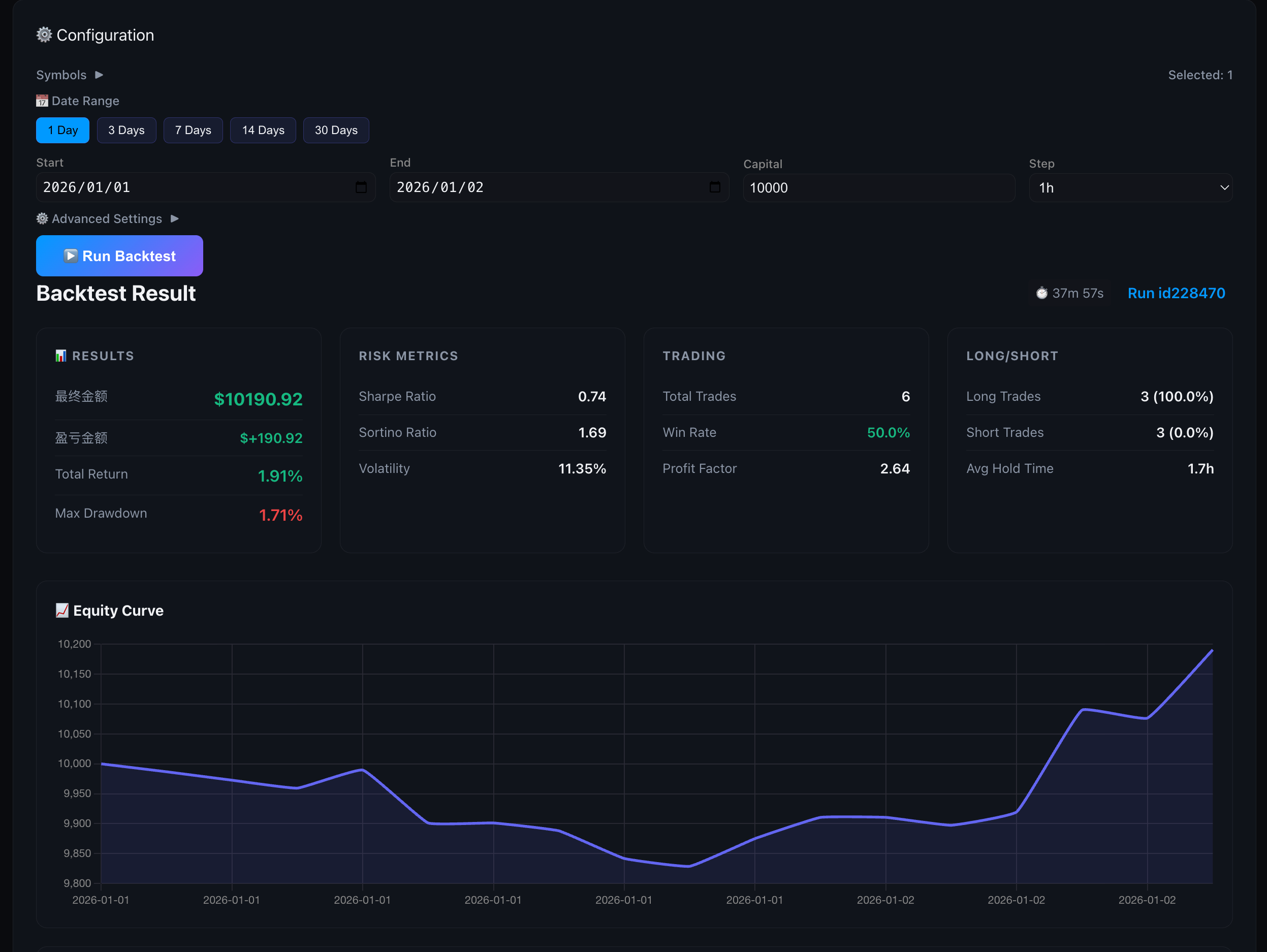
Features:
- 📊 Multi-Tab Parallel Backtests: Run up to 5 backtests simultaneously with independent configurations
- 📈 Real-time Progress: Live equity curve, drawdown chart, and trade markers
- 🎯 LLM-Enhanced Mode: Test the full multi-agent decision system including DeepSeek analysis
- 📅 Flexible Date Ranges: Quick presets (1/3/7/14/30 days) or custom date selection
- ⚙️ Advanced Parameters: Configurable leverage, stop-loss, take-profit, and trailing stops
- 📋 Detailed Metrics: Total return, Sharpe/Sortino ratios, win rate, max drawdown, and more
- 💾 Full Logging: All decisions and LLM interactions saved for analysis
http://localhost:8000/backtest after starting the bot.
📄 Full-Link Data Auditing
Storage Organization
The system automatically records intermediate processes for each cycle in the data/ directory, organized by date for easy review and debugging:
data/
├── market_data/           # Raw Multi-Timeframe K-Lines
│   └── {date}/
│       ├── BTCUSDT5m{timestamp}.json
│       ├── BTCUSDT5m{timestamp}.csv
│       ├── BTCUSDT5m{timestamp}.parquet
│       ├── BTCUSDT15m{timestamp}.json
│       └── BTCUSDT1h{timestamp}.json
│
├── indicators/            # Full Technical Indicators DataFrames
│   └── {date}/
│       ├── BTCUSDT5m{snapshot_id}.parquet
│       ├── BTCUSDT15m{snapshot_id}.parquet
│       └── BTCUSDT1h{snapshot_id}.parquet
│
├── features/              # Feature Snapshots
│   └── {date}/
│       ├── BTCUSDT5m{snapshotid}v1.parquet
│       ├── BTCUSDT15m{snapshotid}v1.parquet
│       └── BTCUSDT1h{snapshotid}v1.parquet
│
├── context/               # Quant Analysis Summary
│   └── {date}/
│       └── BTCUSDTquantanalysis{snapshotid}.json
│
├── llm_logs/              # LLM Input Context & Voting Process
│   └── {date}/
│       └── BTCUSDT{snapshotid}.md
│
├── decisions/             # Final Weighted Vote Results
│   └── {date}/
│       └── BTCUSDT{snapshotid}.json
│
└── execution/             # Execution Tracking
    └── {date}/
        └── BTCUSDT_{timestamp}.json
Data Formats
- JSON: Human-readable, used for configuration and decision results
- CSV: High compatibility, easy for Excel import
- Parquet: Efficient compression, used for large-scale time-series data
🛡️ Safety Warning
⚠️ Important Safety Measures:
- API Keys: Keep them safe, DO NOT commit to version control.
- Test First: Use
--testargument to run simulations first. - Risk Control: Set reasonable stop-loss and position limits in
config.yaml. - Minimal Permissions: Grant only necessary Futures Trading permissions to API keys.
- Monitoring: Regularly check the
logs/directory for anomalies.
📚 Documentation Navigation
| Document | Description | |------|------| | README.md | Project Overview & Quick Start | | Data Flow Analysis | Complete Data Flow Mechanisms | | API Key Guide | API Key Configuration Guide | | Config Example | Trading Parameters Template | | Env Example | Environment Variables Template |
🎉 Latest Updates
2026-02-07:
- ✅ Multi-Agent Chatroom: Per-cycle agent outputs with Decision Core final action.
- ✅ Agent Config Tabs: Per-agent parameters + optional system prompts in the UI.
- ✅ LLM Toggle (default off): Enables LLM only when key is provided.
- ✅ Multi-Period Parser: 1h/15m/5m alignment summarized for Decision Core.
- ✅ Balance & PnL Fixes: Initial balance fixed, PnL-driven current balance.
- ✅ AUTO3 Two-Stage Symbol Selection: Enhanced
SymbolSelectorAgentwith two-stage filtering.
- ✅ BacktestAgentRunner Parity: Full consistency between backtest and live trading environments.
- ✅ Enhanced Backtest CLI:
python backtest.pywith support for:
--strategy-mode agent)
- LLM enhancement option (--use-llm)
- Detailed HTML reports with equity curves
2025-12-31:
- ✅ Full Chinese Internationalization (i18n): Complete bilingual support with language toggle button.
2025-12-28:
- ✅ Dashboard Log Mode Toggle: Switch between Simplified (agent summaries) and Detailed (full debug) log views.
- ✅ Net Value Curve Enhancement: Smart x-axis labels that adapt to data volume while preserving first cycle timestamp.
- ✅ ReflectionAgent (The Philosopher): New agent that analyzes every 10 trades and provides insights to improve future decisions.
- ✅ Trading Retrospection: Automatic pattern detection, confidence calibration, and actionable recommendations.
- ✅ Decision Integration: Reflection insights are injected into Decision Agent prompts for continuous learning.
- ✅ Multi-LLM Support: Added support for 8 LLM providers (DeepSeek, OpenAI, Claude, Qwen, Gemini, Kimi, MiniMax, GLM) with unified interface.
- ✅ Dashboard LLM Settings: Switch LLM provider and API keys directly from Dashboard Settings.
- ✅ Multi-Account Architecture: New
src/exchanges/module withBaseTraderabstraction for multi-exchange support. - ✅ Account Manager: Manage multiple trading accounts via Dashboard or
config/accounts.json.
- ✅ ML Model Upgrade: Upgraded
PredictAgentto use LightGBM machine learning model. - ✅ Auto-Training: Implemented automatic model retraining every 2 hours to adapt to market drifts.
- ✅ Dashboard Refinement: Enhanced dashboard with auto-scrolling logs, robust scrollbars, and ML probability display.
- ✅ Adversarial Decision Framework: Introduced
PositionAnalyzerandRegimeDetector. - ✅ Confidence Score Refactor: Implemented dynamic confidence penalties.
- ✅ Full-Link Auditing: Implemented complete intermediate state archiving.
❓ Frequently Asked Questions (FAQ)
For Beginners
Q: Is this safe to use? Will I lose money? A: Test mode is 100% safe - it uses virtual money. For live trading, only use funds you can afford to lose. Cryptocurrency trading is risky.
Q: Do I need to know Python to use this? A: No! Just follow the Quick Start guide. You only need Python installed, not programming knowledge.
Q: How much money do I need to start? A: Test mode is free. For live trading, minimum $100 USDT recommended, but start small while learning.
Q: Will the bot trade 24/7? A: Yes, once started in continuous mode, it runs non-stop analyzing markets and making decisions.
Q: How do I know if it's working? A: Open http://localhost:8000 in your browser to see the real-time dashboard with live logs and charts.
Technical Questions
Q: Which exchanges are supported? A: Currently only Binance Futures. Spot trading and other exchanges are not supported.
Q: Can I customize the trading strategy? A: Yes! Edit config.yaml for basic parameters. Advanced users can modify agent logic in src/ directory.
Q: What's the difference between Test and Live mode? A: Test mode simulates trading with $1000 virtual balance. Live mode executes real trades on Binance.
Q: How do I stop the bot? A: Press Ctrl+C in the terminal, or run pkill -f "python main.py"
Q: Why is the dashboard not loading? A: Make sure the bot is running and visit http://localhost:8000. Check firewall settings if issues persist.
Troubleshooting
Q: "ModuleNotFoundError" when starting A: Run pip install -r requirements.txt to install all dependencies.
Q: "API Key invalid" error A: Check your .env file has correct Binance API keys. For test mode, API keys are optional.
Q: Bot keeps saying "WAIT" and not trading A: This is normal! The bot is conservative and only trades when conditions are favorable. Check the dashboard logs for reasoning.
Q: How do I update to the latest version? A: Run git pull origin main then restart the bot.
🤝 Contribution
Issues and Pull Requests are welcome!
This project is licensed under the MIT License. See the LICENSE file for details.
Empowered by AI, Focused on Precision, Starting a New Era of Intelligent Quant! 🚀


