
EVE Buddy is a companion app for Eve Online players available on Windows, macOS, Linux and Android.
EVE Buddy
A multi-platform companion app for Eve Online players available on Windows, Linux, macOS and Android.





Contents
- Windows - macOS - Linux - AndroidDescription
EVE Buddy is a multi-platform companion app for Eve Online players. It provides the following key features:
- Character monitor: Check current information about each of your characters, e.g. inspect the training queue of a character or browse it's assets. Export trained skills to clipboard in PyFA-compatible format or to a CSV file (Windows and macOS).
- Corporation monitor: Check current information about each of your corporations: e.g. check wallets and assets.
- Overviews: Keep track of and get unique insights about all your characters and corporations with consolidated views, e.g. find assets across of your characters or see which character has manufacturing slots available.
- Notifications: Get notified on your desktop or mobile about new EVE communications and other important updates, e.g. a structure was attacked or a training queue became empty.
- New Eden search: Search live on the game server, similar to in-game search bar, e.g. search for characters, corporations solar systems.
- Information windows: Show additional information for most objects on screen, similar to in-game information windows, e.g. sender of a mail:
- Mail client: Send and receive EVE mails for all your characters
- Run in Background: The app can run in the background and continue to notify you while you are doing something else, e.g. play Eve Online
- Customizable UI: UI can be customized, e.g. dark and light color theme
[!Note]
We are proud to have been mentioned twice in Eve Online's official Community Beat newsletter:>
- EVE Community Beat newsletter 16 August 2025.
- EVE Community Beat newsletter 22 November 2024.
[!IMPORTANT]
We would very much appreciate your feedback. If you encounter any problems or have a question please feel free to open an issue or come chat with us on our Discord server) in the support channel #evebuddy.
EVE Buddy is in-development and we are constantly adding new features and improving the app further. If you are missing a feature that would make EVE Buddy more useful for you, please feel free to open a feature request.
[!TIP]
Help wanted! We would very much appreciate any contribution. If you like to provide a fix or add a feature please feel free top open a PR. Or if you have any questions please contact us on Discord.
Screenshots
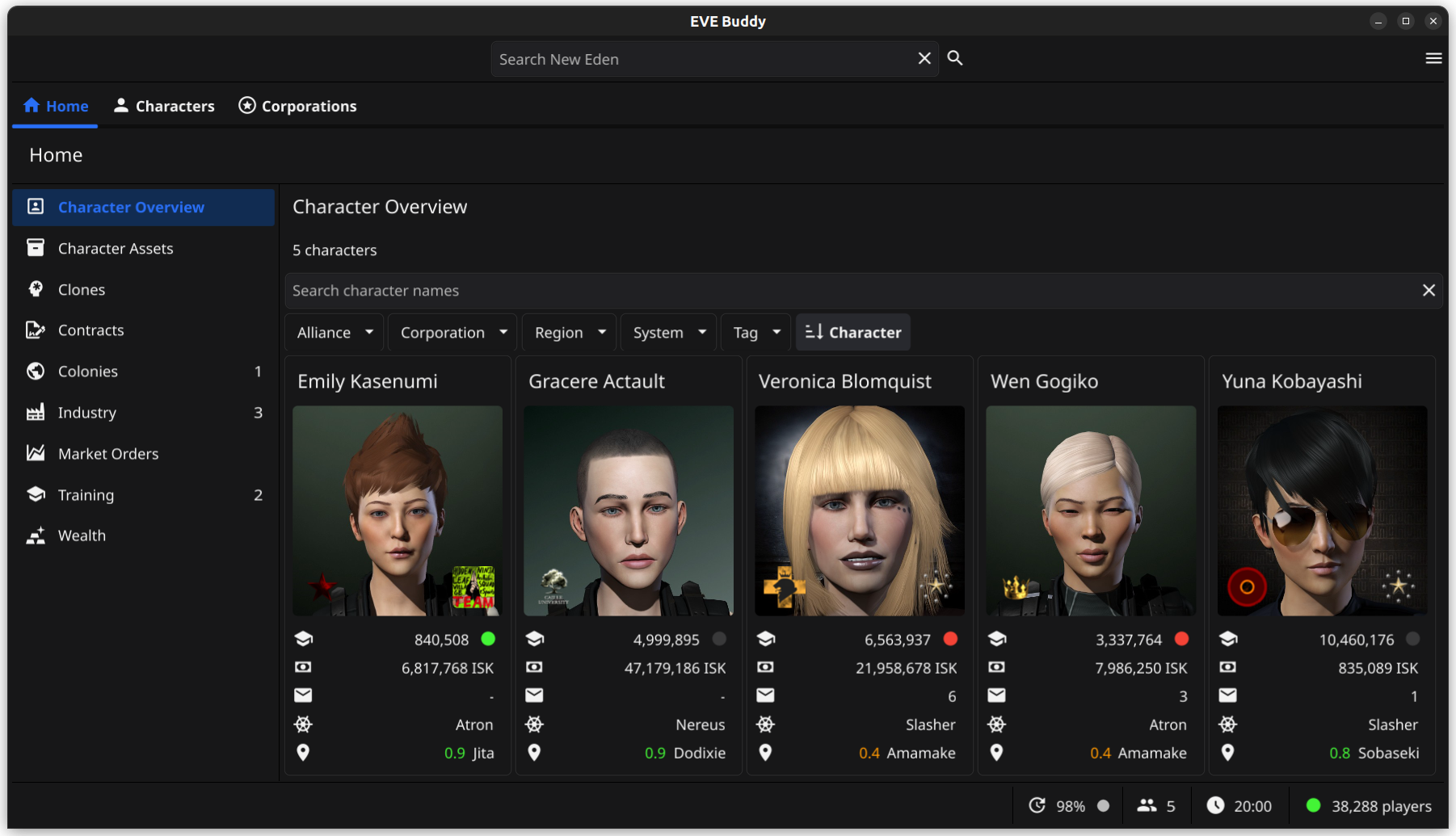
Below are example screenshots for both the desktop and mobile version (EVE Buddy v0.53).
Desktop version
Mobile version

Features
The following is a detailed list of EVE Buddy's features. Most features are available for both desktop and mobile:
- Overviews: Keep track of and get unique insights about all your characters and corporations with consolidated views:
- Character monitor: Check current information about each of your characters:
Skill Name Level, one per line) so they can be pasted directly into PyFA's character skill import.
- Export to CSV: Saves all trained skills to a .csv file with Name and Level columns for use in spreadsheets or other tools.
- Wallet: Wallet and market Transactions
- Corporation monitor: Check current information about each of your corporations: (depending on their roles)
- Notifications: Get notified on your desktop or mobile about new EVE communications and other important updates:
- New Eden search: Search live on the game server, similar to in-game search bar:
- Information windows: Show additional information for most objects on screen, similar to in-game information windows:
- Mail client: Full mail client for receiving and sending Eve mails
- Run in Background: The app can run in the background and continue to notify you while you are doing something else (e.g. play Eve Online)
- Customizable UI: The UI can be customized:
Installing
To install EVE buddy just download the latest release from the releases page to your computer or mobile. The app ships as a single executable file that can be run directly. When you run the app for the first time it will automatically install itself for the current user (i.e. by creating folders in the home folder for the current user).
You find the latest packages for download on the releases page.
Windows
- Download the windows zip file from the latest release on Github.
- Unzip the file into a directory of your choice and run the .exe file to start the app.
[!TIP]
Windows defender (and similar programs) may report EVE Buddy incorrectly as containing a trojan. This is usually a false positive and caused by a known issue with programs made with the Go programming language. Each EVE Buddy release is build from scratch on a fresh Windows container provided by Github, so it is highly unlikely to be infected. If this happens to you, please exclude EVE Buddy's executable from Windows defender (and similar programs) to proceed.
Mac OS
- Download the darwin zip file from the latest release on Github for your respective platform (arm or intel).
- Unzip the file into a directory of your choice.
- Run the .app file to start the app.
[!TIP]
MacOS may report EVE Buddy incorrectly as "damaged", because it is not signed with an Apple certificate. You can remove this error by opening a terminal and running the following command. For more information please see Fyne Troubleshooting:>
xattr -r -d com.apple.quarantine "EVE Buddy.app"
Linux
We are providing two variants for installing on Linux desktop:
- AppImage: The AppImage variant allows you to run the app directly from the executable without requiring installation or root access.
- Tarball: The tar file requires installation, but also allows you to integrate the app into your desktop environment. The tarball also has wider compatibility among different Linux versions.
AppImage
[!NOTE]
The app is shipped in the AppImage format, so it can be used without requiring installation and run on many different Linux distributions.
- Download the latest AppImage file from the releases page
- Make the AppImage file executable
- Execute the AppImage file to start the app
[!TIP]
Should you get the following error: AppImages require FUSE to run., you need to first install FUSE on your system. Thi s is a library required by all AppImages to function. Please see this page for details.
Tarball
- Download the latest tar file from the releases page
- Decompress the tar file, for example with:
tar xf evebuddy-0.33.0-linux-amd64.tar.xz - Run
make user-installto install the app for the current user or runsudo make installto install the app on the system
To uninstall the app again run either: make user-uninstall or sudo make uninstall depending on how you installed it.
Android
[!NOTE]
Please note that the app can currently be only installed from the release page and is currently not available in any of the Android app stores.
[!IMPORTANT]
EVE Buddy needs unrestricted background usage in order to function probably. The reason is that Android otherwise automatically suspends apps when you switch to another app. Then you can no longer add new characters, because it requires you to switch to your browser app, but EVE Buddy needs to keep running for the process to work. Also EVE Buddy needs to keep running in order to pick up events for notifications.Please also make sure you do not have Power saving mode enabled (e.g. on Samsung Galaxy), which would also restrict background app usage.
Here is how to install EVE Buddy on your Android phone:
- Make sure you have enabled in settings that you can install from your web browser (For detailed instructions please see How to install Unknown Sources applications in Android)
- Navigate to the github releases page in your mobile browser
- Select to download the latest EVE_Buddy.apk file from the release page (this can take a minute)
- When prompted choose to install the file / open the file with the default installer
- In case you get a security warning from Google Play Protect:
- Enable unrestricted background usage for EVE Buddy in the Android Settings app. Please see How to enable unrestricted background usage for a step-by-step guide.
- Optional: Enable notifications for EVE BUddy. Please see How to enable notifications for a step-by-step guide.
How to enable notifications
Here is how to enable notifications for EVE Buddy on your Android phone:
- Go to settings and enable what kind of notifications you want to receive (e.g. mails)
- Send a test notification (via menu in settings)
- When asked: Allow EVE buddy to send Android notifications
How to enable unrestricted background usage
Here is how to enable unrestricted background usage for EVE Buddy on your Android phone:
- Open the Settings app.
- Go to Apps and choose EVE Buddy. You should now see a screen like this:
- Choose "App battery usage". You should now see a screen like this:
- Click on "Allow background usage". You should now see a screen like this:
- Make sure the "Unrestricted" option is selected. That's it.
Updating
The app will inform you when there is a new version available for download. To update your app just download and install the newest version for your platform from the releases page.
Uninstalling
If you no longer want to use the app you can uninstall it.
Windows, Linux and macOS
The desktop versions has an special app for removing our data:
First start the delete app for removing your user data:
./evebuddy --delete-dataThis command will ask for confirmation and then delete user data from your computer like characters, log files, etc.
Then delete the file itself:
rm evebuddyAndroid
On Android you can uninstall the app via the system's Settings app. This will also remove all data.
Support
[!IMPORTANT]
For bugs and feature requests please open an issue in the GitHub repository.
[!TIP]
For support and any other questions please join us on in our channel #eve-buddy on this Discord server.
Common issues
The following is an overview of common issues with solutions:
Android
Windows
Logs
The app has an application log and a crash file that can help with trouble shooting. The location of the logs follows the standard of each platform:
Platform | Path -- | -- Android | Export only Linux | /home/{username}/.local/share/evebuddy/log macOS | /Users/{username}/Library/Application Support/evebuddy/log' Windows | C:\Users\{username}\AppData\Local\evebuddy\evebuddy\log
On desktop you can view the location of your log files on the User Data dialog, which you find in the main menu.
On both desktop and mobile you can export both logs from the Settings menu in the General section.
To view the exported logs on mobile you might want to install another app. While there are many decent apps for viewing log and text files on the Google Play store, we can recommend the following two apps:
- For viewing log files: LogLog
- For viewing txt files: Text Viewer
FAQ
How well is my data protected?
EVE Buddy is designed to protect your data and tokens and has implemented the following safety measures:
- All data and tokens retrieved from CCP's servers are stored on your local computer only. Your data is therefore safe as long as you prevent any unauthorized access to the data on your computer.
- EVE Buddy also does not log any tokens (they are replaced with the text
REDACTED). It is therefore safe to share your logs with maintainers for troubleshooting.
- EVE Buddy is fully compliant with the requirements for OAuth 2.0 for Mobile or Desktop Applications from CCP.
- In case you need to switch computers you can remove your data with the delete app.
Why do I not see all of my character's data in the app?
Some of your data from the game server might not be visible in EVE Buddy due to technical limitations of the game server API (ESI) or missing permissions.
When I try to add a character the app redirect to localhost. Should it not redirect to an CCP server?
No, the redirect to locahost is correct. This connects to EVE Buddy's own web server, which is needed for implementing CCP's authorization process called SSO. For more information please see the EVE Developer Documentation / SSO.
Server limitations
CCP's servers have limitations on how far back some character data can be retrieved.
Here is an overview of some limitations:
- Wallet journal: 30 days, 2.500 entries
- Wallet transaction: 2.500 entries
Permissions
A special case are Upwell structures. Access to structures depends on in-game docking rights. Unfortunately, it is not possible to later retrieve the name or location of a structure, which the character no longer has access to. For example character assets might be displayed in an "unknown structure".
External web sites
You can find EVE Buddy mentions on other web sites:
Credits
"EVE", "EVE Online", "CCP", and all related logos and images are trademarks or registered trademarks of CCP hf.


