
将 C/C++ 代码转换成流程图 / Turn your C/C++ code into flowchart
Last updated Jun 29, 2026
815
Stars
66
Forks
10
Issues
0
Stars/day
Attention Score
68
Language breakdown
No language data available.
▸ Files
click to expand
README
cxx2flow
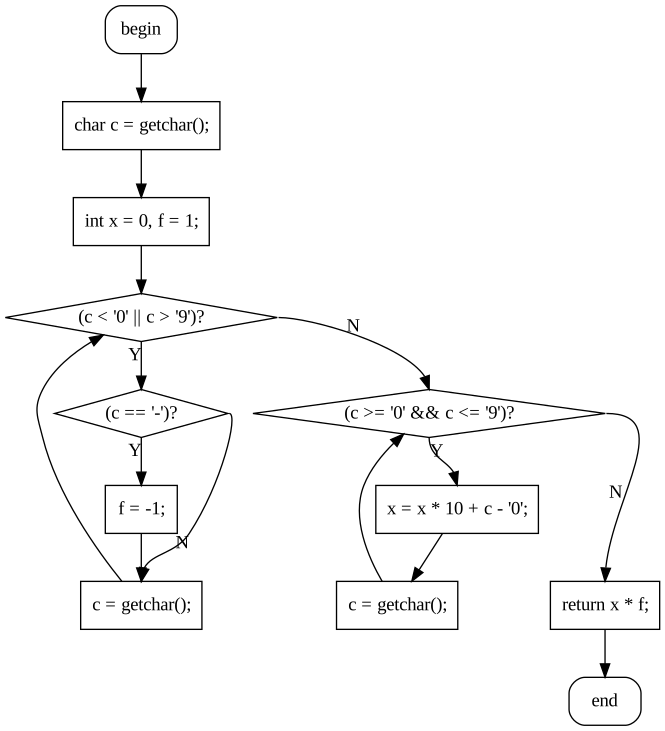
简体中文 | English 将 C/C++ 代码转换为流程图效果
更多效果图请参考 GALLERY 两种样式: | | | |:-:|:-:| | 折线 | 平滑 | |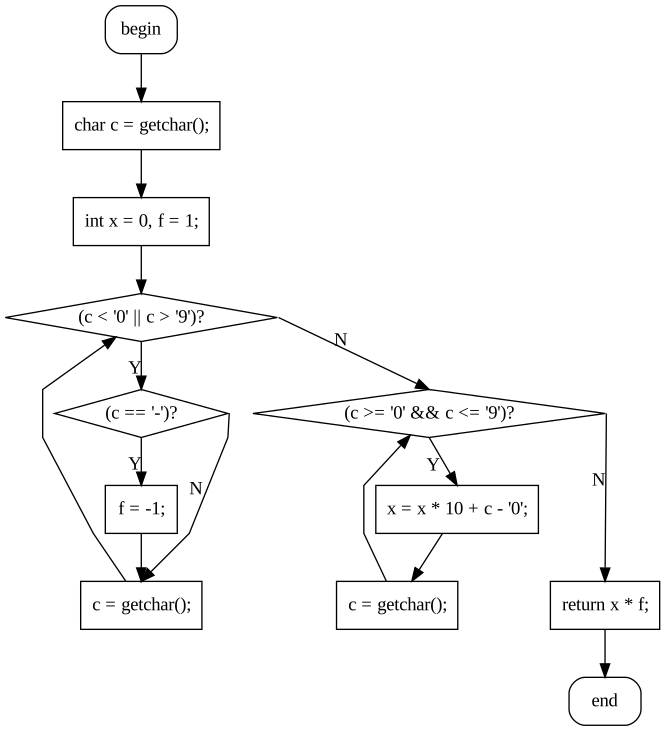 |
| |
|
inline int read() {  //快读
  char c = getchar();
  int x = 0, f = 1;
  while (c < '0' || c > '9') {
    if (c == '-') f = -1;
    c = getchar();
  }
  while (c >= '0' && c <= '9') {
    x = x * 10 + c - '0';
    c = getchar();
  }
  return x * f;
}
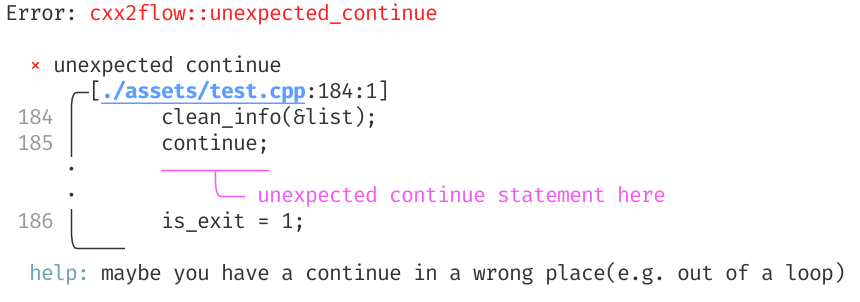
错误报告
安装
在线使用(推荐)
推荐直接使用在线网页版本,无需下载安装!
访问:https://enter-tainer.github.io/cxx2flow/
在线版本提供了完整的功能,包括代码编辑器和实时流程图预览,无需安装任何软件即可使用。
自行编译
cargo install cxx2flow下载预构建二进制
推荐从右侧的 Github Release 下载对应平台的二进制文件。
使用 GUI 版本
对于没有命令行使用经验的用户,推荐下载使用基于 tauri 编写的 GUI 版本。 https://github.com/Enter-tainer/cxx2flow-gui/releases
使用
为了编译生成的 dot 文件,你需要安装 graphviz,并将其添加到 PATH 中。也可以将生成的结果复制进在线的 graphviz 服务中,如 http://magjac.com/graphviz-visual-editor/ 。Convert your C/C++ code to control flow chart
Usage: cxx2flow [OPTIONS] [INPUT] [FUNCTION]
Arguments:
[INPUT] Sets the path of the input file. e.g. test.cpp
If not specified, cxx2flow will read from stdin.
[FUNCTION] The function you want to convert. e.g. main [default: main]
Options:
-o, --output <OUTPUT> Sets the output file.
If not specified, result will be directed to stdout.
e.g. graph.dot
-c, --curly Sets the style of the flow chart.
If specified, output flow chart will have curly connection line.
--cpp Use C preprocessor.
-t, --tikz Use tikz backend.
-d, --dump-ast Dump AST(For debug purpose only).
-h, --help Print help information
-V, --version Print version information
Note that you need to manually compile the dot file using graphviz to get SVG or PNG files.
EXAMPLES:
cat main.cpp | cxx2flow | dot -Tsvg -o test.svg
cxx2flow test.cpp | dot -Tpng -o test.png
cxx2flow main.cpp mycustomfunc | dot -Tsvg -o test.svg
Please give me star if this application helps you!
如果这个应用有帮助到你,请给我点一个 star!
https://github.com/Enter-tainer/cxx2flow限制
- 对于预处理器的支持基于
cpp,默认关闭,需要使用--cpp参数手动启用。如果PATH中不存在cpp则会失败。 - 支持的控制流语句有:while,for,if,break,continue,break,return,switch, goto, do-while。
- 对 range for 有基本支持。部分情况下,受到 tree-sitter-cpp 能力限制,会出现一些问题。
WebAssembly(浏览器 / Node.js)
cxx2flow 现在提供了 wasm 入口点 generatedot(content, functionname, curly) 用于浏览器使用。
构建 wasm 包:
CCwasm32unknown_unknown="$PWD/scripts/clang-wasm.sh" wasm-pack build --target web --release或者使用 just(自动检测操作系统):
just wasm-buildWindows (PowerShell):
$env:CCwasm32unknown_unknown = (Resolve-Path scripts/clang-wasm.cmd).Path
wasm-pack build --target web --release
在 Node.js 中运行最小烟雾测试:
node scripts/wasm-smoke.mjs使用 just:
just wasm-smokeWeb UI(React + shadcn 风格 + lucide)
本仓库在 web/ 目录下包含了一个浏览器应用:
- 左侧面板:C/C++ 源代码编辑器
- 右侧面板:Graphviz SVG 预览
- 引擎:
cxx2flowwasm +@hpcc-js/wasm-graphviz
just web-install
just web-dev
此 Web 应用使用 pnpm。
构建静态资源:
just web-buildGitHub Pages 部署配置在 .github/workflows/pages.yml 中,并在推送到 master 分支时触发。
注意事项:
- 浏览器/wasm 模式仅通过
generate_dot暴露 DOT 后端。 - 仅 CLI 功能(如
--cpp和 AST dump 彩色输出)仅在原生模式下可用。 .cargo/config.toml故意不用于 wasm 工具链配置;请在每个 shell/会话中显式设置CCwasm32unknown_unknown。


