
Purely is a cloud-first microservices web application, containerized and deployed to AWS Elastic Kubernetes Service (EKS) using Helm and automated via GitHub Actions CI/CD pipelines.
🌟 Cloud first microservices e-commerce web application 🌟








- Purely is a cloud-first microservices web application showcasing Kubernetes. The application is a web-based e-commerce app where users can browse items, add them to the cart, and purchase them.
- The architecture leverages Spring Boot microservices, Spring Cloud Gateway, and Eureka Service Registry, with a React.js frontend and MongoDB databases.
- The solution is containerized and deployed to AWS Elastic Kubernetes Service (EKS) using Helm and automated via GitHub Actions CI/CD pipelines.
📑 Table of contents
- Component Diagram - Frontend - Service Registry - Api Gateway - Auth Service - Category Service - Product Service - Cart Service - Order Service - Notification Service - Communication between services - Deployment Diagram - Containerization - Kubernetes Orchestration - AWS Infrastructure - Networking (AWS VPC) - Kubernetes Cluster (AWS EKS) - Terraform - Infrastructure as Code - CI/CD with GitHub Actions📂 Project tree
fullstack-E-commerce-web-application/
├── .github/
│   └── workflows/
│       ├── ci-cd-auth.yml
│       ├── ci-cd-cart.yml
│       ├── ci-cd-category.yml
│       ├── ci-cd-gateway.yml
│       ├── ci-cd-ingress.yml
│       ├── ci-cd-notification.yml
│       ├── ci-cd-order.yml
│       ├── ci-cd-product.yml
│       ├── ci-cd-registry.yml
│       ├── ci-cd-user.yml
│       └── ci-cd-web.yml
├── assets/
├── frontend/
│   ├── nginx/
│   ├── public/
│   ├── src/
│   │   ├── api-service/
│   │   ├── assets/
│   │   ├── components/
│   │   ├── contexts/
│   │   ├── pages/
│   │   ├── routes/
|   |   ├── App.jsx
│   │   └── main.jsx
│   ├── Dockerfile
│   └── index.html
├── helm-charts/
│   ├── api-gateway/
│   ├── auth-service/
│   ├── cart-service/
│   ├── category-service/
│   ├── ingress-alb/
│   ├── notification-service/
│   ├── order-service/
│   ├── product-service/
│   ├── service-registry/
│   ├── user-service/
│   └── web-app/
├── microservice-backend/
│   ├── api-gateway/
│   ├── auth-service/
│   ├── cart-service/
│   ├── category-service/
│   ├── notification-service/
│   ├── order-service/
│   ├── product-service/
│   ├── service-registry/
│   └── user-service/
├── sample-data/
│   ├── purelycategoryservice.categories.json
│   └── purelyproductservice.products.json
└── terraform/
│   ├── common-data.tf
│   ├── common-provider.tf
│   ├── common-variables.tf
│   ├── ecr-registries.tf
│   ├── eks-access-entries.tf
│   ├── eks-alb-controller.tf
│   ├── eks-cluster-autoscaler.tf
│   ├── eks-cluster.tf
│   ├── eks-metrics-server.tf
│   ├── eks-node-groups.tf
│   ├── eks-openid-connect-provider.tf
│   ├── policies/
│   │   ├── AWSLoadBalancerControllerIAMPolicy.json
│   │   └── EKSClusterAutoscalerIAMPolicy.json
│   ├── vpc-internet-gateway.tf
│   ├── vpc-nat-gateway.tf
│   ├── vpc-route-tables.tf
│   ├── vpc-subnets.tf
│   └── vpc.tf
└── README.md👨💻 Development set up
- Microservices Architecture: Independent services for User, Auth, Product, Category, Cart, Order, and Notification.
- Service Discovery: Centralized Eureka Service Registry manages dynamic discovery of microservices within the cluster. Simplifies communication and load balancing between services.
- API Gateway: Built using Spring Cloud Gateway. Acts as the single entry point for all client requests.
- Frontend: Developed in React.js, providing a responsive user interface. Communicates with the backend exclusively via API Gateway.
- Databases: Each microservice uses a dedicated MongoDB database.
Component Diagram
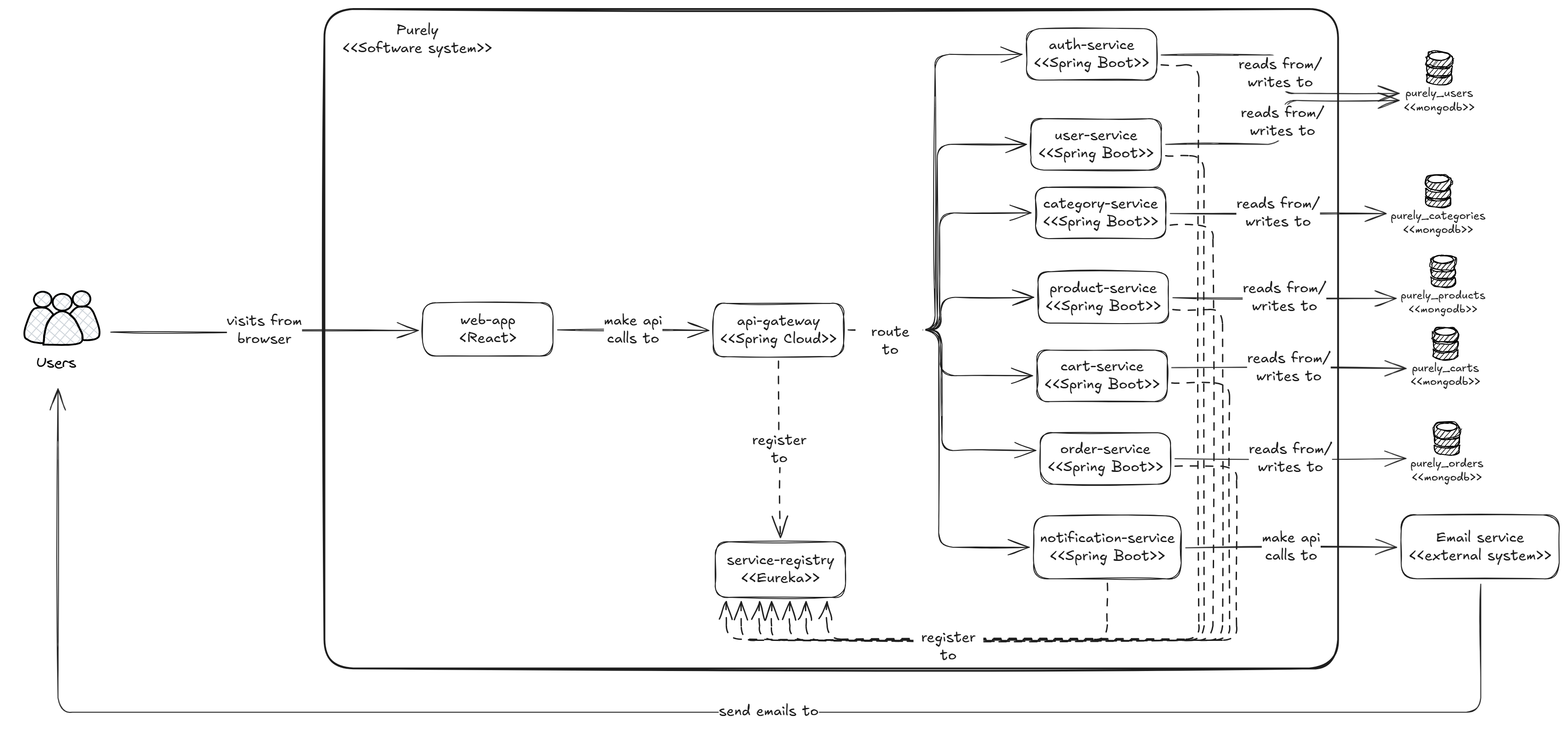
Frontend
Service Registry
- The Service Registry serves as a centralized repository for storing information about all the available services in the microservices architecture.
- This includes details such as IP addresses, port numbers, and other metadata required for communication.
- As services start, stop, or scale up/down dynamically in response to changing demand, they update their registration information in the Service Registry accordingly.
API Gateway
- The API gateway acts as a centralized entry point for clients, providing a unified interface to access the microservices.
- API gateway acts as the traffic cop of our microservices architecture. It routes incoming requests to the appropriate microservice, or instance based on predefined rules or configurations.
Auth Service
- The Auth Service is responsible for securely verifying user identities and facilitating token-based authentication.
 |
| /auth/signin | - | User login |
| | /auth/signup | - | User registration |
|  |
| /auth/signup/verify | code | Validate registration one time password code |
| | /auth/isValidToken | token | Validate json web token |
Category Service
- The Category Service provides centralized data management and operations for product categories.
| /admin/category/create | - | Create new category | Yes | Admin |
|  |
| /admin/category/edit | categoryId | Edit existing category | Yes | Admin |
|  |
| /admin/category/delete | categoryId | Delete existing category | Yes | Admin |
| | /category/get/all | - | Get all categories | No | Admin/User/Non user |
| | /category/get/byId | categoryId | Get category by id | No | Admin/User/Non user |
Product Service
- The Product Service provides centralized data management and operations for available products.
| /admin/product/add | - | Create new product | Yes | Admin |
| | /admin/product/edit | productId | Edit existing product | Yes | Admin |
| | /product/get/all | - | Get all products | No | Admin/User/Non user |
| | /product/get/byId | productId | Get product by id | No | Admin/User/Non user |
| | /product/get/byCategory | categoryId | Get product by category | No | Admin/User/Non user |
| | /product/search | searchKey | Search products by key | No | Admin/User/Non user |
Cart Service
- The Cart Service provides centralized data management and operations for user carts.
| /cart/add | - | Add item to cart, update quantity | Yes | User |
| | /cart/get/byUser | - | Get cart details by user | Yes | User |
| | /cart/get/byId | cartId | Get cart details by cart id | Yes | User |
| | /cart/remove | productId | Remove an item from the cart | Yes | User |
| | /cart/clear/byId | cartId | Remove all the items from the cart | Yes | User |
Order Service
- The Order Service provides centralized data management and operations for orders.
| /order/create | - | Place an order | Yes | User |
| | /order/get/byUser | - | Get orders by user | Yes | User |
| | /order/get/all | - | Get all orders | Yes | Admin |
| | /order/cancel | orderId | Cancel the order | Yes | User |
Notification Service
- The Notification Service provides centralized operations for send emails to user.
| /notification/send | Send email |
Communication between services
- OpenFeign, a declarative HTTP client library for Java, is used to simplify the process of making HTTP requests to other microservices.
🚀 Deployment set up
Deployment Diagram
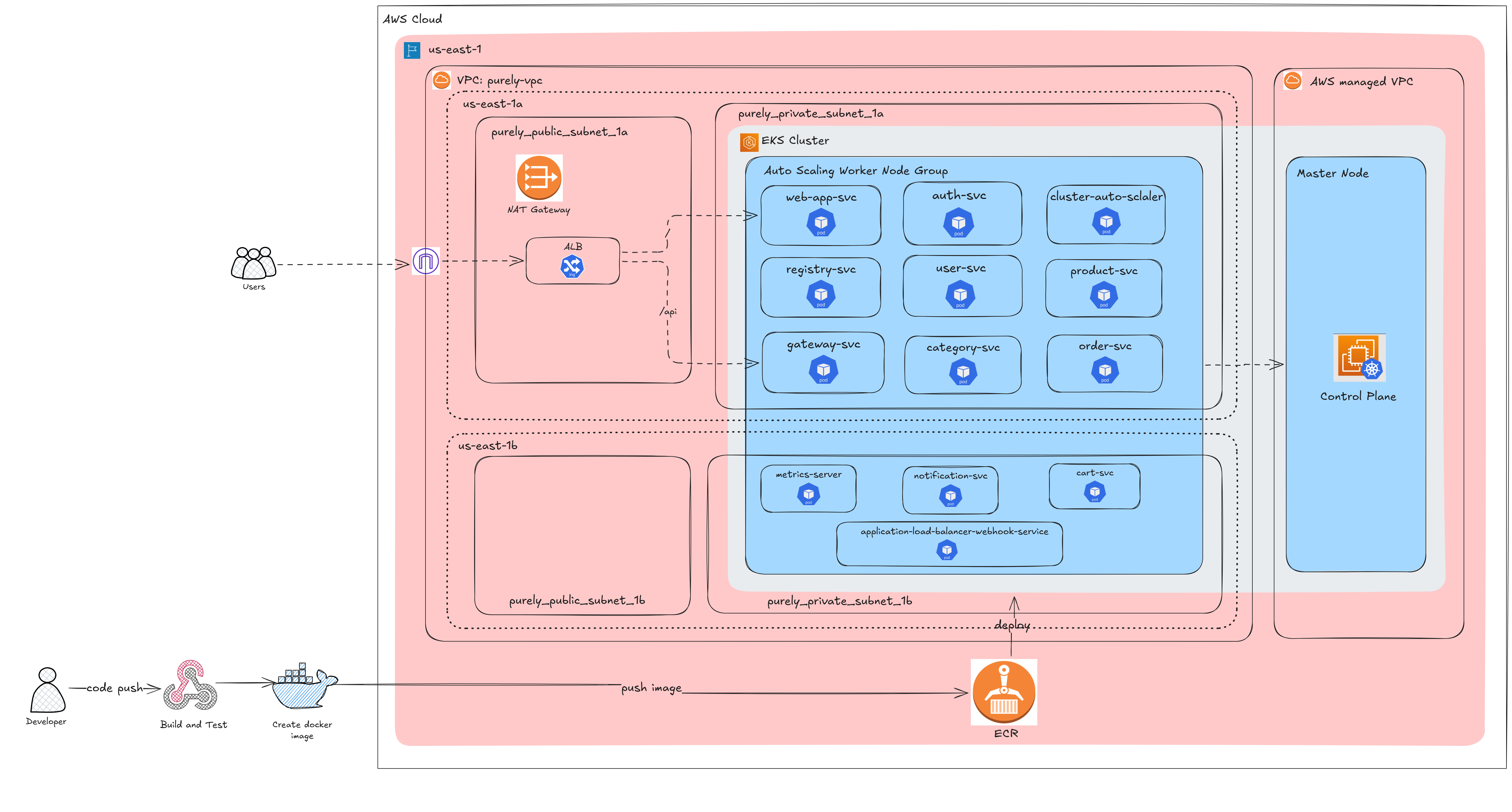
Containerization
- Each component (frontend, service-registry, api-gateway, and other microservices) has its own Dockerfile, and is packaged into a Docker image.
- Images pushed to Amazon Elastic Container Registry (ECR).
Kubernetes Orchestration
- Each service is deployed as a separate Helm chart under
/helm-chartsdirectory. - Each chart includes Kubernetes resources:
Deployment,hpa,Service,ConfigMaps, andSecrets. - All components (Ingress, frontend, service-registry, api-gateway, and other microservices) deployed as
ClusterIPservice type.
AWS Infrastructure
Networking (AWS VPC)
- 2 Public subnets (1 in each AZ). - 2 Private subnets (1 in each AZ).- Internet Gateway: Attached to VPC for public subnet access for public subnets.
- NAT Gateway: Deployed in one public subnet, allowing outbound internet access for resources in private subnets (e.g., EKS worker nodes pulling Docker images).
- Route Tables:
Kubernetes Cluster (AWS EKS)
- EKS Cluster deployed within the above VPC.
- EKS Node Group (managed worker nodes) spread across the two AZs for high availability. Worker nodes are deployed in private subnets, ensuring they are not exposed directly to the internet.
- Application Load Balancer controller is installed within the EKS cluster, to let traffic route using ingress.
- Metrics-server is installed within the EKS cluster, to let
Horizontal Pod AutoScalerget the current CPU/memory usage for each Pod. - Cluster AutoScaler is installed within the EKS Cluster, automatically adjusting the number of worker nodes in the EKS cluster based on pending pods.
Horizontal Pod AutoScaler (HPA) is a Kubernetes resource that automatically scales the number of pods in a Deployment, ReplicaSet, or StatefulSet. It continuously watches pod resource metrics (like CPU %, memory %, or custom metrics) from metrics-server. If usage goes above or below a defined threshold, it increases or decreases pods.
Cluster Autoscaler (CA) is a Kubernetes component that automatically adjusts the number of worker nodes in the cluster. If HPA scales up pods but no nodes have enough resources to run them, CA adds new nodes. If nodes are scaled down, it removes nodes to save cost.
Terraform (Infrastructure as Code)
- Infrastructure provisioned using Terraform, ensuring reproducibility and automation.
- Terraform manage:
CI/CD with GitHub Actions
- Separate workflow files per service for isolation and independent deployments.
- Workflow stages:
🖥️ How to run locally?
Prerequistics
Make sure you have the following tools installed locally:
- JAVA Development Kit (JDK 21)
- Maven
- Node.js
- npm
- Git
Step 1: Fork and Clone the Repository
- Fork the repository to your GitHub account.
- Clone the forked repository to your local machine.
git clone https://github.com/<your-username>/Fullstack-E-commerce-web-applicationStep 2: Setting up databases.
- Create the following databases in MongoDB Atlas and update the
spring.data.mongodb.urivalue inapplication.ymlfile of each service:
purelyauthservicepurelycategoryservicepurelyproductservicepurelycartservicepurelyorderservice
- You can find sample data for products and categories to get started here.
Step 3: Setting up e-mail configurations
- In the
notification-service, configure the following credentials in theapplication.propertiesfile to enable email sending functionality:
spring.mail.username=YOUR_USERNAME
spring.mail.password=YOUR_PASSWORD
Replace YOURUSERNAME and YOURPASSWORD with your actual email service credentials.
Step 4: Run the microservices.
- First run
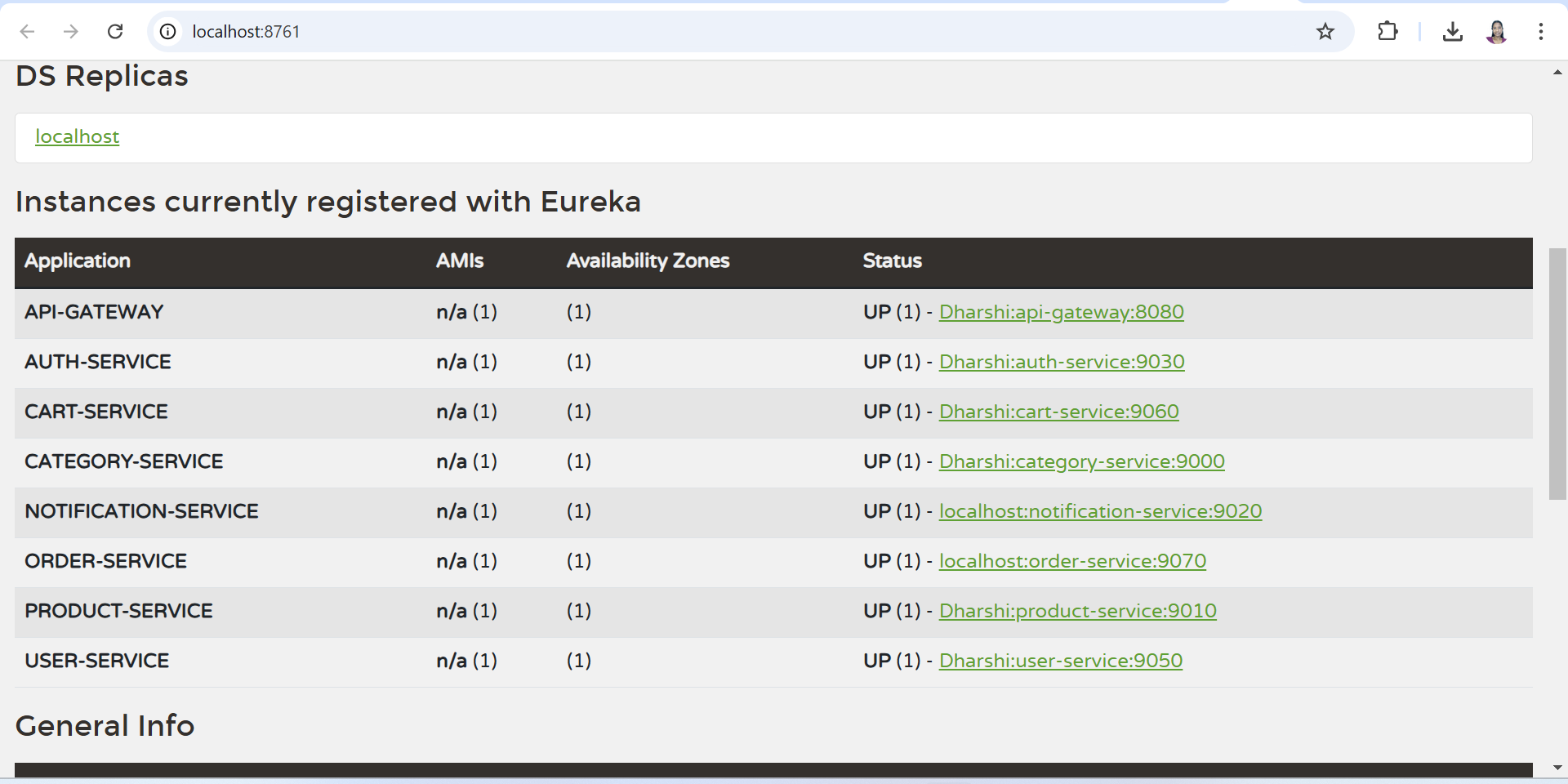
service-registry. Access the Eureka dashboard athttp://localhost:8761. Next run the other services.
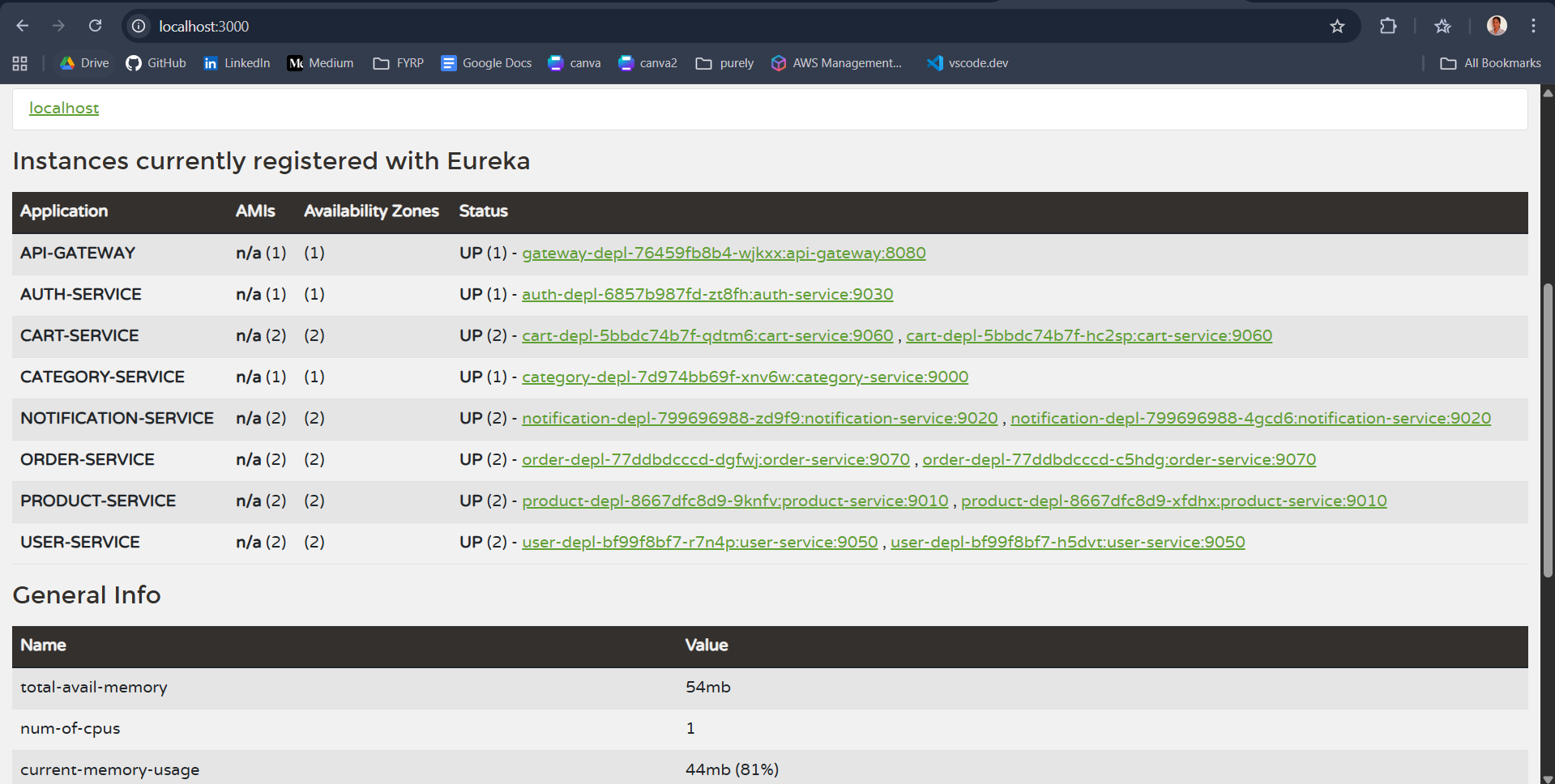
mvn springboot:run- Make sure all the services are up and running in the Eureka Dashboard as below.
Step 5: Run the frontend
- Navigate to frontend direcory.
cd ./frontend- Install dependencies.
npm install- Update APIBASEURL in
apiConfig.js.
const APIBASEURL = "http://localhost:8080"- Run the app.
npm run devAccess the application at http://localhost:5173/
☁️ How to deploy to Amazon EKS?
Prerequistics
Make sure you have the following tools installed locally:
- kubectl
- Helm
- AWS CLI
- ekctl
- Terraform
Step 1: Containerization
- Each component (frontend, service-registry, api-gateway, and microservices) has its own Dockerfile.
- You don’t need to change anything here. The components will be automatically built and push images to Amazon ECR when running CI/CD.
Step 2: Kubernetes Orchestration
- Each service is deployed as a separate Helm chart under
/helm-chartsdirectory. Leave them as that. - No need to modify the chart structure unless adding new services or debugging purposes.
Step 3: AWS Infrastructure
- AWS resources are provisioned using Terraform manifests in the
terraform/directory. - By default, you can’t directly access an eks cluster without the AmazonEKSClusterAdminPolicy.
terraform/eksaccess_entry.tf.
- Update IAM usernames for GitHub Actions and local CLI in terraform/variables.tf.
- Then, run the following commands:
terraform init
terraform plan
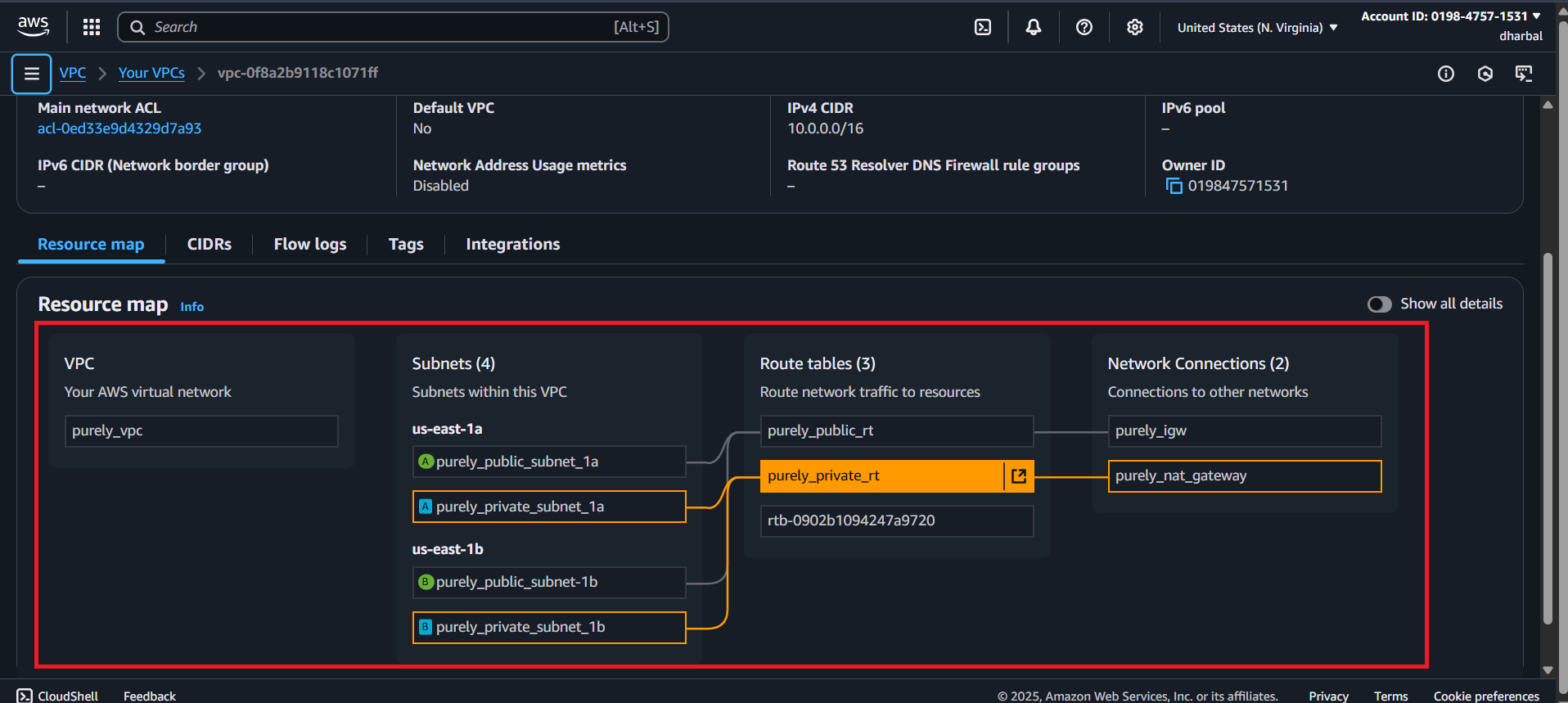
terraform apply- This will create a VPC, subnets (2 public, 2 private), an Internet Gateway, a NAT Gateway, and route tables. You can verify the networking setup from
AWS console > VPC > Resource Map.
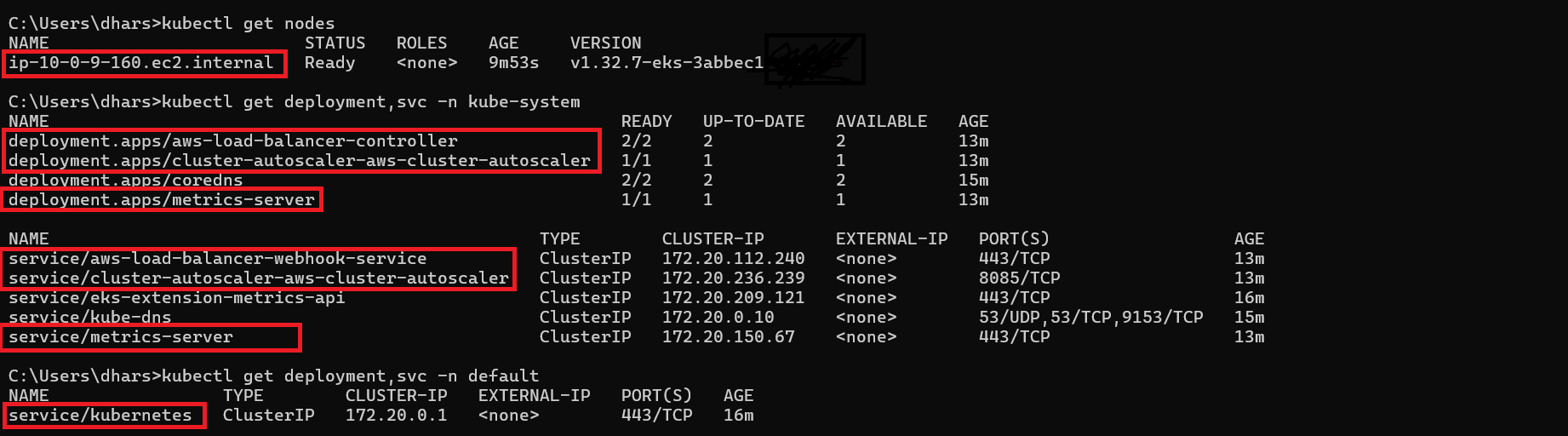
- This will deploy an EKS cluster (purely-cluster), EKS node groups, Application Load Balancer controller, Metrics server, and Cluster autoscaler.
- After Terraform finishes, update your kubeconfig (Ensure the local AWS CLI user has an access entry in the EKS cluster.
aws eks update-kubeconfig --region YOURREGION --name YOURCLUSTER_NAME
- Next, ensure that nodes, Application Load Balancer controller, Metrics server, and Cluster autoscaler are installed properly.
Step 4: CI/CD with GitHub Actions
- IAM User for CI/CD
- Add the following secrets to your GitHub repository:
AWSACCESSKEY_ID | Access key of IAM user|
| AWS_REGION | us-east-1 (unless you’re using a different AWS region) |
| AWSSECRETACCESS_KEY | Secret access key of IAM user |
|ECRAUTHREPOSITORY| purelyauthregistry (unless you're using a different name for ECR repository of Auth service) |
| ECRCARTREPOSITORY | purelycartregistry (unless you're using a different name for ECR repository of Cart service) |
| ECRCATEGORYREPOSITORY | purelycategoryregistry (unless you're using a different name for ECR repository of Category service) |
| ECRGATEWAYREPOSITORY | purelygayewayregistry (unless you're using a different name for ECR repository of API Gateway) |
| ECRNOTIFICATIONREPOSITORY | purelynotificationregistry (unless you're using a different name for ECR repository of Notification service) |
| ECRORDERREPOSITORY | purelyorderregistry (unless you're using a different name for ECR repository of Order service) |
| ECRPRODUCTREPOSITORY | purelyproductregistry (unless you're using a different name for ECR repository of Product service) |
| ECRREGISTRYREPOSITORY | purelyserviceregistry (unless you're using a different name for ECR repository of Service Registry) |
| ECRUSERREPOSITORY | purelyuserregistry (unless you're using a different name for ECR repository of User service) |
| ECRWEBREPOSITORY | purelywebregistry (unless you're using a different name for ECR repository of Frontend) |
| EKS_CLUSTER | purely-cluster (unless you're using a different name for EKS cluster) |
| SPRINGDATAMONGODBURIAUTH | Database URI of auth service from MongoDB Atlas |
| SPRINGDATAMONGODBURICART | Database URI of cart service from MongoDB Atlas |
| SPRINGDATAMONGODBURICATEGORY | Database URI of category service from MongoDB Atlas |
| SPRINGDATAMONGODBURIORDER | Database URI of order service from MongoDB Atlas |
| SPRINGDATAMONGODBURIPRODUCT | Database URI of product service from MongoDB Atlas |
| SPRINGMAILPASSWORD | Your mail app password |
| SPRINGMAILUSERNAME | Your mail |
- Each service has its own workflow file (ensuring isolation). Trigger workflows from GitHub Actions. Once completed, services will be live in your EKS cluster.
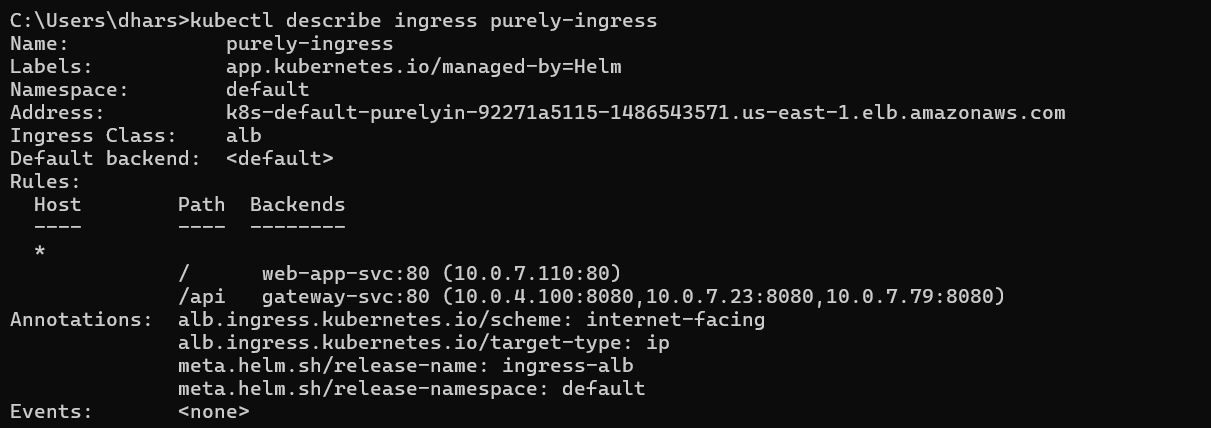
- Verify cluster resources:

- Deployment 
- Horizontal Pod Autoscaler 
- Service 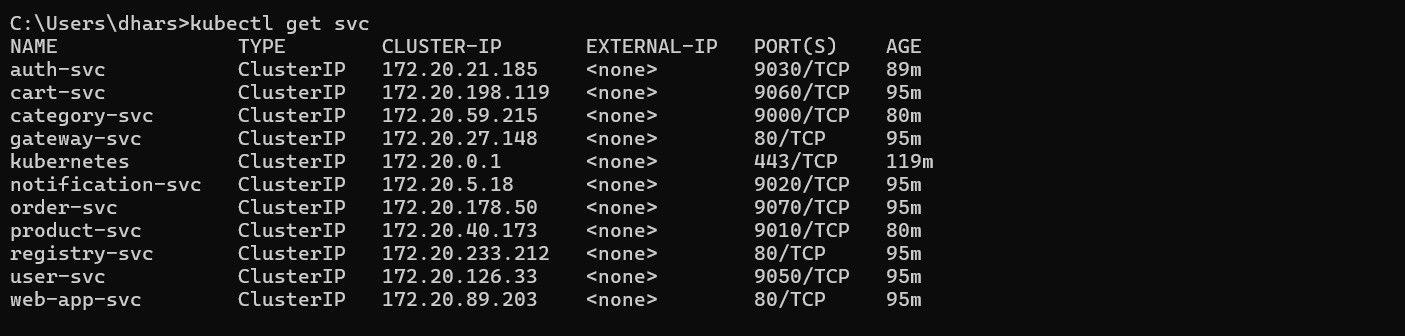
- Ingress 
- Verify the Eureka server via port forwarding 
Copy the Ingress DNS address from the kubectl get ingress and open it in your browser to view the live application.
Demo video
https://github.com/user-attachments/assets/d648cb16-6008-44b0-ad2a-b6752df40702


