
FinnewsHunter: Multi-agent financial intelligence platform powered by AgenticX. Real-time news analysis, sentiment fusion, and alpha factor mining.
FinnewsHunter: Multi-Agent Investment Decision Platform Driven by Financial News

An enterprise-grade financial news analysis system built on the AgenticX framework, integrating real-time news streams, deep quantitative analysis, and multi-agent debate mechanisms.
FinnewsHunter goes beyond traditional text classification by deploying multi-agent teams (NewsAnalyst, Researcher, etc.) to monitor multiple financial news sources in real-time, including Sina Finance, National Business Daily, Financial World, Securities Times, and more. It leverages large language models for deep interpretation, sentiment analysis, and market impact assessment, combined with knowledge graphs to mine potential investment opportunities and risks, providing decision-level alpha signals for quantitative trading.
🎯 Project Features
- ✅ AgenticX Native: Deeply integrated with AgenticX framework, using core abstractions like Agent, Tool, and Workflow
- ✅ AgenticX Component Integration: Direct use of AgenticX's
BailianEmbeddingProviderandMilvusStorage, avoiding reinventing the wheel - ✅ Agent-Driven: NewsAnalyst agent automatically analyzes news sentiment and market impact
- ✅ Multi-Provider LLM Support: Supports 5 major LLM providers (Bailian, OpenAI, DeepSeek, Kimi, Zhipu), switchable with one click in the frontend
- ✅ Batch Operations: Supports batch selection, batch deletion, and batch analysis of news, improving operational efficiency
- ✅ Stock K-Line Analysis: Integrated with akshare real market data, supporting daily/minute K-line multi-period display
- ✅ Intelligent Stock Search: Supports code and name fuzzy queries, pre-loaded with 5000+ A-share data
- ✅ Complete Tech Stack: FastAPI + PostgreSQL + Milvus + Redis + React
- ✅ Real-time Search: Supports multi-dimensional search by title, content, stock code, with keyword highlighting
- ✅ Async Vectorization: Background async vectorization execution, non-blocking analysis flow
- ✅ Production Ready: One-click deployment with Docker Compose, complete logging and monitoring
🏗️ System Architecture
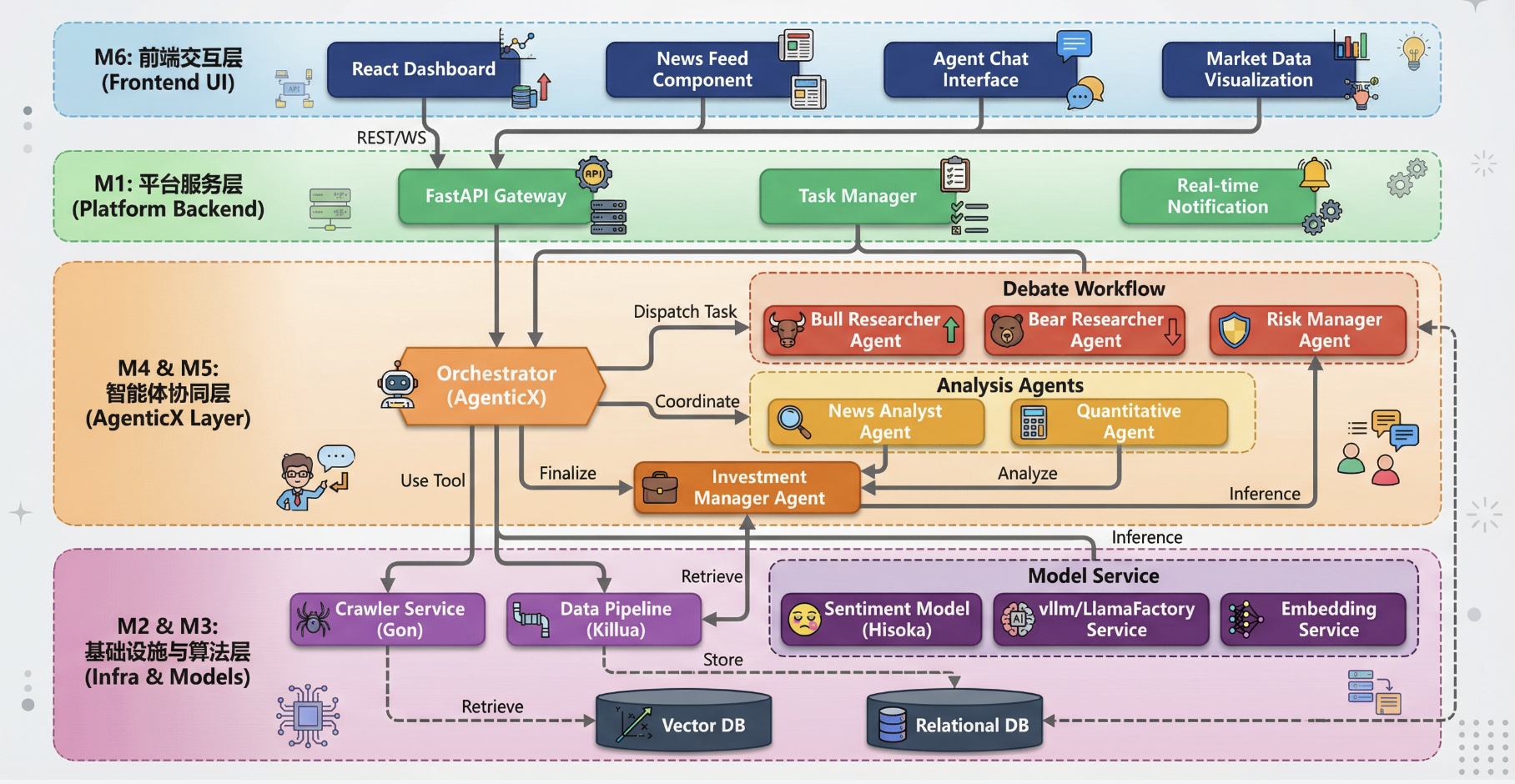
The system adopts a layered architecture design:
- M6 Frontend Interaction Layer: React + TypeScript + Shadcn UI
- M1 Platform Service Layer: FastAPI Gateway + Task Manager
- M4/M5 Agent Collaboration Layer: AgenticX Agent + Debate Workflow
- M2/M3 Infrastructure Layer: Crawler Service + LLM Service + Embedding
- M7-M11 Storage & Learning Layer: PostgreSQL + Milvus + Redis + ACE Framework
🚀 Quick Start
Prerequisites
- Python 3.11+
- Docker & Docker Compose
- (Optional) OpenAI API Key or local LLM
- Node.js 18+ (for frontend development)
1. Install AgenticX
cd /Users/damon/myWork/AgenticX
pip install -e .
2. Install Backend Dependencies
cd FinnewsHunter/backend
pip install -r requirements.txt
3. Configure Environment Variables
cd FinnewsHunter/backend
cp env.example .env
Edit .env file and fill in LLM API Key and other configurations
Multi-Provider LLM Configuration:
The system supports 5 LLM providers, at least one needs to be configured:
| Provider | Environment Variable | Registration URL | |----------|---------------------|------------------| | Bailian (Alibaba Cloud) | DASHSCOPEAPIKEY | https://dashscope.console.aliyun.com/ | | OpenAI | OPENAIAPIKEY | https://platform.openai.com/api-keys | | DeepSeek | DEEPSEEKAPIKEY | https://platform.deepseek.com/ | | Kimi (Moonshot) | MOONSHOTAPIKEY | https://platform.moonshot.cn/ | | Zhipu | ZHIPUAPIKEY | https://open.bigmodel.cn/ |
Example Configuration (Recommended: Bailian):
# Bailian (Alibaba Cloud) - Recommended, fast access in China
DASHSCOPEAPIKEY=sk-your-dashscope-key
DASHSCOPEBASEURL=https://dashscope.aliyuncs.com/compatible-mode/v1
BAILIAN_MODELS=qwen-plus,qwen-max,qwen-turbo
Optional: Other providers
OPENAIAPIKEY=sk-your-openai-key
DEEPSEEKAPIKEY=sk-your-deepseek-key
4. Start Base Services (PostgreSQL, Redis, Milvus)
cd FinnewsHunter
docker compose -f deploy/docker-compose.dev.yml up -d postgres redis milvus-etcd milvus-minio milvus-standalone
5. Initialize Database
cd FinnewsHunter/backend
python init_db.py
5.1 Initialize Stock Data (Optional, for stock search functionality)
cd FinnewsHunter/backend
python -m app.scripts.init_stocks
Will fetch all A-share data (approximately 5000+ stocks) from akshare and save to database
6. Start Backend API Service
cd FinnewsHunter/backend
uvicorn app.main:app --reload --host 0.0.0.0 --port 8000
7. Start Celery Worker and Beat (Auto Crawling)
# Open a new terminal
cd FinnewsHunter
docker compose -f deploy/docker-compose.dev.yml up -d celery-worker celery-beat
8. Start Frontend Service
# Open a new terminal
cd FinnewsHunter/frontend
npm install  # First time requires dependency installation
npm run dev
9. Access Application
- Frontend Interface: http://localhost:3000
- Backend API: http://localhost:8000
- API Documentation: http://localhost:8000/docs
🔄 Service Management
View All Service Status
cd FinnewsHunter
docker compose -f deploy/docker-compose.dev.yml ps
Restart All Services
cd FinnewsHunter
Restart Docker services (infrastructure + Celery)
docker compose -f deploy/docker-compose.dev.yml restart
If backend API is started independently, manually restart it
Press Ctrl+C to stop backend process, then rerun:
cd backend
uvicorn app.main:app --reload --host 0.0.0.0 --port 8000
Restart Specific Service
cd FinnewsHunter
Restart only Celery (after code changes)
docker compose -f deploy/docker-compose.dev.yml restart celery-worker celery-beat
Restart only database
docker compose -f deploy/docker-compose.dev.yml restart postgres
Restart only Redis
docker compose -f deploy/docker-compose.dev.yml restart redis
Stop All Services
cd FinnewsHunter
docker compose -f deploy/docker-compose.dev.yml down
View Logs
cd FinnewsHunter
View Celery Worker logs
docker compose -f deploy/docker-compose.dev.yml logs -f celery-worker
View Celery Beat logs (scheduled task dispatch)
docker compose -f deploy/docker-compose.dev.yml logs -f celery-beat
View PostgreSQL logs
docker compose -f deploy/docker-compose.dev.yml logs -f postgres
View all service logs
docker compose -f deploy/docker-compose.dev.yml logs -f
🗑️ Reset Database
Method 1: Use One-Click Reset Script (Recommended) ⭐
cd FinnewsHunter
Execute reset script
./resetalldata.sh
Enter yes to confirm
The script will automatically complete:
- ✅ Clear all news and task data in PostgreSQL
- ✅ Clear Redis cache
- ✅ Reset database auto-increment IDs (restart from 1)
- ✅ Clear Celery schedule files
- ✅ Automatically restart Celery services
- 5-10 minutes for the system to automatically re-crawl data
- Access frontend to view new data
Method 2: Manual Reset (Advanced)
Step 1: Clear PostgreSQL Data
# Enter PostgreSQL container
docker exec -it finnewspostgres psql -U finnews -d finnewsdb
Execute in PostgreSQL command line:
-- Clear news table
DELETE FROM news;
-- Clear task table DELETE FROM crawl_tasks;
-- Clear analysis table DELETE FROM analyses;
-- Reset auto-increment IDs ALTER SEQUENCE newsidseq RESTART WITH 1; ALTER SEQUENCE crawltasksid_seq RESTART WITH 1; ALTER SEQUENCE analysesidseq RESTART WITH 1;
-- Verify results (should all be 0) SELECT 'news table', COUNT(*) FROM news; SELECT 'crawltasks table', COUNT(*) FROM crawltasks; SELECT 'analyses table', COUNT(*) FROM analyses;
-- Exit \q
Step 2: Clear Redis Cache
cd FinnewsHunter
docker exec finnews_redis redis-cli FLUSHDB
Step 3: Clear Celery Schedule Files
cd FinnewsHunter/backend
rm -f celerybeat-schedule*
Step 4: Restart Celery Services
cd FinnewsHunter
docker compose -f deploy/docker-compose.dev.yml restart celery-worker celery-beat
Step 5: Verify Data Cleared
# Check news count (should be 0)
docker exec finnewspostgres psql -U finnews -d finnewsdb -c "SELECT COUNT(*) FROM news;"
Check Redis (should be 0 or very small)
docker exec finnews_redis redis-cli DBSIZE
Check if Celery has started crawling
docker compose -f deploy/docker-compose.dev.yml logs -f celery-beat
Should see 10 crawl tasks triggered per minute
Method 3: Use Python Script Reset
cd FinnewsHunter/backend
python reset_database.py
Enter yes to confirm
Method 4: Quick Manual Cleanup (One-Line Commands) 🔥
Use Case: When reset script doesn't work, this is the fastest method
cd FinnewsHunter
Step 1: Clear database tables
docker exec finnewspostgres psql -U finnews -d finnewsdb -c "DELETE FROM news; DELETE FROM crawl_tasks; DELETE FROM analyses;"
Step 2: Reset auto-increment IDs
docker exec finnewspostgres psql -U finnews -d finnewsdb -c "ALTER SEQUENCE newsidseq RESTART WITH 1; ALTER SEQUENCE crawltasksidseq RESTART WITH 1; ALTER SEQUENCE analysesid_seq RESTART WITH 1;"
Step 3: Clear Redis cache
docker exec finnews_redis redis-cli FLUSHDB
Step 4: Clear Celery schedule files
rm -f backend/celerybeat-schedule*
Step 5: Restart Celery services
docker compose -f deploy/docker-compose.dev.yml restart celery-worker celery-beat
Step 6: Verify cleared (should display 0)
docker exec finnewspostgres psql -U finnews -d finnewsdb -c "SELECT COUNT(*) FROM news;"
Immediately refresh browser after execution:
- Mac:
Command + Shift + R - Windows:
Ctrl + Shift + R
🖥️ Clear Frontend Cache (Important!)
After data is cleared, frontend may still display old data due to browser cache.
Method 1: Hard Refresh Browser (Recommended) ⭐
Mac System:
Press Command + Shift + R or Command + Option + RWindows/Linux System:
Press Ctrl + Shift + R or Ctrl + F5Method 2: Developer Tools Clear Cache
- Press
F12to open developer tools - Right-click the refresh button (next to address bar)
- Select "Empty Cache and Hard Reload"
Method 3: Clear Browser Cache
- Chrome/Edge:
Command + Shift + Delete (Mac) or Ctrl + Shift + Delete (Windows)
- Check "Cached images and files"
- Time range select "All time"
- Click "Clear data"
- After refreshing page, hard refresh again
Method 4: Restart Frontend Dev Server (Most Thorough)
# Press Ctrl+C in frontend terminal to stop service
Then restart
cd FinnewsHunter/frontend
npm run dev
📊 Data Recovery Timeline After Reset
| Time | Event | Expected Result | |------|-------|----------------| | 0 min | Execute reset script | Database cleared, Redis cleared | | 1 min | Celery Beat starts scheduling | 10 crawl tasks triggered | | 2-5 min | First batch of news saved | Database starts having data | | 5-10 min | All sources have data | Frontend can see 100+ news | | 30 min | Data continues growing | 500+ news | | 1 hour | Stable operation | 1000-2000 news |
Notes:
- Need to wait 5-10 minutes after reset to see new data
- Frontend must hard refresh (Command+Shift+R / Ctrl+Shift+R) to clear cache
- Don't reset frequently, affects system stability
- Execute reset command
- Immediately press
Command + Shift + R(Mac) orCtrl + Shift + R(Windows) in browser - Wait 5-10 minutes then refresh again to view new data
⚠️ Crawler Status Check
Check Which Sources Are Working
cd FinnewsHunter
View news count by source
docker exec finnewspostgres psql -U finnews -d finnewsdb -c "
SELECT source, COUNT(*) as count
FROM news
WHERE created_at > NOW() - INTERVAL '1 hour'
GROUP BY source
ORDER BY count DESC;
"
View recent crawl task status
docker exec finnewspostgres psql -U finnews -d finnewsdb -c "
SELECT source,
       crawled_count,
       saved_count,
       status,
       error_message
FROM crawl_tasks
WHERE created_at > NOW() - INTERVAL '10 minutes'
ORDER BY created_at DESC
LIMIT 20;
"
View Crawl Errors
cd FinnewsHunter
View ERROR logs
docker compose -f deploy/docker-compose.dev.yml logs celery-worker | grep ERROR
View specific source issues
docker compose -f deploy/docker-compose.dev.yml logs celery-worker | grep "jwview"
📚 User Guide
Auto Crawl Mode (Recommended) ⭐
System is configured with automatic crawling for 10 news sources:
- 🌐 Sina Finance
- 🐧 Tencent Finance
- 💰 Financial World
- 📊 Economic Observer
- 📈 Caijing.com
- 📉 21st Century Business Herald
- 📰 National Business Daily
- 🎯 Yicai
- 📧 NetEase Finance
- 💎 East Money
- ✅ Celery Beat automatically triggers crawling for all sources every 1 minute
- ✅ Automatic deduplication (URL level)
- ✅ Smart time filtering (keep news within 24 hours)
- ✅ Stock keyword filtering
- ✅ No manual operation needed
# View Celery Beat scheduling logs
cd FinnewsHunter
docker compose -f deploy/docker-compose.dev.yml logs -f celery-beat
View Celery Worker execution logs
docker compose -f deploy/docker-compose.dev.yml logs -f celery-worker
Manual Refresh (Get Latest Immediately)
Method 1: Via Frontend
- Visit http://localhost:3000/news
- Click the "🔄 Refresh Now" button in the top right
- System will immediately trigger crawling, data updates in about 2 minutes
# Force refresh Sina Finance curl -X POST "http://localhost:8000/api/v1/news/refresh?source=sina"
Force refresh all sources (need to call individually)
for source in sina tencent jwview eeo caijing jingji21 nbd yicai 163 eastmoney; do
  curl -X POST "http://localhost:8000/api/v1/news/refresh?source=$source"
  sleep 1
done
View News List
Method 1: Via Frontend (Recommended)
- Visit http://localhost:3000
- Homepage: View source statistics and latest news
- News Feed: Filter news by source and sentiment
- Batch selection support: Use checkboxes to select multiple news, supports Shift key range selection
- Batch operations: Select all/deselect all, batch delete, batch analyze
# Get latest news from all sources (200 items)
curl "http://localhost:8000/api/v1/news/latest?limit=200"
Get news from specific source
curl "http://localhost:8000/api/v1/news/latest?source=sina&limit=50"
Filter by sentiment (using old API)
curl "http://localhost:8000/api/v1/news/?sentiment=positive&limit=20"
Get all available news source list
curl "http://localhost:8000/api/v1/news/sources"
Batch Operations on News
Frontend Operations:
- Batch Selection:
- Batch Delete:
- Batch Analysis:
API Operations:
# Batch delete news curl -X POST "http://localhost:8000/api/v1/news/batch/delete" \   -H "Content-Type: application/json" \   -d '{"news_ids": [1, 2, 3]}'
Batch analyze news
curl -X POST "http://localhost:8000/api/v1/analysis/batch" \
  -H "Content-Type: application/json" \
  -d '{"news_ids": [1, 2, 3], "provider": "bailian", "model": "qwen-plus"}'
Analyze News
Method 1: Via Frontend
- Click "✨ Analyze" button on news card
- Wait 3-5 seconds to view analysis results
- Click news card to open detail drawer, view complete analysis content
# Analyze news with specified ID (using default model) curl -X POST http://localhost:8000/api/v1/analysis/news/1
Analyze news (specify model)
curl -X POST http://localhost:8000/api/v1/analysis/news/1 \
  -H "Content-Type: application/json" \
  -d '{"provider": "bailian", "model": "qwen-max"}'
View analysis results
curl http://localhost:8000/api/v1/analysis/1
Switch LLM Model
Frontend Operations:
- Click model selector in top right (shows current model name)
- Select different provider and model from dropdown menu
- Selection automatically saves, subsequent analyses will use new model
- 🔥 Bailian: qwen-plus, qwen-max, qwen-turbo, qwen-long
- 🤖 OpenAI: gpt-4, gpt-4-turbo, gpt-3.5-turbo
- 🧠 DeepSeek: deepseek-chat, deepseek-coder
- 🌙 Kimi: moonshot-v1-8k, moonshot-v1-32k, moonshot-v1-128k
- 🔮 Zhipu: glm-4, glm-4-plus, glm-4-air
curl http://localhost:8000/api/v1/llm/configSearch News
Frontend Operations:
- Enter keywords in top search box
- Supports search: title, content, stock code, source
- Matching keywords will be highlighted
- Search has 300ms debounce, automatically searches after input stops
- Search stock code:
600519(Kweichow Moutai) - Search keywords:
新能源(new energy),半导体(semiconductor) - Search source:
sina,eastmoney
View News Details
Frontend Operations:
- Click any news card
- Detail drawer slides out from right, displaying:
- Click "Copy Analysis Content" to copy analysis report in Markdown format
Stock K-Line Analysis
Frontend Operations:
- Visit http://localhost:3000/stocks/SH600519 (Kweichow Moutai example)
- Use top right search box to enter stock code or name (e.g.,
茅台(Moutai),600519) - Select time period: Daily K, 60min, 30min, 15min, 5min, 1min
- Chart supports:
API Operations:
# Get K-line data (daily, default 180 items)
curl "http://localhost:8000/api/v1/stocks/SH600519/kline?period=daily&limit=180"
Get minute K-line (60-minute line)
curl "http://localhost:8000/api/v1/stocks/SH600519/kline?period=60m&limit=200"
Search stocks
curl "http://localhost:8000/api/v1/stocks/search/realtime?q=茅台&limit=10"
View stock count in database
curl "http://localhost:8000/api/v1/stocks/count"
Filter by Source
Frontend Operations:
- Homepage (Dashboard)
- News Feed Page
API Operations:
# View Sina Finance news
curl "http://localhost:8000/api/v1/news/latest?source=sina&limit=50"
View National Business Daily news
curl "http://localhost:8000/api/v1/news/latest?source=nbd&limit=50"
View all sources
curl "http://localhost:8000/api/v1/news/latest?limit=200"
🏗️ Project Structure
FinnewsHunter/
├── backend/                    # Backend service
│   ├── app/
│   │   ├── agents/            # Agent definitions (NewsAnalyst, debate agents, etc.)
│   │   ├── api/v1/            # FastAPI routes
│   │   │   ├── analysis.py    # Analysis API (supports batch analysis)
│   │   │   ├── llm_config.py  # LLM config API
│   │   │   ├── news_v2.py     # News API (supports batch delete)
│   │   │   └── ...
│   │   ├── core/              # Core configuration (config, database, redis, neo4j)
│   │   ├── models/            # SQLAlchemy data models
│   │   ├── services/          # Business services
│   │   │   ├── llm_service.py      # LLM service (multi-provider support)
│   │   │   ├── analysis_service.py # Analysis service (async vectorization)
│   │   │   ├── embedding_service.py # Vectorization service (based on AgenticX BailianEmbeddingProvider)
│   │   │   └── stockdataservice.py # Stock data service
│   │   ├── storage/           # Storage wrapper
│   │   │   └── vector_storage.py # Milvus vector storage (based on AgenticX MilvusStorage)
│   │   ├── tasks/             # Celery tasks
│   │   └── tools/              # AgenticX tools (Crawler, Cleaner)
│   ├── tests/                 # Test and utility scripts
│   │   ├── checkmilvusdata.py           # Check Milvus vector storage data
│   │   ├── checknewsembedding_status.py # Check news vectorization status
│   │   └── manual_vectorize.py           # Manually vectorize specified news
│   ├── env.example            # Environment variable template
│   └── requirements.txt       # Python dependencies
├── frontend/                  # React frontend
│   └── src/
│       ├── components/        # Components
│       │   ├── ModelSelector.tsx    # LLM model selector
│       │   ├── NewsDetailDrawer.tsx # News detail drawer
│       │   └── HighlightText.tsx    # Keyword highlighting
│       ├── context/           # React Context
│       ├── hooks/             # Custom Hooks
│       │   └── useDebounce.ts # Debounce Hook
│       ├── layout/            # Layout components
│       └── pages/             # Page components
│           └── NewsListPage.tsx # News list page (supports batch operations)
├── deploy/                    # Deployment configuration
│   ├── docker-compose.dev.yml # Docker Compose configuration
│   ├── Dockerfile.celery     # Celery image build file
│   └── celery-entrypoint.sh  # Celery container startup script
├── conclusions/               # Module summary documentation
│   ├── backend/              # Backend module summaries
│   └── frontend/             # Frontend module summaries
└── .dev-docs/                 # Development documentation
🧪 Testing & Acceptance
MVP Acceptance Criteria
- [x] News crawling successful and saved to PostgreSQL
- [x] NewsAnalyst calls LLM to complete analysis
- [x] Analysis results include sentiment scores
- [x] Frontend can display news and analysis results
- [x] Support multi-provider LLM dynamic switching
- [x] News details display complete analysis content
- [x] Real-time search and filtering functionality
- [x] Batch selection, batch delete, batch analysis functionality
- [x] Vectorization and storage services based on AgenticX
- [x] Async vectorization, non-blocking analysis flow
Testing Process
- Start All Services
./start.sh- Check Docker Container Status
docker ps
# Should see: postgres, redis, milvus-standalone, milvus-etcd, milvus-minio- Test News Crawling
curl -X POST http://localhost:8000/api/v1/news/crawl \
     -H "Content-Type: application/json" \
     -d '{"source": "sina", "startpage": 1, "endpage": 1}'

   # Wait 5-10 seconds then check results
curl http://localhost:8000/api/v1/news/?limit=5- Test Agent Analysis
# Get first news ID
   NEWS_ID=$(curl -s http://localhost:8000/api/v1/news/?limit=1 | jq '.[0].id')

   # Trigger analysis
   curl -X POST http://localhost:8000/api/v1/analysis/news/$NEWS_ID

   # View analysis results
curl http://localhost:8000/api/v1/analysis/1- Test Frontend Interface
frontend/index.html
- Click "Crawl News" and wait for completion
- Select a news item and click "Analyze"
- Check if sentiment score is displayed
🔧 Troubleshooting
Issue 1: Database Connection Failed
Symptom: Backend startup error could not connect to database
Solution:
cd FinnewsHunter
Check if PostgreSQL is running
docker ps | grep postgres
View logs
docker compose -f deploy/docker-compose.dev.yml logs postgres
Restart container
docker compose -f deploy/docker-compose.dev.yml restart postgres
Wait 30 seconds then retry backend startup
Issue 2: Celery Tasks Not Executing
Symptom: Frontend shows 0 news count, no automatic crawling
Troubleshooting Steps:
cd FinnewsHunter
1. Check if Celery Worker is running
docker ps | grep celery
2. View Celery Beat logs (should see tasks triggered every minute)
docker compose -f deploy/docker-compose.dev.yml logs celery-beat --tail=100
3. View Celery Worker logs (check task execution)
docker compose -f deploy/docker-compose.dev.yml logs celery-worker --tail=100
4. Check Redis connection
docker exec finnews_redis redis-cli PING
Should return PONG
5. Restart Celery services
docker compose -f deploy/docker-compose.dev.yml restart celery-worker celery-beat
Issue 3: Crawling Failed (404 Error)
Symptom: Celery logs show 404 Client Error: Not Found
Cause: News website URL has changed
Solution:
# 1. Manually visit URL to verify if available
curl -I https://finance.caijing.com.cn/
2. If URL changed, update corresponding crawler configuration
Edit backend/app/tools/{source}_crawler.py
Update BASEURL and STOCKURL
3. Clear Python cache
cd FinnewsHunter/backend
find . -type d -name pycache -exec rm -rf {} + 2>/dev/null || true
4. Restart Celery
cd ..
docker compose -f deploy/docker-compose.dev.yml restart celery-worker celery-beat
Issue 4: Only Sina Finance Has Data
Symptom: Other 9 sources have no news
Possible Causes:
- Celery Beat configuration incomplete
- Crawler code has errors
- Website URL incorrect
cd FinnewsHunter
1. Check Celery Beat configuration
docker compose -f deploy/docker-compose.dev.yml logs celery-beat | grep "crawl-"
Should see 10 scheduled tasks (crawl-sina, crawl-tencent, ..., crawl-eastmoney)
2. Manually test single source crawling
docker exec -it finnewsceleryworker python -c "
from app.tools import getcrawlertool
crawler = getcrawlertool('nbd')  # Test National Business Daily
news = crawler.crawl()
print(f'Crawled {len(news)} news items')
"
3. View data volume by source in database
docker exec finnewspostgres psql -U finnews -d finnewsdb -c "
SELECT source, COUNT(*) as count
FROM news
GROUP BY source
ORDER BY count DESC;
"
4. If a source keeps failing, view detailed errors
docker compose -f deploy/docker-compose.dev.yml logs celery-worker | grep "ERROR"
Issue 5: LLM Call Failed
Symptom: Analysis functionality not working, error LLM Provider NOT provided
Solution:
cd FinnewsHunter/backend
1. Check if API Key is configured
grep -E "DASHSCOPEAPIKEY|OPENAIAPIKEY|DEEPSEEKAPIKEY" .env
2. Check if Base URL is correct (Bailian must configure)
grep DASHSCOPEBASEURL .env
Should be: https://dashscope.aliyuncs.com/compatible-mode/v1
3. Verify LLM config API is normal
curl http://localhost:8000/api/v1/llm/config | jq '.providers[].hasapikey'
At least one should return true
4. If using Bailian, ensure complete configuration
cat >> .env << EOF
DASHSCOPEAPIKEY=sk-your-key
DASHSCOPEBASEURL=https://dashscope.aliyuncs.com/compatible-mode/v1
BAILIAN_MODELS=qwen-plus,qwen-max
EOF
5. Restart backend service
Issue 6: Frontend Shows Blank or CORS Error
Symptom: Frontend cannot load data, browser Console shows CORS error
Solution:
# 1. Check backend CORS configuration
cd FinnewsHunter/backend
grep BACKENDCORSORIGINS .env
Should include http://localhost:3000
2. Check frontend API address configuration
cd ../frontend
cat .env
VITEAPIURL should be http://localhost:8000
3. Hard refresh browser
Chrome/Edge: Ctrl+Shift+R (Windows) or Cmd+Shift+R (Mac)
4. Restart frontend dev server
npm run dev
Issue 7: Milvus Connection Failed
Symptom: Vector search functionality not working
Solution:
cd FinnewsHunter
Milvus requires longer startup time (approximately 60 seconds)
docker compose -f deploy/docker-compose.dev.yml logs milvus-standalone
Check health status
docker inspect finnews_milvus | grep -A 10 Health
Restart Milvus related services
docker compose -f deploy/docker-compose.dev.yml restart milvus-etcd milvus-minio milvus-standalone
Issue 8: Data Statistics Inaccurate
Symptom: Homepage shows news count doesn't match actual
Solution:
# Use reset script to clear data and start fresh
cd FinnewsHunter
./resetalldata.sh
Common Debugging Commands
cd FinnewsHunter
View all container status
docker compose -f deploy/docker-compose.dev.yml ps
View complete logs for a service
docker compose -f deploy/docker-compose.dev.yml logs celery-worker --tail=500
Enter container for debugging
docker exec -it finnewsceleryworker bash
View database connection
docker exec finnewspostgres psql -U finnews -d finnewsdb -c "\conninfo"
View Redis connection
docker exec finnews_redis redis-cli INFO
Test network connectivity
docker exec finnewsceleryworker ping -c 3 postgres
⚡ Quick Reference (Common Commands)
Project Directory
cd FinnewsHunterOne-Click Operations
# Start all services
docker compose -f deploy/docker-compose.dev.yml up -d
Stop all services
docker compose -f deploy/docker-compose.dev.yml down
Restart Celery (after code updates)
docker compose -f deploy/docker-compose.dev.yml restart celery-worker celery-beat
Clear all data and start fresh
./resetalldata.sh
View Status
# Service status
docker compose -f deploy/docker-compose.dev.yml ps
News count
docker exec finnewspostgres psql -U finnews -d finnewsdb -c "SELECT source, COUNT(*) FROM news GROUP BY source;"
Task count
docker exec finnewspostgres psql -U finnews -d finnewsdb -c "SELECT status, COUNT(*) FROM crawl_tasks GROUP BY status;"
Redis cache
docker exec finnews_redis redis-cli DBSIZE
View Logs
# Celery Beat (scheduled dispatch)
docker compose -f deploy/docker-compose.dev.yml logs -f celery-beat
Celery Worker (task execution)
docker compose -f deploy/docker-compose.dev.yml logs -f celery-worker
PostgreSQL
docker compose -f deploy/docker-compose.dev.yml logs -f postgres
All services
docker compose -f deploy/docker-compose.dev.yml logs -f
Direct Access
- Frontend: http://localhost:3000
- Backend API: http://localhost:8000
- API Documentation: http://localhost:8000/docs
📊 Database Structure
News Table
- id, title, content, url, source
- publishtime, stockcodes
- sentimentscore, isembedded
Analysis Table
- id, newsid, agentname
- sentiment, sentiment_score, confidence
- analysisresult, structureddata
Stock Table
- id, code, name, industry, market
🛠️ Development Guide
Add New Crawler
- Inherit
BaseCrawlerclass - Implement
crawl()method - Register in
tools/init.py
# backend/app/tools/custom_crawler.py
from .crawler_base import BaseCrawler
class CustomCrawlerTool(BaseCrawler):     name = "custom_crawler"          def crawl(self, startpage, endpage):         # Implement crawling logic         pass
Use Enhanced Crawler (Optional)
For scenarios requiring JS rendering or intelligent content extraction, use enhanced crawler:
from app.tools.crawlerenhanced import crawlurl, EnhancedCrawler
Quick crawl single URL
article = crawl_url("https://finance.sina.com.cn/xxx", engine='auto')
print(article.to_markdown())
Get LLM message format (multimodal)
llmmessages = article.tollm_message()
Batch crawl (with cache)
crawler = EnhancedCrawler(use_cache=True)
articles = crawler.crawl_batch(urls, delay=1.0)
Supported Engines:
requests: Basic HTTP requests (default)playwright: JS rendering (requiresplaywright install chromium)jina: Jina Reader API (requiresJINAAPIKEYconfiguration)auto: Automatically select best engine
pip install markdownify readabilipy playwright
playwright install chromium  # Optional, for JS rendering
Add New Agent
- Inherit
Agentclass - Define role, goal, backstory
- Implement business methods
# backend/app/agents/risk_analyst.py
from agenticx import Agent
class RiskAnalystAgent(Agent):     def init(self, llm_provider):         super().init(             name="RiskAnalyst",             role="Risk Analyst",             goal="Assess investment risks",             llmprovider=llmprovider         )
Using AgenticX Components
FinnewsHunter deeply integrates AgenticX framework core components to avoid reinventing the wheel:
1. Embedding Service
The system uses agenticx.embeddings.BailianEmbeddingProvider as the core embedding engine:
from app.services.embedding_service import EmbeddingService
Synchronous interface (for sync contexts)
embedding_service = EmbeddingService()
vector = embeddingservice.embedtext("text content")
Asynchronous interface (recommended for async contexts)
vector = await embeddingservice.aembedtext("text content")
Batch processing (Provider handles internal batching)
vectors = embeddingservice.embedbatch(["text1", "text2", "text3"])Features:
- Redis caching support to avoid duplicate calculations
- Automatic text length limit handling (6000 characters)
- Both sync and async interfaces to avoid event loop conflicts
2. Vector Storage (Milvus)
The system uses agenticx.storage.vectordb_storages.milvus.MilvusStorage as the vector database:
from app.storage.vector_storage import VectorStorage
vector_storage = VectorStorage()
Store single vector
vectorstorage.storeembedding(
    news_id=1,
    text="news content",
    embedding=[0.1, 0.2, ...]
)
Batch storage
vectorstorage.storeembeddings_batch([
    {"news_id": 1, "text": "content1", "embedding": [...]},
    {"news_id": 2, "text": "content2", "embedding": [...]}
])
Similarity search
results = vectorstorage.searchsimilar(queryvector=[...], topk=10)
Get statistics (with query count fallback mechanism)
stats = vectorstorage.getstats()Features:
- Direct use of AgenticX MilvusStorage, no duplicate implementation
- Compatibility interface for simplified calls
- Query count fallback when
num_entitiesis inaccurate - Async operation support to avoid blocking
3. Async Embedding Best Practices
In async contexts (e.g., FastAPI routes), use async interfaces:
from app.services.embedding_service import EmbeddingService
from app.storage.vector_storage import VectorStorage
async def analyzenews(newsid: int, text: str):     embedding_service = EmbeddingService()     vector_storage = VectorStorage()          # Use async interface to avoid event loop conflicts     embedding = await embeddingservice.aembedtext(text)          # Store vector asynchronously in background (non-blocking)     asyncio.create_task(         vectorstorage.storeembedding(news_id, text, embedding)     )          # Continue with analysis logic...
Notes:
- In async contexts, use
aembedtext()instead ofembedtext() - Embedding operations run asynchronously in background, non-blocking
- Milvus
flush()operation is optimized, not executed by default (relies on auto-flush)
Multi-Agent Debate Architecture
FinnewsHunter's core feature is the bull-bear debate mechanism, through collaboration and confrontation of multiple professional agents, deeply mining investment value and risks of individual stocks.
Core Participants
| Agent | Role | Core Responsibilities | |-------|------|---------------------| | BullResearcher | Bull Researcher | Mine growth potential, core positives, valuation advantages | | BearResearcher | Bear Researcher | Identify downside risks, negative catalysts, refute optimistic expectations | | SearchAnalyst | Search Analyst | Dynamically acquire data (AkShare/BochaAI/browser search) | | InvestmentManager | Investment Manager | Host debate, evaluate argument quality, make final decisions |
Debate Data Flow Architecture
graph TD
    subgraph Debate Initiation
        Manager[Investment Manager] -->|Opening Statement| Orchestrator[Debate Orchestrator]
    end

    subgraph Multi-Round Debate
        Orchestrator -->|Round N| Bull[Bull Researcher]
        Bull -->|Statement + Data Request| Orchestrator
        Orchestrator -->|Trigger Search| Searcher[Search Analyst]

        Searcher -->|Financial Data| AkShare[AkShare]
        Searcher -->|Real-time News| BochaAI[BochaAI]
        Searcher -->|Web Search| Browser[Browser Engine]

        AkShare --> Context[Update Context]
        BochaAI --> Context
        Browser --> Context

        Context --> Orchestrator
        Orchestrator -->|Round N| Bear[Bear Researcher]
        Bear -->|Statement + Data Request| Orchestrator
    end

    subgraph Final Decision
        Orchestrator -->|Intelligent Data Supplement| Searcher
        Orchestrator -->|Comprehensive Judgment| Manager
        Manager -->|Investment Rating| Result[Final Report]
    end
Dynamic Search Mechanism
During debate, agents can request additional data through specific format:
[SEARCH: "Recent gross margin data" source:akshare]   -- Get financial data from AkShare
[SEARCH: "Industry competition analysis" source:bochaai]   -- Search news from BochaAI
[SEARCH: "Recent fund flows" source:akshare]       -- Get fund flows
[SEARCH: "Competitor comparison analysis"]                       -- Automatically select best data source
Supported Data Sources:
- AkShare: Financial indicators, K-line market data, fund flows, institutional holdings
- BochaAI: Real-time news search, analyst reports
- Browser Search: Baidu News, Sogou, 360 and other multi-engine search
- Knowledge Base: Historical news and analysis data
📈 Roadmap
Phase 1: MVP (Completed) ✅
- [x] Project infrastructure
- [x] Database models
- [x] Crawler tool refactoring (10 news sources)
- [x] LLM service integration
- [x] NewsAnalyst agent
- [x] FastAPI routes
- [x] React + TypeScript frontend
Phase 1.5: Multi-Provider LLM Support (Completed) ✅
- [x] Support 5 major LLM providers (Bailian, OpenAI, DeepSeek, Kimi, Zhipu)
- [x] Frontend dynamic model switching
- [x] LLM config API (
/api/v1/llm/config) - [x] News detail drawer (complete content + AI analysis)
- [x] Real-time search functionality (multi-dimensional + keyword highlighting)
- [x] Markdown rendering (supports tables, code blocks)
- [x] One-click copy analysis report
Phase 1.6: Stock Analysis & Enhanced Crawler (Completed) ✅
- [x] Stock K-line charts (integrated akshare + klinecharts)
- [x] Multi-period support (Daily K/60min/30min/15min/5min/1min)
- [x] Stock search (code/name fuzzy query, pre-loaded 5000+ A-shares)
- [x] Enhanced crawler module
Phase 1.7: AgenticX Deep Integration & Batch Operations (Completed) ✅
- [x] Migrated to AgenticX BailianEmbeddingProvider (removed redundant batch processing logic)
- [x] Migrated to AgenticX MilvusStorage (simplified storage wrapper, removed duplicate code)
- [x] Async vectorization interfaces (aembedtext/aembedbatch), avoid event loop conflicts
- [x] Background async vectorization, non-blocking analysis flow
- [x] Milvus statistics optimization (query count fallback mechanism)
- [x] Frontend batch selection functionality (checkboxes + Shift range selection)
- [x] Batch delete news functionality
- [x] Batch analyze news functionality (with progress display and result statistics)
- [x] Docker Compose optimization (Celery image build, improved startup performance)
Phase 2: Multi-Agent Debate (Completed) ✅
- [x] BullResearcher & BearResearcher agents
- [x] SearchAnalyst search analyst (dynamic data acquisition)
- [x] InvestmentManager investment manager decision
- [x] Debate orchestrator (DebateOrchestrator)
- [x] Dynamic search mechanism (on-demand data acquisition during debate)
- [x] Three debate modes: parallel analysis, real-time debate, quick analysis
- [ ] Real-time WebSocket push (in progress)
- [ ] Agent execution trace visualization (in progress)
Phase 3: Knowledge Enhancement (Planned)
- [ ] Financial knowledge graph (Neo4j)
- [ ] Agent memory system
- [ ] GraphRetriever graph retrieval
Phase 4: Self-Evolution (Planned)
- [ ] ACE framework integration
- [ ] Investment strategy Playbook
- [ ] Decision effectiveness evaluation and learning
📄 License
This project follows the AgenticX license.
🙏 Acknowledgments
- AgenticX - Multi-agent framework
- FastAPI - Web framework
- Milvus - Vector database
- Alibaba Cloud Bailian - LLM service
- Shadcn UI - Frontend component library
⭐ Star History
If you find this project helpful, please give it a Star ⭐️!
Built with ❤️ using AgenticX


