
Deploys VMs + k3s cluster + cloud controllers
Kloud3s
K3S Cluster Deployer. Simple bash script which spins up VMs in GCP/DigitalOcean, installs k3s on them and downloads kubeconfig.
Perfect for POCs and other testing whenever you need a real (instead of minikube or kind) K8s cluster quickly.
Getting Started
Please follow the instructions below depending on the cloud provider you want to use.
DigitalOcean
Prerequisites
For DigitalOcean, the only thing you need is token (How to get token) and ssh key fingerprints. DigitalOcean CLI is not required. Simply paste your token on line 7:
# Paste your DO token below
doapitoken="""ssh_keys": ["8b:f9:xx:xx:xx:xx:xx:xx:xx:xx:xx:xx:xx:xx:xx:xx"],Usage
If you wish not to overwrite your existing kubeconfig (which script does by default), set loadkubeconfig to false (line 9 in k3s_deployer.sh)
Simply execute
./k3s_deployer.shOn DigitalOcean process takes around 2 minutes.
Google Cloud
Prerequisites
In order to use 60sk3s with Google Cloud, you need to have gcloud CLI installed (How to do it) and preferably default zone and project set. You can do that by executing:
gcloud auth login
gcloud config set compute/region europe-west4-a
gcloud config set core/project my-project
Just keep in mind that you need to put it in format username:yoursshkey. So if You do $cat youridrsa.pub at the end there will be something like john@host, so then your metadata parameter should look like:
--metadata=ssh-keys="john:ssh-rsa AAAAB3Nz[...]ktk/HB3 john@host" \Usage
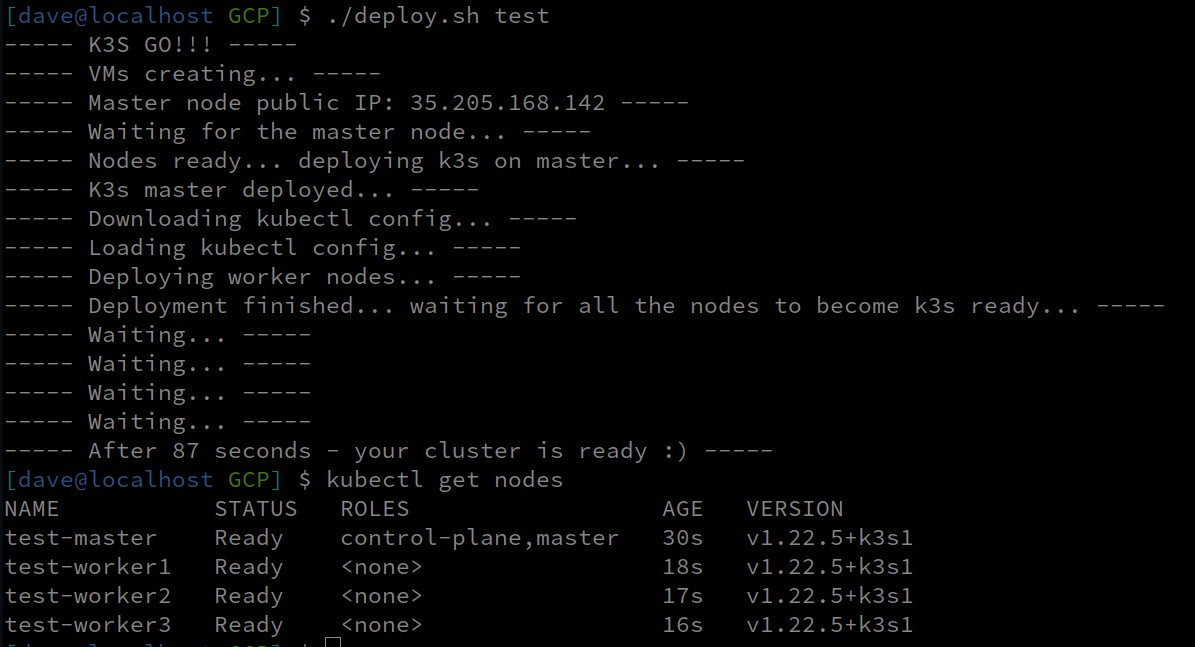
Execute:
./deployer.sh [cluster_name]To destroy the cluster:
./deployer.sh [cluster_name] deleteOn Google Cloud process takes less than 60 seconds.
Contributing
Simply raise a GitHub issue or send a PR.
License
This project is licensed under the GPL-3.0 license - see the LICENSE.md file for details


