
The norepeat package contains some magical function, tools
norepeat
The norepeat package contains some magical function, it's my personal tools collection...
Installation
You can install the Real Python Feed Reader from PyPI:
pip install norepeatnorepeat package (DEBUG)
https://pypi.org/project/norepeat/1.0.0/TEST:
- python3 setup.py sdist bdist_wheel
- pip install -i https://test.pypi.org/simple/ norepeat==1.0.0
- python -u main.py -h -a > a.txt
- python3 setup.py sdist bdist_wheel
DOC
1.Count a project sum of codes number
norepeat countcodenums -husage: countcodenums [-h] [-p PATH] [-t TYPE]
Count summary codes lines/统计代码行数 Eg: norepeat countcodenums -p=project -t=py
optional arguments: -h, --help show this help message and exit -p PATH, --path PATH file/directory path -t TYPE, --type TYPE file type
2.Generate markdown menu automatically
norepeat genmarkdownmenu -husage: genmarkdownmenu [-h] [-n NAME] [-p PREFIX]
Generate markdown Menu(TOC(Table of Content)) automatically 生成Markdown TOC目录结构, 对###三层可以增加自动序号 Eg: norepeat genmarkdownmenu -n=sample.md OR
then you will get a sample_back.md with contents sample_back.md is new generated file including menu
optional arguments: -h, --help show this help message and exit -n NAME, --name NAME file name -p PREFIX, --prefix PREFIX auto generate num prefix for menu
3.Merge all dirs files to a same directory named 'merge'
norepeat merge_dir -husage: merge_dir [-h] [-p PATH]
Merge all dirs files to a same directory named 'merge' 合并迭代所有目录文件夹, 将全部文件合并到merge文件夹下 Eg: norepeat split_dir -p=test before: dir txt txt2 c.txt a.txt b.txt png a.png b.png after: dir merge a.txt b.txt c.txt a.png b.png
optional arguments: -h, --help show this help message and exit -p PATH, --path PATH dir path
4.Split files to a new directory for same type
norepeat split_dir -husage: split_dir [-h] [-p PATH] [-r REMOVE]
Split files to a new directory for same type 根据文件类型分离目录下文件到不同文件夹 Eg: norepeat split_dir -p=test before: dir a.txt b.txt a.png b.png after: dir txt a.txt b.txt png a.png b.png
optional arguments: -h, --help show this help message and exit -p PATH, --path PATH dir path -r REMOVE, --remove REMOVE if remove src files, default is No
5.Rename multiple file names
norepeat rename_file -husage: renamefile [-h] [-d DIRPATH] [-p PREFIX] [-s SUFFIX] [-r REMOVE] [-i ID]
Rename multiple file names 批量重命名 Eg: norepeat rename_file -d=test -p=test -s=end -r=true -i=true before: dir a.txt b.txt after: dir testaend1.txt testbend1.txt
optional arguments: -h, --help show this help message and exit -d DIRPATH, --dirpath DIR_PATH directory path -p PREFIX, --prefix PREFIX new file name prefix -s SUFFIX, --suffix SUFFIX new file name suffix -r REMOVE, --remove REMOVE new file name with removing src name -i ID, --id ID new file name need id
6.Download http image
norepeat download_img -husage: download_img [-h] [-u URL] [-n NAME]
Download image to current directory 下载网络图片到本地目录 Eg: norepeat download_img -u=https://test.png -n=test.png
optional arguments: -h, --help show this help message and exit -u URL, --url URL img url -n NAME, --name NAME image name
7.Compare dirs files
norepeat diff_file -husage: difffile [-h] [-p1 PATH1] [-p2 PATH2] [-d1 DIRPATH1] [-d2 DIR_PATH2]
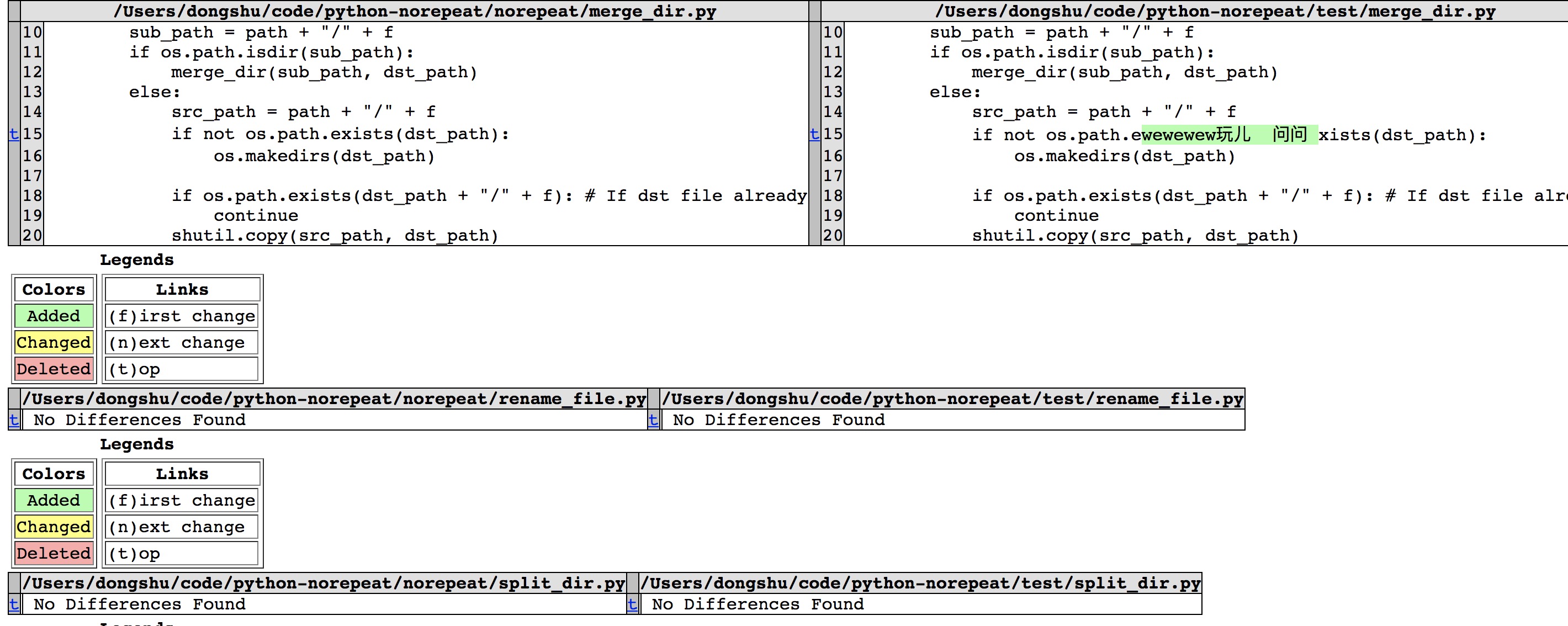
Compare two files 对比两个文件差异 Eg: norepeat diff_file -p1=a.md -p2=b.md Compare all files that have same name in two dirs including recursive subdirs 对比迭代所有文件夹下重名文件内容差异(可以跨文件目录搜索文件, 打包输出到一个result文件) Eg: norepeat diff_file -d1=python-norepeat/norepeat/ -d2=python-norepeat/test/
optional arguments: -h, --help show this help message and exit -p1 PATH1, --path1 PATH1 file path -p2 PATH2, --path2 PATH2 file path -d1 DIRPATH1, --dirpath1 DIR_PATH1 dir path -d2 DIRPATH2, --dirpath2 DIR_PATH2 dir path
result:
8.Spell check
norepeat spell_check -husage: spell_check [-h] [-p PATH]
It's used to check en-US word typo in project spell-check用来检查项目中英文单词拼写问题 Eg: norepeat spell_check -p=test output: spellcheckignore.txt : ignore checking words spellcheckwrong.txt : wrong spell words
optional arguments: -h, --help show this help message and exit -p PATH, --path PATH directory path


