
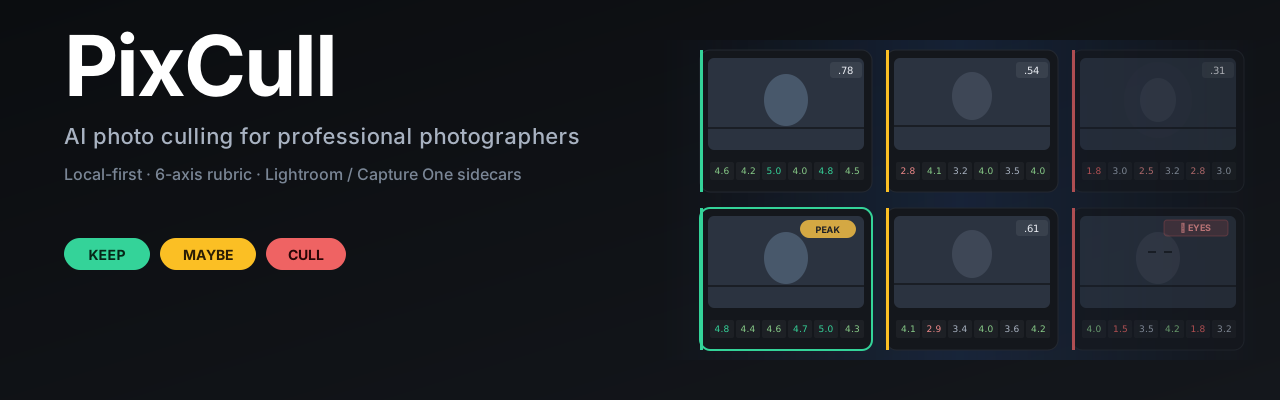
Local-first AI photo culling for professional photographers — 6-axis rubric, XMP/IPTC export, Lightroom & Capture One ready.








English · 简体中文 · 日本語 (in-app) · ModelScope · Releases
Local-first AI culling for working photographers.
Six calibrated axes · style clone (CLIP) · LAN multi-shooter sync ·
tethered live scoring · client share links + QR · Lr/C1 round-trip.
No photo ever leaves your disk.
v0.9 is in flight. Hero reveal · signature soft-bounce motion ·
brand identity refresh · ⌘K command palette already shipped (4 / 13).
Full charter at docs/ROADMAP-v0.9-charter.md.
What's new
v2.14 — **real-data learning: de-stub the "moment" axis so it can actually be learned** (see docs/ROADMAP-v2.14-charter.md + docs/DESIGN-AUDIT-2030Q2.md). The audit found the "moment" axis — the decisive-moment axis the product most loudly markets — was a constant 0.5 placeholder for every photo in fusion, plus two of its three rubric checks always returned None. A constant feature carries zero information, so the rescorer could never learn it. Now moment_score is a real signal where one honestly exists (wedding-moment confidence; face smile/eyes), left neutral where no signal exists (landscapes unchanged); emotion_present is evaluated from wedding-moment confidence and the face smile blendshape; and actionatpeak now resolves from the burst-peak ranker — within a real burst, the crowned frame is the captured action moment (singletons honestly stay unscored). The once-constant "moment" axis is finally a learnable, non-degenerate feature. An end-to-end A/B regression caught a latent NaN→1.0 bug (a pandas None→NaN slipped past an is None check and clamped score_final to 1.0 = always-keep for every no-signal frame) — now fixed and guarded by a test. The 400-sample real-label training session + flipping the rescorer to adjudicate mode is owner-gated (fabricated labels poison the model — the RESCORER-V3 lesson). Also wires axis-aware personalization: once you have ≥50 corrections, fusion's per-axis weights now tilt toward the axes you demonstrably value (a composition-lover's runs reward composition-strong frames and demote weak ones), not just a global threshold nudge — clamped to a gentle ±2× and a no-op without a profile (generic runs stay byte-identical, verified by an A/B regression). Adds an aerial scene for DJI/drone footage: detected deterministically from the drone camera's EXIF model code (DJI FC####; the Mavic 2 Pro/3's Hasselblad L1D-20c/L2D-20c) — matching the model, not the make, so a genuine Hasselblad body isn't mistaken for a drone — with a DJI_ filename fallback. Non-drone frames are untouched (16 real aerials → aerial, 10 Canon frames byte-identical in an A/B).
v2.13 — root-caused the "screenshot hang" and fixed a real UI bug (see docs/ROADMAP-v2.13-charter.md). The v2.12 "body-not-delivered to headless chromium" theory was wrong: the similarity slider simply never mounted — render() only repaints the grid, never the sidebar #viewToggles group that the slider lives in, and nothing called buildViewToggles() after the fold toggle (this reproduces in a real browser, not just headless). Fixed, then an adversarial review pass swept the same bug class across the frontend and fixed 8 more: preset-apply / ⌘K-reset / "reset all filters" / Smart-Collection restore all left sidebar pills visually stale (and "reset all" was silently keeping face/location/burst filters active; Smart- Collection restore's window.render() was a dead no-op that never repainted at all). The same dead-window.render() pattern also left Selects mode (⌘1) completely inert — it set the filter sentinel but never re-rendered, and the "keep + maybe only" filter was never actually wired into render(); it now filters for real, with a brass top-rule cue. Plus a module-level debounce fix + detached-node guards. A new DRY helper _rebuildFilterControls() keeps the sidebar in sync with filterState.
v2.12 — explanation goes one level deeper + local discoverability metrics (see docs/ROADMAP-v2.12-charter.md). The verdict glass box no longer just names the weakest axis — it says why it's low, mapped from the row's own signals ("光线偏低 · 高光过曝 12%", "构图偏低 · 地平线倾斜 5°", "主体偏低 · 无明确主体"). And the transparency tools now record local-only usage counts (localStorage.pixcull_metrics, never sent anywhere) so you can see whether near-dup / Scenes / glass box actually get used. (The deferred slider/face-Close-ups screenshots are best captured locally — the headless capture is killed by the dev host; the features themselves are verified.)
v2.11 — discoverability + explanation for the v2.9/v2.10 transparency features (see docs/ROADMAP-v2.11-charter.md / docs/DESIGN-AUDIT-2030Q1.md). The near-dup fold + Scenes toggles were buried in a burst-only sidebar group that **vanished on burst-less runs — they now live in an always-visible 「整理 · 折叠」** group, so the tools are findable on every run (this also un-broke the similarity slider, whose CSS had been mis-scoped since v2.9). A one-time coachmark introduces the transparency trio, and the verdict glass box's one-liner is now a **per-axis driver** — "构图 4.8★ 撑分,光线 2.5★ 拖后腿" straight from the rubric.
v2.10 — polish on the v2.9 transparency slices: Scenes now also renders inline section headers in the grid (time-ordered, header per scene — not just the navigator strip), and a **face Close-up click locates that face on the main photo** (a pulsing box maps the crop back onto the full frame). Small-batch grids (≤200) get the inline sections; larger keep the navigator.
v2.9 — transparency + content-first viewing (the deferred competitor patterns from the v2.8 reflection — see docs/ROADMAP-v2.9-charter.md and docs/DESIGN-AUDIT-2029Q3.md): a similarity slider turns the near-dup fold from a fixed-threshold black box into a glass box — drag 0.80–0.99 and the grouping re-folds live (Peakto-style) · a face Close-ups rail in the lightbox shows a zoomed crop of every detected face so you can check eyes / expression without manual zoom (Narrative Select) · a Scenes navigator segments a shoot by capture-time gaps (adaptive median+MAD) into a time-grouped narrative · a verdict glass box makes the inspector's default read a single line — "why this decision" — and folds the per-axis breakdown behind one tap (progressive disclosure).
v2.8 — UI/UX subtraction + colour-system pass: grid cards shed the badge wall, decision badges go outline (not solid fills), the lightbox gains a discoverable "zen" toggle (i key / button → photo claims the full viewport), header stats + toolbar move to progressive disclosure / grouping, and the palette becomes an OKLCH three-variable system (base / accent / contrast → relative-colour-derived surfaces, with a hex fallback for older engines). Two lightbox freeze root-causes fixed. Editorial restraint after Linear / Narrative Select — see docs/DESIGN-REFLECTION-v2.8.md.
v2.7 — four intelligence slices: bilingual reel captions (zh + en, locale-selected) · cross-shoot dedup (pixcull dedup-across — the same frame recurring across separate sessions) · video duplicate-frame trimming (pixcull trim-dupes — dHash near-static runs) · self-hosted VLM ONNX (BLIP → onnxruntime; real-export captions match transformers, no transformers needed at inference).
v2.6 — CLIP visual near-duplicate fold (catches the re-shot composition that time-bucketed bursts miss; ≈N badge → side-by-side compare) + lightbox- freeze & thumbnail-starvation stability fixes.
v2.5 — single-file frontend split into a build artifact (templates/src + make results-html) · contact-sheet / client-proof PDF export (pixcull contact-sheet).
v2.4 — intelligence + workflow: personalisation-from-corrections (threshold shift learned from your edits) · keyboard-first cull loop · natural-language semantic search (CLIP) · audio-threshold calibration (laughter recall 0.25→0.85) · burst "collapse to peak" + ⧉N stack · true VLM best-frame caption (opt-in BLIP).
v2.0–v2.3 — video culling + reel pipeline (temporal scoring / shake-blur cull / audio-event tagging / GoPro·DJI GPMF / reel auto-assembly + export presets) · editorial-warm rebrand (espresso + brass, vendored Geist).
v1.0 — learned rescorer · bias-audit dashboard · per-axis attribution heatmap.
v0.9 (in flight) — Brand identity refresh (signature gradient
- logo redo + serif accent) · Hero reveal "first 2 seconds" signature
docs/ROADMAP-v0.9-charter.md.
v0.8 — i18n 中 / EN / 日 · LAN collaboration (event token + 5s polling + conflict markers) · style clone V2 (CLIP embedding centroid) · short links + QR + share-URL modal · structured CSV / JSON export (annotations + style distances joined) · docs/ROADMAP-v0.8-charter.md.
v0.7 — A/B compare modal redesign · annotation rubric modal redesign · 5k+ photo stability (IndexedDB adapter) · Loupe RGB readout · Inspector mobile bottom-sheet · view-preset v2 · /share/<run>/<token> · style clone V1 · tethered live · Sparkle auto-update infra · /history. See docs/RELEASE_NOTES-v0.7.md.
Why PixCull
A 1,500-frame wedding takes a human ~6 hours to cull. AI-assist tools exist, but the popular ones make three trade-offs working photographers shouldn't have to swallow:
- They upload your photos. Wedding contracts and journalism NDAs
- They give you a score, not a reason. A single 0..1 number tells
- They live outside your tooling. Lightroom, Capture One, Photo
PixCull is the alternative that flips all three:
- Local-first. RAW decode, scoring, faces, GPS — everything runs
- 6-axis rubric. Every frame gets stars on technical, subject,
- Sidecar-native. Verdicts ship as XMP files Lightroom and
Who it helps
- Wedding & event photographers shooting 1,000+ frames a day who
- Sports / action shooters running tethered to Lightroom — PixCull
- Photojournalists under embargo or IP contract who literally
- Studios with second shooters who need to merge coverage of the
- Wildlife / landscape photographers who shoot bursts of the same
- Self-taught photographers who want the tool to explain
What you get today
- 6-axis rubric scoring. Technical, subject, composition, light,
- Per-genre verticals. Wedding · wildlife · sports · landscape ·
- V20 advice envelope. Every photo carries a short verdict, a
- Local face clustering. InsightFace ArcFace embeddings →
- GPS location clustering. Haversine DBSCAN groups photos by
- Burst-peak ranking. Sub-second bursts get a calibrated peak
- Cull-reason taxonomy. When you cull, optionally tag why —
focusmiss, eyesclosed, motion_blur, framing,
duplicate, exposure, other. Powers a filter pill and
builds a richer training signal.
- Similar-photos lookup. Composite signature (burst-cluster +
- Free-pick A/B compare. Click ⇆ on any two photos →
- 1:1 focus check. Click any photo in the lightbox to pixel-
- XMP / IPTC / gallery export. XMP sidecars for Lightroom &
- iOS swipe companion. SwiftUI app for swipe-style triage on
/api/v1/ namespace.
- Lr / Capture One tether mode. Point it at the tether
scores.csv survives Ctrl-C.
- Multi-machine sync. Symlink-based folder mirror over
- Active-learning queue. The next photos most worth labeling,
- Multi-user profiles. Studio with two shooters? Each user has
Why it's different from a generic AI culling app
| | PixCull | typical SaaS culling | Lightroom AI Select | |---|---|---|---| | Photos leave your disk | No | Yes (upload required) | No, but vendor-locked | | Scoring rationale | 6-axis stars + canon citations | Single 0..1 score | "Best of this group" | | Workflow integration | XMP sidecars + Lr plugin + iOS + tether | Web app only | Lightroom only | | Per-genre tuning | 9 verticals + extensible | One model | Hidden | | Open source | MIT | Closed | Closed, subscription | | Active learning | Built-in | Closed re-train cycle | None visible | | Face library across runs | Yes (V22.2) | Per-batch | Per-catalog | | Burst peak picker | Yes | Yes | Yes (Stack) | | Cull-reason taxonomy | Yes (taxonomy + filter) | No | No | | 1:1 focus check + sync | Lightbox + compare | Limited | Yes | | Hackable | Plain Python + plain JS | No | No |
Screenshots
**Real product UI captured against a 200-photo Canon EOS card from
2022(/100CANON/3J0A8133.JPG–3J0A8332.JPG),mostly coastal /
landscape / architecture frames.** Pipeline ran end-to-end:
200 张 → keep 104, maybe 1, cull 95, 178 burst clusters. Every
screenshot below is the live page rendered from that real run
(/tmp/pixcull_demo/realdemo01/)—not a mockup or template-skeleton.
>
新手指南: 完整的"从安装到选完 200 张照片"操作流程见
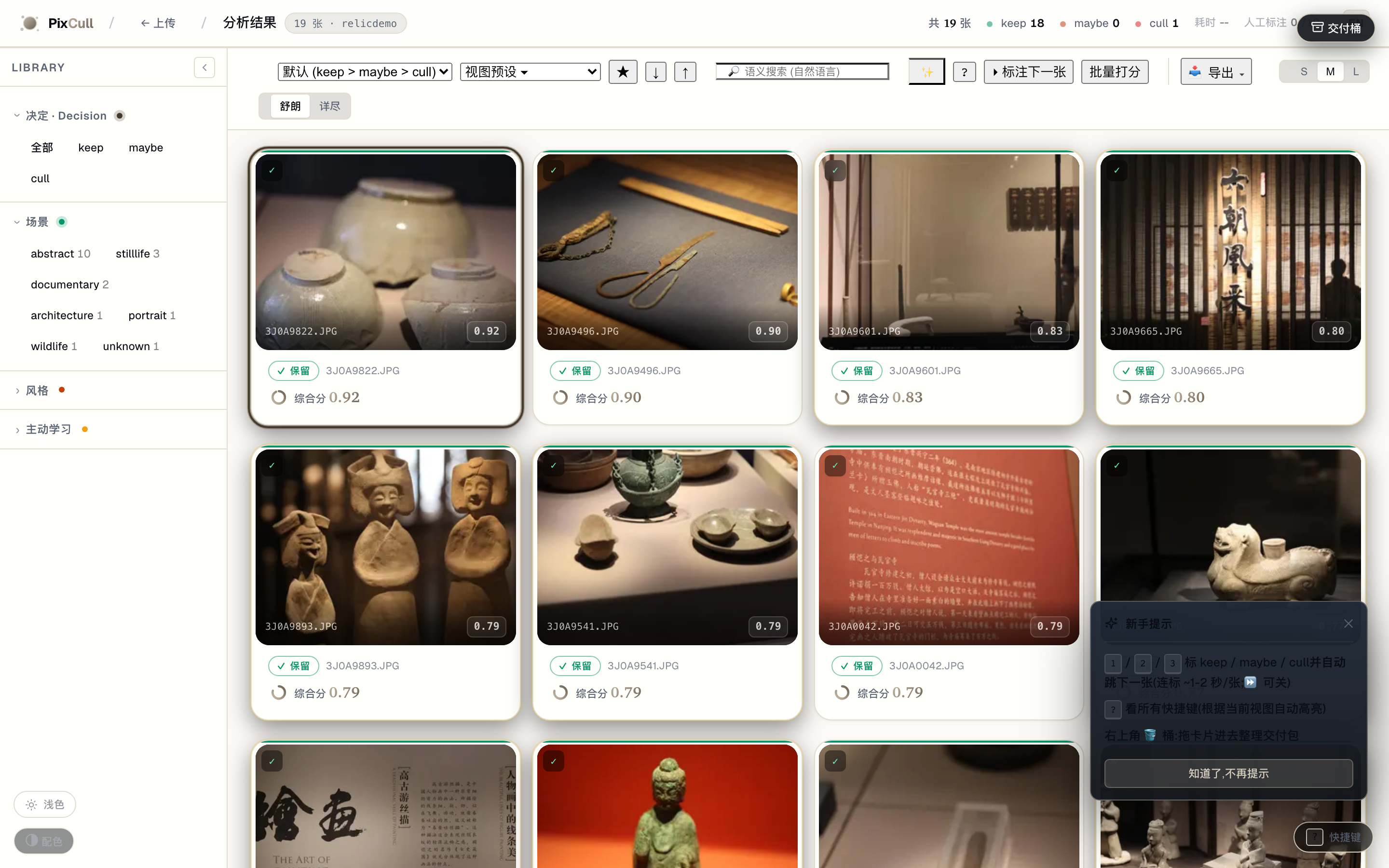
docs/USER-GUIDE.md。The culling surface
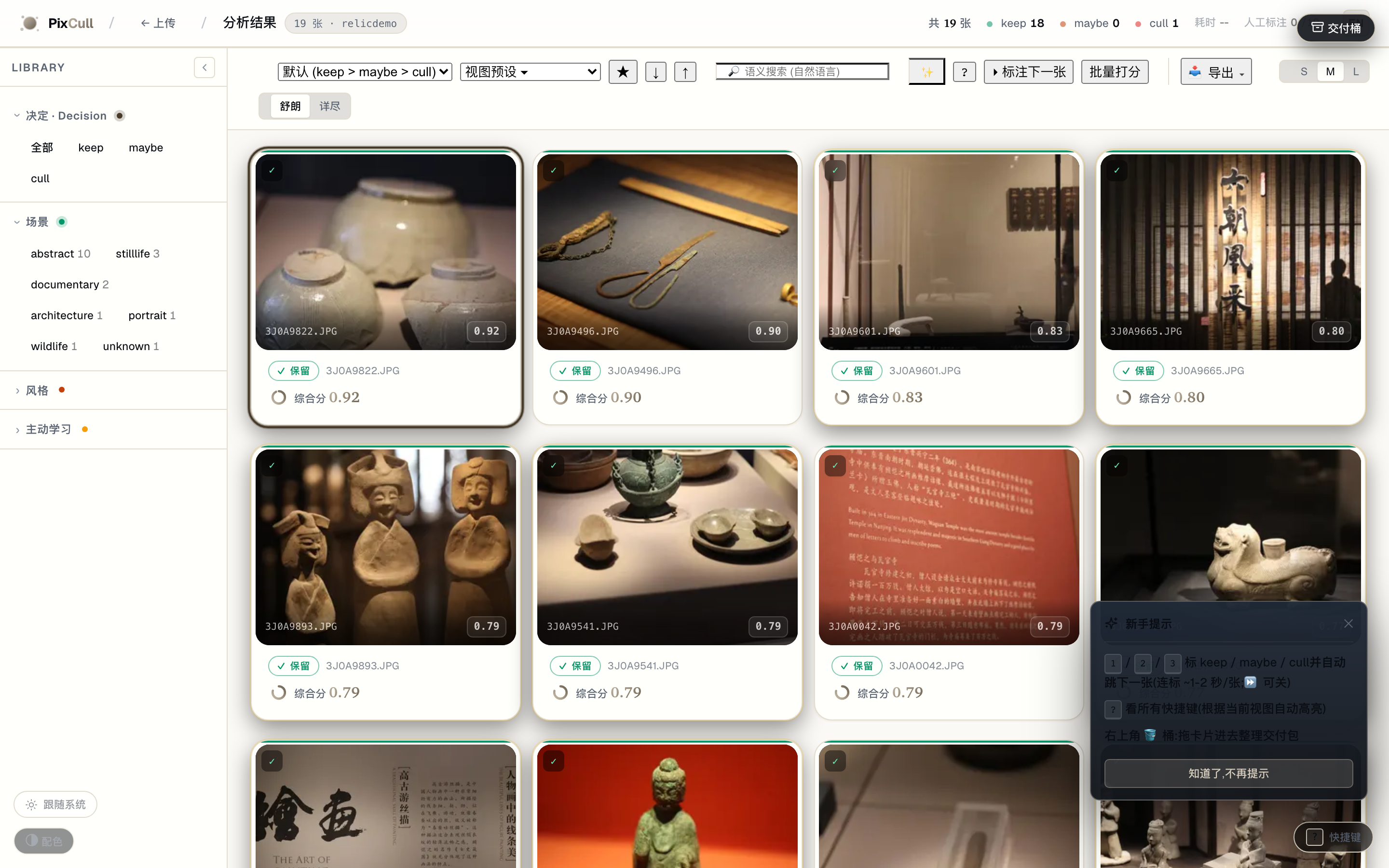
Drag a folder of JPG / RAW / HEIC into the upload page, pick a vertical, and you get this back. Each card carries a decision badge (keep / maybe / cull), a final composite score, the 6-axis rubric stars, the detected scene + style chips, and the V20 advice one-liner. The colored left edge is a glanceable decision indicator.
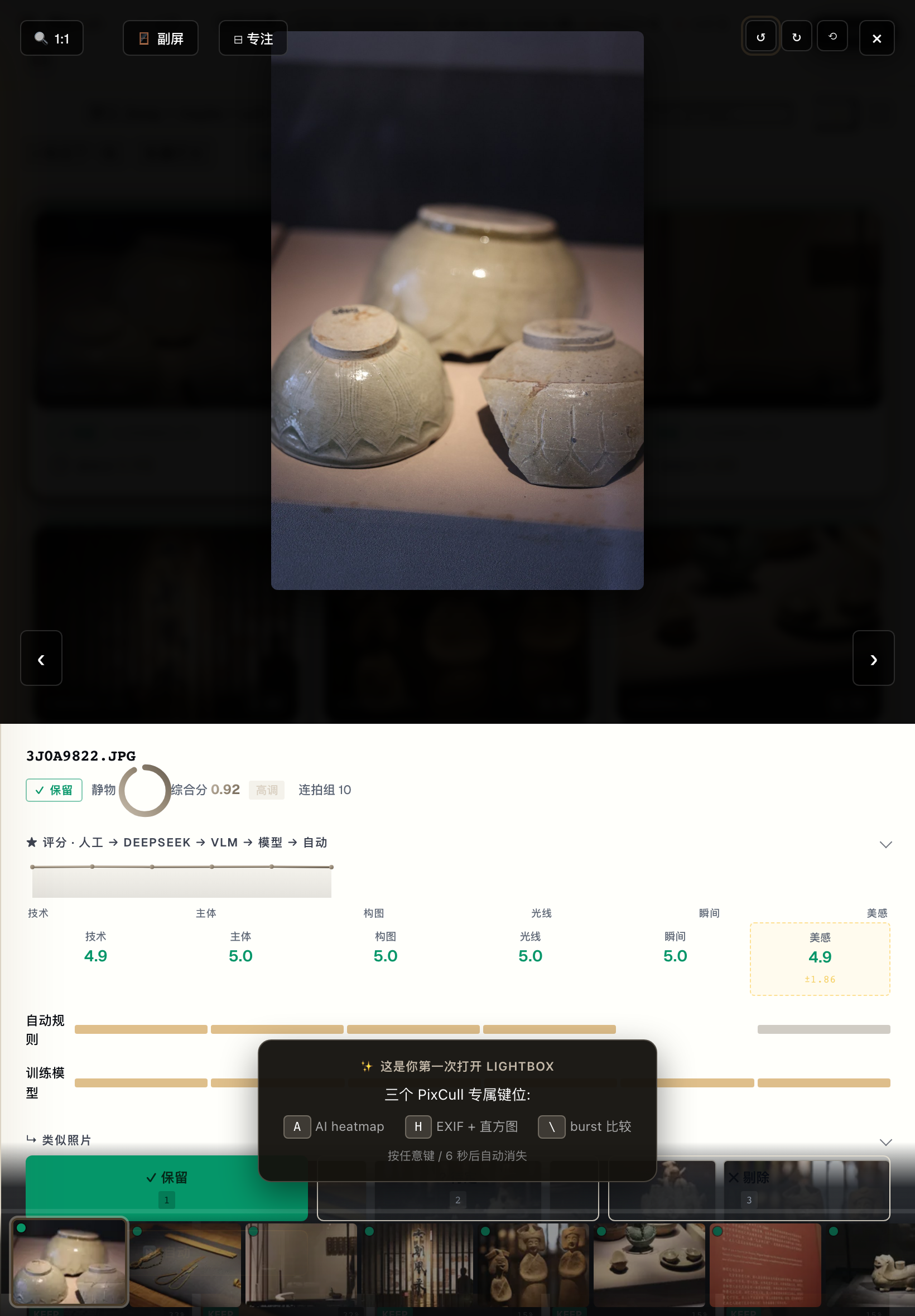
Lightbox with V20 advice + sticky decision toolbar
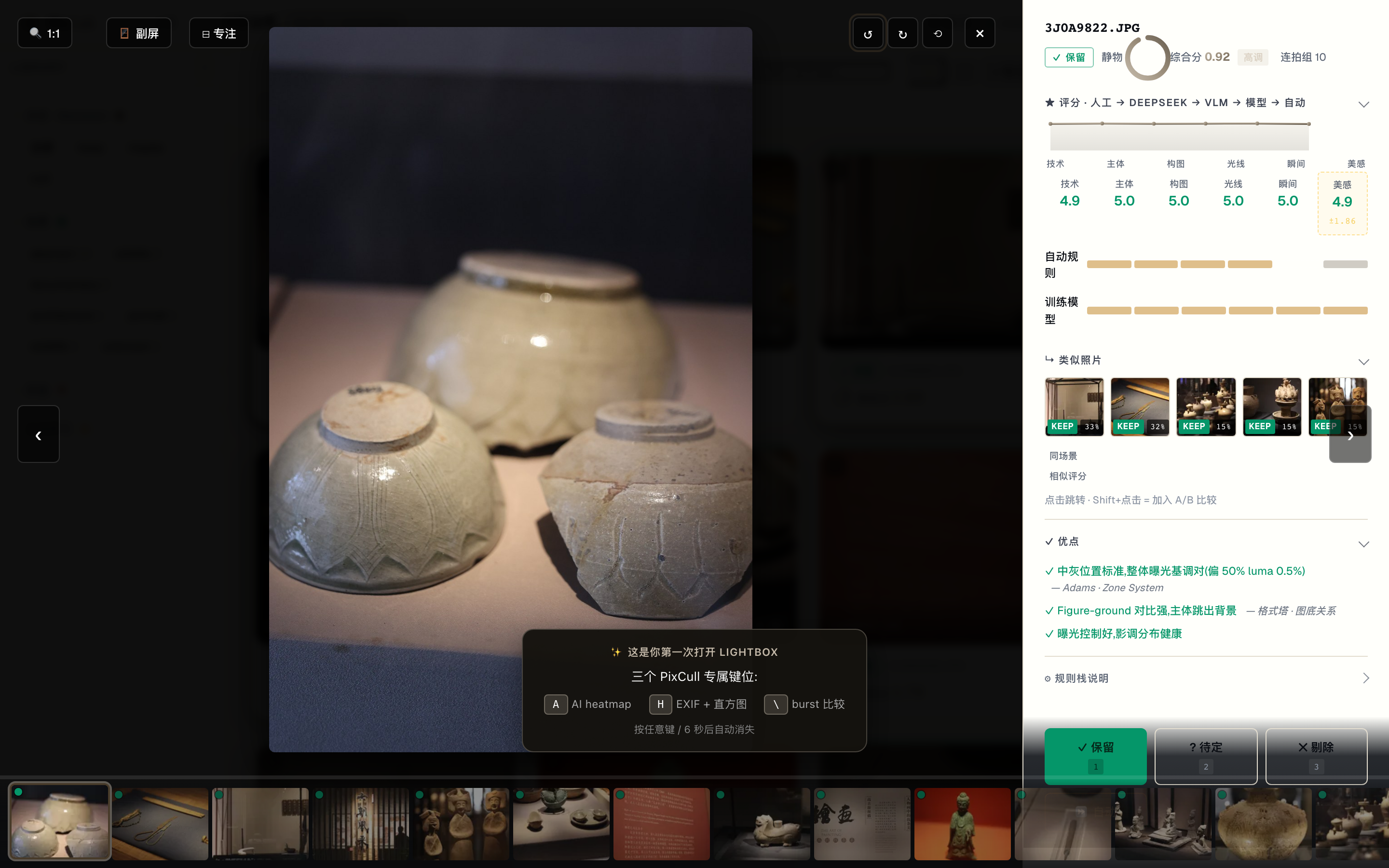
Click any thumbnail and the lightbox opens with the full rubric on the right: 6-axis stars + 4-source breakdown (auto / model / VLM / human), DeepSeek meta-judge reasoning, V5.2 advice with canon citations (Adams' Zone System, Rule of Space, etc), a top-5 similar-photo strip, and sticky keep / maybe / cull decision buttons. Click the image to 1:1 focus-check; mouse-wheel to fine-tune zoom.
A/B compare with synced 1:1 zoom
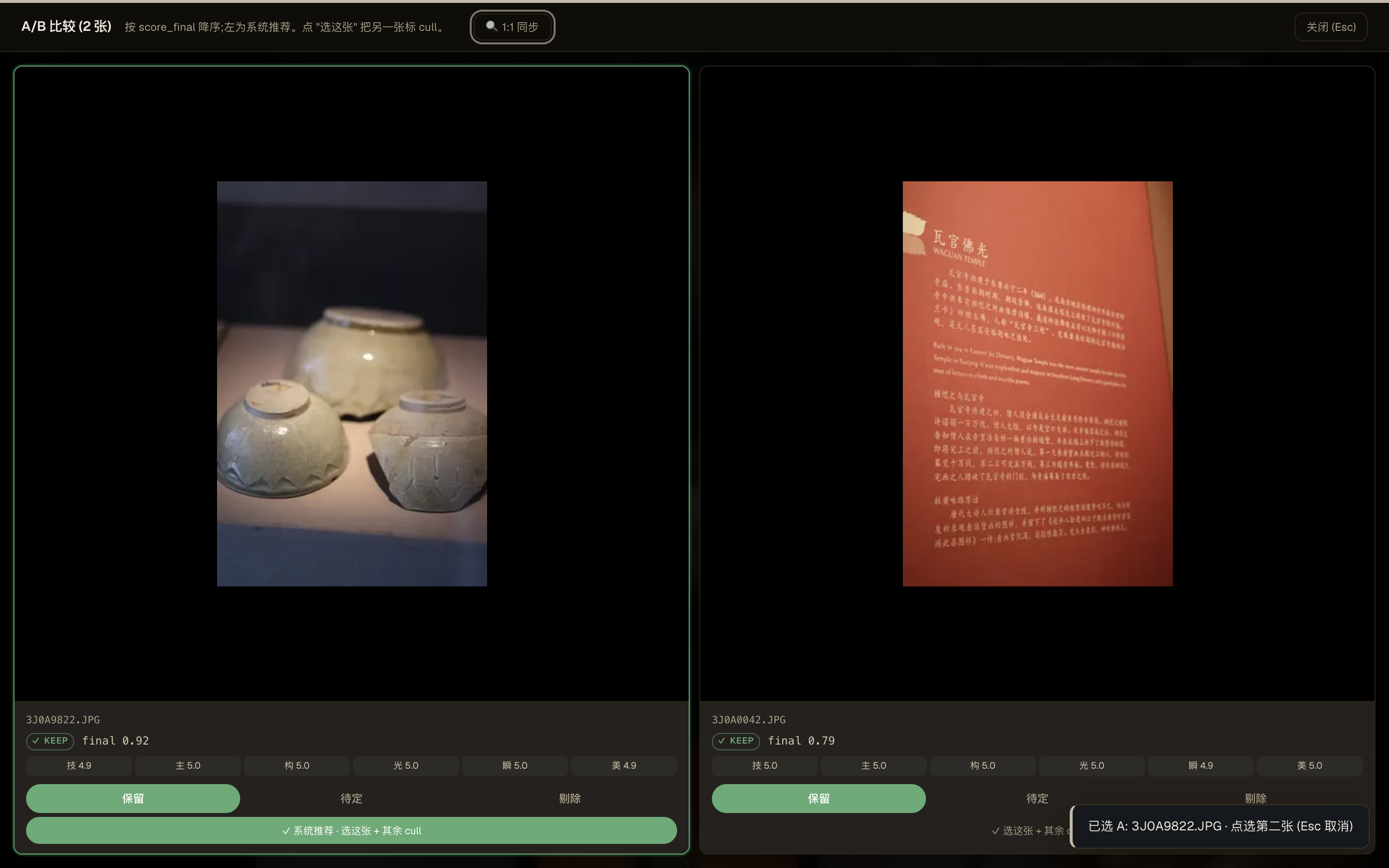
Pin any two photos via the ⇆ button (or Shift-click a thumb) and they open side-by-side. Click either image to 1:1 zoom on both simultaneously, drag to pan in lockstep, mouse-wheel to fine-tune. Built for "which one of these two near-dupes do I keep?".
Drag-drop upload
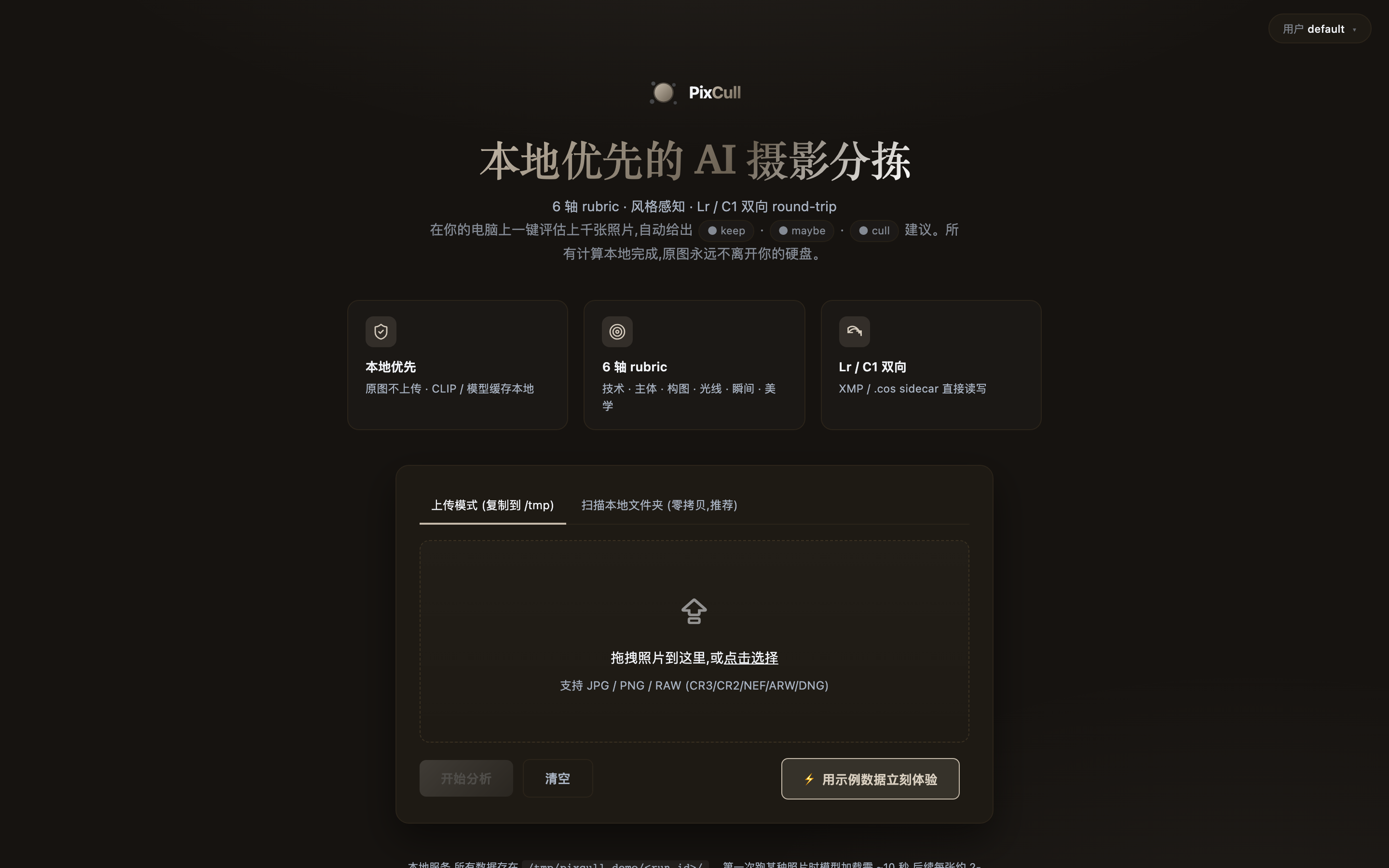
Two modes: drop a copy into /tmp (default, non-destructive) or scan an existing folder in place (zero-copy, RAW + DNG friendly).
Cmd+K command palette (v0.9-P0-4)
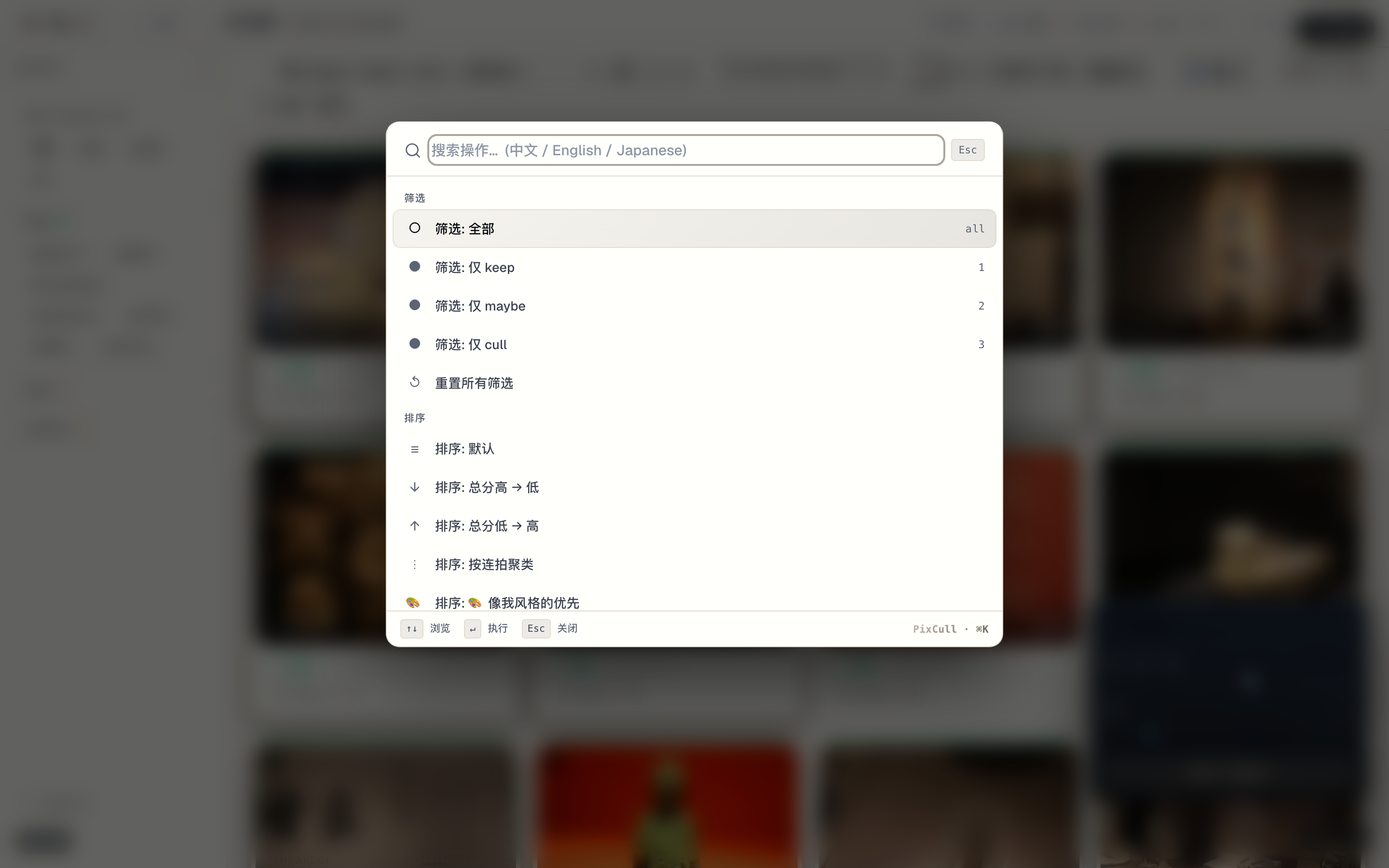
Linear/Raycast pattern. ⌘K opens the palette anywhere; fuzzy match across 27 actions surfaced in < 50 ms. Recent-used at top.
Client-facing portfolio share (v0.9-P0-5)
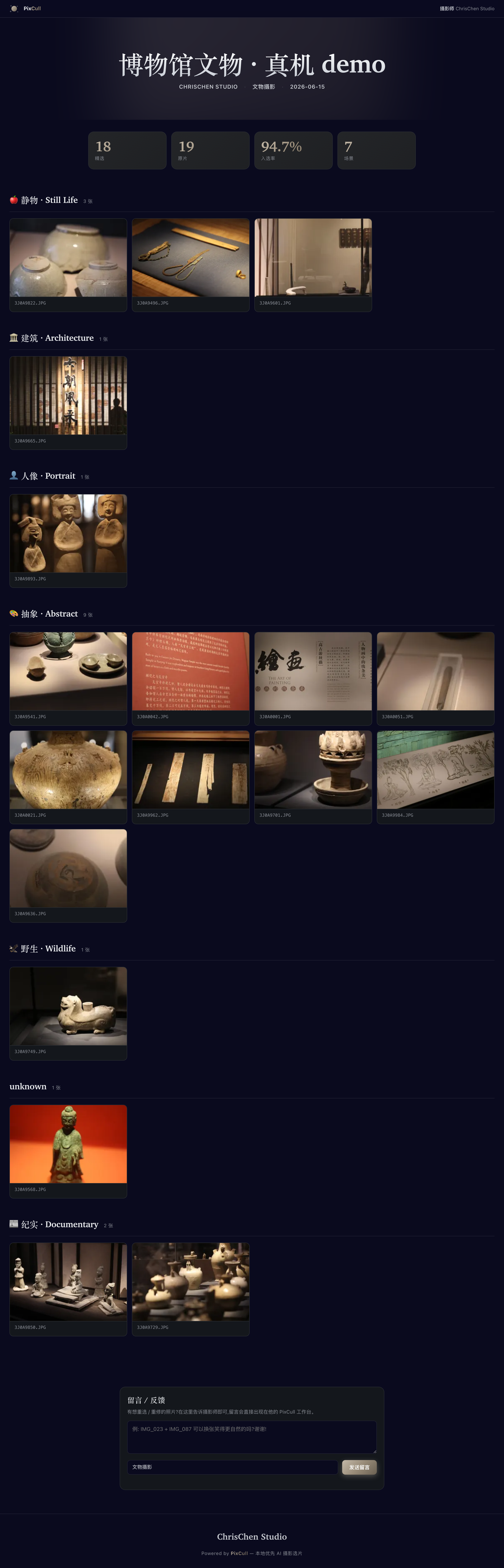
/share/<run>/<token> reads as the photographer's portfolio, not a software dashboard. Brand-mark bar + serif gradient hero title + 3 keynum tiles (ntotal / nkeeps / ratio%) + chapter-grouped grid of cards. Adaptive layout from iPhone portrait to iPad landscape.
History timeline (v0.7-P2-4)
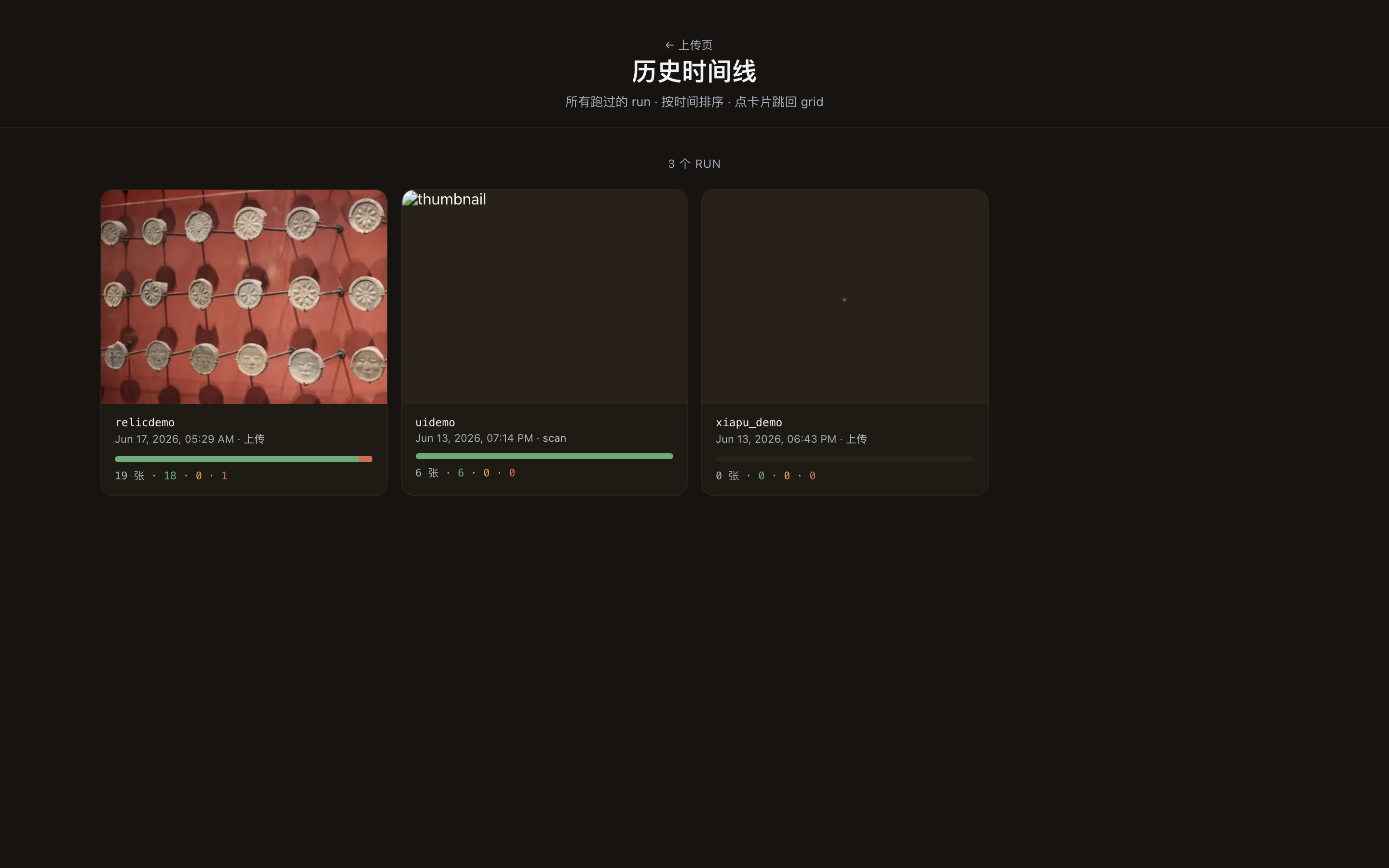
Every past run is one card. Decision distribution bar + thumbnail of the highest-scoring keep. Click → back into the grid where you left off.
Tethered live (v0.7-P2-2)
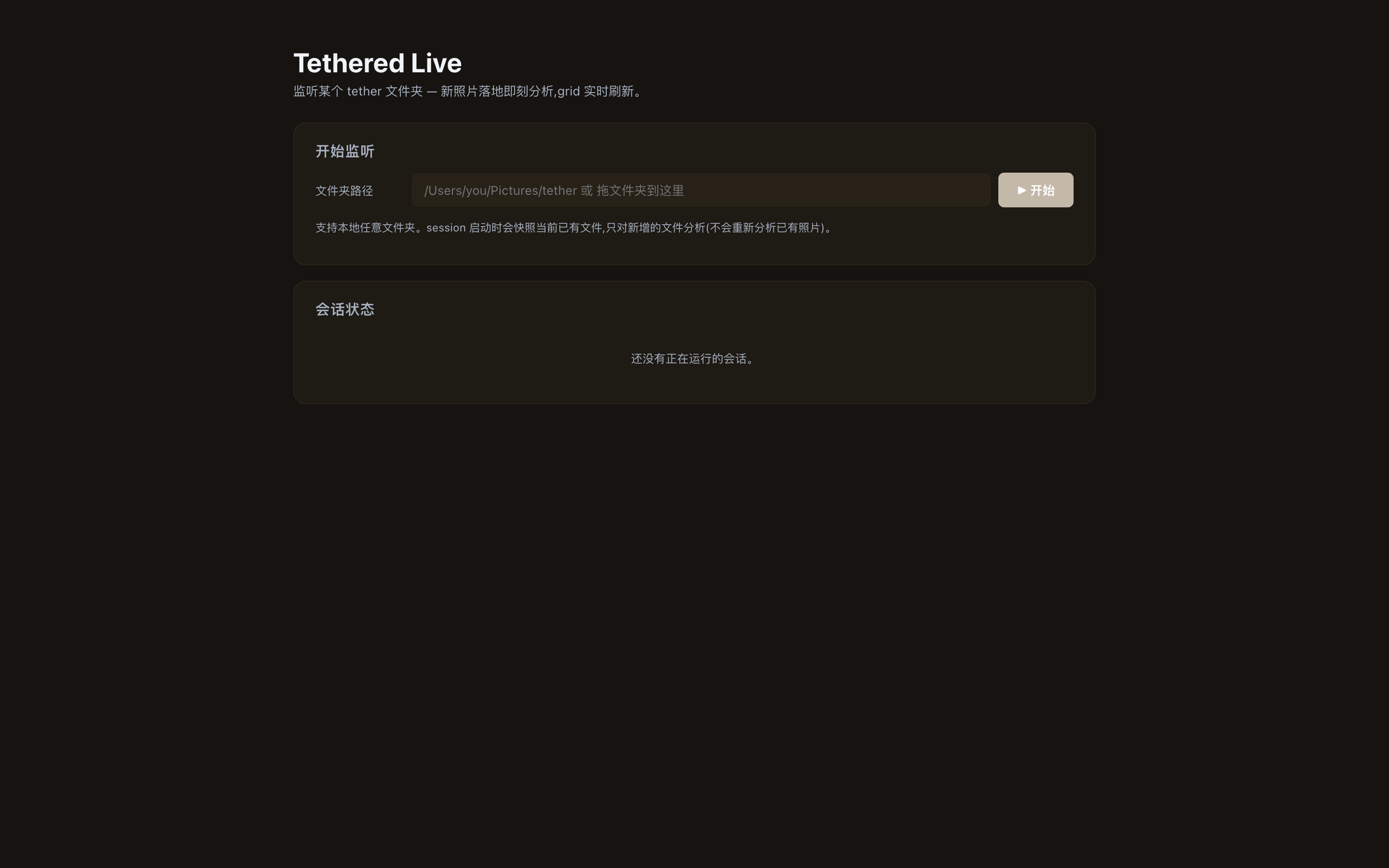
Watch a Lightroom / Capture One tether folder; new RAW lands on disk → analysed within ~2 s → result card appears. Wedding shoot in-camera workflow.
Admin perf data table (v0.9-P2-2)
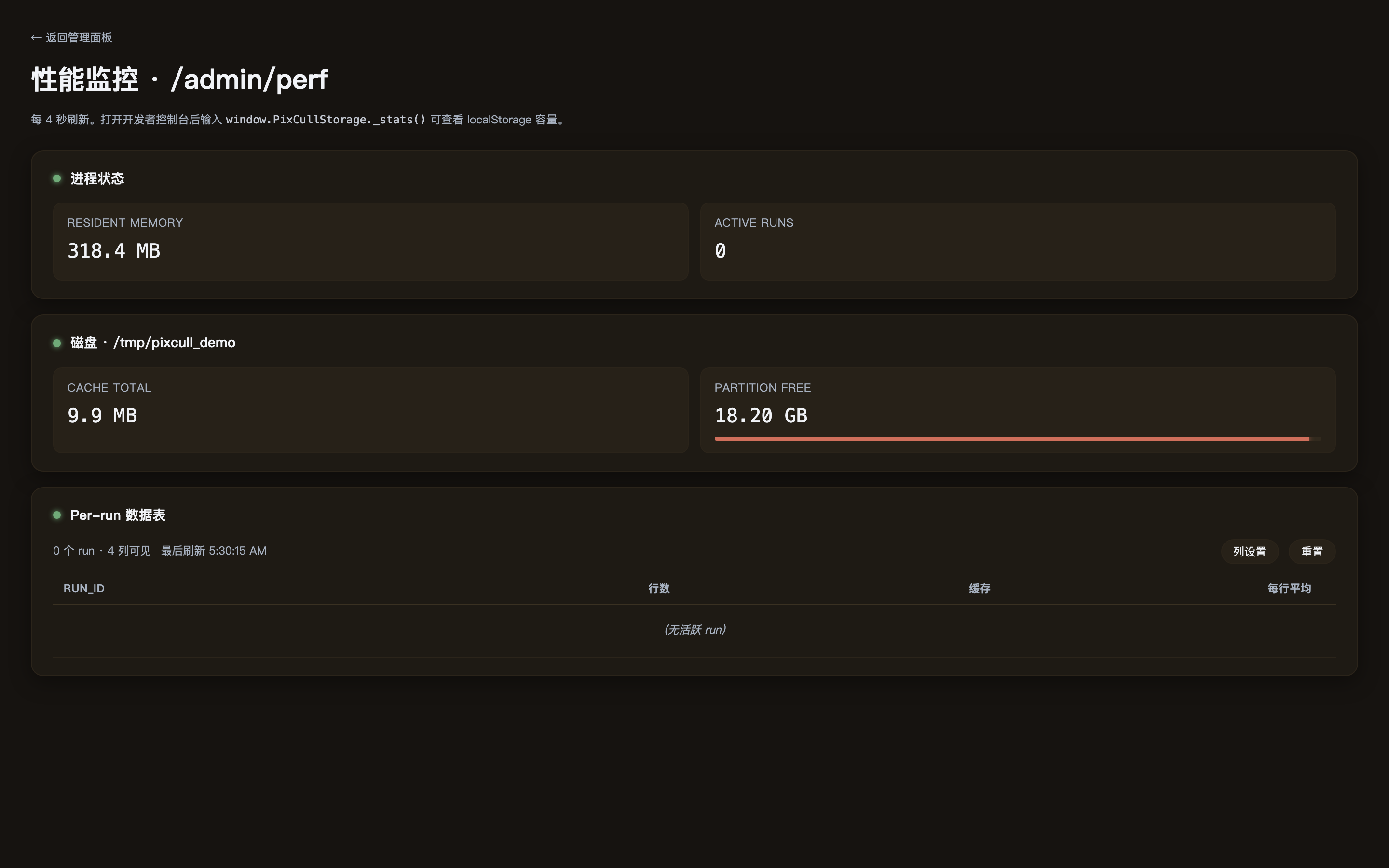
/admin/perf is a first-class data table (clickable sort, draggable columns, toggle visibility, sticky header, zebra rows, size-class chips on the cache column). Layout preferences persist in localStorage.
Light theme V2 (v0.9-P2-1)
Sand-cream palette + warm burnt-sienna shadows + display-weight bumps (700/600/450). Light isn't an "invert the dark theme" afterthought — it's editorial-paper feel.
iPad lightbox + gestures (v0.9-P1-5)
Apple Photos-style gesture suite: horizontal swipe for prev/next, vertical swipe-down to dismiss, two-finger pinch to zoom, tap to toggle fit ↔ 1:1. Vanilla TouchEvent, no third-party gesture lib.
Empty-state illustrations (v0.9-P2-3)
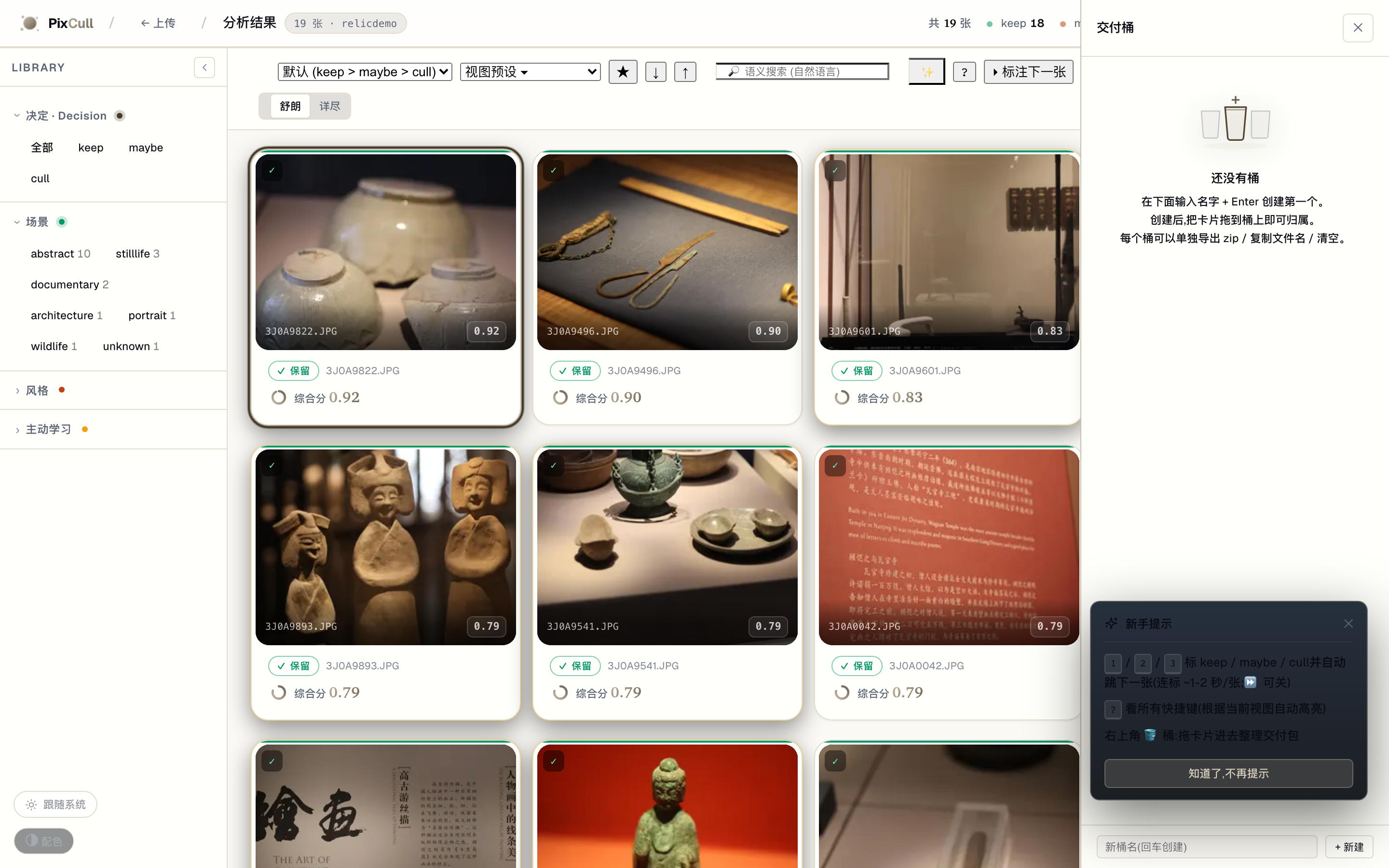
10 illustrations across the v0.4 + v0.9 + v0.10 empty surfaces. Consistent editorial-line treatment with one brand-gradient accent area per illustration. Phase B Brief 02 will replace these with hand-drawn versions.
Mobile grid (v0.6, P-UX-17 responsive)
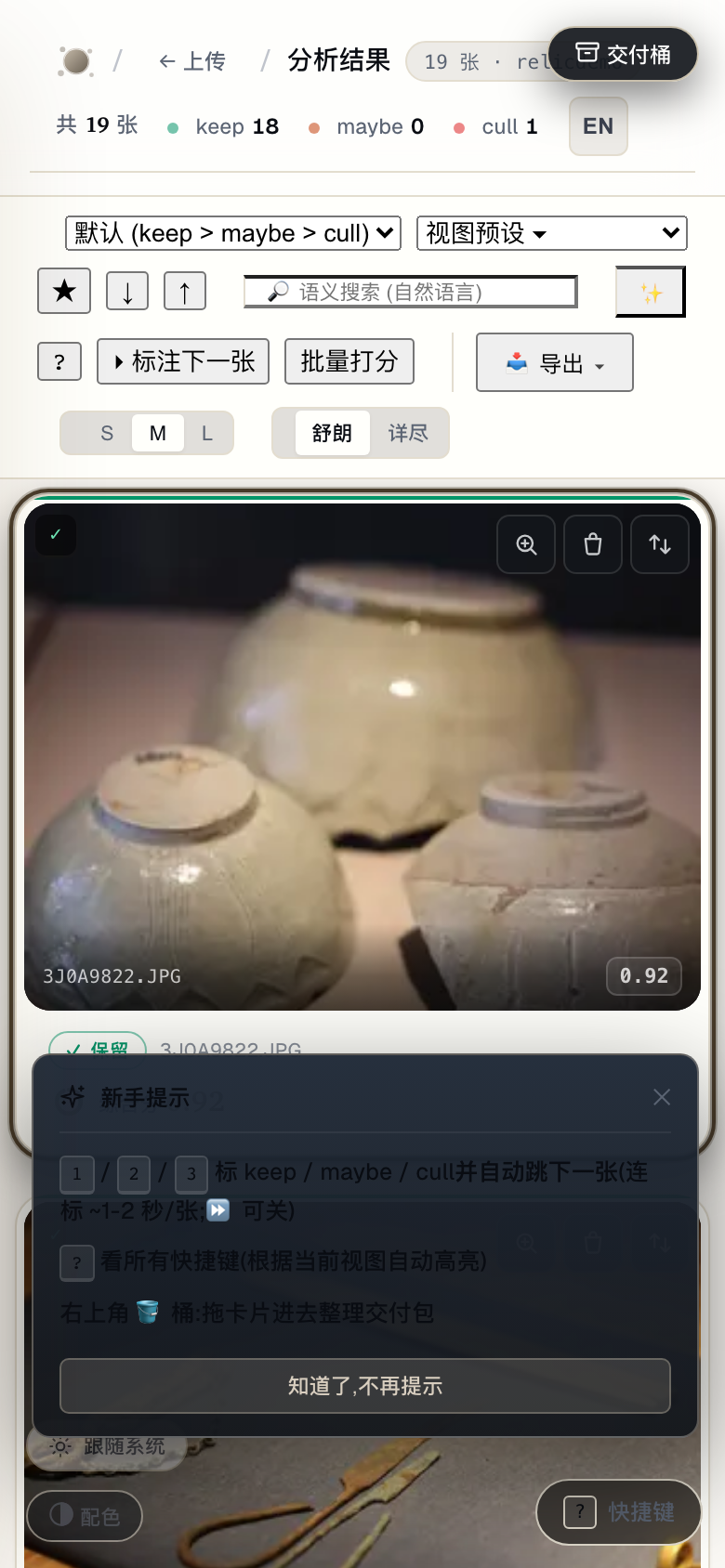
390-wide viewport with the Inspector pulling up as a bottom-sheet, LR Mobile-Library style.
Marquee select + bulk toolbar (v0.11-P1-2)
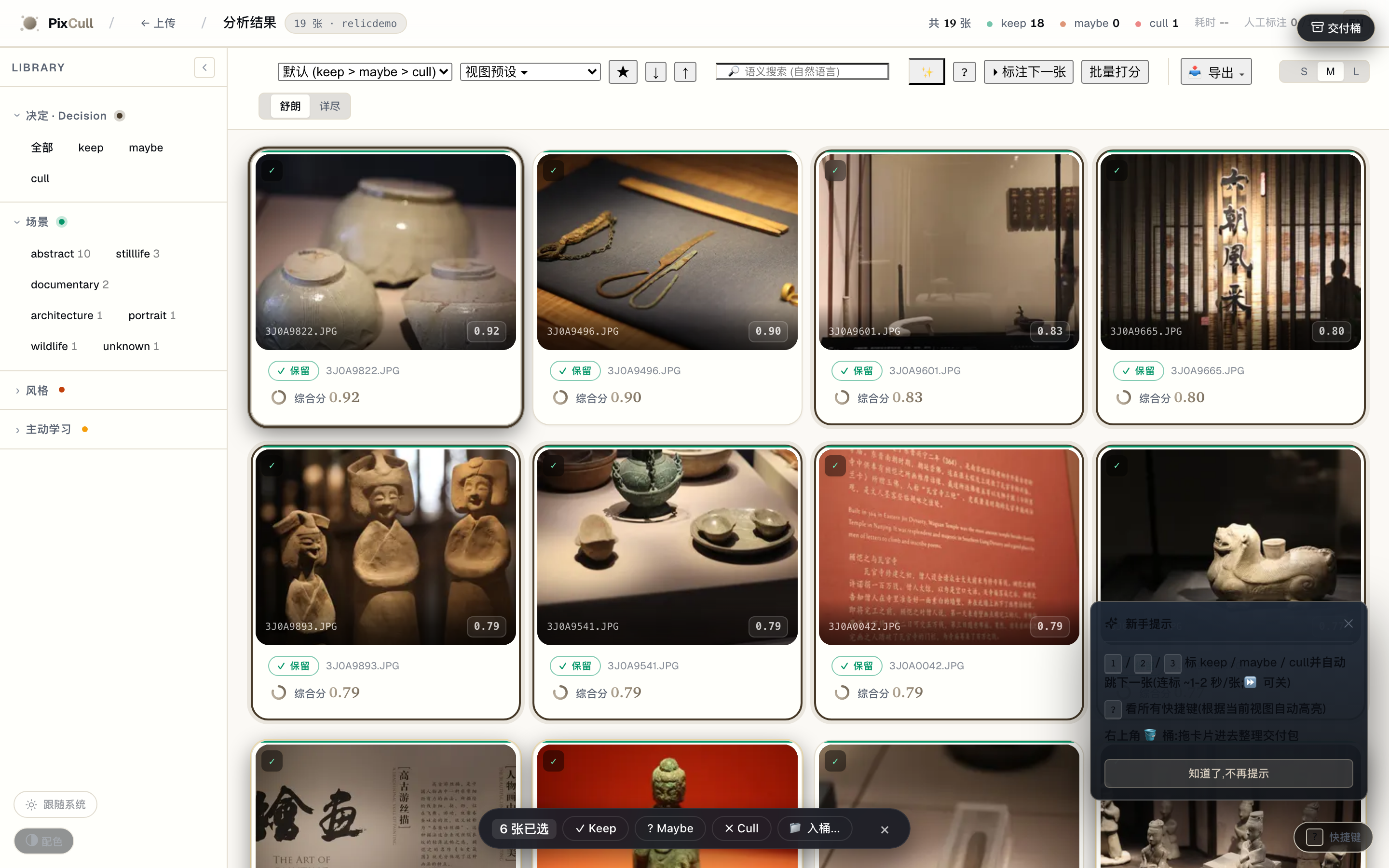
Drag a rectangle in the grid's empty space → every intersected card is added to the selection. Bottom toolbar surfaces keep/maybe/cull/ bucket bulk actions. ⌘A selects all visible, Esc clears. Lightroom-Library parity.
Bias audit dashboard (v0.13-P0-4)

/admin/bias aggregates every annotation across every run + buckets by scene / time-of-day / aperture. Red callouts when a bucket deviates > 1.5σ from the family mean ("rescorer 在 夜景人像 上 cull rate 38% (全局 22%) — 模型可能过严"). 24h cache; ?force=1 to rebuild; /admin/bias.md for markdown export. Shown empty because the real demo run hasn't accumulated annotations yet.
Confidence-weighted modal (v0.13-P0-3)
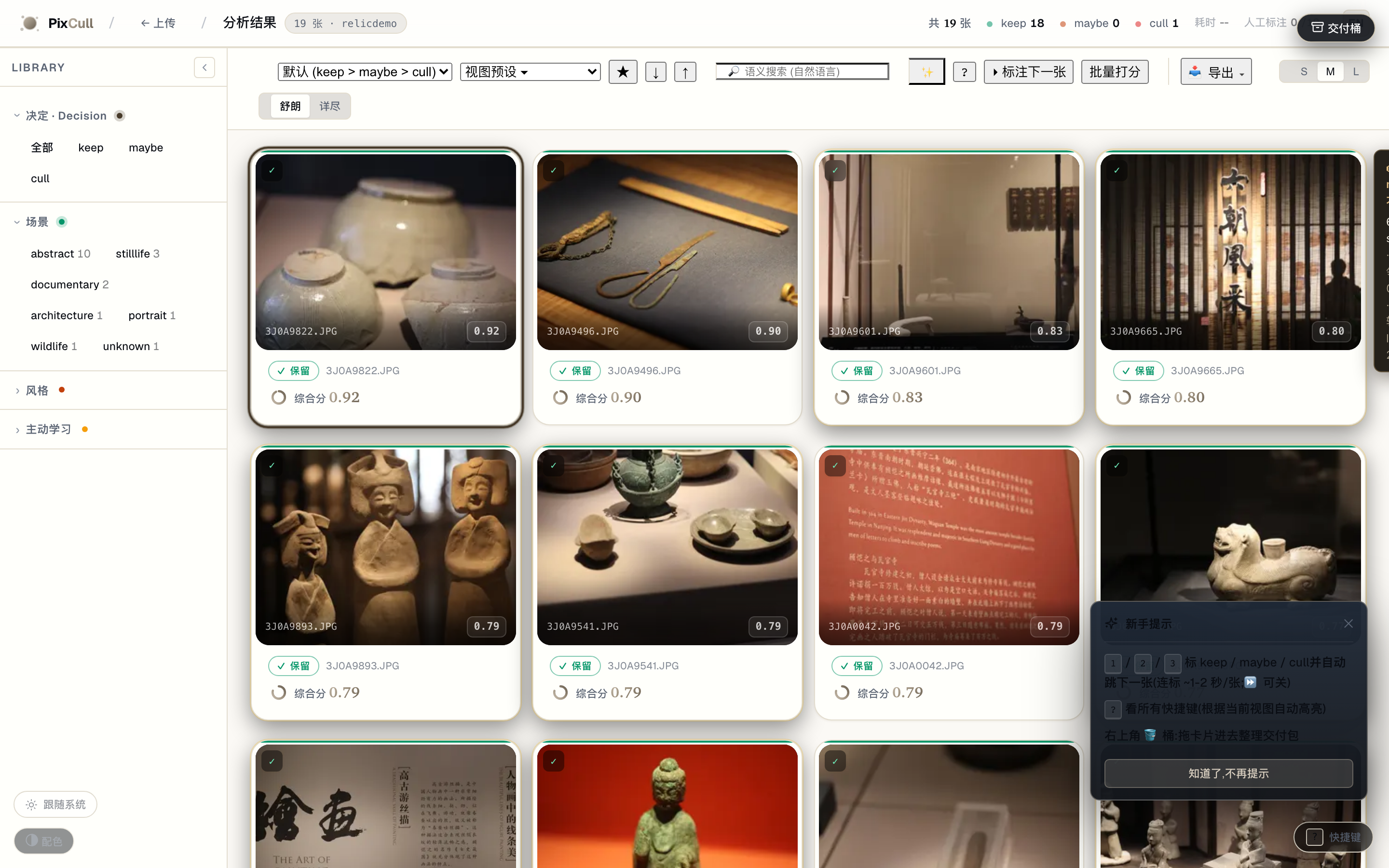
Cards in the maybe-band (0.45 ≤ score_final ≤ 0.55) hover-surface a small popover explaining "62% sure · top reason: 同组邻居高 0.04 · 最弱轴 · light 2.5★". Dismissable per-run via "不再显示".
Per-axis attribution heatmap (v0.13-P0-1)
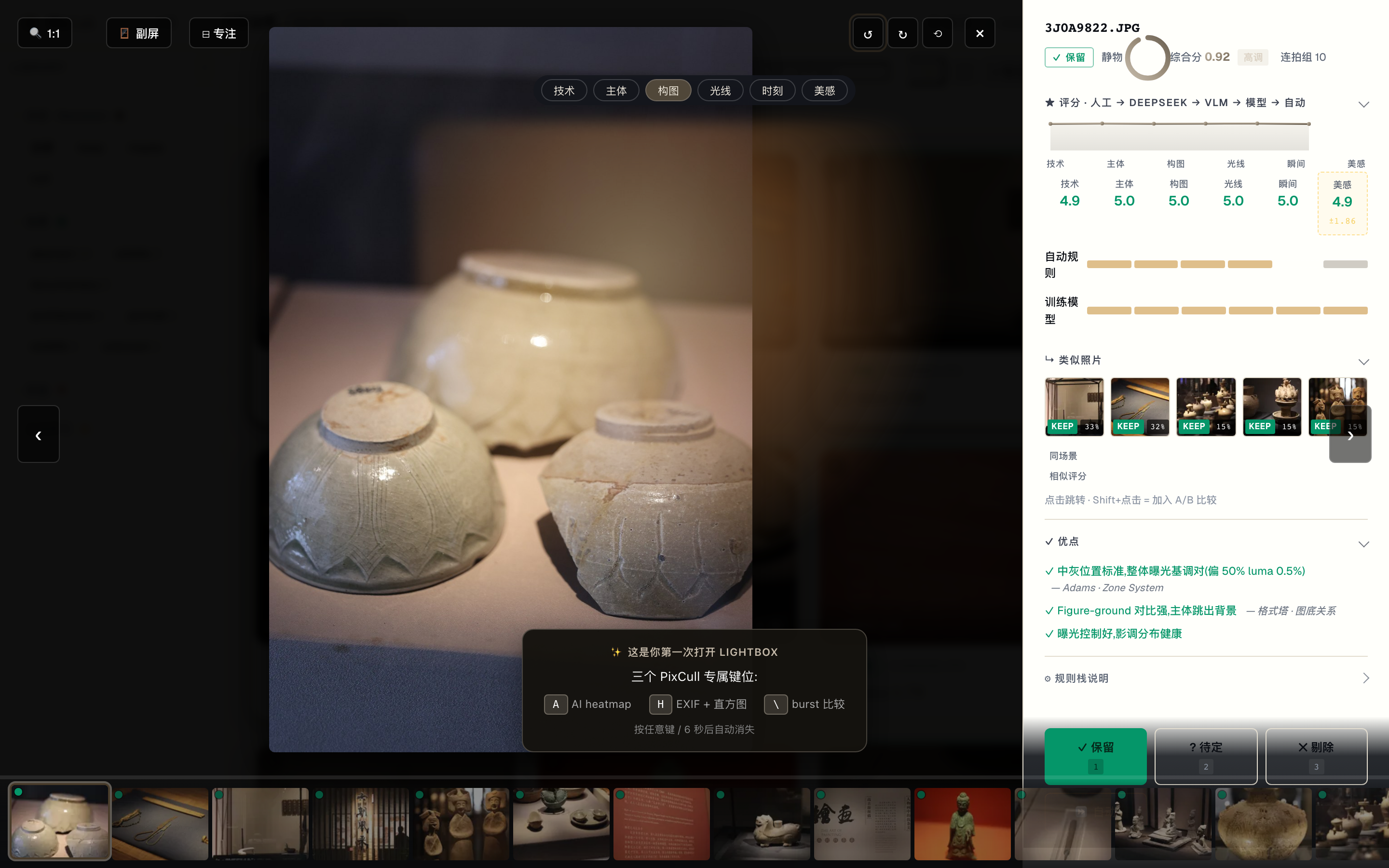
Press A in the lightbox → 6-axis chip strip (技术/主体/构图/光线/ 时刻/美感) appears, click any axis → that axis's Integrated-Gradients heatmap (over the timm mobilenetv3small100 backbone) overlays the photo at 0.5 alpha. Espresso→brass warm colorize matches the editorial brand. Per-axis cache at output/attribution/<axis>/<sha>.png.
Every surface at a glance
| Surface | What it does | Shipped | |---|---|---| | / upload page | Drag-drop a folder; live progress as scoring runs. Vertical chooser + active user switcher. Brand-gradient hero. | v0.1 + v0.9-P0-3 | | /results/<run> | The main culling surface. LR Library left sidebar (8 collapsible filter groups) + 3-col grid + LR Develop right Inspector (9 collapsible sections). Hero reveal on open. | v0.6 + v0.9-P0-2 | | /results/<run> lightbox | Rubric stars + V20 advice + GPS map + face clusters + similar photos + sticky decision toolbar. RGB readout in 1:1 mode. | v0.1 + v0.7-P1-1 | | /results/<run> Inspector mobile | At ≤640px the Inspector becomes a pull-up bottom sheet (LR Mobile-Library style). | v0.7-P1-2 | | /results/<run> 1:1 zoom | Click any photo to zoom to 100%; drag to pan; wheel to fine-tune. Loupe RGB readout follows the cursor. | v0.7-P1-1 | | /results/<run> A/B compare | Pin any 2 photos via ⇆ button; synced 1:1 zoom + pixel readout across both cells. | v0.7-P0-1 | | /results/<run> ⌘K command palette | Linear/Raycast-style keyboard-first action entry. 27 actions across 7 groups, fuzzy match, recent-used. | v0.9-P0-4 | | /results/<run> hold-Space | Press & hold Space for ~350ms surfaces a context-aware shortcut cheat-sheet (macOS Finder pattern). | v0.6 (5/5) | | /results/<run>?event=<token> | LAN collaboration: second-shooter / editor opens this URL, polls host every 5s for annotation changes, shows conflict markers. | v0.8-P0-2 | | /share/<run>/<token> | Token-gated client delivery page; only keeps surfaced; photographer brand + client watermark; share-URL modal with QR. | v0.7-P1-4 + v0.8-P1-3 | | /tether | Watch a Lr/C1 tether folder; new RAWs analyze on landing; live status cards. | v0.7-P2-2 | | /history | Date-sorted timeline of every past run; decision distribution chips; one-click jump back. | v0.7-P2-4 | | /s/<6-char> | Short-link issuer + inline SVG QR (pure-Python QR encoder, no JS bundle). | v0.8-P1-3 | | /admin | Storage info; run management; license token; sync configuration. | v0.1 | | /verticals | Per-genre policy editor; promote a sample to the team bank. | v0.4 | | iOS companion | SwiftUI grid + per-photo swipe annotator + rich lightbox. | v0.5 |
What sets PixCull apart
If you've seen Aftershoot, FilterPixel, Narrative, or any other "AI photo culling" SaaS, the things you'll notice immediately on PixCull:
- Photos never leave your disk. RAW decode, scoring, faces, GPS,
- Style clone learns YOU, not the average photographer. Give
- LAN multi-shooter sync. Main shooter on Mac, second shooter on
- Lightroom round-trip both ways. XMP sidecars Lightroom writes
- A real keyboard product. Photo Mechanic-grade hotkeys (1/2/3 +
[ / ] for verdict tweaks + c for
compare + ⌘K command palette + hold-Space cheat sheet + ? full
shortcut overlay).
- Open source, MIT. Bring your own training data. Bring your
Quick start
# 1. Clone
git clone https://github.com/ChrisChen667788/pixcull.git
cd pixcull
2. Python 3.11 or 3.12 (mediapipe pins numpy<2 which forces 3.12-max)
python3.12 -m venv .venv
source .venv/bin/activate
3. Install (this pulls torch CPU + InsightFace ONNX + MediaPipe)
pip install -e ".[dev]"
4. Run the demo server
python scripts/serve_demo.py
→ open http://127.0.0.1:8770
Drop a folder of JPG / RAW / HEIC into the upload page; first run warms the models (~30 s on Apple Silicon), subsequent batches score at roughly 1 s / photo on M2 Pro.
Tether mode (Lr / Capture One)
python scripts/pixcull_tether.py \
    --vertical wedding \
    ~/Pictures/Lightroom-Tether/2026-05-16-wedding
PixCull watches the folder, scores each frame within ~2 s of the shutter click, and writes a live scores.csv. Ctrl-C to stop; partial results are preserved.
Standalone macOS app
A signed + notarized .app bundle (PyInstaller + Apple Developer ID) lives at app/. See app/RELEASE.md for the build / notarize / Sparkle-update pipeline.
Configuration
| What | Where | Default | |---|---|---| | Server port | --port flag on scripts/serve_demo.py | 8770 | | API key (for LAN deploy) | PIXCULLAPIKEY env / X-PixCull-API-Key header | unset | | CORS allowlist | PIXCULLAPICORS_ORIGINS env (comma-sep) | * if unset | | Active user | PIXCULL_USER env / X-PixCull-User header / cookie | none | | App data dir | ~/Library/Application Support/PixCull (macOS) | per-platform | | DeepSeek API key (optional) | DEEPSEEKAPIKEY env / config.json in app data | unset | | Sync target (optional) | pixcull/sync.py configuresyncfor_user(path) | none |
Architecture at a glance
Three editorial-warm diagrams, animated on GitHub — data flows along the connectors and each stage pulses as it activates (reduced-motion users get a clean static frame). Editable draw.io sources sit beside them in docs/diagrams/.
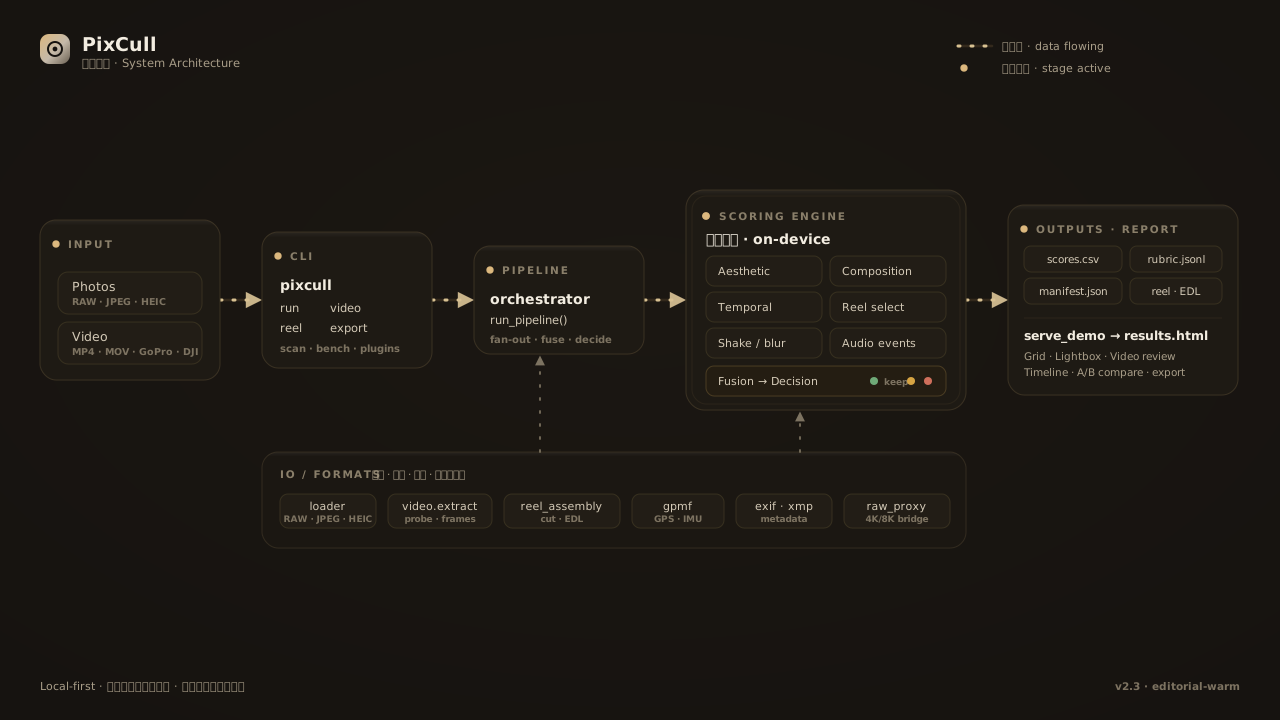
System architecture · input → CLI →
run_pipeline → on-device scoring engine → outputs → web report, over an IO / formats foundation 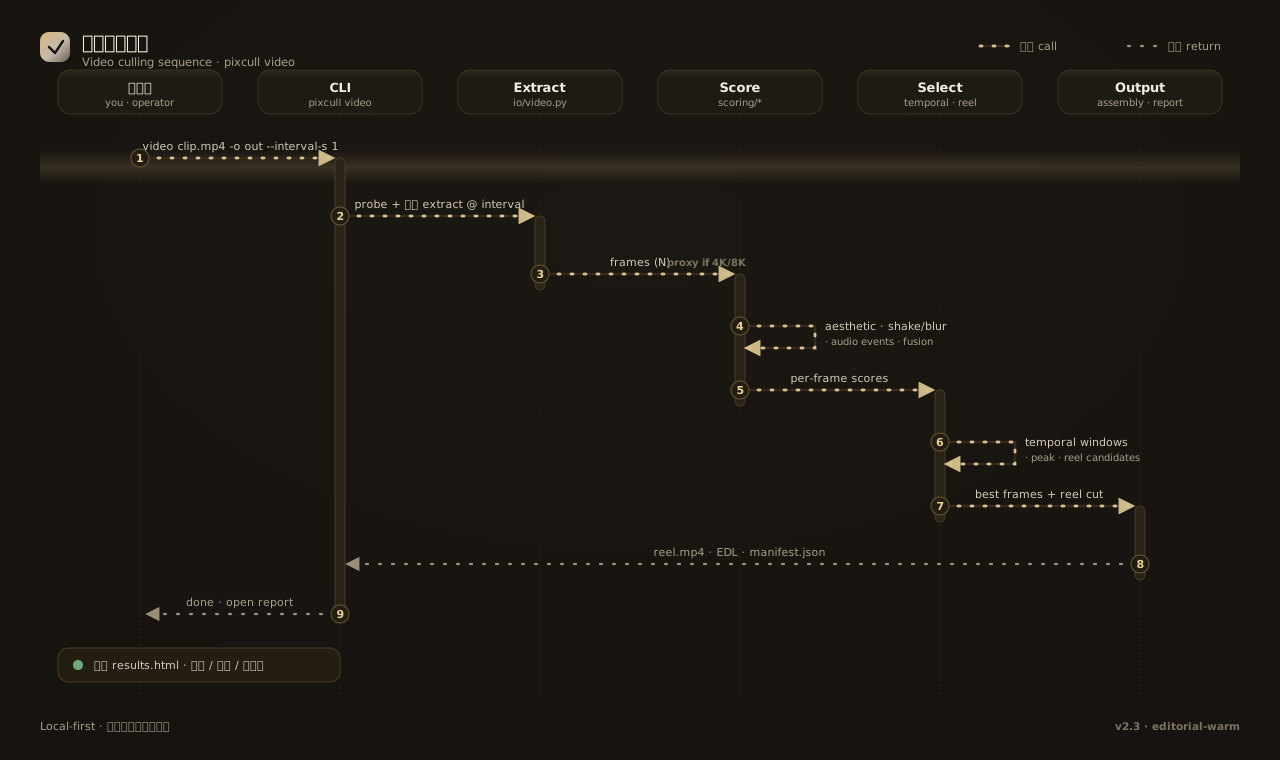
Video culling sequence ·
pixcull video → extract frames → score → temporal / reel select → assemble reel + open report 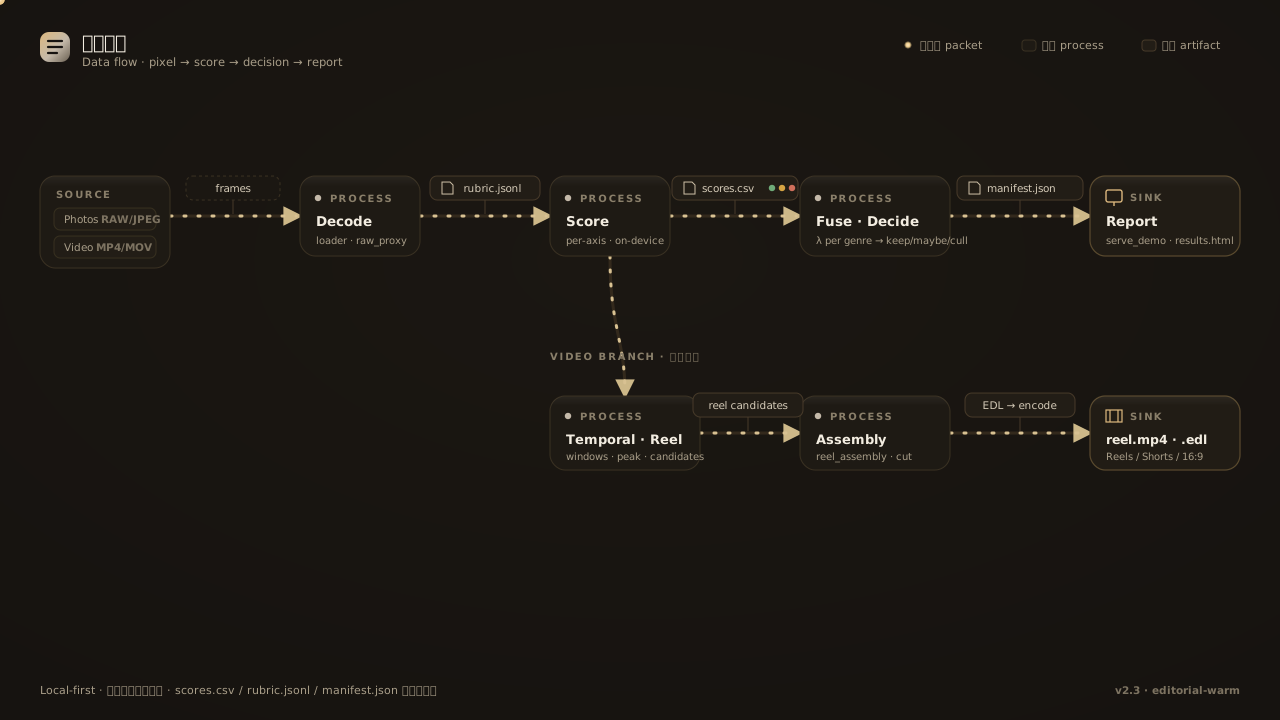
Data flow · pixels →
rubric.jsonl → scores.csv → manifest.json → report, plus the video-reel branch For the full engineering-grade architecture (C4 system context + container diagram + photo-pipeline sequence + LAN sync sequence + 16-row ML model card + storage layout + tech-decision table), see docs/ARCHITECTURE.md — all diagrams are Mermaid, rendered inline on GitHub + ModelScope.
The 10-second version, showing how PixCull is positioned in the team workflow:
%%{init: {'theme':'base','themeVariables':{'primaryColor':'#241d12','primaryTextColor':'#f3ede1','lineColor':'#c4b9a9','primaryBorderColor':'#3a3122','tertiaryColor':'#161310'}}}%%
flowchart LR
P[("📷 Head shooter")]
S[("📷 Second shooter")]
E[("✎ Editor")]
C[("👤 Client")]
PIX{{"<b>PixCull</b><br/>local-first<br/>AI photo culling"}}
DS["DeepSeek API<br/>(opt-in)"]
P -->|"upload RAW/JPEG"| PIX S -->|"join LAN event"| PIX E -->|"label + push edits"| PIX PIX -->|"portfolio share link<br/>/share/<token>"| C PIX -.->|"opt-in · text only"| DS
style PIX fill:#241d12,color:#f3ede1,stroke:#c4b9a9 style DS fill:#1b1712,stroke:#6a6052
The architecture has a few non-obvious commitments worth calling out:
- Zero external web framework — Python's built-in
http.server,
scripts/serve_demo.py, deliberately flat for easy
audit. No Flask / Django / FastAPI.
- No database —
scores.csv+ append-onlyannotations.jsonl
cat | tail; cross-machine
migration is rsync.
- Multi-model fusion — 8 ONNX models (U²-Net / ArcFace /
- Local-first sync over LAN — token + 5 s HTTP polling +
Design quality, honest: the engineering layer is mature
(614 tests passing, 7 charters shipped, 57 slices); the visual
design layer is still "developer + AI" rather than
"designer-curated". We name this gap openly and have drafted a
concrete uplift plan in
docs/DESIGN-SYSTEM-ROADMAP.md
covering tool selection (Figma + Penpot + Tokens Studio + Rive),
commissioned-illustration brief, and three phases over the next
six months — the goal is to move from "iconic functionality" to
"iconic-craft visual product" before v1.0.
Repository structure
pixcull/
├── pixcull/                    # the actual Python package
│   ├── scoring/                # 6-axis rubric, scene templates, style modes
│   ├── pipeline/               # orchestrator, worker, face / GPS clustering, advice
│   ├── detectors/              # blur, eye-state, exposure, composition, etc.
│   ├── io/                     # RAW loader, XMP / IPTC writers, EXIF
│   ├── db/                     # annotations.jsonl + scores.csv schema helpers
│   ├── report/templates/       # the results.html web UI (zero-build, vanilla JS)
│   ├── license/                # local license-token state machine
│   ├── verticals.py            # per-genre scoring policy
│   ├── sync.py                 # INFRA-2 multi-machine folder mirror
│   └── tether.py               # P2.2 Lr/C1 tether watcher
├── scripts/                    # runnable entry points
│   ├── serve_demo.py           # the HTTP server + web UI host (10k lines)
│   ├── pixcull_tether.py       # the tether CLI
│   ├── train_rescorer.py       # per-axis rescorer training
│   └── ...                     # ~30 maintenance + analysis scripts
├── mobile/PixCullCompanion/    # SwiftUI iOS app (Swift Package)
├── lr_plugin/PixCull.lrplugin/ # Lightroom plugin (Lua)
├── app/                        # PyInstaller spec for the .app bundle
├── tests/                      # pytest suite (1,200+ tests across 88 files)
├── training.csv                # sanitized rubric ground truth (130 rows)
├── training_axis.csv           # sanitized per-axis ground truth (3,000 rows)
├── ROADMAP.md                  # the next ~12 months of work
└── pyproject.toml              # MIT, Python 3.11–3.12
Roadmap
The full ROADMAP.md has the running plan with rough sizing. The current focus areas:
- Photo evaluation intelligence. Reject-reason taxonomy →
cull because eyes_closed
becomes a real signal); per-axis confidence intervals; meta-judge
inconsistency detection.
- Pro-grade workflows. Tighter Lr / Capture One round-trip;
- Mobile companion V0.4+. Pull-to-refresh, swipe-down dismiss,
Security and privacy
PixCull is local-first by design. The default serve_demo.py binds to 127.0.0.1 only; the optional LAN deploy is gated by an X-PixCull-API-Key header you set via PIXCULLAPIKEY.
See SECURITY.md for the full threat model and disclosure policy. TL;DR: trusted local user, untrusted image input (Pillow is pinned ≥ 10.2), no telemetry, optional DeepSeek calls go straight to DeepSeek with your token (we never proxy).
Contributing
See CONTRIBUTING.md. PRs welcome; bug reports welcome (use the issue template); the highest-leverage first PRs are listed in the contributing doc.
License
MIT. Use it commercially, fork it freely, send a pull request.
About
PixCull started as a single-developer project to stop personally spending an evening per shoot in Lightroom's catalog. Eighteen months and a lot of small commits later, it's the AI culling tool I wish had existed when I picked up my first camera. Open-sourcing it under MIT so the next photographer doesn't have to rebuild it from scratch.
English · 简体中文 · ModelScope
专业摄影师的本地优先 AI 选片工具。
6 维评分,XMP / IPTC / 相册一键导出,Lightroom & Capture One 直通,照片永远不出本机。
为什么有这个项目
一场 1,500 张的婚礼,人工选片平均要花一个晚上。市面上的 AI 选片工具 存在,但主流方案都让职业摄影师作出三个不该接受的妥协:
- 它们会把你的照片上传。 婚礼合同和新闻摄影的 NDA 都明令禁止把
- 它们只给一个分数,没有理由。 0..1 的总分告诉不了你为什么这张
- 它们活在你工作流之外。 Lightroom、Capture One、Photo Mechanic、
PixCull 把这三件事全部翻过来:
- 本地优先。 RAW 解码、评分、人脸、GPS —— 全在你电脑上跑。
- 6 维评分细则。 每张照片在 技术 / 主体 / 构图 / 光线 / 瞬间 / 美感
- Sidecar 原生。 评分以 XMP 文件输出,Lightroom 和 Capture One
适合谁
- 婚礼 / 活动摄影师 —— 每天 1,000+ 张,明早就要交,而且要在
- 体育 / 动作摄影师 —— tether 接 Lightroom,PixCull 监控
- 新闻摄影师 —— 在 embargo 或 IP 合同下根本不能上传到 SaaS。
- 多人摄影工作室 —— 多个二摄拍同一时刻,需要跨相机合并覆盖、
- 野生 / 风光摄影师 —— 同场景连拍一组,需要自动选峰值帧而又不
- 自学摄影爱好者 —— 想要工具 解释 评判 —— 优点、缺点、改进
现在就能用的能力
- 6 维评分细则。 技术 / 主体 / 构图 / 光线 / 瞬间 / 美感,每维 1-5
- 9 种细分领域 (verticals)。 婚礼 · 野生 · 体育 · 风光 · 人像 ·
- V20 建议信封。 每张照片附带:简短 verdict、引用摄影正典的
- 本地人脸聚类。 InsightFace ArcFace embedding → DBSCAN →
- GPS 位置聚类。 Haversine DBSCAN 按拍摄地点 (~100 m 半径) 分组。
- 连拍峰值排序。 亚秒级的连拍组自动选峰值帧 (最佳对焦、表情、
- Cull 原因分类。 Cull 时可选标 为什么:
focus_miss(焦点不准)、
eyesclosed (闭眼)、motionblur (模糊抖动)、framing (构图差)、
duplicate (与更佳重复)、exposure (曝光问题)、other。驱动一个
筛选条目,并建立更丰富的训练信号。
- 类似照片查找。 复合特征 (连拍组 + 场景 + 人脸重叠 + GPS + 评分
- 自选 A/B 对比。 在任意两张照片上点 ⇆ 按钮 →
- 1:1 焦点检查。 大图窗中点任意位置 1:1 放大,拖动平移,滚轮细
- XMP / IPTC / 相册 导出。 XMP sidecar 进 Lr/C1,IPTC Caption-
- iOS 滑动伴侣 App。 SwiftUI 写的手机端滑动选片 App,后台跑笔记
/api/v1/ 接口。
- Lr / C1 Tether 模式。 指向 tether 目录;PixCull 监控,每个快门
- 跨机同步 (INFRA-2)。 基于符号链接的目录镜像,走 iCloud / Dropbox /
- 主动学习队列 (P2.4)。 按 rescorer 分歧度 + 不确定度 + 阈值附
- 多用户 profile (V28)。 工作室里两个二摄?各有自己的 vertical +
和其他 AI 选片工具的对比
| | PixCull | 主流 SaaS 选片 | Lightroom AI Select | |---|---|---|---| | 照片要不要离开本机 | 不需要 | 必须上传 | 不离开但厂商锁定 | | 评分理由 | 6 维 + 正典引用 | 单一 0..1 分 | "这组的最佳" | | 工作流融入度 | XMP + Lr 插件 + iOS + tether | 仅 Web App | 仅 Lightroom | | 按拍摄类型调权 | 9 种 vertical + 可扩展 | 单一模型 | 不透明 | | 开源 | MIT | 闭源 | 闭源、订阅制 | | 主动学习 | 内置 | 闭源再训练循环 | 不可见 | | 跨 run 人脸库 | 支持 (V22.2) | 每批独立 | 每个 catalog 独立 | | 连拍峰值选择 | 支持 | 支持 | 支持 (Stack) | | Cull 原因分类 | 支持 (分类 + 筛选) | 不支持 | 不支持 | | 1:1 焦点检查 + 同步 | 大图窗 + 比较窗 | 有限 | 支持 | | 可定制 | 纯 Python + 纯 JS | 不可定制 | 不可定制 |
截图
UI 是一个零构建的 HTML 模板 (pixcull/report/templates/results.html) 加一个 SwiftUI App (mobile/PixCullCompanion/)。两者都是黑色主题、 键鼠优先、无 webpack / 无 Xcode workspace。
真机数据来源:Canon EOS 卡 100CANON/3J0A8133.JPG–3J0A8332.JPG 连续 200 张(海岸 / 风光 / 建筑 / 纪实混合)。完整 pipeline 跑完: keep 104 · maybe 1 · cull 95 · 178 个连拍组。所有截图都是这一个 真机 run(/tmp/pixcull_demo/realdemo01/)的实时页面,不是 mockup。
新手 0→1 操作指南: 见 docs/USER-GUIDE.md ——20 分钟跟着步骤跑完第一批照片,每个功能都配真机截图。
以下截图全部用 Playwright headless 抓取的真实运行界面(运行 bash scripts/brand/capturerealscreenshots.sh realdemo01 自动 再生成,前提是先 pixcull/.venv/bin/python -m pixcull run <photos> -o /tmp/pixcull_demo/realdemo01/output 跑出 run 数据):
选片主界面 · v0.9 reveal + brand gradient
大图窗 · V20 advice + AI 视觉化(v0.9-P1-4)
Cmd+K 命令面板(v0.9-P0-4)
客户分享作品集(v0.9-P0-5)
历史时间线(v0.7-P2-4)
Tethered Live(v0.7-P2-2)
管理 perf 数据表(v0.9-P2-2)
Light theme V2 · 暖色 sand-cream 调色板(v0.9-P2-1)
iPad 大图窗 · Apple Photos 手势(v0.9-P1-5)
10 个 empty-state SVG(v0.9-P2-3,Phase B brief 02 将由真人插画师重画)
响应式移动端(v0.6,P-UX-17)
上传页 · brand gradient hero
A/B 比较窗(v0.7-P0-1)
Marquee 框选 + 批量工具栏(v0.11-P1-2)
网格空白处按住鼠标拖矩形,松手所有框中的卡进入"已选"状态。 底部出现 Keep/Maybe/Cull/入桶 工具栏。⌘A 全选当前可见, Esc 取消。Lightroom Library 标杆体验。
偏差审计 dashboard(v0.13-P0-4)
/admin/bias 汇总所有 run 的标注,按 scene / time-of-day / aperture 分桶,红色高亮偏离均值 > 1.5σ 的桶("rescorer 在 夜景人像 上 cull rate 38% (全局 22%) — 模型可能过严")。24h 缓存; ?force=1 强制刷新;/admin/bias.md 导出 markdown 给客户。 真机 demo run 还没积累标注,因此显示 empty-state。
置信度弹窗(v0.13-P0-3)
score_final ∈ [0.45, 0.55] 的临界 maybe 卡,鼠标悬停弹出小 popover: "62% sure · 同组邻居高 0.04 · 最弱轴 · light 2.5★"。可"不再显示" per-run 关闭(v0.13-P0-3)。
像素级 attribution heatmap(v0.13-P0-1)
Lightbox 按 A 弹出 6 轴选择条(技术 / 主体 / 构图 / 光线 / 时刻 / 美感),点任意轴 → 该轴的 Integrated Gradients 显著度图叠加在 原图上(0.5 alpha),espresso→brass 暖色渐变配色。Heatmap 缓存到 output/attribution/<axis>/<sha>.png,后续打开秒级出图。
🎬 视频审片 · 时间线 scrubber V2(v2.0-P0-4)
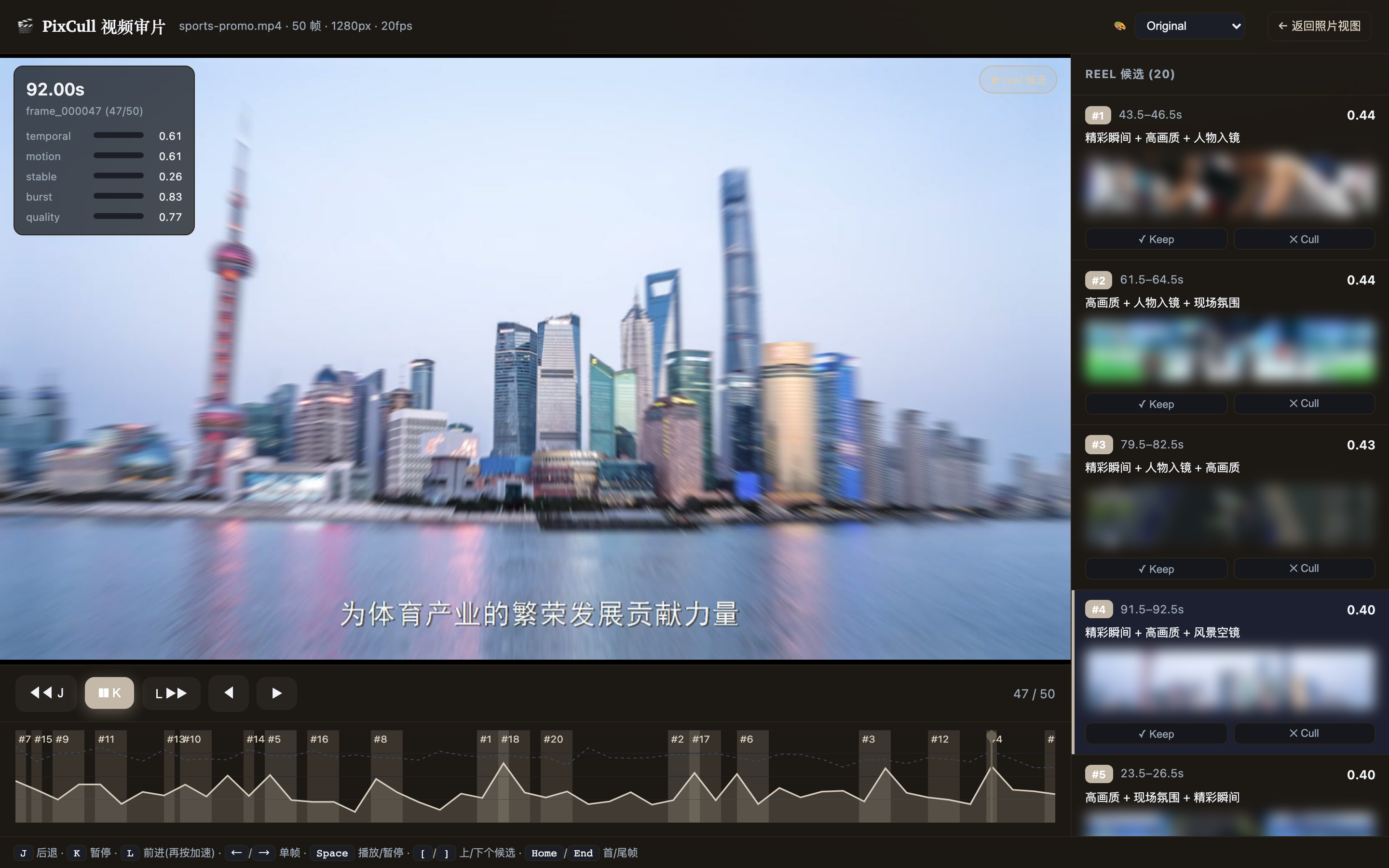
pixcull video <片子.mp4> 会抽关键帧 → 跑现有 6 轴评分 → 加时间维 评分(score_temporal = 动作连续性 + 时间稳定性 + 突发峰值)→ 找 出 reel 候选,然后在 /video/<run_id> 用视频原生 lightbox 审片: 时间轴画每帧 score_temporal 山峰 + 候选片段暖色带,拖动播放头实 时切帧,J/K/L 倒退/暂停/前进(DaVinci 式,再按加速),右栏候选像 照片一样 Keep / Cull。**上图是真机跑一段 99s 实拍样片渲染的实页 (聚焦 lightbox + 时间轴)。**
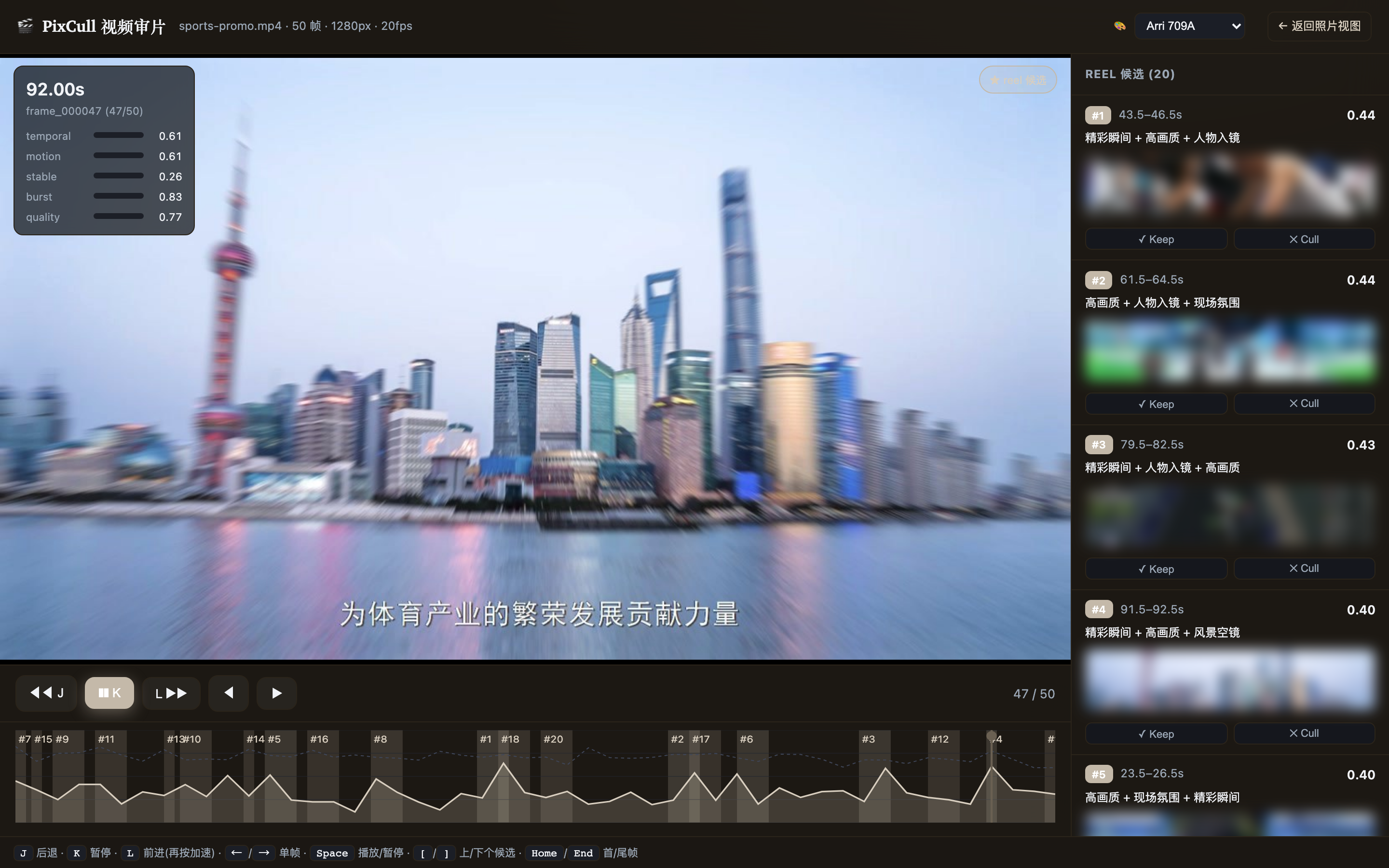
头部 🎨 调色下拉(v2.0-P2-2)一键套用胶片预置(Fuji Eterna / Kodak Vision3 / Arri 709A / Teal-Orange / B&W),主画面 + 每个 reel 候选缩略图实时套用 ASC-CDL 参数化预览(仅预览,不改原片)。
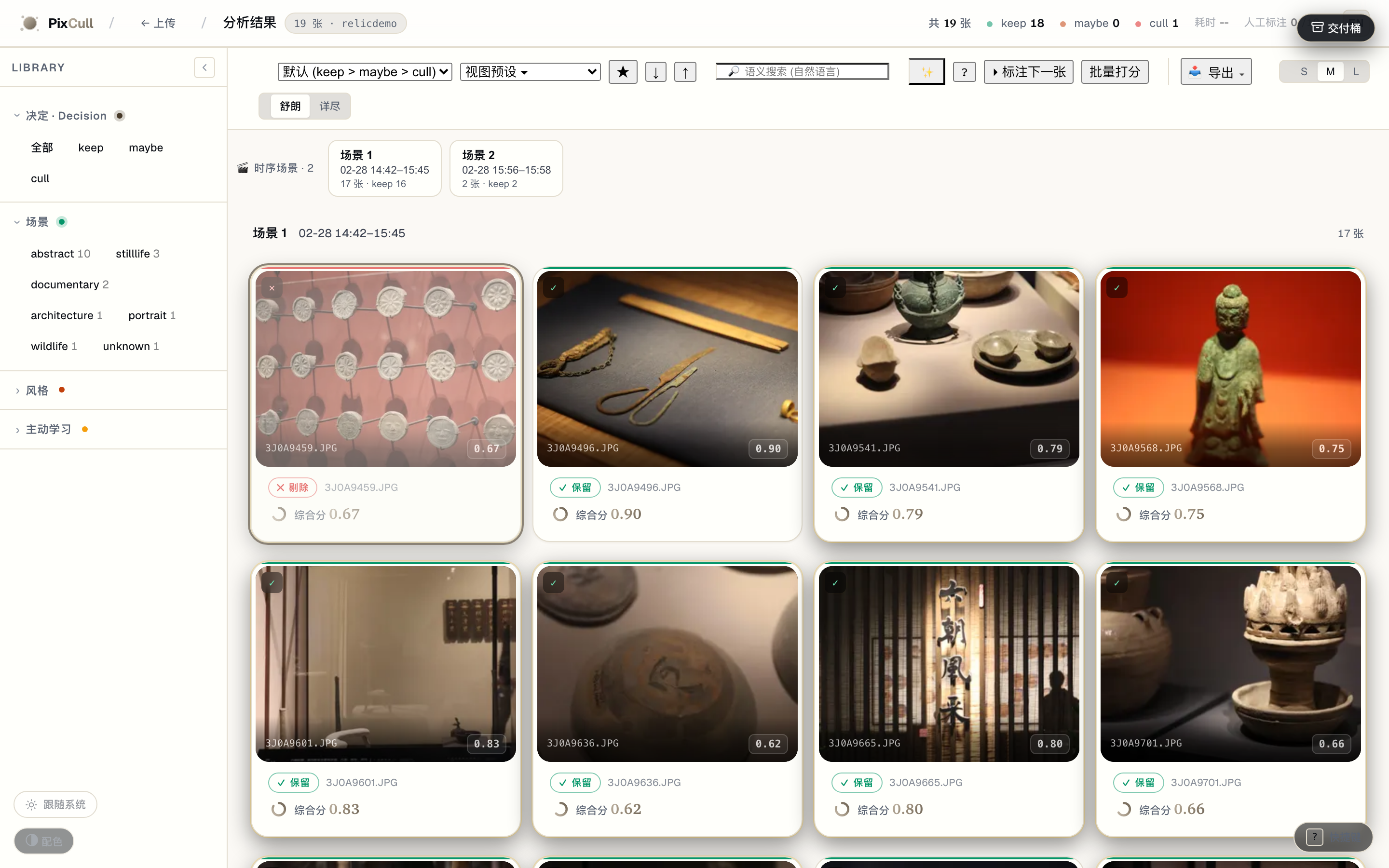
v2.9 · 智能透明 + 内容优先观看
🎬 Scenes 时序叙事导航(v2.9-P1-1) — 按拍摄时间自适应切段,点场景跳到那一段。
scoring/scenes.py 用 median+MAD 自适应间隙阈值把一次拍摄切成时序场景,导航条 显示每段时间范围 · 张数 · keep 数;点 chip 即把网格筛到那一段(叙事流,而非一格 格扁平网格)。
🔍 判定 glass box(v2.9-P1-2) — 默认一行「为什么是这个判定」,展开看逐轴。
lightbox inspector 顶部的玻璃箱:默认只显判定徽标 + 一句话理由(渐进披露,取代 过去默认 6 个展开区);展开才看逐轴评分 + 最强信号(✓优点 / →改进)+ AI 判读。
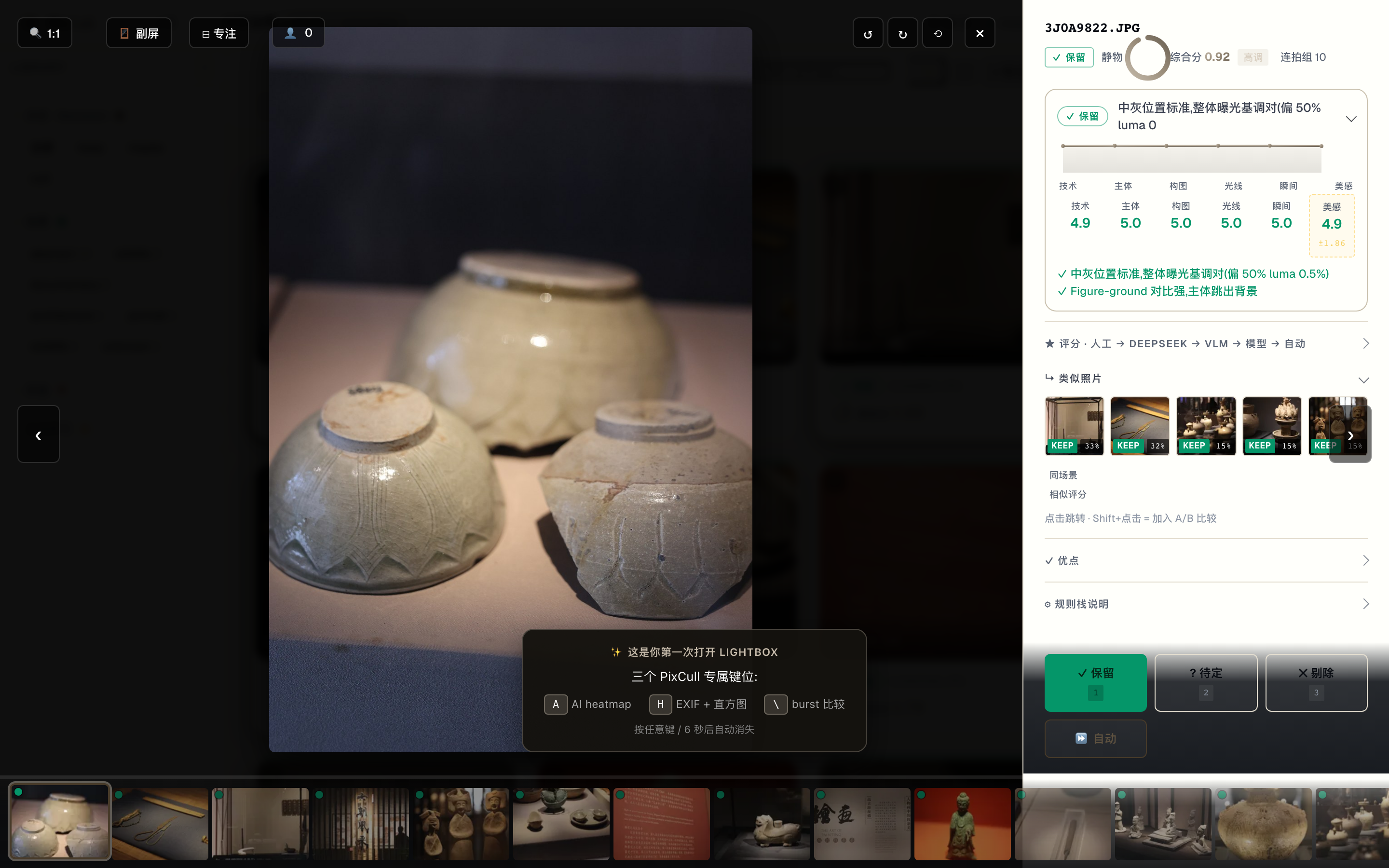
另两个 v2.9 切片——相似度滑块(Peakto 式可调近重复阈值)与 **人脸 Close-ups
轨**(Narrative 式 lightbox 人脸特写)——见
docs/ROADMAP-v2.9-charter.md。v2.11 · 透明度的可发现性
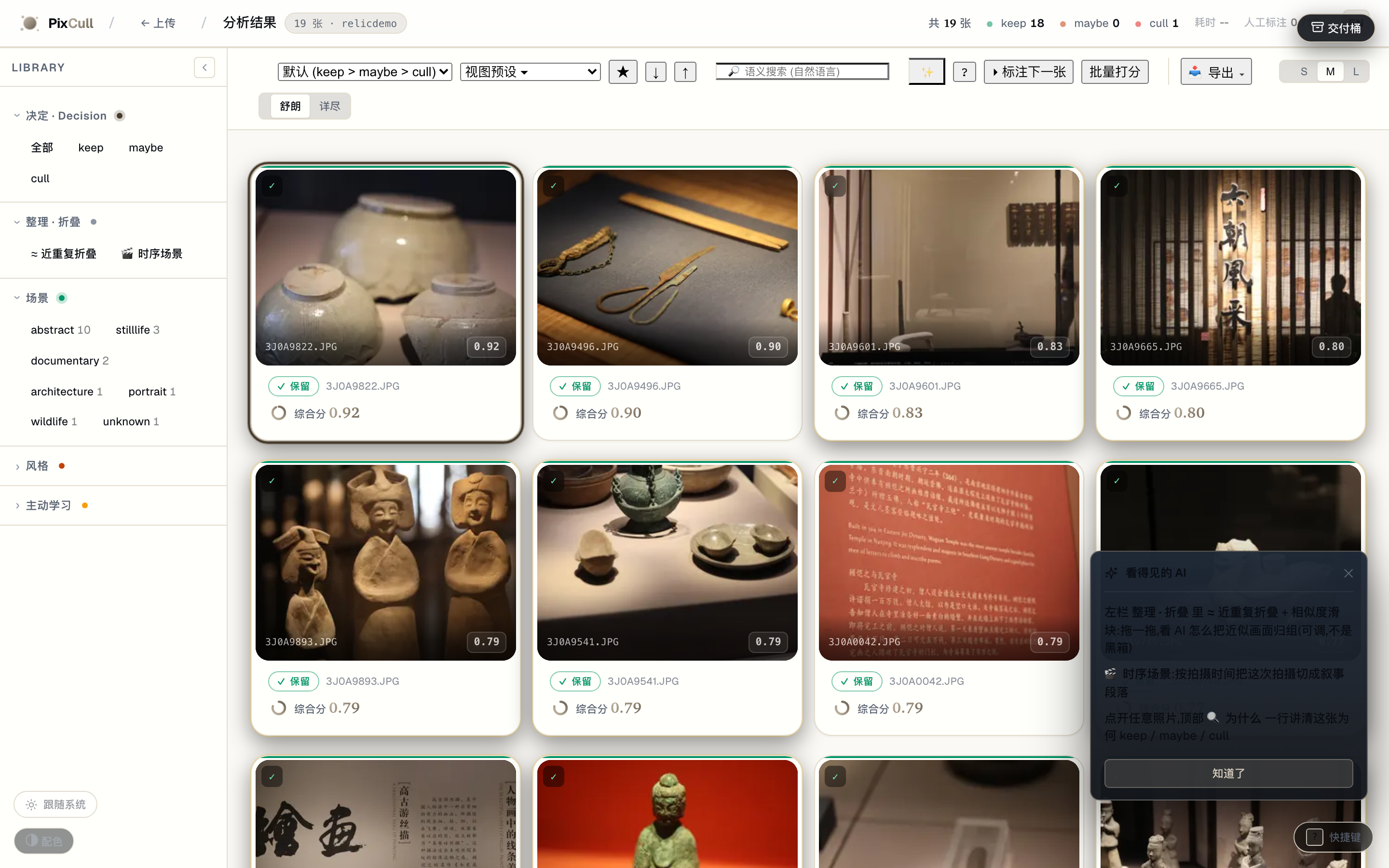
整理 · 折叠 组 + 首次 coachmark — 透明度工具不再藏起来,每个 run 都看得到入口。
近重复折叠(+ 相似度滑块)和 🎬 时序场景 从默认隐藏的「连拍」组迁到常显的 「整理 · 折叠」 侧栏组;首次进入用一次性 coachmark 把透明度三件套指出来。
快速开始
# 1. 克隆
git clone https://github.com/ChrisChen667788/pixcull.git
cd pixcull
2. Python 3.11 或 3.12 (mediapipe 把 numpy 钉死在 <2,所以 3.12 是上限)
python3.12 -m venv .venv
source .venv/bin/activate
3. 安装 (会拉 torch CPU + InsightFace ONNX + MediaPipe)
pip install -e ".[dev]"
4. 跑起来
python scripts/serve_demo.py
→ 浏览器开 http://127.0.0.1:8770
把一个 JPG / RAW / HEIC 的文件夹拖到上传页;首次约 30 秒预热模型 (Apple Silicon),之后每张 ~1 秒 (M2 Pro 实测)。
Tether 实时选片 (Lr / Capture One)
python scripts/pixcull_tether.py \
    --vertical wedding \
    ~/Pictures/Lightroom-Tether/2026-05-16-wedding
PixCull 监控目录,每张快门 ~2 秒内出 verdict,实时写 scores.csv。 Ctrl-C 退出,部分结果保留。
macOS 独立 App
app/ 下有签名 + 公证过的 .app 打包配置 (PyInstaller + Apple Developer ID)。app/RELEASE.md 里有完整的构建 / 公证 / Sparkle 更 新 pipeline。
配置项
| 内容 | 位置 | 默认值 | |---|---|---| | 端口 | scripts/serve_demo.py --port | 8770 | | API key (LAN 部署) | PIXCULLAPIKEY 环境变量 / X-PixCull-API-Key 头 | 未设置 | | CORS 白名单 | PIXCULLAPICORS_ORIGINS (逗号分隔) | 未设置时 * | | 当前用户 | PIXCULL_USER env / X-PixCull-User 头 / cookie | 无 | | App 数据目录 | ~/Library/Application Support/PixCull (macOS) | 因平台而异 | | DeepSeek API key (可选) | DEEPSEEKAPIKEY env / app-data 下 config.json | 未设置 | | 同步目标 (可选) | pixcull/sync.py::configuresyncfor_user(path) | 无 |
架构速览
完整工程架构(C4 系统上下文 + 容器图 + 拍摄 pipeline 时序 + LAN 同步 时序 + 16 行 ML 模型表 + 存储布局 + 技术决策表)见 docs/ARCHITECTURE.md —— 全部用 Mermaid 绘制,GitHub + ModelScope 均原生渲染。
10 秒版,PixCull 在团队工作流中的位置:
%%{init: {'theme':'base','themeVariables':{'primaryColor':'#241d12','primaryTextColor':'#f3ede1','lineColor':'#c4b9a9','primaryBorderColor':'#3a3122','tertiaryColor':'#161310'}}}%%
flowchart LR
P[("📷 主摄")]
S[("📷 二摄")]
E[("✎ 编辑")]
C[("👤 客户")]
PIX{{"<b>PixCull</b><br/>本地优先<br/>AI 选片"}}
DS["DeepSeek API<br/>(可选)"]
P -->|"上传 RAW/JPEG"| PIX S -->|"加入 LAN event"| PIX E -->|"标注 + 推决定"| PIX PIX -->|"作品集分享链接<br/>/share/<token>"| C PIX -.->|"opt-in · 仅文本"| DS
style PIX fill:#241d12,color:#f3ede1,stroke:#c4b9a9 style DS fill:#1b1712,stroke:#6a6052
几个不太显眼但值得点出的工程承诺:
- 无 Web 框架依赖 —— Python 内置
http.server,15k 行单文件
scripts/serve_demo.py,故意保持平铺以便审计。无 Flask / Django /
FastAPI
- 无数据库 ——
scores.csv+ append-onlyannotations.jsonl+
cat | tail;跨机迁移就是 rsync
- 多模型融合 —— 8 个 ONNX 模型(U²-Net / ArcFace / scene CNN /
- LAN 同步本地优先 —— token + 5 秒 HTTP polling + mDNS 自动发现。
设计质感坦白: 工程层已经成熟(614 个测试通过、7 个 charter
落地、57 个 slice),但**视觉设计层仍是"开发者 + AI"而非"设计师
介入"**。这是我们公开承认的差距。详见
docs/DESIGN-SYSTEM-ROADMAP.md ——
包含工具链选型(Figma + Penpot + Tokens Studio + Rive)、自定义插
画委托清单、未来 6 个月分三阶段的升级计划。目标:**v1.0 前从
"功能 iconic"升级到"工艺 iconic"**。
仓库结构
pixcull/
├── pixcull/                    # Python 包本体
│   ├── scoring/                # 6 维评分 + 场景模板 + 风格模式
│   ├── pipeline/               # 编排器 + worker + 人脸/GPS 聚类 + 建议
│   ├── detectors/              # 模糊 / 闭眼 / 曝光 / 构图 / ... 检测器
│   ├── io/                     # RAW 加载 + XMP / IPTC 写 + EXIF
│   ├── db/                     # annotations.jsonl + scores.csv schema
│   ├── report/templates/       # results.html 主 UI (零构建,vanilla JS)
│   ├── license/                # 本地 license token 状态机
│   ├── verticals.py            # 按拍摄类型的评分策略
│   ├── sync.py                 # 多机同步 (folder mirror)
│   └── tether.py               # Lr/C1 tether 监控
├── scripts/                    # CLI 入口
│   ├── serve_demo.py           # HTTP 服务 + Web UI 主程序 (10k 行)
│   ├── pixcull_tether.py       # Tether CLI
│   ├── train_rescorer.py       # rescorer 训练脚本
│   └── ...                     # ~30 个维护 + 分析脚本
├── mobile/PixCullCompanion/    # SwiftUI iOS App (Swift Package)
├── lr_plugin/PixCull.lrplugin/ # Lightroom 插件 (Lua)
├── app/                        # PyInstaller 打包配置
├── tests/                      # pytest 测试套 (240+ 用例)
├── training.csv                # 脱敏后的 rubric ground truth (130 行)
├── training_axis.csv           # 脱敏后的 per-axis ground truth (3,000 行)
├── ROADMAP.md                  # 未来 12 个月规划
└── pyproject.toml              # MIT,Python 3.11–3.12
路线图
完整 ROADMAP.md 在仓库根。当前重点:
- 照片评价智能化。 Cull 原因 → rubric 模型再训练 (让你的
- 专业工作流。 更紧的 Lr / C1 round-trip;Photo Mechanic 级别
- iOS 伴侣 V0.4+。 下拉刷新、下滑关闭、快速标注的触感反馈、
安全与隐私
PixCull 默认本地优先。serve_demo.py 只绑定 127.0.0.1;LAN 部 署由 PIXCULLAPIKEY 环境变量设置 X-PixCull-API-Key 头进行 控制。
完整威胁模型和漏洞披露政策见 SECURITY.md。 TL;DR:可信本地用户,不可信图像输入 (Pillow 钉在 ≥ 10.2);无遥 测;可选的 DeepSeek 调用走的是 你的 token,我们绝不代理转发。
参与贡献
详见 CONTRIBUTING.md。欢迎 PR;欢迎报 bug (用 issue 模板);最容易上手的几个 PR 类型在贡献指南里。
协议
MIT。可商用、自由 fork、欢迎 PR。
作者
PixCull 始于一个简单想法:不要再花一个晚上在 Lightroom catalog 里挑片。十八个月、无数个小 commit 之后,它变成了我刚摸相机时就 希望存在的 AI 选片工具。MIT 开源,让下一个摄影师不用再从头造一遍。


