Offline inference engine for art, real-time voice conversations, LLM powered chatbots and automated workflows
AI Runner
Edge AI for art and chat companions, built with privacy, flexibility, and creativity in mind.
AI Runner is a private AI companion you shape — name, personality, voice, memory — and a layered canvas for AI art generation. Everything runs offline on your machine.


🐞 Report Bug · ✨ Request Feature · 🛡️ Report Vulnerability · 📖 Wiki
What AI Runner Is For
AI Runner is built around two interlocking experiences.
A companion you shape. Name it, give it a personality, assign it a voice, and let it build memory of who you are over time. Your companion is aware of the time, date, and weather, and its mood shifts naturally through conversation. Everything — the conversations, the memories, the personality — stays on your machine.
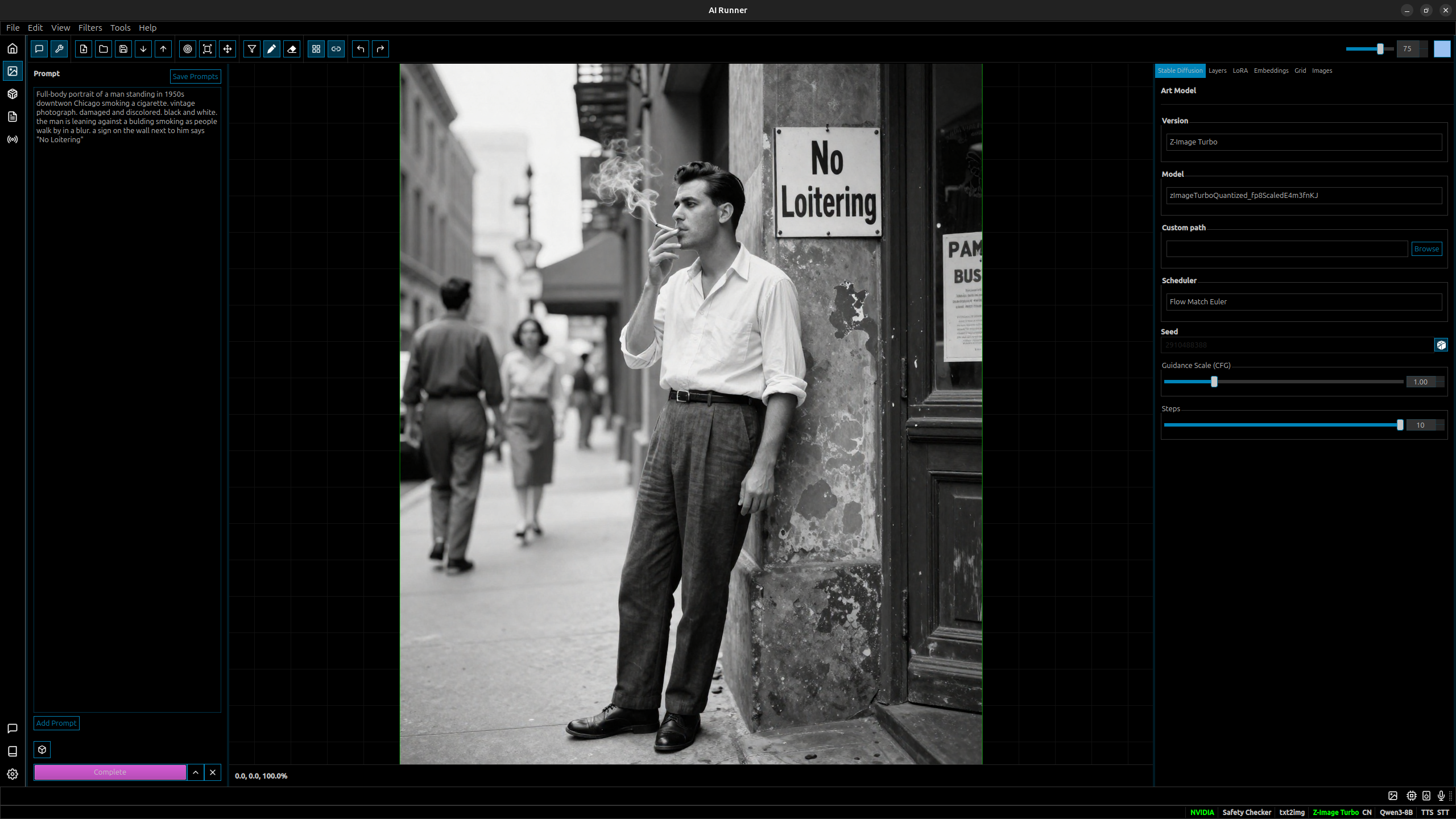
A canvas for AI art. A layered drawing and generation surface where you can sketch, paint, generate, and filter. Convert sketches to images, iterate with image-to-image, composite on layers, and apply styles and filters — with your companion present alongside you while you create.
Neither experience requires an internet connection, an API key, or a subscription. Everything runs on your hardware.
✨ Key Features
| Feature | Description | |---------|-------------| | 🤖 AI Companion | Shape a named, voiced companion with persistent personality, shifting mood, and long-term memory built from your conversations | | 🎨 Layered Canvas | Draw, paint, generate, and filter on a multi-layer canvas — convert sketches to images, composite scenes, and iterate in place | | 🖼️ Image Generation | SDXL and Z-Image Turbo with LoRA, embeddings, image-to-image, inpainting, and post-process filters, background removal | | 🗣️ Voice Conversation | Full TTS and STT — speak to your companion and hear it respond in a voice you choose | | 🧠 Memory & Recall | Companion builds long-term memory of you across sessions with RAG-powered recall | | 🌤️ Environmental Awareness | Companion is aware of time, date, and local weather — grounded in the real moment | | 🔒 Privacy First | Fully local — no external APIs, no telemetry, no data leaves your machine | | 🛡️ Safety Filters | Configurable NSFW output filtering and always-on prompt classifier for illegal content | | 📦 Model Management | Built-in HuggingFace and Civitai downloaders with support for multiple local LLMs and image models |
🌍 Language Support
| Language | TTS | LLM | STT | GUI | |----------|-----|-----|-----|-----| | English | ✅ | ✅ | ✅ | ✅ | | Japanese | ✅ | ✅ | ❌ | ✅ | | Spanish/French/Chinese/Korean | ✅ | ✅ | ❌ | ❌ |
⚙️ System Requirements
| | Minimum | Recommended | |---|---------|-------------| | OS | Ubuntu 22.04, Windows 10 | Ubuntu 22.04 (Wayland) | | CPU | Ryzen 2700K / i7-8700K | Ryzen 5800X / i7-11700K | | RAM | 16 GB | 32 GB | | GPU | NVIDIA RTX 3060 | NVIDIA RTX 5080 | | Storage | 22 GB - 100 GB+ (actual usage varies, SSD recommended) | 100 GB+ |
💾 Installation
Current status: The hybrid-runtime branch completed the runtime refactor, and AIRunner now has embedded-Python bundle builders and installer packagers.
Available packaging paths:
- Linux staged bundle archive:
./scripts/buildairunnerbundle.sh - Linux AppImage wrapper:
./scripts/packagelinuxappimage.sh - Linux tarball installer:
./install.sh --bundle-archive <bundle.tar.gz> - Windows bundle staging:
python src/airunner/bin/buildenduser_bundle.py - Windows NSIS installer:
pwsh ./scripts/packagewindowsnsis.ps1
Docker (Recommended)
GUI Mode:
xhost +local:docker && docker compose run --rm airunnerHeadless API Server:
docker compose run --rm --service-ports airunner --headlessNote: --service-ports is required to expose port 8080 for the API.
To trim container dependencies for a specific deployment, rebuild with a profile list such as:
docker build \
  --build-arg AIRUNNERINSTALLPROFILES=core,llm-native,stt-native \
  -t airunner:headless .
The headless server exposes an HTTP API on port 8080 with endpoints:
GET /health- Health check and service statusPOST /llm- LLM inferencePOST /art- Image generation
Manual Installation (Ubuntu/Debian)
Python 3.13+ required. We recommend using pyenv and venv.
- Install system dependencies:
sudo apt update && sudo apt install -y \
     build-essential cmake git curl wget pkg-config \
     nvidia-cuda-toolkit pipewire libportaudio2 libxcb-cursor0 \
     espeak espeak-ng-espeak qt6-qpa-plugins qt6-wayland \
     libsentencepiece-dev \
mecab libmecab-dev mecab-ipadic-utf8 libxslt-dev mkcert- Create data directory:
mkdir -p ~/.local/share/airunner- Choose the package profiles you need:
core: shared API, storage, config, and runtime plumbing
- llm-native: local llama.cpp runtime and LLM toolchain
- stt-native: local STT runtime helpers
- art-python: Python image-generation runtimes
- tts-python: Python TTS runtimes without MeCab-backed language packs
- gui: desktop UI dependencies
- development: test, lint, and packaging tooling
- Install AI Runner:
pip install torch torchvision torchaudio --index-url https://download.pytorch.org/whl/cu128
   pip install \
     "airunner[core,llm-native,stt-native,art-python,tts-python,gui]"
For a headless-only install, omit the GUI profile:
pip install \ "airunner[core,llm-native,stt-native,art-python,tts-python]"From a local clone in editable mode:
git clone https://github.com/Capsize-Games/airunner.git cd airunner python -m venv venv source venv/bin/activate pip install --upgrade pip setuptools wheel pip install torch torchvision torchaudio --index-url https://download.pytorch.org/whl/cu128 pip install -e \ ".[core,llm-native,stt-native,art-python,tts-python,gui,development]"The base tts-python profile intentionally excludes the MeCab-backed Japanese and Korean voice packs so a fresh virtual environment can install without extra native build steps.
To include those language packs after installing the system packages above, use:
pip install -e ".[openvoicejp,openvoicekr]"- Install llama-cpp-python with CUDA (Python 3.13, Linux):
pip install --no-cache-dir \
    --extra-index-url https://abetlen.github.io/llama-cpp-python/whl/cu124 \
"llama-cpp-python==0.3.21"Qwen3.5-9B-Q8_0.gguf in this repo.
- The cu124 wheel enables GPU offload on Linux without rebuilding from source.
- If you must build from source for an RTX 5080 / compute capability 12.0, use CUDA toolkit 12.8+ and GGMLCUDAARCHITECTURES=120.
- Run:
airunnerAlembic Upgrades
When you need to run database migrations manually from a local clone, use the repo Alembic config and upgrade all heads:
source venv/bin/activate
alembic -c src/airunner/alembic.ini upgrade heads
If you are targeting a non-default database, set AIRUNNERDATABASEURL before running the command.
For detailed instructions, see the Installation Wiki.
Hybrid Runtime Migration
The hybrid-runtime rewrite is being delivered in explicit phases: runtime foundation, LLM cutover, STT isolation, art/TTS isolation, then packaging, bundles, CI, and rollout hardening. The phase order, rollout gates, and full issue-tree checklist live in HYBRIDRUNTIME_MIGRATION.md.
That migration is the runtime architecture foundation. AIRunner now also includes the no-system-Python distribution layer with one primary airunner entry point, described in ENDUSER_DISTRIBUTION.md.
🤖 Models
AI Runner downloads essential TTS/STT models automatically. LLM and image models must be configured:
| Category | Model | Size | |----------|-------|------| | LLM (default) | Llama 3.1 8B Instruct (4bit) | ~4 GB | | Image | Stable Diffusion 1.5 | ~2 GB | | Image | SDXL 1.0 | ~6 GB | | Image | Z-Image Turbo | ~12 GB | | TTS | OpenVoice | 654 MB | | STT | Whisper Tiny | 155 MB |
LLM Providers: Local (HuggingFace), Ollama, OpenRouter, OpenAI
Art Models: Place your models in ~/.local/share/airunner/art/models/
🛠️ CLI Commands
| Command | Description | |---------|-------------| | airunner | Launch GUI | | airunner-headless | Start headless API server | | airunner-hf-download | Download/manage models from HuggingFace | | airunner-civitai-download | Download models from CivitAI | | airunner-build-ui | Rebuild UI from .ui files | | airunner-tests | Run test suite | | airunner-generate-cert | Generate SSL certificate |
Note: To download models, use Tools → Download Models from the main application menu, or use airunner-hf-download / airunner-civitai-download from the command line.
Rebuilding Qt UI Files
When you change any .ui file in a local clone, rebuild the generated *_ui.py files from the repo root with:
source venv/bin/activate
python src/airunner/bin/build_ui.py
If you installed AIRunner's console scripts, airunner-build-ui runs the same rebuild.
This rebuild also refreshes the Qt resources and generated stylesheet assets.
🖥️ Headless Server
AI Runner can run as a headless HTTP API server, enabling remote access to LLM, image generation, TTS, and STT capabilities. This is useful for:
- Running AI services on a remote server
- Integration with other applications via REST API
- VS Code integration as an Ollama/OpenAI replacement
- Automated pipelines and scripting
Quick Start
# Start with defaults (port 8080, LLM only)
airunner-headless
Start with a specific LLM model
airunner-headless --model "/path/to/Qwen2.5-7B-Instruct-4bit"
Run as Ollama replacement for VS Code (port 11434)
airunner-headless --ollama-mode
Don't preload models - load on first request
airunner-headless --no-preload
Command Line Options
| Option | Description | |--------|-------------| | --host HOST | Host address to bind to (default: 127.0.0.1) | | --port PORT | Port to listen on (default: 8080, or 11434 in ollama-mode) | | --ollama-mode | Run as Ollama replacement on port 11434 | | --insecure-no-auth | Allow binding to non-loopback without AIRUNNERAPIKEY (not recommended) | | --model, -m PATH | Path to LLM model to load. Also enables the LLM service. Quote paths that contain spaces. | | --art-model PATH | Path to Stable Diffusion model to load. Also enables the art service. Quote paths that contain spaces. | | --tts-model PATH | Path to TTS model to load. Also enables the TTS service. Quote paths that contain spaces. | | --stt-model PATH | Path to STT model to load. Also enables the STT service. Quote paths that contain spaces. | | --enable-llm | Enable LLM service | | --enable-art | Enable Stable Diffusion/art service | | --enable-tts | Enable TTS service | | --enable-stt | Enable STT service | | --no-preload | Don't preload models at startup |
Environment Variables
| Variable | Description | |----------|-------------| | AIRUNNERLLMMODEL_PATH | Path to LLM model | | AIRUNNERARTMODEL_PATH | Path to art model | | AIRUNNERTTSMODEL_PATH | Path to TTS model | | AIRUNNERSTTMODEL_PATH | Path to STT model | | AIRUNNERAPIKEY | If set, requires auth for API requests and docs (X-API-Key / Authorization: Bearer) | | AIRUNNERINSECURENO_AUTH | Set to 1 to allow unauthenticated remote access (not recommended) | | AIRUNNERALLOWEDTENANT_KEYS | Comma-separated allowlist for X-Tenant-Key when API key auth is enabled | | AIRUNNER_DEBUG | Set to 1 to include exception details in 500s for loopback requests | | AIRUNNERNOPRELOAD | Set to 1 to disable model preloading | | AIRUNNERLLMON | Enable LLM service (1 or 0) | | AIRUNNERSDON | Enable Stable Diffusion (1 or 0) | | AIRUNNERTTSON | Enable TTS service (1 or 0) | | AIRUNNERSTTON | Enable STT service (1 or 0) |
API Endpoints
Native AIRunner Endpoints
| Method | Endpoint | Description | |--------|----------|-------------| | GET | /health | Health check and service status | | POST | /llm | LLM text generation (streaming) | | POST | /llm/generate | LLM text generation | | POST | /art | Image generation | | POST | /tts | Text-to-speech | | POST | /stt | Speech-to-text |
Ollama-Compatible Endpoints (port 11434)
| Method | Endpoint | Description | |--------|----------|-------------| | GET | /api/tags | List available models | | GET | /api/version | Get version info | | GET | /api/ps | List running models | | POST | /api/generate | Text generation | | POST | /api/chat | Chat completion | | POST | /api/show | Show model info |
OpenAI-Compatible Endpoints
| Method | Endpoint | Description | |--------|----------|-------------| | GET | /v1/models | List models | | POST | /v1/chat/completions | Chat completion with tool support |
Example: LLM Request
curl -X POST http://localhost:8080/llm \
  -H "Content-Type: application/json" \
  -d '{
    "prompt": "What is the capital of France?",
    "stream": true,
    "temperature": 0.7,
    "max_tokens": 100
  }'
Example: Image Generation (Art)
# Requires: airunner-headless --enable-art
curl -X POST http://localhost:8080/art \
  -H "Content-Type: application/json" \
  -d '{
    "prompt": "A beautiful sunset over mountains",
    "negative_prompt": "blurry, low quality",
    "width": 512,
    "height": 512,
    "steps": 20,
    "seed": 42
  }'
Returns: {"images": ["base64pngdata..."], "count": 1, "seed": 42}
Example: Text-to-Speech (TTS)
# Requires: airunner-headless --enable-tts
curl -X POST http://localhost:8080/tts \
  -H "Content-Type: application/json" \
  -d '{"text": "Hello, world!"}'
Returns: {"status": "queued", "message": "Text queued for speech synthesis"}
Audio plays through system speakers
Example: Speech-to-Text (STT)
# Requires: airunner-headless --enable-stt
Audio must be base64-encoded WAV (16kHz mono recommended)
curl -X POST http://localhost:8080/stt \
  -H "Content-Type: application/json" \
  -d '{"audio": "UklGRi4AAABXQVZFZm10IBAAAAABAAEA..."}'
Returns: {"transcription": "Hello world", "status": "success"}
Example: Ollama Mode with VS Code
- Start the headless server in Ollama mode:
airunner-headless --ollama-mode --model "/path/to/your/model"If a model path contains spaces, quote it. For example:
airunner-headless --enable-art --art-model "/home/joe/.local/share/airunner/art/models/Z-Image Turbo/txt2img/moodyRealMix_zitV3FP8.safetensors"- Configure VS Code Continue extension to use
http://localhost:11434
- The server will respond to Ollama API calls, allowing seamless integration.
Auto-Loading Models
When --no-preload is used, models are automatically loaded on the first request to the corresponding endpoint. This is useful for:
- Reducing startup time
- Running multiple services without loading all models upfront
- Memory-constrained environments
📦 Model Management
Download Models
# List available models
airunner-hf-download
List only LLM models
airunner-hf-download list --type llm
Download a model (GGUF by default)
airunner-hf-download qwen3-8b
Download full safetensors version
airunner-hf-download --full qwen3-8b
Download any HuggingFace model
airunner-hf-download Qwen/Qwen3-8B
List downloaded models
airunner-hf-download --downloaded
Delete Models
# Delete a model (with confirmation)
airunner-hf-download --delete Qwen3-8B
Delete without confirmation (for scripts)
airunner-hf-download --delete Qwen3-8B --force
Download from CivitAI
# Download a model from CivitAI URL
airunner-civitai-download https://civitai.com/models/995002/70s-sci-fi-movie
Download a specific version
airunner-civitai-download https://civitai.com/models/995002?modelVersionId=1880417
Download to a custom directory
airunner-civitai-download <url> --output-dir /path/to/models
Use API key for authentication (for gated models)
airunner-civitai-download <url> --api-key yourapikey
Or set CIVITAIAPIKEY environment variable
export CIVITAIAPIKEY=yourapikey
airunner-civitai-download <url>
🔒 HTTPS Configuration
AI Runner's local server uses HTTPS by default. Certificates are auto-generated in ~/.local/share/airunner/certs/.
For browser-trusted certificates, install mkcert:
sudo apt install libnss3-tools mkcert -install⚖️ Colorado AI Act Notice
Effective February 1, 2026, the Colorado AI Act (SB 24-205) regulates high-risk AI systems.
Your Responsibility: If you use AI Runner for decisions with legal or significant effects on individuals (employment screening, loan eligibility, insurance, housing), you may be classified as a deployer of a high-risk AI system and must:
- Implement a risk management policy
- Complete impact assessments
- Provide consumer notice and appeal mechanisms
- Report algorithmic discrimination to the Colorado Attorney General
- Model Downloads: Connecting to HuggingFace or CivitAI to download models
- Web Search / Deep Research: Search queries sent to DuckDuckGo; web pages scraped for research
- Weather Prompt: Location coordinates sent to Open-Meteo API if enabled
- External LLM Providers: Prompts sent to OpenRouter or OpenAI if configured
🧪 Testing
# Run headless-safe tests
pytest src/airunner/utils/tests/
Run display-required tests (Qt/GUI)
xvfb-run -a pytest src/airunner/utils/tests/xvfb_required/
Contributing
See CONTRIBUTING.md and the Development Wiki.
Documentation