
A collection of essential and foundational cybersecurity knowledge, thoughtfully organized for easy comprehension.
Remember to take a look at the /More folder! ;)




Thank you for exploring this project! I hope you will find the content valuable and perhaps even worth sharing with others. This project represents years of dedication, learning, and refinement, fueled by countless hours and cups of coffee ☕. If you’d like to support its continued growth, your contribution would be highly appreciated.
List of Contents
1. Security Models 1. CIA Triad 2. DAD Triad 3. The Bell-La Padula Model 4. Biba Model 5. Clark-Wilson Model 2. Trust and Access Control 1. Principles of Privileges 2. Zero Trust versus Trust but Verify 3. Threat Identification and Management 1. Threat Modeling and Incident Response 2. Vulnerability vs Threat vs Risk 3. Threat intelligence Classifications 4. Threat Intelligence Tools 5. The Pyramid of Pain 4. Ethical and Legal Aspects 5. Security Assessment Frameworks and Methodologies 1. Black, Grey, & White Box Testing 2. OSSTMM 3. OWASP 4. NIST 5. NCSC CAF 6. MITRE ATT&CK 7. Unified Kill chain 6. Global Security Standards 1. ISO/IEC 19249 2. ISO27001 7. Operational Roles and Career Development 1. Aircrack-ng 2. Gobuster 3. Feroxbuster 4. Hashcat 5. Hydra 6. John The Ripper 7. Metasploit 8. Netcat 9. Nikto 10. Nmap 11. SQLMap 1. Autopsy 2. Burp Suite 3. Nessus 4. Wireshark 1. Nano 2. VIM 1. Internet Protocol (IP) 2. The Router 3. IPv4 Classes 4. Subnetting 5. Address Resolution Protocol (ARP) 1. Content Discovery 2. SQL Injection 3. Command Injection 4. Directory Traversal 5. Authentication Bypass 6. Insecure Direct Object Reference (IDOR) 7. File Inclusion (LFI/RFI) 8. Cross Site Request Forgery (CSRF) 9. Cross Site Scripting (XSS) 10. Server Side Request Forgery (SSRF) 11. Server Side Template Injection (SSTI) 12. Server Side Includes (SSI) 1. File Analysis 2. PCAP Analysis 3. Steganography 4. Memory Analysis 5. Disk Imaging 1. Registers 2. The Stack 3. Calling Conventions 4. Global Offset Table (GOT) 5. Buffers and Buffer Overflows 6. Return Oriented Programming (ROP) 7. Binary Security 8. The Heap and Exploitation 9. Format String Vulnerability 10. Integer Overflow 11. ASLR Bypass 1. Assembly Language 2. Disassemblers & Debuggers 3. Decompilers 1. Genating Keys 2. Cryptographic Methods 3. Encoding 4. Hashing 5. Ciphers 6. Encryption (RSA) 1. Active Directory 2. Windows Reverse Shells 3. Samba (SMB) 1. TTY Shell 2. Privilege Escalation 1. Social Engineering 2. Denial of Service (DoS) 3. MisconfigurationsLinks
Abuse.ch - a collection of malware and threat intelligence feeds. Ahmia - search engine for hidden services on the Tor network AI Generated Photos - 100.000 AI generated faces. Aperisolve - all in one steganography analysis Archive.org - internet Archieve ASCII Converter - Hex, decimal, binary, base64, and ASCII converter Assembly Tutorials - assembly tutorials Base64 Decodr/Encoder - base64 decoder/encoder Bcrypt Generator - a simple bcrypt generator Bug Bounty - a list of bug bounty programs Can I use - provides up-to-date browser support tables for support of front-end web technologies. Censys - search engine for internet connected devices Cheatography - over 3,000 free cheat sheets, revision aids and quick references. CodeBeautify - code Beautifier, Viewer and converter Common ports - a lists of the most common ports Cipher Identifier - cipher identifier Convert Binary - a wide range of different converters for binary numbers Convertcsv - convert SQL to CSV Crackstation (Rainbow tables) - hash cracker CSS Reference - CSS reference CVECrowd - a platform for sharing and discussing cybersecurity vulnerabilities. CVE Details - CVE security vulnerability advanced database. CVE Mitre - list of publicly known cybersecurity vulnerabilities. CVS - Scoring System Calculator CyberChef - a web app for encryption, encoding, compression and data analysis. Cybercrime Tracker - monitors and tracks various malware families that are used to perpetrate cyber crimes. crt.sh - Certificate Transparency Log Search Engine for subdomain enumeration. CTF 101 - learn the different CTF topics in cybersecurity CTF Cryptography - ctf cryptography for beginners dCode - dcode.fr has many decoders for a lot of ciphers dehashed - is a hacked database search engine. Diff Checker - compare images DNSDumpster - free domain research tool that can discover hosts related to a domain DogBolt - decompiler explorer EmailHippo - a free email verification tool. Emkei - fake mail generator Explain Shell - a tool to help you understand shell commands. ExploitDB - searchable archive from The Exploit Database. fakenamegenerator - your randomly generated identity. Feodo Tracker - a project by abuse.ch tracking the C2 infrastructure of the Feodo Tracker Botnet. File Signature - a table of file signatures (aka "magic numbers") File Signature Wiki - another list of file signatures (aka "magic numbers") Forensically - a tool to analyze images. Godbolt - compiler explorer Google advanced search - google dorking made easy Google Hacking Database - juicy information found by dorking GTFOBins - list of Unix binaries that can be used to bypass local security restrictions in misconfigured systems. HackerOne - HackerOne is a vulnerability coordination and bug bounty platform. Hacking Glossary - a glossary of hacking terms made by HackTheBox. Hash Analyzer - tool to identify hash types Hash Identifierhttps://hashes.com/en/tools/hash_identifiers) - hash identifier using CyberChef have i been pwned? - check if you have an account that has been compromised in a data breach. HexEd - HexEd is a powerful online hex editor running in your web browser hilite.me - converts your code snippets into pretty-printed HTML formats HSV to RGB - HSV to RGB color converter HTML Reference - HTML reference HTTrack - website copier Hunter.io - find email addresses in seconds. Image Color Picker - select a color and get the HTML Color Code of this pixel Intelix - Search Tor, I2P, data leaks and the public web by email, domain, IP, CIDR, Bitcoin address and more. JoomScan - Joomla Vulnerability Scanner k8s-security - kubernetes security notes and best practices. Kali Linux Tutorials - Kali Linux Tutorials Keybase - it's open source and powered by public-key cryptography. LFI - learn about local file inclusion Linux Commands - a list of linux commands malc0de - malware search engine. Malware Bazaar - malware search engine. MD5 Online - md5Online offers several tools related to the MD5 cryptographic algorithm. Morse Code Translator a morse code translator Morse Code Adaptive Audio Decoder - a morse code adaptive audio decoder Morse Code Audio Decoder - a morse code audio decoder Morse Code Sound & Vibration Listener - a morse code sound & vibration listener Namechk - check if your desired username is available on over 500 social networks (username OSINT). NerdyData - the search engine for source code ntlm.pw - NTLM password cracker Observatory by Mozilla- set of tools to analyze your website. Office Recovery - repair corrupt JPEG, PNG, GIF, BMP, TIFF, and RAW images. PDF24 - free and easy to use online PDF tools Phishtool - PhishTool is a free phishing simulation tool. NPiet - Piet is an esoteric programming language based of using colored pixels to represent commands. Ping.eu - online Ping, Traceroute, DNS lookup, WHOIS and others. pipl - is the place to find the person behind the email address, social username or phone number. Pixrecovery - repair corrupt JPEG, PNG, GIF, BMP, TIFF, and RAW images. Rapid7 - vulnerability and exploit database. Regex101 - online regex tester and debugger: PHP, PCRE, Python, Golang and JavaScript. RegEx Pal - online regex testing tool + other tools. RegExr - online tool to learn, build, & test Regular Expressions (RegEx / RegExp). Revshell - reverse shell generator. RequestBin - RequestBin gives you a URL that collects requests so you can inspect them in a human-friendly way RGBA Color Picker - an RGBA color picker ShellCheck - finds bugs in your shell scripts. Shodan - learn various pieces of information about the client’s network, without actively connecting to it. sploitus - the exploit and tools database. SRI Hash Generator - Subresource Integrity (SRI) Hash Generator SSL Scanner - analyze website security. SSL Scan - sslscan tests SSL/TLS enabled services to discover supported cipher suites Steganographic Decoder - decodes the payload that was hidden in a JPEG image or a WAV or AU audio file Stego Tricks - learn stego tricks Subnet Calculator - IPv4 to IPv6 subnet calculator Subnet Cheatsheet - subnet cheatsheet SSL Blacklist - a free SSL blacklist that can be used to detect malicious SSL certificates. Tabulate - create clean looking tables Talos Intelligence - threat intelligence from Cisco. Threat Fox - a resource for sharing indicators of compromise (IOCs). TIO - TIO is a free online interpreter, compiler and REPL. URL Haus - a project by abuse.ch to collect and classify malicious URLs. urlscan.io - service to scan and analyse websites. urlvoid - this service helps you detect potentially malicious websites. User-Agent Switcher switch and manage user agents Vega - web security scanner and web security testing platform ViewDNS - one source for free DNS related tools and information. VirusTotal - analyze suspicious files and URLs to detect types of malware. Visual Subnet Calculator - a visual subnet calculator WebToolHub-LE - HTML hyperlink extractor WebToolHub - lots of different web tools WhatsMyName - social media username enumeration WHOIS lookup - best whois lookup Wigle - is a website for collecting information about the different wireless hotspots around the world WPScan - WordPress security scannerCTF Sites
TryHackMe - TryHackMe is a free online platform for learning cyber security, using hands-on exercises and labs. HackTheBox - HackTheBox is a massive, online cybersecurity practical training platform. CTFLearn - An online platform built to help ethical hackers learn, practice, and compete. Challenges - Reverse engineering CTF training platform Cryptohack - Cryptography learning platform. Root Me - Root Me is a platform for everyone to test and improve knowledge in computer security and hacking. ROP Emperium - ROP Emporium is a series of challenges based around Return Oriented Programming (ROP). pico CTF - picoCTF is a free computer security game targeted at middle and high school students.Books
- Penetration Testing
- Linux Basics for Hackers
- The Linux Command Line and Shell Scripting Bible
- Black Hat Python
- The Hacker PlayBook 2 & 3
- Hacker Methodology Handbook
- Gray Hat Hacking
- Red Team Field Manual
- Metasploit
- The Web Application Hacker’s Handbook
- Real-World Bug Hunting
- Attacking Network Protocols
Services
A variety of services that can be useful for cybersecurity professionals.Network security
An Intrusion Detection and Prevention System (IDPS) or simply Intrusion Prevention System (IPS) is a system that can detect and prevent network intrusions. IDS setups can be divided based on their location in the network into:Host-based IDS (HIDS): Installed on an OS to monitor inbound/outbound host traffic and running processes.
Network-based IDS (NIDS): A dedicated device or server monitoring network traffic via a switch’s monitor port to detect malicious activity across the network or VLANs.
VPN Providers
A Virtual Private Network (VPN) encrypts your internet connection to protect your privacy and security.Some of these providers are:
VPS Providers
A Virtual Private Server (VPS) is an isolated environment created on a physical server using virtualization technology.Some of these providers are:
Terms
| Term | Description | |--------------------------------------|---------------------------------------------------------------------------------------------------------------------------------------------| | Active reconnaissance | Directly interacting with the system. | | Asymmetric encryption | Uses different keys to encrypt and decrypt. | | APT | Advanced Persistent Threat (team/group or even nation-state). | | Authentication | Proving that the user is whom they claim to be. | | Broken Access Control | Example: We cannot let anyone view the webmail before logging in or modify someone else's account. | | Brute force | Attacking cryptography by trying every possible password or key. | | Cipher | A method of encrypting or decrypting data. Modern ciphers are cryptographic, but there are non-cryptographic ones like Caesar cipher. | | Ciphertext | The result of encrypting plaintext; encrypted data. | | Credential Stuffing | Attack where compromised credentials are used to gain unauthorized access to an account. | | Cryptanalysis | Attacking cryptography by finding a weakness in the underlying mathematics. | | Defacing | Modifying a website to display a message or image. | | Defensive security | Protecting a network and systems by analyzing and securing against digital threats. | | Defence-in-Depth | A security strategy involving multiple levels, also known as Multi-Level Security. | | Dynamic SSH Tunneling | Dynamic port forwarding turns your SSH client into a SOCKS proxy server. | | Encoding | A form of data representation (e.g., base64), not encryption, and immediately reversible. | | Encryption | Transforming data into ciphertext using a cipher. | | Firewall | A firewall restricts connections based on predefined rules, controlling what can enter or leave a network. | | Hash collision | When two different inputs generate the same hash output. | | IDOR | Insecure Direct Object Reference, a type of access control vulnerability. | | IP Spoofing | Creating IP packets with a modified source address to hide the sender's identity or impersonate another system. | | IPP | Internet Printing Protocol. | | IaaS | Infrastructure-as-a-Service. | | Identification and Authentication Failure | Allowing brute force attacks or storing passwords in plain text. | | Identification | The ability to uniquely identify a user. | | Intrusion Detection System (IDS) | Detects system and network intrusions and attempts. | | Intrusion Prevention System (IPS) | Blocks detected intrusions and attempts to prevent network breaches. | | Key | Information needed to decrypt ciphertext and retrieve plaintext. | | Offensive security | Breaking into systems, exploiting software bugs, and finding loopholes to gain unauthorized access. | | Packet sniffing | Capturing data packets on a network. | | Passive reconnaissance | Relying on publicly available information for gathering intelligence. | | Passphrase | A password-like string used to protect a key. | | Password Spraying | Brute force attack using a list of usernames and a single password to gain system access. | | Penetration Tester | A professional who tests systems to find exploitable vulnerabilities. | | Plaintext | Unencrypted data, often text but could be any file like a photograph. | | Proxy | A server acting as a gateway between an application and the internet. | | Private Blog Network (PBN) | A network of websites used to build links to improve search engine rankings. | | Port Forwarding | Technique allowing external devices to access services on private networks. | | RCE | Remote Code Execution vulnerability allowing commands to be executed on a target system. | | Rainbow tables | Lookup tables of hashes to corresponding plaintexts used in password cracking. | | Red Teamer | Plays the role of an adversary, simulating attacks on an organization. | | Reverse SSH Connection | A remote system initiates a connection to your local system. | | SAM | Security Account Manager, a Windows database storing user accounts and security descriptors. | | SIEM | Security Information and Event Management, a system that aggregates and analyzes security data. | | SSH Tunneling | Transporting arbitrary data over an encrypted SSH connection. | | SSL/TLS | Cryptographic protocols for secure data transmission; SSL is outdated, TLS is the modern version. | | Security Engineer | Designs, monitors, and maintains security controls to prevent cyberattacks. | | Symmetric encryption | Uses the same key to encrypt and decrypt. | | VPS | Virtual Private Server, a type of IaaS. | | VPN concentrator appliance | A VPN ensures network traffic confidentiality and integrity by preventing third-party access and modification. | | XSS | Cross-Site Scripting, a vulnerability in web applications that can be used to execute malicious scripts. |Forms of Malwares/Attacks
There are several types of malware and attacks that can compromise systems and data. Here are some common ones.| Term | Description | |---------------------|---------------------------------------------------------------------------------------------------------------------------------------------| | Virus | Malware that infects a computer by inserting itself into programs, potentially causing data and program damage. Needs user interaction to spread. | | Worm | Malware that replicates itself and spreads without user interaction, often through networks, email, or other means. | | Trojan horse | Malware disguised as a legitimate program that performs harmful actions once inside a system. | | Spyware | Malware that secretly collects information about a user's activities and reports it back to the attacker. | | Phishing | A technique to steal sensitive information by posing as a legitimate organization or individual. | | DoS attack | Overloading a system with traffic to disrupt its services. | | DDoS attack & botnets| A distributed denial-of-service attack using a network of compromised devices to overload a target with traffic. | | Spam | Unwanted email that can overwhelm recipients and may spread malware or phishing attempts. | | Ransomware | Malware that encrypts data and demands payment for decryption. | | Rootkit | Malware that grants an attacker root access and conceals its presence from the user. | | Adware | Malware that displays unwanted advertisements on a computer. |
Principles and Standards
Security Models
CIA Triad
CIA Triad is a model designed to guide policies for information security within an organisation. It consists of three core principles being: Confidentiality, Integrity, and Availability.- Confidentiality ensures that only the intended persons or recipients can access the data.
- Integrity aims to ensure that the data cannot be altered; moreover, we can detect any alteration if it occurs.
- Availability aims to ensure that the system or service is available when needed.
DAD Triad
The security of a system is attacked through one of several means. It can be via the disclosure of secret data, alteration of data, or destruction of data. It is the opposite of the CIA triad.- Disclosure: Unauthorized access to information. Is the opposite of confidentiality.
- Alteration: Unauthorized changes to information. Is the opposite of Integrity
- Destruction: Unauthorized or intentional destruction of information. Is the opposite of Availability
The Bell-La Padula Model
The Bell-LaPadula Model aims to achieve confidentiality by specifying three rules:- Simple Security Property: This property is referred to as “no read up”; it states that a subject at a lower security level cannot read an object at a higher security level. This rule prevents access to sensitive information above the authorized level.
- Star Security Property: This property is referred to as “no write down”; it states that a subject at a higher security level cannot write to an object at a lower security level. This rule prevents the disclosure of sensitive information to a subject of lower security level.
- Discretionary-Security Property: This property uses an access matrix to allow read and write operations. An example access matrix is shown in the table below and used in conjunction with the first two properties.
| Subjects | Object A | Object B | | --- | --- | --- | | Subject 1 | Write | No access | | Subject 2 | Read/Write | Read |
Limitation: It was not designed to handle file-sharing.
Biba Model
The Biba Model aims to achieve integrity by specifying two main rules- Simple Integrity Property: This property is referred to as “no read down”; a higher integrity subject should not read from a lower integrity object.
- Start Integrity Property: This property is referred to as “no write up”; a lower integrity subject should not write to a higher integrity object.
Clark-Wilson Model
The Clark-Wilson Model also aims to achieve integrity by using the following concepts:- Constrained Data Item (CDI): This refers to the data type whose integrity we want to preserve.
- Unconstrained Data Item (UDI): This refers to all data types beyond CDI, such as user and system input.
- Transformation Procedures (TPs): These procedures are programmed operations, such as read and write, and should maintain the integrity of CDIs.
- Integrity Verification Procedures (IVPs): These procedures check and ensure the validity of CDIs.
Trust and Access Control
Principles of Privileges
It is vital to administrate and correctly define the various levels of access to an individuals require. These levels are determined on two primary factors:- The individual's role/function within the organisation
- The sensitivity of the information being stored on the system
- PIM is used to translate a user's role within an organisation into an access role on a system.
- PAM is the management of the privileges a system's access role has, amongst other things.
Zero Trust versus Trust but Verify
Trust in cybersecurity is addressed through two key principles:- Trust but Verify: Verify the actions of trusted entities through automated security mechanisms like logs and intrusion detection.
- Zero Trust: Assume no trust and require authentication and authorization for all access, reducing the potential impact of breaches. Implementations like microsegmentation enhance security.
Threat Identification and Management
Threat Modeling and Incident Response
Threat modelling is the process of reviewing, improving, and testing the security protocols in place in an organisation's information technology infrastructure and services.This process is very similar to a risk assessment made in workplaces for employees and customers. The principles all return to:
Preparation -> Identification -> Mitigations -> ReviewIt is, however, a complex process that needs constant review and discussion with a dedicated team. An effective threat model includes:
- Threat intelligence
- Asset identification
- Mitigation capabilities
- Risk assessment
Vulnerability vs Threat vs Risk
- Vulnerability: Vulnerabilities are weaknesses that can be exploited.
- Threat: A threat represents the possibility of harm resulting from the exploitation of a vulnerability.
- Risk: Concerned with the likelihood of a threat actor exploiting a vulnerability and the potential impact on the business. Risk assessment involves evaluating the probability and consequences of security incidents.
Threat intelligence Classifications
Threat Intel is geared towards understanding the relationship between your operational environment and your adversary. With this in mind, we can break down threat intel into the following classifications:- Strategic Intel: High-level intel that looks into the organisation's threat landscape and maps out the risk areas based on trends, patterns and emerging threats that may impact business decisions.
- Technical Intel: Looks into evidence and artefacts of attack used by an adversary. Incident Response teams can use this intel to create a baseline attack surface to analyse and develop defence mechanisms.
- Tactical Intel: Assesses adversaries' tactics, techniques, and procedures (TTPs). This intel can strengthen security controls and address vulnerabilities through real-time investigations.
- Operational Intel: Looks into an adversary's specific motives and intent to perform an attack. Security teams may use this intel to understand the critical assets available in the organisation (people, processes, and technologies) that may be targeted.
Threat intelligence Tools
- Using UrlScan.io to scan for malicious URLs.
- Using Abuse.ch to track malware and botnet indicators.
- Investigate phishing emails using PhishTool.
- Using Cisco's Talos Intelligence platform for intel gathering.
The Pyramid of Pain
The Pyramid of Pain is a cybersecurity concept that refers to a hierarchy of assets within an organization that, if compromised, would cause the most significant harm. The pyramid's height represents the level of harm caused by a security breach, with the most critical assets at the top and less critical assets at the bottom.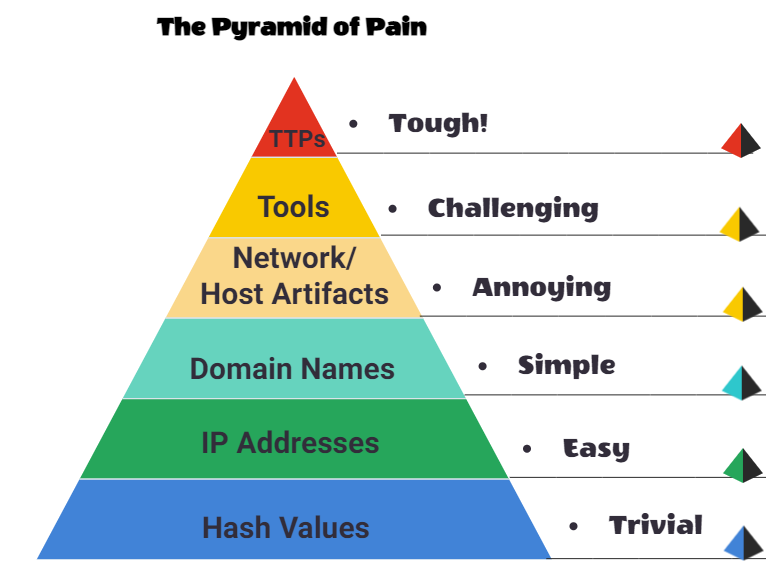
The idea is that organizations should focus their cybersecurity efforts on the assets at the top of the pyramid to prevent the most significant damage from a security breach. The components of the Pyramid of Pain may vary depending on the organization and its specific needs, but typically include sensitive data, critical infrastructure, key personnel, and reputation.
Ethical and Legal Aspects
Governance & Regulation
- Governance: Managing and directing an organisation or system to achieve its objectives and ensure compliance with laws, regulations, and standards.
- Regulation: A rule or law enforced by a governing body to ensure compliance and protect against harm.
- Compliance: The state of adhering to laws, regulations, and standards that apply to an organisation or system.
Developing Governance Documents
Developing governance documents can involve the following steps:- Identify Scope and Purpose: Define what the document will cover and its necessity.
- Research and Review: Investigate laws, regulations, and best practices to make the document comprehensive.
- Draft the Document: Create an actionable, specific draft aligned with organizational goals.
- Review and Approval: Involve stakeholders for feedback and final approval.
- Implementation and Communication: Distribute the document and educate employees.
- Review and Update: Regularly update the document for relevance and compliance.
Information Security Frameworks
Policies: Formal statements that set organizational goals and how to achieve them. Standards: Specific requirements for processes, products, or services. Guidelines: Non-mandatory recommendations for achieving objectives. Procedures: Step-by-step instructions for specific tasks. Baselines: Minimum security standards that must be met.Preparing a Password Policy - Real-world Scenario
Let's take a real-world scenario of preparing a password policy.- Define Requirements: Set rules for password length, complexity, and expiration.
- Usage Guidelines: Specify unique passwords for each account and prohibit sharing.
- Storage and Transmission: Use encryption and secure connections.
- Change and Reset Guidelines: Define how often to change passwords.
- Communication and Monitoring: Educate employees and monitor compliance.
Making an Incident Response Procedure - Real-world Scenario
Now, let's take a real-world scenario of making an incident response procedure.- Define Incident Types: Categorize incidents like unauthorized access or data breaches.
- Roles and Responsibilities: Identify key stakeholders.
- Detailed Steps: Create a step-by-step guide for each incident type.
- Reporting and Documentation: Keep records for future reference.
- Communication and Review: Make sure procedures are understood and periodically updated.
Penetration Tests
Before a penetration test starts, a formal discussion occurs between the penetration tester and the system owner. Various tools, techniques, and systems to be tested are agreed on. This discussion forms the scope of the penetration testing agreement and will determine the course the penetration test takes.Rules of Engagement (ROE)
The ROE is a document that is created at the initial stages of a penetration testing engagement. This document consists of three main sections:- Permission
- Test scope
- Rules
Security Assessment Frameworks and Methodologies
Penetration Testing Methodologies
The steps a penetration tester takes during an engagement is known as the methodology. All of them have a general theme of the following stages:| Stage | Description | |---|---| | Information Gathering | This stage involves collecting as much publically accessible information about a target/organisation as possible, for example, OSINT and research. Note: This does not involve scanning any systems. | | Enumeration/Scanning | This stage involves discovering applications and services running on the systems. For example, finding a web server that may be potentially vulnerable. | | Exploitation | This stage involves leveraging vulnerabilities discovered on a system or application. This stage can involve the use of public exploits or exploiting application logic. | | Privilege Escalation | Once you have successfully exploited a system or application (known as a foothold), this stage is the attempt to expand your access to a system. You can escalate horizontally and vertically, where horizontally is accessing another account of the same permission group (i.e. another user), whereas vertically is that of another permission group (i.e. an administrator). | | Post-exploitation | This stage involves a few sub-stages:
- What other hosts can be targeted (pivoting)
- What additional information can we gather from the host now that we are a privileged user
- Covering your tracks
- Reporting
Black, Grey & White Box Testing
There are three primary scopes when testing an application or service.| Box | Description | |---|---| | Black | This testing process is a high-level process where the tester is not given any information about the inner workings of the application or service. | | Grey | The tester will have some limited knowledge of the internal components of the application or piece of software. | | White | The tester will have full knowledge of the application and its expected behaviour. |
OSSTMM
The Open Source Security Testing Methodology Manual provides a detailed framework of testing strategies for systems, software, applications, communications and the human aspect of cybersecurity.OWASP
OWASP, the Open Web Application Security Project, is a nonprofit foundation that works to improve software security. It provides free, openly available articles, methodologies, documentation, tools, and technologies in the field of web application security.OWASP is known for its widely-referenced OWASP Top 10, a standard awareness document for developers and web application security that lists the most critical security risks to web applications.
NIST Cybersecurity Framework 2.0
The NIST Cybersecurity Framework is a popular framework used to improve an organisations cybersecurity standards and manage the risk of cyber threats.The framework is divided into six core functions:
- Govern: Establish oversight to manage and reduce cybersecurity risks across the organization.
- Identify: Understand your systems, assets, and risks.
- Protect: Implement safeguards to ensure services' security.
- Detect: Identify cybersecurity threats and breaches in real-time.
- Respond: Take action when cybersecurity events are detected.
- Recover: Restore operations and improve resilience post-incident.
NCSC CAF
The NCSC Cyber Assessment Framework (CAF) is a structured guide designed to ensure the security of organizations, particularly those part of the Critical National Infrastructure.The CAF aligns with NIS regulations and is structured around 14 objectives, categorized into four main goals: managing security risk, protecting against cyber attacks, detecting cybersecurity events, and minimizing the impact of incidents. It provides comprehensive indicators of good practice for organizations to assess and improve their security posture
Mitre ATT&CK
The MITRE ATT&CK framework is a knowledge base of adversary tactics and techniques based on real-world observations. It is used as a foundation for the development of specific threat models and methodologies in the private sector, government, and the cybersecurity product and service community.Unified Kill Chain
The Unified Kill Chain is a framework that combines the Lockheed Martin Cyber Kill Chain and the MITRE ATT&CK framework to provide a comprehensive view of the cyber kill chain. It is designed to help organizations understand and respond to cyber threats more effectively.The Unified Kill Chain consists of the following stages:
- Reconnaissance: Gathering information about the target.
- Weaponization: Developing or obtaining the tools needed to exploit vulnerabilities.
- Delivery: Delivering the weaponized payload to the target.
- Exploitation: Exploiting vulnerabilities to gain access to the target.
- Installation: Installing malware or other tools to maintain access to the target.
- Command and Control: Establishing communication channels to control the compromised system.
- Actions on Objectives: Achieving the attacker's goals, such as stealing data or disrupting operations.
Global Security Standards
ISO/IEC 19249
ISO/IEC 19249 outlines architectural and design principles for creating secure IT products and systems- Least Privilege: This principle emphasizes providing the minimum permissions necessary for individuals or entities to perform their tasks. (Design Principle: 1)
- Attack Surface Minimization: It focuses on reducing the potential points of attack by eliminating unnecessary services and reducing vulnerabilities. (Design Principle: 2)
- Centralized Parameter Validation: This principle suggests centralizing the validation of input parameters to prevent threats that may exploit vulnerabilities. (Design Principle: 3)
- Centralized General Security Services: It advocates for centralizing security services such as authentication to enhance control and reduce potential points of failure. (Design Principle: 4)
- Preparing for Error and Exception Handling: This principle emphasizes designing systems to handle errors and exceptions gracefully and securely, ensuring they do not leak sensitive information. (Design Principle: 5)
- Domain Separation: Components are grouped into distinct entities, each with its own domain and set of security attributes. This separation helps control access and privileges. (Architectural Principle: 1)
- Layering: The system is structured into abstract levels or layers, enabling the imposition of security policies at different levels and facilitating validation of system operations. (Architectural Principle: 2)
- Encapsulation: Involves hiding low-level implementations and preventing direct manipulation of data by providing specific methods, similar to object-oriented programming, to ensure data integrity. (Architectural Principle: 3)
- Redundancy: Ensures availability and integrity by implementing redundancy measures. Examples include redundant power supplies or RAID configurations in data storage. (Architectural Principle: 4)
- Virtualization: Sharing a single set of hardware among multiple operating systems, which enhances security boundaries and containment of malicious programs, particularly relevant in the context of cloud services. (Architectural Principle: 5)
ISO27001
ISO (the International Organization for Standardization) is a worldwide federation of national standards bodies (ISO member bodies), where ISO27001 is an international standard on how to manage information security.An ISMS consists of the policies, procedures, guidelines, and associated resources and activities, collectively managed by an organization, in the pursuit of protecting its information assets.
It is a systematic approach for establishing, implementing, operating, monitoring, reviewing, maintaining and improving an organization’s information security to achieve business objectives. It is based on a risk assessment and the organization’s risk acceptance levels designed to effectively treat and manage risks.
Operational Roles and Career Development
Hat Categories
Hackers are sorted into three hats, where their ethics and motivations behind their actions determine what hat category they are placed into. | Hat | Description | |---|---| | Black hat | These people are criminals and often seek to damage organisations or gain some form of financial benefit at the cost of others. | | Grey hat | These people use their skills to benefit others often; however, they do not respect/follow the law or ethical standards at all times. | | White hat | These hackers are considered the "good people". They remain within the law and use their skills to benefit others. |Career paths
| Career | Description | |---|---| | Security Analyst | Responsible for maintaining the security of an organisation's data | | Security Engineer | Design, monitor and maintain security controls, networks, and systems to help prevent cyberattacks | | Incident Responder | Identifies and mitigates attacks whilst an attackers operations are still unfolding | | Digital Forensics Examiner | Responsible for using digital forensics to investigate incidents and crimes | | Malware Analyst | Analyses all types of malware to learn more about how they work and what they do | | Penetration Tester | Responsible for testing technology products for security loopholes | | Red Teamer | Plays the role of an adversary, attacking an organisation and providing feedback from an enemies perspective |Linux Commands
Essential command-line tools for cybersecurity work as well as some other external tools that are useful for various tasks.List of contents
File & Directory Management
In this section: pwd, ls, tree, mkdir, touch, cat, stat, mv, rm, ln (symbolic links), apt, Operators, File Descriptors
Hide File & Directory Management Commands
pwd
Find the full Path to our current working directorypwdls
List files and directories.ls-l = long listing format
-a = include hidden files (starting with .)
-h = human-readable sizes (e.g., KB, MB)
-t = sort by modification time (newest first)
-r = reverse order of sort
-S = sort by file size
You can combine options, e.g., ls -lahtrS
tree
Displays the directory structure in a tree-like format.tree -a-a = show hidden files
-d = list directories only
-L <level> = limit the depth of the directory tree displayed
-h = human-readable sizes
-f = print the full path prefix for each file
mkdir
Used for creating directories.mkdir <name>-p = create parent directories as needed (e.g., mkdir -p Folder/i/am/in)
-v = verbose output, showing created directories
touch
Used to create an empty file.touch <filename>cat
Display file contents or combine multiple files.cat file.txt # Show file contents
cat -b file.txt # Show line numbers for non-blank lines (-n for all)Key options: -n = show numbers -b = show numbers for non-blank lines
stat
Displays detailed information about given files or file systems.stat file.txtThese informations can be: file name, file size, blocks, type, inode, UID, GID, access, modify, change and creation times.
mv
Move or rename files and directories.mv source.txt destination.txt # Rename a file
mv file.txt /tmp # Move a file to another directoryrm
Used to remove files or directories.rm file.txt # Remove a file
rm -r directory/ # Remove a directory and its contents
rm -rf /tmp/* # Remove all files in /tmp directory-v = Verbose output, showing what is being removed
-r = Deletes every file in the directory
-f = Suppresses all warning prompts
ln (symbolic links)
Creates symbolic links (shortcuts) to files or directories.ln -s /root/flag.txt flagThis creates a symbolic link named flag that points to the file /root/flag.txt.
You can also use it with other commands, such as cat to read the contents of the file through the symbolic link:
cat flag/root/flag.txt. apt
apt is a command-line utility for installing, updating, removing, and otherwise managing debian packages.sudo apt update # Update the package list
sudo apt upgrade # Upgrade installed packages
sudo apt full-upgrade # Full upgrade (may remove packages if necessary)
sudo apt install <package_name> # Install a package
sudo apt remove <package_name> # Remove a package
sudo apt autoremove # Remove unused packages
sudo apt list --installed # List installed packagesOperators
> redirects command output to a file, replacing its contents.
>> appends command output to the end of a file, keeping existing data.
| pipes the output of one command as input to another command.
File Descriptors
In Unix-like operating systems, file descriptors are integer handles used to access files or input/output streams. The standard file descriptors are:Data Stream for Input → STDIN – 0 Data Stream for Output → STDOUT – 1 Data Stream for Output that relates to an error occurring. →STDERR – 2
To redirect Redirect STDERR to /dev/null, which is a special file that discards all data written to it, you add 2>/dev/null to your command. This is useful for suppressing error messages.
find /etc/ -name shadow 2>/dev/nullRedirect STDOUT and STDERR to Separate Files
find /etc/ -name shadow 2> stderr.txt 1> stdout.txtUser & Permission Management
In this section: whoami, adduser & addgroup, chmod, chown, sudo
README truncated. View on GitHub


