
A tui tool for browsing and downloading torrents
nyaa 🐈⬛
A simple TUI for browsing and downloading anime torrents from nyaa.si.


)



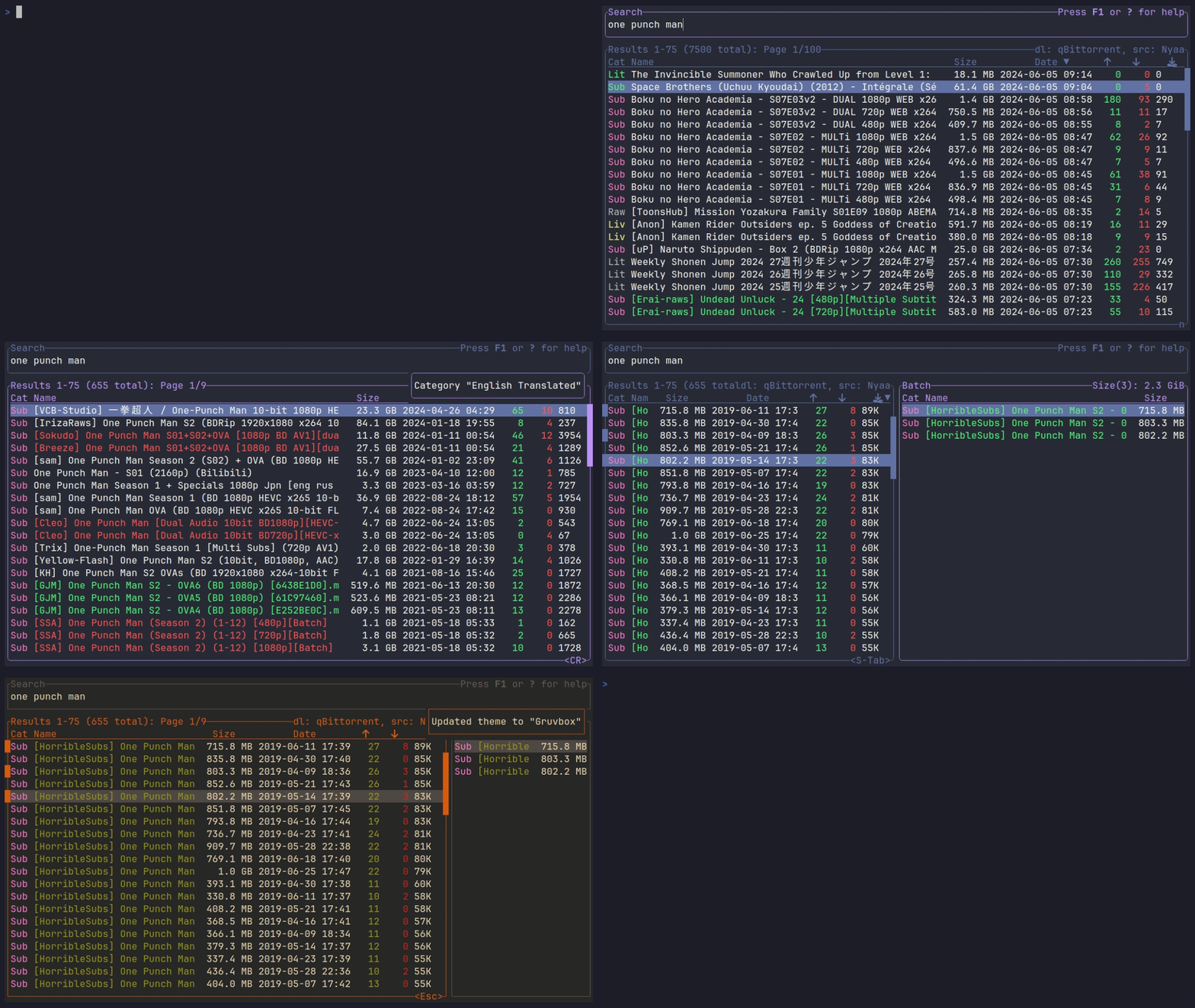
Table of Contents
- With a package manager - Nix (via home-manager) - Windows/Linux Binaries - From Source - Download Client Integration⚡ Installation
With a package manager
### With cargo
cargo install nyaa
On Arch Linux (AUR)
yay -S nyaa # or nyaa-bin for a pre-compiled binary
Ubuntu/Debian (.deb file from latest release)
with apt:
sudo apt install ./nyaa-VERSION-x86_64.deb
or dpkg:
sudo dpkg -i ./nyaa-VERSION-x86_64.deb
Fedora (.rpm file from latest release)
sudo dnf install ./nyaa-VERSION-x86_64.rpm
With nix profile
nix profile install github:Beastwick18/nyaa
nix (flakes) run without installing
nix run github:Beastwick18/nyaa
Nix (via home-manager)
Add toinputs in flake.nix
nyaa = {
  url = "github:Beastwick18/nyaa";
  inputs.nixpkgs.follows = "nixpkgs";
};home.nix imports and enable
imports = [
  inputs.nyaa.homeManagerModule
]
programs.nyaa.enable = true;Windows/Linux Binaries
Binaries for Linux and Windows are available on the releases page.
From Source
To install from source, you must have git, cargo, and Rust version $\ge$ 1.75 installed.
git clone https://github.com/Beastwick18/nyaa
cd nyaa
cargo install --path .
📗 Wiki
For detailed information on configuration, themes, sources, and download client integration check the Wiki.⌨️ Keybinds
Like modal text editors such as Vim, there are several modes. Each have their own keybinds, which can be found out by pressing F1 or ? while in that mode. Some of the important ones are:
- hjkl or arrow keys for general navigation
- / or i to search
- Ctrl-s to change sources
- d to change download client
- c to change category
- s to change sort (S for reverse sort)
- f to change filter
- t to change theme
- n, p or l, h for next and previous page
- q to quit
🌐 Proxies
If either nyaa.si or torrentgalaxy is not accessible in your region, try one of the proxies (nyaa proxies, TorrentGalaxy proxies). Once you find one that works, replace the value for base_url in the source config with the working proxy url. For nyaa, I would recommend nyaa.land, as it is very compatible, and usually working. Here's what the config for nyaa.land would look like:
[source.nyaa]
base_url = 'nyaa.land'
If you have your own proxy setup, you use it by adding:
request_proxy = "localhost:8118"to the top of your config. Replace the value with the IP and port for your proxy.
⚙️ Configuration
The location of the config file for linux is:
~/.config/nyaa/config.tomland on windows is
C:\Users\%USERNAME%\AppData\Roaming\nyaa\config\config.tomlDefault Config
theme = "Default"                # the theme to use by default
default_source = "Nyaa"          # the source to use by default
download_client = "qBittorrent"  # the download client to use by default
date_format = "%Y-%m-%d %H:%M"   # date format for results (unset by default)
request_proxy = "localhost:8118" # request proxy for sending requests through (unset by default)
timeout = 30                     # request timeout for sources and clients (measured in seconds)
scroll_padding = 6               # scroll padding for results table
saveconfigon_change = true     # save config when changing sources/themes
yankfullmagnet = true          # if false, only keep the torrent hash in the magnet link
[source.nyaa] ...
[source.torrentgalaxy] ...
[client.cmd] ...
...
theme refers to the theme selected by default when the app is opened. Possible values are Default, Dracula, Gruvbox, or Catppuccin Macchiato. You can also use custom user-defined themes.
defaultsource refers to the source selected by default once the app is opened. Possible values are Nyaa, TorrentGalaxy, or Sukebei. Each source has its own configuration. Check the wiki for more information on each sources config.
downloadclient refers to the download client selected by default once the app is opened. Each download client has its own configuration. Check the wiki for more information on each download clients config.
Download Client Integration
- Check the wiki for connecting to your torrent client:
📋 Clipboard
By default, nyaa uses OSC52 to copy to the clipboard. It's a type of ANSI escape sequence supported by most terminals. The state of support for some popular terminals are:| Terminal | OSC52 support | |----------|:-------------:| | alacritty | yes | | contour | yes | | far2l | yes | | foot | yes | | gnome terminal (and other VTE-based terminals) | not yet | | hterm | yes | | iterm2 | yes | | kitty | yes | | konsole | not yet | | qterminal | not yet | rxvt | yes | | st | yes (but needs to be enabled, see here) | | terminal.app) | no, but see workaround | | tmux | yes | | urxvt | yes (with a script, see here) | | wezterm | yes | | windows terminal | yes | | xterm.js (Hyper terminal) | yes | | zellij | yes |
Source: vim-oscyank
If your terminal is not supported, you should disable OSC52 by adding
[clipboard] osc52 = falseconfig.toml. This will make nyaa use an alternative method for copying, such as X11 selections or wl-clipboard. To see more info on clipboards, check the wiki;
🎨 Custom Themes
Check the wiki for how to add User-defined Themes🗺️ Planned Features
- [ ] Mouse support
- [ ] Custom user-defined sources
- [x]
Sources other than nyaa - [x]
User-defined themes - [x]
Integration with torrent clients - [x]
RPM Release - [x]
Nyaa proxies/mirrors support - [x]
Page navigation - [x]
Choice between HTML scraper or RSS feed


