
Azure Databricks MLOps sample for Python based source code using MLflow without using MLflow Project.
Last updated Feb 27, 2026
97
Stars
61
Forks
1
Issues
0
Stars/day
Attention Score
19
Topics
Language breakdown
No language data available.
▸ Files
click to expand
README
page_type: sample ms.custom:
- team=cse
- prdeb-12/21/2021
- anchugh-12/21/2021
- python
- azure-databricks
- azure-blob-storage
- azure-monitor
Azure Databricks MLOps using MLflow
This is a template or sample for MLOps for Python based source code in Azure Databricks using MLflow without using MLflow Project.
This template provides the following features:
- A way to run Python based MLOps without using MLflow Project, but still using MLflow for managing the end-to-end machine learning lifecycle.
- Sample of machine learning source code structure along with Unit Test cases
- Sample of MLOps code structure along with Unit Test cases
- Demo setup to try on users subscription
Problem Summary
- This demonstrates deployment scenario of Orchestrate MLOps on Azure Databricks using Databricks Notebook
Products/Technologies/Languages Used
- Products & Technologies:
- Languages:
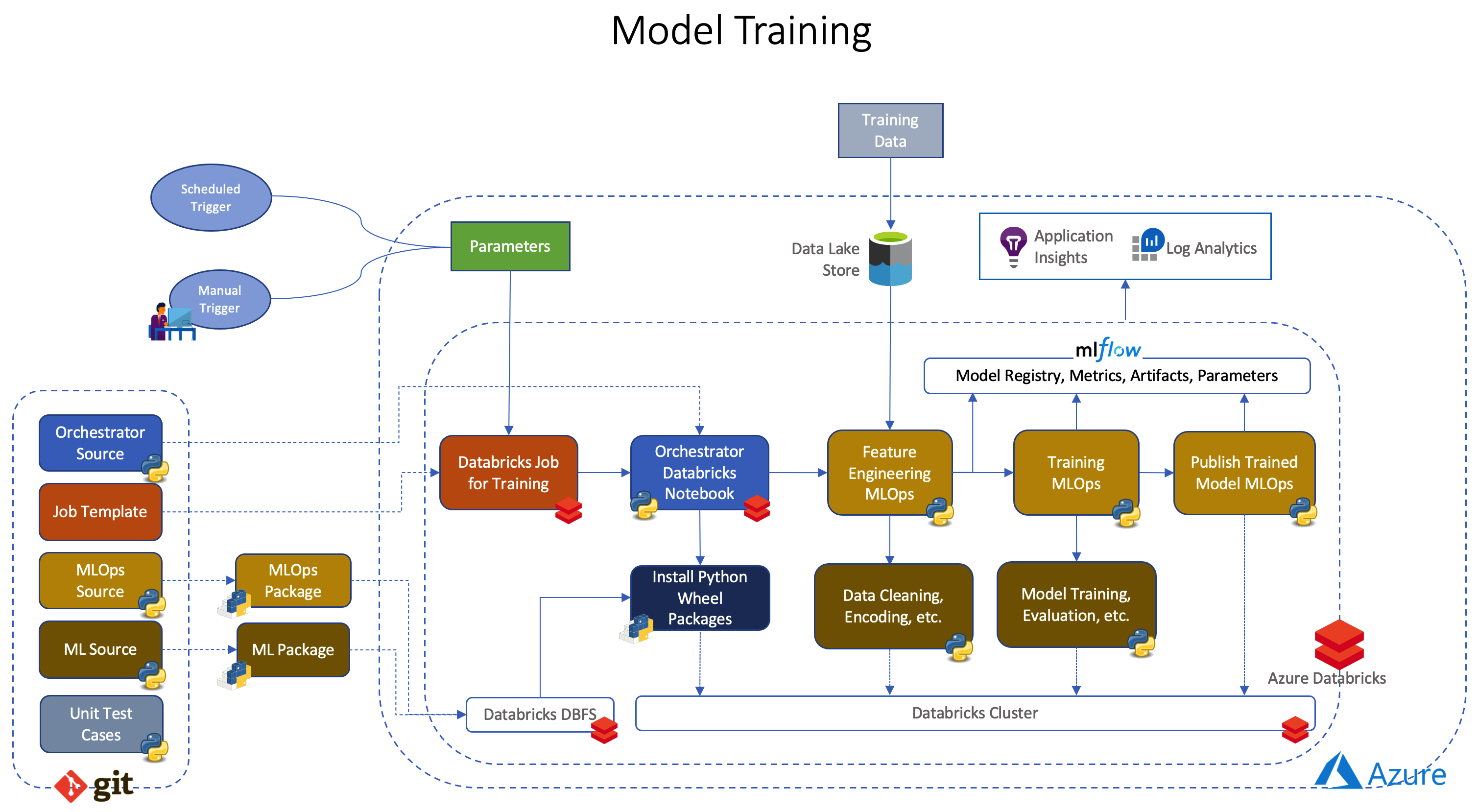
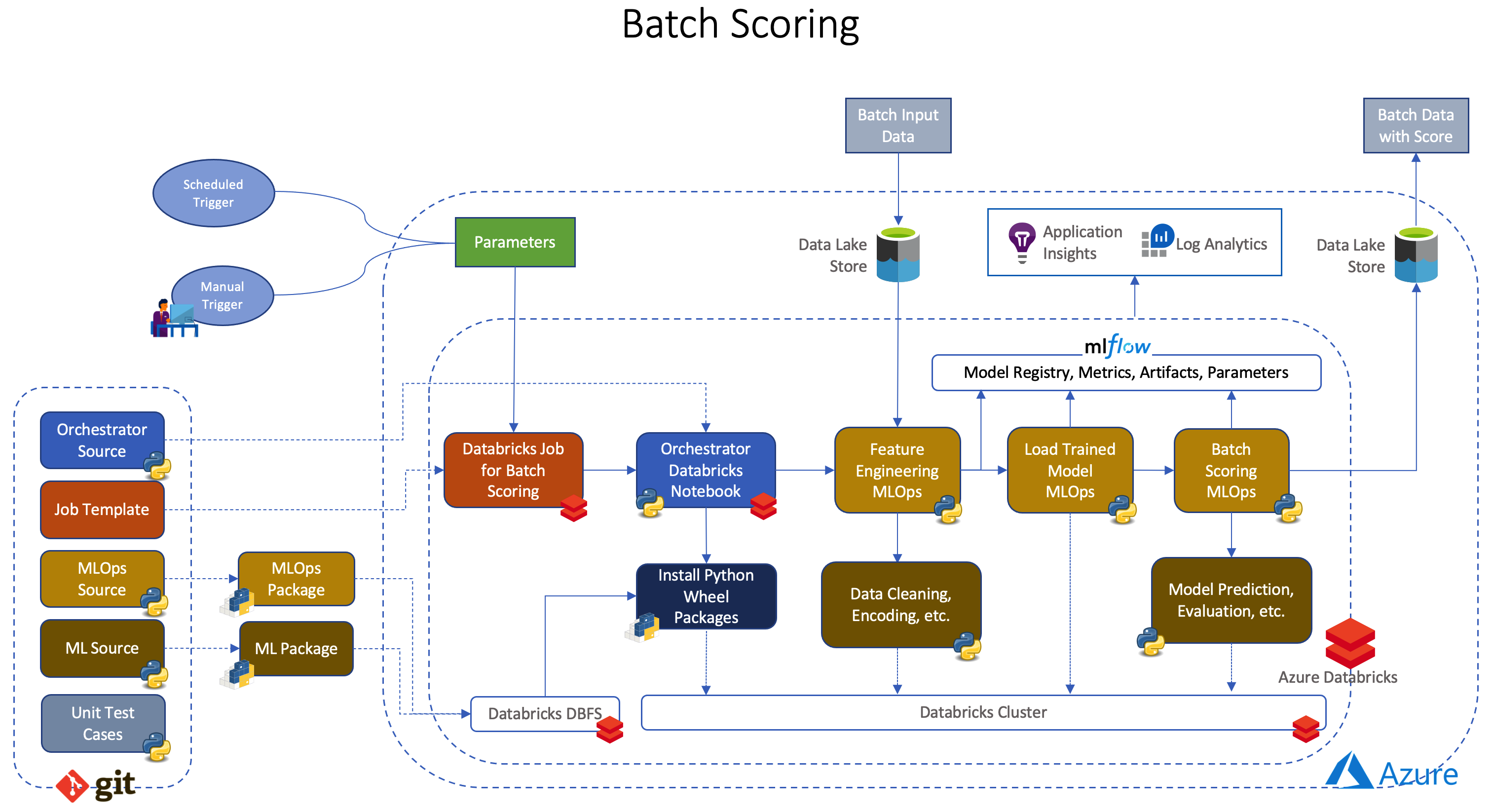
Architecture
Model Training
Batch Scoring
Individual Components
- mlexperiment - sample ML experiment notebook.
- ml_data - dummy data for sample model
- ml_ops - sample MLOps code along with Unit Test cases, orchestrator, deployment setup.
- ml_source - sample ML code along with Unit Test cases
- Makefile - for build, test in local environment
- requirements.txt - python dependencies
Getting Started
Prerequisites
- Azure Databricks workspace
- Azure Data Lake Storage Gen2 account
- Visual Studio Code in local environment for development
- Docker in local environment for development
Development
git clone https://github.com/Azure-Samples/azure-databricks-mlops-mlflow.gitcd azure-databricks-mlops-mlflow- Open cloned repository in Visual Studio Code Remote Container
- Open a terminal in Remote Container from Visual Studio Code
make installto install sample packages (taxifaresandtaxifares_mlops) locallymake testto Unit Test the code locally
Package
make distto build wheel Ml and MLOps packages (taxifaresandtaxifares_mlops) locally
Deployment
make databricks-deploy-codeto deploy Databricks Orchestrator Notebooks, ML and MLOps Python wheel packages. If any code changes.make databricks-deploy-jobsto deploy Databricks Jobs. If any changes in job specs.
Run training and batch scoring
- To trigger training, execute
make run-taxi-fares-model-training - To trigger batch scoring, execute
make run-taxi-fares-batch-scoring
Observability
Check Logs, create alerts. etc. in Application Insights. Following are the few sample Kusto Query to check logs, traces, exception, etc.
- Check for Error, Info, Debug Logs
mlflowexperimentid
traces
  | extend mlflowexperimentid = customDimensions.mlflowexperimentid
  | where timestamp > ago(30m)
  | where mlflowexperimentid == <mlflow experiment id>
  | limit 1000
Kusto Query for checking general logs for a specific Databricks job execution filtered by mlflowexperimentid and mlflowrunid
traces
  | extend mlflowrunid = customDimensions.mlflowrunid
  | extend mlflowexperimentid = customDimensions.mlflowexperimentid
  | where timestamp > ago(30m)
  | where mlflowexperimentid == <mlflow experiment id>
  | where mlflowrunid == "<mlflow run id>"
| limit 1000- Check for Exceptions
exceptions
  | where timestamp > ago(30m)
| limit 1000- Check for duration of different stages in MLOps
dependencies
  | where timestamp > ago(30m)
  | where cloudRoleName == 'TaxiFaresTraining'
  | limit 1000
To correlate dependencies, exceptions and traces, operation_Id can be used a filter to above Kusto Queries.
Demo
- Create Databricks workspace, a storage account (Azure Data Lake Storage Gen2) and Application Insights
- Initialize Databricks (create cluster, base workspace, mlflow experiment, secret scope)
make databricks-authenticate
3. Execute make databricks-init
- Create Azure Data Lake Storage Gen2 Container and upload data
taxifares
2. Upload as blob taxi-fares data files into Azure Data Lake Storage Gen2 container named - taxifares
- Put secrets to Mount ADLS Gen2 Storage using Shared Access Key
make databricks-secrets-put to put secret in Databricks secret scope
- Put Application Insights Key as a secret in Databricks secret scope (optional)
make databricks-add-app-insights-key to put secret in Databricks secret scope
- Package and deploy into Databricks (Databricks Jobs, Orchestrator Notebooks, ML and MLOps Python wheel packages)
make deploy
- Run Databricks Jobs
make run-taxifares-model-training
2. To trigger batch scoring, execute make run-taxifares-batch-scoring
- Expected results
 2. Databricks jobs
 3. Databricks mlflow experiment
 4. Databricks mlflow model registry
 5. Output of batch scoring

Additional Details
Related resources
- Azure Databricks
- MLflow
- MLflow Project
- Run MLflow Projects on Azure Databricks
- Databricks Widgets
- Databricks Notebook-scoped Python libraries
- Databricks CLI
- Azure Data Lake Storage Gen2
- Application Insights
- Kusto Query Language
Glossaries
- Application developer : It is a role that work mainly towards operationalize of machine learning.
- Data scientist : It is a role to perform the data science parts of the project


