
Agentic RAG to help you build a startup🚀
Last updated May 31, 2026
57
Stars
14
Forks
0
Issues
0
Stars/day
Attention Score
17
Language breakdown
Python 97.3%
Shell 1.3%
Dockerfile 0.8%
PowerShell 0.6%
▸ Files
click to expand
README
RAGcoon🦝
Agentic RAG to help you build your startup
If you find RAGcoon userful, please consider to donate and support the project:

Install and launch🚀
The first step, common to both the Docker and the source code setup approaches, is to clone the repository and access it:git clone https://github.com/AstraBert/ragcoon.gitDocker (recommended)🐋
Required: Docker and docker compose
- Add the
groqapikeyin the.env.examplefile and modify the name of the file to.env. Get this key:
mv .env.example .env- Launch the Docker application:
# If you are on Linux/macOS
bash start_services.sh
If you are on Windows
.\start_services.ps1docker compose up qdrant -d
docker compose up frontend -d
docker compose up backend -dhttp://localhost:8001/ and you will be able to use it. Depending on your connection and on your hardware, the set up might take some time (up to 30 mins to set up) - but this is only for the first time your run it!
Source code🖥️
Required: Docker, docker compose and conda_
- Add the
groqapikeyin the.env.examplefile and modify the name of the file to.envin thescriptsfolder. Get this key:
mv .env.example scripts/.env- Set up RAGcoon using the dedicated script:
# For MacOs/Linux users
bash setup.sh
For Windows users
.\setup.ps1- Or you can do it manually, if you prefer:
docker compose up qdrant -d
conda env create -f environment.yml
conda activate ragcoon- Now launch the frontend application
gunicorn frontend:me --bind 0.0.0.0:8001- And then, from another terminal window, go into
scriptsand launch the backend:
uvicorn main:app --host 0.0.0.0 --port 8000http://localhost:8001 and you will be able to use it.
How it works
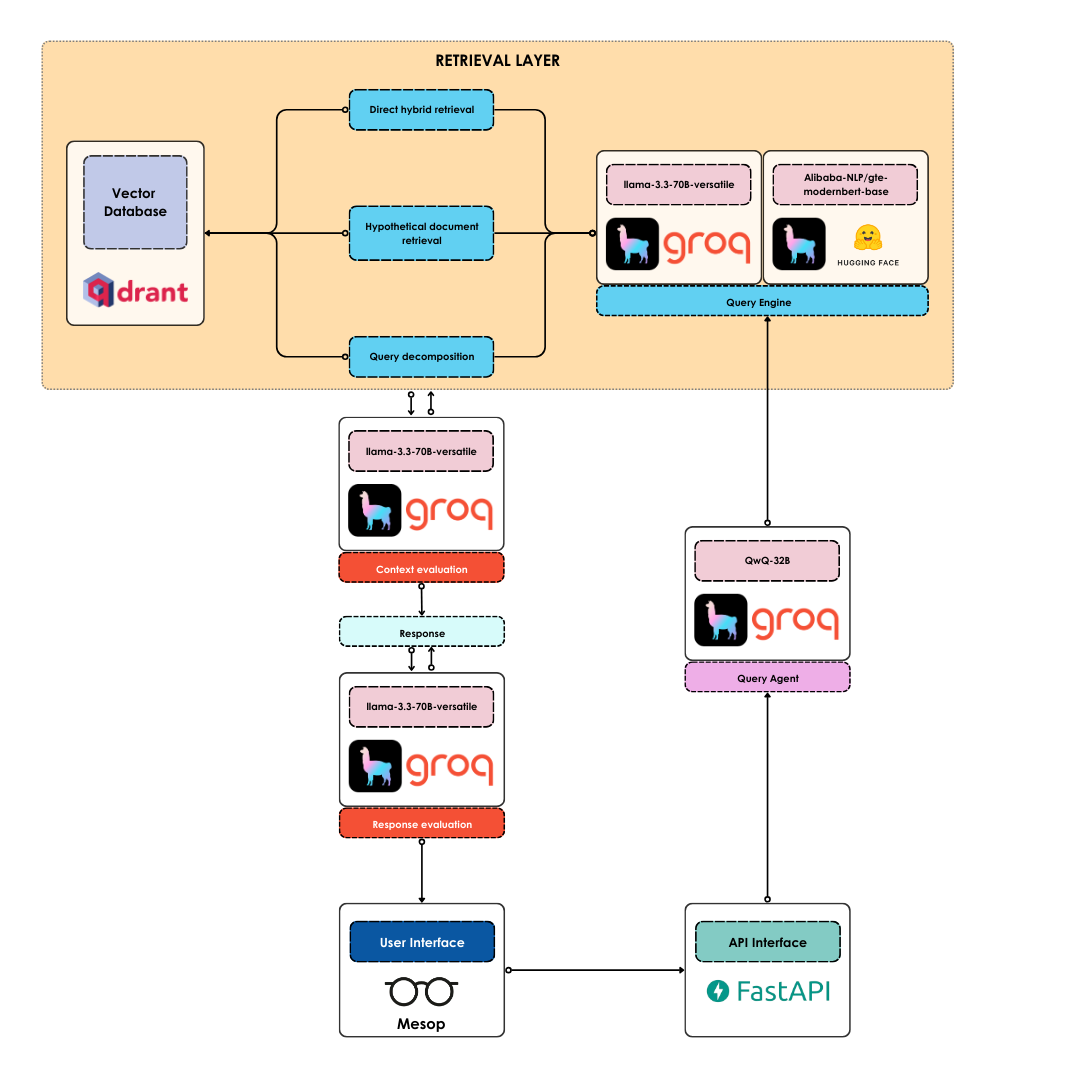 The main workflow is handled by a Query Agent, built upon the ReAct architecture. The agent exploits, as a base LLM, the latest reasoning model by Qwen, i.e.
 QwQ-32B, provisioned by Groq.
- The question coming from the frontend (developed with Mesop - running on
http://localhost:8001) is sent into a POST request to the FastAPI-managed API endpoint onhttp://localhost:8000/chat.
- When the Agent is prompted with the user's question, it tries to retrieved relevant context routing the query to one of three query engines:
Alibaba-NLP/gte-modernbert-base) and a sparse (Qdrant/bm25) retriever
- If the query is general and vague, it first creates an hypothetical document, which is embedded and used for retrieval
- If the query is complex and involves searching for nested information, the query is decomposed into several sub-queries, and the retrieval is performed for all of them, with a summarization step in the end
- The agent evaluates the context using
llama-3.3-70B-versatile, provisioned through Groq. If the context is deemed relevant, the Agent proceeds, otherwise it goes back to retrieval, trying a different method.
- The agent produces a candidate answer
- The agent evaluates the faithfulness and relevancy of the candidate response, in light of the retrieved context, using LlamaIndex evaluation methods
- If the response is faithful and relevant, the agent returns the response, otherwise it gets back at generating a new one.


