
An agentic AI application that allows you to chat with your papers and gather also information from papers on ArXiv and on PubMed
Last updated Jul 23, 2026
157
Stars
29
Forks
0
Issues
0
Stars/day
Attention Score
33
Language breakdown
Python 97.3%
Shell 1.4%
PowerShell 0.7%
Dockerfile 0.5%
▸ Files
click to expand
README
PapersChat
Chatting With Papers Made Easy
If you find PapersChat useful, please consider to support us through donation:

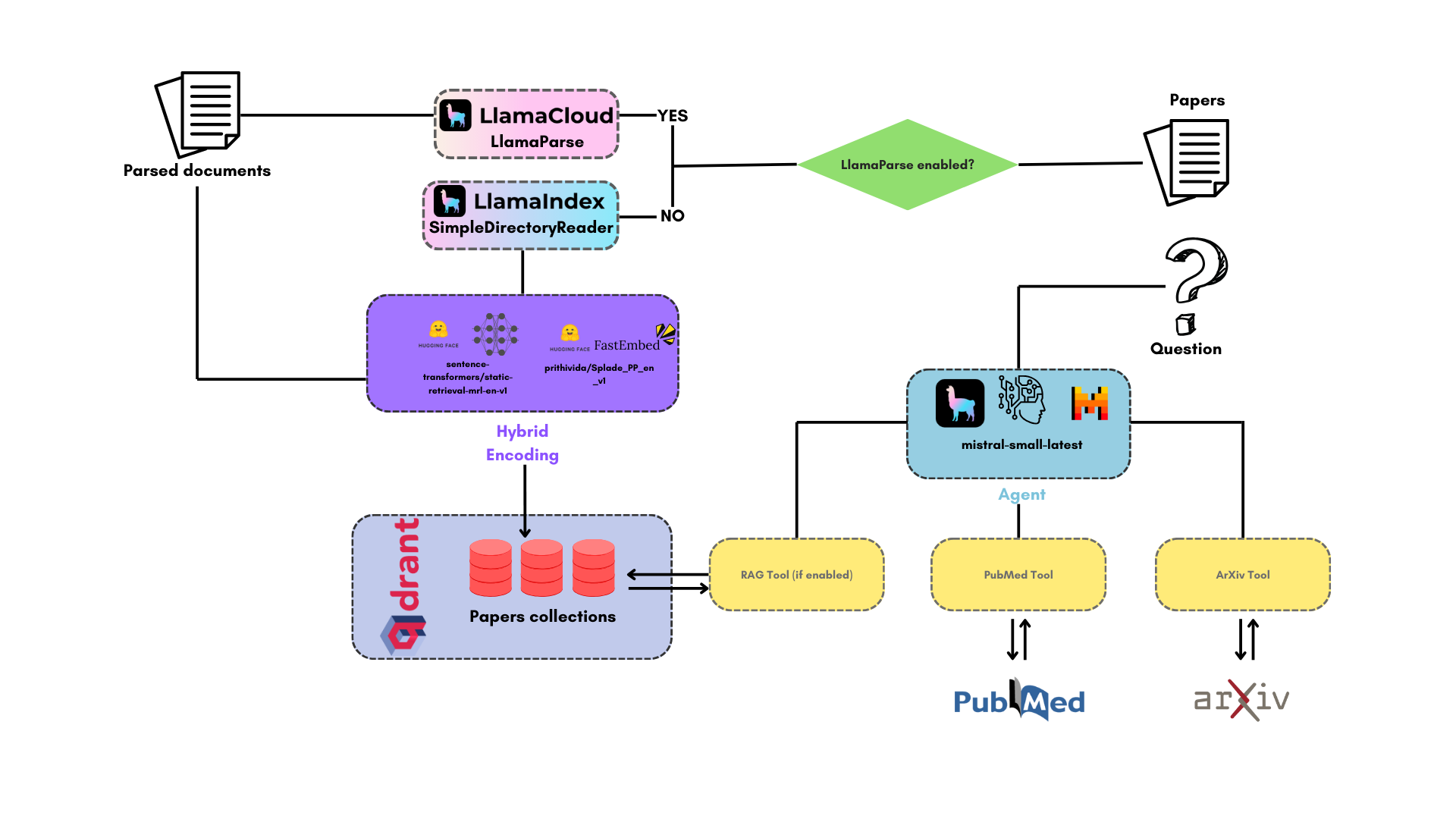
Flowchart
Install and launch it
The installation of the application is a unique process, you simply have to clone the GitHub repository:git clone https://github.com/AstraBert/PapersChat.git
cd PapersChat/Required: Docker and docker compose
- Add the
mistralapikey,phoenixapikeyandllamacloudapikeyvariables in the.env.examplefile and modify the name of the file to.env. Get these keys:
# modify your access token, e.g. hftoken="hfabcdefg1234567"
mv .env.example .env- Launch the docker application:
# If you are on Linux/macOS
bash start_services.sh
If you are on Windows
.\start_services.ps1Required: Docker, docker compose and conda_
- Add the
mistralapikey,phoenixapikeyandllamacloudapikeyvariables in the.env.examplefile and modify the name of the file to.env. Get these keys:
mv .env.example .env
modify the variables, e.g.:
llamacloudapikey="llx-000-abc"
mistralapikey="01234abc"
phoenixapikey="56789def"
- Alternatively, if you wish to use Azure OpenAI or Ollama, specify:
azureopenaiapi_key="*" # if you wish to use Azure OpenAI
ollama_model="gemma3:latest" # if you wish to use OllamaThis is only possible while launching from source code, Docker launching does not support this option
- Set up PapersChat using the dedicated script:
# For MacOs/Linux users
bash local_setup.sh
For Windows users
.\local_setup.ps1- Or you can do it manually, if you prefer:
docker compose up db -d

conda env create -f environment.yml

conda activate papers-chat
python3 scripts/app.py
conda deactivate


