No description available.
Yolov4-Detector-and-Distance-Estimator
Find the distance from the object to the camera using the YoloV4 object detector, here we will be using a single camera :camera:, detailed explanation of distance estimation is available in another repository Face detection and Distance Estimation using single camera
https://user-images.githubusercontent.com/66181793/124917186-f5066b00-e00c-11eb-93cf-24d84e9c2e7a.mp4
Video Tutorial Explains the concept and implementation

- Here we are targeting the person and cell phone classes only, for demo purposes.
- you can follow all the steps mentioned in the video to create other objects as well.
TO DO
- [x] Finding the distance of multiple objects at the same time.
Installation you need opencv-contrib-python
windows
pip install opencv-contrib-python==4.5.3.56Linux or Mac
pip3 install opencv-contrib-python==4.5.3.56then just clone this repository and you are good to go.
I have used tiny weights, check out more on darknet GitHub for more
Add more Classes(Objects) for Distance Estimation
You will make changes on these particular lines DistanceEstimation.py
if classid ==0: # person class id      datalist.append([classnames[classid[0]], box[2], (box[0], box[1]-2)]) elif classid ==67: # cell phone     datalist.append([classnames[classid[0]], box[2], (box[0], box[1]-2)])      Adding more classes for distance estimation
elif classid ==2: # car     datalist.append([classnames[classid[0]], box[2], (box[0], box[1]-2)])
elif classid ==15: # cat     datalist.append([classnames[classid[0]], box[2], (box[0], box[1]-2)]) In that way you can include as many classes as you want
# returning list containing the object data.  return data_list
Reading images and getting focal length
You have to make changes on these lines 📝 DistanceEstimation.py there are two situations, if the object(classes) in the single image then, here you can see my reference image 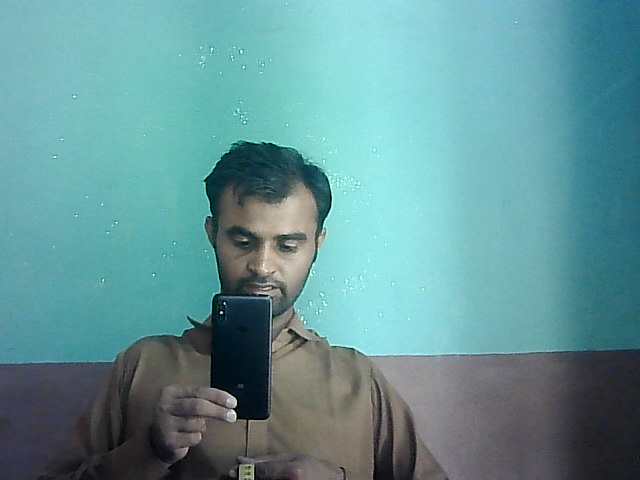 it has to two object, person and cell phone
# reading reference images  ref_person = cv.imread('ReferenceImages/image14.png') ref_mobile = cv.imread('ReferenceImages/image4.png') calling the object detector function to get the width or height of the object getting pixel width for person persondata = objectdetector(ref_person) personwidthinrf = persondata[0][1]
Getting pixel width for cell phone
mobiledata = objectdetector(ref_mobile)
mobilewidthinrf = mobiledata[1][1]
getting pixel width for cat
catdata = objectdetector(ref_person)
catwidthinrf = persondata[2][1]
Getting pixel width for car
cardata = objectdetector(ref_person)
carwidthinrf = persondata[3][1]# reading the reference image from dir
refperson = cv.imread('ReferenceImages/personref_img.png')
refcar = cv.imread('ReferenceImages/carref_img.png.png')
refcat = cv.imread('ReferenceImages/catref_img.png')
refmobile = cv.imread('ReferenceImages/refcell_phone.png')
Checking object detection on the reference image
getting pixel width for person
persondata = objectdetector(ref_person)
personwidthinrf = persondata[0][1]
Getting pixel width for cell phone
mobiledata = objectdetector(ref_mobile)
mobilewidthinrf = mobiledata[0][1]
getting pixel width for cat
catdata = objectdetector(ref_cat)
catwidthinrf = persondata[0][1]
Getting pixel width for car
cardata = objectdetector(ref_car)
carwidthinrf = persondata[0][1]
Then you find the Focal length for each
📫 Let's Connect





💼 Freelance Platforms


💬 Questions or Need Help?
If you have any questions or need help with the project, feel free to DM me on Instagram!